Introduction
Database Administration Tools are software solutions designed to help database administrators (DBAs) and IT teams manage, configure, monitor, and optimize databases efficiently. These tools simplify complex tasks such as query execution, performance tuning, backup management, user access control, and database maintenance.
In modern IT environments, databases power almost every application—from banking systems to SaaS platforms. As data volume and complexity grow, manual database management becomes inefficient and risky. Database administration tools provide automation, visibility, and control to ensure high availability and performance.
Common use cases include:
- Database configuration and setup
- Query development and execution
- Performance monitoring and optimization
- Backup and recovery management
- User access and security control
- Schema design and migration
Key evaluation criteria:
- Multi-database support (SQL & NoSQL)
- Performance monitoring and tuning features
- Ease of use and interface design
- Automation capabilities (backup, scheduling)
- Security and access control features
- Integration with cloud and DevOps tools
- Scalability for enterprise environments
- Query optimization and debugging tools
Best for: Database administrators, DevOps engineers, backend developers, and enterprise IT teams.
Not ideal for: Non-technical users or organizations without database infrastructure.
Key Trends in Database Administration Tools
- Cloud-native database management platforms
- AI-assisted query optimization and performance tuning
- Automation of backup and recovery processes
- Unified tools for SQL and NoSQL databases
- Integration with DevOps and CI/CD pipelines
- Cross-platform database management (hybrid environments)
- Real-time performance monitoring dashboards
- Increased support for distributed databases
- GUI-based tools replacing command-line-heavy workflows
- Security-first administration with RBAC and encryption support
How We Selected These Tools (Methodology)
- Strong adoption among DBAs and enterprise IT teams
- Support for multiple database engines (SQL & NoSQL)
- Performance monitoring and optimization capabilities
- Ease of use and productivity features
- Integration with cloud and DevOps ecosystems
- Security and access control capabilities
- Scalability for enterprise environments
- Backup, recovery, and automation features
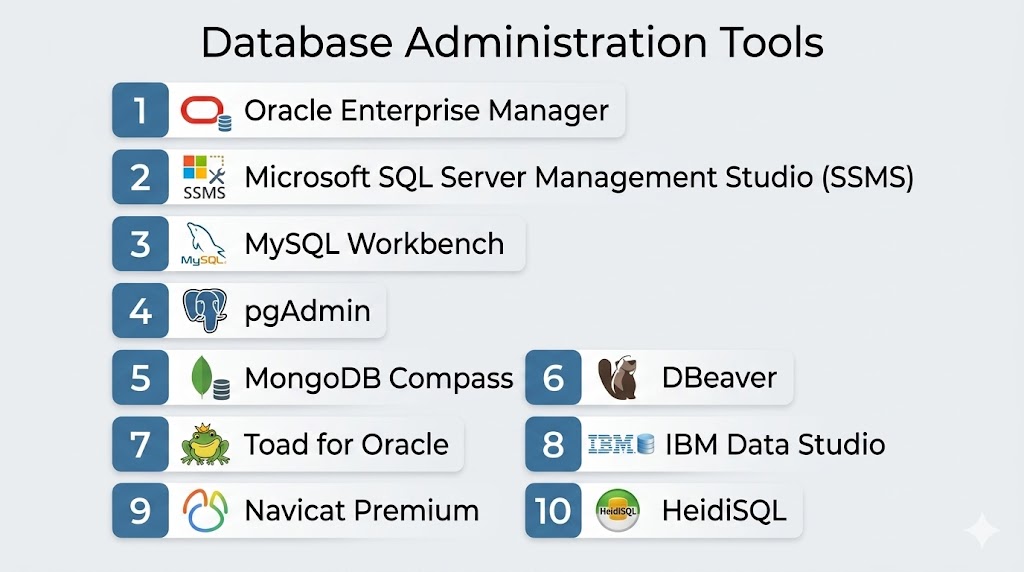
Top 10 Database Administration Tools
#1 — Oracle Enterprise Manager
Short description: A comprehensive enterprise-grade tool for managing Oracle databases with deep performance tuning, monitoring, and automation capabilities.
Key Features
- Database performance monitoring
- Automated backup and recovery
- SQL tuning advisor
- User and security management
- Real-time alerts and dashboards
Pros
- Best for Oracle environments
- Highly scalable enterprise solution
Cons
- Complex setup
- Oracle ecosystem dependency
Platforms / Deployment
Cloud / On-premise
Security & Compliance
Enterprise-grade encryption; Not publicly stated
Integrations & Ecosystem
- Oracle Database
- Enterprise systems
- APIs
Support & Community
Strong Oracle enterprise support
#2 — Microsoft SQL Server Management Studio (SSMS)
Short description: A powerful GUI-based tool for managing SQL Server databases, widely used for development and administration tasks.
Key Features
- Query editor and execution
- Database design and management
- Backup and restore tools
- Security management
- Performance monitoring
Pros
- Free and widely used
- Strong Microsoft integration
Cons
- Limited to SQL Server
- Windows dependency
Platforms / Deployment
Windows
Security & Compliance
Built-in SQL Server security; Not publicly stated
Integrations & Ecosystem
- Azure
- Active Directory
- Microsoft tools
Support & Community
Strong Microsoft support and community
#3 — MySQL Workbench
Short description: A visual tool for designing, developing, and managing MySQL databases with modeling and administration features.
Key Features
- Database modeling (ER diagrams)
- SQL query development
- Server administration
- Data migration tools
- Performance dashboards
Pros
- User-friendly interface
- Strong MySQL integration
Cons
- Limited to MySQL databases
- Performance issues on large workloads
Platforms / Deployment
Windows / macOS / Linux
Security & Compliance
MySQL security features; Not publicly stated
Integrations & Ecosystem
- MySQL servers
- Cloud databases
- APIs
Support & Community
Strong open-source community
#4 — pgAdmin
Short description: The most popular open-source administration tool for PostgreSQL databases with a web-based interface.
Key Features
- Query tool and debugger
- Database design tools
- Role and user management
- Backup and restore
- Monitoring dashboards
Pros
- Free and open-source
- Strong PostgreSQL support
Cons
- UI can feel heavy
- Limited advanced automation
Platforms / Deployment
Cloud / On-premise
Security & Compliance
PostgreSQL security features; Not publicly stated
Integrations & Ecosystem
- PostgreSQL
- Cloud databases
- APIs
Support & Community
Strong open-source community
#5 — MongoDB Compass
Short description: A visual GUI tool for managing MongoDB databases with powerful query and schema analysis features.
Key Features
- Visual query builder
- Schema analysis
- Index management
- Performance insights
- Data exploration
Pros
- Great for NoSQL databases
- Easy to use
Cons
- MongoDB-only
- Limited enterprise features
Platforms / Deployment
Windows / macOS / Linux
Security & Compliance
MongoDB security features; Not publicly stated
Integrations & Ecosystem
- MongoDB Atlas
- APIs
- Cloud systems
Support & Community
Strong MongoDB ecosystem support
#6 — DBeaver
Short description: A universal database management tool supporting multiple SQL and NoSQL databases with a unified interface.
Key Features
- Multi-database support
- SQL editor
- ER diagrams
- Data export/import
- Plugin ecosystem
Pros
- Supports many databases
- Free community edition
Cons
- UI complexity
- Performance varies
Platforms / Deployment
Windows / macOS / Linux
Security & Compliance
Depends on database; Not publicly stated
Integrations & Ecosystem
- Oracle, MySQL, PostgreSQL
- NoSQL databases
- APIs
Support & Community
Strong open-source community
#7 — Toad for Oracle
Short description: A professional-grade Oracle database management tool focused on development, administration, and performance tuning.
Key Features
- SQL development tools
- Database performance tuning
- Automation scripts
- Schema comparison
- Backup management
Pros
- Powerful Oracle optimization tools
- Widely used by DBAs
Cons
- Oracle-only focus
- Paid tool
Platforms / Deployment
Windows
Security & Compliance
Oracle security features; Not publicly stated
Integrations & Ecosystem
- Oracle databases
- Enterprise systems
- APIs
Support & Community
Strong enterprise support
#8 — IBM Data Studio
Short description: IBM’s database administration tool designed for managing DB2 and other enterprise databases.
Key Features
- Query development
- Database administration
- Performance monitoring
- Schema management
- Debugging tools
Pros
- Strong IBM integration
- Enterprise-ready
Cons
- Limited outside IBM ecosystem
- Complex setup
Platforms / Deployment
Windows / Linux
Security & Compliance
Enterprise encryption; Not publicly stated
Integrations & Ecosystem
- IBM DB2
- Cloud systems
- APIs
Support & Community
Strong IBM support
#9 — Navicat Premium
Short description: A powerful multi-database administration tool with a clean interface and advanced data management capabilities.
Key Features
- Multi-database support
- Data modeling
- Query builder
- Data synchronization
- Backup tools
Pros
- Supports many database types
- User-friendly interface
Cons
- Paid tool
- Resource-heavy
Platforms / Deployment
Windows / macOS / Linux
Security & Compliance
Database-level security; Not publicly stated
Integrations & Ecosystem
- MySQL, PostgreSQL, Oracle
- Cloud databases
- APIs
Support & Community
Good commercial support
#10 — HeidiSQL
Short description: A lightweight and free database management tool mainly used for MySQL, MariaDB, and PostgreSQL systems.
Key Features
- SQL query editor
- Database management
- Table editing
- Data export/import
- Session management
Pros
- Lightweight and fast
- Free to use
Cons
- Limited advanced features
- Windows-focused
Platforms / Deployment
Windows
Security & Compliance
Database-level security; Not publicly stated
Integrations & Ecosystem
- MySQL
- MariaDB
- PostgreSQL
Support & Community
Community-driven support
Comparison Table (Top 10)
| Tool Name | Best For | Platform(s) Supported | Deployment | Standout Feature | Public Rating |
|---|---|---|---|---|---|
| Oracle Enterprise Manager | Oracle DB admins | Multi | Cloud/On-prem | Full automation | N/A |
| SSMS | SQL Server users | Windows | On-prem | Microsoft integration | N/A |
| MySQL Workbench | MySQL developers | Multi | Local/Cloud | Visual design | N/A |
| pgAdmin | PostgreSQL admins | Multi | Cloud/On-prem | Open-source GUI | N/A |
| MongoDB Compass | MongoDB users | Multi | Cloud/Local | Schema analysis | N/A |
| DBeaver | Multi-DB users | Multi | Cloud/On-prem | Universal support | N/A |
| Toad for Oracle | Oracle DB tuning | Windows | On-prem | Performance tuning | N/A |
| IBM Data Studio | IBM DB2 users | Multi | On-prem | Enterprise tools | N/A |
| Navicat Premium | Multi-DB management | Multi | Cloud/Local | Multi-database GUI | N/A |
| HeidiSQL | Lightweight DB admin | Windows | Local | Fast performance | N/A |
Evaluation & Scoring of Database Administration Tools
| Tool Name | Core (25%) | Ease (15%) | Integrations (15%) | Security (10%) | Performance (10%) | Support (10%) | Value (15%) | Weighted Total (0–10) |
|---|---|---|---|---|---|---|---|---|
| Oracle Enterprise Manager | 9 | 7 | 9 | 10 | 9 | 9 | 7 | 8.5 |
| SSMS | 9 | 9 | 8 | 9 | 9 | 9 | 10 | 9.0 |
| MySQL Workbench | 8 | 9 | 8 | 8 | 8 | 8 | 9 | 8.3 |
| pgAdmin | 8 | 8 | 8 | 8 | 8 | 8 | 10 | 8.2 |
| MongoDB Compass | 8 | 9 | 8 | 8 | 8 | 8 | 9 | 8.3 |
| DBeaver | 9 | 8 | 9 | 8 | 8 | 8 | 10 | 8.6 |
| Toad for Oracle | 9 | 7 | 8 | 9 | 9 | 9 | 7 | 8.3 |
| IBM Data Studio | 8 | 7 | 8 | 9 | 8 | 9 | 7 | 8.0 |
| Navicat Premium | 9 | 8 | 9 | 8 | 8 | 8 | 8 | 8.5 |
| HeidiSQL | 7 | 9 | 7 | 7 | 8 | 7 | 10 | 7.9 |
Which Database Administration Tool Is Right for You?
Solo / Freelancer
Use lightweight tools like HeidiSQL or pgAdmin
SMB
MySQL Workbench or DBeaver for multi-database support
Mid-Market
Navicat Premium or Toad for Oracle
Enterprise
Oracle Enterprise Manager or IBM Data Studio
Budget vs Premium
- Budget → Open-source tools
- Premium → Enterprise-grade platforms
Feature Depth vs Ease of Use
- Advanced tools → More control, more complexity
- Simple tools → Faster onboarding
Integrations & Scalability
Choose tools that support multi-database and cloud environments
Security & Compliance Needs
Enterprise environments require audit logging, RBAC, and encryption support
Frequently Asked Questions (FAQs)
1. What are Database Administration Tools?
They are tools used to manage, configure, and maintain databases efficiently.
2. Why are they important?
They improve performance, security, and reliability of databases.
3. Do they support multiple databases?
Yes, many tools support SQL and NoSQL databases.
4. Are they free?
Some tools are free (pgAdmin, DBeaver), others are paid.
5. Can they improve performance?
Yes, they help optimize queries and monitor performance.
6. Do they work in the cloud?
Yes, many tools support cloud databases.
7. Are they difficult to use?
Enterprise tools can be complex, but many are user-friendly.
8. Do they support automation?
Yes, many tools support backup and task automation.
9. Can they manage security?
Yes, they help manage users, roles, and access control.
10. Who uses these tools?
DBAs, developers, DevOps engineers, and IT teams.
Conclusion
Database Administration Tools are essential for managing modern data systems efficiently and securely. As databases grow in size and complexity, these tools help organizations ensure high performance, reliability, and scalability. From simple open-source tools like pgAdmin and HeidiSQL to enterprise platforms like Oracle Enterprise Manager and IBM Data Studio, the market offers solutions for every level of complexity. The right choice depends on your database type, infrastructure, and team expertise. While lightweight tools are great for small systems, enterprise environments require advanced automation, monitoring, and optimization features. Ultimately, these tools empower teams to manage databases more efficiently, reduce downtime, and improve application performance.
