Introduction
GPU Cluster Scheduling Tools help organizations efficiently allocate, manage, prioritize, and optimize GPU resources across AI, machine learning, high-performance computing, and large-scale data processing workloads. These platforms are critical for enterprises, research institutions, cloud providers, and AI engineering teams that run GPU-intensive applications across distributed infrastructure.
As AI model training, inference workloads, and large-scale distributed computing continue to grow, organizations face increasing pressure to maximize GPU utilization, reduce idle compute costs, prevent resource contention, and improve workload fairness. Real-world use cases include scheduling AI training jobs, orchestrating Kubernetes GPU workloads, managing multi-tenant GPU infrastructure, balancing inference clusters, supporting distributed deep learning, and automating resource allocation policies. Buyers should evaluate scalability, Kubernetes integration, multi-tenancy, workload prioritization, autoscaling, observability, quota management, security, scheduling intelligence, and support for heterogeneous GPU environments.
Best for: AI infrastructure teams, MLOps engineers, HPC administrators, cloud providers, research labs, and enterprises managing shared GPU infrastructure.
Not ideal for: Small development teams with only a few GPUs, organizations without distributed workloads, or teams running isolated standalone GPU systems.
Key Trends in GPU Cluster Scheduling Tools
- AI-aware workload scheduling and prioritization
- Kubernetes-native GPU orchestration adoption
- Multi-tenant GPU sharing and quota management
- Dynamic autoscaling for AI workloads
- GPU utilization analytics and observability dashboards
- Support for heterogeneous GPU clusters
- Integration with MLOps and AI training pipelines
- Fractional GPU allocation and GPU virtualization
- Energy-efficient workload optimization strategies
- Increased use of policy-driven and fair-share scheduling models
How We Selected These Tools
- Evaluated adoption in AI, HPC, and GPU infrastructure environments
- Assessed scheduling intelligence and workload optimization capabilities
- Reviewed Kubernetes and container orchestration support
- Evaluated multi-tenant and quota management features
- Verified scalability for enterprise AI clusters
- Assessed observability, monitoring, and analytics capabilities
- Reviewed integration support for MLOps and AI pipelines
- Evaluated deployment flexibility across cloud and on-premise infrastructure
- Assessed security controls and access management features
- Reviewed ecosystem maturity, documentation, and support resources
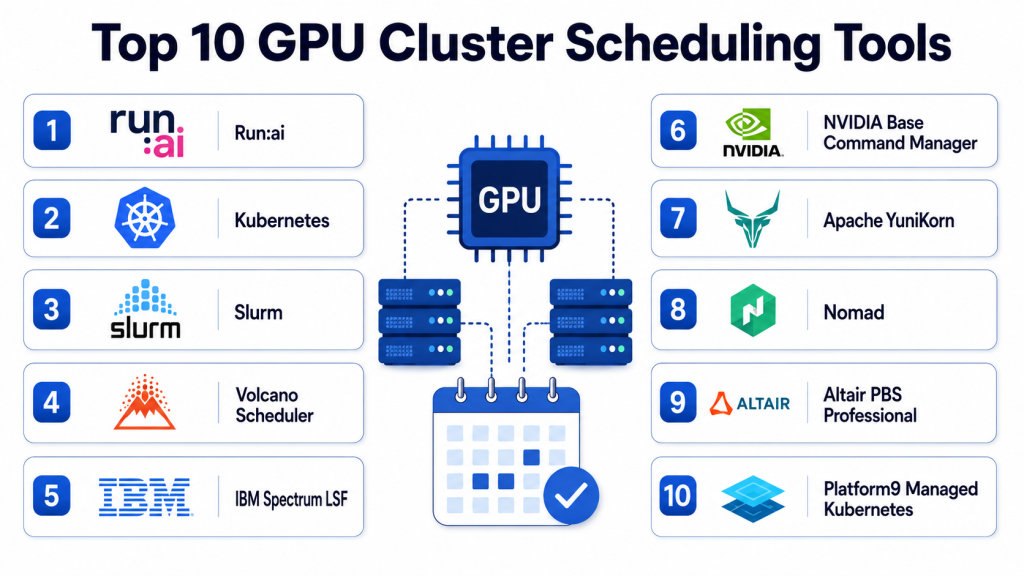
Top 10 GPU Cluster Scheduling Tools
#1 — Kubernetes with NVIDIA GPU Operator
Short description: Kubernetes combined with NVIDIA GPU Operator provides a powerful foundation for GPU workload orchestration, resource scheduling, and cluster automation. It enables organizations to manage GPU-enabled Kubernetes environments efficiently while simplifying driver deployment, monitoring, and workload management. It is widely used for AI training, inference, and scalable GPU infrastructure operations. Kubernetes offers strong flexibility for enterprises managing modern AI workloads.
Key Features
- Kubernetes-native GPU scheduling
- Automated GPU driver and runtime management
- Multi-node AI workload orchestration
- GPU monitoring and observability
- Support for distributed AI training
- Integration with containerized AI pipelines
- Autoscaling and policy-based scheduling
Pros
- Highly scalable architecture
- Strong cloud-native ecosystem
- Excellent AI workload orchestration flexibility
- Broad industry adoption and integrations
Cons
- Complex setup and operations
- Requires Kubernetes expertise
- Observability setup may need additional tooling
- Advanced scheduling policies require configuration
Platforms / Deployment
Linux / Kubernetes Clusters
Cloud / Hybrid / On-premise
Security & Compliance
- RBAC, namespace isolation, secure container runtime support
- Security depends on Kubernetes and infrastructure configuration
Integrations & Ecosystem
Kubernetes integrates with AI frameworks, monitoring tools, MLOps systems, and cloud-native infrastructure platforms.
- NVIDIA ecosystem
- Prometheus and Grafana
- Kubeflow
- MLflow
- Cloud GPU infrastructure
- Container registries
Support & Community
Large open-source community, enterprise support through vendors, extensive documentation, and ecosystem integrations.
#2 — Slurm
Short description: Slurm is a widely used open-source workload manager and scheduler for HPC and AI clusters. It is commonly deployed in research institutions, universities, national labs, and enterprise GPU environments. Slurm provides advanced scheduling policies, job queuing, fair-share allocation, and support for large-scale distributed workloads. It is especially strong in scientific computing and AI training clusters.
Key Features
- Advanced workload scheduling and queuing
- GPU-aware job scheduling
- Fair-share resource allocation
- Multi-user and multi-tenant support
- Large-scale cluster scalability
- Job monitoring and accounting
- Policy-driven workload prioritization
Pros
- Extremely scalable for HPC environments
- Strong scheduling flexibility
- Mature and stable ecosystem
- Widely adopted in research and AI infrastructure
Cons
- Requires specialized administration expertise
- Complex configuration for advanced workflows
- User experience less modern than cloud-native tools
- Visualization capabilities may require additional tools
Platforms / Deployment
Linux / HPC Clusters
On-premise / Hybrid / Cloud
Security & Compliance
- User isolation, access control, accounting support
- Security configuration depends on deployment architecture
Integrations & Ecosystem
Slurm integrates with HPC systems, AI frameworks, and monitoring environments.
- CUDA workloads
- HPC infrastructure
- TensorFlow and PyTorch clusters
- Monitoring systems
- Accounting tools
- Scientific computing environments
Support & Community
Strong open-source ecosystem, research community adoption, documentation, and enterprise support options.
#3 — Run:AI
Short description: Run:AI provides AI infrastructure orchestration and GPU scheduling optimized for Kubernetes-based machine learning environments. It focuses on maximizing GPU utilization, workload prioritization, and multi-tenant AI infrastructure efficiency. Run:AI is especially useful for enterprises operating large shared GPU clusters for AI training and inference workloads.
Key Features
- AI-aware workload scheduling
- GPU virtualization and fractional GPU allocation
- Multi-tenant resource management
- Kubernetes-native orchestration
- Real-time GPU utilization analytics
- Dynamic workload prioritization
- Quota and policy management
Pros
- Excellent GPU utilization optimization
- Strong enterprise AI focus
- Fractional GPU allocation support
- Advanced observability and analytics
Cons
- Enterprise-focused pricing
- Kubernetes expertise required
- Advanced features may need tuning
- Smaller ecosystem compared to Kubernetes-native open-source tools
Platforms / Deployment
Kubernetes / Linux
Cloud / Hybrid / On-premise
Security & Compliance
- RBAC, tenant isolation, policy controls
- Enterprise security configuration support
Integrations & Ecosystem
Run:AI integrates with AI infrastructure, Kubernetes, MLOps, and enterprise GPU environments.
- NVIDIA GPUs
- Kubernetes
- Kubeflow
- MLflow
- AI model training pipelines
- Monitoring systems
Support & Community
Enterprise support, onboarding resources, technical documentation, and AI infrastructure consulting.
#4 — Volcano
Short description: Volcano is a Kubernetes-native batch scheduling system designed for AI, machine learning, and high-performance computing workloads. It provides advanced job scheduling, gang scheduling, resource fairness, and workload prioritization for GPU-intensive environments. Volcano is widely used in AI and data-intensive Kubernetes deployments.
Key Features
- Kubernetes-native batch scheduling
- GPU-aware scheduling policies
- Gang scheduling support
- Queue and resource management
- Fair-share scheduling
- AI and HPC workload orchestration
- Extensible scheduler architecture
Pros
- Strong Kubernetes integration
- Good support for AI workloads
- Flexible scheduling policies
- Open-source and extensible
Cons
- Requires Kubernetes expertise
- Advanced scheduling setup can be complex
- Observability requires external tooling
- Smaller ecosystem compared to core Kubernetes projects
Platforms / Deployment
Kubernetes / Linux
Cloud / Hybrid / On-premise
Security & Compliance
- Kubernetes RBAC and namespace controls
- Security depends on cluster configuration
Integrations & Ecosystem
Volcano integrates with Kubernetes AI environments and HPC workflows.
- Kubeflow
- Kubernetes
- AI model training systems
- GPU infrastructure
- Monitoring platforms
- Container orchestration tools
Support & Community
Open-source documentation, Kubernetes community support, and active developer ecosystem.
#5 — Apache YuniKorn
Short description: Apache YuniKorn is a lightweight, cloud-native scheduler designed for batch workloads and multi-tenant Kubernetes environments. It supports AI and GPU-intensive workloads while focusing on fairness, scalability, and policy-based scheduling. YuniKorn is useful for organizations that need flexible resource sharing across teams and workloads.
Key Features
- Multi-tenant workload scheduling
- Queue-based resource allocation
- Kubernetes-native architecture
- Fair-share scheduling policies
- Batch and AI workload support
- Flexible resource quotas
- Lightweight scheduler design
Pros
- Open-source and flexible
- Good multi-tenant support
- Lightweight deployment model
- Strong fairness and queue management
Cons
- Smaller ecosystem maturity
- Limited advanced observability features
- Requires Kubernetes expertise
- Enterprise support ecosystem still growing
Platforms / Deployment
Kubernetes / Linux
Cloud / Hybrid / On-premise
Security & Compliance
- Kubernetes RBAC and policy controls
- Security depends on deployment architecture
Integrations & Ecosystem
YuniKorn integrates with Kubernetes clusters and AI scheduling workflows.
- Kubernetes
- AI batch workloads
- Container orchestration
- Monitoring systems
- Cloud-native infrastructure
- Resource management workflows
Support & Community
Apache open-source community, documentation, and contributor ecosystem.
#6 — Ray Scheduler
Short description: Ray provides distributed computing and scheduling capabilities for AI, machine learning, reinforcement learning, and large-scale data processing workloads. It supports distributed GPU training and workload orchestration while simplifying scaling for AI applications. Ray is especially popular among AI engineering and research teams.
Key Features
- Distributed AI workload scheduling
- GPU-aware task orchestration
- Scalable distributed execution
- Dynamic resource allocation
- AI and reinforcement learning support
- Autoscaling capabilities
- Python-native distributed framework
Pros
- Excellent for distributed AI workloads
- Strong developer experience
- Flexible distributed computing model
- Scales well for ML experimentation
Cons
- Not a traditional cluster scheduler
- Production governance requires planning
- Enterprise operational tooling may need additions
- Requires distributed systems expertise
Platforms / Deployment
Linux / Kubernetes / Distributed Systems
Cloud / Hybrid / On-premise
Security & Compliance
- Security controls depend on deployment model and infrastructure configuration
Integrations & Ecosystem
Ray integrates with AI frameworks, distributed ML workflows, and Kubernetes infrastructure.
- TensorFlow
- PyTorch
- Kubernetes
- Distributed ML systems
- AI experimentation frameworks
- Monitoring tools
Support & Community
Strong AI community adoption, open-source documentation, and active ecosystem support.
#7 — Kubeflow Training Operator
Short description: Kubeflow Training Operator helps orchestrate distributed machine learning workloads on Kubernetes with support for GPU scheduling and AI training pipelines. It simplifies AI workload management for TensorFlow, PyTorch, XGBoost, and other distributed frameworks. It is especially useful in MLOps-focused Kubernetes environments.
Key Features
- Distributed AI training orchestration
- GPU-aware Kubernetes scheduling
- Multi-framework ML support
- AI pipeline integration
- Job lifecycle management
- Resource allocation controls
- Cloud-native deployment support
Pros
- Strong AI ecosystem integration
- Useful for MLOps environments
- Kubernetes-native workflows
- Supports multiple training frameworks
Cons
- Requires Kubernetes and Kubeflow expertise
- Complex production setup
- Monitoring may require additional tooling
- Advanced scheduling may need customization
Platforms / Deployment
Kubernetes / Linux
Cloud / Hybrid / On-premise
Security & Compliance
- Kubernetes RBAC and namespace controls
- Security depends on infrastructure setup
Integrations & Ecosystem
Kubeflow Training Operator integrates with ML pipelines, Kubernetes infrastructure, and AI model workflows.
- TensorFlow
- PyTorch
- MLflow
- Kubernetes
- AI pipelines
- GPU infrastructure
Support & Community
Strong open-source ecosystem, Kubernetes community adoption, and AI engineering resources.
#8 — IBM Spectrum LSF
Short description: IBM Spectrum LSF is an enterprise-grade workload scheduler for AI, HPC, and distributed compute clusters. It provides advanced policy-based scheduling, GPU optimization, and workload orchestration for large enterprise environments. LSF is commonly used in research, financial services, and large-scale compute infrastructure.
Key Features
- Enterprise GPU workload scheduling
- Advanced fair-share allocation
- AI and HPC optimization
- Multi-cluster orchestration
- Job prioritization and queuing
- Resource utilization analytics
- Policy-based workload management
Pros
- Enterprise-grade scalability
- Mature HPC scheduling capabilities
- Strong workload optimization features
- Good support for heterogeneous environments
Cons
- Complex enterprise deployment
- Premium licensing costs
- Requires specialized administration skills
- Less cloud-native than Kubernetes-first tools
Platforms / Deployment
Linux / HPC Clusters
Cloud / Hybrid / On-premise
Security & Compliance
- Enterprise access control and workload isolation support
- Security configuration depends on deployment model
Integrations & Ecosystem
LSF integrates with HPC infrastructure, AI training systems, and enterprise compute environments.
- CUDA workloads
- AI frameworks
- HPC systems
- Monitoring tools
- Enterprise compute infrastructure
- Scheduling analytics tools
Support & Community
Enterprise support, implementation consulting, technical documentation, and enterprise HPC ecosystem support.
#9 — HTCondor
Short description: HTCondor is an open-source distributed workload management system designed for compute-intensive jobs and large-scale resource sharing. It supports GPU scheduling, job queuing, and distributed execution across shared infrastructure. HTCondor is commonly used in research and academic computing environments.
Key Features
- Distributed workload scheduling
- GPU-aware job management
- Resource matchmaking and allocation
- Multi-user workload support
- Large-scale distributed execution
- Job checkpointing and recovery
- Policy-based scheduling controls
Pros
- Open-source flexibility
- Strong distributed scheduling capabilities
- Useful for research environments
- Good scalability for shared clusters
Cons
- Older operational model compared to cloud-native tools
- Requires administration expertise
- Modern observability may need additional tooling
- UI and workflow complexity for new users
Platforms / Deployment
Linux / Distributed Compute Clusters
On-premise / Hybrid / Cloud
Security & Compliance
- Access controls and workload isolation support
- Security depends on infrastructure implementation
Integrations & Ecosystem
HTCondor integrates with research computing environments and distributed GPU workloads.
- Scientific computing systems
- GPU workloads
- AI training jobs
- HPC infrastructure
- Distributed execution workflows
- Scheduling and accounting systems
Support & Community
Strong academic community, open-source documentation, and long-term research adoption.
#10 — Nomad with GPU Scheduling
Short description: HashiCorp Nomad provides lightweight workload orchestration with support for GPU-aware scheduling and distributed compute workloads. It is useful for organizations seeking simpler alternatives to Kubernetes while still managing AI and GPU-intensive applications. Nomad supports containerized and non-containerized workloads across distributed infrastructure.
Key Features
- GPU-aware workload scheduling
- Lightweight orchestration architecture
- Multi-workload support
- Distributed cluster management
- Policy-driven scheduling
- Service discovery integration
- Flexible workload deployment support
Pros
- Simpler operational model than Kubernetes
- Lightweight architecture
- Good flexibility for mixed workloads
- Supports both containers and non-containerized jobs
Cons
- Smaller GPU ecosystem compared to Kubernetes
- Advanced AI orchestration features limited
- Enterprise observability may need additional tools
- Multi-tenant controls less mature than specialized platforms
Platforms / Deployment
Linux / Distributed Clusters
Cloud / Hybrid / On-premise
Security & Compliance
- ACLs, workload isolation, secure service communication
- Security depends on infrastructure configuration
Integrations & Ecosystem
Nomad integrates with distributed infrastructure and AI compute workflows.
- HashiCorp ecosystem
- GPU workloads
- Container runtimes
- Monitoring platforms
- Service discovery systems
- Distributed infrastructure tools
Support & Community
Documentation, enterprise support options, and growing infrastructure automation ecosystem.
Comparison Table
| Tool Name | Best For | Platform Supported | Deployment | Standout Feature | Public Rating |
|---|---|---|---|---|---|
| Kubernetes + NVIDIA GPU Operator | Cloud-native AI infrastructure | Kubernetes / Linux | Cloud / Hybrid | Kubernetes-native GPU orchestration | N/A |
| Slurm | HPC and research clusters | Linux / HPC | On-premise / Hybrid | Advanced fair-share scheduling | N/A |
| Run:AI | Enterprise AI teams | Kubernetes / Linux | Cloud / Hybrid | GPU virtualization and optimization | N/A |
| Volcano | Kubernetes AI scheduling | Kubernetes / Linux | Cloud / Hybrid | Gang scheduling support | N/A |
| Apache YuniKorn | Multi-tenant Kubernetes clusters | Kubernetes / Linux | Cloud / Hybrid | Queue-based fairness scheduling | N/A |
| Ray Scheduler | Distributed AI workloads | Linux / Kubernetes | Cloud / Hybrid | Distributed AI execution | N/A |
| Kubeflow Training Operator | MLOps AI training | Kubernetes / Linux | Cloud / Hybrid | ML framework orchestration | N/A |
| IBM Spectrum LSF | Enterprise HPC environments | Linux / HPC | Cloud / Hybrid | Enterprise workload optimization | N/A |
| HTCondor | Research compute sharing | Linux / Distributed Clusters | On-premise / Hybrid | Distributed resource sharing | N/A |
| Nomad with GPU Scheduling | Lightweight orchestration | Linux / Clusters | Cloud / Hybrid | Simpler distributed scheduling | N/A |
Evaluation & Scoring
| Tool Name | Core 25% | Ease 15% | Integrations 15% | Security 10% | Performance 10% | Support 10% | Value 15% | Weighted Total |
|---|---|---|---|---|---|---|---|---|
| Kubernetes + NVIDIA GPU Operator | 9 | 7.5 | 9 | 8.5 | 9 | 8 | 8 | 8.5 |
| Slurm | 9 | 6.5 | 8 | 8 | 9 | 8 | 8.5 | 8.2 |
| Run:AI | 9 | 8 | 8.5 | 8.5 | 8.5 | 8 | 7 | 8.3 |
| Volcano | 8.5 | 7.5 | 8 | 8 | 8 | 7.5 | 8 | 8.0 |
| Apache YuniKorn | 8 | 7.5 | 7.5 | 7.5 | 7.5 | 7 | 8 | 7.7 |
| Ray Scheduler | 8.5 | 8 | 8 | 7.5 | 8.5 | 7.5 | 8 | 8.0 |
| Kubeflow Training Operator | 8.5 | 7 | 8.5 | 7.5 | 8 | 7.5 | 7.5 | 7.9 |
| IBM Spectrum LSF | 9 | 6.5 | 8 | 8.5 | 9 | 8 | 6.5 | 8.0 |
| HTCondor | 8 | 6.5 | 7 | 7.5 | 8 | 7 | 8.5 | 7.6 |
| Nomad with GPU Scheduling | 7.5 | 8 | 7.5 | 7.5 | 7.5 | 7.5 | 8 | 7.7 |
These scores are comparative and should be interpreted based on workload type, cluster scale, operational expertise, and infrastructure strategy. Enterprise AI teams may prioritize advanced orchestration and GPU optimization, while research environments may focus more on fairness, scalability, and cost efficiency.
Which GPU Cluster Scheduling Tool Is Right for You?
Solo / Freelancer
Most standalone developers do not need advanced GPU schedulers. Lightweight orchestration or direct GPU allocation may be enough unless workloads scale significantly.
SMB
SMBs using Kubernetes for AI infrastructure may benefit from Volcano, Nomad, or Kubeflow Training Operator because they provide manageable scheduling and AI orchestration capabilities without excessive enterprise complexity.
Mid-Market
Mid-market AI organizations often require multi-tenant controls, GPU utilization visibility, and distributed training orchestration. Run:AI, Kubernetes with NVIDIA GPU Operator, and Ray provide strong flexibility for growing AI infrastructure.
Enterprise
Large enterprises and research institutions should evaluate Slurm, Run:AI, Kubernetes GPU Operator, and IBM Spectrum LSF for advanced scheduling policies, scalability, workload isolation, and enterprise-grade orchestration.
Budget vs Premium
Open-source tools such as Slurm, Volcano, HTCondor, and YuniKorn reduce licensing costs but require strong infrastructure expertise. Premium enterprise platforms provide advanced automation, analytics, and operational support.
Feature Depth vs Ease of Use
Kubernetes-native ecosystems provide deep orchestration flexibility but require operational maturity. Lightweight schedulers simplify deployment but may lack advanced workload optimization and observability features.
Integrations & Scalability
GPU schedulers should integrate with AI pipelines, observability tools, container orchestration systems, and MLOps workflows. Buyers should validate scaling performance under real distributed training workloads.
Security & Compliance Needs
Organizations should prioritize RBAC, workload isolation, namespace security, audit logging, multi-tenant controls, and secure cluster communication when deploying shared GPU infrastructure.
Frequently Asked Questions
1. What is a GPU Cluster Scheduling Tool?
A GPU Cluster Scheduling Tool allocates and manages GPU resources across distributed workloads, ensuring fair usage, high utilization, and efficient orchestration for AI and compute-intensive applications.
2. Why are GPU schedulers important for AI workloads?
AI training jobs consume large GPU resources and often run simultaneously across teams. Scheduling tools help prevent resource contention, improve utilization, and automate workload allocation.
3. Is Kubernetes necessary for GPU scheduling?
Not always. Many modern AI environments use Kubernetes, but traditional HPC schedulers such as Slurm and HTCondor remain widely used in research and scientific computing.
4. What is fair-share scheduling?
Fair-share scheduling ensures that users or teams receive balanced access to shared GPU resources based on policies, quotas, or historical usage patterns.
5. Can GPU schedulers support multi-tenant environments?
Yes, many enterprise schedulers support multi-tenant environments through quotas, namespace isolation, access controls, and policy-driven scheduling.
6. What is gang scheduling?
Gang scheduling ensures that distributed AI jobs start only when all required resources are available together, preventing partial resource allocation failures.
7. How do these tools improve GPU utilization?
They optimize workload placement, reduce idle resources, support autoscaling, and prioritize workloads intelligently across distributed infrastructure.
8. Are open-source schedulers reliable for enterprise use?
Yes, many enterprises use open-source schedulers such as Kubernetes, Slurm, Volcano, and HTCondor successfully at scale, though operational expertise is important.
9. What integrations matter most for GPU scheduling platforms?
Key integrations include Kubernetes, AI frameworks, MLOps platforms, monitoring tools, cloud GPU infrastructure, and distributed storage systems.
10. What should buyers evaluate first?
Organizations should evaluate scalability, orchestration complexity, workload types, GPU utilization goals, operational expertise, and integration requirements before selecting a scheduler.
Conclusion
GPU Cluster Scheduling Tools are essential for organizations managing modern AI, machine learning, and distributed compute infrastructure at scale. Open-source platforms such as Kubernetes, Slurm, Volcano, and HTCondor provide flexible and scalable orchestration for research and enterprise workloads, while Run:AI and IBM Spectrum LSF deliver advanced enterprise optimization and workload management capabilities. The best choice depends on infrastructure maturity, AI workload complexity, operational expertise, and multi-tenant scheduling requirements. Organizations should test schedulers using real GPU workloads, validate scalability and fairness policies, monitor utilization efficiency, and evaluate integration compatibility before rolling out scheduling infrastructure across production AI environments.

This article provides a clear overview of GPU cluster scheduling tools and explains how they help optimize resource allocation and workload management in AI and high-performance computing environments. It also highlights the strengths of different platforms in improving efficiency, scalability, and GPU utilization.
Excellent comparison of GPU cluster scheduling tools—this article clearly explains how these platforms help optimize resource allocation, workload management, and computing efficiency.
One important aspect that is often underrepresented in GPU cluster scheduling discussions is resource fragmentation and utilization efficiency over time. Many schedulers can allocate GPUs successfully, but production environments frequently struggle with stranded resources caused by mismatched GPU requests, heterogeneous hardware, and competing AI workloads. As clusters grow, features such as topology-aware scheduling, GPU sharing, preemption policies, quota management, and workload prioritization become critical for maximizing utilization. Organizations should also evaluate observability around queue wait times, GPU idle percentages, and cost-per-training-job metrics, since operational efficiency often has a larger impact on ROI than raw scheduling capabilities alone. This becomes even more important as teams adopt multi-tenant AI platforms where fairness, governance, and capacity planning directly affect developer productivity and infrastructure costs.
GPU resources are often the most expensive component of modern AI infrastructure, making utilization efficiency a critical evaluation factor. In practice, teams frequently struggle with idle GPU allocation, fragmented workloads, and balancing training jobs against inference demands. Exploring strategies for quota management, cost visibility, and dynamic resource reallocation would provide a more realistic view of the operational challenges organizations face after deployment.
GPU scheduling has become increasingly complex as AI workloads grow in size and diversity. Beyond allocating GPUs, organizations also need to optimize memory utilization, interconnect bandwidth, and support for shared GPU technologies such as Multi-Instance GPU (MIG). A discussion on intelligent resource partitioning, workload prioritization, and strategies for minimizing GPU idle time would provide readers with valuable insight into selecting a scheduler that maximizes both infrastructure efficiency and AI training performance.