Introduction
Vulnerability Assessment Tools are cybersecurity solutions designed to identify, analyze, and prioritize security weaknesses across systems, networks, applications, and cloud environments. These tools automatically scan for misconfigurations, outdated software, missing patches, and exploitable vulnerabilities, helping organizations reduce their attack surface.
As cyber threats continue to evolve, organizations must continuously monitor their environments rather than relying on one-time assessments. Vulnerability assessment tools provide continuous scanning, actionable reporting, and risk-based prioritization, enabling faster remediation and stronger security posture.
Use Cases:
- Continuous vulnerability scanning across networks and endpoints
- Identifying misconfigurations and missing patches
- Supporting compliance and audit readiness
- Prioritizing risks based on severity and impact
- Enhancing threat detection and incident response
What buyers should evaluate:
- Coverage (network, application, cloud, endpoints)
- Accuracy and false-positive rate
- Automation and continuous scanning capabilities
- Reporting and prioritization features
- Integration with SIEM, SOAR, and ITSM tools
- Ease of deployment and usability
- Scalability for large environments
- Security and compliance features
Best for: Security teams, SOC analysts, DevSecOps engineers, and enterprises that require continuous visibility into vulnerabilities.
Not ideal for: Organizations with minimal infrastructure or those relying only on manual security checks.
Key Trends in Vulnerability Assessment Tools
- Continuous and real-time vulnerability scanning
- AI-driven risk prioritization and remediation
- Integration with DevSecOps and CI/CD pipelines
- Cloud-native vulnerability assessment solutions
- Expansion into container and Kubernetes security
- Automation of patch management workflows
- Risk-based vulnerability management
- Integration with SOAR and SIEM platforms
- Increased focus on compliance reporting
- Unified platforms combining vulnerability management and endpoint security
How We Selected These Tools (Methodology)
- Market adoption and industry trust
- Depth of vulnerability detection capabilities
- Performance and scanning accuracy
- Security and compliance features
- Integration ecosystem strength
- Support for cloud, network, and application scanning
- Ease of use and deployment
- Scalability across enterprise environments
- Innovation in automation and analytics
- Quality of support and documentation
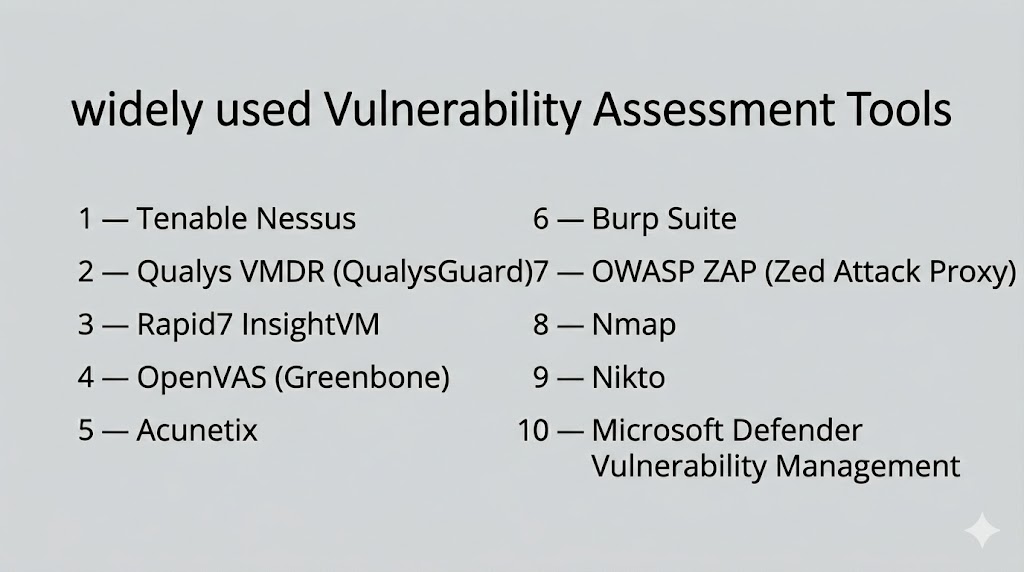
Top 10 Vulnerability Assessment Tools
#1 — Tenable Nessus
Short description: A widely used vulnerability scanner known for its extensive plugin library and ability to detect vulnerabilities across networks, systems, and applications.
Key Features
- Comprehensive vulnerability scanning
- Credentialed and non-credentialed scans
- Large plugin database
- Risk-based prioritization
- Detailed reporting
Pros
- Highly accurate detection
- Easy to use
Cons
- Limited enterprise features
- Requires tuning for advanced use
Platforms / Deployment
- Web / Windows / Linux
- Cloud / On-prem
Security & Compliance
- SSO, MFA, encryption
- Not publicly stated
Integrations & Ecosystem
Supports integration with SIEM, ITSM, and security tools.
- Splunk
- ServiceNow
Support & Community
Strong community support and extensive documentation.
#2 — Qualys VMDR
Short description: A cloud-based vulnerability management platform offering continuous monitoring, asset discovery, and automated remediation workflows.
Key Features
- Continuous vulnerability scanning
- Asset discovery
- Risk prioritization
- Patch management
- Compliance reporting
Pros
- Scalable cloud platform
- Strong automation
Cons
- Complex interface
- Pricing varies
Platforms / Deployment
- Web
- Cloud
Security & Compliance
- SSO, MFA, RBAC
- Not publicly stated
Integrations & Ecosystem
- Cloud platforms
- SIEM and ITSM tools
Support & Community
Enterprise support and documentation.
#3 — Rapid7 InsightVM
Short description: A vulnerability management tool providing real-time visibility into vulnerabilities with strong analytics and automation capabilities.
Key Features
- Live vulnerability monitoring
- Risk scoring
- Asset discovery
- Integration with security tools
- Reporting dashboards
Pros
- Real-time insights
- Strong analytics
Cons
- Learning curve
- Requires configuration
Platforms / Deployment
- Web / Windows / Linux
- Cloud / Hybrid
Security & Compliance
- SSO, MFA, encryption
- Not publicly stated
Integrations & Ecosystem
- SIEM, SOAR, cloud platforms
Support & Community
Good documentation and enterprise support.
#4 — OpenVAS (Greenbone)
Short description: An open-source vulnerability scanner offering comprehensive scanning capabilities for networks and systems.
Key Features
- Open-source scanning engine
- Regular vulnerability updates
- Network scanning
- Reporting tools
- Custom configurations
Pros
- Free and open-source
- Strong scanning capabilities
Cons
- Requires technical expertise
- Limited enterprise support
Platforms / Deployment
- Linux
- Self-hosted
Security & Compliance
- Not publicly stated
Integrations & Ecosystem
- API support and community integrations
Support & Community
Active open-source community.
#5 — Microsoft Defender Vulnerability Management
Short description: A vulnerability management solution integrated into the Microsoft ecosystem, offering continuous monitoring and risk prioritization.
Key Features
- Continuous vulnerability assessment
- Risk-based prioritization
- Asset inventory
- Integration with endpoint security
- Remediation recommendations
Pros
- Seamless Microsoft integration
- Real-time insights
Cons
- Best suited for Microsoft environments
- Limited flexibility outside ecosystem
Platforms / Deployment
- Web
- Cloud
Security & Compliance
- SSO, MFA, RBAC
- Not publicly stated
Integrations & Ecosystem
- Microsoft security tools
Support & Community
Enterprise support and documentation.
#6 — Tripwire IP360
Short description: A vulnerability management tool focused on network visibility and risk prioritization across enterprise environments.
Key Features
- Asset discovery
- Vulnerability scanning
- Risk prioritization
- Reporting tools
- Compliance support
Pros
- Strong risk scoring
- Enterprise-grade features
Cons
- Complex deployment
- Requires expertise
Platforms / Deployment
- Web / Windows
- On-prem / Hybrid
Security & Compliance
- SSO, MFA
- Not publicly stated
Integrations & Ecosystem
- SIEM and ITSM tools
Support & Community
Professional support available.
#7 — Acunetix
Short description: A web application security scanner designed to detect vulnerabilities such as SQL injection and XSS.
Key Features
- Web application scanning
- Automated vulnerability detection
- Reporting dashboards
- Integration with development tools
- API scanning
Pros
- Strong web scanning
- Developer-friendly
Cons
- Limited network scanning
- Focused use case
Platforms / Deployment
- Web / Windows / Linux
- Cloud / On-prem
Security & Compliance
- SSO, MFA
- Not publicly stated
Integrations & Ecosystem
- CI/CD tools
- Issue tracking systems
Support & Community
Good support and documentation.
#8 — Burp Suite
Short description: A comprehensive web vulnerability scanning and testing platform widely used by security professionals.
Key Features
- Web vulnerability scanning
- Proxy and testing tools
- Automated scanning
- API testing
- Manual testing tools
Pros
- Powerful testing features
- Widely adopted
Cons
- Steep learning curve
- Limited automation in free version
Platforms / Deployment
- Windows / Linux / macOS
- Desktop / Cloud
Security & Compliance
- Not publicly stated
Integrations & Ecosystem
- DevSecOps tools
- APIs and plugins
Support & Community
Large community and extensive documentation.
#9 — OWASP ZAP
Short description: An open-source web vulnerability scanner suitable for developers and security teams.
Key Features
- Automated scanning
- Proxy-based testing
- API support
- Active and passive scanning
- Script-based automation
Pros
- Free and open-source
- Developer-friendly
Cons
- Requires expertise
- Limited enterprise features
Platforms / Deployment
- Windows / Linux / macOS
- Self-hosted
Security & Compliance
- Not publicly stated
Integrations & Ecosystem
- CI/CD pipelines
- Developer tools
Support & Community
Strong open-source community.
#10 — Nexpose (Rapid7)
Short description: A vulnerability scanner providing real-time vulnerability detection and integration with broader security ecosystems.
Key Features
- Real-time vulnerability scanning
- Risk prioritization
- Reporting dashboards
- Integration with Rapid7 platform
- Asset discovery
Pros
- Strong analytics
- Integration capabilities
Cons
- Complex setup
- Requires tuning
Platforms / Deployment
- Web / Windows / Linux
- On-prem / Hybrid
Security & Compliance
- SSO, MFA
- Not publicly stated
Integrations & Ecosystem
- SIEM, SOAR, cloud tools
Support & Community
Enterprise support and documentation.
Comparison Table (Top 10)
| Tool Name | Best For | Platform(s) Supported | Deployment | Standout Feature | Public Rating |
|---|---|---|---|---|---|
| Nessus | SMB/Enterprise | Web / Windows / Linux | Cloud / On-prem | Plugin library | N/A |
| Qualys VMDR | Enterprise | Web | Cloud | Continuous scanning | N/A |
| InsightVM | Enterprise | Web / Windows / Linux | Cloud / Hybrid | Real-time monitoring | N/A |
| OpenVAS | SMB | Linux | Self-hosted | Open-source | N/A |
| Microsoft Defender VM | Enterprise | Web | Cloud | Endpoint integration | N/A |
| Tripwire IP360 | Enterprise | Web / Windows | Hybrid | Risk scoring | N/A |
| Acunetix | Dev teams | Web / Windows / Linux | Cloud / On-prem | Web scanning | N/A |
| Burp Suite | Security testers | Windows / Linux / macOS | Desktop / Cloud | Manual testing | N/A |
| OWASP ZAP | Developers | Windows / Linux / macOS | Self-hosted | Open-source scanning | N/A |
| Nexpose | Enterprise | Web / Windows / Linux | Hybrid | Risk analytics | N/A |
Evaluation & Scoring of Vulnerability Assessment Tools
| Tool Name | Core (25%) | Ease (15%) | Integrations (15%) | Security (10%) | Performance (10%) | Support (10%) | Value (15%) | Weighted Total (0–10) |
|---|---|---|---|---|---|---|---|---|
| Nessus | 9 | 8 | 8 | 8 | 9 | 8 | 8 | 8.4 |
| Qualys | 9 | 7 | 9 | 8 | 9 | 8 | 7 | 8.3 |
| InsightVM | 8 | 7 | 8 | 8 | 8 | 7 | 7 | 7.8 |
| OpenVAS | 7 | 6 | 6 | 7 | 7 | 6 | 9 | 7.1 |
| Defender VM | 8 | 8 | 7 | 8 | 8 | 7 | 7 | 7.8 |
| Tripwire | 8 | 6 | 7 | 8 | 8 | 7 | 7 | 7.6 |
| Acunetix | 7 | 8 | 6 | 7 | 7 | 7 | 7 | 7.2 |
| Burp Suite | 8 | 6 | 6 | 7 | 7 | 8 | 7 | 7.2 |
| OWASP ZAP | 7 | 7 | 6 | 7 | 7 | 7 | 9 | 7.3 |
| Nexpose | 8 | 7 | 8 | 8 | 8 | 7 | 7 | 7.8 |
Scores are comparative and reflect tool strengths across features, usability, integrations, and value. Higher scores indicate stronger enterprise readiness, while mid-range scores suit growing teams.
Which Vulnerability Assessment Tool Is Right for You?
Solo / Freelancer
Use open-source tools like OpenVAS or OWASP ZAP for cost-effective scanning.
SMB
Nessus and Acunetix provide ease of use and strong features.
Mid-Market
InsightVM and Qualys offer balanced scalability and automation.
Enterprise
Qualys, Rapid7, and Microsoft Defender provide advanced capabilities.
Budget vs Premium
Open-source tools are cost-effective; enterprise tools offer deeper insights and automation.
Feature Depth vs Ease of Use
Advanced tools provide detailed analysis but require expertise.
Integrations & Scalability
Choose tools that integrate with your existing security ecosystem.
Security & Compliance Needs
Ensure support for compliance frameworks and reporting.
Frequently Asked Questions (FAQs)
What are vulnerability assessment tools?
They are tools that scan systems to identify and prioritize security weaknesses.
How often should vulnerability scans be run?
Regularly, often continuously or weekly depending on risk level.
Are these tools automated?
Yes, most tools automate scanning and reporting processes.
Do they replace penetration testing?
No, they complement penetration testing but do not replace it.
Are open-source tools effective?
Yes, but may require more expertise and configuration.
Can these tools integrate with other systems?
Yes, most integrate with SIEM, SOAR, and ITSM platforms.
What industries need these tools most?
Finance, healthcare, tech, and enterprises with sensitive data.
Do these tools reduce cyber risk?
Yes, by identifying and prioritizing vulnerabilities for remediation.
Are they suitable for cloud environments?
Yes, many tools support cloud and hybrid environments.
What is the biggest challenge?
Managing false positives and prioritizing vulnerabilities.
Conclusion
Vulnerability Assessment Tools are essential for maintaining a strong cybersecurity posture by continuously identifying and addressing security weaknesses. They enable organizations to move from reactive to proactive security by providing visibility into risks across systems, applications, and networks.
The choice of tool depends on your organization’s size, infrastructure, and security maturity. Enterprise environments benefit from advanced platforms with automation and integrations, while smaller teams can leverage open-source or lightweight solutions.
It is important to focus on accuracy, scalability, and integration capabilities when selecting a tool. No single solution fits all use cases, and each tool offers unique strengths.
A practical approach is to shortlist a few tools, test them in your environment, and evaluate how well they align with your workflows and risk management strategy.
