Introduction
Passkey & FIDO2 authentication platforms are modern identity security solutions that replace traditional passwords with cryptographic authentication methods. Instead of relying on something users know, like passwords, these platforms use public-private key cryptography combined with biometrics or device-based authentication. This approach significantly reduces the risk of phishing, credential theft, and account compromise.
As organizations move toward passwordless security models, Passkey and FIDO2 standards are becoming the foundation of secure authentication systems. They are now widely adopted across enterprises, SaaS applications, and consumer platforms to enhance user experience while maintaining strong security controls.
Real-world use cases:
- Passwordless login for enterprise applications
- Secure authentication for remote workforce
- Customer identity and access management
- Multi-factor authentication replacement
What buyers should evaluate:
- FIDO2 and passkey support
- Integration with identity providers and apps
- User experience and ease of adoption
- Security features like phishing resistance
- Device and platform compatibility
- Scalability for enterprise deployment
- Compliance and regulatory alignment
- Administration and policy controls
Best for: Enterprises, SaaS platforms, security teams, and organizations aiming to eliminate passwords and adopt phishing-resistant authentication.
Not ideal for: Environments with legacy systems that cannot support modern authentication standards or organizations not ready for passwordless adoption.
Key Trends in Passkey & FIDO2 Authentication Platforms
- Passwordless adoption growth: Organizations are moving away from traditional passwords
- Passkeys across ecosystems: Support expanding across devices and platforms
- Phishing-resistant authentication: Stronger protection against credential attacks
- Biometric integration: Increased use of fingerprint and facial recognition
- Cloud identity integration: Seamless connection with IAM platforms
- Zero Trust alignment: Authentication integrated into Zero Trust architectures
- Cross-device authentication: Syncing passkeys across devices
- Improved user experience: Faster and simpler login flows
- Regulatory compliance focus: Meeting security and privacy requirements
How We Selected These Tools (Methodology)
- Evaluated market leadership and adoption
- Assessed FIDO2 and passkey support maturity
- Compared security capabilities and phishing resistance
- Reviewed integration with identity and access systems
- Analyzed user experience and deployment ease
- Considered enterprise scalability and flexibility
- Evaluated support and ecosystem strength
- Balanced enterprise and developer-focused platforms
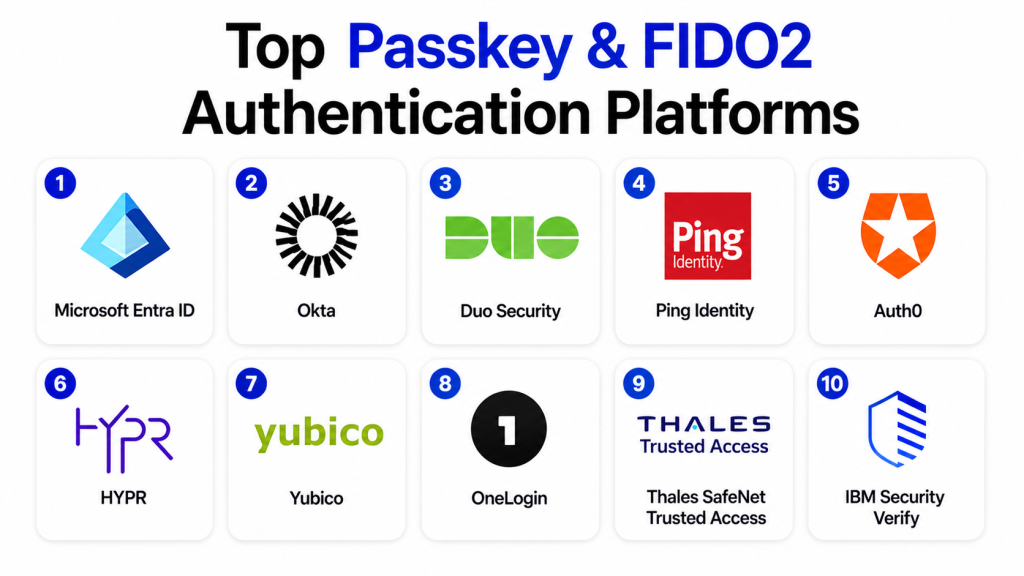
Top 10 Passkey & FIDO2 Authentication Platforms Tools
#1 — Microsoft Entra ID
Short description: Microsoft Entra ID is a leading identity platform that supports passwordless authentication using FIDO2 security keys and passkeys, integrated with enterprise environments.
Key Features
- FIDO2 and passkey support
- Passwordless authentication
- Conditional access policies
- Multi-factor authentication
- Identity governance
Pros
- Strong enterprise integration
- Scalable
- Comprehensive security features
Cons
- Requires Microsoft ecosystem
- Complex configuration
- Licensing costs
Platforms / Deployment
Cloud
Security & Compliance
MFA, RBAC, encryption
Not publicly stated
Integrations & Ecosystem
Deep integration with enterprise and cloud environments.
- Microsoft ecosystem
- SaaS apps
- Identity systems
Support & Community
Enterprise-grade support.
#2 — Okta
Short description: Okta provides identity and access management solutions with strong support for passkeys and FIDO2 authentication.
Key Features
- Passwordless login
- FIDO2 authentication
- Adaptive MFA
- Identity federation
- Lifecycle management
Pros
- Easy integration
- Strong security
- Developer-friendly
Cons
- Pricing complexity
- Requires configuration
- Vendor dependency
Platforms / Deployment
Cloud
Security & Compliance
MFA, adaptive authentication
Not publicly stated
Integrations & Ecosystem
Extensive integrations with enterprise applications.
- SaaS apps
- APIs
- Identity tools
Support & Community
Strong enterprise and developer support.
#3 — Duo Security
Short description: Duo Security offers secure authentication with support for FIDO2 and passwordless access.
Key Features
- Passwordless authentication
- Device trust
- MFA support
- Endpoint visibility
- Policy enforcement
Pros
- Easy to deploy
- Strong security
- User-friendly
Cons
- Limited advanced features
- Requires Cisco ecosystem for full benefits
- Pricing varies
Platforms / Deployment
Cloud
Security & Compliance
MFA, device verification
Not publicly stated
Integrations & Ecosystem
Works with enterprise systems and applications.
- Identity providers
- Network tools
Support & Community
Strong support availability.
#4 — Ping Identity
Short description: Ping Identity provides enterprise authentication solutions with FIDO2 and passwordless capabilities.
Key Features
- FIDO2 support
- Adaptive authentication
- Identity federation
- Risk-based access
- API security
Pros
- Enterprise-ready
- Flexible deployment
- Strong security
Cons
- Complex setup
- Requires expertise
- Higher cost
Platforms / Deployment
Cloud / Hybrid
Security & Compliance
Adaptive security
Not publicly stated
Integrations & Ecosystem
Integrates with enterprise identity systems.
- APIs
- IAM tools
Support & Community
Enterprise support.
#5 — Auth0
Short description: Auth0 provides developer-friendly authentication solutions with passkey and FIDO2 support.
Key Features
- Passwordless login
- FIDO2 authentication
- API-first design
- Customizable flows
- Identity federation
Pros
- Developer-friendly
- Flexible
- Easy integration
Cons
- Pricing complexity
- Requires configuration
- Limited enterprise controls
Platforms / Deployment
Cloud
Security & Compliance
MFA, encryption
Not publicly stated
Integrations & Ecosystem
Works well with modern application stacks.
- APIs
- SaaS apps
Support & Community
Strong developer community.
#6 — HYPR
Short description: HYPR specializes in passwordless authentication with strong FIDO2 compliance and enterprise focus.
Key Features
- Passwordless authentication
- FIDO2 certification
- Biometric authentication
- Phishing resistance
- Enterprise deployment
Pros
- Strong security
- Passwordless-first approach
- Enterprise focus
Cons
- Higher cost
- Limited small business focus
- Requires setup
Platforms / Deployment
Cloud / Hybrid
Security & Compliance
FIDO2 security
Not publicly stated
Integrations & Ecosystem
Integrates with enterprise systems.
- IAM platforms
- Security tools
Support & Community
Enterprise-grade support.
#7 — Yubico
Short description: Yubico provides hardware-based authentication solutions with FIDO2 support using security keys.
Key Features
- Hardware security keys
- FIDO2 support
- Multi-protocol authentication
- Phishing-resistant login
- Cross-platform compatibility
Pros
- Very secure
- Easy to use
- Strong reputation
Cons
- Requires hardware
- Cost per user
- Limited software features
Platforms / Deployment
Cross-platform
Security & Compliance
FIDO2 compliance
Not publicly stated
Integrations & Ecosystem
Works with many identity platforms.
- Identity providers
- Security tools
Support & Community
Strong support.
#8 — OneLogin
Short description: OneLogin provides identity management with support for passwordless and FIDO2 authentication.
Key Features
- Passwordless login
- MFA support
- Identity management
- Policy controls
- Directory integration
Pros
- Easy to use
- Scalable
- Good integrations
Cons
- Limited advanced features
- Pricing varies
- Smaller ecosystem
Platforms / Deployment
Cloud
Security & Compliance
MFA, access control
Not publicly stated
Integrations & Ecosystem
Supports enterprise applications.
- SaaS apps
- Identity systems
Support & Community
Moderate support.
#9 — Thales SafeNet Trusted Access
Short description: Thales provides enterprise authentication solutions with strong security and compliance capabilities.
Key Features
- Passwordless authentication
- FIDO2 support
- Risk-based access
- Strong compliance features
- Identity federation
Pros
- Strong compliance
- Enterprise-grade
- Secure
Cons
- Complex setup
- Higher cost
- Requires expertise
Platforms / Deployment
Cloud / Hybrid
Security & Compliance
Strong compliance focus
Not publicly stated
Integrations & Ecosystem
Works with enterprise environments.
- Security tools
- Identity systems
Support & Community
Enterprise support.
#10 — IBM Security Verify
Short description: IBM Security Verify offers identity and access management with support for passwordless authentication and FIDO2.
Key Features
- Passwordless login
- Identity governance
- MFA support
- Risk-based authentication
- AI-driven insights
Pros
- Enterprise-ready
- Strong security
- Scalable
Cons
- Complex setup
- Requires expertise
- Pricing varies
Platforms / Deployment
Cloud / Hybrid
Security & Compliance
Enterprise security
Not publicly stated
Integrations & Ecosystem
Integrates with enterprise IT systems.
- Cloud platforms
- Identity tools
Support & Community
Strong enterprise support.
Comparison Table (Top 10)
| Tool Name | Best For | Platform(s) Supported | Deployment | Standout Feature | Public Rating |
|---|---|---|---|---|---|
| Microsoft Entra ID | Enterprise IAM | Cloud | Cloud | Passwordless identity | N/A |
| Okta | Identity management | Cloud | Cloud | Adaptive authentication | N/A |
| Duo Security | Secure access | Cloud | Cloud | Device trust | N/A |
| Ping Identity | Enterprise auth | Cloud/Hybrid | Hybrid | Risk-based access | N/A |
| Auth0 | Developers | Cloud | Cloud | API-first auth | N/A |
| HYPR | Passwordless | Cloud/Hybrid | Hybrid | FIDO2 focus | N/A |
| Yubico | Hardware auth | Cross-platform | Hardware | Security keys | N/A |
| OneLogin | SMB IAM | Cloud | Cloud | Simplicity | N/A |
| Thales | Compliance | Cloud/Hybrid | Hybrid | Security focus | N/A |
| IBM Verify | Enterprise IAM | Cloud/Hybrid | Hybrid | AI insights | N/A |
Evaluation & Scoring of Passkey & FIDO2 Authentication Platforms
| Tool Name | Core | Ease | Integrations | Security | Performance | Support | Value | Weighted Total |
|---|---|---|---|---|---|---|---|---|
| Microsoft Entra ID | 9 | 8 | 9 | 9 | 8 | 9 | 8 | 8.7 |
| Okta | 9 | 8 | 9 | 9 | 8 | 9 | 8 | 8.6 |
| Duo Security | 8 | 9 | 8 | 9 | 8 | 8 | 8 | 8.4 |
| Ping Identity | 9 | 7 | 9 | 9 | 8 | 8 | 7 | 8.3 |
| Auth0 | 8 | 9 | 9 | 8 | 8 | 8 | 8 | 8.4 |
| HYPR | 9 | 7 | 8 | 9 | 8 | 8 | 7 | 8.3 |
| Yubico | 8 | 9 | 8 | 9 | 9 | 8 | 7 | 8.5 |
| OneLogin | 8 | 8 | 8 | 8 | 8 | 7 | 8 | 8.0 |
| Thales | 9 | 7 | 8 | 9 | 8 | 8 | 7 | 8.2 |
| IBM Verify | 9 | 7 | 8 | 9 | 8 | 9 | 7 | 8.3 |
How to interpret the scores:
These scores provide a comparative view of platform capabilities based on real-world usage, security strength, and integration depth. Higher scores indicate stronger overall performance, but the best platform depends on your specific needs. For example, Microsoft Entra ID and Okta excel in enterprise environments, while Auth0 is better suited for developers. Always align your choice with your infrastructure, compliance requirements, and user experience goals.
Which Passkey & FIDO2 Authentication Platform Is Right for You?
Solo / Freelancer
Choose Auth0 or Duo Security for simplicity and ease of use.
SMB
OneLogin or Okta provide balanced features and scalability.
Mid-Market
Ping Identity or HYPR offer advanced security capabilities.
Enterprise
Microsoft Entra ID or IBM Security Verify are ideal for large-scale deployments.
Budget vs Premium
Open standards reduce cost, but enterprise platforms require investment.
Feature Depth vs Ease of Use
Simpler tools offer ease, while enterprise platforms provide deeper control.
Integrations & Scalability
Enterprise platforms provide stronger integration capabilities.
Security & Compliance Needs
Choose platforms with strong FIDO2 compliance and policy controls.
Frequently Asked Questions (FAQs)
1. What is FIDO2 authentication?
FIDO2 is a standard for passwordless authentication using cryptographic keys. It replaces passwords with secure authentication methods. It is widely used for secure login systems.
2. What are passkeys?
Passkeys are secure digital credentials stored on devices. They allow users to log in without passwords. They are resistant to phishing attacks.
3. Are passkeys more secure than passwords?
Yes, passkeys are more secure because they use cryptographic authentication. They cannot be easily stolen or reused. This reduces security risks.
4. Do passkeys work across devices?
Yes, many platforms support syncing passkeys across devices. This improves usability. Compatibility depends on the ecosystem.
5. Can passkeys replace MFA?
Passkeys can replace traditional MFA in many cases. They provide strong authentication. However, some systems still use additional factors.
6. Are these platforms enterprise-ready?
Yes, most platforms are designed for enterprise use. They support scalability and compliance. They integrate with identity systems.
7. Do I need special hardware?
Not always. Some solutions use built-in device authentication. Others like Yubico require hardware keys.
8. Are passkeys easy to implement?
Implementation varies by platform. Some offer easy integration, while others require configuration. Developer tools simplify the process.
9. What industries use FIDO2?
Industries like finance, healthcare, and technology use FIDO2. It is ideal for high-security environments. Adoption is growing rapidly.
10. How do I choose the right platform?
Evaluate security, integrations, and scalability. Consider your user base and infrastructure. Test platforms before deployment.
Conclusion
Passkey and FIDO2 authentication platforms are redefining identity security by eliminating passwords and introducing phishing-resistant, user-friendly authentication methods. Solutions like Microsoft Entra ID and Okta lead in enterprise identity management, while platforms like Auth0 and HYPR offer flexibility for developers and passwordless-first strategies. Hardware-based solutions like Yubico add an extra layer of security for high-risk environments. Each platform has its strengths depending on your scale, integration needs, and security requirements. There is no one-size-fits-all solution, and the best choice depends on your infrastructure and user experience goals. Start by identifying your authentication needs, shortlist a few platforms, and run pilot implementations to validate usability, integration, and security before full deployment.
