Introduction
Bug Tracking Tools are software platforms used to identify, log, track, prioritize, and resolve software defects throughout the development lifecycle. These tools act as a centralized system where developers, testers, and product teams collaborate to ensure issues are documented and fixed efficiently.
In modern software development, especially with agile and DevOps practices, managing bugs effectively is critical to delivering high-quality products. Bug tracking tools help teams maintain visibility into issues, streamline workflows, and improve release quality by ensuring nothing falls through the cracks.
Real-world use cases include:
- Tracking bugs during software development cycles
- Managing issue backlogs and prioritization
- Collaborating across development and QA teams
- Monitoring bug resolution progress
- Improving product quality and reliability
What buyers should evaluate:
- Ease of use and workflow customization
- Integration with development and CI tools
- Issue tracking and prioritization capabilities
- Reporting and analytics features
- Collaboration and notifications
- Scalability for growing teams
- Security and access control
- Pricing and flexibility
Best for: Developers, QA teams, product managers, and software organizations managing complex development workflows.
Not ideal for: Teams with very simple projects or those not requiring structured issue tracking.
Key Trends in Bug Tracking Tools
- AI-assisted bug detection and prioritization
- Integration with CI CD and DevOps pipelines
- Real-time collaboration and notifications
- Automation of bug workflows and assignments
- Advanced reporting and analytics dashboards
- Integration with version control systems
- Cloud-based tools with scalability
- Developer-first interfaces and APIs
- Agile and Scrum workflow support
- Cross-platform and mobile accessibility
How We Selected These Tools
- Evaluated industry adoption and popularity
- Assessed bug tracking and workflow features
- Considered ease of use and onboarding
- Reviewed integration with development tools
- Analyzed scalability across team sizes
- Evaluated reporting and analytics capabilities
- Considered security and compliance features
- Assessed value for money and flexibility
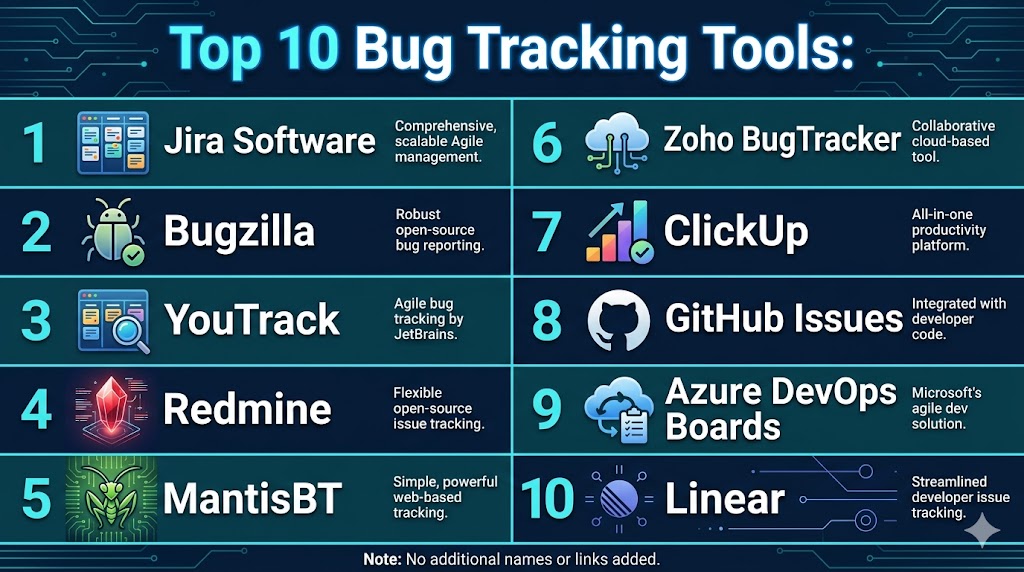
Top 10 Bug Tracking Tools
#1 — Jira Software
Short description: Jira Software is one of the most widely used bug tracking and project management tools, offering powerful workflow customization and integration capabilities.
Key Features
- Issue tracking
- Workflow customization
- Agile boards
- Reporting dashboards
- Integration with DevOps tools
- Automation rules
- Backlog management
Pros
- Highly customizable
- Strong ecosystem
- Scalable
Cons
- Complex setup
- Learning curve
- Pricing increases with scale
Platforms / Deployment
- Web Mobile
- Cloud On-premise
Security & Compliance
- Role-based access control, encryption
- Not publicly stated
Integrations & Ecosystem
Integrates with a wide range of development tools.
- Git tools
- CI tools
- APIs
Support & Community
Large global community and strong support
#2 — Bugzilla
Short description: Bugzilla is an open-source bug tracking system known for reliability and flexibility.
Key Features
- Bug tracking
- Advanced search
- Reporting tools
- Workflow management
- Custom fields
Pros
- Free and open-source
- Highly customizable
- Reliable
Cons
- Outdated UI
- Requires setup
- Limited integrations
Platforms / Deployment
- Web
- Self-hosted
Security & Compliance
- Not publicly stated
Integrations & Ecosystem
Supports integration via plugins and APIs.
- APIs
- Extensions
Support & Community
Strong open-source community
#3 — YouTrack
Short description: YouTrack by JetBrains is a developer-friendly issue tracker with strong search and customization features.
Key Features
- Issue tracking
- Agile boards
- Advanced search
- Workflow automation
- Reporting
Pros
- Developer-friendly
- Flexible workflows
- Powerful search
Cons
- Learning curve
- Smaller ecosystem
- Setup effort
Platforms / Deployment
- Web
- Cloud Self-hosted
Security & Compliance
- Not publicly stated
Integrations & Ecosystem
Integrates with development tools.
- Git
- APIs
Support & Community
Good support and documentation
#4 — Redmine
Short description: Redmine is an open-source project management and bug tracking tool with multi-project support.
Key Features
- Issue tracking
- Project management
- Gantt charts
- Reporting
- Plugin support
Pros
- Free and open-source
- Flexible
- Multi-project support
Cons
- Outdated interface
- Requires setup
- Limited native integrations
Platforms / Deployment
- Web
- Self-hosted
Security & Compliance
- Not publicly stated
Integrations & Ecosystem
Supports plugins and integrations.
- APIs
- Extensions
Support & Community
Active open-source community
#5 — MantisBT
Short description: MantisBT is a lightweight bug tracking tool focused on simplicity and ease of use.
Key Features
- Bug tracking
- Email notifications
- Reporting
- Workflow management
- Access control
Pros
- Easy to use
- Lightweight
- Free
Cons
- Limited advanced features
- Basic UI
- Smaller ecosystem
Platforms / Deployment
- Web
- Self-hosted
Security & Compliance
- Not publicly stated
Integrations & Ecosystem
Supports plugins and integrations.
- APIs
- Extensions
Support & Community
Open-source community support
#6 — Zoho BugTracker
Short description: Zoho BugTracker is a cloud-based issue tracking tool with strong integration into the Zoho ecosystem.
Key Features
- Issue tracking
- Automation
- Reporting
- Time tracking
- Workflow management
Pros
- Easy to use
- Affordable
- Good integrations
Cons
- Limited advanced features
- Smaller ecosystem outside Zoho
- Customization limits
Platforms / Deployment
- Web Mobile
- Cloud
Security & Compliance
- Not publicly stated
Integrations & Ecosystem
Integrates with Zoho and third-party tools.
- Zoho apps
- APIs
Support & Community
Good support resources
#7 — ClickUp
Short description: ClickUp is a versatile project management tool with built-in bug tracking and issue management features.
Key Features
- Task and bug tracking
- Custom workflows
- Automation
- Reporting dashboards
- Collaboration tools
Pros
- All-in-one platform
- Highly customizable
- Easy to use
Cons
- Can be overwhelming
- Performance issues
- Learning curve
Platforms / Deployment
- Web Mobile
- Cloud
Security & Compliance
- Not publicly stated
Integrations & Ecosystem
Supports wide integrations.
- CRM
- APIs
Support & Community
Strong support and community
#8 — GitHub Issues
Short description: GitHub Issues is a simple yet powerful issue tracking system integrated with GitHub repositories.
Key Features
- Issue tracking
- Labels and milestones
- Collaboration
- Integration with code
- Notifications
Pros
- Seamless GitHub integration
- Easy to use
- Free for basic use
Cons
- Limited advanced features
- Not standalone
- Basic reporting
Platforms / Deployment
- Web
- Cloud
Security & Compliance
- Not publicly stated
Integrations & Ecosystem
Integrated with GitHub ecosystem.
- GitHub tools
- APIs
Support & Community
Large developer community
#9 — Azure DevOps Boards
Short description: Azure DevOps Boards provides bug tracking and work management integrated with development pipelines.
Key Features
- Issue tracking
- Agile boards
- Reporting
- Integration with CI tools
- Automation
Pros
- Strong DevOps integration
- Scalable
- Enterprise-ready
Cons
- Complex
- Requires setup
- Learning curve
Platforms / Deployment
- Web
- Cloud On-premise
Security & Compliance
- Enterprise-level controls
- Not publicly stated
Integrations & Ecosystem
Integrates with Microsoft ecosystem.
- Azure tools
- APIs
Support & Community
Enterprise-level support
#10 — Linear
Short description: Linear is a modern issue tracking tool designed for speed, simplicity, and developer experience.
Key Features
- Issue tracking
- Workflow automation
- Keyboard shortcuts
- Reporting
- Collaboration
Pros
- Fast and modern UI
- Easy to use
- Developer-friendly
Cons
- Limited enterprise features
- Smaller ecosystem
- Fewer integrations
Platforms / Deployment
- Web Desktop
- Cloud
Security & Compliance
- Not publicly stated
Integrations & Ecosystem
Supports integrations with dev tools.
- Git
- APIs
Support & Community
Growing community and support
Comparison Table Top 10
| Tool Name | Best For | Platform Supported | Deployment | Standout Feature | Public Rating |
|---|---|---|---|---|---|
| Jira Software | Enterprises | Web Mobile | Cloud On-premise | Workflow customization | N/A |
| Bugzilla | Open-source | Web | Self-hosted | Free flexibility | N/A |
| YouTrack | Developers | Web | Cloud Self-hosted | Advanced search | N/A |
| Redmine | Multi-project | Web | Self-hosted | Project management | N/A |
| MantisBT | Lightweight | Web | Self-hosted | Simplicity | N/A |
| Zoho BugTracker | SMB | Web Mobile | Cloud | Integration | N/A |
| ClickUp | All-in-one | Web Mobile | Cloud | Custom workflows | N/A |
| GitHub Issues | Developers | Web | Cloud | Code integration | N/A |
| Azure DevOps | Enterprise | Web | Cloud On-premise | DevOps integration | N/A |
| Linear | Modern teams | Web Desktop | Cloud | Speed | N/A |
Evaluation & Scoring of Bug Tracking Tools
| Tool Name | Core | Ease | Integrations | Security | Performance | Support | Value | Weighted Total |
|---|---|---|---|---|---|---|---|---|
| Jira Software | 9 | 7 | 9 | 8 | 9 | 9 | 7 | 8.4 |
| Bugzilla | 8 | 6 | 6 | 7 | 8 | 7 | 9 | 7.5 |
| YouTrack | 8 | 7 | 7 | 7 | 8 | 7 | 8 | 7.6 |
| Redmine | 7 | 6 | 6 | 7 | 7 | 7 | 8 | 7.1 |
| MantisBT | 7 | 7 | 5 | 7 | 7 | 6 | 9 | 7.2 |
| Zoho BugTracker | 8 | 8 | 7 | 7 | 8 | 7 | 8 | 7.8 |
| ClickUp | 8 | 8 | 8 | 7 | 7 | 8 | 8 | 7.9 |
| GitHub Issues | 7 | 9 | 7 | 7 | 8 | 8 | 9 | 7.9 |
| Azure DevOps | 9 | 6 | 9 | 9 | 9 | 8 | 6 | 8.1 |
| Linear | 8 | 9 | 7 | 7 | 8 | 7 | 8 | 7.9 |
Scores are comparative and reflect performance across key criteria. Choose tools based on team size, workflow needs, and integration requirements.
Which Bug Tracking Tool Is Right for You
Solo / Freelancer
GitHub Issues or MantisBT are simple and effective.
SMB
Zoho BugTracker and ClickUp provide strong value.
Mid Market
YouTrack and Linear offer balance and flexibility.
Enterprise
Jira Software and Azure DevOps are ideal.
Budget vs Premium
Bugzilla is budget-friendly, Jira is premium.
Feature Depth vs Ease of Use
Jira for depth, Linear for simplicity.
Integrations & Scalability
Azure DevOps and Jira are strong choices.
Security & Compliance Needs
Enterprise tools offer stronger governance.
Frequently Asked Questions
1. What is a bug tracking tool
A bug tracking tool is software used to record, manage, and resolve software defects. It helps teams track issues systematically. This improves product quality and development efficiency.
2. Why are bug tracking tools important
They ensure that bugs are properly documented and resolved. This improves collaboration between teams. It also helps maintain product stability.
3. How do bug tracking tools work
They allow users to log bugs with details such as severity and status. Teams assign and track these issues until resolution. This creates a structured workflow.
4. Are bug tracking tools suitable for small teams
Yes, many tools are designed for small teams. Simple tools provide easy setup and usage. They help improve workflow efficiency.
5. How much do bug tracking tools cost
Pricing varies depending on features and team size. Some tools are free or open-source. Enterprise tools are more expensive.
6. Do these tools integrate with development tools
Yes, most tools integrate with version control and CI systems. This connects development workflows with issue tracking. Integration improves productivity.
7. How long does implementation take
Implementation can take from a few hours to several days. It depends on tool complexity and customization. Many tools provide onboarding support.
8. What are common mistakes
Common mistakes include poor issue documentation and lack of prioritization. Not updating bug status can also cause problems. Proper usage is important.
9. Are these tools secure
Most tools include access control and security features. Security levels vary by provider. Enterprises should evaluate compliance needs.
10. Are there alternatives to bug tracking tools
Alternatives include spreadsheets or task management tools. However, these lack structured workflows. Dedicated tools provide better tracking.
Conclusion
Bug tracking tools are essential for maintaining software quality and ensuring efficient collaboration between development and QA teams. They provide a structured approach to managing issues, improving visibility, and streamlining workflows throughout the development lifecycle. From simple tools like GitHub Issues to enterprise platforms like Jira and Azure DevOps, each solution offers unique advantages depending on team size and complexity. The best choice depends on your workflow requirements, integration needs, and scalability expectations rather than a single universal option. Organizations should prioritize usability, integration, and reporting capabilities when selecting a tool. It is always recommended to test multiple options and align them with your development processes to achieve the best results.

A useful factor to consider is how well a bug tracking tool fits into the team’s existing workflow. Even powerful features can go underused if reporting, updating, and resolving issues feels more complicated than it needs to be.