Introduction
Natural Language Processing (NLP) toolkits are software libraries and frameworks that help developers and data scientists process, analyze, and understand human language. These toolkits provide pre-built components for tasks like tokenization, sentiment analysis, named entity recognition, text classification, and language modeling.
As organizations increasingly rely on text and conversational data—from customer support chats to documents and social media—NLP has become a foundational capability in modern AI systems. Today’s NLP toolkits go far beyond rule-based processing and leverage deep learning, transformers, and large-scale language models to deliver high accuracy and contextual understanding.
Real-world use cases include:
- Chatbots and virtual assistants
- Sentiment analysis and customer feedback insights
- Document classification and information extraction
- Search and recommendation systems
- Language translation and summarization
What buyers should evaluate:
- Ease of use and learning curve
- Support for modern NLP techniques (transformers, embeddings)
- Performance and scalability
- Community and ecosystem support
- Integration with ML pipelines
- Multilingual capabilities
- Customization and extensibility
- Documentation quality
- Deployment flexibility
- Cost (open-source vs enterprise support)
Best for: Developers, data scientists, AI engineers, researchers, and companies building NLP-powered applications.
Not ideal for: Non-technical users or teams looking for ready-made no-code solutions.
Key Trends in NLP Toolkits
- Rapid adoption of transformer-based architectures
- Integration with large language models (LLMs)
- Growth of multilingual and cross-lingual NLP
- Increased focus on real-time and streaming NLP
- Expansion of pre-trained model libraries
- Hybrid approaches combining rules and ML
- Improved support for low-resource languages
- Deployment on edge devices and private environments
- Better tooling for explainability and bias detection
- Stronger integration with MLOps and data pipelines
How We Selected These Tools (Methodology)
The following toolkits were selected based on:
- Industry adoption and popularity
- Breadth of NLP capabilities
- Support for modern AI/ML techniques
- Ease of use and developer experience
- Community size and contributions
- Integration with popular ML frameworks
- Performance and scalability
- Flexibility for research and production use
- Documentation and learning resources
- Overall value for developers and organizations
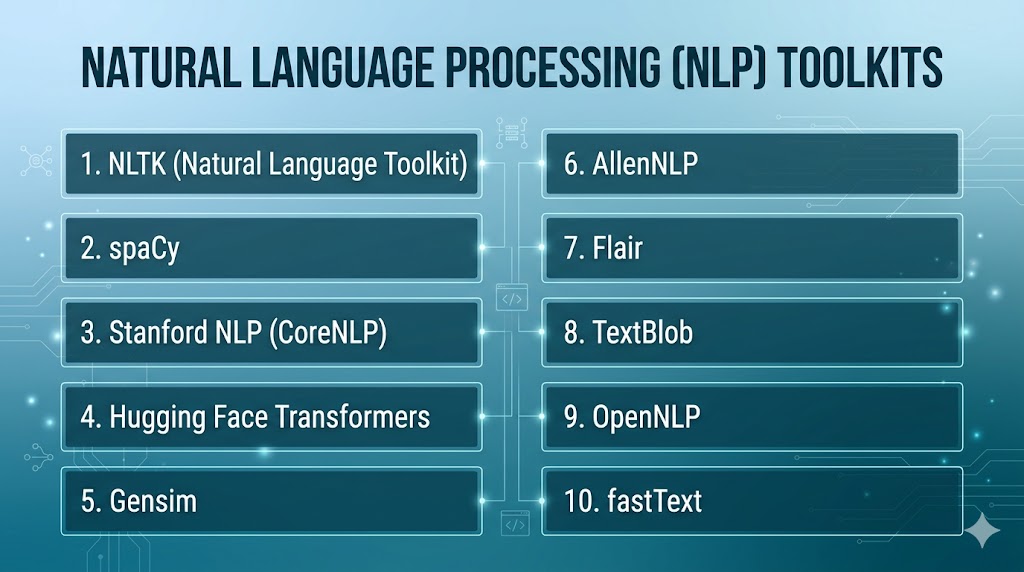
Top 10 Natural Language Processing (NLP) Toolkits
#1 — NLTK (Natural Language Toolkit)
Short description: A foundational Python library widely used for learning and prototyping NLP applications.
Key Features
- Tokenization and parsing
- Lexical resources and corpora
- Text classification
- Stemming and lemmatization
- Educational tools and tutorials
- Rule-based processing
Pros
- Beginner-friendly
- Extensive learning resources
Cons
- Not optimized for production
- Limited deep learning capabilities
Platforms / Deployment
Windows / macOS / Linux
Security & Compliance
Not publicly stated
Integrations & Ecosystem
Integrates with Python-based ML tools and libraries.
- NumPy
- scikit-learn
- Custom pipelines
Support & Community
Very large academic and beginner community
#2 — spaCy
Short description: A production-ready NLP library designed for performance and scalability.
Key Features
- Fast tokenization and parsing
- Named entity recognition
- Pre-trained pipelines
- Custom model training
- GPU support
- Industrial-strength performance
Pros
- High performance
- Production-ready
Cons
- Smaller research flexibility
- Requires some learning
Platforms / Deployment
Windows / macOS / Linux
Security & Compliance
Not publicly stated
Integrations & Ecosystem
- Python ecosystem
- ML frameworks
- APIs
Support & Community
Strong developer community
#3 — Stanford CoreNLP
Short description: A comprehensive NLP toolkit developed for deep linguistic analysis.
Key Features
- POS tagging
- Named entity recognition
- Sentiment analysis
- Dependency parsing
- Coreference resolution
- Multilingual support
Pros
- Rich linguistic features
- Academic reliability
Cons
- Heavy resource usage
- Java-based setup
Platforms / Deployment
Windows / macOS / Linux
Security & Compliance
Not publicly stated
Integrations & Ecosystem
- Java ecosystem
- APIs
Support & Community
Strong academic support
#4 — Hugging Face Transformers
Short description: A leading library for working with transformer models and large language models.
Key Features
- Pre-trained transformer models
- Support for BERT, GPT, and more
- Easy fine-tuning
- Multimodal capabilities
- Model hub access
- Integration with PyTorch and TensorFlow
Pros
- State-of-the-art models
- Huge ecosystem
Cons
- Requires GPU for performance
- Resource intensive
Platforms / Deployment
Windows / macOS / Linux / Cloud
Security & Compliance
Not publicly stated
Integrations & Ecosystem
- PyTorch
- TensorFlow
- APIs
Support & Community
Very large global community
#5 — Gensim
Short description: A library focused on topic modeling and document similarity.
Key Features
- Topic modeling (LDA)
- Document similarity
- Word embeddings
- Streaming data processing
- Large corpus handling
Pros
- Efficient for large datasets
- Lightweight
Cons
- Limited deep learning features
- Narrow focus
Platforms / Deployment
Windows / macOS / Linux
Security & Compliance
Not publicly stated
Integrations & Ecosystem
- Python ecosystem
- ML tools
Support & Community
Active community
#6 — AllenNLP
Short description: A research-focused NLP framework built on PyTorch.
Key Features
- Deep learning models
- Pre-trained NLP models
- Modular architecture
- Experiment tracking
- Research-friendly tools
Pros
- Flexible for research
- Built on PyTorch
Cons
- Less production-ready
- Smaller ecosystem
Platforms / Deployment
Windows / macOS / Linux
Security & Compliance
Not publicly stated
Integrations & Ecosystem
- PyTorch
- ML pipelines
Support & Community
Research-focused community
#7 — Flair
Short description: A simple and powerful NLP library for sequence labeling tasks.
Key Features
- Named entity recognition
- POS tagging
- Embeddings support
- Easy training workflows
- Multilingual support
Pros
- Easy to use
- Good performance
Cons
- Smaller ecosystem
- Limited scalability
Platforms / Deployment
Windows / macOS / Linux
Security & Compliance
Not publicly stated
Integrations & Ecosystem
- PyTorch
- Python tools
Support & Community
Growing community
#8 — TextBlob
Short description: A beginner-friendly NLP library for simple text processing tasks.
Key Features
- Sentiment analysis
- POS tagging
- Translation
- Text classification
- Simple API
Pros
- Very easy to use
- Quick setup
Cons
- Limited advanced features
- Not suitable for large-scale systems
Platforms / Deployment
Windows / macOS / Linux
Security & Compliance
Not publicly stated
Integrations & Ecosystem
- Python ecosystem
Support & Community
Beginner-friendly community
#9 — Apache OpenNLP
Short description: A machine learning-based NLP toolkit for processing text in Java environments.
Key Features
- Tokenization
- Sentence detection
- Named entity recognition
- POS tagging
- Custom model training
Pros
- Stable and reliable
- Java-friendly
Cons
- Limited modern NLP features
- Smaller community
Platforms / Deployment
Windows / macOS / Linux
Security & Compliance
Not publicly stated
Integrations & Ecosystem
- Java ecosystem
- APIs
Support & Community
Moderate support
#10 — fastText
Short description: A lightweight library for efficient text classification and word representation.
Key Features
- Text classification
- Word embeddings
- Fast training
- Multilingual support
- Lightweight models
Pros
- Very fast
- Efficient
Cons
- Limited deep learning capabilities
- Basic feature set
Platforms / Deployment
Windows / macOS / Linux
Security & Compliance
Not publicly stated
Integrations & Ecosystem
- Python
- C++
Support & Community
Active community
Comparison Table (Top 10)
| Tool Name | Best For | Platform(s) Supported | Deployment | Standout Feature | Public Rating |
|---|---|---|---|---|---|
| NLTK | Beginners | Multi-platform | Local | Learning resources | N/A |
| spaCy | Production NLP | Multi-platform | Local | Speed & performance | N/A |
| CoreNLP | Research | Multi-platform | Local | Deep linguistic analysis | N/A |
| Hugging Face | AI models | Multi-platform | Cloud/Local | Transformer models | N/A |
| Gensim | Topic modeling | Multi-platform | Local | Large corpus handling | N/A |
| AllenNLP | Research | Multi-platform | Local | PyTorch framework | N/A |
| Flair | Sequence tasks | Multi-platform | Local | Easy training | N/A |
| TextBlob | Beginners | Multi-platform | Local | Simplicity | N/A |
| OpenNLP | Java NLP | Multi-platform | Local | Stability | N/A |
| fastText | Lightweight NLP | Multi-platform | Local | Speed | N/A |
Evaluation & Scoring of NLP Toolkits
| Tool Name | Core (25%) | Ease (15%) | Integrations (15%) | Security (10%) | Performance (10%) | Support (10%) | Value (15%) | Weighted Total |
|---|---|---|---|---|---|---|---|---|
| NLTK | 7 | 9 | 7 | 6 | 6 | 9 | 10 | 7.9 |
| spaCy | 9 | 8 | 8 | 7 | 9 | 8 | 8 | 8.4 |
| CoreNLP | 8 | 6 | 7 | 7 | 8 | 8 | 7 | 7.6 |
| Hugging Face | 10 | 7 | 9 | 7 | 9 | 9 | 8 | 8.9 |
| Gensim | 7 | 7 | 7 | 6 | 8 | 7 | 9 | 7.5 |
| AllenNLP | 8 | 6 | 8 | 6 | 8 | 7 | 8 | 7.6 |
| Flair | 7 | 8 | 7 | 6 | 7 | 7 | 8 | 7.4 |
| TextBlob | 6 | 10 | 6 | 6 | 6 | 7 | 9 | 7.3 |
| OpenNLP | 7 | 6 | 7 | 7 | 7 | 6 | 8 | 7.0 |
| fastText | 7 | 8 | 7 | 6 | 9 | 7 | 9 | 7.8 |
How to interpret scores:
- Scores are comparative across tools
- Higher scores indicate broader capability and performance
- Research tools excel in flexibility
- Production tools score higher in scalability
- Open-source tools offer strong value
Which NLP Toolkit Is Right for You?
Solo / Freelancer
- Best: TextBlob, NLTK
- Simple and beginner-friendly
SMB
- Best: spaCy, fastText
- Balanced performance and usability
Mid-Market
- Best: Hugging Face, Gensim
- Scalable and flexible
Enterprise
- Best: spaCy, Hugging Face
- Production-ready and powerful
Budget vs Premium
- Budget: Open-source tools
- Premium: Enterprise support services
Feature Depth vs Ease of Use
- Depth: Hugging Face, AllenNLP
- Ease: TextBlob, NLTK
Integrations & Scalability
- Strong: Hugging Face, spaCy
- Moderate: Gensim, Flair
Security & Compliance Needs
- Open-source requires custom setup
- Enterprise environments need additional controls
Frequently Asked Questions (FAQs)
What is an NLP toolkit?
An NLP toolkit is a library or framework used to process and analyze human language. It provides tools for tasks like tokenization, classification, and sentiment analysis. Developers use it to build language-based applications.
Do I need coding skills?
Yes, most NLP toolkits require programming knowledge, especially in Python or Java. Some libraries are beginner-friendly but still require basic coding. No-code options are limited in this category.
Which NLP toolkit is best for beginners?
NLTK and TextBlob are great for beginners. They offer simple APIs and learning resources. They are ideal for small projects and learning NLP concepts.
What is the difference between spaCy and NLTK?
spaCy is optimized for production and performance, while NLTK is better for learning and research. spaCy is faster and more scalable. NLTK provides more educational tools.
Can NLP toolkits handle multiple languages?
Yes, many toolkits support multiple languages. Hugging Face and spaCy offer strong multilingual capabilities. Language support varies by tool.
Are NLP toolkits free?
Most NLP toolkits are open-source and free. However, enterprise support or cloud services may involve costs. Additional infrastructure may also add expenses.
Can I use NLP toolkits for AI models?
Yes, many toolkits support building and training AI models. Hugging Face and AllenNLP are widely used for this purpose. They integrate with deep learning frameworks.
What industries use NLP?
Industries include healthcare, finance, e-commerce, and technology. NLP is used for automation, analytics, and customer insights. It is widely adopted across sectors.
How accurate are NLP toolkits?
Accuracy depends on the model and data used. Modern toolkits provide high accuracy with proper training. Customization improves results.
How do I choose the right toolkit?
Choose based on your use case, skill level, and scalability needs. Beginners should start simple, while advanced users can explore deep learning frameworks. Testing tools is recommended.
Conclusion
Natural Language Processing toolkits are essential building blocks for developing intelligent language-based applications. They enable organizations to process, analyze, and extract insights from vast amounts of textual data efficiently. The right toolkit depends on your technical expertise, project requirements, and scalability needs. Beginner-friendly tools like NLTK and TextBlob are great for learning and small projects, while advanced frameworks like Hugging Face and spaCy provide production-ready capabilities. Integration with machine learning pipelines is critical for modern applications. Performance and model accuracy should be evaluated using real-world datasets. Open-source tools offer flexibility and cost advantages, but require technical setup. Enterprise environments may require additional security and governance layers. Running pilot implementations can help identify the best fit for your needs. Ultimately, the right NLP toolkit will accelerate innovation and unlock the full potential of language data.
