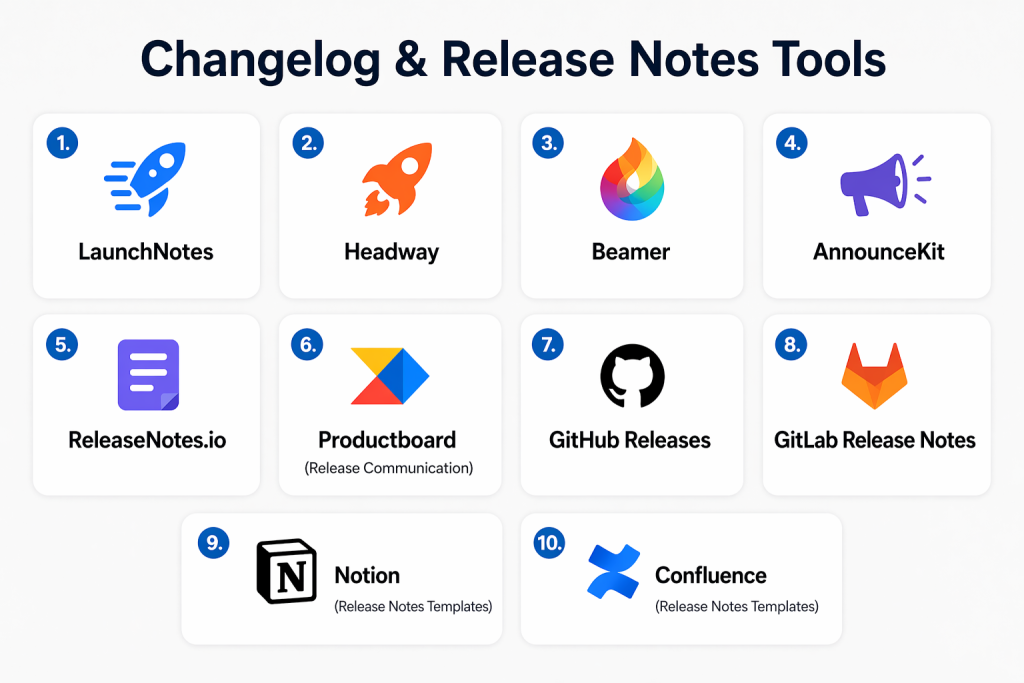
Introduction
Changelog & Release Notes Tools are platforms that help teams document, manage, and communicate product updates in a structured and user-friendly way. Instead of scattered announcements across emails or internal notes, these tools centralize updates so both internal teams and end users stay aligned on what’s changing and why it matters.
In modern product environments driven by continuous delivery and agile workflows, release communication has become essential. Frequent updates, feature rollouts, and bug fixes require clear visibility to maintain trust, reduce confusion, and improve adoption. These tools ensure that every release is properly documented, distributed, and understood.
Common use cases include:
- Publishing product updates for customers
- Internal release tracking for engineering teams
- Compliance and audit documentation
- Marketing announcements for new features
- Customer success communication
Key evaluation criteria:
- Automation capabilities
- Customization and branding
- Audience targeting and segmentation
- Multi-channel publishing
- Integration ecosystem
- Security and access control
- Analytics and engagement tracking
- Ease of use and collaboration
Best for: SaaS companies, product managers, developers, DevOps teams, and enterprises that release updates frequently.
Not ideal for: Small teams with very infrequent releases or those satisfied with basic documentation tools.
Key Trends in Changelog & Release Notes Tools
- AI-powered release note generation from commits and tickets
- Deep integration with CI/CD pipelines
- Personalized release communication for different user segments
- In-app changelog widgets and notifications
- API-first architectures for customization
- Multi-channel publishing (web, email, in-app)
- Increased focus on analytics and user engagement tracking
- Convergence with documentation and knowledge base tools
- Growth of developer-first and open-source solutions
- Stronger emphasis on security and access controls
How We Selected These Tools (Methodology)
- Strong market adoption and recognition
- Feature completeness across automation and publishing
- Reliability and consistent performance
- Security readiness and access control features
- Integration with modern development tools
- Flexibility across team sizes and industries
- Ease of onboarding and usability
- Documentation quality and support availability
- Balance between developer-focused and business-focused capabilities
Top 10 Changelog & Release Notes Tools Tools
#1 — Headway
Short description: Headway is a customer-focused changelog platform that helps teams share updates, collect feedback, and improve feature adoption through in-app widgets and notifications.
Key Features
- Public changelog pages
- In-app widgets
- User feedback collection
- Audience segmentation
- Notification system
- Custom branding
Pros
- Easy to implement
- Strong engagement features
Cons
- Limited automation capabilities
- Less suitable for developer workflows
Platforms / Deployment
- Web
- Cloud
Security & Compliance
- Basic access control
- Not publicly stated
Integrations & Ecosystem
Headway integrates with common communication and product tools.
- Slack
- Intercom
- Zapier
- API support
Support & Community
Well-documented with responsive support and growing adoption.
#2 — Beamer
Short description: Beamer helps product teams announce updates, drive user engagement, and increase feature awareness through notification centers and changelog feeds.
Key Features
- Notification center
- Push notifications
- User segmentation
- Analytics dashboard
- Customizable UI
Pros
- Strong user engagement tools
- Easy integration
Cons
- Limited developer automation
- Pricing may increase with scale
Platforms / Deployment
- Web
- Cloud
Security & Compliance
- Not publicly stated
Integrations & Ecosystem
- Slack
- Intercom
- Zapier
- API
Support & Community
Strong onboarding and customer support.
#3 — ReleaseNote.ai
Short description: ReleaseNote.ai automates the creation of release notes using AI, transforming development activity into structured updates.
Key Features
- AI-generated summaries
- Git integration
- Automated workflows
- Multi-channel publishing
- Collaboration tools
Pros
- Saves time significantly
- Developer-friendly
Cons
- AI output may need review
- Limited customization options
Platforms / Deployment
- Web
- Cloud
Security & Compliance
- Not publicly stated
Integrations & Ecosystem
- GitHub
- GitLab
- CI/CD tools
- API
Support & Community
Emerging platform with improving documentation.
#4 — GitHub Releases
Short description: GitHub Releases allows developers to manage versioned releases and publish release notes directly from repositories.
Key Features
- Version tagging
- Release notes management
- Asset attachments
- Git integration
- Automation support
Pros
- Widely used
- Seamless developer workflow
Cons
- Limited customization
- Not ideal for customer-facing updates
Platforms / Deployment
- Web
- Cloud
Security & Compliance
- Repository-based access control
- Not publicly stated
Integrations & Ecosystem
- GitHub ecosystem
- CI/CD pipelines
- APIs
Support & Community
Extensive documentation and strong community support.
#5 — GitLab Release Notes
Short description: GitLab offers built-in release note generation integrated with its DevOps lifecycle platform.
Key Features
- Automated release notes
- CI/CD integration
- Issue tracking linkage
- Version control
- Collaboration tools
Pros
- Fully integrated platform
- Strong automation support
Cons
- Learning curve for new users
- Limited marketing features
Platforms / Deployment
- Cloud / Self-hosted
Security & Compliance
- Role-based access control
- Not publicly stated
Integrations & Ecosystem
- GitLab ecosystem
- APIs
- DevOps tools
Support & Community
Strong enterprise support and active community.
#6 — Notion (Release Notes Templates)
Short description: Notion provides flexible templates for managing changelogs and release notes within collaborative workspaces.
Key Features
- Custom templates
- Real-time collaboration
- Rich text editing
- Workflow automation
- Knowledge base integration
Pros
- Highly flexible
- Easy to use
Cons
- Manual updates required
- Not purpose-built
Platforms / Deployment
- Web / Windows / macOS / iOS / Android
Security & Compliance
- Not publicly stated
Integrations & Ecosystem
- Slack
- Zapier
- API
Support & Community
Large global community with extensive resources.
#7 — Confluence (Release Notes Templates)
Short description: Confluence enables teams to create structured release notes as part of a broader documentation ecosystem.
Key Features
- Templates for release notes
- Version tracking
- Collaboration tools
- Integration with Jira
- Access control
Pros
- Strong documentation capabilities
- Enterprise-ready
Cons
- Requires manual updates
- Interface can feel complex
Platforms / Deployment
- Cloud / Self-hosted
Security & Compliance
- RBAC and audit logs
- Not publicly stated
Integrations & Ecosystem
- Jira
- Atlassian ecosystem
- APIs
Support & Community
Robust enterprise support and community.
#8 — Keep a Changelog
Short description: Keep a Changelog is a standardized format for maintaining clear and consistent changelogs.
Key Features
- Structured format
- Version tracking
- Open standard
- Developer-friendly
- Lightweight
Pros
- Simple and free
- Widely adopted
Cons
- No automation
- Fully manual
Platforms / Deployment
- Varies / N/A
Security & Compliance
- Varies / N/A
Integrations & Ecosystem
- Git-based workflows
- Documentation tools
Support & Community
Strong open-source adoption.
#9 — AutoChangelog
Short description: AutoChangelog automatically generates changelogs from Git commit history using customizable templates.
Key Features
- Automated generation
- Git integration
- CLI-based operation
- Template customization
- Version tracking
Pros
- Reduces manual work
- Lightweight
Cons
- No graphical interface
- Setup required
Platforms / Deployment
- CLI / Varies
Security & Compliance
- Not publicly stated
Integrations & Ecosystem
- Git tools
- CI/CD pipelines
Support & Community
Moderate community support.
#10 — Releasenotes.dev
Short description: Releasenotes.dev simplifies release note creation for developers with a lightweight and focused workflow.
Key Features
- Automated note generation
- Git integration
- Markdown support
- Version tracking
- Collaboration
Pros
- Developer-friendly
- Simple workflow
Cons
- Limited enterprise features
- Smaller ecosystem
Platforms / Deployment
- Web / Cloud
Security & Compliance
- Not publicly stated
Integrations & Ecosystem
- GitHub
- GitLab
- APIs
Support & Community
Growing community and improving support.
Comparison Table (Top 10)
| Tool Name | Best For | Platform(s) Supported | Deployment | Standout Feature | Public Rating |
|---|---|---|---|---|---|
| Headway | SaaS updates | Web | Cloud | In-app widgets | N/A |
| Beamer | Engagement | Web | Cloud | Notifications | N/A |
| ReleaseNote.ai | Automation | Web | Cloud | AI summaries | N/A |
| GitHub Releases | Developers | Web | Cloud | Git integration | N/A |
| GitLab Release Notes | DevOps | Web | Cloud/Self-hosted | CI/CD integration | N/A |
| Notion | Flexible teams | Multi-platform | Cloud | Templates | N/A |
| Confluence | Enterprise | Multi-platform | Hybrid | Jira integration | N/A |
| Keep a Changelog | Developers | Varies | N/A | Standard format | N/A |
| AutoChangelog | Automation | CLI | N/A | Git-based generation | N/A |
| Releasenotes.dev | Dev teams | Web | Cloud | Lightweight workflow | N/A |
Evaluation & Scoring of Changelog & Release Notes Tools
| Tool Name | Core | Ease | Integrations | Security | Performance | Support | Value | Weighted Total |
|---|---|---|---|---|---|---|---|---|
| Headway | 8 | 9 | 7 | 6 | 8 | 8 | 7 | 7.8 |
| Beamer | 8 | 9 | 7 | 6 | 8 | 8 | 7 | 7.8 |
| ReleaseNote.ai | 9 | 8 | 7 | 6 | 8 | 7 | 8 | 8.0 |
| GitHub Releases | 8 | 7 | 9 | 7 | 9 | 9 | 9 | 8.4 |
| GitLab | 9 | 7 | 9 | 8 | 9 | 8 | 8 | 8.5 |
| Notion | 7 | 9 | 7 | 6 | 8 | 8 | 9 | 7.9 |
| Confluence | 8 | 7 | 9 | 8 | 8 | 9 | 7 | 8.2 |
| Keep a Changelog | 6 | 8 | 5 | 5 | 7 | 7 | 10 | 7.1 |
| AutoChangelog | 7 | 7 | 7 | 5 | 8 | 6 | 9 | 7.3 |
| Releasenotes.dev | 7 | 8 | 7 | 6 | 8 | 7 | 8 | 7.6 |
Interpretation:
These scores are comparative and reflect overall capability, usability, and ecosystem strength. Higher scores indicate more balanced tools, while lower scores represent niche solutions. Enterprise tools typically excel in integrations and security, while simpler tools offer better ease of use and value.
Which Changelog & Release Notes Tools Tool Is Right for You?
Solo / Freelancer
Choose simple tools like Keep a Changelog or Notion for flexibility and minimal overhead.
SMB
Headway or Beamer are ideal for customer communication and engagement.
Mid-Market
ReleaseNote.ai or GitHub Releases provide automation and efficiency.
Enterprise
GitLab or Confluence offer scalability, governance, and deep integrations.
Budget vs Premium
Free tools work well for basic needs, while premium tools provide automation and analytics.
Feature Depth vs Ease of Use
Advanced tools offer more power but require setup; simpler tools are easier to adopt.
Integrations & Scalability
Select tools that integrate with your development stack and scale with your growth.
Security & Compliance Needs
Enterprises should prioritize access control, audit logs, and governance features.
Frequently Asked Questions (FAQs)
1. What are changelog tools used for?
Changelog tools help teams track and communicate product updates in a structured way. They improve transparency, ensure users are informed, and align internal teams on release progress.
2. Are changelog tools necessary for small teams?
Small teams may not need dedicated tools initially. However, as release frequency increases, these tools become valuable for maintaining clarity and consistency.
3. Can release notes be automated?
Yes, many tools integrate with Git and CI/CD pipelines to generate release notes automatically, reducing manual effort and errors.
4. What integrations are important?
Common integrations include GitHub, GitLab, CI/CD tools, Slack, and customer communication platforms.
5. Are these tools secure?
Security varies. Enterprise-grade tools provide better access control and compliance features, while simpler tools may offer basic protection.
6. How do these tools improve customer experience?
They provide clear updates, helping users understand new features and improvements, which increases trust and engagement.
7. Can I customize release notes?
Most tools allow customization, including branding, formatting, and audience segmentation.
8. What are common mistakes?
Common mistakes include inconsistent updates, lack of clarity, and failing to communicate changes effectively.
9. Is it easy to switch tools?
Switching depends on data portability and integration complexity. Tools with APIs make migration easier.
10. Are there free options?
Yes, several tools offer free plans or open-source options suitable for basic changelog management.
Conclusion
Changelog & Release Notes Tools have become essential for modern product teams that ship updates frequently and need to communicate changes clearly. They not only help organize release information but also improve transparency between development teams and end users. With the rise of automation and AI-driven workflows, these tools now reduce manual effort while increasing consistency and accuracy in release communication. Choosing the right tool depends on your team size, technical requirements, and how you want to engage your users. Lightweight tools are ideal for simplicity, while advanced platforms offer automation, integrations, and scalability. It’s important to evaluate how well a tool fits into your existing workflow and whether it supports your long-term growth. Start by shortlisting a few tools, test them in real scenarios, and validate their integration capabilities. A well-chosen solution can significantly enhance both team productivity and user experience.
