Introduction
Shader authoring tools are specialized platforms used to create custom materials, visual effects, and rendering behaviors in real-time graphics. These tools allow developers and artists to define how surfaces react to light, texture, and environmental conditions—essentially shaping the visual identity of games, simulations, and digital experiences.
Modern shader tools have evolved from code-heavy workflows to visual, node-based systems, enabling faster iteration and broader accessibility. Today, they are essential across industries such as gaming, AR/VR, film production, and interactive design.
Common Use Cases
- Creating realistic materials and textures in games
- Designing visual effects for films and animations
- Building immersive AR/VR environments
- Developing procedural materials and shaders
- Prototyping rendering techniques
What Buyers Should Evaluate
- Node-based vs code-based workflows
- Real-time preview capabilities
- Integration with engines and pipelines
- Performance optimization and GPU efficiency
- Extensibility with custom shader code
- Learning curve and usability
- Collaboration features
- Asset and material reuse
- Platform compatibility
- Documentation and community support
Best for: Technical artists, game developers, VFX designers, AR/VR creators, and studios building visually rich experiences.
Not ideal for: Basic 2D design workflows or teams not working with real-time rendering systems.
Key Trends in Shader Authoring Tools
- Rise of node-based visual shader systems replacing manual coding
- AI-assisted shader generation and optimization workflows
- Real-time preview and instant feedback loops
- Integration with procedural material systems
- Cross-platform shader compatibility improvements
- GPU-first optimization pipelines
- Expansion into AR/VR and spatial computing
- Modular shader systems for reuse and scalability
- Growing use of open standards like MaterialX for interoperability
- Increased focus on performance profiling and debugging tools
How We Selected These Tools (Methodology)
- Industry adoption across game development and VFX
- Strength of shader creation and editing capabilities
- Real-time rendering and preview performance
- Integration with major engines and pipelines
- Availability of visual and code-based workflows
- Community support and documentation quality
- Flexibility across use cases (games, film, simulation)
- Extensibility via scripting or plugins
- Support for modern rendering techniques
- Balance between usability and advanced control
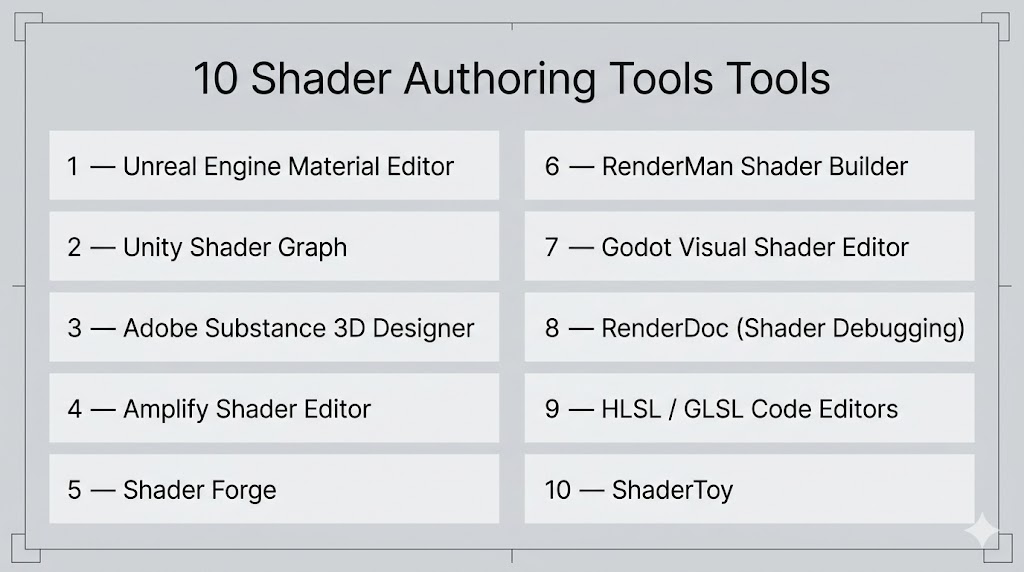
Top 10 Shader Authoring Tools Tools
#1 — Unreal Engine Material Editor
Short description: A powerful node-based shader editor integrated into Unreal Engine, designed for high-end real-time rendering and complex material creation.
Key Features
- Node-based shader creation
- Real-time viewport preview
- Physically based rendering workflow
- Material layering and blending
- Custom HLSL nodes
- Advanced lighting integration
- Procedural shader capabilities
Pros
- Industry-leading visual quality
- Deep integration with rendering pipeline
Cons
- Steep learning curve
- Limited outside Unreal ecosystem
Platforms / Deployment
Windows / macOS
Local
Security & Compliance
Not publicly stated
Integrations & Ecosystem
Integrated tightly within Unreal workflows.
- Engine-native rendering
- VFX pipelines
- Plugin marketplace
Support & Community
Extensive documentation and one of the largest communities in game development.
#2 — Unity Shader Graph
Short description: A visual shader creation tool within Unity that enables developers to build shaders without writing code.
Key Features
- Node-based interface
- Real-time preview
- Sub-graph modular system
- Integration with rendering pipelines
- Custom function nodes
- VFX Graph integration
- Cross-platform support
Pros
- Easy to learn
- Fast iteration for developers and artists
Cons
- Limited advanced control compared to code
- Tied to Unity ecosystem
Platforms / Deployment
Windows / macOS / Linux
Local
Security & Compliance
Not publicly stated
Integrations & Ecosystem
Strong integration within Unity ecosystem.
- Rendering pipelines
- Asset workflows
- Plugin ecosystem
Support & Community
Large community with extensive tutorials and documentation.
#3 — Adobe Substance 3D Designer
Short description: A procedural material and shader creation tool widely used in game and film production.
Key Features
- Node-based material creation
- Procedural texture generation
- PBR workflow support
- Material parameter control
- Integration with 3D pipelines
- Export to multiple engines
Pros
- Industry-standard for materials
- Highly flexible procedural workflows
Cons
- Learning curve for beginners
- Subscription-based pricing
Platforms / Deployment
Windows / macOS
Local
Security & Compliance
Not publicly stated
Integrations & Ecosystem
Strong integration with content creation pipelines.
- Game engines
- 3D modeling tools
- Asset workflows
Support & Community
Well-documented with strong professional community.
#4 — Amplify Shader Editor
Short description: A node-based shader editor for Unity focused on flexibility and performance.
Key Features
- Visual shader editing
- Custom shader code integration
- Real-time preview
- Extensive node library
- Template system
Pros
- More control than default Unity tools
- Optimized performance
Cons
- Paid tool
- Unity-only
Platforms / Deployment
Windows / macOS
Local
Security & Compliance
Not publicly stated
Integrations & Ecosystem
Built specifically for Unity workflows.
Support & Community
Active community with tutorials and documentation.
#5 — Shader Forge
Short description: A legacy shader editor for Unity that introduced node-based shader workflows.
Key Features
- Visual shader creation
- Node-based system
- Real-time preview
- Basic material workflows
Pros
- Easy to use
- Good for learning
Cons
- Limited updates
- Less modern features
Platforms / Deployment
Windows / macOS
Local
Security & Compliance
Not publicly stated
Integrations & Ecosystem
Unity-focused integration.
Support & Community
Declining but still referenced in tutorials.
#6 — RenderMan Shader Builder
Short description: A shader authoring tool used in film and animation pipelines for high-quality rendering.
Key Features
- Node-based shader design
- Advanced rendering support
- Integration with rendering pipelines
- Procedural shading
- High-quality output
Pros
- Industry-grade rendering
- Ideal for film production
Cons
- Complex workflow
- Not game-focused
Platforms / Deployment
Windows / macOS / Linux
Local
Security & Compliance
Not publicly stated
Integrations & Ecosystem
Used within professional VFX pipelines.
- Rendering engines
- Animation tools
Support & Community
Strong in professional studios.
#7 — Godot Visual Shader Editor
Short description: A node-based shader editor within Godot for accessible shader creation.
Key Features
- Visual shader graph
- Real-time preview
- Open-source flexibility
- Integration with engine
- Lightweight design
Pros
- Free and open-source
- Easy for beginners
Cons
- Limited advanced features
- Smaller ecosystem
Platforms / Deployment
Windows / macOS / Linux
Local
Security & Compliance
Not publicly stated
Integrations & Ecosystem
Part of Godot engine ecosystem.
Support & Community
Growing open-source community.
#8 — RenderDoc (Shader Debugging)
Short description: A debugging tool used to inspect and analyze shaders and GPU rendering.
Key Features
- Shader debugging
- Frame capture
- GPU analysis
- Performance profiling
- Cross-platform support
Pros
- Powerful debugging capabilities
- Free tool
Cons
- Not a creation tool
- Technical complexity
Platforms / Deployment
Windows / Linux
Local
Security & Compliance
Not publicly stated
Integrations & Ecosystem
Works with multiple engines and APIs.
Support & Community
Strong developer-focused community.
#9 — HLSL / GLSL Code Editors
Short description: Traditional code-based tools for writing shaders manually.
Key Features
- Full control over shader code
- High performance optimization
- Custom rendering techniques
- Language-level flexibility
Pros
- Maximum control
- No abstraction limitations
Cons
- Steep learning curve
- Time-consuming
Platforms / Deployment
Varies
Security & Compliance
Not publicly stated
Integrations & Ecosystem
Works across engines and platforms.
Support & Community
Strong developer community.
#10 — ShaderToy
Short description: A web-based platform for experimenting with real-time shaders using GLSL.
Key Features
- Real-time shader preview
- Browser-based
- Community sharing
- GLSL support
- Interactive shaders
Pros
- Great for learning
- No setup required
Cons
- Limited production use
- Not engine-integrated
Platforms / Deployment
Web
Cloud
Security & Compliance
Not publicly stated
Integrations & Ecosystem
Primarily standalone.
Support & Community
Active community of shader artists.
Comparison Table (Top 10)
| Tool Name | Best For | Platform(s) Supported | Deployment | Standout Feature | Public Rating |
|---|---|---|---|---|---|
| Unreal Material Editor | AAA visuals | Windows, macOS | Local | Advanced node system | N/A |
| Unity Shader Graph | Game devs | Windows, macOS, Linux | Local | Easy visual workflow | N/A |
| Substance Designer | Materials | Windows, macOS | Local | Procedural materials | N/A |
| Amplify Shader Editor | Unity users | Windows, macOS | Local | Flexibility | N/A |
| Shader Forge | Beginners | Windows, macOS | Local | Simplicity | N/A |
| RenderMan Shader Builder | Film | Windows, macOS, Linux | Local | High-end rendering | N/A |
| Godot Visual Shader | Indie devs | Windows, macOS, Linux | Local | Open-source | N/A |
| RenderDoc | Debugging | Windows, Linux | Local | GPU analysis | N/A |
| HLSL/GLSL Editors | Engineers | Varies | Local | Full control | N/A |
| ShaderToy | Learning | Web | Cloud | Real-time preview | N/A |
Evaluation & Scoring of Shader Authoring Tools
| Tool Name | Core (25%) | Ease (15%) | Integrations (15%) | Security (10%) | Performance (10%) | Support (10%) | Value (15%) | Weighted Total |
|---|---|---|---|---|---|---|---|---|
| Unreal Material Editor | 10 | 6 | 9 | 6 | 9 | 9 | 7 | 8.3 |
| Unity Shader Graph | 9 | 9 | 9 | 6 | 8 | 9 | 8 | 8.6 |
| Substance Designer | 9 | 7 | 8 | 6 | 9 | 8 | 7 | 8.0 |
| Amplify Shader Editor | 8 | 8 | 8 | 5 | 8 | 7 | 8 | 7.8 |
| Shader Forge | 6 | 8 | 6 | 5 | 6 | 6 | 7 | 6.5 |
| RenderMan | 9 | 6 | 8 | 6 | 10 | 8 | 6 | 8.0 |
| Godot Visual Shader | 7 | 9 | 6 | 5 | 7 | 7 | 9 | 7.6 |
| RenderDoc | 7 | 6 | 7 | 5 | 9 | 8 | 9 | 7.6 |
| HLSL/GLSL Editors | 10 | 5 | 9 | 6 | 10 | 8 | 9 | 8.5 |
| ShaderToy | 6 | 10 | 5 | 5 | 7 | 8 | 9 | 7.4 |
How to interpret scores:
- Scores are comparative across tools
- Higher scores indicate balanced capabilities
- Lower scores may still excel in niche use cases
- Consider your workflow before choosing
- Always validate with real usage
Which Shader Authoring Tool Is Right for You?
Solo / Freelancer
- Best: ShaderToy, Godot Visual Shader
- Focus on simplicity and cost
SMB
- Best: Unity Shader Graph, Amplify
- Balance usability and performance
Mid-Market
- Best: Unity Shader Graph, Substance Designer
- Need integration and scalability
Enterprise
- Best: Unreal Material Editor, RenderMan
- Require advanced rendering and pipelines
Budget vs Premium
- Budget: Godot, ShaderToy
- Premium: Substance Designer, RenderMan
Feature Depth vs Ease of Use
- Advanced: HLSL/GLSL, Unreal
- Easy: Unity Shader Graph
Integrations & Scalability
- Strong: Unreal, Unity
- Limited: ShaderToy
Security & Compliance Needs
- Most tools: Not publicly stated
Frequently Asked Questions (FAQs)
What are shader authoring tools?
They are tools used to create materials and visual effects for rendering systems.
Do I need coding knowledge?
Not always; many tools offer visual node-based systems.
Which tool is best for beginners?
Unity Shader Graph and ShaderToy are beginner-friendly.
Are there free tools available?
Yes, several tools are open-source or free.
What is node-based shader design?
It allows users to create shaders visually using connected nodes.
Can shaders be reused?
Yes, most tools support reusable shader components.
Are these tools used outside gaming?
Yes, in film, simulations, and AR/VR.
What is the difference between shaders and materials?
Shaders define behavior; materials apply those shaders with parameters.
Can I switch tools easily?
Not always; compatibility varies across engines.
What are common mistakes?
Overcomplicating shaders and ignoring performance optimization.
Conclusion
Shader authoring tools are essential for creating visually rich and interactive experiences. From beginner-friendly visual editors to advanced code-based systems, each tool serves a different purpose depending on your needs.
