Introduction
Serverless platforms help teams build, deploy, and scale applications without directly managing servers, operating systems, or infrastructure capacity. Instead of provisioning machines or clusters, developers write functions, APIs, services, event handlers, or containerized workloads while the platform handles scaling, availability, runtime management, and much of the operational setup. This approach is useful for modern software teams that want faster releases, lower infrastructure overhead, and more flexible cost models.
Serverless platforms matter because businesses now need applications that respond quickly to demand changes, integrate with cloud services, support automation, and scale globally without large operations teams. Real-world use cases include backend APIs, event-driven workflows, file processing, scheduled jobs, data pipelines, webhooks, IoT processing, AI workflow triggers, and lightweight microservices.
Buyers should evaluate:
- Runtime and language support
- Cold-start behavior
- Event source integrations
- Scaling limits and concurrency controls
- Observability and debugging
- Security controls
- Pricing predictability
- Deployment workflow
- Vendor lock-in risk
- Ecosystem maturity
Best for: developers, startups, SaaS teams, SMBs, enterprises, DevOps teams, data teams, and product engineering teams that want scalable applications without heavy infrastructure management. Not ideal for: teams that need deep infrastructure control, long-running stateful workloads, strict low-latency guarantees, or organizations already standardized on mature Kubernetes operations where serverless may add unnecessary abstraction.
Key Trends in Serverless Platforms
- Event-driven architecture is becoming standard: Serverless is increasingly used for workflows triggered by queues, streams, storage events, APIs, SaaS webhooks, and scheduled jobs.
- Serverless containers are gaining momentum: Teams want the simplicity of serverless with the flexibility and portability of containers.
- AI workflow support is growing: Serverless platforms are being used to trigger AI inference, document processing, enrichment tasks, and automation pipelines.
- Edge serverless is becoming more important: Platforms that run code closer to users are useful for low-latency APIs, personalization, authentication, routing, and lightweight compute.
- Security expectations are higher: Buyers expect IAM, RBAC, MFA, encryption, audit logs, secret management, and secure deployment workflows.
- Cost control is now a priority: Serverless can reduce idle costs, but teams need budgets, alerts, execution limits, and architecture reviews to avoid unpredictable bills.
- Hybrid serverless is relevant for enterprises: Organizations with compliance or infrastructure control needs are adopting Kubernetes-native or OpenShift-based serverless models.
- Developer experience is a key differentiator: CLI tools, local testing, Git workflows, preview environments, templates, logs, and debugging tools influence adoption.
- Observability is no longer optional: Teams need logs, metrics, traces, alerts, and failure analysis across distributed serverless systems.
- Portability is becoming a buyer concern: More teams are evaluating container-based deployment, open standards, and abstraction layers to reduce long-term lock-in.
How We Selected These Tools Methodology
The tools in this list were selected using a practical SaaS and cloud buyer evaluation approach:
- Market adoption: Platforms with strong usage across developers, startups, SMBs, and enterprises were prioritized.
- Feature completeness: Function execution, event triggers, scaling, runtime support, deployment options, and observability were considered.
- Cloud ecosystem strength: Tools with strong integrations across storage, messaging, APIs, databases, identity, security, and monitoring scored higher.
- Reliability and scalability: Platforms designed for production workloads and elastic demand patterns were preferred.
- Security posture: IAM, RBAC, encryption, audit visibility, network controls, and enterprise governance were reviewed where confidently known.
- Developer experience: Documentation, CLI support, templates, local testing, Git deployment, and onboarding simplicity were considered.
- Enterprise readiness: Hybrid deployment, governance, support tiers, compliance-sensitive use cases, and access controls were included.
- SMB fit: Simplicity, cost awareness, ease of setup, and developer-friendly workflows were also evaluated.
- Integration flexibility: APIs, SDKs, CI/CD compatibility, observability tools, and event sources influenced selection.
- Category balance: The list includes hyperscale cloud platforms, edge platforms, frontend-focused platforms, container-based platforms, and Kubernetes-native options.
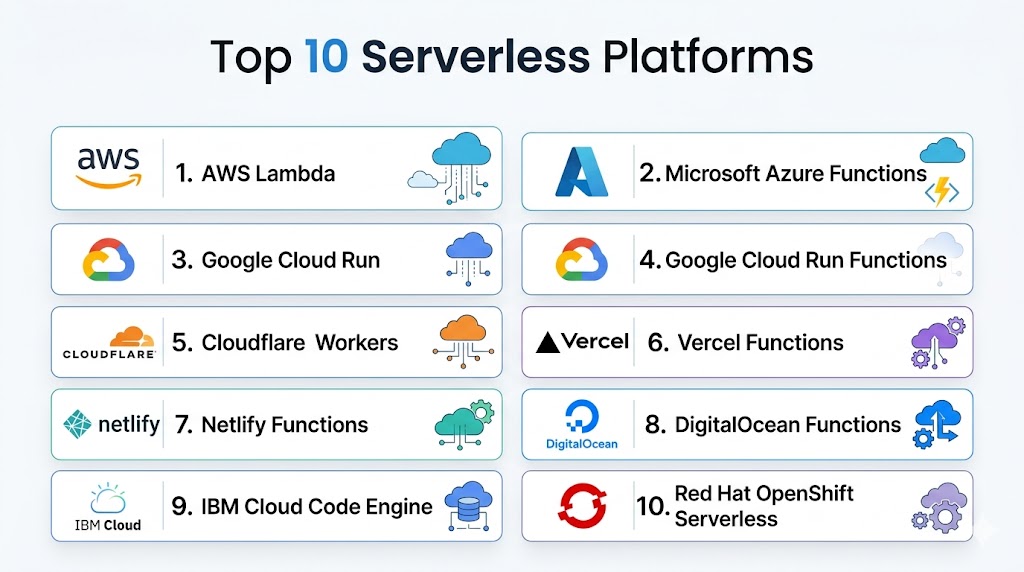
Top 10 Serverless Platforms Tools
#1 — AWS Lambda
Short description: AWS Lambda is one of the most recognized serverless compute platforms for running event-driven code without provisioning or managing servers. It is commonly used for APIs, backend automation, file processing, data pipelines, scheduled jobs, and cloud-native microservices. Lambda is especially suitable for teams already using AWS services because it connects deeply with storage, messaging, database, monitoring, and orchestration tools. It works well for startups, SMBs, and enterprises that need scalable serverless architecture with a mature cloud ecosystem.
Key Features
- Event-driven function execution across many cloud services.
- Supports multiple runtimes including Node.js, Python, Java, Go, Ruby, and custom runtimes.
- Automatic scaling based on incoming requests and events.
- Strong integration with API Gateway, S3, DynamoDB, EventBridge, SQS, SNS, and Step Functions.
- Built-in logging and monitoring through AWS observability services.
- Fine-grained access control through IAM.
- Pay-per-use model based on requests and compute duration.
Pros
- Very mature serverless ecosystem.
- Strong fit for event-driven applications.
- Scales automatically for unpredictable workloads.
- Works well for enterprises already using AWS.
Cons
- AWS-specific patterns can create vendor lock-in.
- Complex applications may require many supporting services.
- Debugging distributed serverless systems can be difficult.
- Cost monitoring is important at scale.
Platforms / Deployment
Cloud
Security & Compliance
AWS Lambda supports IAM-based access control, encryption options through AWS services, logging through CloudWatch, and audit visibility through CloudTrail. Broader compliance depends on the AWS environment, region, architecture, and customer configuration.
Integrations & Ecosystem
AWS Lambda has one of the deepest ecosystems in the serverless market. It connects naturally with AWS storage, messaging, API, identity, analytics, security, and DevOps services, making it highly practical for cloud-native AWS teams.
- Amazon API Gateway
- Amazon S3
- Amazon DynamoDB
- Amazon EventBridge
- Amazon SQS
- AWS Step Functions
Support & Community
AWS Lambda has strong documentation, broad community adoption, many tutorials, reference architectures, enterprise support options, and a large third-party ecosystem.
#2 — Microsoft Azure Functions
Short description: Microsoft Azure Functions is an event-driven serverless compute platform for building APIs, integrations, automation jobs, and background tasks. It is especially useful for organizations already using Azure, Microsoft Entra ID, Visual Studio, Azure DevOps, GitHub, and .NET-based development. Azure Functions supports multiple runtime options and offers flexible hosting models for different workload patterns. It is a strong option for enterprises and mid-market teams that want serverless compute inside a broader Microsoft cloud strategy.
Key Features
- Event-driven function execution for APIs, queues, timers, and storage events.
- Supports C#, JavaScript, TypeScript, Python, Java, and PowerShell.
- Native integration with Azure Event Grid, Service Bus, Storage, Cosmos DB, and API Management.
- Flexible hosting options for different workload needs.
- Integration with Visual Studio, VS Code, Azure DevOps, and GitHub.
- Built-in monitoring through Azure Monitor and Application Insights.
- Enterprise identity support through Microsoft Entra ID.
Pros
- Excellent fit for Microsoft and Azure-first teams.
- Strong developer tooling for .NET and enterprise applications.
- Flexible hosting choices.
- Good integration with Azure security and monitoring services.
Cons
- Azure ecosystem complexity can be challenging for new users.
- Hosting and pricing choices require careful evaluation.
- Advanced use cases may need Azure architecture expertise.
- Portability outside Azure may be limited.
Platforms / Deployment
Cloud / Hybrid patterns
Security & Compliance
Azure Functions can use Microsoft Entra ID, managed identities, RBAC, encryption, network controls, and Azure monitoring. Compliance depends on the Azure environment, region, service configuration, and customer implementation.
Integrations & Ecosystem
Azure Functions integrates deeply with Microsoft cloud and enterprise development workflows. It is useful for application modernization, event-driven automation, SaaS integrations, and internal business systems.
- Azure Event Grid
- Azure Service Bus
- Azure Storage
- Azure Cosmos DB
- Azure API Management
- Azure DevOps
Support & Community
Azure Functions has strong Microsoft documentation, enterprise support options, active developer adoption, and good coverage in .NET and cloud-native communities.
#3 — Google Cloud Run
Short description: Google Cloud Run is a managed serverless platform for running containers, services, jobs, and API workloads without managing servers. It is ideal for teams that want serverless scaling while keeping the flexibility of container packaging. Cloud Run is commonly used for APIs, backend services, web applications, microservices, background jobs, and event-driven workloads. It is a strong choice for teams that value portability, container workflows, and Google Cloud ecosystem integrations.
Key Features
- Serverless container execution with automatic scaling.
- Supports services, jobs, and event-driven workloads.
- Deploys from container images or source-based workflows.
- Strong integration with Google Cloud storage, messaging, databases, and observability.
- Supports HTTP services and microservice patterns.
- Traffic splitting and revision management for safer releases.
- Works well with CI/CD and container pipelines.
Pros
- Strong balance of serverless simplicity and container flexibility.
- Good choice for APIs and microservices.
- More portable than function-only models.
- Useful for teams already building containerized applications.
Cons
- Requires basic container knowledge.
- Google Cloud-specific integrations may create dependency.
- Advanced networking and security setup can require expertise.
- May be more than needed for very simple functions.
Platforms / Deployment
Cloud
Security & Compliance
Google Cloud Run supports IAM, service identities, encryption, traffic controls, private networking patterns, and integration with Google Cloud security services. Compliance depends on the Google Cloud environment, region, and implementation.
Integrations & Ecosystem
Cloud Run integrates well with Google Cloud’s application, data, messaging, and AI ecosystem. It is practical for containerized APIs, backend systems, event-driven workloads, and data services.
- Google Cloud Build
- Artifact Registry
- Pub/Sub
- Cloud Storage
- BigQuery
- Cloud Logging and Monitoring
Support & Community
Cloud Run has strong documentation, growing developer adoption, cloud support options, and good coverage across cloud-native and container communities.
#4 — Google Cloud Run Functions
Short description: Google Cloud Run Functions is Google Cloud’s function-focused serverless experience for developers who want to write small event-driven code units. It is useful for lightweight APIs, automation tasks, storage events, webhooks, and backend processing. The platform works best for teams already using Google Cloud services and looking for a simpler function-based model rather than a container-first approach. It is suitable for developers who want fast deployment and native cloud event integrations.
Key Features
- Event-driven functions with managed infrastructure.
- Simple workflow for writing and deploying code.
- Integrates with Google Cloud events and services.
- Supports common programming languages.
- Automatic scaling based on demand.
- Useful for automation, APIs, and lightweight backend logic.
- Works with Google Cloud observability and IAM tools.
Pros
- Simple entry point for Google Cloud serverless development.
- Good for event handlers and lightweight workflows.
- Strong native Google Cloud integration.
- Reduces infrastructure work for smaller teams.
Cons
- Less flexible than container-based Cloud Run.
- Google Cloud-specific patterns may limit portability.
- Large applications can become harder to organize.
- Advanced debugging requires good observability setup.
Platforms / Deployment
Cloud
Security & Compliance
Google Cloud Run Functions supports IAM, service account-based permissions, encryption through Google Cloud services, and integration with logging and monitoring. Compliance depends on configuration, region, and broader Google Cloud controls.
Integrations & Ecosystem
Cloud Run Functions is designed to connect Google Cloud services through event-based workflows. It works well for small automation tasks, serverless APIs, and background processing.
- Cloud Storage
- Pub/Sub
- Eventarc
- Cloud Logging
- Cloud Monitoring
- Google Cloud IAM
Support & Community
Google Cloud provides documentation, support plans, tutorials, and developer examples. Community adoption is strong among teams already using Google Cloud.
#5 — Cloudflare Workers
Short description: Cloudflare Workers is a serverless compute platform that runs code close to users across Cloudflare’s global network. It is popular for edge APIs, routing, personalization, authentication logic, middleware, request handling, and global web workloads. Workers is especially useful for teams that care about low latency, edge execution, web performance, and simple deployment. It fits developers, SaaS teams, and web infrastructure teams building globally distributed applications.
Key Features
- Serverless execution across a global edge network.
- Designed for low-latency web and API workloads.
- Automatic scaling based on traffic.
- Supports JavaScript, TypeScript, and WebAssembly patterns.
- Integrates with Cloudflare KV, Durable Objects, R2, Queues, and D1.
- Useful for middleware, APIs, authentication, redirects, and personalization.
- Works with Cloudflare’s security, CDN, and networking ecosystem.
Pros
- Strong edge compute capabilities.
- Excellent fit for global web applications.
- Fast deployment and developer-friendly workflows.
- Good integration with Cloudflare security and CDN services.
Cons
- Runtime model differs from traditional serverless functions.
- Not ideal for every backend workload.
- Some use cases require Cloudflare-specific architecture.
- Stateful workloads need careful design.
Platforms / Deployment
Cloud / Edge
Security & Compliance
Cloudflare Workers benefits from Cloudflare’s security ecosystem, access controls, encryption capabilities, and platform-level isolation model. Specific compliance coverage depends on the Cloudflare plan, service configuration, and customer requirements.
Integrations & Ecosystem
Cloudflare Workers integrates closely with Cloudflare’s developer platform and network services. It is useful for global web apps, edge APIs, routing logic, and lightweight compute.
- Cloudflare KV
- Cloudflare R2
- Durable Objects
- Cloudflare Queues
- D1 database
- Cloudflare CDN and security services
Support & Community
Cloudflare Workers has strong documentation, an active developer community, templates, examples, and enterprise support options through Cloudflare plans.
#6 — Vercel Functions
Short description: Vercel Functions provides serverless compute for modern web applications, especially frontend-first and full-stack projects. It is widely used by teams building applications with Next.js and modern JavaScript frameworks. Vercel Functions supports API routes, backend logic, dynamic web experiences, and AI application endpoints. It is best for teams that want fast deployment, preview workflows, and a smooth developer experience for web products.
Key Features
- Serverless functions integrated into Vercel projects.
- Strong fit for Next.js and frontend-first applications.
- Automatic scaling for web and API workloads.
- Preview deployments for branches and pull requests.
- Supports API endpoints and backend logic.
- Integrates with Vercel observability and deployment workflows.
- Useful for AI app prototypes and product backends.
Pros
- Excellent developer experience for frontend teams.
- Very fast deployment workflow.
- Strong fit for Next.js applications.
- Reduces operational complexity for web products.
Cons
- Best experience is tied closely to Vercel workflows.
- Not ideal for complex backend infrastructure needs.
- Enterprise features may require higher-tier plans.
- Workload limits should be reviewed carefully.
Platforms / Deployment
Cloud
Security & Compliance
Vercel provides platform security features such as access controls, deployment protections, firewall capabilities, and enterprise security options. Specific compliance details vary by plan and should be validated during procurement.
Integrations & Ecosystem
Vercel Functions integrates strongly with modern frontend development workflows, Git providers, observability tools, databases, and AI application patterns.
- Next.js
- GitHub
- GitLab
- Bitbucket
- Vercel deployment previews
- Observability and analytics tools
Support & Community
Vercel has strong documentation, a large developer community, templates, examples, and commercial support options. It is especially strong for web developers and product engineering teams.
#7 — Netlify Functions
Short description: Netlify Functions provides serverless backend capabilities within the Netlify web development platform. It is commonly used for Jamstack sites, API endpoints, form handling, webhooks, automation, and lightweight backend logic. The platform is attractive for teams that want Git-based deployment, frontend hosting, and serverless functions in one workflow. It is a strong fit for small teams, agencies, marketers, and developers building modern web experiences.
Key Features
- Serverless functions integrated with Netlify projects.
- Git-based deployment workflow.
- Useful for APIs, forms, webhooks, and automation tasks.
- Works well with static sites and Jamstack architecture.
- Supports local development and deployment previews.
- Integrates with Netlify hosting and build workflows.
- Simple project-based function organization.
Pros
- Easy onboarding for web teams.
- Strong fit for Jamstack and static-first websites.
- Simple workflow for frontend developers.
- Good combination of hosting, deployment, and functions.
Cons
- Less suitable for complex enterprise backends.
- Advanced backend needs may require external services.
- Platform-specific conventions may reduce portability.
- High-traffic workloads need pricing review.
Platforms / Deployment
Cloud
Security & Compliance
Netlify provides platform security controls, access management, encryption-related practices, and web application security features. Specific compliance details depend on plan, configuration, and customer requirements.
Integrations & Ecosystem
Netlify Functions works closely with the Netlify platform and modern web ecosystem. It is useful when combining frontend hosting, serverless APIs, forms, and deployment automation.
- GitHub
- GitLab
- Bitbucket
- Netlify build workflow
- Netlify Forms
- Webhooks
Support & Community
Netlify has strong documentation, an active frontend community, templates, onboarding resources, and support plans. It is especially useful for agencies and web development teams.
#8 — DigitalOcean Functions
Short description: DigitalOcean Functions is a developer-friendly serverless platform for running code on demand without managing infrastructure. It is designed for teams that want simple cloud operations, practical pricing, and easier onboarding than many hyperscale platforms. DigitalOcean Functions is useful for APIs, scheduled tasks, webhooks, background jobs, and lightweight automation. It is best for SMBs, startups, and developers already using DigitalOcean services.
Key Features
- On-demand serverless function execution.
- Simple developer-focused deployment experience.
- Automatic scaling for function workloads.
- Useful for APIs, webhooks, scheduled jobs, and background tasks.
- Integrates with DigitalOcean developer cloud services.
- Supports common runtime patterns.
- Designed for simplicity and cost-conscious teams.
Pros
- Easier to understand than many hyperscale clouds.
- Good fit for SMBs and developer-led teams.
- Useful for lightweight backend workloads.
- Works well for teams already using DigitalOcean.
Cons
- Smaller ecosystem than hyperscale cloud providers.
- May not fit complex enterprise compliance needs.
- Fewer advanced integrations than larger platforms.
- Not ideal for highly specialized enterprise architectures.
Platforms / Deployment
Cloud
Security & Compliance
DigitalOcean provides cloud security features such as access controls, encryption-related platform practices, and account security options. Specific compliance details for Functions should be validated based on plan and workload requirements.
Integrations & Ecosystem
DigitalOcean Functions fits naturally into the broader DigitalOcean developer cloud ecosystem. It works well with app hosting, databases, object storage, and developer workflows.
- DigitalOcean App Platform
- Managed Databases
- Spaces object storage
- Container Registry
- Developer APIs
- CLI workflows
Support & Community
DigitalOcean has accessible documentation, developer education resources, community tutorials, and support plans. It is especially strong for developers who want simpler cloud infrastructure.
#9 — IBM Cloud Code Engine
Short description: IBM Cloud Code Engine is a managed serverless platform for running containers, applications, jobs, and functions without managing infrastructure directly. It is designed for teams that want serverless execution while supporting different workload types in one platform. Code Engine is useful for web apps, microservices, batch jobs, background processing, and event-driven workloads. It is especially relevant for enterprises and teams already using IBM Cloud services.
Key Features
- Managed serverless platform for apps, jobs, containers, and functions.
- Automatic scaling without direct cluster management.
- Supports source code and container image deployment.
- Useful for web apps, microservices, batch jobs, and event-driven functions.
- Integrated with IBM Cloud services.
- Reduces infrastructure management overhead.
- Suitable for containerized workloads and enterprise cloud use cases.
Pros
- Good fit for IBM Cloud customers.
- Supports multiple workload types in one platform.
- Reduces the need to manage Kubernetes directly.
- Useful for containerized and batch processing scenarios.
Cons
- Smaller ecosystem than the largest cloud platforms.
- Best value is for teams already invested in IBM Cloud.
- May require IBM Cloud familiarity.
- Community mindshare is narrower than larger platforms.
Platforms / Deployment
Cloud
Security & Compliance
IBM Cloud Code Engine benefits from IBM Cloud security controls, identity and access management, encryption options, and enterprise governance features. Specific compliance applicability depends on IBM Cloud configuration, region, and customer requirements.
Integrations & Ecosystem
IBM Cloud Code Engine integrates with IBM Cloud services and container workflows. It is practical for enterprise teams that want serverless execution without building their own Kubernetes platform.
- IBM Cloud Container Registry
- IBM Cloud IAM
- IBM Cloud databases
- Event-driven cloud services
- Container image workflows
- CI/CD pipelines
Support & Community
IBM provides enterprise documentation, support options, and onboarding resources. Community adoption is more specialized, but enterprise support can be valuable for IBM Cloud customers.
#10 — Red Hat OpenShift Serverless
Short description: Red Hat OpenShift Serverless brings serverless application development to OpenShift using Kubernetes-native and Knative-based capabilities. It is designed for enterprises that want serverless automation while keeping control over Kubernetes, hybrid cloud, governance, and platform operations. OpenShift Serverless is useful for event-driven applications, scale-to-zero workloads, and containerized services. It is best for organizations already invested in OpenShift, Kubernetes, and hybrid cloud strategy.
Key Features
- Kubernetes-native serverless capabilities on OpenShift.
- Built on Knative-based serverless patterns.
- Supports event-driven applications and scale-to-zero workloads.
- Fits hybrid and multi-cloud enterprise environments.
- Integrates with OpenShift security, networking, and platform controls.
- Supports containerized application deployment.
- Provides enterprise governance and platform consistency.
Pros
- Strong fit for enterprises using OpenShift.
- Better infrastructure control than public-cloud-only serverless.
- Useful for hybrid cloud and regulated environments.
- Reduces vendor lock-in compared with proprietary-only models.
Cons
- Requires Kubernetes and OpenShift expertise.
- More operational overhead than fully managed serverless.
- Not ideal for small teams seeking simple deployment.
- Platform and licensing costs should be reviewed carefully.
Platforms / Deployment
Cloud / Self-hosted / Hybrid
Security & Compliance
OpenShift Serverless can use OpenShift’s enterprise security controls, RBAC, image security, cluster policies, network controls, and identity integrations. Compliance depends on the OpenShift environment, deployment model, and customer implementation.
Integrations & Ecosystem
OpenShift Serverless works within the Red Hat OpenShift and Kubernetes ecosystem. It is practical for teams building enterprise platforms with internal developer portals and hybrid cloud governance.
- Red Hat OpenShift
- Knative
- Kubernetes event sources
- Container registries
- CI/CD pipelines
- Enterprise monitoring tools
Support & Community
Red Hat provides enterprise support, documentation, training, and professional services. The underlying Knative ecosystem also has open-source community support, though successful adoption usually requires platform engineering maturity.
Comparison Table Top 10
| Tool Name | Best For | Platform(s) Supported | Deployment | Standout Feature | Public Rating |
|---|---|---|---|---|---|
| AWS Lambda | AWS-first serverless applications | Web / CLI / Cloud SDKs | Cloud | Deep event-driven AWS ecosystem | N/A |
| Microsoft Azure Functions | Azure and Microsoft enterprise teams | Web / CLI / IDE tooling | Cloud / Hybrid patterns | Strong Microsoft cloud integration | N/A |
| Google Cloud Run | Serverless containers and APIs | Web / CLI / Container workflows | Cloud | Container-based serverless execution | N/A |
| Google Cloud Run Functions | Google Cloud event-driven functions | Web / CLI / Cloud SDKs | Cloud | Simple function-based serverless model | N/A |
| Cloudflare Workers | Edge APIs and global web workloads | Web / CLI | Cloud / Edge | Global edge execution | N/A |
| Vercel Functions | Frontend and full-stack web apps | Web / Git workflows / CLI | Cloud | Next.js and preview deployment workflow | N/A |
| Netlify Functions | Jamstack and lightweight web backends | Web / Git workflows / CLI | Cloud | Web-focused serverless workflow | N/A |
| DigitalOcean Functions | SMB and developer cloud teams | Web / CLI | Cloud | Simple developer cloud experience | N/A |
| IBM Cloud Code Engine | Enterprise serverless containers and jobs | Web / CLI / Container workflows | Cloud | Apps, jobs, containers, and functions in one platform | N/A |
| Red Hat OpenShift Serverless | Kubernetes and hybrid enterprise teams | Web / CLI / Kubernetes tooling | Cloud / Self-hosted / Hybrid | Knative-based serverless on OpenShift | N/A |
Evaluation & Scoring of Serverless Platforms
| Tool Name | Core (25%) | Ease (15%) | Integrations (15%) | Security (10%) | Performance (10%) | Support (10%) | Value (15%) | Weighted Total (0–10) |
|---|---|---|---|---|---|---|---|---|
| AWS Lambda | 9.5 | 8.0 | 9.5 | 9.0 | 9.0 | 9.0 | 8.5 | 8.95 |
| Microsoft Azure Functions | 9.0 | 8.0 | 9.0 | 9.0 | 8.5 | 9.0 | 8.0 | 8.63 |
| Google Cloud Run | 9.0 | 8.5 | 8.5 | 8.5 | 9.0 | 8.5 | 8.5 | 8.65 |
| Google Cloud Run Functions | 8.5 | 8.5 | 8.5 | 8.5 | 8.5 | 8.0 | 8.0 | 8.35 |
| Cloudflare Workers | 8.5 | 8.5 | 8.0 | 8.5 | 9.5 | 8.0 | 8.5 | 8.50 |
| Vercel Functions | 8.0 | 9.0 | 8.0 | 8.0 | 8.5 | 8.0 | 8.0 | 8.20 |
| Netlify Functions | 7.5 | 9.0 | 7.5 | 8.0 | 8.0 | 8.0 | 8.0 | 7.95 |
| DigitalOcean Functions | 7.5 | 8.5 | 7.0 | 7.5 | 7.5 | 7.5 | 8.5 | 7.75 |
| IBM Cloud Code Engine | 8.0 | 7.5 | 7.5 | 8.5 | 8.0 | 8.5 | 7.5 | 7.93 |
| Red Hat OpenShift Serverless | 8.5 | 6.5 | 8.0 | 9.0 | 8.0 | 8.5 | 7.0 | 7.90 |
The scoring table is comparative and should be used as a shortlist guide, not as a universal ranking for every organization. A higher total means the platform performs strongly across the weighted criteria, but the right choice still depends on your cloud stack, developer skills, workload type, and security needs. For example, AWS Lambda scores high for ecosystem depth, while Cloudflare Workers is stronger for edge workloads. Red Hat OpenShift Serverless may score lower on ease of use, but it can be a better fit for enterprises that need hybrid control and Kubernetes alignment. Buyers should validate performance, costs, security controls, and integrations with a pilot before final selection.
Which Serverless Platforms Tool Is Right for You?
Solo / Freelancer
Solo developers and freelancers usually need fast setup, simple deployment, low maintenance, and affordable usage-based pricing. Vercel Functions, Netlify Functions, and DigitalOcean Functions are strong choices because they are easier to adopt and work well for web apps, client projects, prototypes, and SaaS MVPs.
Vercel Functions is a natural fit for Next.js projects. Netlify Functions is useful for Jamstack websites and static-first applications. DigitalOcean Functions is practical for developers who want a simple cloud experience without the complexity of larger cloud ecosystems.
SMB
SMBs should focus on ease of use, cost predictability, integration needs, and future scalability. Google Cloud Run, AWS Lambda, Azure Functions, and DigitalOcean Functions are good options depending on the current technology stack.
If the business already uses AWS, Lambda is a practical choice. If the team uses Microsoft tools or Azure services, Azure Functions is easier to align. If the team prefers containers, Google Cloud Run offers strong flexibility. For simpler use cases, DigitalOcean Functions can reduce operational complexity.
Mid-Market
Mid-market companies usually need better governance, deployment workflows, observability, access control, and reliability. AWS Lambda, Google Cloud Run, Azure Functions, and Cloudflare Workers are strong options for this segment.
AWS Lambda is useful for organizations with heavy AWS adoption. Google Cloud Run is a good fit for container-based services and APIs. Azure Functions works well for Microsoft-centered teams. Cloudflare Workers is useful when global performance and edge execution matter.
Enterprise
Enterprises need stronger controls around security, governance, compliance, monitoring, access, support, and architecture standards. AWS Lambda, Azure Functions, Google Cloud Run, IBM Cloud Code Engine, and Red Hat OpenShift Serverless are strong enterprise-oriented choices.
For cloud-first enterprises, AWS, Azure, and Google Cloud options provide mature managed infrastructure and deep service integration. For hybrid cloud or Kubernetes-driven organizations, Red Hat OpenShift Serverless gives more control. IBM Cloud Code Engine can be useful for enterprises already using IBM Cloud services.
Budget vs Premium
Budget-focused teams should review execution time, request volume, memory allocation, storage, logs, data transfer, and supporting cloud services. Serverless can be cost-effective for bursty workloads, but inefficient code or high-volume event chains can increase costs.
Premium platforms often provide stronger enterprise support, governance, security, observability, and integration depth. The best budget option is not always the cheapest tool; it is the platform that reduces complexity while keeping performance and cost predictable.
Feature Depth vs Ease of Use
For ease of use, Vercel Functions, Netlify Functions, and DigitalOcean Functions are strong choices. They help teams deploy quickly without heavy cloud architecture work.
For feature depth, AWS Lambda, Azure Functions, Google Cloud Run, and Red Hat OpenShift Serverless are stronger. These platforms support more advanced architecture patterns, but they also require stronger cloud or platform engineering knowledge.
Integrations & Scalability
The best integration choice usually depends on your existing cloud stack. AWS Lambda works best inside AWS, Azure Functions works best inside Azure, and Google Cloud Run works best inside Google Cloud.
For global edge scalability, Cloudflare Workers is especially strong. For frontend deployment workflows, Vercel and Netlify are more convenient. For Kubernetes portability and hybrid environments, OpenShift Serverless is the better fit.
Security & Compliance Needs
Security-sensitive buyers should evaluate IAM, RBAC, MFA, SSO, encryption, audit logs, network controls, secrets management, vulnerability scanning, and deployment approvals.
Enterprises should also validate data residency, private networking, incident response, log retention, support options, and compliance documentation. If compliance is a major requirement, confirm details directly during vendor evaluation rather than assuming every platform feature applies to your environment.
Frequently Asked Questions FAQs
1. What is a serverless platform?
A serverless platform lets developers run code without directly managing servers, clusters, or infrastructure capacity.
The provider handles provisioning, runtime operations, scaling, and much of the maintenance work.
Developers usually focus on functions, APIs, containers, workflows, and business logic.
It is commonly used for event-driven applications, automation, APIs, and background processing.
2. Does serverless mean there are no servers?
No, serverless does not mean servers do not exist.
It means the platform provider manages the servers and infrastructure behind the scenes.
Your team does not usually need to provision, patch, or scale machines manually.
However, you are still responsible for application design, security, monitoring, and cost control.
3. How are serverless platforms priced?
Most serverless platforms use usage-based pricing based on requests, execution duration, memory, CPU, bandwidth, or related resources.
Some platforms may also charge for logs, storage, builds, data transfer, or premium features.
Serverless can be cost-effective for bursty workloads because teams avoid paying for idle capacity.
However, high-volume or inefficient workloads can still become expensive without proper monitoring.
4. What are common serverless use cases?
Common use cases include APIs, webhooks, scheduled jobs, file processing, image resizing, form handling, and background automation.
Serverless is also used for data pipelines, event routing, IoT processing, chatbot backends, and AI workflow triggers.
It works best when workloads are event-driven and can scale independently.
Long-running, stateful, or highly customized workloads may need containers or Kubernetes instead.
5. What are the biggest mistakes when adopting serverless?
A common mistake is creating too many small functions without clear ownership, naming, or monitoring.
Teams also underestimate logging costs, cold starts, permission design, dependency management, and testing complexity.
Another mistake is tightly coupling applications to one provider without considering portability.
Good architecture reviews, observability, IAM design, and cost controls help reduce these risks.
6. Are serverless platforms secure?
Serverless platforms can be secure when configured correctly.
Teams still need least-privilege IAM, secret management, input validation, dependency scanning, logging, and secure deployment practices.
Managed infrastructure reduces some operational risks, but application security remains the customer’s responsibility.
Buyers should validate encryption, audit logs, RBAC, SSO, and compliance requirements before production use.
7. Can serverless platforms scale automatically?
Yes, automatic scaling is one of the main benefits of serverless platforms.
Functions or services can scale based on events, requests, queues, and traffic patterns.
However, scaling limits, concurrency rules, downstream database capacity, and third-party API limits still matter.
A scalable serverless application must protect connected systems from overload.
8. What is cold start in serverless?
Cold start is the delay that can happen when a function starts after being idle.
It may affect latency-sensitive workloads, especially with large dependencies or heavier runtimes.
Some platforms provide options to reduce or manage cold-start impact.
Teams should test real workloads before using serverless for strict low-latency applications.
9. How long does serverless onboarding take?
Basic onboarding can be quick for small APIs, functions, or webhooks.
Production onboarding takes longer because teams must configure IAM, CI/CD, monitoring, logging, secrets, alerts, and cost controls.
Enterprises may also need security reviews, architecture approval, and compliance validation.
A pilot project is the safest way to validate platform fit before wider rollout.
10. Can I switch serverless platforms later?
Switching is possible, but the effort depends on how deeply the application uses provider-specific services.
Function code may be portable, but event sources, IAM, databases, queues, monitoring, and deployment pipelines often need rework.
Container-based serverless and open standards can reduce migration difficulty.
Teams should consider portability early if future migration or multi-cloud flexibility is important.
11. Are serverless platforms good for AI applications?
Serverless can be useful for AI applications when workloads are event-driven, bursty, or API-based.
Examples include prompt routing, document processing, enrichment tasks, AI workflow triggers, and lightweight inference calls.
For heavy training, long-running GPU workloads, or large model hosting, specialized AI infrastructure may be better.
The right choice depends on latency, runtime duration, memory, GPU needs, and cost profile.
12. What are alternatives to serverless platforms?
Alternatives include virtual machines, containers, Kubernetes, managed container services, platform-as-a-service tools, and traditional application servers.
Kubernetes may be better for complex microservices, stateful systems, and deep infrastructure control.
Managed containers can be better when applications need longer runtimes or custom dependencies.
Serverless is best when teams want event-driven scaling and less infrastructure management.
Conclusion
Serverless platforms help teams build scalable applications faster by reducing infrastructure management, improving event-driven automation, and supporting modern cloud-native workloads. The best option depends on your cloud ecosystem, developer skills, workload pattern, security needs, latency expectations, and budget. AWS Lambda, Azure Functions, and Google Cloud Run are strong choices for cloud-native enterprise workloads, while Cloudflare Workers is excellent for edge use cases. Vercel Functions and Netlify Functions are ideal for web-focused teams, and OpenShift Serverless is a strong fit for Kubernetes-driven enterprises. Next steps: shortlist two or three platforms that match your current stack, run a small pilot with a real workload, validate integrations, security, observability, and cost behavior, then scale only after the operating model is clear.

This was a great overview of serverless platforms. The comparisons were clear and well structured, making it easy to understand the strengths of each option and where they fit best.