Introduction
Application modernization tools help organizations transform legacy software into modern, scalable, and cloud-ready systems. This process typically involves migrating applications from outdated on-premise environments to cloud-native architectures, improving performance, security, and agility.
Modern businesses depend on fast, flexible applications to stay competitive. Legacy systems often create bottlenecks, increase maintenance costs, and limit innovation. Application modernization tools address these challenges by enabling refactoring, replatforming, containerization, and automation, helping organizations future-proof their technology stack.
Real-world use cases:
- Migrating legacy applications to the cloud
- Refactoring monolithic applications into microservices
- Containerizing workloads for scalability
- Modernizing mainframe systems
- Improving performance and reducing technical debt
What buyers should evaluate:
- Migration capabilities and automation
- Support for cloud-native architectures
- Integration with DevOps and CI/CD pipelines
- Compatibility with existing systems
- Scalability and performance
- Security and compliance features
- Ease of use and learning curve
- Vendor ecosystem and support
- Cost and licensing model
Best for: Enterprises, IT teams, DevOps engineers, and organizations undergoing digital transformation or cloud migration.
Not ideal for: Small projects without legacy systems or organizations not planning infrastructure modernization.
Key Trends in Application Modernization Tools
- AI-assisted code transformation improving speed and accuracy
- Cloud-native and container-first strategies becoming standard
- Hybrid and multi-cloud adoption driving tool flexibility
- Low-code and no-code modernization platforms gaining traction
- Automated dependency mapping and analysis tools
- Microservices and API-first architectures replacing monoliths
- DevOps integration and CI/CD automation
- Focus on cost optimization and observability
- Security-first modernization approaches
- Incremental modernization strategies replacing full rewrites
How We Selected These Tools (Methodology)
- Evaluated industry adoption and enterprise usage
- Assessed migration and modernization capabilities
- Reviewed cloud integration and DevOps support
- Analyzed performance and scalability features
- Considered ease of use and deployment complexity
- Evaluated security and compliance readiness
- Reviewed ecosystem and vendor support
- Compared flexibility across different modernization strategies
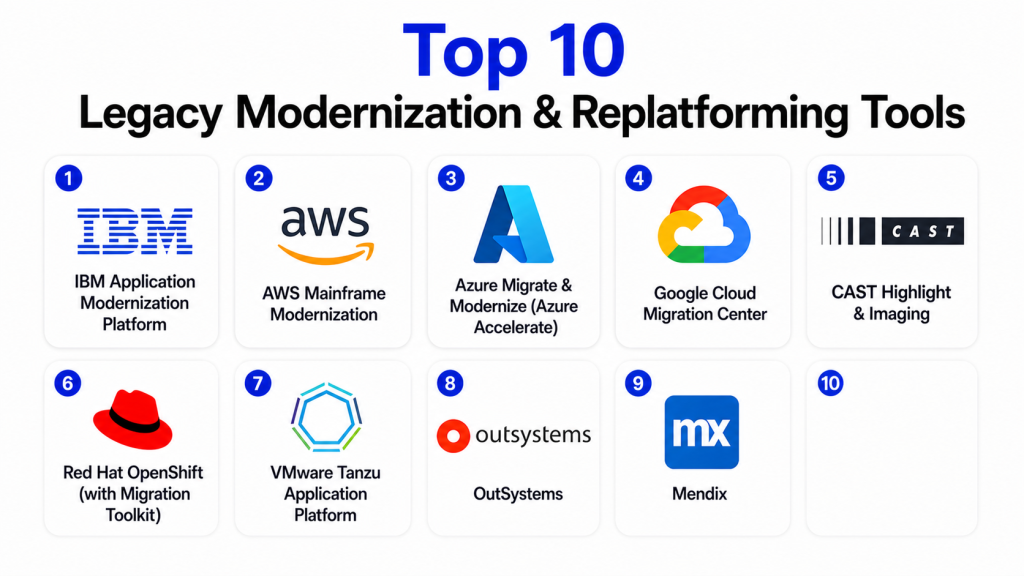
Top 10 Application Modernization Tools
#1 — IBM Application Modernization Platform
Short description:
IBM provides a comprehensive suite of tools for modernizing legacy applications, including dependency mapping, migration planning, and cloud transformation capabilities.
Key Features
- Application discovery and analysis
- Dependency mapping
- Migration recommendations
- Cloud-native transformation
- Containerization support
- Integration with DevOps tools
Pros
- Enterprise-grade capabilities
- Strong legacy system support
- Comprehensive toolset
Cons
- Complex setup
- High cost
- Requires expertise
Platforms / Deployment
Cloud / Hybrid
Security & Compliance
Not publicly stated
Integrations & Ecosystem
Supports enterprise IT ecosystems and cloud platforms.
- DevOps tools
- Cloud environments
Support & Community
Strong enterprise support and documentation.
#2 — Microsoft Azure Migrate
Short description:
Azure Migrate is a cloud-based tool that helps organizations assess, migrate, and modernize applications into the Azure ecosystem.
Key Features
- Application assessment
- Migration planning
- Dependency visualization
- Cloud migration tools
- Integration with Azure services
Pros
- Strong cloud integration
- Easy to use
- Scalable
Cons
- Azure dependency
- Limited multi-cloud support
- Requires planning
Platforms / Deployment
Cloud
Security & Compliance
Not publicly stated
Integrations & Ecosystem
Deep integration with Microsoft ecosystem.
- Azure services
- DevOps tools
Support & Community
Strong enterprise support.
#3 — AWS Application Migration Service (MGN)
Short description:
AWS MGN enables organizations to migrate applications to AWS with minimal downtime and supports modernization through cloud-native services.
Key Features
- Automated migration
- Lift-and-shift support
- Dependency mapping
- Integration with AWS services
- High scalability
Pros
- Reliable and scalable
- Strong ecosystem
- Supports large workloads
Cons
- Complex setup
- Cost management required
- AWS-centric
Platforms / Deployment
Cloud
Security & Compliance
Not publicly stated
Integrations & Ecosystem
Works within AWS ecosystem.
- AWS services
- CI/CD tools
Support & Community
Strong support and documentation.
#4 — Google Cloud Migration Center
Short description:
Google Cloud Migration Center provides centralized tools for assessing and migrating workloads to Google Cloud.
Key Features
- Migration planning
- Dependency analysis
- Centralized dashboard
- Cloud-native integration
- Performance insights
Pros
- Easy monitoring
- Strong cloud capabilities
- Good analytics
Cons
- Google Cloud dependency
- Limited customization
- Learning curve
Platforms / Deployment
Cloud
Security & Compliance
Not publicly stated
Integrations & Ecosystem
Works with Google Cloud services.
- GCP tools
- DevOps pipelines
Support & Community
Strong documentation and support.
#5 — Red Hat OpenShift
Short description:
OpenShift is a Kubernetes-based platform that enables containerization and modernization of applications using cloud-native technologies.
Key Features
- Container orchestration
- Kubernetes platform
- CI/CD integration
- Developer tools
- Multi-cloud support
Pros
- Highly scalable
- Flexible deployment
- Strong enterprise support
Cons
- Complex setup
- Requires Kubernetes knowledge
- Resource-intensive
Platforms / Deployment
Cloud / Hybrid
Security & Compliance
RBAC, encryption
Integrations & Ecosystem
Supports cloud-native ecosystems.
- Kubernetes
- DevOps tools
Support & Community
Strong enterprise and open-source community.
#6 — VMware Tanzu Platform
Short description:
VMware Tanzu helps organizations build, run, and manage modern applications across multiple cloud environments.
Key Features
- Application lifecycle management
- Kubernetes integration
- Multi-cloud support
- Automation tools
- Developer platform
Pros
- Strong multi-cloud capabilities
- Enterprise-ready
- Flexible
Cons
- Complex configuration
- Cost considerations
- Learning curve
Platforms / Deployment
Cloud / Hybrid
Security & Compliance
Not publicly stated
Integrations & Ecosystem
Integrates with VMware ecosystem.
- Cloud platforms
- DevOps tools
Support & Community
Enterprise-grade support.
#7 — IBM Cloud Pak for Applications
Short description:
IBM Cloud Pak provides tools for modernizing applications through containerization and microservices transformation.
Key Features
- Application modernization
- Microservices architecture
- Containerization
- DevOps integration
- Cloud-native tools
Pros
- Comprehensive platform
- Strong enterprise features
- Flexible deployment
Cons
- Complex setup
- High cost
- Requires expertise
Platforms / Deployment
Cloud / Hybrid
Security & Compliance
Not publicly stated
Integrations & Ecosystem
Supports enterprise systems.
- Cloud platforms
- DevOps tools
Support & Community
Strong enterprise support.
#8 — AWS Mainframe Modernization
Short description:
AWS Mainframe Modernization enables migration of legacy mainframe applications to modern cloud environments with automated refactoring.
Key Features
- Code transformation
- Managed runtime
- Integration with AWS
- Automated refactoring
- Cloud-native deployment
Pros
- Strong mainframe support
- Scalable
- Automated processes
Cons
- AWS dependency
- Complex migration
- Cost considerations
Platforms / Deployment
Cloud
Security & Compliance
Not publicly stated
Integrations & Ecosystem
Works with AWS ecosystem.
- AWS services
- DevOps tools
Support & Community
Strong enterprise support.
#9 — CAST Highlight
Short description:
CAST Highlight analyzes application portfolios to identify modernization opportunities and risks.
Key Features
- Code analysis
- Risk assessment
- Dependency mapping
- Portfolio insights
- Reporting tools
Pros
- Strong analytics
- Easy insights
- Useful for planning
Cons
- Limited execution features
- Requires integration
- Not full platform
Platforms / Deployment
Cloud
Security & Compliance
Not publicly stated
Integrations & Ecosystem
Works with enterprise systems.
- DevOps tools
- IT systems
Support & Community
Good enterprise support.
#10 — Mendix
Short description:
Mendix is a low-code platform that enables rapid application modernization and development.
Key Features
- Low-code development
- Rapid application building
- Cloud deployment
- Integration tools
- Automation
Pros
- Easy to use
- Fast development
- Strong UI tools
Cons
- Limited flexibility for complex apps
- Licensing cost
- Vendor lock-in
Platforms / Deployment
Cloud / Hybrid
Security & Compliance
Not publicly stated
Integrations & Ecosystem
Works with enterprise applications.
- APIs
- Cloud services
Support & Community
Strong developer community.
Comparison Table
| Tool Name | Best For | Platform(s) Supported | Deployment | Standout Feature | Public Rating |
|---|---|---|---|---|---|
| IBM Platform | Enterprise modernization | Multi-platform | Hybrid | Dependency mapping | N/A |
| Azure Migrate | Azure users | Cloud | Cloud | Migration planning | N/A |
| AWS MGN | AWS migration | Cloud | Cloud | Automated migration | N/A |
| Google Migration Center | GCP users | Cloud | Cloud | Central dashboard | N/A |
| OpenShift | Containerization | Multi-platform | Hybrid | Kubernetes | N/A |
| Tanzu | Multi-cloud apps | Multi-platform | Hybrid | Lifecycle mgmt | N/A |
| IBM Cloud Pak | Enterprise apps | Multi-platform | Hybrid | Microservices | N/A |
| AWS Mainframe | Legacy systems | Cloud | Cloud | Code refactoring | N/A |
| CAST Highlight | Analysis | Cloud | Cloud | Code insights | N/A |
| Mendix | Low-code apps | Multi-platform | Hybrid | Rapid dev | N/A |
Evaluation & Scoring
| Tool Name | Core | Ease | Integrations | Security | Performance | Support | Value | Weighted Total |
|---|---|---|---|---|---|---|---|---|
| IBM | 9 | 7 | 8 | 8 | 8 | 9 | 7 | 8.2 |
| Azure | 8 | 8 | 9 | 8 | 8 | 8 | 8 | 8.2 |
| AWS MGN | 8 | 7 | 9 | 8 | 9 | 8 | 7 | 8.1 |
| 8 | 7 | 8 | 8 | 8 | 7 | 8 | 7.9 | |
| OpenShift | 9 | 6 | 9 | 8 | 8 | 8 | 7 | 8.0 |
| Tanzu | 8 | 6 | 8 | 8 | 8 | 7 | 7 | 7.6 |
| IBM Pak | 8 | 6 | 7 | 8 | 7 | 7 | 6 | 7.2 |
| AWS Mainframe | 9 | 6 | 8 | 8 | 8 | 7 | 6 | 7.6 |
| CAST | 7 | 8 | 7 | 7 | 7 | 7 | 8 | 7.5 |
| Mendix | 8 | 9 | 7 | 7 | 8 | 8 | 8 | 8.0 |
How to interpret scores:
These scores provide a comparative view of how each tool performs across key dimensions such as features, usability, integrations, and performance. A higher score indicates a more balanced solution, but it does not necessarily mean it is the best choice for every organization. Some tools are optimized for enterprise-scale modernization, while others focus on ease of use or low-code development. Organizations should prioritize the criteria that matter most to their modernization strategy and validate tool performance through pilot implementations before full adoption.
Which Application Modernization Tool Is Right for You?
Solo / Freelancer
Low-code tools like Mendix are ideal for quick development and modernization.
SMB
Azure Migrate or Google Migration Center offer simplicity and scalability.
Mid-Market
OpenShift and AWS MGN provide strong modernization capabilities.
Enterprise
IBM platforms and VMware Tanzu are best for large-scale transformation.
Budget vs Premium
Open-source and cloud-native tools reduce cost, while enterprise platforms offer advanced features.
Feature Depth vs Ease of Use
Low-code tools are easier, while enterprise platforms provide deeper control.
Integrations & Scalability
Choose tools aligned with your cloud provider and infrastructure.
Security & Compliance Needs
Enterprises should prioritize tools with strong governance and compliance features.
Frequently Asked Questions (FAQs)
1. What is application modernization?
Application modernization is the process of updating legacy systems to modern architectures like cloud-native platforms.
2. Why is modernization important?
It improves performance, scalability, and security while reducing maintenance costs.
3. What are common modernization approaches?
Rehosting, replatforming, refactoring, and rebuilding are common approaches.
4. How long does modernization take?
It depends on complexity, ranging from weeks to years.
5. Can legacy systems be modernized without rewriting?
Yes, many tools support incremental modernization.
6. What industries need modernization most?
Finance, healthcare, and government sectors rely heavily on modernization.
7. Are these tools cloud-based?
Most modern tools are cloud-native or hybrid.
8. What are common challenges?
Complex dependencies, cost, and lack of expertise are common challenges.
9. Do these tools support DevOps?
Yes, most integrate with CI/CD pipelines.
10. How do I choose the right tool?
Evaluate your infrastructure, goals, and budget before selecting.
Conclusion
Application modernization is no longer optional for organizations aiming to remain competitive in a rapidly evolving digital landscape. Legacy systems create inefficiencies, security risks, and operational limitations that can hinder growth and innovation. The tools covered in this guide offer a wide range of capabilities, from cloud migration and containerization to low-code development and automated refactoring. Each solution is designed to address specific modernization challenges, whether it is migrating workloads, improving scalability, or enabling faster development cycles. The right choice depends on your organization’s size, technical environment, and long-term transformation goals. Instead of pursuing a one-size-fits-all approach, it is more effective to assess your current systems, identify priorities, and select tools that align with your modernization strategy. A practical next step is to shortlist a few tools, run pilot projects, and validate how well they integrate with your workflows before committing to a full-scale transformation.

Very helpful article. The comparison is easy to follow and provides a clear overview of the strengths and limitations of each application modernization tool, making the evaluation process much simpler.