Introduction
Platform-as-a-Service, or PaaS, is a cloud application platform that helps developers build, deploy, run, and scale applications without managing most of the underlying infrastructure. Instead of manually handling servers, operating systems, runtime environments, scaling rules, and deployment pipelines, teams can use a managed platform that simplifies the application delivery process. PaaS is useful for web apps, APIs, SaaS products, internal tools, customer portals, and cloud-native applications. It matters because businesses need faster software releases, better developer productivity, stronger security controls, and scalable application environments without adding unnecessary infrastructure complexity.
Common real-world use cases include:
- Launching SaaS applications quickly
- Hosting web apps and APIs
- Building internal business applications
- Modernizing legacy applications
- Supporting microservices and containerized workloads
Buyers should evaluate:
- Runtime and language support
- Ease of deployment
- Autoscaling and performance
- Security and access controls
- Monitoring and logging
- Database and service integrations
- CI/CD compatibility
- Pricing predictability
- Compliance readiness
- Portability and vendor lock-in risk
Best for: Developers, DevOps teams, startups, SaaS companies, IT managers, and enterprise platform teams that want faster application delivery with less infrastructure management. PaaS is also useful for organizations that want standardized deployment workflows across multiple teams. Not ideal for: Teams that need deep infrastructure customization, highly specialized networking, bare-metal control, or workloads where self-managed Kubernetes, IaaS, or dedicated infrastructure may provide better flexibility.
Key Trends in Platform-as-a-Service PaaS
- AI-assisted development and operations: PaaS platforms are increasingly supporting smarter debugging, log analysis, deployment recommendations, and performance insights.
- Container-first workflows: More platforms now support Docker and container-based deployment because teams want portability and consistent runtime environments.
- Hybrid deployment models: Enterprises are looking for platforms that support cloud, private cloud, and hybrid environments instead of depending on a single deployment model.
- Developer experience as a priority: Simple dashboards, Git-based deployment, CLI tools, preview environments, and rollback options are becoming important buying factors.
- Platform engineering adoption: Many organizations are using PaaS as part of internal developer platforms to create standardized deployment paths for engineering teams.
- Security by default: Buyers expect SSO, MFA, RBAC, audit logs, encryption, secrets management, and stronger access control as baseline capabilities.
- Integrated observability: PaaS platforms are expected to connect with logs, metrics, tracing, monitoring, and alerting tools.
- Cost visibility and controls: Teams want usage alerts, autoscaling limits, transparent pricing, and better control over idle resources.
- API-first ecosystem: Strong APIs, automation support, and integration with CI/CD tools are now essential for modern application platforms.
- Reduced operational burden: Businesses want platforms that reduce infrastructure work while still supporting production-grade reliability.
How We Selected These Tools Methodology
The tools in this list were selected using practical SaaS and enterprise buyer criteria. The goal is to include widely recognized PaaS tools that support different user types, from startups and small teams to large enterprises and platform engineering groups.
- Market adoption: Tools with strong usage across developers, startups, cloud teams, and enterprises were prioritized.
- Feature completeness: Platforms were evaluated for deployment, scaling, runtime support, logging, monitoring, and application management.
- Developer experience: Easy onboarding, Git deployment, CLI tools, dashboards, and documentation quality were considered.
- Security posture: Access control, SSO, RBAC, encryption, audit logs, and compliance signals were evaluated where confidently known.
- Ecosystem strength: Tools with strong databases, add-ons, APIs, cloud services, and CI/CD integrations ranked higher.
- Reliability and performance: Platforms with mature infrastructure and production use cases were preferred.
- Customer fit: The list balances enterprise platforms, developer-first platforms, cloud-native tools, and hybrid options.
- Scalability: Tools were assessed for their ability to support growing workloads and production environments.
- Pricing and value: Pricing clarity, resource-based billing, free tiers, and operational savings were considered.
- Portability: Container support, Kubernetes alignment, and migration flexibility were considered where relevant.
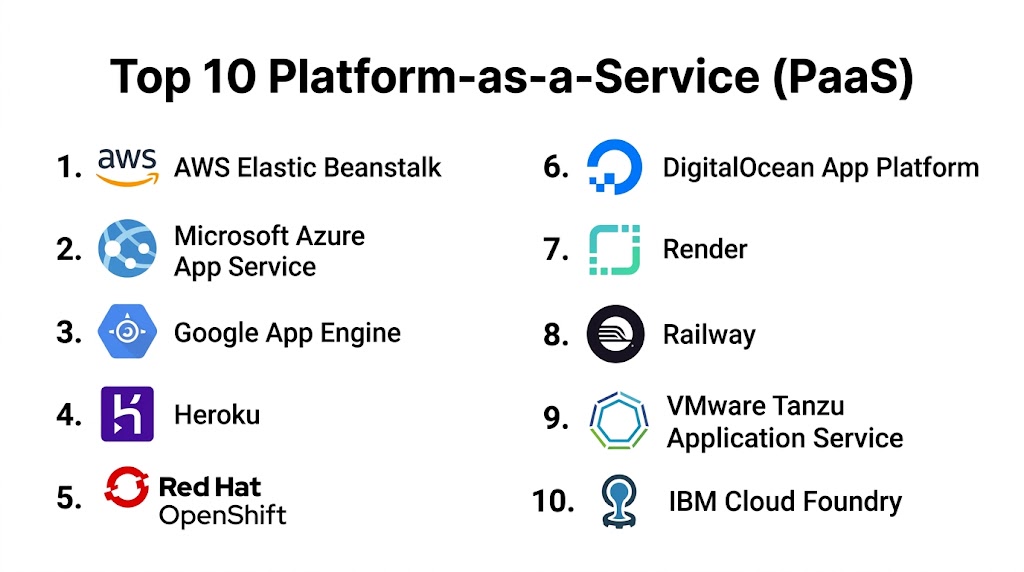
Top 10 Platform-as-a-Service PaaS Tools
#1 — AWS Elastic Beanstalk
Short description: AWS Elastic Beanstalk is a managed PaaS that helps teams deploy and scale web applications on AWS infrastructure without manually configuring every cloud resource. It supports multiple programming languages and Docker-based workloads, making it suitable for teams that want simplified deployment while still benefiting from the broader AWS ecosystem. It is a strong fit for organizations already using AWS services and looking for a balance between automation and infrastructure control.
Key Features
- Managed application deployment for web apps and APIs
- Support for multiple runtimes and Docker workloads
- Automatic provisioning of compute, load balancing, and scaling
- Application health monitoring and version management
- Integration with AWS databases, storage, monitoring, and identity services
- Environment management for development, staging, and production
- Configuration control for scaling, networking, and runtime settings
Pros
- Strong choice for AWS-focused teams
- Offers more infrastructure visibility than many simple PaaS tools
- Supports production-grade application deployment patterns
- Good balance between automation and control
Cons
- AWS services can still be complex for beginners
- Pricing depends on underlying AWS resources
- User interface may feel less modern than newer developer-first platforms
- Troubleshooting often requires AWS knowledge
Platforms / Deployment
Web / Cloud
Security & Compliance
Supports AWS IAM, encryption options, VPC configuration, access controls, and monitoring through AWS services. Compliance depends on customer configuration, selected AWS services, and deployment region.
Integrations & Ecosystem
AWS Elastic Beanstalk benefits from the broad AWS ecosystem, making it useful for teams that need databases, storage, queues, monitoring, identity, and networking services around their applications.
- Amazon RDS
- Amazon S3
- Amazon CloudWatch
- AWS IAM
- AWS CodePipeline
- Docker
Support & Community
AWS provides extensive documentation, paid support tiers, tutorials, training resources, and a large global cloud community. Support quality depends on the selected AWS support plan.
#2 — Microsoft Azure App Service
Short description: Microsoft Azure App Service is a managed PaaS for hosting web applications, APIs, and backend services in the Azure cloud. It supports multiple languages, containers, deployment slots, and strong integration with Microsoft identity and DevOps tools. It is especially useful for enterprises, Microsoft-focused teams, and organizations building cloud applications around Azure services.
Key Features
- Managed hosting for web apps, APIs, and mobile backends
- Support for .NET, Java, Node.js, Python, PHP, and containers
- Deployment slots for staging and production releases
- Built-in scaling, custom domains, and SSL support
- Integration with Azure DevOps and GitHub workflows
- Authentication and access control options
- Monitoring through Azure observability services
Pros
- Strong fit for Microsoft and Azure environments
- Deployment slots make release management easier
- Good identity and enterprise governance integration
- Suitable for both traditional and containerized applications
Cons
- Pricing tiers require careful planning
- Advanced configuration can be complex
- Best value often comes when already using Azure services
- Some workloads may require additional Azure tools for full observability
Platforms / Deployment
Web / Cloud
Security & Compliance
Supports Microsoft Entra ID integration, managed identities, RBAC, SSL/TLS, authentication controls, networking options, and monitoring. Compliance depends on Azure configuration, service selection, and region.
Integrations & Ecosystem
Azure App Service integrates deeply with Microsoft cloud, DevOps, database, identity, and monitoring services, making it practical for enterprise application environments.
- Azure SQL Database
- Azure DevOps
- GitHub Actions
- Azure Monitor
- Microsoft Entra ID
- Azure Container Registry
Support & Community
Microsoft offers detailed documentation, learning resources, enterprise support plans, partner support, and a large developer community around Azure and .NET.
#3 — Google App Engine
Short description: Google App Engine is a fully managed PaaS for building and running web applications and APIs on Google Cloud. It is designed for teams that want automatic scaling and minimal infrastructure administration. With standard and flexible environment options, it works well for developers building cloud-native applications that connect with Google Cloud databases, storage, monitoring, and data services.
Key Features
- Fully managed application hosting
- Automatic scaling based on application traffic
- Support for multiple runtimes and custom environments
- Standard and flexible environment options
- Version management and traffic splitting
- Integration with Google Cloud databases and storage
- Logging, monitoring, and identity integration
Pros
- Strong autoscaling capabilities
- Good integration with Google Cloud services
- Reduces infrastructure management work
- Useful for web apps, APIs, and cloud-native workloads
Cons
- Some environment choices affect flexibility and cost
- Google Cloud knowledge is helpful for advanced use cases
- Migration planning is important to reduce lock-in
- May not be the simplest option for teams outside Google Cloud
Platforms / Deployment
Web / Cloud
Security & Compliance
Supports Google Cloud IAM, service accounts, encryption, logging, monitoring, and networking controls. Compliance depends on Google Cloud configuration, selected services, and region.
Integrations & Ecosystem
Google App Engine connects well with Google Cloud services, making it useful for teams building applications around data, analytics, APIs, and scalable backend services.
- Cloud SQL
- Firestore
- Cloud Storage
- Cloud Logging
- Cloud Monitoring
- Cloud Build
Support & Community
Google Cloud provides documentation, support plans, learning resources, and community guidance. Community strength is strong among cloud-native and Google Cloud developers.
#4 — Heroku
Short description: Heroku is a developer-friendly PaaS known for simple application deployment, Git-based workflows, and a strong add-on ecosystem. It is popular with startups, small teams, SaaS builders, prototypes, and internal tool developers who want to deploy applications without managing infrastructure directly. Heroku is especially valuable when speed, simplicity, and developer productivity matter more than deep infrastructure control.
Key Features
- Git-based and CLI-based deployment
- Dyno-based runtime model
- Add-on marketplace for databases, monitoring, caching, and messaging
- Support for multiple languages and buildpacks
- Review apps and pipeline workflows
- Simple scaling controls
- Application dashboard and logs
Pros
- Very easy for developers to adopt
- Strong add-on ecosystem
- Excellent for MVPs and prototypes
- Reduces infrastructure management for small teams
Cons
- Can become expensive as usage grows
- Less infrastructure control than cloud-native platforms
- Enterprise governance may require higher-tier plans
- Not ideal for complex networking requirements
Platforms / Deployment
Web / Cloud
Security & Compliance
Supports platform access controls, team permissions, encryption features, and application-level security options. Specific compliance details vary by plan and customer configuration.
Integrations & Ecosystem
Heroku has a strong ecosystem of add-ons and integrations that help teams quickly connect databases, monitoring, caching, logging, and third-party services.
- Heroku Postgres
- Redis add-ons
- GitHub integration
- CI/CD workflows
- Logging add-ons
- Buildpacks and container deployment
Support & Community
Heroku offers documentation, guides, paid support options, and a large developer community. It is widely known, making onboarding and troubleshooting easier for many teams.
#5 — Red Hat OpenShift
Short description: Red Hat OpenShift is an enterprise Kubernetes-based application platform that provides PaaS-like workflows for containerized applications. It is designed for organizations that need hybrid cloud flexibility, strong governance, security controls, and scalable platform operations. OpenShift is best suited for enterprises, regulated industries, and platform engineering teams managing complex application environments.
Key Features
- Kubernetes-based application platform
- Hybrid cloud, private cloud, and public cloud deployment options
- Developer self-service workflows
- Container orchestration and image management
- Operator ecosystem support
- Integrated CI/CD and GitOps-friendly workflows
- Policy, access, and governance controls
Pros
- Strong choice for enterprise hybrid cloud strategies
- Good governance and security capabilities
- Suitable for regulated and complex environments
- Helps standardize Kubernetes-based application delivery
Cons
- More complex than lightweight PaaS tools
- Requires Kubernetes and platform operations knowledge
- Implementation can need significant planning
- May be excessive for simple web applications
Platforms / Deployment
Web / Cloud / Self-hosted / Hybrid
Security & Compliance
Supports RBAC, enterprise identity integration, encryption options, audit capabilities, container image security workflows, and Kubernetes security controls. Compliance depends on deployment model, configuration, and customer environment.
Integrations & Ecosystem
OpenShift has a strong enterprise ecosystem across Kubernetes, DevOps, security, service mesh, monitoring, and hybrid cloud operations.
- Kubernetes operators
- Container registries
- GitOps workflows
- CI/CD tools
- Monitoring platforms
- Security scanning tools
Support & Community
Red Hat provides enterprise support, documentation, training, certification programs, and professional services. Community strength is strong among Kubernetes, Linux, and enterprise DevOps users.
#6 — DigitalOcean App Platform
Short description: DigitalOcean App Platform is a managed PaaS built for developers, startups, and SMBs that want simple application deployment without heavy cloud complexity. It supports web apps, APIs, static sites, workers, and container-based workloads. It is a good fit for teams that want an approachable cloud platform with managed deployment, scaling, and integration with DigitalOcean services.
Key Features
- Managed hosting for apps, APIs, workers, and static sites
- Git-based deployments
- Container support
- Built-in HTTPS and custom domains
- Integration with DigitalOcean databases
- Autoscaling and managed infrastructure options
- Simple dashboard and developer-focused workflow
Pros
- Easier to learn than large hyperscale platforms
- Good fit for startups and small teams
- Simple deployment experience
- Practical pricing and cloud service integration
Cons
- Smaller ecosystem than AWS, Azure, or Google Cloud
- Enterprise governance features may be limited
- Advanced global infrastructure needs may require planning
- Complex workloads may need more flexible platforms
Platforms / Deployment
Web / Cloud
Security & Compliance
Supports HTTPS, access controls, environment variables, and managed cloud security features. Specific compliance details vary by service, plan, and configuration.
Integrations & Ecosystem
DigitalOcean App Platform integrates well with common developer tools and DigitalOcean’s broader cloud services, making it useful for small teams building production apps.
- GitHub
- GitLab
- DigitalOcean Managed Databases
- Container registries
- Monitoring tools
- API and CLI workflows
Support & Community
DigitalOcean offers documentation, tutorials, community resources, and paid support options. Its learning content is especially helpful for startups, SMBs, and newer cloud teams.
#7 — Render
Short description: Render is a modern cloud application platform for deploying web services, static sites, background workers, cron jobs, managed databases, and containers. It is designed for developer-first teams that want simple deployment with practical production features. Render is useful for SaaS products, APIs, internal tools, and modern web applications that need a clean platform experience without heavy infrastructure work.
Key Features
- Web services, static sites, workers, and cron jobs
- Git-based automatic deployments
- Managed PostgreSQL and Redis options
- Docker support
- Preview environments
- Built-in TLS and custom domains
- Logs, metrics, and deployment controls
Pros
- Clean and modern developer experience
- Strong fit for startups and small engineering teams
- Supports multiple application components
- Good balance between simplicity and production readiness
Cons
- Enterprise governance may be less extensive than major cloud platforms
- Pricing should be reviewed as usage grows
- Advanced networking may require alternatives
- Smaller ecosystem than hyperscale cloud providers
Platforms / Deployment
Web / Cloud
Security & Compliance
Supports HTTPS, environment variables, access controls, private services, and managed platform security features. Specific certifications and compliance details should be verified by buyers.
Integrations & Ecosystem
Render works well with common developer workflows and offers practical integrations for applications, databases, repositories, and containerized workloads.
- GitHub
- GitLab
- Docker
- PostgreSQL
- Redis
- Custom domains
Support & Community
Render provides documentation, support channels, guides, and an active developer user base. Support options may vary by plan.
#8 — Railway
Short description: Railway is a developer-focused PaaS built for fast application deployment, simple infrastructure provisioning, and quick project setup. It is commonly used for prototypes, APIs, SaaS apps, bots, side projects, and small production workloads. Railway is best for teams that want fast deployment, easy database provisioning, and a simple platform experience with minimal setup overhead.
Key Features
- Fast app and service deployment
- Git-based deployment support
- Built-in database provisioning
- Environment variables and project configuration
- Support for multiple languages and frameworks
- Simple dashboard for services and usage
- API and CLI support
Pros
- Very quick onboarding
- Good for developers and small teams
- Simple database and service provisioning
- Useful for MVPs and early-stage products
Cons
- May not fit complex enterprise governance needs
- Cost should be monitored as usage scales
- Advanced compliance requirements may need alternatives
- Smaller enterprise ecosystem than major platforms
Platforms / Deployment
Web / Cloud
Security & Compliance
Supports environment variables, access controls, managed platform protections, and deployment security features. Specific certifications and compliance details are not publicly stated for every buyer requirement.
Integrations & Ecosystem
Railway focuses on fast developer workflows and simple connections between services, databases, repositories, and application environments.
- GitHub
- PostgreSQL
- MySQL
- Redis
- Docker workflows
- API and CLI tooling
Support & Community
Railway provides documentation, community resources, and support channels. It is especially popular among indie developers, startups, and fast-moving product teams.
#9 — VMware Tanzu Application Service
Short description: VMware Tanzu Application Service is an enterprise application platform based on Cloud Foundry-style workflows. It helps large organizations standardize application deployment, improve governance, and support application modernization across private, hybrid, and enterprise cloud environments. It is best for enterprises with mature platform teams and large application portfolios that need consistency, control, and operational discipline.
Key Features
- Enterprise application platform workflows
- Cloud Foundry-based deployment model
- Support for buildpacks and container patterns
- Platform governance and lifecycle management
- Integration with enterprise infrastructure
- Standardized app deployment experience
- Support for private and hybrid environments
Pros
- Strong enterprise governance
- Good fit for internal developer platforms
- Useful for large application portfolios
- Supports hybrid and private cloud strategies
Cons
- More complex than lightweight PaaS tools
- Requires platform operations expertise
- May be too heavy for startups or small teams
- Licensing and architecture need careful planning
Platforms / Deployment
Web / Self-hosted / Hybrid
Security & Compliance
Supports enterprise identity integration, access controls, secure deployment workflows, platform governance, and audit-oriented operations. Specific compliance depends on enterprise configuration and deployment model.
Integrations & Ecosystem
Tanzu Application Service fits enterprise environments that need integration with existing infrastructure, DevOps processes, monitoring, security, and operational controls.
- Enterprise identity providers
- CI/CD platforms
- Monitoring and logging tools
- Buildpack workflows
- Container workflows
- VMware ecosystem services
Support & Community
VMware provides enterprise support, documentation, professional services, and partner ecosystem resources. Community knowledge is strongest among Cloud Foundry and enterprise platform teams.
#10 — IBM Cloud Foundry
Short description: IBM Cloud Foundry is a PaaS option for deploying cloud-native applications using Cloud Foundry-style workflows within IBM Cloud. It is relevant for enterprises using IBM Cloud services and teams that want application deployment abstraction connected to IBM’s cloud ecosystem. It is best for IBM-centered organizations rather than teams looking for the simplest startup-focused PaaS.
Key Features
- Cloud Foundry application deployment model
- Integration with IBM Cloud services
- Support for common application runtimes
- Managed application lifecycle workflows
- Enterprise cloud service connectivity
- Logging and monitoring through IBM ecosystem
- Suitable for enterprise cloud application deployment
Pros
- Good fit for IBM Cloud customers
- Supports familiar Cloud Foundry workflows
- Useful for enterprise application environments
- Integrates with IBM cloud and data services
Cons
- Less popular among small developer teams
- Best value depends on IBM Cloud adoption
- May not feel as modern as newer developer-first platforms
- Buyers should verify roadmap and service fit before committing
Platforms / Deployment
Web / Cloud
Security & Compliance
Supports IBM Cloud identity and access management, encryption capabilities, logging, and enterprise cloud security controls. Compliance depends on IBM Cloud services, configuration, and region.
Integrations & Ecosystem
IBM Cloud Foundry connects with IBM Cloud’s broader enterprise, data, DevOps, and infrastructure services.
- IBM Cloud databases
- IBM Cloud monitoring
- IBM Cloud logging
- IBM Cloud IAM
- DevOps toolchains
- API services
Support & Community
IBM provides enterprise documentation, support options, onboarding resources, and cloud guidance. Community strength is more enterprise-focused than startup-focused.
Comparison Table Top 10
| Tool Name | Best For | Platform Supported | Deployment | Standout Feature | Public Rating |
|---|---|---|---|---|---|
| AWS Elastic Beanstalk | AWS-focused application teams | Web | Cloud | Managed app deployment with AWS infrastructure control | N/A |
| Microsoft Azure App Service | Microsoft and Azure enterprises | Web | Cloud | Deployment slots and Azure identity integration | N/A |
| Google App Engine | Google Cloud-native teams | Web | Cloud | Fully managed autoscaling application platform | N/A |
| Heroku | Startups and developer-first teams | Web | Cloud | Simple Git-based deployment and add-on ecosystem | N/A |
| Red Hat OpenShift | Enterprise hybrid cloud teams | Web | Cloud / Self-hosted / Hybrid | Kubernetes-backed enterprise application platform | N/A |
| DigitalOcean App Platform | SMBs and startups | Web | Cloud | Simple managed app hosting with developer-friendly workflows | N/A |
| Render | Modern SaaS and web teams | Web | Cloud | Unified hosting for apps, workers, static sites, and databases | N/A |
| Railway | Indie developers and fast-moving startups | Web | Cloud | Rapid app and database provisioning | N/A |
| VMware Tanzu Application Service | Large enterprise platform teams | Web | Self-hosted / Hybrid | Cloud Foundry-style enterprise app platform | N/A |
| IBM Cloud Foundry | IBM Cloud enterprise users | Web | Cloud | Cloud Foundry workflows inside IBM Cloud ecosystem | N/A |
Evaluation & Scoring of Platform-as-a-Service PaaS
| Tool Name | Core 25% | Ease 15% | Integrations 15% | Security 10% | Performance 10% | Support 10% | Value 15% | Weighted Total |
|---|---|---|---|---|---|---|---|---|
| AWS Elastic Beanstalk | 8.7 | 7.5 | 9.3 | 8.8 | 8.7 | 8.6 | 8.1 | 8.48 |
| Microsoft Azure App Service | 8.8 | 8.0 | 9.0 | 8.9 | 8.6 | 8.7 | 8.0 | 8.55 |
| Google App Engine | 8.5 | 8.1 | 8.7 | 8.6 | 8.8 | 8.2 | 7.8 | 8.37 |
| Heroku | 8.0 | 9.3 | 8.5 | 7.8 | 7.8 | 8.3 | 7.2 | 8.12 |
| Red Hat OpenShift | 9.2 | 6.9 | 8.8 | 9.2 | 8.7 | 8.9 | 7.4 | 8.43 |
| DigitalOcean App Platform | 7.7 | 8.8 | 7.8 | 7.6 | 7.8 | 8.0 | 8.4 | 8.03 |
| Render | 7.9 | 8.9 | 7.9 | 7.5 | 7.9 | 7.8 | 8.2 | 8.05 |
| Railway | 7.4 | 9.1 | 7.4 | 7.0 | 7.5 | 7.3 | 8.1 | 7.75 |
| VMware Tanzu Application Service | 8.6 | 6.8 | 8.3 | 8.8 | 8.3 | 8.5 | 7.1 | 8.07 |
| IBM Cloud Foundry | 7.8 | 7.2 | 7.7 | 8.1 | 7.8 | 8.0 | 7.2 | 7.67 |
The scoring table is comparative and should be used as a decision guide, not as an absolute ranking. A higher score means the tool performs strongly across the listed evaluation criteria, but the best platform depends on team size, cloud ecosystem, budget, security needs, and application type. Developer-first platforms may score high for ease of use but lower for enterprise governance. Enterprise platforms may score high for security and control but require more setup and platform expertise.
Which Platform-as-a-Service PaaS Tool Is Right for You?
Solo / Freelancer
Solo developers and freelancers usually need fast deployment, simple setup, and low operational effort. Heroku, Railway, Render, and DigitalOcean App Platform are strong choices because they reduce infrastructure work and make it easier to deploy web apps, APIs, and small SaaS products. Railway is useful for quick prototypes, while Render and DigitalOcean App Platform are better for projects that need a cleaner production path.
SMB
Small and mid-sized businesses need a balance of ease, cost, reliability, and scalability. DigitalOcean App Platform, Render, Heroku, Azure App Service, and AWS Elastic Beanstalk are practical options depending on the team’s cloud experience. SMBs using Microsoft tools may prefer Azure App Service, while AWS-focused teams may choose Elastic Beanstalk. Teams wanting simplicity may prefer Render or DigitalOcean.
Mid-Market
Mid-market organizations usually need stronger deployment controls, monitoring, security, and integration with existing tools. Azure App Service, AWS Elastic Beanstalk, Google App Engine, and Render can all fit depending on cloud preference and workload type. A mid-market business should prioritize platform reliability, CI/CD support, staging workflows, access control, and predictable production scaling.
Enterprise
Enterprises should focus on governance, identity integration, compliance readiness, support, hybrid deployment, and platform standardization. Red Hat OpenShift, VMware Tanzu Application Service, Azure App Service, AWS Elastic Beanstalk, and Google App Engine are stronger fits for large organizations. OpenShift is useful for Kubernetes-based hybrid environments, while Tanzu works well for organizations using Cloud Foundry-style platform workflows.
Budget vs Premium
Budget-focused teams should consider Railway, Render, and DigitalOcean App Platform because they offer fast onboarding and practical pricing for smaller workloads. However, teams should still monitor database, bandwidth, compute, and scaling costs. Premium buyers should consider Azure App Service, AWS Elastic Beanstalk, Google App Engine, OpenShift, or Tanzu when governance, security, enterprise support, and ecosystem depth are more important.
Feature Depth vs Ease of Use
Heroku, Railway, Render, and DigitalOcean App Platform are easier for smaller teams and developers who want fast deployment. AWS Elastic Beanstalk, Azure App Service, Google App Engine, OpenShift, and Tanzu offer deeper platform control and enterprise features. The trade-off is that deeper platforms often require more cloud knowledge, configuration, and operational planning.
Integrations & Scalability
For integration depth, choose based on your current ecosystem. AWS users should consider Elastic Beanstalk, Microsoft users should consider Azure App Service, and Google Cloud teams should evaluate App Engine. Enterprise hybrid teams should consider OpenShift or Tanzu. For simpler projects, Heroku, Render, Railway, and DigitalOcean App Platform provide enough integrations for common applications, databases, and deployment workflows.
Security & Compliance Needs
Security-focused buyers should prioritize SSO, MFA, RBAC, audit logs, encryption, private networking, secrets management, and compliance documentation. Azure App Service, AWS Elastic Beanstalk, Google App Engine, OpenShift, and Tanzu are stronger options for formal enterprise security needs. Smaller platforms may still be secure for many use cases, but buyers should verify security controls before using them for sensitive or regulated workloads.
Frequently Asked Questions FAQs
1. What is Platform-as-a-Service PaaS?
Platform-as-a-Service is a cloud model that gives developers a managed environment for building, deploying, and running applications.
It handles many infrastructure tasks such as runtime management, scaling, deployment, and monitoring.
Teams still own their application code, data, architecture, and configuration choices.
It is commonly used for web apps, APIs, SaaS products, and internal business systems.
2. How is PaaS different from IaaS?
IaaS gives teams infrastructure resources such as servers, storage, and networking with more manual control.
PaaS adds a managed application layer so teams do not need to configure every server or runtime themselves.
IaaS is better for deep customization, while PaaS is better for faster app delivery.
Many companies use both depending on workload complexity and team maturity.
3. How is PaaS different from serverless?
Serverless usually abstracts infrastructure even further and often charges based on execution or usage events.
PaaS usually provides a managed application platform where apps run continuously or in managed service containers.
Some platforms include both PaaS and serverless-style capabilities.
The best choice depends on workload type, runtime needs, scaling behavior, and operational control.
4. What pricing models do PaaS tools use?
PaaS pricing commonly depends on compute size, app instances, memory, bandwidth, databases, storage, add-ons, and support tier.
Some tools use dynos, instances, containers, or service-based billing.
Enterprise platforms may use subscription or licensing models.
Buyers should test real workloads before assuming the lowest starter price reflects production cost.
5. What are common mistakes when choosing a PaaS?
A common mistake is choosing only based on ease of deployment without checking scaling, security, and long-term cost.
Another mistake is ignoring data services, observability, backups, and compliance requirements.
Teams should also avoid lock-in without an exit or migration plan.
A short pilot with real workloads helps reveal practical limitations early.
6. Is PaaS secure enough for enterprise applications?
PaaS can be secure for enterprise applications when configured correctly and paired with proper identity, encryption, monitoring, and governance.
Security depends on both the provider’s platform controls and the customer’s configuration.
Enterprises should verify SSO, RBAC, audit logs, network controls, secrets management, and compliance documentation.
Regulated teams should involve security and compliance stakeholders before production rollout.
7. Can PaaS platforms scale automatically?
Many PaaS platforms support autoscaling, manual scaling, or instance-based scaling.
The exact scaling model depends on the platform and application architecture.
Autoscaling works best when apps are stateless, monitored, and designed for horizontal growth.
Buyers should test scaling under realistic traffic instead of assuming it will work perfectly by default.
8. Do PaaS tools support containers?
Many modern PaaS tools support Docker or container-based deployment, but the depth of support varies.
Some treat containers as a primary workflow, while others support them as an additional deployment option.
Kubernetes-backed platforms such as OpenShift provide deeper container orchestration control.
Teams should verify build, registry, networking, and runtime requirements before choosing.
9. Can I migrate from one PaaS platform to another?
Migration is possible, but effort depends on how tightly the application depends on platform-specific services.
Apps using standard containers, external databases, and portable configuration are easier to move.
Apps relying heavily on proprietary add-ons, buildpacks, or managed services may need more refactoring.
A migration plan should include data, deployment pipelines, secrets, DNS, monitoring, and rollback steps.
10. What integrations should buyers look for?
Buyers should look for Git providers, CI/CD tools, databases, monitoring, logging, secrets management, identity providers, and API integrations.
The platform should fit the tools already used by engineering, security, and operations teams.
Enterprise buyers should also check ITSM, SIEM, audit, and compliance integrations.
Strong integrations reduce manual work and make the platform easier to operate at scale.
11. Is open-source PaaS better than managed PaaS?
Open-source or self-managed PaaS can offer more control, portability, and customization.
Managed PaaS usually offers faster onboarding, simpler maintenance, and less operational responsibility.
Open-source options may require stronger internal platform engineering skills.
The better option depends on whether the organization values control or operational simplicity more.
12. When should a team avoid PaaS?
A team should avoid PaaS when it needs deep infrastructure control, specialized networking, unusual runtime requirements, or highly optimized cost structures.
Very large workloads may be cheaper or more flexible on Kubernetes or IaaS with mature operations.
Highly regulated environments may need a private or hybrid platform instead of a simple public PaaS.
PaaS is best when speed, standardization, and reduced operational overhead matter most.
Conclusion
Platform-as-a-Service PaaS tools help teams build, deploy, and scale applications faster by reducing the operational burden of infrastructure management. The best option depends on your cloud ecosystem, team size, budget, security requirements, and application complexity. AWS Elastic Beanstalk, Azure App Service, and Google App Engine are strong choices for teams already using major cloud platforms, while Heroku, Render, Railway, and DigitalOcean App Platform are better for developer-first teams that value speed and simplicity. Red Hat OpenShift and VMware Tanzu Application Service are stronger fits for enterprises that need governance, hybrid deployment, and platform control. The right next step is to shortlist two or three platforms, run a pilot with a real application, validate integrations and security needs, compare production costs, and then scale only after the platform proves it can support your reliability and workflow requirements.

I found this article very helpful. The comparison is clear and practical, making it easier to understand how different PaaS tools can support application development and deployment needs.