Introduction
Load balancers are critical infrastructure components that distribute incoming network traffic across multiple servers to ensure high availability, reliability, and performance. Instead of overloading a single server, load balancers intelligently route requests, helping applications remain responsive even under heavy traffic.
In modern architectures, especially cloud-native and microservices environments, load balancers play a vital role in scaling applications, preventing downtime, and improving user experience. They also provide additional capabilities such as SSL termination, health checks, traffic routing, and security enforcement.
Real-world use cases:
- Distributing web traffic across multiple servers
- Ensuring high availability for applications
- Scaling applications during traffic spikes
- Managing microservices communication
- Improving performance and fault tolerance
What buyers should evaluate:
- Layer support (Layer 4 vs Layer 7)
- Traffic routing algorithms
- Scalability and performance
- Cloud and on-prem compatibility
- Security features (SSL, DDoS protection)
- Integration with DevOps and cloud platforms
- Ease of configuration and management
- Monitoring and analytics capabilities
- Cost and licensing
Best for: DevOps teams, system administrators, cloud architects, and enterprises running high-traffic or distributed applications.
Not ideal for: Small applications with minimal traffic or environments where redundancy is not required.
Key Trends in Load Balancers
- Shift toward software-based load balancers in cloud environments
- Integration with Kubernetes and microservices architectures
- Layer 7 intelligent routing becoming standard
- AI-driven traffic optimization emerging
- Serverless and cloud-native load balancing services
- Improved security features including WAF integration
- Global load balancing for multi-region deployments
- Automation through infrastructure-as-code tools
- Edge computing and CDN integration
- Enhanced observability and analytics capabilities
How We Selected These Tools (Methodology)
- Evaluated industry adoption and reliability
- Assessed performance and scalability capabilities
- Reviewed Layer 4 and Layer 7 support
- Analyzed integration with cloud and DevOps tools
- Considered ease of deployment and configuration
- Evaluated security and compliance features
- Reviewed monitoring and analytics capabilities
- Compared flexibility across environments
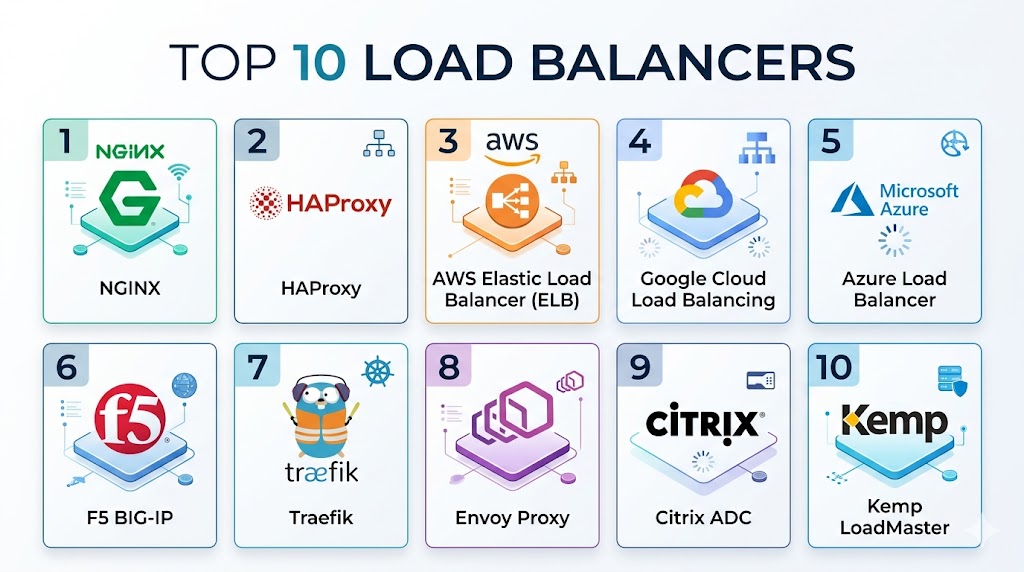
Top 10 Load Balancers
#1 — NGINX
Short description:
NGINX is a high-performance web server and load balancer widely used for distributing HTTP and TCP traffic efficiently.
Key Features
- Layer 7 load balancing
- Reverse proxy capabilities
- SSL termination
- Caching
- High performance
Pros
- Fast and lightweight
- Highly scalable
- Strong community support
Cons
- Advanced features require configuration
- Learning curve for beginners
- Enterprise features require paid version
Platforms / Deployment
Windows / Linux / macOS / Cloud
Security & Compliance
SSL/TLS, access control
Integrations & Ecosystem
Works with modern web stacks.
- Kubernetes
- Web servers
- Cloud platforms
Support & Community
Large open-source community.
#2 — HAProxy
Short description:
HAProxy is an open-source load balancer known for high performance, reliability, and advanced traffic management features.
Key Features
- Layer 4 and Layer 7 support
- High performance
- Health checks
- Traffic routing
- Failover support
Pros
- Extremely reliable
- High performance
- Flexible configuration
Cons
- Complex configuration
- No built-in UI
- Requires expertise
Platforms / Deployment
Linux / Cloud
Security & Compliance
SSL/TLS, access control
Integrations & Ecosystem
Works with server environments.
- Web servers
- Cloud systems
Support & Community
Strong community and documentation.
#3 — AWS Elastic Load Balancer (ELB)
Short description:
AWS ELB provides managed load balancing services within AWS, supporting automatic scaling and high availability.
Key Features
- Auto-scaling
- Managed service
- Multiple load balancing types
- Integration with AWS
- Health checks
Pros
- Easy to use
- Scalable
- Highly available
Cons
- AWS dependency
- Limited customization
- Cost considerations
Platforms / Deployment
Cloud
Security & Compliance
Encryption, access control
Integrations & Ecosystem
Works within AWS ecosystem.
- EC2
- Kubernetes
- Cloud services
Support & Community
Strong AWS support.
#4 — Google Cloud Load Balancing
Short description:
Google Cloud Load Balancing provides global traffic distribution with high performance and low latency.
Key Features
- Global load balancing
- Auto-scaling
- Traffic routing
- Integration with GCP
- High availability
Pros
- Global reach
- High performance
- Reliable
Cons
- GCP dependency
- Configuration complexity
- Cost management
Platforms / Deployment
Cloud
Security & Compliance
Encryption
Integrations & Ecosystem
Works with Google Cloud.
- GCP services
- Kubernetes
Support & Community
Strong cloud support.
#5 — Azure Load Balancer
Short description:
Azure Load Balancer distributes traffic across Azure resources, providing high availability and scalability.
Key Features
- Layer 4 load balancing
- High availability
- Integration with Azure
- Health probes
- Auto-scaling
Pros
- Reliable
- Easy integration
- Scalable
Cons
- Limited Layer 7 features
- Azure dependency
- Basic routing capabilities
Platforms / Deployment
Cloud
Security & Compliance
Encryption
Integrations & Ecosystem
Works within Azure ecosystem.
- Azure services
Support & Community
Strong enterprise support.
#6 — F5 BIG-IP
Short description:
F5 BIG-IP is an enterprise-grade load balancer offering advanced traffic management, security, and application delivery features.
Key Features
- Advanced traffic management
- Application security
- SSL offloading
- WAF integration
- High scalability
Pros
- Enterprise-grade
- Strong security features
- Highly customizable
Cons
- Expensive
- Complex setup
- Requires expertise
Platforms / Deployment
Cloud / On-prem
Security & Compliance
SSL, WAF, encryption
Integrations & Ecosystem
Enterprise integrations.
- Data centers
- Cloud platforms
Support & Community
Strong enterprise support.
#7 — Traefik
Short description:
Traefik is a modern load balancer designed for microservices and containerized environments.
Key Features
- Dynamic configuration
- Kubernetes integration
- Automatic service discovery
- SSL support
- Cloud-native design
Pros
- Easy for containers
- Modern architecture
- Flexible
Cons
- Limited traditional use cases
- Learning curve
- Smaller ecosystem
Platforms / Deployment
Cloud / Container environments
Security & Compliance
SSL, encryption
Integrations & Ecosystem
Works with container platforms.
- Docker
- Kubernetes
Support & Community
Growing community.
#8 — Envoy Proxy
Short description:
Envoy is a high-performance proxy and load balancer used in service mesh architectures.
Key Features
- Service mesh integration
- Layer 7 routing
- Observability features
- High performance
- Dynamic configuration
Pros
- Modern architecture
- High scalability
- Strong observability
Cons
- Complex setup
- Requires expertise
- Resource-intensive
Platforms / Deployment
Cloud / Container environments
Security & Compliance
Encryption, access control
Integrations & Ecosystem
Works with microservices.
- Kubernetes
- Service mesh tools
Support & Community
Strong open-source community.
#9 — Citrix ADC
Short description:
Citrix ADC provides application delivery and load balancing with strong security and performance features.
Key Features
- Application delivery
- Load balancing
- Security features
- Traffic optimization
- Analytics
Pros
- Enterprise-grade
- Strong performance
- Security features
Cons
- Expensive
- Complex
- Learning curve
Platforms / Deployment
Cloud / On-prem
Security & Compliance
Encryption, WAF
Integrations & Ecosystem
Enterprise integrations.
- Cloud platforms
- Data centers
Support & Community
Strong enterprise support.
#10 — Kemp LoadMaster
Short description:
Kemp LoadMaster provides affordable load balancing solutions with strong performance and ease of use.
Key Features
- Load balancing
- SSL offloading
- Traffic management
- Easy setup
- Monitoring
Pros
- Cost-effective
- Easy to use
- Good performance
Cons
- Limited advanced features
- Smaller ecosystem
- Less customization
Platforms / Deployment
Cloud / On-prem
Security & Compliance
Encryption
Integrations & Ecosystem
Works with enterprise systems.
- Web servers
- Cloud platforms
Support & Community
Good support and documentation.
Comparison Table
| Tool Name | Best For | Platform(s) Supported | Deployment | Standout Feature | Public Rating |
|---|---|---|---|---|---|
| NGINX | Web traffic | Multi-platform | Hybrid | Performance | N/A |
| HAProxy | High performance | Linux | Self-hosted | Reliability | N/A |
| AWS ELB | Cloud apps | Cloud | Cloud | Auto-scaling | N/A |
| Google LB | Global traffic | Cloud | Cloud | Global routing | N/A |
| Azure LB | Azure apps | Cloud | Cloud | Simplicity | N/A |
| F5 BIG-IP | Enterprise | Multi-platform | Hybrid | Security | N/A |
| Traefik | Containers | Cloud | Container | Dynamic config | N/A |
| Envoy | Service mesh | Cloud | Container | Observability | N/A |
| Citrix ADC | Enterprise apps | Multi-platform | Hybrid | Optimization | N/A |
| Kemp | SMBs | Multi-platform | Hybrid | Cost-effective | N/A |
Evaluation & Scoring
| Tool Name | Core | Ease | Integrations | Security | Performance | Support | Value | Weighted Total |
|---|---|---|---|---|---|---|---|---|
| NGINX | 9 | 7 | 9 | 8 | 9 | 8 | 9 | 8.6 |
| HAProxy | 9 | 6 | 8 | 8 | 9 | 8 | 9 | 8.4 |
| AWS ELB | 8 | 9 | 9 | 8 | 9 | 9 | 7 | 8.5 |
| Google LB | 8 | 8 | 9 | 8 | 9 | 8 | 7 | 8.2 |
| Azure LB | 7 | 9 | 8 | 8 | 8 | 8 | 8 | 8.0 |
| F5 | 9 | 6 | 9 | 9 | 9 | 9 | 6 | 8.3 |
| Traefik | 8 | 8 | 8 | 8 | 8 | 7 | 8 | 8.0 |
| Envoy | 9 | 6 | 9 | 8 | 9 | 8 | 7 | 8.3 |
| Citrix | 8 | 6 | 8 | 9 | 9 | 8 | 6 | 8.0 |
| Kemp | 7 | 8 | 7 | 8 | 8 | 7 | 9 | 7.9 |
How to interpret scores:
These scores compare load balancers across key criteria such as performance, integrations, and usability. A higher score reflects a well-rounded solution, but it does not automatically make it the best choice for every scenario. Some tools are optimized for enterprise environments, while others focus on simplicity or cloud-native use cases. Organizations should evaluate their traffic requirements, infrastructure, and technical expertise when selecting a load balancer. These scores should be used as a guide rather than a definitive ranking, and real-world testing is recommended before final deployment.
Which Load Balancer Is Right for You?
Solo / Freelancer
NGINX or HAProxy are ideal for simple setups and cost-effective deployments.
SMB
Kemp LoadMaster and Traefik offer ease of use and scalability.
Mid-Market
Envoy and Azure Load Balancer provide flexibility and performance.
Enterprise
F5 BIG-IP and Citrix ADC offer advanced features and security.
Budget vs Premium
Open-source tools reduce cost, while enterprise tools offer advanced capabilities.
Feature Depth vs Ease of Use
Simple tools are easier, while enterprise tools provide deeper control.
Integrations & Scalability
Choose tools that integrate with your cloud and DevOps stack.
Security & Compliance Needs
Enterprise users should prioritize advanced security and monitoring.
Frequently Asked Questions (FAQs)
1. What is a load balancer?
A load balancer distributes incoming traffic across multiple servers to improve performance and reliability.
2. Why are load balancers important?
They prevent server overload and ensure high availability.
3. What are Layer 4 and Layer 7 load balancers?
Layer 4 works at transport level, while Layer 7 operates at application level.
4. Are load balancers required for small apps?
Not always, but they improve reliability and scalability.
5. Can load balancers improve security?
Yes, many include SSL termination and traffic filtering.
6. Are cloud load balancers better?
They offer scalability and ease of management.
7. Do load balancers affect performance?
They improve performance by distributing load.
8. Can they handle global traffic?
Some tools support global load balancing.
9. What is auto-scaling?
Automatically adjusting resources based on demand.
10. How do I choose the right load balancer?
Consider your traffic, infrastructure, and budget.
Conclusion
Load balancers are a fundamental component of modern application infrastructure, ensuring that systems remain scalable, reliable, and performant under varying workloads. As applications become more distributed and traffic patterns grow increasingly complex, the role of intelligent traffic management becomes even more critical. The tools covered in this guide range from lightweight open-source solutions to enterprise-grade platforms with advanced security and optimization features. Selecting the right load balancer depends on your specific needs, including infrastructure type, expected traffic volume, and required integrations. Rather than choosing based on popularity alone, organizations should evaluate their operational requirements and test solutions in real-world environments. A practical next step is to shortlist a few tools, validate their performance and compatibility, and deploy the one that best aligns with your long-term scalability and reliability goals.

Great read. The article does an excellent job of comparing load balancers in a simple and practical way, making it easier to understand their capabilities and choose the right solution for different deployment needs.