Introduction
Personal finance budgeting apps are digital platforms designed to help individuals and families track income, categorize expenses, and plan for future financial goals. In the modern landscape, these tools have moved far beyond simple digital ledgers. They now serve as comprehensive financial command centers that leverage automated bank feeds, machine learning for transaction classification, and predictive analytics to forecast cash flow. As financial lives become increasingly fragmented across multiple banks, credit cards, investment accounts, and digital wallets, these apps provide a critical “single pane of glass” to view one’s entire economic ecosystem.
The significance of these platforms today lies in their ability to provide real-time visibility into discretionary spending and long-term wealth building. By automating the data collection process, they remove the friction of manual entry, which is the primary reason most traditional budgets fail. These tools allow users to move from reactive tracking (looking at what was spent) to proactive planning (deciding where every dollar should go). This shift is essential for navigating modern economic complexities, managing subscriptions, and reaching aggressive savings targets for home ownership or retirement.
Real-world use cases include:
- Debt Reduction: Modeling the impact of extra payments on high-interest credit cards using snowball or avalanche methods.
- Subscription Management: Identifying and cancelling “zombie” subscriptions that are no longer providing value.
- Large Purchase Planning: Visualizing how saving for a major life event, such as a wedding or a home down payment, affects daily spending power.
- Collaborative Household Budgeting: Allowing partners to manage a shared budget while maintaining individual privacy for personal discretionary spending.
- Tax Preparation: Exporting categorized expense reports for freelancers or those with side hustles to simplify annual filings.
What buyers should evaluate:
- Bank Sync Reliability: Does the app connect smoothly to your specific financial institutions without frequent disconnects?
- Budgeting Philosophy: Does the tool favor zero-based budgeting, the envelope system, or simple expense tracking?
- AI Intelligence: How accurately does the app categorize transactions without manual intervention?
- Investment and Net Worth Tracking: Can it track non-liquid assets like real estate, vehicles, and brokerage accounts?
- Security Infrastructure: Does the provider offer multi-factor authentication (MFA) and medical-grade data encryption?
- User Interface (UI): Is the dashboard intuitive and accessible across mobile, web, and wearable devices?
- Collaboration Features: Does it support joint accounts and multi-player budgeting for couples?
- Cost vs. Value: Does the subscription fee justify the money saved through better financial habits?
Mandatory paragraph
- Best for: Working engineers, technical managers, and busy professionals who manage multiple accounts and want an automated, data-driven approach to wealth management.
- Not ideal for: Individuals who operate strictly on a cash-only basis or those who are extremely privacy-conscious to the point of refusing to link bank accounts to third-party software.
Key Trends in Personal Finance Budgeting Apps for the Future
- Predictive Cash Flow Modeling: Moving beyond historical data, modern apps now project your bank balance weeks into the future based on recurring bills and average spending patterns.
- Hyper-Personalized AI Insights: Machine learning models now provide “nudges” when spending in a specific category is trending higher than usual, offering real-time suggestions to recalibrate.
- Deep Integration with Digital Wallets: As mobile payments become dominant, top-tier apps are building native integrations to pull data from digital wallets and “buy now, pay later” services.
- Holistic Net Worth Monitoring: There is a major shift toward including non-traditional assets, such as cryptocurrency, private equity, and real-time property valuations, within the primary budget view.
- Collaborative “Multi-Player” Finance: Shared budgeting is no longer an afterthought; platforms are building “Joint” modes that allow for shared goals while maintaining individual privacy.
- Automated Bill Negotiation: Some platforms now include “concierge” services that use algorithms to negotiate lower rates for internet, phone, and insurance bills on behalf of the user.
- Open Banking Expansion: The global push for Open Banking standards is making connections more stable and secure, reducing the frequency of broken bank links.
- Behavioral Finance Gamification: Apps are incorporating psychological principles like “streaks” and “badges” to encourage consistent savings habits and long-term engagement.
How We Selected These Tools (Methodology)
The selection of the top personal finance budgeting apps is based on a rigorous evaluation of the current global fintech market. Our methodology focuses on the following pillars:
- Market Adoption and Mindshare: We prioritized tools that are widely recognized and utilized by millions of users across various demographics.
- Automation Prowess: Evaluation was based on the accuracy of transaction auto-categorization and the stability of bank syncing.
- Security Posture: Preference was given to platforms with read-only data access, robust encryption, and documented security protocols.
- Philosophical Diversity: The list includes a mix of zero-based, envelope, and “passive” tracking models to suit different financial personalities.
- Feature Completeness: We assessed whether the tool provides a full suite of services, including goal tracking, net worth monitoring, and subscription management.
- User Experience (UX): A significant weight was placed on the quality of the interface, ensuring it reduces financial stress rather than adding to it.
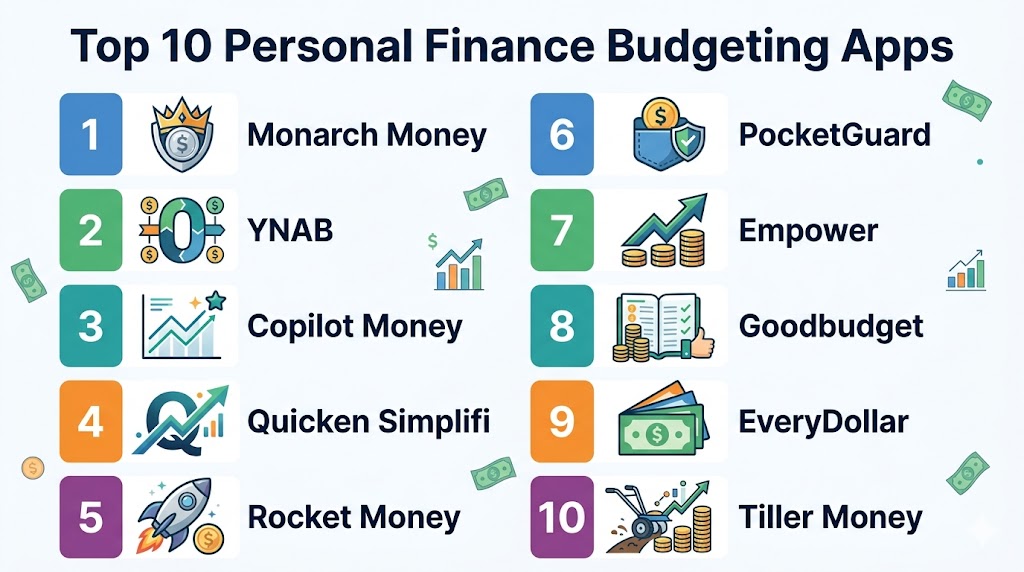
Top 10 Personal Finance Budgeting Apps
#1 — Monarch Money
Short description: Monarch Money is a premier all-in-one platform designed for modern households. It combines budgeting, investment tracking, and long-term planning into a single, clean interface that excels at collaboration and customization.
Key Features
- Multi-Player Support: Built for couples to manage joint and individual finances together.
- Customizable Dashboards: Tailor the home screen to show net worth, spending trends, or specific goal progress.
- Investment Syncing: Track all brokerage accounts and crypto holdings alongside daily spending.
- Recurring Expense Tracker: A dedicated view for all subscriptions and bills with automated renewal alerts.
- Advanced Rules Engine: Create complex rules to automate the categorization and tagging of transactions.
Pros
- Exceptionally modern and uncluttered user interface.
- Strong focus on privacy with a no-ads, subscription-based model.
- High reliability in bank connections using multiple data aggregators.
Cons
- Does not offer a permanently free tier for casual users.
- Can be overwhelming for those who only want simple expense tracking.
Platforms / Deployment
- Web / iOS / Android
- Cloud
Security & Compliance
- 256-bit AES encryption, MFA, and SOC 2 Type II compliance.
- Read-only access to financial data.
Integrations & Ecosystem
Monarch integrates with over 13,000 financial institutions and offers unique property tracking.
- Zillow for real-time home valuation
- Specialized vehicle value tracking
- CSV export for professional accounting
Support & Community
Offers a comprehensive help center, email support, and an active community roadmap where users can vote on new features.
#2 — YNAB (You Need A Budget)
Short description: YNAB is a philosophy-based app centered on four core rules to break the paycheck-to-paycheck cycle. It uses a zero-based budgeting system where every dollar is assigned a specific “job” before it is spent.
Key Features
- Zero-Based Budgeting: Allocates every cent of income to specific categories.
- Age Your Money: A unique metric that tracks how long your money sits in your account before use.
- Target Setting: Set specific goals for “Needs,” “Wants,” and “Savings” with automated tracking.
- Manual or Auto-Sync: Offers the choice of high-discipline manual entry or convenient automated bank feeds.
- Debt Payoff Tool: Specific features to model credit card payments and interest savings.
Pros
- Unrivaled for changing long-term financial behavior and reducing debt.
- Exceptional educational resources, including free live workshops and guides.
- Highly engaged community and proven results for users in debt.
Cons
- Requires more active “work” and daily management than passive trackers.
- Higher annual subscription cost compared to some competitors.
Platforms / Deployment
- Web / iOS / Android / Apple Watch / iPad
- Cloud
Security & Compliance
- Bank-level encryption and secure password protocols.
- Strict data privacy; data is never sold to third parties.
Integrations & Ecosystem
YNAB focuses on reliable bank connections and offers an open API for power users.
- Plaid for secure North American connections
- Support for Apple Card and Apple Cash auto-sync
- Open API for custom community-built tools
Support & Community
Renowned for its “human-led” support team and extensive proactive educational content.
#3 — Copilot Money
Short description: Copilot is a “best-in-class” iOS-native app that leverages artificial intelligence to provide a highly aesthetic and automated experience. It is designed for those who value slick design and “smart” features that learn from behavior.
Key Features
- AI Transaction Categorization: An advanced engine that learns your specific habits to automate labeling.
- Apple Ecosystem Integration: Native support for Apple Card, Apple Cash, and Savings accounts.
- Investment Portfolio Tracking: Real-time views of performance and asset allocation across all brokerages.
- Review Queue: A specialized workflow to verify “new” or “unusual” transactions quickly.
- Visual Spend Trends: Interactive charts that highlight month-over-month or year-over-year changes.
Pros
- Arguably the most beautiful and fluid user interface on the market.
- Very high automation level, making it ideal for busy professionals.
- Highly responsive to the Apple ecosystem and its specific financial tools.
Cons
- Lacks a dedicated Android or full-featured Windows application.
- No free tier; focuses strictly on the premium subscription model.
Platforms / Deployment
- iPhone / Mac / iPad / Apple Watch
- Cloud
Security & Compliance
- 256-bit encryption and MFA.
- Adheres to strict iOS security and privacy guidelines.
Integrations & Ecosystem
Copilot is heavily optimized for the Apple and US-based financial ecosystems.
- Direct Apple Card and Amazon integration
- Venmo integration for deep spending audits
- Zillow integration for net worth tracking
Support & Community
Active development team and a helpful in-app support chat system.
#4 — Quicken Simplifi
Short description: Quicken Simplifi is a cloud-based alternative to classic desktop software. It focuses on “powerfully simple” cash flow management, telling users exactly how much they have left for the month after bills and goals.
Key Features
- Forward-Looking Cash Flow: Projects bank balances based on recurring patterns.
- Automated Spending Plan: A dynamic budget that updates in real-time as you spend.
- Watchlists: Set specific monitors for “problem” categories like dining out or online shopping.
- Bill Manager: Consolidates all upcoming payments into a single calendar view.
- Goal Tracking: Create unlimited savings goals with specific target dates built into the budget.
Pros
- Excellent for those who want a “big picture” view of future financial health.
- Backed by the long-standing reliability and data connectivity of the Quicken brand.
- Competitive pricing for the level of feature depth provided.
Cons
- User interface can feel slightly more traditional than startup-led rivals.
- Fewer community-driven features compared to apps like YNAB.
Platforms / Deployment
- Web / iOS / Android
- Cloud
Security & Compliance
- 256-bit encryption, MFA, and bank-grade data security.
- One of the most reliable bank sync engines in the industry.
Integrations & Ecosystem
Simplifi connects to over 14,000 financial institutions, providing one of the widest sync ranges.
- Credit score monitoring included in most plans
- Investment and net worth tracking modules
- Varies / Not publicly stated
Support & Community
Professional support team and a detailed library of financial literacy resources.
#5 — Rocket Money
Short description: Rocket Money is a financial advocate tool that helps users manage subscriptions, lower bills, and track spending. It is unique for its “concierge” services that proactively save users money.
Key Features
- Subscription Concierge: Scans accounts for recurring charges and offers to cancel them for you.
- Bill Negotiation: Experts contact providers to lower internet, phone, or insurance bills.
- Sliding Scale Pricing: Allows users to choose their own monthly fee within a set range.
- Credit Score Monitoring: Includes full credit reports and history tracking modules.
- Net Worth Tracking: Syncs with bank and investment accounts for a total wealth view.
Pros
- Pays for itself by identifying and eliminating forgotten subscriptions.
- Extremely easy to use for beginners who want a quick “financial cleanup.”
- Unique bill negotiation feature that directly impacts your bottom line.
Cons
- Budgeting tools are less granular than specialized apps like Monarch.
- Success fees for bill negotiations can be high if large savings are achieved.
Platforms / Deployment
- Web / iOS / Android
- Cloud
Security & Compliance
- 256-bit SSL encryption and Plaid-based connections.
- Read-only access to financial data.
Integrations & Ecosystem
Rocket Money focuses on consumer billing and retail banking integrations.
- Major US and international banking institutions
- Insurance and utility billers for negotiation
- Varies / N/A
Support & Community
Large user base and a responsive concierge team for service cancellations.
#6 — PocketGuard
Short description: PocketGuard is designed for the “hands-off” user who wants an immediate answer to “How much can I spend right now?” It calculates a “safe-to-spend” number automatically.
Key Features
- In My Pocket Calculation: A real-time number showing available discretionary cash.
- Debt Payoff Planner: A structured tool to execute a debt-free strategy.
- Bill Discovery: Automatically identifies recurring bills and alerts to price increases.
- Spending Limits: Set “guardrails” on specific categories to prevent overspending.
- Direct Import: Connects to thousands of financial institutions for real-time data feeds.
Pros
- Excellent for those who struggle with “lifestyle creep” or impulsive spending.
- Offers a “Lifetime” payment option, which is rare for modern SaaS tools.
- Very simple and focused interface that doesn’t overwhelm the user.
Cons
- The free version is extremely limited compared to premium rivals.
- Lacks deep investment or comprehensive net worth analysis tools.
Platforms / Deployment
- Web / iOS / Android / Apple Watch
- Cloud
Security & Compliance
- 256-bit SSL encryption and secure bank authentication.
- Adheres to standard global data privacy protocols.
Integrations & Ecosystem
PocketGuard prioritizes daily spending and core banking data.
- Plaid-based bank connectivity
- Basic goal tracking and savings sync
- Varies / N/A
Support & Community
Detailed help center and a growing blog on financial literacy and habit building.
#7 — Empower (Personal Capital)
Short description: Empower is the premier tool for those focused on wealth building and investment performance. It is a powerful hybrid of a personal finance app and a high-end investment dashboard.
Key Features
- Net Worth Tracker: A comprehensive view of all assets and liabilities in one place.
- Investment Checkup: Analyze your portfolio for hidden fees and poor diversification.
- Retirement Planner: Sophisticated Monte Carlo simulations to predict retirement readiness.
- Fee Analyzer: Scans 401k and IRA accounts for high-cost mutual fund fees.
- Cash Management: Offers its own high-yield cash account integrated into the app.
Pros
- Provides the most powerful investment and retirement modeling tools for free.
- Excellent for high-net-worth individuals and serious long-term investors.
- Clean, professional interface that mimics high-end wealth management portals.
Cons
- Budgeting features are secondary and less flexible for daily tracking.
- Users may receive marketing outreach for Empower’s advisory services.
Platforms / Deployment
- Web / iOS / Android
- Cloud
Security & Compliance
- Multi-factor authentication and AES-256 encryption.
- Verified security audits and third-party penetration testing.
Integrations & Ecosystem
Empower is built for complex investment and banking ecosystems.
- Brokerage accounts (Vanguard, Fidelity, etc.)
- Real estate and liability tracking
- Internal high-yield savings accounts
Support & Community
Access to basic financial education and professional human advisors (for a fee).
#8 — Goodbudget
Short description: Goodbudget is the digital version of the classic “paper envelope” system. It is designed for those who want a “hands-on” approach and don’t necessarily want to link their bank accounts.
Key Features
- Digital Envelopes: Allocate specific amounts of cash to virtual envelopes for each category.
- Manual Data Entry: Focuses on intentionality by having you enter transactions yourself.
- Budget Syncing: Share a single household budget across multiple devices.
- Debt Tracking: Specific tools to track and plan for debt repayment.
- Annual Envelopes: Plan for “irregular” expenses like holidays or insurance premiums.
Pros
- Perfect for the “privacy-first” user who doesn’t want to link bank accounts.
- Forces a high level of awareness and discipline through manual entry.
- The free tier is actually usable for basic household budgeting needs.
Cons
- No automated bank sync means a high time commitment for the user.
- Interface looks more utilitarian compared to modern SaaS apps.
Platforms / Deployment
- Web / iOS / Android
- Cloud
Security & Compliance
- Standard web encryption and secure login.
- Manual entry reduces the risk associated with linked accounts.
Integrations & Ecosystem
Goodbudget is a self-contained budgeting environment.
- CSV import for manual bank statement uploads
- Shared cloud sync for family members
- Varies / N/A
Support & Community
Active user forum and a wealth of guides on the envelope budgeting method.
#9 — EveryDollar
Short description: EveryDollar is a zero-based budgeting tool specifically designed to follow the “Baby Steps” framework for financial freedom. It is a guided tool that focuses on simplicity and linear progress.
Key Features
- Guided Setup: Walks you through budget creation based on your goals.
- Baby Steps Tracker: Visual tracking of progress through a structured financial plan.
- Custom Categories: Easy to create, edit, and reorganize spending groups.
- Split Transactions: Ability to divide a single purchase across multiple budget items.
- Web & Mobile Sync: Access your budget across all devices with real-time updates.
Pros
- Exceptionally easy to use for beginners who need a step-by-step plan.
- Zero-based budgeting logic is very effective for controlling impulse spending.
- Very fast transaction entry for those who use the manual version.
Cons
- The free version does not include bank syncing (requires manual entry).
- Lacks advanced features like investment tracking or retirement modeling.
Platforms / Deployment
- Web / iOS / Android
- Cloud
Security & Compliance
- Standard bank-level encryption for the paid tier.
- Adheres to standard data privacy regulations.
Integrations & Ecosystem
EveryDollar focuses on the Ramsey Solutions educational ecosystem.
- Educational wellness content (on paid tier)
- Basic bank sync via Plaid
- Varies / N/A
Support & Community
Massive community of users and high-quality customer support.
#10 — Tiller Money
Short description: Tiller Money is the ultimate tool for “spreadsheet power users.” It automatically pulls bank data directly into Google Sheets or Microsoft Excel, giving you 100% control over analysis.
Key Features
- Auto-Feed to Sheets: Daily updates of bank transactions directly into a spreadsheet.
- Flexible Templates: Choose from dozens of community-built templates or build your own.
- Custom Categorization Rules: Create complex “if/then” rules to categorize data exactly.
- Net Worth Monitoring: Built-in templates to track your overall wealth over time.
- Privacy-First: You own your data; it lives in your personal Google or Microsoft drive.
Pros
- Unlimited flexibility; if it can be done in a spreadsheet, Tiller can do it.
- No cluttered app interface; just your data in its rawest form.
- Excellent for complex financial situations or those who love data tinkering.
Cons
- Requires basic to advanced knowledge of Google Sheets or Excel.
- No dedicated mobile app (though mobile Sheets/Excel apps can be used).
Platforms / Deployment
- Google Sheets / Microsoft Excel (Cloud)
- Cloud
Security & Compliance
- Uses secure, read-only bank connections.
- Two-factor authentication and platform-specific security layers.
Integrations & Ecosystem
Tiller is built to be the “engine” for your personal spreadsheet system.
- Google Workspace / Microsoft 365
- Vast library of community-built add-ons and templates
- Varies / N/A
Support & Community
One of the most helpful and technical user communities in the personal finance world.
Comparison Table
| Tool Name | Best For | Platform(s) Supported | Deployment | Standout Feature | Public Rating |
|---|---|---|---|---|---|
| Monarch Money | Modern Couples | Web, iOS, Android | Cloud | Multi-Player Collaboration | N/A |
| YNAB | Debt Reduction | Web, iOS, Android | Cloud | “Age Your Money” Metric | N/A |
| Copilot Money | Apple Power Users | iOS, Mac, Watch | Cloud | AI-Driven Categorization | N/A |
| Quicken Simplifi | Cash Flow Projections | Web, iOS, Android | Cloud | Forward-Looking Cash Flow | N/A |
| Rocket Money | Bill Reduction | Web, iOS, Android | Cloud | Automated Bill Negotiation | N/A |
| PocketGuard | Spending Guardrails | Web, iOS, Android | Cloud | “In My Pocket” Calculation | N/A |
| Empower | Portfolio Monitoring | Web, iOS, Android | Cloud | Free Investment Fee Analyzer | N/A |
| Goodbudget | Envelope Budgeting | Web, iOS, Android | Cloud | No-Sync Privacy Focus | N/A |
| EveryDollar | Guided Budgeting | Web, iOS, Android | Cloud | Baby Steps Plan Tracker | N/A |
| Tiller Money | Spreadsheet Pros | Sheets, Excel | Cloud | Auto-Sync to Spreadsheets | N/A |
Export to Sheets
Evaluation & Scoring of Personal Finance Budgeting Apps
| Tool Name | Core (25%) | Ease (15%) | Integrations (15%) | Security (10%) | Performance (10%) | Support (10%) | Value (15%) | Weighted Total |
|---|---|---|---|---|---|---|---|---|
| Monarch Money | 10 | 8 | 10 | 10 | 9 | 9 | 8 | 9.1 |
| YNAB | 10 | 6 | 9 | 9 | 10 | 10 | 8 | 8.7 |
| Copilot Money | 9 | 10 | 8 | 9 | 10 | 9 | 8 | 8.9 |
| Quicken Simplifi | 9 | 9 | 10 | 10 | 9 | 8 | 9 | 9.1 |
| Rocket Money | 8 | 10 | 9 | 9 | 9 | 8 | 8 | 8.6 |
| PocketGuard | 7 | 9 | 8 | 9 | 9 | 8 | 9 | 8.1 |
| Empower | 8 | 8 | 9 | 10 | 9 | 7 | 10 | 8.5 |
| Goodbudget | 6 | 7 | 5 | 8 | 9 | 8 | 9 | 7.0 |
| EveryDollar | 8 | 9 | 7 | 9 | 9 | 8 | 8 | 8.1 |
| Tiller Money | 9 | 4 | 10 | 9 | 10 | 10 | 9 | 8.2 |
Export to Sheets
How to Interpret the Scores
The scoring model above provides a comparative look at how these tools stack up against modern industry standards. A high Core (25%) score indicates that the tool provides a comprehensive “all-in-one” experience, including advanced budgeting and tracking. The Weighted Total represents overall balance; for instance, Monarch Money and Quicken Simplifi score highest due to their exceptional balance of ease of use and clinical depth.
When using this table, you should prioritize the columns that match your specific personality. If you are a “hands-off” user who hates manual work, the Ease (15%) and Performance (10%) columns are your most important metrics. If you are a technical manager or engineer, the Integrations (15%) and Security (10%) scores will likely be more critical for your long-term success. The weighted total is a guide, but your individual preference for a specific feature (like bill negotiation or spreadsheets) may overrule the total score.
Which Personal Finance Budgeting App Is Right for You?
Solo / Young Professional
If you are just starting your career and want to build a solid foundation, Copilot Money (on iOS) or PocketGuard are excellent entry points. Copilot offers the best “smart” features for a digital-first lifestyle, while PocketGuard provides the definitive daily spend answer that prevents early-career lifestyle creep.
Couples and Families
If you are managing shared finances, Monarch Money is the undisputed leader. Its ability to create a joint environment where both partners have equal visibility—without sharing a single login—reduces household friction and improves financial transparency for long-term goals.
For Debt Reduction
If you find yourself trapped in the paycheck-to-paycheck cycle or carrying high-interest debt, YNAB is the most effective choice. Its strict zero-based philosophy and focus on “aging your money” provide the behavioral shift necessary to reach a debt-free status quickly.
For High-Net-Worth Individuals
If you are more focused on investment performance, retirement modeling, and fee analysis, Empower is the best fit. It allows you to monitor a complex portfolio of assets and liabilities with a level of detail that general budgeting apps cannot match.
Budget vs Premium
- Budget: Goodbudget and the free version of Empower offer high utility at zero cost for those who don’t mind manual entry or focus purely on investments.
- Premium: Monarch Money and YNAB represent the higher end of the market, offering more features and a more polished experience for a monthly investment.
Feature Depth vs Ease of Use
- Feature Depth: Monarch Money and Tiller Money provide the most granular control over data and rules for those who want to “tinker” with their budget.
- Ease of Use: Rocket Money and Simplifi are designed to be “set it and forget it,” requiring minimal time from the user to maintain an accurate picture.
Integrations & Scalability
If you plan to track everything from your home value to your crypto wallet and your standard bank accounts, Monarch Money offers the best synchronization. If you are a power user who wants to build your own custom dashboards, Tiller Money is the only tool that offers unlimited scalability through spreadsheets.
Security & Compliance Needs
Every user should prioritize MFA. However, if you are working with large sums of capital or require the highest levels of documented security, Empower and Quicken Simplifi provide the highest levels of verified security protocols to satisfy rigorous standards.
Frequently Asked Questions (FAQs)
1. Is it safe to link my bank accounts to these apps?
Most reputable budgeting apps use high-level encryption and secure aggregators like Plaid to access your data in a “read-only” format. This means the app can see your transactions but cannot move your money or change your account settings. Always look for apps that offer multi-factor authentication (MFA) to add an extra layer of protection to your financial data.
2. How much time do I need to spend on my budget each week?
With automated apps like Monarch or Simplifi, you might only need 10–15 minutes a week to review and approve transaction categories. However, with more active systems like YNAB or Goodbudget, you may spend 5–10 minutes a day. The “automated” approach is better for busy professionals, while the “active” approach is superior for those needing a behavioral shift.
3. Will using these apps help me stop overspending?
Yes, by providing real-time visibility into your discretionary cash. Many apps, like PocketGuard, calculate a “safe to spend” number that accounts for all upcoming bills and savings goals. Seeing that you have less money available than your bank balance suggests is often enough of a psychological trigger to stop impulsive purchases.
4. Can these apps help me cancel unwanted subscriptions?
Apps like Rocket Money and Monarch Money specifically scan your transactions for recurring charges. Rocket Money even offers a concierge service that can cancel these for you. Identifying these “zombie” subscriptions is one of the fastest ways to make a budgeting app pay for itself within the first month of use.
5. What is the difference between zero-based budgeting and expense tracking?
Expense tracking is reactive—it tells you where your money went after it’s gone. Zero-based budgeting (like YNAB or EveryDollar) is proactive—it requires you to assign every dollar a “job” (spending, saving, or debt) before you actually spend it. Zero-based budgeting is generally more effective for reaching specific financial goals.
6. Can I use these apps for my small business or freelance work?
While some of these apps (like Tiller or Monarch) can be adapted for simple freelance tracking, they are primarily designed for personal use. If you have complex business needs like invoicing or payroll, you should look for dedicated accounting software. However, for a simple “side hustle,” categorization tags in these apps can simplify your tax reporting.
7. Do these apps work with international banks outside the US?
Support varies significantly. While YNAB and Monarch have expanding international support, others are strictly US-only. If you are in India or Europe, you should look for apps that support Open Banking standards or those that allow for CSV imports to ensure you can still manage your data without direct sync.
8. Are there any good free budgeting apps left?
Empower offers a very powerful free version focused on net worth and investments. Goodbudget and EveryDollar offer free tiers that require manual entry. While “free” is attractive, the paid apps often provide better security, no advertisements, and more reliable bank syncing, which usually leads to higher overall savings.
9. Can these apps help me negotiate my bills?
Specifically, Rocket Money offers a bill negotiation service where they contact providers on your behalf to lower rates. Other apps don’t negotiate for you but provide the data (like alerting you when a “promotional” rate has expired) so you can call and negotiate the rate yourself more effectively.
10. Can I share my budget with my spouse or partner?
Yes, apps like Monarch Money and YNAB offer specific “family” or “together” modes. These allow multiple users to see the same data on their own devices without sharing a single login. This is the best way to ensure both partners are on the same page without creating a bottleneck in financial management.
Conclusion
Selecting the right personal finance budgeting app is a foundational step in taking control of your economic future and reducing financial stress. Whether you choose the collaborative power of Monarch Money, the behavioral discipline of YNAB, or the investment-focused oversight of Empower, the “best” tool is the one you will actually use consistently. Your next step should be to identify your primary financial pain point—such as overspending, debt, or lack of investment visibility—and shortlist two apps from this list to test during their trial periods. By aligning your technology with your personal financial philosophy, you can transform your relationship with money from one of uncertainty to one of intentionality and growth.
