Introduction
Secrets scanning tools help organizations detect sensitive information such as API keys, passwords, tokens, certificates, private keys, database credentials, and cloud access keys before they are exposed in source code, containers, logs, commits, or CI/CD pipelines. In simple terms, these tools prevent developers from accidentally leaking credentials into places where attackers can find and misuse them.
Secrets scanning matters because modern software teams use many cloud services, SaaS platforms, APIs, DevOps tools, and automation pipelines. A single leaked secret can lead to data exposure, cloud account abuse, privilege escalation, supply chain risk, or expensive incident response.
Common use cases include scanning Git repositories, blocking secrets in pull requests, monitoring developer commits, checking CI/CD pipelines, scanning container images, detecting leaked cloud keys, and supporting compliance evidence.
Buyers should evaluate detection accuracy, false positive handling, Git integration, CI/CD support, cloud key validation, remediation workflow, developer experience, alert routing, policy controls, reporting, scalability, and enterprise security features.
Best for: DevSecOps teams, application security teams, platform engineers, cloud security teams, compliance teams, SaaS companies, enterprises, and software teams using Git-based development.
Not ideal for: very small teams with limited code repositories, organizations with no cloud or API-based development, or teams that already have strong secret management and pre-commit controls with minimal risk exposure.
Key Trends in Secrets Scanning Tools
- Shift-left secrets detection is becoming standard, with scanning built into developer workstations, Git hooks, pull requests, and CI/CD pipelines.
- Real-time secret validation is becoming more important because teams need to know whether a detected secret is active, expired, or harmless test data.
- Cloud credential detection is a major priority as leaked AWS, Azure, Google Cloud, and SaaS tokens can create serious security risks.
- Developer-friendly remediation is improving, with tools offering clear fix guidance, ownership routing, and pull request comments.
- Secrets scanning is expanding beyond Git into containers, build logs, artifacts, collaboration tools, tickets, and cloud storage.
- Enterprise policy control is becoming important for large organizations that need centralized rules, audit trails, and exception handling.
- Integration with secret managers is growing so teams can move exposed credentials into secure vaults and rotate them quickly.
- AI-assisted triage is starting to help prioritize findings, reduce noise, and group related exposures.
- Supply chain security programs increasingly include secrets scanning as a required control.
- Continuous monitoring is replacing one-time scanning because old repositories and historical commits may still contain exposed secrets.
How We Selected These Tools
The tools in this list were selected based on practical relevance for secrets detection, developer workflow integration, enterprise security needs, and community adoption.
- We prioritized tools that support Git repository scanning, CI/CD scanning, pre-commit checks, and developer workflow protection.
- We included a balanced mix of open-source tools, enterprise platforms, cloud-native solutions, and application security platforms.
- We considered support for active secret validation, custom rules, historical scanning, and false positive reduction.
- We evaluated integration with GitHub, GitLab, Bitbucket, CI/CD pipelines, cloud platforms, ticketing systems, and security workflows.
- We looked at usability for developers, security engineers, DevOps teams, and compliance teams.
- We considered whether the tool supports remediation guidance, alert routing, policy control, and audit reporting.
- We included tools suitable for startups, SMBs, mid-market teams, enterprises, and regulated organizations.
- We avoided guessed ratings, unverified certifications, unsupported pricing claims, and exaggerated statements.
- We used “N/A” for public ratings when not confidently known.
- We treated scoring as comparative guidance, not a universal ranking.
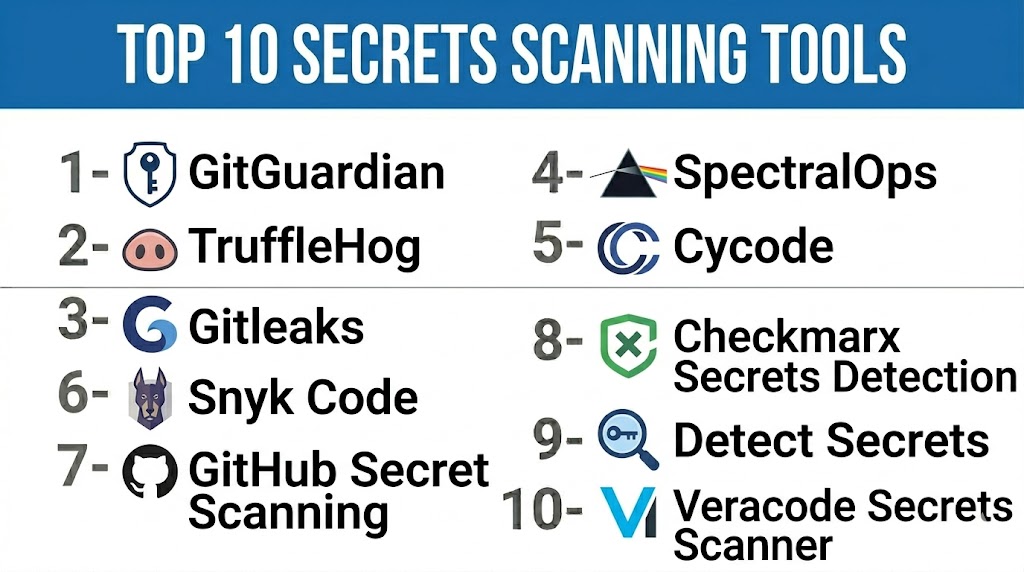
Top 10 Secrets Scanning Tools
1- GitHub Secret Scanning
Short description: GitHub Secret Scanning helps detect secrets committed to GitHub repositories and developer workflows. It is especially useful for teams already using GitHub as their primary source code platform. The tool can detect many common token patterns and help prevent sensitive credentials from being exposed in public or private repositories. It is a strong starting point for organizations that want native secrets protection inside their GitHub environment.
Key Features
- Native secret scanning for GitHub repositories
- Detection of common API keys, tokens, and credentials
- Push protection to block supported secrets before commit
- Alerts for exposed secrets
- Integration with GitHub security workflows
- Support for private and public repository protection depending on plan
- Useful for developer-first remediation
Pros
- Native fit for GitHub users
- Easy to adopt without adding a separate scanning platform
- Push protection helps reduce exposure before secrets are committed
- Good developer workflow integration
Cons
- Best suited for GitHub environments
- Broader enterprise reporting may depend on plan
- Custom detection and workflow depth may not match specialized platforms
- Teams using multiple code platforms may need additional tools
Platforms / Deployment
GitHub cloud and enterprise GitHub environments. Cloud and enterprise deployment options vary by GitHub plan.
Security & Compliance
Security controls depend on GitHub organization settings, repository permissions, access policies, and enterprise configuration. Specific compliance details should be verified based on the GitHub plan and deployment model. If not confirmed, use Not publicly stated.
Integrations & Ecosystem
GitHub Secret Scanning fits naturally into GitHub-native security and developer workflows.
- GitHub repositories
- Pull request workflows
- GitHub Advanced Security features
- Security alerts
- Developer remediation workflows
- CI/CD workflows connected to GitHub
Support & Community
Support depends on GitHub plan and enterprise agreement. Documentation is strong, and community knowledge is broad because GitHub is widely used by developers and security teams.
2- GitLab Secret Detection
Short description: GitLab Secret Detection helps teams identify secrets in GitLab repositories and CI/CD workflows. It is useful for organizations already using GitLab for source control, DevOps pipelines, and security testing. GitLab’s integrated approach makes secrets scanning part of a broader DevSecOps workflow. It is especially practical for teams that want code security checks, pipeline automation, and remediation visibility in one platform.
Key Features
- Secret detection for GitLab repositories
- CI/CD pipeline-based scanning
- Integration with GitLab security dashboards
- Support for common secret patterns
- Developer workflow integration
- Security findings inside GitLab
- Works with broader GitLab DevSecOps features
Pros
- Strong fit for GitLab users
- Integrates naturally with CI/CD pipelines
- Useful as part of a broader DevSecOps program
- Reduces need for multiple separate tools
Cons
- Best value depends on GitLab adoption
- Feature depth may vary by GitLab plan
- Multi-platform teams may need extra coverage
- Custom workflows may require configuration
Platforms / Deployment
GitLab cloud and self-managed GitLab environments. CI/CD pipeline-based scanning.
Security & Compliance
Security controls depend on GitLab access management, project permissions, CI/CD configuration, and plan. Specific compliance certifications and audit details should be verified directly. If not confirmed, use Not publicly stated.
Integrations & Ecosystem
GitLab Secret Detection works best within GitLab’s unified DevSecOps platform.
- GitLab repositories
- GitLab CI/CD
- Merge request workflows
- Security dashboards
- Vulnerability management workflows
- Issue tracking and remediation workflows
Support & Community
GitLab provides documentation, community support, and enterprise support depending on plan. Teams already using GitLab can usually adopt secret detection with less workflow disruption.
3- Gitleaks
Short description: Gitleaks is an open-source secrets scanning tool used to detect hardcoded credentials in Git repositories, files, and CI/CD workflows. It is popular among developers and DevSecOps teams because it is lightweight, fast, and easy to run locally or in pipelines. Gitleaks is especially useful for teams that want a flexible open-source scanner without committing to a large enterprise platform. It is a strong option for pre-commit scanning and repository hygiene.
Key Features
- Open-source secrets scanning
- Git repository and file scanning
- CI/CD pipeline support
- Custom rule configuration
- Baseline support for managing known findings
- Lightweight CLI workflow
- Useful for local developer checks
Pros
- Strong open-source adoption
- Easy to run in CI/CD pipelines
- Good for local and repository-level scanning
- Flexible custom rules
Cons
- Enterprise dashboards require additional tooling
- Remediation workflow must be designed by the team
- False positives may require tuning
- Does not provide a full security platform by itself
Platforms / Deployment
CLI, Linux, macOS, Windows, CI/CD pipelines, containers, and self-hosted workflows.
Security & Compliance
Security depends on how the tool is deployed and integrated. Compliance reporting is not built as a full enterprise governance platform unless combined with other systems. Use Not publicly stated for formal compliance claims unless verified in a specific deployment.
Integrations & Ecosystem
Gitleaks is flexible and can be embedded into many developer and security workflows.
- Git repositories
- Pre-commit hooks
- GitHub Actions
- GitLab CI
- Jenkins and other CI/CD tools
- Containerized scanning workflows
Support & Community
Gitleaks has an active open-source community and strong developer usage. Support is mainly community-driven unless used through a commercial platform or internal security program.
4- TruffleHog
Short description: TruffleHog is a secrets scanning tool designed to find sensitive credentials in repositories and other data sources. It is known for detecting high-entropy strings and validating certain types of secrets to determine whether they are active. TruffleHog is useful for teams that want deeper historical scanning and active secret verification. It is a strong fit for security teams investigating exposed credentials across repositories and developer workflows.
Key Features
- Secrets scanning across Git repositories and other sources
- High-entropy secret detection
- Active verification for supported secrets
- Historical commit scanning
- CLI and automation support
- Useful for incident investigation
- Custom scanning workflows
Pros
- Strong detection depth
- Active secret validation can reduce noise
- Good for historical scanning
- Useful for security investigations
Cons
- May require tuning for large environments
- False positives can still occur
- Enterprise workflow features depend on edition or setup
- Requires careful handling of sensitive scan results
Platforms / Deployment
CLI, Linux, macOS, Windows, CI/CD workflows, repository scanning, and self-hosted automation.
Security & Compliance
Security depends on scan scope, storage of findings, and access controls around results. Compliance features should be verified based on deployment or commercial offering. If not confirmed, use Not publicly stated.
Integrations & Ecosystem
TruffleHog can be used in developer, DevSecOps, and security investigation workflows.
- Git repositories
- CI/CD pipelines
- Developer workstations
- Cloud storage or data source scans depending on setup
- Security automation workflows
- Incident response workflows
Support & Community
TruffleHog has strong recognition among security teams and developers. Community resources are widely available, while enterprise support depends on the offering selected.
5- GitGuardian
Short description: GitGuardian is a secrets detection and remediation platform built for developers, security teams, and enterprises. It helps detect exposed secrets across repositories, collaboration tools, CI/CD workflows, and developer environments. GitGuardian is especially strong for organizations that need alert triage, incident management, developer collaboration, and enterprise-level visibility. It is a good fit for teams that want more than a simple scanner.
Key Features
- Secrets detection across code and developer workflows
- Real-time monitoring and alerting
- Public and private repository monitoring
- Secret validity checks for supported providers
- Incident management and remediation workflows
- Developer collaboration features
- Enterprise dashboards and reporting
Pros
- Strong enterprise remediation workflows
- Good visibility for security teams
- Useful for both prevention and monitoring
- Supports developer-focused collaboration
Cons
- May be more than small teams need
- Pricing should be validated directly
- Best value requires process adoption
- Some workflows may require tuning to reduce alert noise
Platforms / Deployment
Cloud platform. Supports Git-based workflows, developer tools, and security workflows. Deployment details may vary by plan.
Security & Compliance
Enterprise security features may include access controls, auditability, and identity integrations depending on plan. Specific certifications and compliance claims should be verified directly. If not confirmed, use Not publicly stated.
Integrations & Ecosystem
GitGuardian works well in modern DevSecOps environments where secrets exposure must be tracked from detection to remediation.
- GitHub
- GitLab
- Bitbucket
- CI/CD workflows
- Slack and alerting tools
- Ticketing and incident workflows
Support & Community
GitGuardian provides documentation, onboarding, and support options depending on plan. Community visibility is strong among application security, DevSecOps, and cloud security teams.
6- Snyk Code and Snyk IaC
Short description: Snyk provides developer security tools that include code scanning, infrastructure as code scanning, and security workflows that can support secrets risk detection as part of a broader AppSec program. Snyk is best for organizations that want secret-related checks alongside dependency scanning, container security, IaC scanning, and developer remediation. It is especially useful for teams building a consolidated developer security platform. Buyers should validate the exact secrets scanning capabilities they need before adoption.
Key Features
- Developer-first security scanning
- Code and infrastructure as code checks
- CI/CD and repository integrations
- Security issue prioritization
- Developer remediation guidance
- Integration with broader AppSec workflows
- Useful for consolidated security programs
Pros
- Strong developer experience
- Fits broader application security programs
- Good repository and CI/CD integration
- Useful for teams that want more than secrets scanning
Cons
- Secrets scanning depth should be validated for specific needs
- May be broader than required for teams wanting only secret detection
- Pricing should be verified directly
- Advanced enterprise workflows may depend on plan
Platforms / Deployment
Cloud platform, CLI, CI/CD workflows, developer IDE workflows, and repository integrations.
Security & Compliance
Security and compliance features vary by plan and deployment model. Identity integration, access controls, reporting, and audit features should be verified directly. If not confirmed, use Not publicly stated.
Integrations & Ecosystem
Snyk fits teams that want security integrated into the developer lifecycle.
- GitHub
- GitLab
- Bitbucket
- CI/CD tools
- IDE workflows
- Container and IaC workflows
Support & Community
Snyk has broad developer security adoption, documentation, and support options depending on plan. It is best suited for teams that want an integrated AppSec platform rather than a standalone secrets scanner only.
7- Semgrep
Short description: Semgrep is a code analysis platform that can help detect risky code patterns, security issues, and secrets-like patterns through customizable rules. It is useful for teams that want flexible static analysis with security rules embedded into development workflows. Semgrep is especially strong for organizations that need custom code scanning logic and developer-friendly feedback. For secrets scanning, it works best when combined with purpose-built rules and security processes.
Key Features
- Static code analysis
- Custom rules for security and code patterns
- CI/CD and pull request integration
- Developer-friendly findings
- Multi-language support
- Policy-style rule management
- Useful for custom security checks
Pros
- Flexible and developer-friendly
- Strong custom rule capability
- Useful beyond secrets scanning
- Good fit for code security teams
Cons
- Not only a dedicated secrets scanner
- Custom rules require maintenance
- Secret validation may need other tools
- Enterprise workflows depend on plan
Platforms / Deployment
Cloud platform, CLI, CI/CD workflows, developer environments, Linux, macOS, Windows.
Security & Compliance
Security and compliance details vary by edition and deployment model. Access controls, auditability, and enterprise features should be verified directly. If not confirmed, use Not publicly stated.
Integrations & Ecosystem
Semgrep works well where teams want customizable code security checks inside normal developer workflows.
- GitHub
- GitLab
- Bitbucket
- CI/CD pipelines
- Developer workstations
- Security dashboards
Support & Community
Semgrep has a strong developer and security community. Documentation and rule examples are widely used. Enterprise support depends on selected plan and deployment model.
8- detect-secrets
Short description: detect-secrets is an open-source tool originally designed to help prevent secrets from entering codebases. It uses a baseline approach to track existing findings while preventing new secrets from being introduced. It is useful for teams that want a lightweight, practical way to add secret detection to local development and CI/CD workflows. It is especially helpful for organizations that want to manage historical findings without overwhelming developers.
Key Features
- Open-source secrets detection
- Baseline-based workflow
- Pre-commit integration
- Plugin-based detection
- Useful for preventing new secrets
- Lightweight CLI usage
- Configurable scanning behavior
Pros
- Good for pre-commit protection
- Baseline workflow helps manage existing findings
- Lightweight and practical
- Easy to integrate into developer workflows
Cons
- Not a full enterprise secrets management platform
- Reporting and dashboards require additional tooling
- Custom remediation workflows must be built
- Detection depth may vary by configuration
Platforms / Deployment
CLI, Linux, macOS, Windows, pre-commit hooks, CI/CD workflows, and self-hosted developer environments.
Security & Compliance
Security depends on how the tool is configured and where scan results are stored. Formal compliance capabilities are Not publicly stated unless implemented through additional governance processes.
Integrations & Ecosystem
detect-secrets is commonly used in lightweight developer workflows where teams want to stop new secrets early.
- Pre-commit hooks
- Git repositories
- CI/CD pipelines
- Local developer environments
- Baseline files
- Custom plugin workflows
Support & Community
Support is primarily open-source and community-driven. The tool is practical for engineering teams that can maintain their own scanning rules and developer processes.
9- Yelp detect-secrets
Short description: Yelp detect-secrets is widely known as the open-source project behind the baseline-driven secrets detection approach. It helps teams scan repositories for secrets and prevent new sensitive values from being committed. It is useful for teams that want a simple and effective way to introduce secrets scanning without heavy platform complexity. Its baseline model is especially helpful when older repositories already contain known findings.
Key Features
- Baseline-based secrets scanning
- Pre-commit hook support
- Multiple detection plugins
- Audit workflow for reviewing findings
- Lightweight CLI usage
- Configurable filters
- Useful for legacy repositories
Pros
- Practical baseline approach
- Good for preventing new secrets
- Lightweight and developer-friendly
- Useful for teams starting secrets scanning
Cons
- Limited enterprise dashboarding
- Requires internal process ownership
- Not designed as a complete remediation platform
- May need tuning to reduce false positives
Platforms / Deployment
CLI, local development environments, Git workflows, pre-commit hooks, and CI/CD pipelines.
Security & Compliance
Security depends on repository access, configuration, and baseline management. Compliance reporting is not built as a full governance platform. Use Not publicly stated for formal certifications or compliance claims.
Integrations & Ecosystem
Yelp detect-secrets is most useful in developer-controlled Git workflows.
- Git repositories
- Pre-commit framework
- CI/CD pipelines
- Local developer checks
- Baseline review workflows
- Custom detection filters
Support & Community
Support is community-driven through open-source documentation and usage examples. It works best for teams that can maintain lightweight security automation internally.
10- Aikido Security
Short description: Aikido Security is a developer-focused security platform that includes code, dependency, cloud, container, and secrets-related security capabilities. It is useful for teams that want a consolidated security platform rather than separate tools for every security category. Aikido is especially relevant for startups and growing engineering teams looking for practical security coverage with lower operational complexity. Buyers should validate the exact secrets scanning coverage required for their environment.
Key Features
- Developer-focused security platform
- Code and dependency security checks
- Secrets-related scanning workflows
- Cloud and container security coverage
- Repository and CI/CD integrations
- Prioritized security findings
- Team-friendly remediation workflows
Pros
- Consolidated security approach
- Good for smaller and growing teams
- Developer-friendly workflow design
- Can reduce tool sprawl
Cons
- Secrets scanning depth should be validated directly
- May not replace specialized enterprise secrets platforms
- Advanced enterprise controls may vary by plan
- Pricing and compliance details should be confirmed
Platforms / Deployment
Cloud platform, repository integrations, CI/CD workflows, and developer security workflows.
Security & Compliance
Security features and compliance details should be verified directly with the vendor. If not confirmed, use Not publicly stated.
Integrations & Ecosystem
Aikido Security fits teams that want security checks connected directly into software delivery workflows.
- GitHub
- GitLab
- Bitbucket
- CI/CD tools
- Cloud and container workflows
- Security issue management workflows
Support & Community
Support depends on plan and customer agreement. Documentation and onboarding resources are typically important for teams adopting a consolidated developer security platform.
Comparison Table
| Tool Name | Best For | Platforms Supported | Deployment | Standout Feature | Public Rating |
|---|---|---|---|---|---|
| GitHub Secret Scanning | GitHub-native teams | GitHub repositories | Cloud / Enterprise options vary | Native push protection and repository alerts | N/A |
| GitLab Secret Detection | GitLab DevSecOps teams | GitLab repositories, CI/CD | Cloud / Self-managed | Integrated GitLab security workflow | N/A |
| Gitleaks | Open-source CI/CD scanning | CLI, Git, CI/CD | Self-hosted / CI/CD | Lightweight secrets scanning | N/A |
| TruffleHog | Deep secret discovery and validation | CLI, Git, CI/CD | Self-hosted / Cloud options vary | Active secret verification | N/A |
| GitGuardian | Enterprise secrets detection | Git platforms, CI/CD, collaboration tools | Cloud | Incident workflow and remediation | N/A |
| Snyk Code and Snyk IaC | Developer security programs | Repositories, CI/CD, IDE workflows | Cloud / CLI | Broader AppSec platform coverage | N/A |
| Semgrep | Custom code security rules | CLI, CI/CD, repositories | Cloud / CLI | Flexible custom security rules | N/A |
| detect-secrets | Lightweight pre-commit protection | CLI, Git, pre-commit | Self-hosted | Baseline-based secrets prevention | N/A |
| Yelp detect-secrets | Legacy repository baseline workflows | CLI, Git, pre-commit | Self-hosted | Managing existing findings with baselines | N/A |
| Aikido Security | Consolidated developer security | Repositories, CI/CD, cloud workflows | Cloud | Simple unified security workflow | N/A |
Evaluation & Scoring of Secrets Scanning Tools
| Tool Name | Core 25% | Ease 15% | Integrations 15% | Security 10% | Performance 10% | Support 10% | Value 15% | Weighted Total 0–10 |
|---|---|---|---|---|---|---|---|---|
| GitHub Secret Scanning | 8.8 | 9.0 | 9.0 | 8.8 | 8.8 | 8.5 | 8.5 | 8.76 |
| GitLab Secret Detection | 8.4 | 8.5 | 8.7 | 8.5 | 8.4 | 8.3 | 8.4 | 8.45 |
| Gitleaks | 8.5 | 8.7 | 8.5 | 8.0 | 8.8 | 8.0 | 9.2 | 8.57 |
| TruffleHog | 9.0 | 8.0 | 8.2 | 8.2 | 8.5 | 8.0 | 8.8 | 8.48 |
| GitGuardian | 9.2 | 8.4 | 9.0 | 8.8 | 8.7 | 8.8 | 8.0 | 8.73 |
| Snyk Code and Snyk IaC | 8.0 | 8.7 | 8.8 | 8.5 | 8.5 | 8.6 | 8.0 | 8.44 |
| Semgrep | 7.8 | 8.5 | 8.6 | 8.2 | 8.5 | 8.4 | 8.5 | 8.31 |
| detect-secrets | 7.8 | 8.6 | 8.0 | 7.8 | 8.3 | 7.5 | 9.0 | 8.16 |
| Yelp detect-secrets | 7.7 | 8.5 | 7.8 | 7.8 | 8.2 | 7.4 | 9.0 | 8.07 |
| Aikido Security | 8.0 | 8.8 | 8.3 | 8.2 | 8.4 | 8.2 | 8.3 | 8.31 |
The scores are comparative and should be used as a practical guide, not as a final ranking for every company. GitHub Secret Scanning and GitLab Secret Detection are strong choices for teams already committed to those platforms. Gitleaks, TruffleHog, and detect-secrets are strong open-source options for engineering-led teams. GitGuardian is better suited for organizations needing enterprise incident workflows, while Snyk, Semgrep, and Aikido fit broader developer security programs.
Which Secrets Scanning Tool Is Right for You?
Solo / Freelancer
Solo developers should start with lightweight tools that can run locally and inside simple CI/CD workflows. Gitleaks, TruffleHog, and detect-secrets are practical options because they are easy to run without a large platform. If you use GitHub, native GitHub Secret Scanning can also provide useful protection.
The priority should be preventing secrets before commit, rotating any exposed credentials quickly, and using a password manager or secret manager instead of hardcoding credentials.
SMB
SMBs need tools that are easy to deploy, affordable, and developer-friendly. GitHub Secret Scanning, GitLab Secret Detection, Gitleaks, TruffleHog, and Aikido Security are strong options depending on the existing development platform.
SMBs should focus on repository scanning, pre-commit checks, CI/CD scanning, and clear remediation ownership. A simple tool with strong adoption is better than a complex platform that developers ignore.
Mid-Market
Mid-market organizations usually need centralized visibility, team ownership, pull request protection, alert routing, and integration with security workflows. GitGuardian, Snyk, Semgrep, GitHub Secret Scanning, and GitLab Secret Detection are strong candidates.
Teams should evaluate how each tool handles false positives, active secret validation, incident assignment, and historical repository scanning.
Enterprise
Enterprises need scalable scanning across many repositories, teams, business units, and development platforms. GitGuardian, GitHub Secret Scanning, GitLab Secret Detection, Snyk, and Semgrep are strong enterprise options depending on the environment.
Large organizations should focus on governance, identity integration, audit trails, policy controls, exception workflows, ticketing integration, and centralized reporting.
Budget vs Premium
Open-source tools such as Gitleaks, TruffleHog, and detect-secrets provide excellent value for teams with internal security ownership. They are strong for local scanning, CI/CD checks, and baseline workflows.
Premium tools are better when teams need dashboards, alert routing, secret validation, remediation workflows, enterprise reporting, and centralized security management.
Feature Depth vs Ease of Use
For ease of use, native tools like GitHub Secret Scanning and GitLab Secret Detection are strong because they fit directly into existing repository workflows. For deeper detection and validation, TruffleHog and GitGuardian are strong options.
For custom scanning logic, Semgrep is useful. For lightweight engineering workflows, Gitleaks and detect-secrets are practical choices.
Integrations & Scalability
If your organization uses one major Git platform, start with its native scanning features. If you use multiple Git providers, CI/CD systems, and collaboration tools, consider GitGuardian, Snyk, Semgrep, or a combination of open-source scanners and centralized reporting.
Scalability depends not only on scanning speed but also on remediation workflows, alert ownership, and false positive control.
Security & Compliance Needs
Security-focused buyers should evaluate access controls, audit logs, alert routing, secret validation, encryption, SSO, role-based permissions, and compliance reporting. Teams in regulated industries should also define how exposed secrets are triaged, rotated, documented, and closed.
Do not assume certifications or compliance support unless confirmed directly by the vendor or validated in your own environment.
Frequently Asked Questions
1. What is a secrets scanning tool?
A secrets scanning tool detects sensitive values such as API keys, passwords, access tokens, private keys, and cloud credentials in code or development workflows. It helps prevent secrets from being exposed in repositories, commits, CI/CD logs, and build artifacts. These tools reduce the risk of account takeover, data exposure, and cloud abuse. They are an important part of DevSecOps and software supply chain security.
2. Why are secrets scanning tools important?
Secrets are often accidentally committed by developers during fast-moving software delivery. Once exposed, attackers may use them to access systems, databases, cloud accounts, or SaaS platforms. Secrets scanning tools detect these exposures early and help teams remediate quickly. They also improve security hygiene by encouraging safer development practices.
3. How do secrets scanning tools work?
Most secrets scanning tools use pattern matching, entropy analysis, provider-specific rules, and custom detectors to identify sensitive values. Some tools also validate whether a secret is active or expired. Scans can run locally, in pre-commit hooks, in pull requests, or inside CI/CD pipelines. Advanced tools also monitor historical commits and external repositories.
4. What types of secrets can these tools detect?
They can detect API keys, cloud access keys, database passwords, OAuth tokens, SSH keys, private certificates, service account keys, webhook secrets, and SaaS tokens. Detection quality depends on the tool’s rules and provider coverage. Some tools detect generic high-entropy strings, while others focus on known token formats. Custom rules may be needed for internal secrets.
5. Can secrets scanning prevent secrets from being committed?
Yes, some tools can block secrets before they are committed or pushed. This is often done through pre-commit hooks, push protection, pull request checks, or CI/CD gates. Prevention is better than detection after exposure. However, teams should still monitor historical repositories because older commits may already contain secrets.
6. What should teams do after finding a leaked secret?
The first step is to verify whether the secret is active. If active, rotate or revoke it immediately. Then investigate where it was exposed, who had access, and whether it was used suspiciously. Finally, remove the secret from code, update secure storage practices, and document the remediation for audit purposes.
7. Are open-source secrets scanning tools enough?
Open-source tools can be enough for teams with strong engineering ownership and simple workflows. Tools like Gitleaks, TruffleHog, and detect-secrets are useful for local scans and CI/CD pipelines. However, larger organizations may need enterprise dashboards, alert routing, audit logs, and centralized remediation. The right choice depends on scale and governance needs.
8. How do secrets scanning tools reduce false positives?
Tools reduce false positives through better detection rules, entropy tuning, allowlists, baselines, provider validation, and context-aware analysis. Some tools verify whether detected secrets are active, which helps prioritize real risks. Teams should review and tune policies regularly. A poorly tuned scanner can create alert fatigue and reduce developer trust.
9. Do secrets scanning tools replace secret managers?
No, secrets scanning tools do not replace secret managers. Secret managers store and control access to sensitive credentials, while secrets scanners detect accidental exposure. Both are important. A strong security program uses secret managers to store credentials and scanning tools to catch mistakes before or after they happen.
10. How should a company start with secrets scanning?
Start by enabling scanning on active repositories and CI/CD pipelines. Add pre-commit or push protection for high-risk secrets. Review historical repositories in phases and prioritize active secrets first. Assign clear owners for remediation, define rotation procedures, and educate developers on using secure secret storage.
Conclusion
Secrets scanning tools are essential for protecting modern software delivery pipelines from accidental credential exposure. The best tool depends on your Git platform, team size, security maturity, CI/CD setup, compliance needs, and remediation workflow. GitHub Secret Scanning and GitLab Secret Detection are strong native options for teams using those platforms, while Gitleaks, TruffleHog, and detect-secrets provide flexible open-source scanning. GitGuardian is strong for enterprise secrets incident management, while Snyk, Semgrep, and Aikido are useful when teams want broader developer security coverage. The right next step is to shortlist two or three tools, test them on real repositories, compare detection accuracy and false positives, validate remediation workflows, and then expand scanning across all active development environments.
