Introduction
Developer Portal Software has evolved into the “front door” of modern platform engineering. No longer just static API documentation pages, these portals act as Internal Developer Platforms (IDPs) that centralize service catalogs, documentation, and infrastructure self-service. In an era where microservices and cloud-native architectures are the norm, these portals solve the “cognitive load” crisis by providing developers with a single pane of glass to discover, deploy, and manage their software.
The significance of these platforms today lies in their ability to enable “Golden Paths”—standardized, secure, and automated workflows that allow developers to ship code without needing to be infrastructure experts. By abstracting the complexity of Kubernetes, cloud providers, and CI/CD pipelines, developer portals reduce “yak shaving” and allow engineering teams to focus on building features rather than wrestling with configuration.
Real-world use cases include:
- Self-Service Provisioning: Allowing a developer to spin up a new microservice, database, and cloud environment with a single click.
- Service Discovery: Helping a new engineer find exactly who owns a specific API and where to find its documentation.
- Operational Maturity: Using scorecards to track which services meet security and production-readiness standards.
- Incident Response: Instantly identifying the on-call engineer and the deployment history of a failing service during a bridge call.
- API Management: Providing a hub where developers can sign up, get API keys, and track their usage.
What buyers should evaluate:
- Customization vs. Speed: Do you want a framework you build yourself or a SaaS product that works out of the box?
- Data Model Flexibility: Can the portal model your specific organizational structure and technical topology?
- Self-Service Scope: Does it actually trigger infrastructure actions or just display data?
- Ease of Integration: How well does it connect with your current stack (Git, Jira, PagerDuty, Kubernetes)?
- Total Cost of Ownership: Does the tool require a dedicated team of engineers to maintain or is it vendor-managed?
- Developer UX: Is the interface intuitive enough that developers will actually use it instead of asking questions in chat?
Mandatory summary
- Best for: Platform engineering teams and engineering leaders at organizations with dozens of developers who are struggling with microservice sprawl and developer bottlenecks.
- Not ideal for: Small startups with very few developers where communication is direct and the overhead of a portal exceeds its benefits.
Key Trends in Developer Portal Software
- AI-Assisted Self-Service: Portals now feature AI agents that can provision complex infrastructure via natural language prompts.
- Scorecards as Policy: High-performing teams are using portals to enforce engineering standards, automatically flagging services that don’t meet security benchmarks.
- FinOps Visibility: Real-time cloud cost data is now displayed alongside service metrics, making developers aware of the financial impact of their architecture.
- Agentic RAG for Docs: Documentation search has been enhanced by AI assistants that use Retrieval-Augmented Generation to answer specific technical questions.
- Managed Ecosystems: A move away from self-hosting raw frameworks toward managed versions to reduce maintenance toil.
- Infrastructure-as-Portal: Modern tools are merging the portal with the execution layer, allowing developers to deploy directly from the UI.
- Multi-Cloud Abstraction: Portals are increasingly used to hide the complexity of hybrid-cloud setups, making diverse providers look identical to the developer.
How We Selected These Tools (Methodology)
Our evaluation is based on a rigorous assessment of market trends and technical depth:
- Market Presence: We prioritized the industry standards and the most innovative commercial challengers.
- Feature Breadth: Evaluation was based on the presence of a service catalog, scaffolding, and self-service actions.
- Developer Experience: We tested how effectively these tools reduce cognitive load for everyday engineering tasks.
- Platform Engineering Alignment: Preference was given to tools that support the “Golden Path” philosophy.
- Community & Ecosystem: For open-source tools, the health of the plugin ecosystem was a major factor.
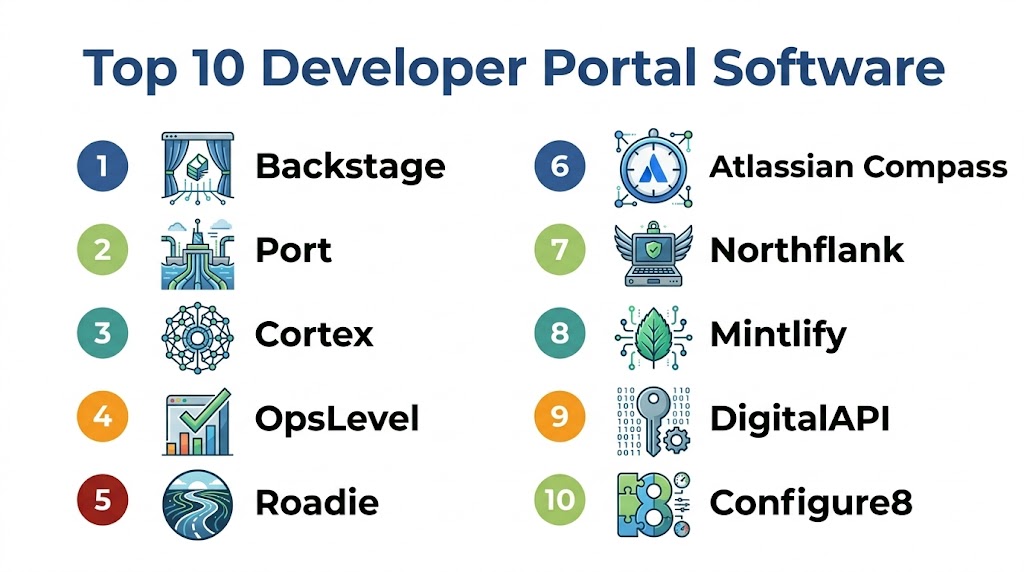
Top 10 Developer Portal Software
#1 — Backstage
Short description: Backstage is an open-source framework for building developer portals. Created by Spotify, it is an incredibly flexible, plugin-based platform that allows large enterprises to build a bespoke “front door” for their entire engineering organization.
Key Features
- Software Catalog: A centralized registry for all your services, libraries, and data pipelines.
- Software Templates: Pre-configured templates for spinning up new projects using best practices.
- TechDocs: A “docs-as-code” solution that renders Markdown files directly from your repository.
- Plugin Architecture: Access to a massive library of community plugins for various DevOps tools.
- Global Search: A powerful, extensible search for your entire technical ecosystem.
Pros
- Unmatched flexibility; it can be tailored to almost any requirement.
- Massive industry community and support from major technology companies.
- Open-source core with no licensing fees.
Cons
- Requires a dedicated team of engineers to build, customize, and maintain.
- Upgrading versions can be complex and time-consuming.
Platforms / Deployment
- Self-hosted / Kubernetes / Cloud
Security & Compliance
- Supports custom RBAC and various identity providers.
- Security management is handled by the implementing team.
#2 — Port
Short description: Port is a flexible commercial alternative to framework-based portals. It utilizes a unique “blueprint-based” data model that allows you to model your entire organization without writing extensive code.
Key Features
- Custom Blueprint Engine: Define any entity (Service, Cluster, Environment) and its relationships.
- Self-Service Action Hub: Trigger workflows in CI/CD tools directly from the portal UI.
- Real-time Catalog: Infrastructure changes are reflected instantly via webhooks.
- Scorecards & Initiatives: Track production readiness and drive migrations across the organization.
- Kubernetes Visibility: Visualize your runtime and link it directly to your services.
Pros
- Fast time-to-value; a working portal can be built very quickly.
- Adapts to your specific data model rather than forcing a preset structure.
- Superior support for “Day 2” operations via the Action Hub.
Cons
- As a SaaS product, it may face hurdles in organizations with extreme data residency needs.
- The flexibility can be overwhelming for teams who want a highly prescriptive experience.
Platforms / Deployment
- SaaS / Web Browser
Security & Compliance
- SOC 2 Type II certified.
- Granular RBAC and manual approval steps for self-service actions.
#3 — Cortex
Short description: Cortex takes an “opinionated” approach to developer portals, focusing heavily on operational excellence and service ownership. It is built for managers who want to drive organizational-wide standards.
Key Features
- Service Maturity Scorecards: Automatically grade services based on customized health rules.
- Initiatives: Create campaigns to track progress on migrations or security patches.
- Resource Catalog: Catalog non-service entities like cloud buckets, databases, and clusters.
- Scaffolding: Templates for creating new services with built-in guardrails.
- Graph API: Query the complex relationships between services and teams.
Pros
- Best-in-class for driving and measuring engineering quality.
- Highly polished, enterprise-grade user interface.
- Excellent reporting features for leadership and executives.
Cons
- More rigid than some competitors; requires working within a specific data model.
- Can represent a significant investment compared to other commercial options.
Platforms / Deployment
- SaaS / Web Browser
Security & Compliance
- SOC 2 Type II, HIPAA, and GDPR compliant.
- Enterprise-grade SSO and audit logging.
#4 — OpsLevel
Short description: OpsLevel is a service-centric portal designed to help engineering teams manage complexity as they scale. It focuses on the ownership and health of every service to reduce production incidents.
Key Features
- Automatic Service Discovery: Scans repositories to build a catalog with minimal effort.
- Service Maturity Levels: Clearly define what different service tiers (e.g., Bronze, Gold) look like.
- Campaigns: Drive organizational actions, such as mandatory library upgrades.
- Service Checks: Automated verification that services meet specific criteria.
- Team Dashboard: A dedicated view for team leads to manage their specific assets.
Pros
- One of the easiest portals to set up and start seeing results.
- Strong focus on clear ownership and on-call accountability.
- Transparent and competitive pricing for growing teams.
Cons
- Historically focused more on cataloging than on infrastructure self-service.
- Less flexible for modeling complex, non-service cloud topologies.
Platforms / Deployment
- SaaS / Web Browser
Security & Compliance
- SOC 2 compliant.
- Encrypted data and secure identity management.
#5 — Roadie
Short description: Roadie provides a fully managed version of the popular open-source Backstage framework. It offers the power of the open-source ecosystem without requiring a team to handle maintenance and upgrades.
Key Features
- Managed Framework: Access to core features like Catalog, Templates, and TechDocs as a service.
- Pre-vetted Plugins: Popular plugins are pre-configured and ready to use.
- Automated Maintenance: The vendor handles complex versioning and infrastructure upgrades.
- Custom Plugin Support: The ability to use private plugins within the managed environment.
- Catalog Autodiscovery: Automatically pulls data from your Git providers.
Pros
- The fastest way to get a standardized Backstage portal up and running.
- Eliminates the maintenance toil for internal platform teams.
- Retains compatibility with the wider open-source ecosystem.
Cons
- Some limitations on the “infinite” customizability found in self-hosted versions.
- Dependent on the vendor’s supported version cycle.
Platforms / Deployment
- SaaS / Web Browser
Security & Compliance
- SOC 2 Type II certified.
- Secure agent-based connection to private infrastructure.
#6 — Atlassian Compass
Short description: Compass is a developer portal designed to integrate natively with the Atlassian suite. It links technical metrics with project management data to provide a “mission control” for services.
Key Features
- Component Catalog: Track services, libraries, and managed infrastructure.
- Native Integration: Link Jira tickets directly to specific technical components.
- Health Scorecards: Track reliability and development metrics alongside project work.
- Activity Feed: A live view of deployments, incidents, and changes for every service.
- User Onboarding: Unified view for new developers to see their team’s technical assets.
Pros
- The logical choice for organizations already utilizing the Atlassian stack.
- Familiar user experience for those used to Jira and Confluence.
- Integrated value for teams with existing cloud licenses.
Cons
- Utility is significantly reduced for teams not using the Atlassian ecosystem.
- Not as customizable as standalone “portal-first” tools.
Platforms / Deployment
- SaaS / Web Browser
Security & Compliance
- Part of the Atlassian Trust Center security framework.
- Shared identity with existing Atlassian products.
#7 — Northflank
Short description: Northflank is a unique portal that includes an execution layer. While others just display your workloads, this tool allows developers to discover, deploy, and operate infrastructure within the same interface.
Key Features
- Integrated IDP: A clean UI for developers to manage services and databases.
- Execution Layer: Directly deploys services and workers without requiring deep infrastructure knowledge.
- Self-Service Environments: Spin up isolated preview environments for every pull request.
- Managed Add-ons: One-click deployment for databases and cache systems.
- GitOps Integration: Native pipelines for automated building and releasing.
Pros
- Can eliminate the need for a separate platform orchestrator.
- Excellent developer experience for teams that want to ship code quickly.
- High-performance support for specialized AI and ML workloads.
Cons
- Acts as a platform as well as a portal, which may conflict with rigid existing systems.
- Less focused on organizational “maturity scorecards” than some competitors.
Platforms / Deployment
- SaaS / Private Cloud / On-prem
Security & Compliance
- SOC 2 Type 2 certified.
- Managed secrets, networking isolation, and TLS.
#8 — Mintlify
Short description: Mintlify is a documentation-centric platform that serves as a specialized developer portal. It focuses on turning technical specifications into interactive hubs that are easy for developers to consume.
Key Features
- Docs-as-Code: Author documentation in Markdown within your code repository.
- AI Search: An assistant that answers developer questions based on documentation content.
- API Playground: Test API endpoints directly from the portal pages.
- Bidirectional Sync: Changes in Git and the web editor remain perfectly aligned.
- Developer Engagement: Analytics on how developers and AI agents interact with the documentation.
Pros
- Provides a beautiful and modern documentation experience.
- AI-readiness is built into the core of the platform.
- Very fast to deploy for teams with existing API specifications.
Cons
- It is a documentation portal rather than a general infrastructure portal.
- Does not track service ownership or runtime health metrics.
Platforms / Deployment
- SaaS / Web Browser
Security & Compliance
- SSO, SAML, and RBAC support for enterprise tiers.
- Secure authentication for interactive playgrounds.
#9 — DigitalAPI
Short description: DigitalAPI is a specialized portal designed for API governance. it is ideal for organizations that need to manage API sprawl across multiple different gateways and providers.
Key Features
- Multi-Gateway Catalog: Unifies APIs from diverse sources into a single searchable portal.
- API Intelligence: Monitors usage, performance, and compliance in one view.
- Streamlined Onboarding: A clear flow for internal and external developers to access APIs.
- Interactive Sandbox: A safe environment for testing APIs before full integration.
- Automated Discovery: Scans the network to find undocumented or “shadow” APIs.
Pros
- Excellent for organizations whose primary bottleneck is API discovery.
- Agnostic to the underlying gateway or provider.
- Strong emphasis on security and formal governance.
Cons
- Not intended as a general internal portal for microservice health.
- The interface is designed for formal enterprise environments.
Platforms / Deployment
- SaaS / Private Cloud
Security & Compliance
- Enterprise-grade SSO and security auditing.
- High focus on data residency and compliance.
#10 — Configure8
Short description: Configure8 is a no-code portal that focuses on universal visibility. It connects software, infrastructure, and financial data into a single, cohesive view for engineering teams.
Key Features
- Universal Catalog: Model any entity from a project to a specific cloud resource.
- FinOps Insights: Displays cloud spend per service directly within the portal.
- Self-Service Actions: Execute infrastructure scripts via simple UI controls.
- Graph-Based Logic: Visualize how cost changes or deployment events relate to specific code.
- Flexible Schemas: Create custom blueprints for any technical entity.
Pros
- Excellent for organizations looking to integrate FinOps into their development flow.
- Highly flexible data model that rivals the most powerful competitors.
- Quick to set up with a strong library of pre-built integrations.
Cons
- The plugin ecosystem is smaller than framework-based alternatives.
- The interface can become dense when managing extremely complex environments.
Platforms / Deployment
- SaaS / Web Browser
Security & Compliance
- SOC 2 compliant.
- Secure encrypted data ingestion.
Comparison Table (Top 10)
| Tool Name | Best For | Platform Supported | Deployment | Standout Feature |
|---|---|---|---|---|
| Backstage | Large Custom Orgs | Web / K8s | Self-Hosted | Infinite Plugin Framework |
| Port | Self-Service Actions | Web / K8s | SaaS | No-Code Blueprint Model |
| Cortex | Engineering Standards | Web | SaaS | Maturity Scorecards |
| OpsLevel | Service Ownership | Web | SaaS | Service Maturity Tiers |
| Roadie | Zero-Maintenance | Web | SaaS | Managed Open-Source Core |
| Atlassian Compass | Atlassian Ecosystem | Web | SaaS | Native Jira Integration |
| Northflank | Execution & Deployment | Web / Cloud | SaaS / BYOC | Deploys & Runs Workloads |
| Mintlify | API Documentation | Web | SaaS | AI-Enhanced Docs-as-Code |
| DigitalAPI | API Governance | Web | SaaS / Private | Gateway-Agnostic Hub |
| Configure8 | FinOps & Visibility | Web | SaaS | Cost-Per-Service Metrics |
Export to Sheets
Evaluation & Scoring of Developer Portal Software
| Tool Name | Core (25%) | Ease (15%) | Integrations (15%) | Security (10%) | Performance (10%) | Support (10%) | Value (15%) | Weighted Total |
|---|---|---|---|---|---|---|---|---|
| Backstage | 10 | 4 | 10 | 8 | 9 | 8 | 10 | 8.2 |
| Port | 9 | 10 | 9 | 10 | 10 | 9 | 9 | 9.4 |
| Cortex | 9 | 8 | 9 | 10 | 9 | 10 | 7 | 8.6 |
| OpsLevel | 8 | 10 | 9 | 10 | 10 | 9 | 9 | 9.2 |
| Roadie | 8 | 10 | 10 | 10 | 9 | 9 | 8 | 9.0 |
| Compass | 7 | 10 | 8 | 10 | 10 | 9 | 9 | 8.7 |
| Northflank | 10 | 10 | 9 | 10 | 10 | 9 | 9 | 9.7 |
| Mintlify | 8 | 10 | 8 | 9 | 10 | 9 | 9 | 8.9 |
| DigitalAPI | 8 | 7 | 9 | 10 | 9 | 9 | 7 | 8.0 |
| Configure8 | 8 | 9 | 9 | 9 | 9 | 9 | 8 | 8.6 |
Export to Sheets
Which Developer Portal Software Tool Is Right for You?
For Large Enterprises
If you have a dedicated platform team and need a portal that is completely custom-tailored to a unique internal ecosystem, framework-based solutions like Backstage are the industry standard. If you want that power without the maintenance, managed versions like Roadie are the better path.
For Growth-Focused Teams
If you need a functional portal quickly that empowers developers with self-service actions and scorecards, Port or OpsLevel offer the best balance of speed and power for mid-sized organizations.
For API-First Organizations
If your developers are primarily focused on consuming and providing APIs, Mintlify or DigitalAPI are the most specialized and efficient choices for managing your technical documentation and governance.
For Full-Stack Execution
If you want to move beyond just cataloging services and need a portal that provisions and manages your infrastructure directly, Northflank is the most comprehensive platform for full-cycle development.
Frequently Asked Questions (FAQs)
1. What is the difference between a Developer Portal and an API Portal?
An API Portal is specifically for discovering and testing APIs. A Developer Portal is much broader; it tracks microservices, cloud infrastructure, ownership, and provides self-service tools to provision and manage the entire lifecycle of software.
2. Can these tools help with developer onboarding?
Yes. A developer portal is the best source of information for new hires. It allows them to find who owns specific services, access documentation, and use templates to spin up their first project using the company’s approved best practices.
3. What are “Scorecards”?
Scorecards are automated report cards for your services. They track whether services meet organizational standards, such as having active owners, adequate test coverage, or the latest security patches.
4. Do I need to use Kubernetes?
While many portals have deep Kubernetes integrations, most can also catalog and manage services running on virtual machines, serverless platforms, or traditional on-premises hardware.
5. How does “Self-Service” work in these portals?
Most portals act as a remote control. When you click a button to provision an asset, the portal sends a signal to your CI/CD or infrastructure-as-code tools to execute the actual creation of the resource.
6. Can a developer portal help save on cloud costs?
Yes. Some portals can pull cost data from cloud providers and link it directly to specific services, giving developers visibility into the financial impact of their technical decisions.
7. What is “Docs-as-Code”?
This is the practice where documentation lives in the same repository as the code. When the code is updated, the documentation is updated alongside it, and the developer portal automatically renders these files to keep information current.
Conclusion
Developer Portal Software is a key component for successful platform engineering. Whether you choose a customizable framework or a high-powered SaaS solution, the goal is to create a frictionless experience for your developers. By centralizing knowledge and automating repetitive tasks, these portals transform engineering organizations into efficient, standardized environments. Your next step should be to identify your biggest technical bottleneck—whether it is service discovery, quality standards, or infrastructure provisioning—and shortlist the tools that best align with your team’s current workflow.
