Introduction
Function-as-a-Service FaaS is a cloud computing model that allows developers to run small pieces of code as independent functions without managing servers, virtual machines, operating systems, or backend infrastructure. A function is executed only when triggered by an event such as an API request, file upload, database update, message queue event, webhook, or scheduled task.
FaaS is a major part of serverless computing because it helps teams build applications faster, scale automatically, and reduce infrastructure overhead. Instead of running always-on servers, teams deploy focused functions that perform specific tasks. This makes FaaS useful for APIs, backend automation, real-time processing, event-driven workflows, data transformation, authentication flows, and lightweight microservices.
For businesses, the right FaaS platform should support the preferred cloud ecosystem, programming languages, security requirements, deployment workflow, monitoring needs, and cost model. Some platforms are best for large cloud-native systems, while others are better for frontend teams, edge applications, self-hosted environments, or enterprise integration.
Real-world use cases
- API backends for web apps, mobile apps, SaaS platforms, and internal portals
- Webhook processing for payments, CRM updates, notifications, and third-party integrations
- File processing such as image resizing, document parsing, compression, and validation
- Scheduled automation for reports, cleanup tasks, reminders, sync jobs, and alerts
- Event-driven workflows triggered by storage, queues, databases, and streaming services
- Edge logic for redirects, personalization, authentication, caching, and routing
- Data processing for logs, user events, analytics pipelines, and lightweight transformations
Evaluation Criteria for Buyers
When selecting a FaaS platform, buyers should evaluate practical factors that affect cost, scalability, security, and developer productivity.
- Runtime support: Check whether the platform supports languages such as JavaScript, Python, Java, Go, .NET, Ruby, or custom containers.
- Trigger options: Look for support for HTTP requests, queues, storage events, database events, schedulers, and event buses.
- Cold start performance: Evaluate whether the platform is suitable for latency-sensitive applications.
- Scalability controls: Review concurrency limits, regional availability, throttling, timeout limits, and execution settings.
- Security controls: Check IAM, secrets management, private networking, encryption, audit logging, and access policies.
- Observability: Confirm availability of logs, metrics, traces, alerts, dashboards, and error monitoring.
- Deployment workflow: Look for CLI support, Git workflows, CI/CD integrations, infrastructure-as-code, and rollback features.
- Cost structure: Understand pricing based on invocations, memory, duration, bandwidth, requests, and logging.
- Ecosystem fit: Choose a platform that works well with your databases, storage, APIs, monitoring tools, and identity systems.
- Vendor lock-in: Consider how portable your functions, event triggers, permissions, and deployment configuration will be.
Best for: Teams building scalable, event-driven applications without managing servers.
Not ideal for: Long-running workloads, highly stateful applications, always-on services, or systems requiring deep control over operating systems and infrastructure.
Key Trends in Function-as-a-Service FaaS
- Event-driven architecture is becoming common as businesses break large backend systems into smaller event-based services.
- Edge functions are gaining attention because teams want faster response times and logic closer to users.
- Serverless APIs are growing as teams build lightweight backends without managing application servers.
- Container-based serverless is expanding for teams that need more runtime flexibility and custom dependencies.
- Observability is now essential because distributed functions are difficult to troubleshoot without strong logs and traces.
- Security governance is becoming more important as functions often access databases, APIs, secrets, and customer data.
- Cost control is a growing priority because high invocation volume, retries, logging, and inefficient memory settings can increase spend.
- Developer experience is a major differentiator with local testing, preview deployments, templates, and Git-based workflows.
- Hybrid and self-hosted FaaS options are still relevant for teams that need infrastructure control or Kubernetes alignment.
- Multi-cloud interest is increasing, but real portability remains difficult because triggers and identity models vary by provider.
Methodology: How We Selected These Platforms
This list focuses on credible and widely used FaaS platforms across cloud-native, enterprise, edge, frontend, and self-hosted environments. The selection is based on practical usefulness for real workloads rather than hype.
- Strength of function execution model
- Breadth of supported triggers
- Runtime and deployment flexibility
- Cloud ecosystem integration
- Security and access control options
- Monitoring and debugging capabilities
- Fit for APIs, automation, event processing, and edge workloads
- Developer experience and deployment simplicity
- Suitability for startups, SMBs, enterprises, and platform teams
- Practical scalability and production readiness
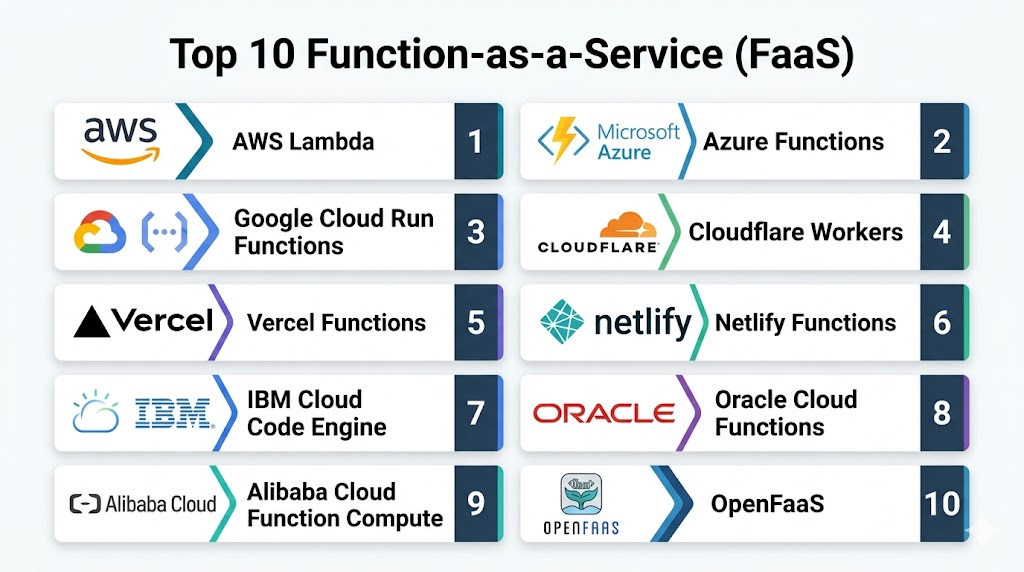
Top 10 Function-as-a-Service FaaS Platforms
- AWS Lambda
- Azure Functions
- Google Cloud Run Functions
- Cloudflare Workers
- Vercel Functions
- Netlify Functions
- IBM Cloud Code Engine
- Oracle Cloud Functions
- Alibaba Cloud Function Compute
- OpenFaaS
1 — AWS Lambda
AWS Lambda is a highly adopted FaaS platform for running event-driven code without managing servers. It is especially useful for teams already using AWS services because it connects deeply with storage, queues, databases, API gateways, monitoring, event buses, and workflow tools. Lambda is commonly used for APIs, backend automation, file processing, stream processing, scheduled jobs, and enterprise cloud applications that need automatic scaling.
Key Features
- Event-driven function execution
- Automatic scaling based on incoming demand
- Support for multiple runtimes and custom runtimes
- Integrations with storage, queues, databases, APIs, and event services
- Versioning and alias support
- Scheduled and asynchronous execution options
- Built-in logging and monitoring integrations
Pros
- Strong ecosystem for cloud-native workloads
- Mature security and access control model
- Good fit for large-scale production systems
Cons
- Can become complex in distributed architectures
- Requires careful cost and performance monitoring
- Best suited for teams already using AWS
Platforms / Deployment
Cloud-based deployment through AWS. Supports console, CLI, SDKs, infrastructure-as-code, and CI/CD workflows.
Security & Compliance
Supports IAM policies, resource permissions, encryption integrations, secrets management, audit logging, and networking controls. Compliance depends on workload configuration and selected services.
Integrations & Ecosystem
AWS Lambda works deeply with AWS services such as object storage, API management, event routing, databases, queues, monitoring, and orchestration tools.
Support & Community
AWS provides official documentation, enterprise support, partner ecosystem support, training resources, and a large developer community.
2 — Azure Functions
Azure Functions is Microsoft’s FaaS platform for building event-driven applications in the Azure ecosystem. It is a strong choice for organizations using Microsoft cloud services, .NET development, Azure DevOps, Microsoft identity tools, and enterprise integration workflows. Azure Functions supports APIs, background jobs, scheduled automation, queue processing, file triggers, and workflow orchestration through Durable Functions.
Key Features
- Event-driven function execution
- Strong support for .NET and other popular languages
- HTTP, timer, queue, storage, and event triggers
- Durable Functions for workflow orchestration
- Integration with Azure identity and monitoring services
- Multiple hosting options for different performance needs
- Works well with Azure DevOps and Git-based workflows
Pros
- Strong fit for Microsoft and Azure environments
- Useful orchestration support through Durable Functions
- Good enterprise governance and identity alignment
Cons
- Best experience is inside Azure ecosystem
- Hosting options can feel complex for new users
- Performance tuning requires platform knowledge
Platforms / Deployment
Cloud-based deployment through Microsoft Azure. Supports portal, CLI, Visual Studio, VS Code, Azure DevOps, Git workflows, and infrastructure-as-code.
Security & Compliance
Supports managed identities, role-based access control, Key Vault integrations, private networking, logging, and Azure security services. Compliance depends on workload configuration.
Integrations & Ecosystem
Azure Functions integrates with Azure Storage, Event Grid, Service Bus, Cosmos DB, API Management, Key Vault, Monitor, and Microsoft identity services.
Support & Community
Microsoft offers official documentation, enterprise support, developer learning resources, partner support, and a strong developer ecosystem.
3 — Google Cloud Run Functions
Google Cloud Run Functions is a serverless function platform for building event-driven applications within Google Cloud. It is suitable for APIs, automation tasks, file processing, data workflows, scheduled jobs, and backend services. Teams using Google Cloud Storage, Pub/Sub, Firestore, BigQuery, and cloud monitoring services can use it to build scalable functions without managing servers.
Key Features
- Serverless function execution
- HTTP and event-based triggers
- Automatic scaling
- Support for common programming languages
- Integration with Google Cloud events and services
- Logging and monitoring through Google Cloud tools
- Suitable for APIs, automation, and data processing
Pros
- Simple developer experience
- Strong fit for Google Cloud users
- Useful for event-driven data and analytics workflows
Cons
- Best suited for Google Cloud environments
- Advanced architectures may require additional services
- Portability requires planning
Platforms / Deployment
Cloud-based deployment through Google Cloud. Supports console, CLI, source deployment, and CI/CD workflows.
Security & Compliance
Supports IAM, service accounts, Secret Manager, logging, monitoring, and networking controls. Compliance depends on configuration and workload design.
Integrations & Ecosystem
Google Cloud Run Functions connects with Cloud Storage, Pub/Sub, Firestore, BigQuery, Eventarc, Cloud Scheduler, Secret Manager, Cloud Logging, and Cloud Monitoring.
Support & Community
Google Cloud provides documentation, support plans, technical resources, community support, and partner ecosystem services.
4 — Cloudflare Workers
Cloudflare Workers is a serverless compute platform designed to run code at the edge. It is ideal for low-latency web applications, request routing, authentication logic, personalization, redirects, API gateways, and lightweight backend services. Because Workers runs close to users through Cloudflare’s network, it is especially valuable for globally distributed applications and performance-focused web teams.
Key Features
- Edge-based serverless execution
- Global deployment model
- Fast startup for request handling
- JavaScript and WebAssembly support
- Integration with Cloudflare developer services
- Useful for routing, personalization, and API logic
- Supports edge storage and stateful patterns through related services
Pros
- Strong fit for low-latency edge workloads
- Good developer experience for web teams
- Useful for routing, security, and personalization
Cons
- Runtime model differs from traditional FaaS
- Not suitable for every backend workload
- Best value comes inside Cloudflare ecosystem
Platforms / Deployment
Managed edge deployment through Cloudflare. Supports CLI workflows, dashboard-based management, and developer tooling.
Security & Compliance
Supports environment secrets, access controls, platform security features, and Cloudflare security services. Specific compliance details vary by plan and configuration.
Integrations & Ecosystem
Cloudflare Workers integrates with Cloudflare Pages, KV, Durable Objects, R2, D1, Queues, Access, CDN, DNS, and security services.
Support & Community
Cloudflare offers documentation, developer examples, community resources, paid support options, and strong adoption among web developers.
5 — Vercel Functions
Vercel Functions is a serverless function platform built for modern web applications and frontend-driven teams. It is commonly used with frameworks such as Next.js to create API routes, form handlers, authentication logic, webhooks, and lightweight backend services. Vercel is especially strong for teams that want hosting, Git deployment, preview environments, serverless functions, and edge capabilities in one workflow.
Key Features
- Serverless functions for web applications
- Edge function support for low-latency use cases
- Strong frontend framework integration
- Git-based deployment workflow
- Preview deployments for testing changes
- API route support
- Rollback and deployment management features
Pros
- Excellent for frontend and full-stack web teams
- Strong fit for modern JavaScript frameworks
- Simple deployment and preview workflow
Cons
- Best suited for web-focused workloads
- Heavy backend workloads may need external services
- Platform-specific patterns may increase dependency
Platforms / Deployment
Cloud deployment through Vercel. Supports Git-based deployment, CLI workflows, preview environments, and framework-based deployment.
Security & Compliance
Supports team access controls, environment variables, deployment protections, and platform security features. Specific compliance details vary by plan and configuration.
Integrations & Ecosystem
Vercel works with Git providers, frontend frameworks, headless CMS tools, authentication providers, databases, API services, and observability tools.
Support & Community
Vercel provides documentation, examples, enterprise support options, framework-focused resources, and a large developer community.
6 — Netlify Functions
Netlify Functions provides serverless backend logic for websites, static applications, JAMstack projects, and frontend-heavy products. It allows teams to add APIs, form handlers, scheduled jobs, webhooks, authentication logic, and automation tasks without building a separate backend server. Netlify is useful for agencies, startups, frontend teams, and small businesses that want simple deployment and integrated hosting.
Key Features
- Serverless functions for web projects
- Git-based deployment workflow
- Form handling and webhook support
- Scheduled functions
- Edge function capabilities
- Environment variable management
- Integration with static and frontend hosting
Pros
- Easy for frontend teams to adopt
- Good for web projects and JAMstack applications
- Integrated hosting and function workflow
Cons
- Less suitable for complex backend systems
- Advanced observability may need third-party tools
- Enterprise-scale backend workloads may require additional infrastructure
Platforms / Deployment
Cloud deployment through Netlify. Supports Git-based workflows, CLI tools, build pipelines, and integrated web hosting.
Security & Compliance
Supports team permissions, environment variables, access controls, and platform security features. Specific compliance details vary by plan and configuration.
Integrations & Ecosystem
Netlify integrates with Git providers, static site generators, frontend frameworks, headless CMS platforms, form workflows, webhooks, and identity services.
Support & Community
Netlify offers documentation, support plans, community forums, tutorials, and a strong JAMstack developer community.
7 — IBM Cloud Code Engine
IBM Cloud Code Engine is a serverless platform that supports applications, jobs, and container-based workloads without requiring teams to manage infrastructure. While it is broader than traditional FaaS, it can support function-like serverless workloads where teams want managed execution and container flexibility. It is most suitable for IBM Cloud users, enterprise teams, batch tasks, APIs, and containerized automation.
Key Features
- Serverless container execution
- Support for applications and jobs
- Automatic scaling
- Managed infrastructure abstraction
- Container-based deployment model
- Suitable for APIs, batch tasks, and event-driven workloads
- Integration with IBM Cloud services
Pros
- Flexible for container-based serverless workloads
- Useful beyond simple functions
- Good fit for IBM Cloud customers
Cons
- Not as function-native as pure FaaS platforms
- Smaller ecosystem than major hyperscale providers
- Best suited for teams already using IBM Cloud
Platforms / Deployment
Cloud deployment through IBM Cloud. Supports container-based workflows and managed serverless deployment.
Security & Compliance
Supports IBM Cloud IAM, secrets, access management, container security controls, and cloud security services. Compliance depends on configuration.
Integrations & Ecosystem
IBM Cloud Code Engine connects with IBM Cloud Container Registry, Object Storage, Event Streams, cloud databases, logging, monitoring, and CI/CD workflows.
Support & Community
IBM provides documentation, enterprise support, partner resources, and cloud platform support.
8 — Oracle Cloud Functions
Oracle Cloud Functions is Oracle Cloud Infrastructure’s serverless FaaS platform for running event-driven code without managing servers. It is useful for organizations using Oracle Cloud services, enterprise databases, application integration workflows, backend APIs, automation tasks, and cloud-native systems. It provides function execution with OCI-native identity, monitoring, networking, and event services.
Key Features
- Serverless function execution
- Event-driven workload support
- Integration with Oracle Cloud Infrastructure
- Container-based function packaging
- Automatic scaling
- API and automation support
- CLI and developer tool support
Pros
- Strong fit for Oracle Cloud customers
- Useful for enterprise application integration
- Container-based packaging adds flexibility
Cons
- Best suited for OCI environments
- Smaller developer ecosystem than major FaaS leaders
- Requires Oracle Cloud knowledge for best results
Platforms / Deployment
Cloud deployment through Oracle Cloud Infrastructure. Supports console, CLI, container workflows, and cloud-native deployment methods.
Security & Compliance
Supports OCI IAM, compartments, policies, secrets, networking controls, logging, and cloud security services. Compliance depends on workload configuration.
Integrations & Ecosystem
Oracle Cloud Functions integrates with OCI Events, API Gateway, Object Storage, Streaming, Vault, Container Registry, Oracle databases, and monitoring services.
Support & Community
Oracle provides documentation, enterprise support plans, training resources, and partner support options.
9 — Alibaba Cloud Function Compute
Alibaba Cloud Function Compute is a serverless FaaS platform for running event-driven code within Alibaba Cloud. It is suitable for APIs, web applications, ecommerce workloads, backend automation, scheduled tasks, data processing, and event-based cloud workflows. It is especially relevant for teams building in Alibaba Cloud environments or targeting regions where Alibaba Cloud has strong infrastructure presence.
Key Features
- Event-driven serverless execution
- Automatic scaling
- Support for multiple runtimes
- HTTP and cloud-service triggers
- Scheduled and asynchronous workflows
- Integration with Alibaba Cloud services
- Suitable for backend APIs and data processing
Pros
- Strong fit for Alibaba Cloud users
- Useful for Asia-focused cloud strategies
- Good integration with Alibaba Cloud services
Cons
- Less common outside Alibaba Cloud ecosystem
- Global developer community may be smaller
- Platform-specific design can increase lock-in
Platforms / Deployment
Cloud deployment through Alibaba Cloud. Supports console, CLI, SDKs, and cloud-native deployment workflows.
Security & Compliance
Supports Alibaba Cloud identity, access policies, secrets, networking controls, monitoring, and cloud security services. Specific compliance details vary by region and configuration.
Integrations & Ecosystem
Alibaba Cloud Function Compute integrates with Object Storage Service, API Gateway, Message Queue, EventBridge, Log Service, CloudMonitor, Container Registry, and database services.
Support & Community
Alibaba Cloud offers official documentation, regional support, enterprise support plans, and developer resources.
10 — OpenFaaS
OpenFaaS is an open-source framework for running functions and serverless workloads on Kubernetes or container-based infrastructure. It is best suited for platform engineering teams, DevOps teams, and organizations that want FaaS-style development while keeping control over infrastructure, networking, security, scaling, and deployment environments. OpenFaaS is useful for hybrid cloud, private cloud, self-hosted, and Kubernetes-focused teams.
Key Features
- Open-source FaaS framework
- Kubernetes and container-based deployment
- Multiple language templates
- Function packaging with containers
- CLI and gateway workflow
- Self-hosted and hybrid deployment support
- Integration with monitoring and CI/CD tools
Pros
- Greater control over infrastructure
- Useful for hybrid and self-hosted environments
- Strong fit for Kubernetes teams
Cons
- Requires operational ownership
- More complex than managed FaaS platforms
- Security and scaling depend on implementation quality
Platforms / Deployment
Self-hosted or cloud-hosted deployment, commonly on Kubernetes. Supports private cloud, public cloud, hybrid cloud, and edge environments depending on infrastructure design.
Security & Compliance
Security depends on Kubernetes configuration, container security, secrets management, access controls, network policies, and operational practices. Compliance is implementation-dependent.
Integrations & Ecosystem
OpenFaaS works with Kubernetes, Docker, Prometheus, Grafana, NATS, CI/CD pipelines, container registries, ingress controllers, and cloud-native monitoring tools.
Support & Community
OpenFaaS has open-source documentation, community resources, commercial support options, and adoption among platform engineering teams.
Function-as-a-Service FaaS Comparison Table
| Tool Name | Best For | Platforms Supported | Deployment | Standout Feature | Public Rating |
|---|---|---|---|---|---|
| AWS Lambda | AWS-native event-driven workloads | Cloud | Managed cloud | Deep AWS ecosystem integration | Varies / N/A |
| Azure Functions | Microsoft and enterprise teams | Cloud | Managed cloud | Durable Functions and Azure integrations | Varies / N/A |
| Google Cloud Run Functions | Google Cloud APIs and automation | Cloud | Managed cloud | Simple event-driven development | Varies / N/A |
| Cloudflare Workers | Edge logic and low-latency applications | Edge cloud | Managed edge | Global edge execution | Varies / N/A |
| Vercel Functions | Full-stack web applications | Cloud / Edge | Managed cloud | Frontend framework integration | Varies / N/A |
| Netlify Functions | JAMstack and web projects | Cloud / Edge | Managed cloud | Integrated hosting and functions | Varies / N/A |
| IBM Cloud Code Engine | Serverless containers and jobs | Cloud | Managed cloud | Container-based serverless execution | Varies / N/A |
| Oracle Cloud Functions | Oracle Cloud workloads | Cloud | Managed cloud | OCI-native function execution | Varies / N/A |
| Alibaba Cloud Function Compute | Alibaba Cloud applications | Cloud | Managed cloud | Alibaba Cloud event integration | Varies / N/A |
| OpenFaaS | Kubernetes and self-hosted FaaS | Kubernetes / Hybrid | Self-hosted / Hybrid | Open-source infrastructure control | Varies / N/A |
Evaluation & Scoring Table
| Tool | Core Features 25% | Ease 15% | Integrations 15% | Security 10% | Performance 10% | Support 10% | Value 15% | Weighted Total |
|---|---|---|---|---|---|---|---|---|
| AWS Lambda | 9.5 | 8.0 | 9.5 | 9.5 | 9.0 | 9.0 | 8.5 | 9.0 |
| Azure Functions | 9.0 | 8.0 | 9.0 | 9.0 | 8.5 | 9.0 | 8.5 | 8.7 |
| Google Cloud Run Functions | 8.5 | 8.5 | 8.5 | 8.5 | 8.5 | 8.5 | 8.5 | 8.5 |
| Cloudflare Workers | 8.5 | 8.5 | 8.0 | 8.5 | 9.5 | 8.0 | 8.5 | 8.5 |
| Vercel Functions | 8.0 | 9.5 | 8.0 | 8.0 | 8.5 | 8.5 | 8.0 | 8.4 |
| Netlify Functions | 7.5 | 9.0 | 7.5 | 7.5 | 8.0 | 8.0 | 8.5 | 8.0 |
| IBM Cloud Code Engine | 8.0 | 7.5 | 7.5 | 8.5 | 8.0 | 8.5 | 7.5 | 7.9 |
| Oracle Cloud Functions | 7.5 | 7.5 | 7.5 | 8.5 | 8.0 | 8.0 | 7.5 | 7.8 |
| Alibaba Cloud Function Compute | 7.5 | 7.5 | 8.0 | 8.0 | 8.0 | 7.5 | 8.0 | 7.8 |
| OpenFaaS | 8.0 | 7.0 | 8.0 | 7.5 | 8.0 | 7.5 | 8.5 | 7.8 |
Which Function-as-a-Service FaaS Platform Is Right for You?
For Solo Developers
Solo developers should choose a platform that is simple to deploy, easy to debug, and low maintenance. Vercel Functions and Netlify Functions are strong options for web projects because they combine hosting, Git deployment, and serverless APIs. Cloudflare Workers is also useful for edge routing, redirects, and lightweight request handling.
For Small Businesses
Small businesses should prioritize simple pricing, low operational effort, and smooth integration with existing tools. Google Cloud Run Functions, AWS Lambda, Vercel Functions, and Netlify Functions are practical choices depending on whether the workload is backend-heavy or web-focused.
For Mid-Market Teams
Mid-market teams usually need better governance, monitoring, CI/CD, and integration support. AWS Lambda, Azure Functions, and Google Cloud Run Functions are strong options because they support larger cloud architectures and production-grade workflows.
For Enterprises
Enterprises should focus on identity, compliance, private networking, audit controls, support, monitoring, and ecosystem fit. AWS Lambda is strong for AWS-native companies, Azure Functions fits Microsoft-centered organizations, and Google Cloud Run Functions works well for Google Cloud users.
For Edge Applications
Cloudflare Workers is a strong choice for edge applications that require low latency, global execution, request routing, personalization, authentication logic, and lightweight APIs close to users.
For Kubernetes Teams
OpenFaaS is a good option for Kubernetes-focused teams that want FaaS-style development while maintaining infrastructure control. It is especially useful for self-hosted, hybrid, or private cloud environments.
For Budget-Conscious Teams
Budget-focused teams should not look only at invocation price. They should also calculate memory usage, execution duration, bandwidth, logging, retries, monitoring, API gateway costs, and developer time.
For Security-Sensitive Teams
Security-sensitive teams should evaluate least-privilege IAM, secrets handling, private networking, encryption, audit logs, vulnerability management, and compliance alignment before selecting a FaaS platform.
Common Mistakes to Avoid
- Choosing a FaaS platform without checking ecosystem fit
- Ignoring cold starts for user-facing applications
- Creating too many small functions without ownership
- Using overly broad permissions
- Hardcoding secrets inside function code
- Forgetting to monitor retries and failed executions
- Underestimating logging and monitoring costs
- Using FaaS for long-running workloads
- Not setting timeout and concurrency limits
- Skipping local testing and staging environments
- Ignoring vendor lock-in risks
- Treating serverless as automatically cheap
- Not documenting dependencies and triggers
- Waiting too long to add observability
Best Practices for FaaS Implementation
- Start with a focused use case such as a webhook, API route, or scheduled job
- Keep each function small, clear, and easy to test
- Use least-privilege permissions for every function
- Store secrets in managed secret systems, not in code
- Monitor execution duration, memory, errors, retries, and cold starts
- Use queues to manage traffic spikes and unreliable downstream services
- Set timeout, memory, and concurrency limits carefully
- Use infrastructure-as-code for repeatable deployments
- Build staging and rollback workflows before production rollout
- Document function ownership, triggers, dependencies, and failure behavior
Frequently Asked Questions
1. What is Function-as-a-Service FaaS?
Function-as-a-Service is a cloud computing model where developers run small pieces of code as event-triggered functions. The cloud platform manages servers, scaling, runtime, and infrastructure, allowing teams to focus mainly on application logic.
2. How is FaaS different from serverless computing?
Serverless computing is a broader model that includes functions, databases, storage, queues, APIs, and workflow services without server management. FaaS is one specific type of serverless compute focused on running event-triggered functions.
3. What are the main benefits of FaaS?
The main benefits are automatic scaling, reduced infrastructure management, faster development, event-driven execution, and pay-for-use pricing. It helps teams build APIs, automation workflows, and backend services without maintaining servers.
4. What are common use cases for FaaS?
Common use cases include API backends, webhook processing, image resizing, file validation, scheduled jobs, notifications, data transformation, queue processing, authentication logic, and event-driven automation.
5. What are cold starts in FaaS?
A cold start happens when a function takes extra time to initialize before handling a request. This can affect latency-sensitive applications, especially when functions have large dependencies, low traffic, or complex runtime initialization.
6. Is FaaS good for enterprise applications?
Yes, FaaS can support enterprise applications when security, monitoring, access control, deployment governance, and architecture are properly designed. Enterprises often use FaaS for automation, APIs, event workflows, and cloud-native integrations.
7. Is FaaS cheaper than traditional servers?
FaaS can be cheaper for variable or event-driven workloads because teams pay mainly when functions run. However, high traffic, long execution time, heavy logging, retries, and poor configuration can increase total cost.
8. What workloads are not ideal for FaaS?
FaaS is not ideal for long-running tasks, highly stateful applications, persistent socket connections, heavy compute jobs, or workloads requiring full operating system control. Containers or dedicated services may be better for those cases.
9. How should teams secure FaaS applications?
Teams should use least-privilege permissions, secure secrets management, input validation, dependency scanning, private networking where needed, audit logs, encryption, and continuous monitoring. Security depends heavily on correct configuration.
10. Which FaaS platform should I choose?
Choose based on your existing cloud ecosystem, developer workflow, runtime needs, latency requirements, security expectations, and integration strategy. AWS Lambda, Azure Functions, and Google Cloud Run Functions suit cloud-native teams, while Cloudflare Workers, Vercel Functions, and Netlify Functions are strong for web and edge use cases.
Conclusion
Function-as-a-Service FaaS is one of the most practical ways to build scalable, event-driven applications without managing traditional infrastructure. It helps teams move faster by running focused functions only when needed, while the platform handles scaling, runtime management, and infrastructure operations. AWS Lambda, Azure Functions, and Google Cloud Run Functions are strong choices for cloud-native environments, while Cloudflare Workers, Vercel Functions, and Netlify Functions are excellent for modern web and edge workloads. OpenFaaS remains useful for teams that need self-hosted control and Kubernetes alignment.

Really useful comparison. The article explains the key features, advantages, and limitations of each FaaS platform in a simple way, making it easier to find the right solution for different workloads.