Introduction
Accessibility auditing tools help organizations evaluate whether their websites, mobile apps, and digital products are usable by people with disabilities. These tools scan digital interfaces to identify issues such as missing alt text, poor color contrast, keyboard navigation problems, improper semantic structure, and violations of accessibility standards like WCAG. For businesses, accessibility is not only about compliance but also about inclusivity, user experience, and reaching a broader audience. Poor accessibility can lead to legal risks, lost customers, and reduced usability, while strong accessibility improves engagement, usability, and brand trust.
Real-world use cases:
- Testing websites for accessibility compliance
- Identifying WCAG issues in web and mobile apps
- Improving user experience for assistive technologies
- Monitoring accessibility in CI/CD pipelines
- Auditing enterprise digital platforms
Buyer evaluation criteria:
- WCAG compliance coverage
- Automated vs manual testing capabilities
- Integration with development workflows
- Reporting and issue tracking
- Ease of use
- Browser and platform support
- API and automation support
- Scalability for large websites
- Developer-friendly features
- Cost and licensing
Best for: Developers, QA teams, product teams, enterprises, government organizations, and agencies focused on accessibility compliance and inclusive design.
Not ideal for: Teams that do not require compliance testing or have very simple static websites with minimal accessibility needs.
Key Trends in Accessibility Auditing Tools
- Increased focus on WCAG compliance and legal requirements
- Integration with CI/CD and DevOps pipelines
- Growth of automated accessibility testing tools
- AI-assisted issue detection and recommendations
- Shift toward continuous accessibility monitoring
- Developer-first tools with browser extensions
- Expansion into mobile app accessibility testing
- Real-time reporting dashboards
- Stronger collaboration between design and development teams
- Increased adoption of accessibility-first product development
How We Selected These Tools Methodology
- Widely used and trusted accessibility tools
- Strong compliance with WCAG standards
- Balance of automated and manual testing capabilities
- Integration with development and QA workflows
- Ease of use for developers and non-technical users
- Reporting clarity and actionable insights
- Support for multiple platforms and browsers
- Scalability for enterprise use
- Strong community or vendor support
- Proven effectiveness in real-world audits
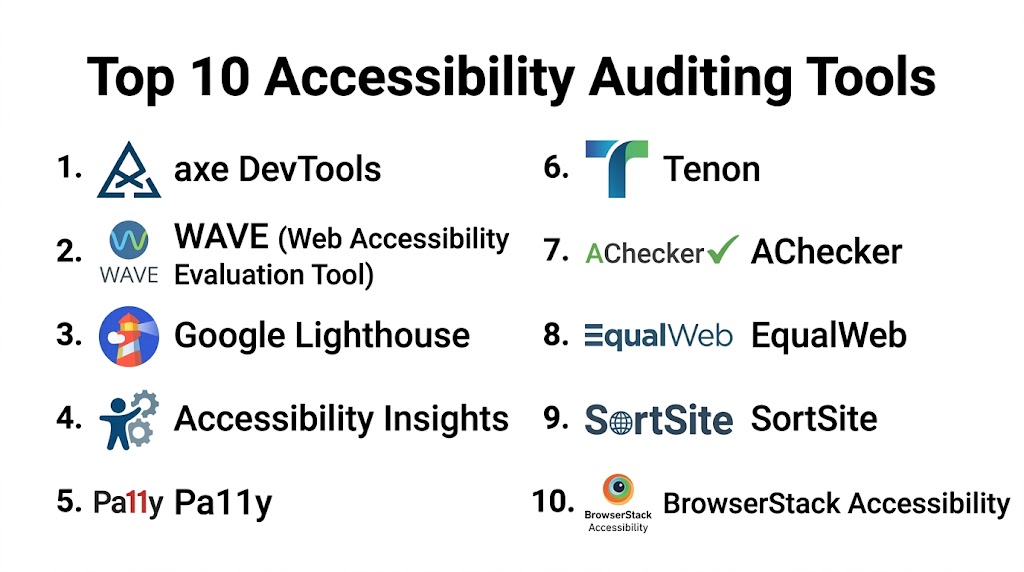
Top 10 Accessibility Auditing Tools
#1 — axe DevTools
Short description: axe DevTools is a developer-focused accessibility testing toolkit that helps identify and fix accessibility issues directly within development workflows. It is widely used for automated and manual testing and integrates with browsers and CI pipelines, making it ideal for teams building accessible web applications.
Key Features
- Automated accessibility testing
- Browser extension
- CI/CD integration
- WCAG compliance checks
- Developer-friendly reports
Pros
- Accurate issue detection
- Easy integration
- Developer-focused
- Supports automation
Cons
- Advanced features require setup
- Learning curve for beginners
- Limited non-technical UI
- Premium features cost extra
Platforms / Deployment
Web / Browser / Cloud
Security & Compliance
Supports secure testing practices and compliance workflows.
Integrations & Ecosystem
- CI/CD tools
- Browser extensions
- Developer workflows
- APIs
Support & Community
Strong developer community and documentation.
#2 — WAVE
Short description: WAVE is a web accessibility evaluation tool that provides visual feedback on accessibility issues directly within web pages. It is widely used by designers and developers for quick accessibility checks and issue identification.
Key Features
- Visual accessibility feedback
- Browser extension
- WCAG checks
- Error highlighting
- Page structure analysis
Pros
- Easy to use
- Visual insights
- Free version available
- Quick analysis
Cons
- Limited automation
- Not suitable for large-scale audits
- Requires manual review
- Limited reporting
Platforms / Deployment
Web / Browser
Security & Compliance
Supports accessibility testing workflows.
Integrations & Ecosystem
- Browser tools
- Web testing workflows
Support & Community
Large user base and simple documentation.
#3 — Google Lighthouse
Short description: Google Lighthouse is an automated auditing tool that evaluates web performance, SEO, and accessibility. It provides accessibility scores and recommendations directly in the browser or development tools.
Key Features
- Accessibility scoring
- Automated audits
- Developer tools integration
- Performance insights
- SEO checks
Pros
- Built into Chrome
- Free and easy to use
- Quick results
- Developer-friendly
Cons
- Limited depth for complex audits
- Basic reporting
- Requires manual follow-up
- Not enterprise-focused
Platforms / Deployment
Web / Browser
Security & Compliance
Supports safe testing workflows.
Integrations & Ecosystem
- Chrome DevTools
- CI/CD tools
- APIs
Support & Community
Widely supported with strong documentation.
#4 — Accessibility Insights
Short description: Accessibility Insights is a testing tool that helps developers identify accessibility issues through guided and automated testing workflows. It is designed to simplify accessibility audits for teams.
Key Features
- Automated testing
- Guided manual tests
- Browser extension
- WCAG compliance checks
- Reporting tools
Pros
- Easy guided testing
- Free to use
- Developer-friendly
- Good reporting
Cons
- Limited enterprise features
- Requires manual effort
- Not full automation
- Basic UI
Platforms / Deployment
Web / Browser
Security & Compliance
Supports accessibility compliance workflows.
Integrations & Ecosystem
- Browser tools
- Developer workflows
Support & Community
Good documentation and community support.
#5 — Pa11y
Short description: Pa11y is an open-source accessibility testing tool designed for developers who want automated testing via command-line or CI environments. It is useful for integrating accessibility checks into development pipelines.
Key Features
- Command-line testing
- Automated checks
- CI integration
- Open-source flexibility
- Reporting
Pros
- Free and open-source
- Automation-friendly
- Lightweight
- Flexible
Cons
- Requires technical knowledge
- Limited UI
- Setup required
- Not beginner-friendly
Platforms / Deployment
Web / CLI / Self-hosted
Security & Compliance
Supports secure testing workflows.
Integrations & Ecosystem
- CI/CD tools
- APIs
- Dev workflows
Support & Community
Active open-source community.
#6 — Tenon
Short description: Tenon is an accessibility testing API that provides automated testing and reporting for developers and enterprises. It is used to integrate accessibility checks into applications and workflows.
Key Features
- API-based testing
- Automated audits
- Reporting
- Integration support
- WCAG checks
Pros
- Flexible API
- Automation support
- Scalable
- Accurate results
Cons
- Requires integration
- Limited UI
- Technical setup
- Pricing varies
Platforms / Deployment
Web / API / Cloud
Security & Compliance
Supports secure API-based testing.
Integrations & Ecosystem
- APIs
- CI/CD
- Dev tools
Support & Community
Documentation and support available.
#7 — AChecker
Short description: AChecker is a web-based accessibility testing tool that evaluates web pages against accessibility standards and provides detailed reports.
Key Features
- Web-based testing
- WCAG validation
- Error reports
- Guidelines reference
Pros
- Easy to use
- Free option
- Detailed reports
- Good for beginners
Cons
- Limited automation
- Not scalable
- Basic interface
- Manual review needed
Platforms / Deployment
Web
Security & Compliance
Supports accessibility validation.
Integrations & Ecosystem
- Web workflows
- Testing tools
Support & Community
Basic support available.
#8 — EqualWeb
Short description: EqualWeb is an accessibility platform that offers auditing, monitoring, and remediation tools for websites. It helps organizations improve compliance and user accessibility.
Key Features
- Accessibility audits
- Compliance monitoring
- Remediation tools
- Reports
- Automation
Pros
- Full accessibility suite
- Monitoring features
- Easy to use
- Enterprise support
Cons
- Pricing varies
- Requires setup
- Not developer-first
- Feature learning curve
Platforms / Deployment
Web / Cloud
Security & Compliance
Supports compliance workflows.
Integrations & Ecosystem
- Web platforms
- CMS tools
- APIs
Support & Community
Enterprise support available.
#9 — SortSite
Short description: SortSite is a website testing tool that checks accessibility, SEO, and usability issues across entire websites. It is used for auditing large digital properties.
Key Features
- Website scanning
- Accessibility checks
- Reporting
- Batch testing
Pros
- Full-site scanning
- Multiple checks
- Good reporting
- Scalable
Cons
- Desktop-based
- Requires setup
- Not real-time
- Limited UI
Platforms / Deployment
Windows / Desktop
Security & Compliance
Supports accessibility auditing.
Integrations & Ecosystem
- Web testing tools
- Reports
Support & Community
Documentation available.
#10 — BrowserStack Accessibility
Short description: BrowserStack Accessibility allows teams to test accessibility issues across real devices and browsers. It helps identify cross-platform accessibility issues effectively.
Key Features
- Real device testing
- Accessibility checks
- Cross-browser testing
- Reporting
- Automation
Pros
- Real device testing
- Cross-platform support
- Scalable
- Accurate results
Cons
- Subscription required
- Setup needed
- Learning curve
- Not standalone tool
Platforms / Deployment
Web / Cloud
Security & Compliance
Supports secure testing environments.
Integrations & Ecosystem
- Testing tools
- CI/CD
- Dev workflows
Support & Community
Strong support and documentation.
Comparison Table
| Tool | Best For | Platform | Deployment | Feature | Rating |
|---|---|---|---|---|---|
| axe | Developers | Web | Cloud | Automation | N/A |
| WAVE | Designers | Web | Browser | Visual testing | N/A |
| Lighthouse | Devs | Web | Browser | Quick audit | N/A |
| Insights | QA teams | Web | Browser | Guided tests | N/A |
| Pa11y | DevOps | Web | CLI | Automation | N/A |
| Tenon | API users | Web | Cloud | API testing | N/A |
| AChecker | Beginners | Web | Cloud | Validation | N/A |
| EqualWeb | Enterprise | Web | Cloud | Compliance | N/A |
| SortSite | Audits | Desktop | Local | Full scan | N/A |
| BrowserStack | QA teams | Web | Cloud | Device testing | N/A |
Evaluation & Scoring
| Tool | Core | Ease | Integrations | Security | Performance | Support | Value | Total |
|---|---|---|---|---|---|---|---|---|
| axe | 9.0 | 8.0 | 8.5 | 8.5 | 8.6 | 8.4 | 8.2 | 8.55 |
| WAVE | 8.0 | 9.0 | 7.5 | 7.8 | 8.0 | 8.0 | 8.5 | 8.17 |
| Lighthouse | 8.2 | 9.2 | 8.0 | 7.9 | 8.4 | 8.3 | 9.0 | 8.43 |
| Insights | 8.3 | 8.5 | 7.8 | 8.0 | 8.2 | 8.1 | 8.6 | 8.23 |
| Pa11y | 8.5 | 7.0 | 8.3 | 8.2 | 8.3 | 7.9 | 8.8 | 8.20 |
| Tenon | 8.4 | 7.5 | 8.6 | 8.3 | 8.4 | 8.0 | 7.9 | 8.18 |
| AChecker | 7.8 | 8.8 | 7.2 | 7.5 | 7.9 | 7.6 | 8.4 | 7.99 |
| EqualWeb | 8.6 | 8.2 | 8.0 | 8.4 | 8.3 | 8.5 | 7.8 | 8.29 |
| SortSite | 8.3 | 7.5 | 7.6 | 8.0 | 8.2 | 7.8 | 7.9 | 8.00 |
| BrowserStack | 8.7 | 8.3 | 8.4 | 8.2 | 8.5 | 8.4 | 8.1 | 8.33 |
Frequently Asked Questions
1. What are accessibility auditing tools?
Accessibility auditing tools help identify issues that make websites or apps difficult for people with disabilities to use. They scan digital content for problems like missing alt text, poor contrast, or navigation issues. These tools provide reports and recommendations to improve accessibility. They are essential for compliance and better user experience.
2. Why is accessibility important?
Accessibility ensures that all users, including those with disabilities, can use digital products effectively. It improves usability, expands audience reach, and helps avoid legal risks. Accessible design also enhances overall user experience. Businesses benefit from increased engagement and inclusivity.
3. What is WCAG?
WCAG stands for Web Content Accessibility Guidelines, which define standards for making web content accessible. These guidelines cover areas like text alternatives, navigation, and readability. Accessibility tools check compliance with these standards. Following WCAG improves usability and compliance.
4. Are accessibility tools fully automated?
Most tools provide automated testing but cannot detect all issues. Manual testing is still required for complete accessibility validation. Automated tools help identify common problems quickly. A combination of both approaches is recommended.
5. Who should use these tools?
Developers, designers, QA teams, and organizations building digital products should use accessibility tools. They are especially important for enterprises and government organizations. Accessibility should be part of the development process. Early testing prevents costly fixes later.
6. Can accessibility tools guarantee compliance?
No tool can guarantee full compliance because accessibility involves human experience. Tools help identify issues but cannot replace manual review. Regular audits and testing are required. Compliance depends on implementation quality.
7. Do accessibility tools support mobile apps?
Yes, many modern tools support mobile accessibility testing. However, some are focused on web applications. Teams should choose tools based on their platform needs. Mobile testing is becoming more important.
8. How often should accessibility audits be done?
Accessibility audits should be done regularly, especially after updates or new releases. Continuous monitoring helps maintain compliance. Many teams integrate testing into CI/CD pipelines. This ensures issues are caught early.
9. What are common accessibility issues?
Common issues include missing alt text, poor color contrast, lack of keyboard navigation, and incorrect HTML structure. These problems affect usability for assistive technologies. Fixing them improves user experience. Tools help identify these issues quickly.
10. How do I choose the right tool?
Choose based on your technical needs, team expertise, and platform type. Developers may prefer automation tools, while designers may prefer visual tools. Enterprise teams should consider scalability and reporting. Running a pilot helps ensure the best fit.
Conclusion
Accessibility auditing tools are essential for building inclusive and compliant digital experiences. The right tool depends on whether you need automated testing, manual guidance, enterprise monitoring, or developer integration. Tools like axe DevTools and Lighthouse are great for developers, while platforms like EqualWeb and BrowserStack offer broader enterprise capabilities. The best approach is to shortlist tools, test them in your workflow, validate compliance coverage, and integrate accessibility into your development lifecycle for long-term success.
