Introduction
Brand Asset Portals are centralized platforms that store, manage, and distribute an organization’s digital brand assets, including logos, images, videos, marketing collateral, and templates. These tools ensure brand consistency across departments, partners, and agencies, and streamline workflows for content creation and approval.
Real-world use cases include providing a single source of truth for brand assets, enabling marketing teams to access approved logos and templates, sharing assets with external partners, enforcing brand guidelines, and tracking asset usage analytics for ROI and compliance.
Evaluation criteria for buyers include ease of asset upload and retrieval, search and tagging capabilities, version control, permission management, integration with collaboration and marketing tools, analytics, scalability, and security/compliance.
Best for: marketing teams, creative departments, global enterprises, agencies, and organizations managing large volumes of brand assets.
Not ideal for: small teams with minimal assets or businesses that do not require centralized management of digital assets.
Key Trends in Brand Asset Portals
- Cloud-based portals for global accessibility and collaboration.
- AI-powered search and tagging for faster asset retrieval.
- Integration with DAM, marketing automation, and collaboration tools.
- Version control and approval workflows to maintain brand consistency.
- User permissions and role-based access for secure sharing.
- Analytics dashboards for asset usage, engagement, and ROI measurement.
- Support for multiple file formats including images, videos, and presentations.
- Branding guidelines enforcement through templates and restricted editing.
- API access for automated workflows and asset synchronization.
- Mobile access for remote teams and distributed workforces.
How We Selected These Tools (Methodology)
- Market adoption and brand reputation in digital asset management.
- Feature coverage including search, tagging, versioning, and approval workflows.
- Integration capabilities with CRM, DAM, and marketing platforms.
- Ease of use and user experience for creative and marketing teams.
- Scalability to handle large asset libraries.
- Security and compliance for enterprise-level usage.
- AI-driven search, metadata enrichment, and automation features.
- Analytics and reporting capabilities.
- Pricing and value for both SMBs and enterprise users.
- Support, documentation, and community engagement.
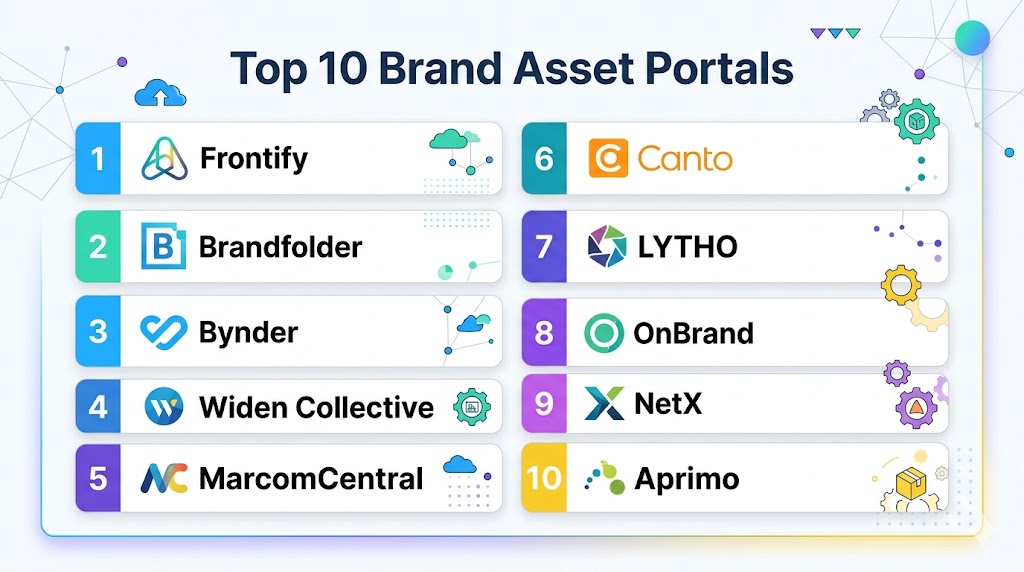
Top 10 Brand Asset Portals
#1 — Bynder
Short description: Bynder is a cloud-based brand asset management platform that centralizes digital assets, streamlines workflows, and enforces brand guidelines. It is ideal for enterprises managing global brand consistency.
Key Features
- Centralized asset library
- AI-powered search and metadata tagging
- Version control and approval workflows
- Brand guideline templates
- Analytics and reporting dashboards
Pros
- Scalable for large enterprises
- Strong AI-driven search capabilities
- Supports multiple file types
Cons
- Enterprise pricing
- Requires training for advanced features
- May be complex for small teams
Platforms / Deployment
- Web / Cloud
Security & Compliance
- SSO, encryption
- GDPR, SOC 2
Integrations & Ecosystem
- CRM: Salesforce, HubSpot
- Collaboration: Slack, Microsoft Teams
- DAM and marketing platforms
Support & Community
- Enterprise support tiers
- Documentation and tutorials
- Active user community
#2 — Widen Collective
Short description: Widen Collective offers a robust platform for managing, distributing, and analyzing brand assets. It supports workflows, approvals, and integrations with marketing tools.
Key Features
- Asset library with metadata tagging
- Approval and workflow management
- Analytics and usage reporting
- Version control
- Multi-channel publishing
Pros
- Enterprise-ready
- Strong analytics and reporting
- Comprehensive workflow support
Cons
- Enterprise pricing
- Learning curve for full functionality
- Limited mobile app functionality
Platforms / Deployment
- Web / Cloud
Security & Compliance
- GDPR, SOC 2
- Encryption, SSO
Integrations & Ecosystem
- Salesforce, HubSpot, Marketo
- DAM tools and CMS platforms
- Collaboration software
Support & Community
- Enterprise support
- Tutorials and documentation
- Customer community
#3 — Brandfolder
Short description: Brandfolder provides a centralized portal for storing, managing, and sharing brand assets with teams and external partners. Its AI tools help with automated tagging and search.
Key Features
- Asset library and folder management
- AI-powered search and tagging
- Version control and approvals
- Sharing permissions and roles
- Analytics dashboards
Pros
- Intuitive interface
- AI-driven asset management
- Easy sharing with external stakeholders
Cons
- Limited advanced workflow features
- Enterprise plans required for full functionality
- Custom integrations may require development
Platforms / Deployment
- Web / Cloud
Security & Compliance
- SSO, encryption
- GDPR, SOC 2
Integrations & Ecosystem
- Salesforce, HubSpot, Adobe Creative Cloud
- Slack, Teams
- API access for automated workflows
Support & Community
- Enterprise support
- Documentation and tutorials
- Active community
#4 — Extensis Portfolio
Short description: Extensis Portfolio is a digital asset management platform designed for creative teams, providing organization, search, and sharing capabilities for brand assets.
Key Features
- Centralized asset repository
- Metadata tagging and AI-assisted search
- Version control and approval workflows
- Reporting and analytics
- Multi-channel publishing
Pros
- Flexible for creative teams
- Supports multiple file formats
- Scalable for growing asset libraries
Cons
- Pricing geared toward enterprises
- Limited integrations outside creative software
- Some advanced features require setup
Platforms / Deployment
- Web / Cloud / On-premises
Security & Compliance
- SSO, encryption
- GDPR
Integrations & Ecosystem
- Adobe Creative Cloud, Photoshop, Illustrator
- CMS and collaboration platforms
- API integration
Support & Community
- Enterprise support tiers
- Tutorials and documentation
- Community forums
#5 — Canto
Short description: Canto provides a digital asset management platform that centralizes brand assets, streamlines workflow, and enforces consistency across teams and external partners.
Key Features
- Asset library with tagging and search
- Version control and approvals
- Workflow management
- Analytics and usage reporting
- Sharing permissions
Pros
- User-friendly interface
- Strong search and metadata capabilities
- Scalable for mid-market to enterprise
Cons
- Enterprise plans required for advanced features
- Limited integration with some third-party tools
- Mobile app functionality is basic
Platforms / Deployment
- Web / Cloud
Security & Compliance
- SSO, encryption
- GDPR
Integrations & Ecosystem
- Salesforce, HubSpot, Adobe Creative Cloud
- Slack, Teams
- API for custom workflows
Support & Community
- Enterprise support
- Documentation
- Active user community
#6 — Aprimo
Short description: Aprimo provides a comprehensive digital asset management and marketing operations platform. It enables asset centralization, workflow automation, and performance reporting.
Key Features
- Centralized digital asset management
- Workflow automation and approvals
- Metadata tagging and search
- Analytics dashboards
- Multi-channel asset distribution
Pros
- Enterprise-grade features
- Supports global teams
- Advanced analytics and reporting
Cons
- Higher cost for SMBs
- Setup complexity for advanced workflows
- Learning curve for users
Platforms / Deployment
- Web / Cloud
Security & Compliance
- GDPR, SOC 2
- SSO, encryption
Integrations & Ecosystem
- CRM: Salesforce, HubSpot
- Marketing automation: Marketo, Eloqua
- Collaboration tools: Slack, Teams
Support & Community
- Enterprise support tiers
- Documentation and training
- Active user community
#7 — Frontify
Short description: Frontify is a brand management platform providing centralized asset storage, style guides, and collaborative workflows for marketing and creative teams.
Key Features
- Brand asset library
- Style guide management
- Approval and workflow automation
- Analytics dashboards
- Integration with creative tools
Pros
- User-friendly interface
- Collaborative workflow management
- Ensures brand consistency
Cons
- Limited advanced reporting
- Enterprise features require premium plans
- Custom integrations may require development
Platforms / Deployment
- Web / Cloud
Security & Compliance
- SSO, encryption
- GDPR
Integrations & Ecosystem
- Adobe Creative Cloud
- Slack, Teams
- API access for custom integrations
Support & Community
- Documentation and tutorials
- Enterprise support tiers
- Active user community
#8 — Brandworkz
Short description: Brandworkz centralizes brand assets, manages permissions, and ensures brand consistency across global teams. It also provides reporting and analytics on asset usage.
Key Features
- Digital asset library
- Permission management and approvals
- Workflow automation
- Analytics dashboards
- Multi-language support
Pros
- Scalable for global teams
- Strong permission controls
- Analytics on asset usage
Cons
- Enterprise pricing
- Learning curve for workflow setup
- Limited third-party integrations
Platforms / Deployment
- Web / Cloud
Security & Compliance
- SSO, encryption
- GDPR
Integrations & Ecosystem
- Salesforce, HubSpot
- Adobe Creative Cloud
- API integrations
Support & Community
- Enterprise support
- Documentation
- Community resources
#9 — MediaValet
Short description: MediaValet is a cloud-based brand asset portal with AI-powered search and analytics. It enables teams to manage, share, and track the usage of digital assets efficiently.
Key Features
- Centralized asset management
- AI-driven search and tagging
- Version control and workflow approvals
- Analytics and reporting dashboards
- Multi-channel distribution
Pros
- AI-powered search
- Easy asset sharing
- Scalable for enterprises
Cons
- Enterprise pricing
- Some features require training
- Integration setup may be needed
Platforms / Deployment
- Web / Cloud
Security & Compliance
- SSO, encryption
- GDPR, SOC 2
Integrations & Ecosystem
- CRM: Salesforce, HubSpot
- Adobe Creative Cloud
- Collaboration platforms
Support & Community
- Enterprise support
- Documentation
- Active user community
#10 — Asset Bank
Short description: Asset Bank is a digital asset management platform that centralizes, organizes, and distributes brand assets. It provides user permissions, workflow approvals, and analytics for efficient brand management.
Key Features
- Asset library with tagging
- Version control and approvals
- Workflow management
- Reporting dashboards
- Multi-channel asset distribution
Pros
- User-friendly interface
- Scalable for growing organizations
- Easy workflow automation
Cons
- Enterprise pricing for advanced features
- Integration setup may require development
- Limited AI-powered search
Platforms / Deployment
- Web / Cloud
Security & Compliance
- SSO, encryption
- GDPR
Integrations & Ecosystem
- Salesforce, HubSpot
- Adobe Creative Cloud
- API for custom workflows
Support & Community
- Enterprise support
- Documentation and tutorials
- Active user community
Comparison Table (Top 10)
| Tool Name | Best For | Platform(s) Supported | Deployment | Standout Feature | Public Rating |
|---|---|---|---|---|---|
| Bynder | Enterprise brand management | Web | Cloud | AI search & workflow automation | N/A |
| Widen Collective | Asset management & approval | Web | Cloud | Workflow & analytics | N/A |
| Brandfolder | Centralized digital assets | Web | Cloud | AI tagging & search | N/A |
| Extensis Portfolio | Creative teams | Web | Cloud / On-prem | Metadata tagging & search | N/A |
| Canto | Mid-market & enterprise | Web | Cloud | User-friendly interface & sharing | N/A |
| Aprimo | Marketing operations | Web | Cloud | Workflow automation & analytics | N/A |
| Frontify | Brand guidelines & assets | Web | Cloud | Collaborative workflows | N/A |
| Brandworkz | Global brand management | Web | Cloud | Permission controls & analytics | N/A |
| MediaValet | AI-powered asset management | Web | Cloud | AI tagging & search | N/A |
| Asset Bank | Asset library & workflow | Web | Cloud | Version control & distribution | N/A |
Evaluation & Scoring of Brand Asset Portals
| Tool Name | Core (25%) | Ease (15%) | Integrations (15%) | Security (10%) | Performance (10%) | Support (10%) | Value (15%) | Weighted Total |
|---|---|---|---|---|---|---|---|---|
| Bynder | 9 | 8 | 8 | 8 | 9 | 8 | 8 | 8.5 |
| Widen Collective | 8 | 8 | 7 | 8 | 8 | 7 | 7 | 7.7 |
| Brandfolder | 8 | 9 | 7 | 8 | 8 | 7 | 7 | 7.8 |
| Extensis Portfolio | 8 | 7 | 7 | 8 | 8 | 7 | 7 | 7.5 |
| Canto | 8 | 8 | 7 | 8 | 8 | 7 | 7 | 7.7 |
| Aprimo | 9 | 7 | 8 | 8 | 9 | 8 | 8 | 8.2 |
| Frontify | 8 | 9 | 7 | 8 | 8 | 7 | 7 | 7.8 |
| Brandworkz | 8 | 8 | 7 | 8 | 8 | 7 | 7 | 7.7 |
| MediaValet | 9 | 8 | 8 | 8 | 9 | 8 | 8 | 8.3 |
| Asset Bank | 8 | 8 | 7 | 8 | 8 | 7 | 7 | 7.7 |
Which Brand Asset Portal Is Right for You?
Solo / Freelancer
- Canto or Brandfolder for smaller teams managing limited assets.
SMB
- Canto, Frontify, or Brandfolder for centralized storage and team collaboration.
Mid-Market
- Bynder, MediaValet, or Widen Collective for workflow automation, analytics, and global access.
Enterprise
- Bynder, Aprimo, MediaValet, or Brandworkz for multi-channel asset management, AI tagging, and advanced workflows.
Budget vs Premium
- SMBs can use Canto or Brandfolder for cost-effective asset management.
- Enterprises benefit from Bynder, Aprimo, or MediaValet for advanced features, AI search, and analytics.
Feature Depth vs Ease of Use
- Brandfolder, Canto, and Frontify prioritize ease of use and quick adoption.
- Bynder, Aprimo, MediaValet, and Widen Collective provide advanced workflow automation and analytics.
Integrations & Scalability
- Enterprise platforms integrate with Salesforce, HubSpot, Adobe Creative Cloud, and marketing automation platforms.
- SMB tools suit smaller teams with fewer integrations.
Security & Compliance Needs
- Enterprise tools support SSO, encryption, and GDPR/SOC 2 compliance for global operations.
Frequently Asked Questions (FAQs)
1. What is a Brand Asset Portal?
A centralized platform for storing, managing, and sharing digital assets while enforcing brand guidelines and workflows.
2. Can small teams use these tools?
Yes. Canto, Brandfolder, and Frontify are easy-to-use options for SMBs.
3. How does AI help in asset management?
AI assists with automated tagging, search, and metadata enrichment to improve retrieval efficiency.
4. Can these portals integrate with creative tools?
Yes. Most integrate with Adobe Creative Cloud, collaboration software, and CRM platforms.
5. Do these tools provide version control?
Yes. Version control and approval workflows ensure only approved assets are used.
6. Can assets be shared externally?
Yes. Permissions and role-based access allow secure sharing with agencies, partners, or stakeholders.
7. How scalable are these platforms?
Enterprise portals like Bynder, MediaValet, and Widen Collective can manage millions of assets across global teams.
8. Are analytics included?
Yes. Most platforms provide dashboards to track asset usage, engagement, and ROI.
9. Can brand guidelines be enforced?
Yes. Frontify, Bynder, and Brandworkz offer templates and restricted editing to maintain consistency.
10. How long does implementation take?
Simple setups for SMBs may take a few hours, while enterprise deployments with integrations may take several weeks.
Conclusion
Brand Asset Portals are essential for maintaining brand consistency, improving workflow efficiency, and providing a single source of truth for all digital assets. SMBs can benefit from Canto, Frontify, or Brandfolder for cost-effective and easy-to-use solutions, while enterprises may rely on Bynder, MediaValet, or Aprimo for AI-powered search, advanced workflows, and global scalability. Use the comparison and scoring tables to shortlist 2–3 portals, run pilot programs, and ensure integrations and compliance. A well-implemented brand asset portal streamlines content creation, improves brand alignment, and enhances collaboration across teams and partners.

This article offers a clear comparison of brand asset portals and their role in organizing and sharing brand resources efficiently. The feature-by-feature analysis makes it easy to evaluate different platforms and find the best fit for team collaboration.