Introduction
Academic Writing Tools are software platforms and services designed to support research, writing, editing, citation management, and document quality for students, researchers, educators, and academics. These tools help improve writing structure, grammar, citations, literature review workflows, plagiarism detection, and collaboration across research teams. Modern academic writing technologies include reference management, grammar and style checkers, research assistants, note‑taking tools, and workflow integrations.
Real‑world use cases include structuring theses and dissertations, managing references and bibliographies, checking grammar and academic tone, conducting literature reviews and annotation, and detecting plagiarism in research submissions. Buyers should evaluate citation support, grammar and style quality, collaboration capabilities, research organization, document export formats, academic integrity features, integrations, pricing, security, and support quality.
Best for: students, researchers, academic writers, research labs, faculty, and academic support teams.
Not ideal for: casual writing without scholarly reference needs, very early stage brainstorming, or projects that do not require structured citations.
Key Trends in Academic Writing Tools
- AI‑assisted research summarization and literature review suggestions
- Integrated citation and bibliography management with automatic formatting
- Real‑time collaboration for research teams across institutions
- Grammar and academic tone detection tailored to scholarly writing
- Cross‑platform sync for writing continuity between devices
- Plagiarism detection and academic integrity checks integrated into workflows
- Cloud‑enabled writing and project management for distributed researchers
- Enhanced templates for theses, journal submissions, and conference papers
- Multilingual support for international academic authors
- Data export and reporting that aligns with journal and institutional requirements
How We Selected These Tools
- Reviewed adoption among students, researchers, and institutions
- Evaluated grammar, style, and academic tone correction quality
- Assessed strength of citation, bibliography, and reference features
- Considered literature review and annotation support
- Checked collaboration and sharing capabilities
- Reviewed export and template support for academic output
- Examined plagiarism detection and academic integrity support
- Compared usability for individual and team workflows
- Assessed pricing models and academic plans
- Checked documentation, tutorials, and support resources
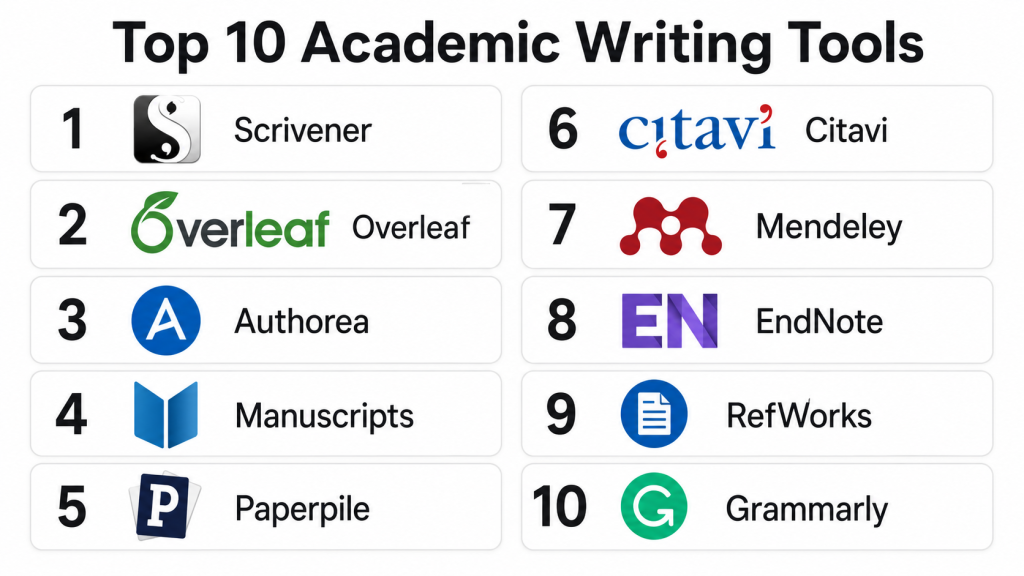
Top 10 Academic Writing Tools
#1 — Zotero
Short description: Zotero is a popular open‑source reference management tool that helps researchers collect, organize, annotate, and cite sources. It is widely used in academic writing for producing bibliographies and maintaining research libraries.
Key Features
- Reference management library
- Browser capture of sources
- Citation and bibliography generation
- Tagging and collections organization
- PDF annotation support
Pros
- Free and open‑source
- Excellent citation support
- Sync across devices
- Works with major writing platforms
Cons
- Learning curve for new users
- Manual organization required
- Limited grammar/style support
- Collaboration requires shared libraries
Platforms / Deployment
- Windows / macOS / Linux / Web
- Cloud sync
Security & Compliance
- Not publicly stated
Integrations & Ecosystem
Zotero integrates with writing editors and reference formats commonly used in academic publishing.
- Word processor plugins
- Citation style support
- Browser capture extensions
- PDF annotation workflows
- Export formats for journals
Support & Community
Zotero has active documentation, community forums, and user guides. Its open‑source community contributes plugins and support resources.
#2 — Mendeley
Short description: Mendeley is a reference manager and academic collaboration platform that assists in organizing research, formatting citations, and sharing libraries. It is useful for students and researchers working on papers, theses, and group projects.
Key Features
- Reference and bibliography manager
- PDF organization and annotation
- Group libraries for teams
- Citation formatting tools
- Research networking and discovery
Pros
- Easy citation generation
- Integrated PDF reader and notes
- Team collaboration features
- Research discovery recommendations
Cons
- Cloud limits on free plans
- Sync issues reported by some users
- Less intuitive than other management tools
- Limited grammar/style checking
Platforms / Deployment
- Windows / macOS / Linux / Web / iOS / Android
- Cloud
Security & Compliance
- Not publicly stated
Integrations & Ecosystem
Mendeley supports academic workflows and integrates with document editors.
- Word processor citation plugins
- PDF annotation sync
- Shared libraries
- Collaboration tools
Support & Community
Mendeley provides documentation, help center resources, and community forums for researchers.
#3 — EndNote
Short description: EndNote is an advanced reference and bibliography manager designed for researchers and institutions. It supports extensive citation styles, collaboration, and large research libraries.
Key Features
- Comprehensive reference library
- Citation and bibliography formatting
- Journal matching and manuscript templates
- Group sharing and collaboration
- Large citation style repository
Pros
- Industry‑recognized citation tool
- Powerful search and organization
- Good for large research projects
- Institutional support workflows
Cons
- Expensive compared with alternatives
- Steeper learning curve
- Desktop‑centric workflows
- Cloud sharing limitations
Platforms / Deployment
- Windows / macOS / Web
- Desktop and cloud sync
Security & Compliance
- Not publicly stated
Integrations & Ecosystem
EndNote integrates with word processors and offers research sharing features.
- Word processor plugins
- Citation style libraries
- Journal submission templates
- Shared libraries for teams
Support & Community
EndNote offers official documentation, support channels, and academic user communities.
#4 — Grammarly
Short description: Grammarly is a writing assistant that improves grammar, clarity, tone, and academic style. It helps academic writers produce error‑free manuscripts and thesis drafts with better readability.
Key Features
- Academic tone suggestions
- Grammar and spelling corrections
- Clarity and conciseness feedback
- Plagiarism detection (selected plans)
- Browser and document integrations
Pros
- Strong grammar and clarity feedback
- Works across writing environments
- Tone improvement for academic content
- Useful for many academic documents
Cons
- Premium required for advanced features
- Not specialized for research citations
- AI rewriting sometimes oversimplifies content
- Not designed for reference management
Platforms / Deployment
- Web / Windows / macOS / iOS / Android
- Cloud
Security & Compliance
- Enterprise security options
- SSO and admin controls in business plans
Integrations & Ecosystem
Grammarly fits into academic writing workflows.
- Word processor support
- Browser integration
- Document editor plugins
- Email and research writing apps
Support & Community
Grammarly provides documentation, help resources, and account support with business plans.
#5 — Hemingway Editor
Short description: Hemingway Editor focuses on readability, conciseness, sentence complexity, and academic clarity. It highlights passive voice, adverbs, and hard‑to‑read sentence structures to help writers produce clear academic prose.
Key Features
- Readability assessment
- Sentence complexity highlights
- Passive voice detection
- Word and phrase suggestions
- Simple editor interface
Pros
- Improves clarity and readability
- Intuitive formatting feedback
- Good for editing academic drafts
- Helps simplify complex writing
Cons
- Not a full grammar checker
- No direct citation support
- Limited academic style guidance
- Output needs manual review
Platforms / Deployment
- Web / Windows / macOS
- Cloud / Desktop
Security & Compliance
- Not publicly stated
Integrations & Ecosystem
Hemingway is a focused clarity tool that works in editorial workflows.
- Web editor
- Desktop editor
- Text export
- Copy workflows
Support & Community
Documentation and simple help resources are available. Community usage examples exist online.
#6 — ZoteroBib
Short description: ZoteroBib is a lightweight, free citation generator that creates bibliographies quickly without requiring an account. It is useful for students and casual academic writing tasks.
Key Features
- Fast bibliography generator
- Many citation styles supported
- No login required
- Quick reference formatting
- Works in browser
Pros
- Free and simple to use
- No account or library setup
- Supports many citation styles
- Ideal for quick bibliography tasks
Cons
- Not a full reference manager
- No research library features
- No annotation support
- No collaboration tools
Platforms / Deployment
- Web
- Cloud
Security & Compliance
- Not publicly stated
Integrations & Ecosystem
ZoteroBib is focused on quick citations.
- Browser workflows
- Export to documents
- Supports major style formats
Support & Community
Help resources and simple guides are available online.
#7 — Scrivener
Short description: Scrivener is a writing and research organization tool that helps long‑form academic writing. It is especially useful for dissertations, theses, and scholarly books, enabling research consolidation, note‑taking, and chapter organization.
Key Features
- Project structure and binder system
- Research and notes panel
- Writing targets and progress tracking
- Full‑screen writing mode
- Export to academic formats
Pros
- Strong structure and organization
- Ideal for long documents
- Effective research consolidation
- Flexible export formats
Cons
- Learning curve
- Not citation focused by default
- Not cloud‑native by default
- Collaboration relies on external sync
Platforms / Deployment
- Windows / macOS / iOS
- Desktop
Security & Compliance
- Not publicly stated
Integrations & Ecosystem
Scrivener supports writing and export workflows.
- Document export
- Integration with reference managers (manual)
- Notes and research support
- Project templates
Support & Community
Strong documentation, tutorials, and active user communities.
#8 — RefWorks
Short description: RefWorks is a web‑based reference manager for academic research and writing. It helps academics build, organize, and share bibliographies with institutional support features.
Key Features
- Reference database
- Citation and bibliography formatting
- Team collaboration
- Research folders
- Integration with writing platforms
Pros
- Web‑native collaboration
- Useful for research teams
- Citation support across styles
- Integration with academic workflows
Cons
- Subscription required
- Less intuitive than some competitors
- Not built for grammar or style guidance
- Dependent on institutional access in some plans
Platforms / Deployment
- Web
- Cloud
Security & Compliance
- Not publicly stated
Integrations & Ecosystem
RefWorks fits academic workflows.
- Document editor plugins
- Citation export
- Shared folders
- Collaboration tools
Support & Community
Documentation, help center, and institutional support resources available.
#9 — Turnitin
Short description: Turnitin is a plagiarism detection and academic integrity tool used by educators and institutions to check academic submissions against large databases. It helps identify unoriginal content and enforce integrity standards.
Key Features
- Deep plagiarism scanning
- Similarity reports
- Feedback and grading tools (selected versions)
- Repository comparison
- Academic integrity dashboards
Pros
- Strong plagiarism detection
- Academic institution adoption
- Supports instructor feedback
- Helps enforce academic standards
Cons
- Expensive
- Mainly institution licensed
- Not designed for everyday writing feedback
- Limited grammar or style checking
Platforms / Deployment
- Web
- Cloud
Security & Compliance
- Not publicly stated
Integrations & Ecosystem
Turnitin integrates with learning platforms and submission systems.
- LMS integration
- Submission workflows
- Reporting APIs
- Feedback tools
Support & Community
Institutional support and help resources are available.
#10 — Litmaps
Short description: Litmaps is a research discovery and literature mapping tool that helps researchers visualize citation networks and explore related academic works. It supports idea generation and literature review planning.
Key Features
- Citation network visualization
- Literature discovery suggestions
- Research filtering tools
- Project “map” views
- Export and tracking
Pros
- Helps find relevant literature
- Visual research exploration
- Useful for literature review planning
- Supports research strategy
Cons
- Not a writing editor
- Requires internet connection
- Export features vary
- Learning curve for new users
Platforms / Deployment
- Web
- Cloud
Security & Compliance
- Not publicly stated
Integrations & Ecosystem
Litmaps supports research workflows.
- Browser workflows
- Export reports
- Integrate with research notes
- Collaborative exploration
Support & Community
Documentation, help resources, and research community forums.
Comparison Table
| Tool Name | Best For | Platform(s) Supported | Deployment | Standout Feature | Public Rating |
|---|---|---|---|---|---|
| Zotero | Reference management | Windows, macOS, Linux, Web | Cloud sync | Open‑source library and citation | N/A |
| Mendeley | Reference and annotation | Windows, macOS, Linux, iOS, Android, Web | Cloud | Integrated reference manager | N/A |
| EndNote | Professional reference | Windows, macOS, Web | Desktop, Cloud | Large citation style library | N/A |
| Grammarly | Grammar and clarity | Web, Windows, macOS, iOS, Android | Cloud | Academic tone and clarity | N/A |
| Hemingway Editor | Readability improvement | Web, Windows, macOS | Cloud, Desktop | Clarity and readability focus | N/A |
| ZoteroBib | Quick bibliography | Web | Cloud | Fast citation generator | N/A |
| Scrivener | Writing organization | Windows, macOS, iOS | Desktop | Structure and notes | N/A |
| RefWorks | Web‑based references | Web | Cloud | Institutional collaboration | N/A |
| Turnitin | Plagiarism detection | Web | Cloud | Academic integrity scanning | N/A |
| Litmaps | Literature discovery | Web | Cloud | Citation network exploration | N/A |
Evaluation & Scoring
| Tool Name | Core | Ease | Integrations | Security | Performance | Support | Value | Weighted Total |
|---|---|---|---|---|---|---|---|---|
| Zotero | 9 | 8 | 8 | 7 | 8 | 8 | 9 | 8.40 |
| Mendeley | 8 | 8 | 8 | 7 | 8 | 8 | 8 | 8.05 |
| EndNote | 9 | 7 | 8 | 7 | 8 | 8 | 7 | 8.00 |
| Grammarly | 8 | 9 | 9 | 8 | 8 | 8 | 8 | 8.30 |
| Hemingway Editor | 7 | 9 | 7 | 7 | 8 | 7 | 8 | 7.65 |
| ZoteroBib | 6 | 10 | 7 | 7 | 7 | 7 | 9 | 7.55 |
| Scrivener | 8 | 7 | 7 | 7 | 8 | 8 | 8 | 7.85 |
| RefWorks | 8 | 7 | 8 | 7 | 8 | 8 | 7 | 7.85 |
| Turnitin | 8 | 7 | 7 | 7 | 9 | 8 | 7 | 8.00 |
| Litmaps | 7 | 8 | 7 | 7 | 8 | 7 | 8 | 7.60 |
Scores are comparative and reflect strengths across reference management, academic writing support, research organization, integrity checks, and value for academic use.
Which Academic Writing Tool Is Right for You
Solo / Student Learner
Students writing essays and assignments benefit from Zotero, Grammarly, Hemingway Editor, and ZoteroBib. Zotero helps manage sources, Grammarly improves clarity, and Hemingway makes prose easier to read. ZoteroBib is useful for quick bibliography creation.
Graduate / Researcher
Researchers and thesis writers should consider Zotero, Mendeley, Scrivener, and Litmaps. Zotero and Mendeley organize references, while Scrivener supports long narrative structure and Litmaps aids literature review strategy.
Academic Teams and Labs
Academic teams gain from collaboration and institutional tools like Mendeley, RefWorks, and Turnitin. These tools facilitate shared libraries, citation management, plagiarism checks, and research coordination.
Educators and Faculty
Faculty and academic support teams should prioritize tools that ensure quality and integrity like Turnitin for plagiarism detection, RefWorks for shared references, and Grammarly for writing quality across student submissions.
Budget vs Premium
Free tools like Zotero, ZoteroBib, and Hemingway offer strong value. Premium tools such as EndNote, Mendeley (advanced plans), and Turnitin provide deeper academic workflows and institution‑level capabilities.
Feature Depth vs Ease of Use
Tools like Zotero and Grammarly are easy to adopt and practical. EndNote and RefWorks offer deeper feature sets but require more setup. Scrivener adds structure for long writing tasks but needs learning time.
Integrations & Scalability
For teams and institutions, cloud‑enabled tools and LMS integrations matter. Turnitin, Mendeley, and RefWorks provide scalable data and collaboration support in academic environments.
Security & Compliance Needs
Academic institutions with sensitive research should choose tools with strong access control and privacy settings. Enterprise plans with SSO and admin features help maintain security standards.
Frequently Asked Questions
1. What are Academic Writing Tools?
Academic Writing Tools help writers plan, write, edit, cite, and polish scholarly content. They assist with reference management, grammar and style, readability, plagiarism detection, and research organization.
2. Do these tools replace human editing?
No. Tools improve grammar, structure, citations, and plagiarism detection, but human judgment remains key for academic quality and argument coherence. Use them as support, not replacements.
3. Which tool handles references best?
Zotero, Mendeley, and EndNote are among the strongest reference managers. Zotero is free and flexible, Mendeley integrates collaboration, and EndNote suits institutional and large research libraries.
4. Are plagiarism checks important?
Yes. Plagiarism tools like Turnitin help ensure academic integrity and catch unoriginal content before submission. This is essential for academic institutions and published research.
5. Can students use these tools for free?
Several tools offer free tiers or open‑source access. Zotero, ZoteroBib, and Hemingway Editor are free for core features. Other tools may provide free trials or academic discount plans.
6. How do I choose between tools?
Evaluate based on your writing workflow, citation needs, collaboration requirements, and integration with your editor or platform. A pilot test with real writing tasks helps determine the best fit.
7. Can these tools work together?
Yes. Many writers combine reference managers with grammar tools and structure editors. For example, Zotero for references, Grammarly for grammar, and Scrivener for organization.
8. Do these tools support group projects?
Cloud‑enabled tools like Mendeley, RefWorks, and Turnitin support collaboration for teams and shared libraries. Some tools allow shared access and centralized project management.
9. Are citation styles up to date?
Reference managers support major citation standards like APA, MLA, Chicago, and others. Ensure your tool offers the citation styles needed for your field or journal.
10. Do these tools work offline?
Some tools like Scrivener and desktop versions of Zotero and EndNote work offline. Cloud features will require internet access for syncing and collaboration.
Conclusion
Academic Writing Tools help writers, researchers, and institutions create better scholarly work faster and with higher integrity. Reference managers like Zotero and Mendeley make citations and libraries manageable. Writing assistants like Grammarly and Hemingway improve grammar and clarity. Collaboration and plagiarism tools like RefWorks and Turnitin ensure quality in team and institutional contexts. Choosing the right tool depends on your workflow, research complexity, citation needs, and collaboration requirements. A recommended approach is to shortlist tools, test them with real writing tasks, evaluate ease of integration into your academic workflow, and scale usage in ways that improve writing quality, research management, and academic output.
