Introduction
Stock Media Libraries are platforms that provide ready-to-use digital assets such as images, videos, audio, and graphics for creative, marketing, and content projects. They help businesses, marketers, and designers access high-quality media without creating content from scratch. Modern stock media libraries offer search, filtering, licensing, and integration tools to streamline workflows and ensure legal compliance.
Real-world use cases include:
- Accessing high-quality photos, videos, and graphics for marketing campaigns.
- Enabling creative teams to build content quickly without producing original media.
- Supporting social media, website, and advertising content needs.
- Licensing media legally to avoid copyright issues.
- Integrating stock assets with design and content platforms for seamless workflows.
Evaluation criteria for buyers include:
- Media quality, variety, and resolution
- Licensing options and legal compliance
- Search and AI-powered filtering
- Integration with creative and content platforms
- Download and asset management workflows
- Subscription or pay-per-use pricing models
- Scalability for SMBs and enterprises
- Ease of use and interface design
- Reporting and asset usage tracking
- Global and multi-language content support
Best for: Marketing teams, content creators, agencies, and enterprises seeking legal and high-quality media assets for campaigns.
Not ideal for: Organizations producing all original content or with minimal need for stock media.
Key Trends in Stock Media Libraries
- AI-powered search and auto-tagging for faster asset discovery
- Expansion of video, 3D, and audio libraries
- Subscription-based access alongside pay-per-download models
- Integration with creative tools like Adobe, Canva, and Figma
- Licensing simplification for global and multi-platform usage
- Curated collections and trend-based media suggestions
- Multi-format support for social, web, and print content
- Cloud-based access and collaborative features
- Analytics to track asset usage and engagement
- Emphasis on diversity, inclusivity, and culturally relevant content
How We Selected These Tools
- Evaluated content quality and variety across images, videos, and audio
- Considered legal compliance and licensing options
- Assessed integration with creative and marketing platforms
- Evaluated search capabilities and AI-assisted discovery
- Analyzed scalability for small, mid-market, and enterprise users
- Reviewed analytics, reporting, and download management
- Considered user experience and interface design
- Assessed pricing models for subscription and pay-per-download
- Evaluated support resources and community engagement
- Factored in global and multi-language content coverage
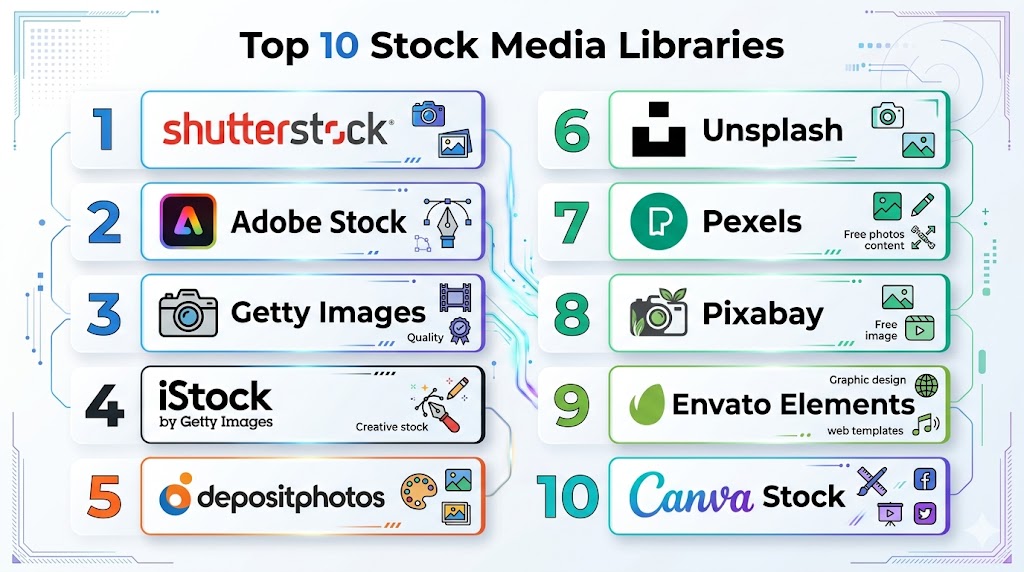
Top 10 Stock Media Libraries
#1 — Shutterstock
Short description: Shutterstock offers a vast collection of stock photos, videos, and music for creative projects. Its platform provides search filters, licensing options, and integration with popular design tools for efficient content workflows.
Key Features
- Extensive library of images, videos, and audio
- AI-powered search and keyword tagging
- Multiple licensing options
- Integration with Adobe Creative Cloud and Canva
- Curated collections and trend-based suggestions
Pros
- Comprehensive media library
- High-quality and royalty-free content
- Easy integration with creative platforms
Cons
- Subscription can be costly for small teams
- Some niche media limited
- Pay-per-download model may increase costs
Platforms / Deployment
- Web / Cloud
Security & Compliance
- GDPR
Integrations & Ecosystem
- Adobe Creative Cloud, Canva, Microsoft Office
- APIs for custom integration
Support & Community
- Documentation, tutorials, customer support
#2 — Adobe Stock
Short description: Adobe Stock provides high-quality stock images, videos, templates, and 3D assets. Integrated with Adobe Creative Cloud, it enables seamless use of media directly in design and editing workflows.
Key Features
- Stock images, videos, 3D, and templates
- Integration with Adobe Creative Cloud
- AI-assisted search and smart filters
- Royalty-free licensing
- Curated collections and trend insights
Pros
- Deep integration with Adobe tools
- High-quality media assets
- Suitable for professional designers
Cons
- Premium pricing for large libraries
- Limited non-Adobe integrations
- Some content requires separate licensing
Platforms / Deployment
- Web / Cloud
Security & Compliance
- GDPR
Integrations & Ecosystem
- Adobe Photoshop, Illustrator, Premiere Pro
- Creative Cloud Libraries
Support & Community
- Adobe support portal, tutorials, forums
#3 — Getty Images
Short description: Getty Images offers premium stock photos, videos, and editorial content. It is widely used by marketing teams, publishers, and agencies seeking high-quality, exclusive assets.
Key Features
- High-resolution photos and videos
- Editorial and creative content
- Licensing management
- Curated and thematic collections
- Search filters and AI tagging
Pros
- Premium, exclusive content
- Legal licensing compliance
- Global and editorial media coverage
Cons
- Expensive for SMBs
- Licensing complexity for certain assets
- Limited bulk subscription options
Platforms / Deployment
- Web / Cloud
Security & Compliance
- GDPR
Integrations & Ecosystem
- Adobe Creative Cloud, Canva
- Marketing and CMS integrations
Support & Community
- Customer support, tutorials, documentation
#4 — iStock
Short description: iStock provides affordable stock photos, vectors, and videos. It caters to small businesses and creative teams looking for quality assets at lower subscription rates.
Key Features
- Library of images, vectors, and videos
- Flexible subscription and credit packs
- Curated collections
- Search filters and AI suggestions
- Royalty-free licensing
Pros
- Affordable for SMBs
- Easy-to-use interface
- Broad variety of media
Cons
- Smaller library than Getty or Shutterstock
- Fewer premium assets
- Limited video content
Platforms / Deployment
- Web / Cloud
Security & Compliance
- GDPR
Integrations & Ecosystem
- Adobe Creative Cloud, Canva
- APIs for asset management
Support & Community
- Tutorials, documentation, email support
#5 — Pond5
Short description: Pond5 specializes in stock video and music but also offers images and sound effects. It provides royalty-free licensing and easy integration for creative projects.
Key Features
- Video, music, images, and sound effects
- Royalty-free licensing
- Curated collections
- Search filters and metadata tagging
- Contributor marketplace
Pros
- Strong video and audio library
- Flexible licensing options
- Suitable for video creators
Cons
- Limited image library
- Higher pricing for premium video
- Interface less intuitive for beginners
Platforms / Deployment
- Web / Cloud
Security & Compliance
- GDPR
Integrations & Ecosystem
- Adobe Premiere, After Effects, Canva
- Video editing software integrations
Support & Community
- Documentation, tutorials, support portal
#6 — Envato Elements
Short description: Envato Elements provides stock media, templates, and creative assets under a subscription model. It is designed for marketers, designers, and agencies needing unlimited downloads.
Key Features
- Stock images, videos, audio, and templates
- Unlimited downloads via subscription
- Creative asset marketplace
- Search filters and curated collections
- Templates for presentations and design
Pros
- Subscription model offers cost predictability
- Large variety of creative assets
- Easy to download and use
Cons
- Less focus on premium, exclusive content
- Some assets require attribution
- Limited AI tagging
Platforms / Deployment
- Web / Cloud
Security & Compliance
- GDPR
Integrations & Ecosystem
- Adobe Creative Cloud, Canva
- Design tools and CMS
Support & Community
- Tutorials, documentation, email support
#7 — Depositphotos
Short description: Depositphotos provides affordable stock images, videos, and vectors for marketing, web, and content projects. It offers subscription plans and pay-per-download options for flexibility.
Key Features
- Images, videos, vectors, and illustrations
- Subscription and pay-per-download plans
- Advanced search filters
- Royalty-free licensing
- Curated collections
Pros
- Affordable pricing for SMBs
- Easy search and download
- Broad media coverage
Cons
- Limited exclusive content
- Smaller video library
- Analytics capabilities limited
Platforms / Deployment
- Web / Cloud
Security & Compliance
- GDPR
Integrations & Ecosystem
- Adobe Creative Cloud, Canva
- Marketing platforms
Support & Community
- Documentation, support portal
#8 — Alamy
Short description: Alamy provides high-quality stock images and videos for editorial and commercial use. It offers flexible licensing and a broad collection for creative and marketing teams.
Key Features
- Editorial and commercial photos and videos
- Licensing management
- Advanced search and filtering
- Contributor marketplace
- High-resolution content
Pros
- Large collection of unique content
- Flexible licensing options
- Suitable for professional creatives
Cons
- Higher pricing for commercial use
- Limited integration with creative tools
- Interface less modern
Platforms / Deployment
- Web / Cloud
Security & Compliance
- GDPR
Integrations & Ecosystem
- Adobe Creative Cloud, Canva
- Marketing and CMS platforms
Support & Community
- Tutorials, email support, documentation
#9 — 123RF
Short description: 123RF offers stock photos, vectors, and videos with flexible pricing. It provides subscription and credit-based models suitable for SMBs and freelancers.
Key Features
- Images, vectors, videos, and audio
- Subscription and pay-per-download plans
- Search and filtering tools
- Royalty-free licensing
- Curated collections
Pros
- Affordable for SMBs
- Easy search and download
- Flexible pricing models
Cons
- Smaller library than Shutterstock or Adobe Stock
- Limited advanced analytics
- Video content limited
Platforms / Deployment
- Web / Cloud
Security & Compliance
- GDPR
Integrations & Ecosystem
- Adobe Creative Cloud, Canva
- Marketing platforms
Support & Community
- Documentation, email support
#10 — Stocksy
Short description: Stocksy offers high-quality curated stock photography and videos with a focus on artistic and authentic content. It provides royalty-free licensing for commercial and editorial projects.
Key Features
- Curated photography and video
- Royalty-free licensing
- Contributor-driven content
- Advanced search and filters
- High-resolution downloads
Pros
- Unique, high-quality content
- Curated artistic style
- Ethical contributor model
Cons
- Premium pricing
- Smaller library than major platforms
- Limited integrations
Platforms / Deployment
- Web / Cloud
Security & Compliance
- GDPR
Integrations & Ecosystem
- Adobe Creative Cloud, Canva
- Limited integrations
Support & Community
- Email support, documentation, tutorials
Comparison Table (Top 10)
| Tool Name | Best For | Platform(s) Supported | Deployment | Standout Feature | Public Rating |
|---|---|---|---|---|---|
| Shutterstock | Comprehensive media | Web / Cloud | Cloud | Vast image, video, audio library | N/A |
| Adobe Stock | Creative Cloud users | Web / Cloud | Cloud | Deep Adobe integration | N/A |
| Getty Images | Premium, editorial content | Web / Cloud | Cloud | Exclusive, high-quality content | N/A |
| iStock | Affordable SMB media | Web / Cloud | Cloud | Flexible subscriptions | N/A |
| Pond5 | Video and audio creators | Web / Cloud | Cloud | Stock video and music library | N/A |
| Envato Elements | Unlimited downloads | Web / Cloud | Cloud | Subscription-based downloads | N/A |
| Depositphotos | Cost-effective images | Web / Cloud | Cloud | Affordable stock media | N/A |
| Alamy | Professional/editorial | Web / Cloud | Cloud | Flexible licensing | N/A |
| 123RF | SMBs and freelancers | Web / Cloud | Cloud | Flexible subscription and credits | N/A |
| Stocksy | Artistic, curated content | Web / Cloud | Cloud | Curated, high-quality media | N/A |
Evaluation & Scoring of Stock Media Libraries
| Tool Name | Core (25%) | Ease (15%) | Integrations (15%) | Security (10%) | Performance (10%) | Support (10%) | Value (15%) | Weighted Total |
|---|---|---|---|---|---|---|---|---|
| Shutterstock | 9 | 8 | 8 | 8 | 9 | 8 | 8 | 8.5 |
| Adobe Stock | 9 | 8 | 8 | 8 | 9 | 8 | 8 | 8.5 |
| Getty Images | 9 | 7 | 8 | 8 | 9 | 8 | 7 | 8.1 |
| iStock | 8 | 8 | 7 | 7 | 8 | 7 | 7 | 7.6 |
| Pond5 | 8 | 7 | 7 | 7 | 8 | 7 | 7 | 7.4 |
| Envato Elements | 8 | 8 | 7 | 7 | 8 | 7 | 7 | 7.5 |
| Depositphotos | 7 | 8 | 7 | 7 | 7 | 6 | 7 | 7.0 |
| Alamy | 8 | 7 | 7 | 7 | 8 | 7 | 7 | 7.4 |
| 123RF | 7 | 8 | 7 | 7 | 7 | 6 | 7 | 7.0 |
| Stocksy | 8 | 7 | 7 | 7 | 8 | 7 | 7 | 7.4 |
Which Stock Media Library Is Right for You?
Solo / Freelancer
Envato Elements or 123RF offer cost-effective access and unlimited downloads for small projects.
SMB
iStock or Depositphotos provide affordable subscriptions with a variety of images, videos, and audio for small marketing teams.
Mid-Market
Shutterstock or Adobe Stock offer vast libraries, search tools, and integration with creative platforms for growing teams.
Enterprise
Getty Images, Stocksy, or Alamy provide premium, curated, and global content for professional marketing and media teams.
Budget vs Premium
Lightweight platforms like Envato Elements and 123RF are cost-efficient; premium libraries like Getty Images or Shutterstock offer exclusive content and enterprise features.
Feature Depth vs Ease of Use
123RF and Depositphotos are intuitive and easy to adopt, while Adobe Stock and Shutterstock provide advanced search and AI-assisted tagging for enterprise workflows.
Integrations & Scalability
Enterprise platforms like Shutterstock and Adobe Stock integrate with Adobe Creative Cloud, Canva, and CMS platforms, supporting large teams and global deployments.
Security & Compliance Needs
Most platforms follow GDPR compliance, provide encryption, and ensure secure licensing and content usage.
Frequently Asked Questions (FAQs)
1. What is a stock media library?
A platform providing ready-to-use images, videos, audio, and graphics for creative, marketing, and content projects.
2. Can small teams use stock media libraries?
Yes, Envato Elements and 123RF are affordable and suitable for small projects.
3. Are these libraries legally safe to use?
Yes, all reputable platforms provide royalty-free licensing and compliance with copyright laws.
4. Can I search using AI or filters?
Top platforms like Shutterstock and Adobe Stock offer AI-powered search, tags, and filters.
5. Are these platforms suitable for video content?
Yes, most platforms provide videos, audio, and image assets suitable for multi-channel campaigns.
6. Do they integrate with design tools?
Yes, Adobe Creative Cloud, Canva, Figma, and other creative software integrations are common.
7. How scalable are these platforms?
They scale from freelancers needing a few assets to enterprises managing millions of files.
8. Can I track usage and downloads?
Most platforms provide dashboards and analytics to track asset usage and performance.
9. Are these platforms global?
Yes, libraries offer international and multi-language content, suitable for global campaigns.
10. How long does setup take?
Minimal setup for subscription-based access; enterprise accounts may require onboarding and integration.
Conclusion
Stock Media Libraries provide ready access to images, videos, and audio for marketers, content creators, and creative teams. Freelancers and SMBs benefit from Envato Elements, 123RF, or Depositphotos for cost-effective, high-quality assets. Mid-market teams can leverage Shutterstock and Adobe Stock for vast libraries, AI search, and integrations. Enterprises seeking premium or curated content should consider Getty Images, Stocksy, or Alamy. Shortlist 2–3 platforms, run a pilot for your content needs, ensure licensing and compliance, and scale usage based on project requirements to improve content efficiency and quality.

This article provides a useful comparison of stock media libraries and the resources they offer for creative projects. The clear feature breakdown and practical insights make it easier to find the right platform for images, videos, and other media assets.