Introduction
Sleep Tracking Apps are mobile and wearable applications that monitor sleep patterns, quality, duration, and related metrics using sensors, motion analysis, sound recording, or integrations with wearable devices. These tools help users understand their sleep habits, identify patterns, and make data‑informed adjustments to improve rest and overall health. In an era where wellness and digital health are priorities, sleep tracking tools have become essential for individuals and health professionals alike.
Real‑world use cases include monitoring sleep quality and cycles, identifying sleep disturbances, tracking long‑term trends connected to health goals, improving daytime energy and productivity, and sharing sleep reports with healthcare providers. Buyers should evaluate tracking accuracy, device compatibility, ease of use, insights quality, wearable integration, privacy policies, actionable recommendations, cost, and customer support.
Best for: individuals focused on health and wellness, users with sleep concerns, athletes optimizing recovery, and people who want data‑driven sleep improvement.
Not ideal for: casual users who only need manual sleep logs or those uninterested in metrics beyond simple bedtime reminders.
Key Trends in Sleep Tracking Apps
- Integration with wearables and smart devices to improve tracking accuracy
- AI‑powered sleep analysis and personalized recommendations
- Sleep coaching and behavior change guidance
- Multi‑metric dashboards showing cycles, disturbances, and trends
- Integration with heart rate, breathing, and stress monitoring
- Support for sleep apnea and breathing irregularity alerts
- Community and habit‑building features to support routines
- Privacy controls for health data and user consent management
- Multi‑platform support including mobile and wearable OS
- Partnerships with health providers for guided interventions
How We Selected These Tools
- Evaluated market adoption and popularity among users
- Assessed tracking accuracy and multi‑metric analytics
- Considered compatibility with wearables and devices
- Reviewed ease of use and accessibility of insights
- Measured quality of recommendations and coaching features
- Compared privacy protections and data security claims
- Examined interface, visualizations, and reporting options
- Considered cost, subscription models, and value
- Reviewed support options and user resources
- Prioritized apps with consistent updates and improvements
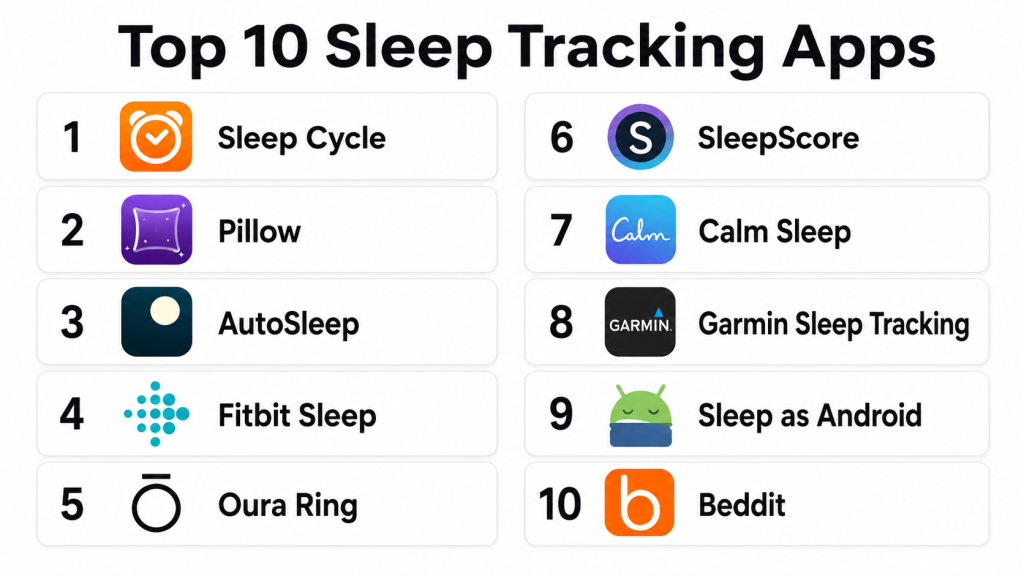
Top 10 Sleep Tracking Apps
#1 — Sleep Cycle
Short description: Sleep Cycle uses sound and motion detection to analyze sleep stages, duration, and quality. It offers detailed insights, trend reports, and smart alarms that wake users during light sleep for better mornings.
Key Features
- Sleep stage detection
- Smart wake‑up alarm
- Long‑term sleep trend reports
- Snore detection
- Data export and history
Pros
- Easy to use with phone only
- Smart alarm improves wake‑up timing
- Detailed trend analysis
- Snore and noise recording
Cons
- Sensor accuracy varies by phone placement
- Advanced features require premium
- Sleep stage detection is approximated
- No wearable integration in free version
Platforms / Deployment
- iOS / Android
- App
Security & Compliance
- Not publicly stated
Integrations & Ecosystem
Integrates with health data platforms on devices for broader wellness tracking.
- Health platform syncing
- Trend sharing
- Snore insights
Support & Community
Provides help resources, guides, and support options. User community discussions exist online.
#2 — Fitbit Sleep
Short description: Fitbit Sleep tracking works with Fitbit wearables to monitor sleep stages, heart rate, restlessness, and offers sleep score insights. It helps users correlate daily activity with sleep outcomes.
Key Features
- Sleep stage monitoring
- Heart rate and breathing tracking
- Sleep score and trends
- Smart wake alarms
- Sleep insights with activity correlation
Pros
- Accurate wearable‑based tracking
- Health metric correlations
- Activity and sleep trend comparison
- Works within Fitbit ecosystem
Cons
- Requires Fitbit device
- Premium insights require subscription
- Limited standalone app features
- Battery usage high with wearables
Platforms / Deployment
- iOS / Android
- App (Wearable integration)
Security & Compliance
- Not publicly stated
Integrations & Ecosystem
Works within Fitbit ecosystem and health platforms.
- Fitbit dashboards
- Device integration
- Health platform sync
Support & Community
Official support and community forums provided by Fitbit.
#3 — Apple Sleep
Short description: Apple Sleep uses iPhone and Apple Watch sensors to track sleep duration, heart rate, wind‑down schedules, and produces sleep trends. It is built into system health apps and emphasizes simplicity.
Key Features
- Sleep duration tracking
- Heart rate during sleep
- Wind‑down schedule guidance
- Sleep goals and trends
- Integration with health data metrics
Pros
- Built into Apple ecosystem
- Simple interface
- Works with Apple Watch
- Seamless health data sync
Cons
- Limited deep analysis
- Advanced insights require third‑party apps
- Apple Watch required for richer data
- Limited coaching guidance
Platforms / Deployment
- iOS / Apple Watch
- System app
Security & Compliance
- Apple privacy and data protection standards
Integrations & Ecosystem
Deep integration with Apple Health and related wellness metrics.
- Apple Health sync
- Heart rate and activity data
- Sleep goals
Support & Community
Official Apple documentation and support channels exist.
#4 — Oura Ring
Short description: Oura Ring uses wearable sensor technology to track sleep stages, readiness, temperature, and recovery metrics. It is ideal for users focused on holistic health and performance.
Key Features
- Sleep stage and quality analysis
- Readiness and recovery scores
- Temperature and breathing insights
- Long‑term health trend tracking
- Personalized health guidance
Pros
- High sensor accuracy
- Holistic health metrics
- Personalized insights
- Lightweight wearable
Cons
- Requires Oura Ring hardware
- Premium subscription enhances insights
- Pricey compared with app‑only tools
- Battery needs frequent charging
Platforms / Deployment
- iOS / Android
- Wearable
Security & Compliance
- Not publicly stated
Integrations & Ecosystem
Integrates with health platforms and ecosystem dashboards.
- Health platform sync
- Trend comparisons
- Data export
Support & Community
Official guides, help center, and active user community.
#5 — Whoop
Short description: Whoop is a performance and recovery platform with detailed sleep tracking, strain reporting, and recovery coaching. It is geared toward athletes, fitness enthusiasts, and users tracking holistic wellness.
Key Features
- Sleep stage and recovery metrics
- Strain and recovery coaching
- Heart rate variability tracking
- Personalized recommendations
- Long‑term trend insights
Pros
- Excellent for performance tracking
- Detailed recovery guidance
- Correlates daily activity with sleep quality
- Great for athletes
Cons
- Subscription required
- Requires Whoop wearable
- Not ideal for casual users
- Advanced metrics may overwhelm beginners
Platforms / Deployment
- iOS / Android
- Wearable
Security & Compliance
- Not publicly stated
Integrations & Ecosystem
Works within Whoop ecosystem for health metrics.
- Whoop app insights
- Activity and sleep correlation
- Trend analytics
Support & Community
Support resources and athlete community channels available.
#6 — SleepScore
Short description: SleepScore uses sonar and phone sensors to estimate sleep stages, quality, and provides personalized tips. It focuses on non‑wearable tracking with actionable guidance for improvement.
Key Features
- Sonar and motion sleep detection
- Sleep quality scoring
- Personalized recommendations
- Daytime habit insights
- Long‑term trend tracking
Pros
- No wearable required
- Personalized guidance
- Simple interface
- Trend analysis
Cons
- Accuracy varies by phone placement
- Some tips require subscription
- No wearable integration
- Sound detection may be affected by environment
Platforms / Deployment
- iOS / Android
- App
Security & Compliance
- Not publicly stated
Integrations & Ecosystem
Works mainly within its own app ecosystem without many external integrations.
- Trend insights
- Habit tracking
Support & Community
Help resources and support are available within the app.
#7 — Pillow
Short description: Pillow combines automatic sleep tracking via Apple devices with heart rate, sleep cycles, and nap detection. It is known for a user‑friendly interface and smart analytics.
Key Features
- Sleep stage analysis
- Nap detection
- Heart rate trends
- Smart alarm feature
- Sleep diary
Pros
- Easy for Apple users
- Smart alarms
- Heart rate insights
- Trend reporting
Cons
- Best with Apple Watch
- Deep analytics require subscription
- No Android support
- Not standalone without wearable
Platforms / Deployment
- iOS / Apple Watch
- App
Security & Compliance
- Not publicly stated
Integrations & Ecosystem
Integrates within Apple health for broader insights.
- Apple Health sync
- Trend comparisons
- Sleep diary entries
Support & Community
Documentation and help resources are available online.
#8 — Calm Sleep
Short description: Calm Sleep combines guided sleep meditations, soundscapes, and sleep trackers to help users fall asleep and stay asleep. It integrates relaxation tools with sleep pattern insights.
Key Features
- Sleep meditations and stories
- Soundscapes for sleep
- Sleep reminders
- Stats tracking
- Relaxation guides
Pros
- Great for sleep onset support
- Relaxation tools included
- Useful for anxiety and stress
- Easy to use
Cons
- Not focused on detailed analytics
- Best with premium subscription
- Sleep metrics not as granular
- Not a stand‑alone health metric app
Platforms / Deployment
- iOS / Android
- App
Security & Compliance
- Not publicly stated
Integrations & Ecosystem
Works within its own ecosystem for relaxation and sleep content.
- Meditation and story features
- Sleep reminders
- Routine guidance
Support & Community
In‑app support and help resources exist.
#9 — Relax Melodies
Short description: Relax Melodies focuses on customizable soundscapes, binaural beats, and sleep routines that help users relax and fall asleep. It is ideal for users prioritizing sleep onset support.
Key Features
- Custom sound combinations
- Binaural and isochronic tones
- Sleep timer
- Guided routines
- Ambient sounds
Pros
- Excellent for sleep onset
- Highly customizable soundscapes
- Good for stress relief
- Easy UI
Cons
- Not analytic‑centric
- No advanced tracking metrics
- Sounds may cost extra
- Not integrated with wearables
Platforms / Deployment
- iOS / Android
- App
Security & Compliance
- Not publicly stated
Integrations & Ecosystem
Works within its own app ecosystem for sleep routines.
- Sound routine templates
- Timer and personalization
- Sleep aids
Support & Community
Help guides and community forums available.
#10 — Sleep Genius
Short description: Sleep Genius uses neuroscience‑based sound programs to help users fall asleep faster and improve sleep quality. It combines sleep science with guided audio rhythms.
Key Features
- Neuroscience‑based sleep programs
- Relaxation audio cues
- Custom sleep tracks
- Nap and deep sleep programs
- Sleep scoring summary
Pros
- Science‑guided sound programs
- Helps with sleep onset
- Easy for bedtime routines
- Relaxation focus
Cons
- Less focus on tracking metrics
- Best when combined with other tracking tools
- Premium subscription for full library
- Not integrated with wearables
Platforms / Deployment
- iOS / Android
- App
Security & Compliance
- Not publicly stated
Integrations & Ecosystem
App ecosystem focuses on relaxation and sleep improvement features.
- Audio programs
- Nap routines
- Tracking summary
Support & Community
In‑app help resources and guidelines.
Comparison Table
| Tool Name | Best For | Platforms Supported | Deployment | Standout Feature | Public Rating |
|---|---|---|---|---|---|
| Sleep Cycle | Phone‑based tracking | iOS, Android | App | Smart wake and trends | N/A |
| Fitbit Sleep | Wearable sleep metrics | iOS, Android | App (Wearable) | Heart rate and stages | N/A |
| Apple Sleep | Apple ecosystem | iOS, Apple Watch | System app | Simple Apple integration | N/A |
| Oura Ring | Holistic health focus | iOS, Android | Wearable | Readiness and recovery | N/A |
| Whoop | Performance recovery | iOS, Android | Wearable | Strain and recovery metrics | N/A |
| SleepScore | Non‑wearable tracking | iOS, Android | App | Personalized sleep tips | N/A |
| Pillow | Apple wearable sleep | iOS, Apple Watch | App | Smart alarm and diary | N/A |
| Calm Sleep | Sleep onset support | iOS, Android | App | Guided meditations | N/A |
| Relax Melodies | Soundscape routines | iOS, Android | App | Custom sleep sounds | N/A |
| Sleep Genius | Sleep science audio | iOS, Android | App | Neuroscience audio tracks | N/A |
Evaluation & Scoring
| Tool Name | Core | Ease | Integrations | Security | Performance | Support | Value | Weighted Total |
|---|---|---|---|---|---|---|---|---|
| Sleep Cycle | 8 | 9 | 8 | 7 | 8 | 8 | 8 | 8.10 |
| Fitbit Sleep | 9 | 8 | 9 | 7 | 9 | 8 | 8 | 8.40 |
| Apple Sleep | 8 | 9 | 9 | 8 | 8 | 8 | 8 | 8.30 |
| Oura Ring | 9 | 8 | 8 | 7 | 9 | 8 | 7 | 8.30 |
| Whoop | 9 | 7 | 8 | 7 | 9 | 8 | 7 | 8.10 |
| SleepScore | 8 | 8 | 7 | 7 | 8 | 7 | 8 | 7.80 |
| Pillow | 8 | 8 | 8 | 7 | 8 | 7 | 8 | 7.85 |
| Calm Sleep | 7 | 9 | 7 | 7 | 7 | 7 | 7 | 7.65 |
| Relax Melodies | 7 | 9 | 7 | 7 | 7 | 7 | 7 | 7.65 |
| Sleep Genius | 7 | 8 | 7 | 7 | 7 | 7 | 7 | 7.50 |
Scores are comparative and help highlight strengths across tracking accuracy, ease of use, integration with wearables, privacy, performance, support, and value.
Which Sleep Tracking App Is Right for You
Solo / Casual Sleep Improvement
Users wanting simple sleep insights without wearables should consider Sleep Cycle, SleepScore, Calm Sleep, or Relax Melodies. These apps help with trends, basic coaching, and relaxation.
Wearable Users
Wearable‑based apps like Fitbit Sleep, Apple Sleep, Pillow, Oura Ring, and Whoop provide richer data including heart rate, sleep stages, recovery, and personalized trends.
Fitness and Recovery Focus
Athletes or wellness enthusiasts benefit from Whoop or Oura Ring, which correlate sleep with performance, strain, and recovery.
Holistic Sleep Coaching
Apps that combine guidance with relaxation tools, like Calm Sleep and Sleep Genius, are useful for users who want help with sleep onset and sleep behavior change.
Budget vs Premium
Phone‑only apps are easier on budget with free tiers and optional premium. Wearable‑linked apps or dedicated hardware often involve upfront costs for devices and subscription plans.
Feature Depth vs Ease of Use
Apps like Sleep Cycle and Apple Sleep are simple yet effective for daily insights. Oura Ring and Whoop provide deeper metrics but require hardware and subscription.
Integrations & Scalability
Users embedded in health ecosystems should choose tools that sync with health platforms; Fitbit and Apple Sleep are strong in this area.
Security & Compliance
Review privacy policies and data usage before sharing sensitive health metrics, especially with cloud and wearable data.
Frequently Asked Questions
1. What do Sleep Tracking Apps do?
Sleep Tracking Apps monitor sleep duration, stages, trends, and disturbances using phone sensors or wearable data. They help users analyze patterns and identify areas for improvement.
2. Are wearable devices better than phone‑only apps?
Wearable devices generally provide more accurate sleep data with heart rate, movement tracking, and stage details. Phone‑only apps offer useful insights but rely on external motion and sound approximation.
3. Do these apps help improve sleep quality?
Many apps provide personalized recommendations, sleep coaching, and habit suggestions. However, individual lifestyle adjustments and consistent routines are key to lasting improvement.
4. Is sleep tracking data private?
Privacy depends on app policies and data controls. Always review privacy settings, consent options, and whether data syncs to third‑party platforms or cloud services.
5. Can sleep tracking help health professionals?
Yes, sharing sleep reports can help clinicians understand patterns related to rest, stress, and overall health. Professional interpretation remains essential.
6. Are premium features worth it?
Premium plans often offer advanced insights, trend analytics, guided coaching, and personalized recommendations. For frequent users, these can be valuable.
7. Do these tools track naps?
Some apps, especially wearable‑linked tools, offer nap detection and analysis. Check individual app capabilities if daytime sleep tracking matters.
8. Can tracking reduce anxiety about sleep?
Some users find insights helpful; others may become anxious about metrics. Balance tracking with healthy sleep habits and professional guidance if needed.
9. Do Sleep Tracking Apps sync with health platforms?
Many integrate with health platforms on smartphones and wearable ecosystems to provide holistic wellness data.
10. Which metrics matter most?
Sleep duration, sleep stages, sleep quality score, restlessness, and heart rate trends are key metrics. Compare tools based on your focus areas.
Conclusion
Sleep Tracking Apps have become essential for anyone seeking to understand and improve their sleep patterns. Phone‑only apps like Sleep Cycle, SleepScore, Calm Sleep, and Relax Melodies offer accessible insights and relaxation tools. Wearable‑linked solutions like Fitbit Sleep, Apple Sleep, Oura Ring, Pillow, and Whoop provide deeper data including heart rate, sleep stages, recovery, and personalized guidance. The best choice depends on your health goals, device ecosystem, desire for coaching or analytics, and budget considerations. Start by testing a couple of apps to see how their insights match your routines and preferences, and choose tools that encourage healthier sleep habits and better overall rest.
