Introduction
AI Dubbing Tools are software platforms that use artificial intelligence to generate voiceovers in multiple languages for videos, audio, and other multimedia content. They combine natural language processing, text-to-speech synthesis, and lip-syncing technology to create realistic audio quickly and efficiently. These tools help content creators, marketers, and enterprises scale their operations and reach global audiences.
Real-world use cases include localizing marketing videos for international audiences, producing multilingual educational content, automating voiceovers for podcasts and audiobooks, enhancing gaming and interactive media experiences, and streamlining corporate training materials. Buyers should evaluate voice quality, language coverage, ease of integration, pricing flexibility, AI model accuracy, security and compliance, scalability, and support ecosystem.
Best for: media companies, e-learning platforms, corporate communications teams, marketing agencies, and global content creators seeking multilingual reach.
Not ideal for: projects requiring fully human voice nuance, artistic voice acting, or niche languages not supported by AI.
Key Trends in AI Dubbing Tools
- Multi-speaker AI models to handle diverse voices in a single project.
- Integration with video editing and content management systems for seamless workflows.
- Voice cloning and personalization for consistent brand voices.
- Expanding support for rare and regional languages.
- AI models optimized for emotion and intonation in storytelling.
- Cloud-based deployment with private and secure options for sensitive content.
- Flexible subscription and pay-per-use pricing models for businesses of all sizes.
- Features for regulatory compliance including GDPR and content auditability.
- Real-time live dubbing for streaming events and webinars.
- End-to-end interoperability with translation and transcription platforms.
How We Selected These Tools
- Reviewed market adoption and recognition across media, corporate, and education sectors.
- Assessed feature completeness, including voice naturalness and multi-language support.
- Evaluated reliability and performance based on output quality and responsiveness.
- Considered security posture including encryption, access controls, and compliance.
- Measured integration capabilities with video editors, LMS, and AI pipelines.
- Checked suitability across freelancers, SMBs, and enterprise teams.
- Analyzed ease of use and learning curve for non-technical users.
- Reviewed support options and strength of user communities.
- Compared pricing models and perceived value for different content volumes.
- Prioritized platforms with regular AI model updates and improvements.
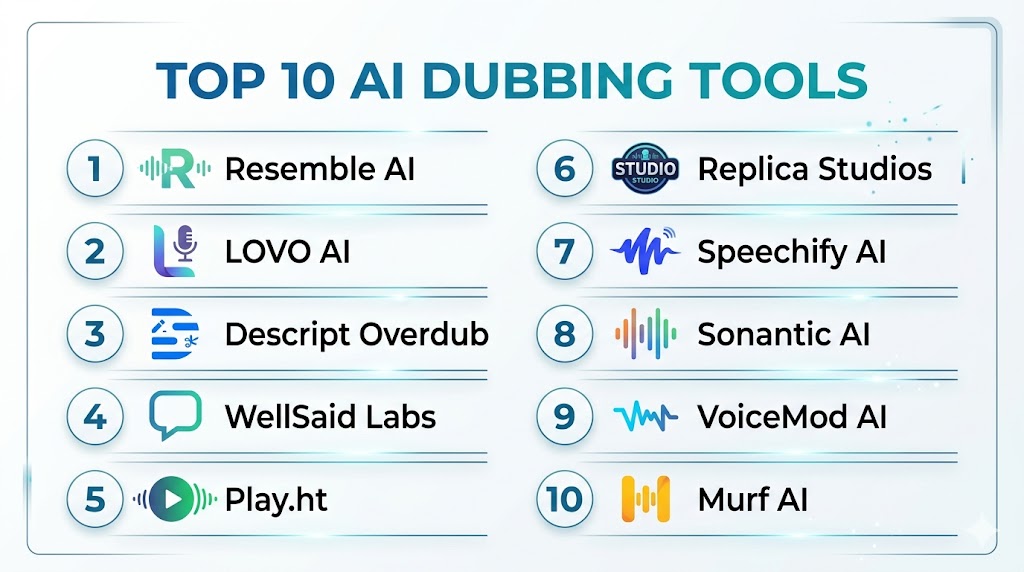
Top 10 AI Dubbing Tools
#1 — Descript Overdub
Short description: Descript Overdub allows creators to generate realistic voiceovers and replace audio segments quickly. It is designed for podcasters, video producers, and content teams seeking efficient AI dubbing.
Key Features
- Voice cloning for brand consistency
- Multi-language text-to-speech
- Seamless audio editing integration
- Collaboration support
- AI-driven transcription and alignment
Pros
- Realistic voice output
- Easy integration with editing tools
- Reduces manual dubbing time
Cons
- Limited rare language support
- Requires voice sample for cloning
- May not capture nuanced emotion
Platforms / Deployment
- Web / Windows / macOS
- Cloud
Security & Compliance
- Not publicly stated
Integrations & Ecosystem
Supports video and podcast workflows
- API access
- Works with project files
- Export to multiple audio/video formats
Support & Community
- Active documentation
- Email and chat support
- Growing creator community
#2 — LOVO AI
Short description: LOVO AI provides AI-generated voiceovers in multiple languages. It targets marketing, e-learning, and gaming professionals needing scalable voice solutions.
Key Features
- 33+ languages with 180+ voices
- Emotion and tone adjustments
- Custom voice cloning
- Batch processing
- API access
Pros
- Fast and scalable
- Expressive voice output
- Strong language coverage
Cons
- Advanced features require premium plan
- Limited offline support
- Occasional pronunciation errors
Platforms / Deployment
- Web / Windows / macOS / iOS
- Cloud
Security & Compliance
- Not publicly stated
Integrations & Ecosystem
Integrates with e-learning platforms and video editors
- REST API
- Export to MP3, WAV
- LMS and CMS support
Support & Community
- Tutorials and documentation
- Email support
- Community forums
#3 — Resemble AI
Short description: Resemble AI allows developers and media producers to generate realistic AI voices for videos and applications. It offers real-time streaming and custom voice creation.
Key Features
- Custom voice cloning
- Emotion-aware synthesis
- Multi-language support
- Real-time streaming API
- Batch voice generation
Pros
- Realistic voices
- Supports interactive media
- Flexible developer APIs
Cons
- Learning curve for API features
- Limited pre-built templates
- Higher cost for large projects
Platforms / Deployment
- Web / Windows / macOS
- Cloud
Security & Compliance
- Not publicly stated
Integrations & Ecosystem
- API-first platform
- Game engine and streaming integrations
- Supports enterprise workflow automation
Support & Community
- Developer documentation
- Dedicated support channels
- Growing user community
#4 — Synthesia
Short description: Synthesia focuses on AI video creation with voice dubbing, suitable for corporate communications, marketing, and educational content creators.
Key Features
- 120+ AI avatars
- Multi-language voiceover
- Script-based video creation
- Brand voice cloning
- Multi-format export
Pros
- Integrated video and voice AI
- Rapid content creation
- User-friendly interface
Cons
- Limited voice customization
- Cloud-only deployment
- High-resolution export requires premium
Platforms / Deployment
- Web
- Cloud
Security & Compliance
- Not publicly stated
Integrations & Ecosystem
- Works with video production tools
- Script automation support
- LMS and presentation integration
Support & Community
- Tutorials and documentation
- Email support
- Customer success guidance
#5 — Murf AI
Short description: Murf AI provides realistic voiceovers for marketing, corporate, and educational content. It emphasizes natural-sounding voices and simplicity.
Key Features
- 120+ voices in 20+ languages
- Pitch, speed, and emphasis control
- Brand voice cloning
- Noise removal
- Cloud-based editor
Pros
- Easy-to-use platform
- Realistic output
- Fast processing
Cons
- Limited offline functionality
- Custom voice creation may take time
- Free plan restrictions
Platforms / Deployment
- Web
- Cloud
Security & Compliance
- Not publicly stated
Integrations & Ecosystem
- Export to video and audio editors
- LMS integration
- REST API for automation
Support & Community
- Documentation and tutorials
- Email and chat support
- Active community
#6 — Play.ht
Short description: Play.ht generates voices for podcasts, audiobooks, and video dubbing. It focuses on high-quality TTS and flexible voice options for professional content creators.
Key Features
- 600+ voices in 60+ languages
- Emotion and style modulation
- Custom voice cloning
- Audio embedding for web
- API access
Pros
- Extensive voice and language options
- Suitable for long-form audio
- Easy publishing workflow
Cons
- Cloud-only platform
- Limited video integration
- Premium plan needed for full features
Platforms / Deployment
- Web
- Cloud
Security & Compliance
- Not publicly stated
Integrations & Ecosystem
- CMS integration
- Podcast and LMS platforms
- REST API for automation
Support & Community
- Documentation
- Email support
- Limited forums
#7 — WellSaid Labs
Short description: WellSaid Labs specializes in realistic AI voice generation for e-learning and corporate content. It is designed for training teams and content developers.
Key Features
- 50+ realistic voices
- Text-to-speech with emotion
- Brand voice cloning
- Multi-language support
- Audio editing
Pros
- Natural-sounding voices
- Intuitive interface
- Strong e-learning focus
Cons
- Limited free trial
- Smaller voice variety
- Cloud-only
Platforms / Deployment
- Web
- Cloud
Security & Compliance
- Not publicly stated
Integrations & Ecosystem
- LMS integration
- MP3/WAV export
- Team collaboration support
Support & Community
- Tutorials
- Email support
- Limited community
#8 — Rephrase.ai
Short description: Rephrase.ai focuses on video dubbing with AI voices for marketing and corporate videos. It allows content teams to produce personalized video messages efficiently.
Key Features
- Script-based video dubbing
- Multi-language TTS
- Custom AI voice cloning
- Video export
- API for automation
Pros
- Streamlines video localization
- Fast production workflow
- Supports personalization
Cons
- Limited voice emotion
- Cloud-only
- Premium pricing for enterprise
Platforms / Deployment
- Web
- Cloud
Security & Compliance
- Not publicly stated
Integrations & Ecosystem
- Video editors
- LMS and marketing platforms
- API access
Support & Community
- Documentation
- Email support
- Not publicly stated
#9 — DeepDub
Short description: DeepDub provides AI dubbing for films, series, and streaming content. It focuses on accurate lip-syncing and natural voice reproduction across multiple languages.
Key Features
- Lip-sync AI
- Multi-language support
- Emotion and tone adaptation
- Studio-grade audio
- Post-production integration
Pros
- Cinematic voice quality
- Advanced lip-sync
- Optimized for entertainment
Cons
- Enterprise pricing
- Not ideal for small projects
- Cloud-only
Platforms / Deployment
- Web
- Cloud
Security & Compliance
- Not publicly stated
Integrations & Ecosystem
- Video editing software
- Post-production workflows
- API automation
Support & Community
- Enterprise support
- Documentation
- Not publicly stated
#10 — Papercup
Short description: Papercup delivers AI dubbing for media and corporate videos with natural-sounding translations. It is used by broadcasters, streaming platforms, and training teams.
Key Features
- Multi-language AI voiceover
- Emotion and intonation adjustment
- Batch video processing
- Cloud editor
- Custom voice creation
Pros
- Fast localization
- Human-like voice output
- Media and corporate use
Cons
- Premium pricing
- Limited offline capabilities
- May require manual fine-tuning
Platforms / Deployment
- Web
- Cloud
Security & Compliance
- Not publicly stated
Integrations & Ecosystem
- Video editors and CMS
- API batch processing
- LMS integration
Support & Community
- Documentation
- Email support
- Enterprise account management
Comparison Table
| Tool Name | Best For | Platform(s) Supported | Deployment | Standout Feature | Public Rating |
|---|---|---|---|---|---|
| Descript Overdub | Podcasters, content creators | Web, Windows, macOS | Cloud | Voice cloning and overdub | N/A |
| LOVO AI | Marketing, e-learning, gaming | Web, Windows, macOS, iOS | Cloud | Multi-language TTS | N/A |
| Resemble AI | Developers, media producers | Web, Windows, macOS | Cloud | Real-time API streaming | N/A |
| Synthesia | Corporate, marketing, education | Web | Cloud | AI avatars and voice | N/A |
| Murf AI | Marketing, corporate, education | Web | Cloud | Pitch, speed, emphasis control | N/A |
| Play.ht | Podcasts, audiobooks | Web | Cloud | Large voice and language library | N/A |
| WellSaid Labs | E-learning, corporate content | Web | Cloud | Natural-sounding TTS | N/A |
| Rephrase.ai | Video marketing, personalization | Web | Cloud | Script-based video dubbing | N/A |
| DeepDub | Films, series, streaming | Web | Cloud | Advanced lip-sync | N/A |
| Papercup | Media, corporate training | Web | Cloud | Emotion-adjusted dubbing | N/A |
Evaluation & Scoring
| Tool Name | Core | Ease | Integrations | Security | Performance | Support | Value | Weighted Total |
|---|---|---|---|---|---|---|---|---|
| Descript Overdub | 9 | 9 | 8 | 7 | 9 | 8 | 8 | 8.55 |
| LOVO AI | 8 | 8 | 7 | 7 | 8 | 8 | 8 | 7.85 |
| Resemble AI | 9 | 7 | 9 | 7 | 9 | 7 | 7 | 8.05 |
| Synthesia | 8 | 9 | 7 | 7 | 8 | 8 | 7 | 7.85 |
| Murf AI | 8 | 8 | 7 | 7 | 8 | 7 | 8 | 7.75 |
| Play.ht | 8 | 7 | 8 | 7 | 8 | 7 | 7 | 7.55 |
| WellSaid Labs | 8 | 8 | 7 | 7 | 8 | 7 | 7 | 7.65 |
| Rephrase.ai | 7 | 8 | 7 | 7 | 7 | 7 | 7 | 7.25 |
| DeepDub | 9 | 7 | 7 | 7 | 9 | 7 | 6 | 7.70 |
| Papercup | 8 | 7 | 7 | 7 | 8 | 7 | 7 | 7.50 |
Scores are comparative and show relative strengths across features, ease, integrations, security, performance, support, and value.
Which AI Dubbing Tool Is Right for You
Solo / Freelancer
Descript Overdub and Murf AI provide simple interfaces and lower costs, ideal for individuals producing video or podcast content.
SMB
LOVO AI and Play.ht are scalable and support multiple languages, helping small teams create content efficiently.
Mid-Market
Resemble AI and Synthesia combine quality, customization, and API integration for mid-sized media, education, or corporate teams.
Enterprise
DeepDub, Papercup, and WellSaid Labs offer advanced voice realism, workflow integration, and security for large-scale content production.
Budget vs Premium
Budget-friendly options like Murf AI and Play.ht meet basic needs. Premium tools such as DeepDub and Synthesia deliver advanced dubbing, multi-language support, and enterprise-grade integrations.
Feature Depth vs Ease of Use
Descript Overdub and Murf AI focus on usability. DeepDub and Resemble AI offer advanced features but require technical setup.
Integrations & Scalability
Enterprise users benefit from Synthesia, DeepDub, and Resemble AI, which integrate with video editors, LMS, and streaming platforms.
Security & Compliance Needs
Teams handling sensitive content should prioritize platforms with strong access controls, encryption, and secure cloud deployment.
Frequently Asked Questions
1. How much do AI dubbing tools cost?
Pricing varies based on usage, number of voices, and features. Some tools offer free tiers for basic needs, while enterprise plans include premium voice options, batch processing, and advanced integrations.
2. Can I dub videos in any language?
Most tools cover major global languages. Niche or regional languages may be limited, so it is important to verify language support before selecting a platform.
3. How realistic do AI-generated voices sound?
Modern AI dubbing tools produce human-like voices with emotion, tone, and pacing. Some nuance may still require manual adjustment for critical or artistic content.
4. Are these tools secure for sensitive content?
Most platforms use standard encryption and access controls. Specific certifications may not always be publicly stated, but enterprise-grade tools typically include secure cloud deployments.
5. Can AI dubbing integrate with video editors?
Yes, many platforms support direct export or API integration with video editing software, LMS, and content management systems for streamlined workflows.
6. How fast can I generate dubbed content?
Processing speed depends on video length, voice complexity, and platform capabilities. Most cloud-based tools deliver results in minutes, with batch processing for multiple videos.
7. Can I create a custom brand voice?
Yes, several tools offer voice cloning to create consistent brand-specific voices, ideal for corporate videos, marketing, and e-learning content.
8. What types of content are suitable for AI dubbing?
Marketing videos, e-learning modules, podcasts, corporate training materials, video games, and streaming content all benefit from AI dubbing.
9. How steep is the learning curve?
Platforms like Murf AI and Descript Overdub are designed for simplicity, while developer-focused tools like Resemble AI may require technical familiarity for advanced features.
10. Can I switch tools easily?
Most cloud-based tools allow exporting audio or video in standard formats, making it possible to migrate content between platforms if needed.
Conclusion
AI Dubbing Tools are transforming content creation by enabling fast, high-quality, multilingual voiceovers. The choice of tool depends on project scale, language needs, desired voice realism, and integration requirements. Freelancers benefit from ease-of-use platforms, SMBs gain from scalable multi-language options, and enterprises require high-end realism and workflow integrations. Evaluating features, pricing, security, and support is crucial before committing. The best approach is to shortlist 2–3 tools, run a pilot project to assess output quality and workflow fit, validate integrations and security, and then scale for production across your content pipeline. By following this method, organizations can deliver professional, localized audio content efficiently and consistently.

This article offers a clear comparison of AI dubbing tools and their capabilities for multilingual content creation. The straightforward feature analysis helps readers quickly understand the strengths of each platform and make an informed choice.