Introduction
Recipe Management Apps are digital tools that help users collect, organize, store, and share recipes across devices. These platforms often include features like meal planning, grocery lists, nutritional information, and integrations with smart kitchen devices. They are designed for home cooks, food bloggers, professional chefs, nutrition‑focused users, and families managing varied dietary needs.
Real‑world use cases include organizing personal recipe collections, meal planning for dietary goals, creating and sharing recipes with friends or communities, generating grocery lists from meal plans, and tracking nutritional data for health management. Buyers should evaluate recipe organization capabilities, meal planner features, grocery list automation, device integrations, nutrition tracking, usability, cross‑platform syncing, pricing, and support.
Best for: home cooks, food bloggers, families planning meals, nutrition‑focused users, and culinary professionals managing recipe workflows.
Not ideal for: casual users who only need simple recipes stored in notes or basic bookmarks.
Key Trends in Recipe Management Apps
- Cloud‑based syncing across multiple devices
- Meal planning with automated grocery lists
- Integration with smart kitchen appliances
- AI‑powered recipe suggestions based on diet preferences
- Barcode scanning for ingredient logging
- Calorie and nutrition tracking per recipe
- Sharing recipes within communities or via social platforms
- Voice‑assistant support for hands‑free kitchen use
- Cross‑platform availability including mobile and web
- Custom dietary filters for allergies and preferences
How We Selected These Tools
- Reviewed adoption and popularity among home cooks and pros
- Evaluated recipe organization and tagging features
- Assessed meal planning and grocery list automation
- Considered nutrition tracking and dietary filter support
- Checked cross‑platform sync and offline access
- Measured integrations with smart kitchen devices
- Compared ease of use and onboarding experience
- Reviewed pricing models and subscription value
- Examined support documentation and community presence
- Prioritized tools with regular updates and feature growth
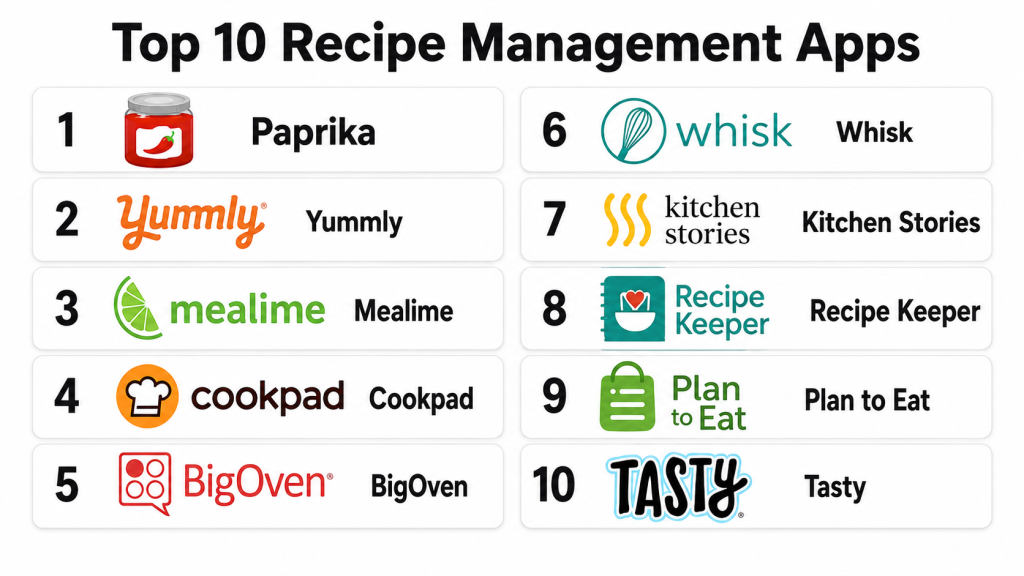
Top 10 Recipe Management Apps
#1 — Paprika Recipe Manager
Short description: Paprika Recipe Manager helps users save, organize, and plan recipes with powerful tools for meal planning, grocery lists, and cross‑device sync. It works well for everyday cooks and culinary enthusiasts.
Key Features
- Recipe saving and categorization
- Meal planning calendar
- Grocery list automation
- Cross‑device sync
- Recipe scaling and timers
Pros
- Reliable recipe organization
- Intuitive meal planner
- Grocery list linked to recipes
- Works offline
Cons
- Paid app with a one‑time fee
- No built‑in nutrition tracking
- Limited social sharing features
- No AI recipe suggestions
Platforms / Deployment
- iOS / Android / macOS / Windows
- App
Security & Compliance
- Not publicly stated
Integrations & Ecosystem
Paprika works with third‑party clipboard detection and recipe import.
- Cross‑device sync
- Category tags
- Recipe import tools
- Grocery list export
- Meal calendar
Support & Community
Offers documentation, help guides, and an active user base sharing workflows.
#2 — Yummly
Short description: Yummly is a smart recipe app that recommends recipes based on preferences, dietary needs, and past likes. It includes meal planning tools and Smart Grocery Lists.
Key Features
- Personalized recipe feed
- Dietary filters and preferences
- Smart Grocery List
- Step‑by‑step guided cooking
- Nutrition information
Pros
- Strong AI‑driven recipe recommendations
- Easy meal planning
- Nutrition labels included
- Great for diverse diets
Cons
- Ads in free version
- Some features require subscription
- Grocery list can be basic
- UI may feel busy for some users
Platforms / Deployment
- iOS / Android / Web
- Cloud
Security & Compliance
- Not publicly stated
Integrations & Ecosystem
Yummly integrates with grocery delivery partners and health data platforms.
- Grocery partner connections
- Nutrition insights
- Recipe saving and sharing
- Dietary filters
Support & Community
Help resources, FAQs, and user reviews available. Community is active in sharing recipe ideas.
#3 — Mealime
Short description: Mealime focuses on meal planning with simple recipe selections, nutrition insights, and automated grocery lists. It is ideal for busy households and nutrition‑focused users.
Key Features
- Meal plan builder
- Grocery list automation
- Nutrition tracking
- Custom dietary filters
- Recipe collection saving
Pros
- Easy meal planning
- Simple and clean UI
- Grocery list automation saves time
- Dietary preferences handled well
Cons
- Limited recipe database in free plan
- Some customization requires subscription
- Not as deep for professional chefs
- Nutrition data limited in free tier
Platforms / Deployment
- iOS / Android / Web
- Cloud
Security & Compliance
- Not publicly stated
Integrations & Ecosystem
Mealime supports quick export to grocery apps and health platforms.
- Health data sync
- Grocery list export
- Diet filters
- Meal templates
Support & Community
Documentation, guides, and community resources available.
#4 — BigOven
Short description: BigOven helps users manage personal recipes, plan meals, and create shopping lists. It is popular for family meal planning and seasonal cooking.
Key Features
- Recipe organizer
- Meal planner calendar
- Grocery list builder
- Leftovers meal ideas
- Community recipe sharing
Pros
- Easy to organize recipes
- Family meal planning friendly
- Grocery list automation
- Leftovers recommendation tool
Cons
- UI can be cluttered
- Ads in free plan
- Some features require subscription
- Nutrition details not as deep
Platforms / Deployment
- iOS / Android / Web
- Cloud
Security & Compliance
- Not publicly stated
Integrations & Ecosystem
BigOven connects with grocery list tools and social sharing.
- Recipe sharing feeds
- Grocery list export
- Meal planner sync
- Leftovers ideas
Support & Community
Help documentation and large user community sharing recipes.
#5 — Cookpad
Short description: Cookpad is a community‑centric recipe app that allows users to share their recipes, follow others, and explore trending dishes worldwide.
Key Features
- Recipe publishing and sharing
- Community interaction
- Recipe saving and categorization
- Photo and step instruction support
- Social features and likes
Pros
- Strong community engagement
- Inspiring recipe discovery
- Easy to share original recipes
- Great for social cooks
Cons
- Limited meal planning tools
- Grocery automation minimal
- Nutrition info not prominent
- Ads and premium loops appear
Platforms / Deployment
- iOS / Android / Web
- Cloud
Security & Compliance
- Not publicly stated
Integrations & Ecosystem
Cookpad focuses on social connection rather than device integrations.
- Sharing and likes
- Recipe photo uploads
- Follow features
- Search and categorize
Support & Community
User community is active; guides and help resources are available.
#6 — Plan to Eat
Short description: Plan to Eat focuses on meal planning with recipe saving, meal schedules, and automated shopping lists. It emphasizes organization and routine meal planning.
Key Features
- Recipe organizer
- Meal calendar planning
- Shopping list automation
- Drag‑and‑drop interface
- Cross‑device sync
Pros
- Intuitive drag‑and‑drop meal planner
- Seamless grocery list creation
- Works across devices
- Great for weekly planning
Cons
- No AI recipe suggestions
- Nutrition data limited
- Less social or community features
- Subscription required
Platforms / Deployment
- iOS / Android / Web
- Cloud
Security & Compliance
- Not publicly stated
Integrations & Ecosystem
Plan to Eat works with clipboard import and grocery list export.
- Recipe import
- Grocery list sync
- Meal calendar
- Export workflows
Support & Community
Documentation and support resources available; active user forums.
#7 — Pepperplate
Short description: Pepperplate offers recipe organization, meal planning, and shopping list generation. It is simple and effective for cooks who want classic organization features without complexity.
Key Features
- Recipe storage
- Meal calendar
- Shopping list builder
- Timer and cooking mode
- Import tools
Pros
- Simple recipe organization
- Effective calendar and lists
- Works offline
- Multi‑device sync
Cons
- Feature set feels basic
- No AI recommendations
- Nutrition tracking absent
- Limited community features
Platforms / Deployment
- iOS / Android / Web
- App
Security & Compliance
- Not publicly stated
Integrations & Ecosystem
Pepperplate supports basic integrations for recipes and timers.
- Recipe imports
- Meal planner sync
- Shopping list exports
Support & Community
Help documentation and support forums available.
#8 — Eat This Much
Short description: Eat This Much focuses on automated meal plans and calorie‑based diet planning. It fits users who want AI‑driven planning tied to nutritional goals.
Key Features
- Automated meal plans
- Calorie and macro guidance
- Grocery list generation
- Diet preference settings
- Adjustable portion sizes
Pros
- Strong nutrition and diet planning
- Smart grocery lists
- Custom meal targets
- Good for weight management
Cons
- Subscription required for full power
- Recipe database may feel limited
- Not a pure community app
- Food preference nuances vary
Platforms / Deployment
- iOS / Android / Web
- Cloud
Security & Compliance
- Not publicly stated
Integrations & Ecosystem
Integrates with health tracking tools and grocery workflows.
- Health data sync
- Grocery list export
- Nutrition summary
Support & Community
Support resources and guides available.
#9 — Tasty
Short description: Tasty is a recipe app from a popular food network that offers video‑based recipes, step‑by‑step instructions, and trending dishes. It is ideal for visual learners and social cooks.
Key Features
- Video recipe guides
- Trending recipe feeds
- Recipe saving and categorization
- Smart search and filters
- Step‑by‑step instructions
Pros
- Excellent video support
- Great for inspiration
- Easy browsing
- Visual learning format
Cons
- Limited meal planning features
- Grocery list automation modest
- Nutrition info sometimes missing
- Focused on content, not organization
Platforms / Deployment
- iOS / Android / Web
- Cloud
Security & Compliance
- Not publicly stated
Integrations & Ecosystem
Tasty focuses on recipe content and visual lessons.
- Video guides
- Filters and search
- Recipe collections
Support & Community
Help guides and user feedback options available.
#10 — MealBoard
Short description: MealBoard combines recipe management, meal planning, grocery list automation, and pantry tracking in a single app. It is geared toward home cooks who want complete control over kitchen workflows.
Key Features
- Recipe storage and organization
- Meal calendar and plans
- Smart grocery lists
- Pantry inventory tracking
- Recipe import
Pros
- All‑in‑one kitchen management
- Pantry tracking saves waste
- Grocery automation
- Cross‑device sync
Cons
- Paid app required
- Nutrition tracking limited
- UI can feel dated
- Less community sharing
Platforms / Deployment
- iOS / Android
- App
Security & Compliance
- Not publicly stated
Integrations & Ecosystem
MealBoard connects recipe, pantry, and grocery workflows.
- Pantry sync
- Shopping list exports
- Meal calendar
- Recipe imports
Support & Community
Documentation and support forums available.
Comparison Table
| Tool Name | Best For | Platforms Supported | Deployment | Standout Feature | Public Rating |
|---|---|---|---|---|---|
| Paprika | Everyday recipe organization | iOS, Android, macOS, Windows | App | Meal planning + grocery lists | N/A |
| Yummly | Personalized recipes | iOS, Android, Web | Cloud | AI‑driven recommendations | N/A |
| Mealime | Meal planning & nutrition | iOS, Android, Web | Cloud | Automated grocery lists | N/A |
| BigOven | Family meal planner | iOS, Android, Web | Cloud | Leftovers meal ideas | N/A |
| Cookpad | Community sharing | iOS, Android, Web | Cloud | Social recipe sharing | N/A |
| Plan to Eat | Drag & drop planner | iOS, Android, Web | Cloud | Intuitive meal scheduler | N/A |
| Pepperplate | Simple organization | iOS, Android, Web | App | Classic recipe storage | N/A |
| Eat This Much | Diet‑centric planning | iOS, Android, Web | Cloud | Nutrition‑based AI planning | N/A |
| Tasty | Video recipes and guides | iOS, Android, Web | Cloud | Video step‑by‑step | N/A |
| MealBoard | Kitchen workflow | iOS, Android | App | Pantry tracking + lists | N/A |
Evaluation & Scoring
| Tool Name | Core | Ease | Integrations | Security | Performance | Support | Value | Weighted Total |
|---|---|---|---|---|---|---|---|---|
| Paprika | 9 | 9 | 8 | 7 | 9 | 8 | 8 | 8.40 |
| Yummly | 8 | 8 | 8 | 7 | 8 | 7 | 8 | 7.90 |
| Mealime | 8 | 9 | 8 | 7 | 8 | 8 | 8 | 8.05 |
| BigOven | 8 | 8 | 7 | 7 | 8 | 7 | 8 | 7.75 |
| Cookpad | 7 | 8 | 7 | 7 | 7 | 7 | 8 | 7.55 |
| Plan to Eat | 8 | 9 | 8 | 7 | 8 | 7 | 8 | 7.95 |
| Pepperplate | 7 | 9 | 7 | 7 | 7 | 7 | 8 | 7.55 |
| Eat This Much | 8 | 8 | 8 | 7 | 8 | 7 | 8 | 7.90 |
| Tasty | 7 | 9 | 7 | 7 | 7 | 7 | 8 | 7.45 |
| MealBoard | 8 | 8 | 8 | 7 | 8 | 8 | 8 | 8.00 |
Which Recipe Management App Is Right for You
Solo Cooks
Solo cooks who want simple recipe organization and planning should consider Paprika, Mealime, or Pepperplate. These tools make daily cooking easier without complexity.
Families and Meal Planning
Families and households will benefit from Paprika, Mealime, BigOven, or Plan to Eat for weekly meal planning and grocery list automation.
Community and Inspiration
Users who enjoy recipe discovery and sharing should explore Cookpad and Tasty for inspiration and social engagement.
Nutrition and Diet Focus
Nutrition‑focused users and those with specific dietary goals should consider Mealime and Eat This Much for planned meal suggestions and nutrition tracking.
All‑in‑One Kitchen Workflow
Home cooks who want complete kitchen management including pantry tracking can use MealBoard for a central workflow hub.
Budget vs Premium
Many apps provide free access with optional subscriptions for advanced features. Paprika and MealBoard require a one‑time or subscription purchase, while cloud tools often offer freemium models.
Feature Depth vs Ease of Use
Apps like Paprika and Mealime strike a balance between powerful features and ease of use. Tasty and Cookpad are heavier on content inspiration, while Plan to Eat excels at organized planning.
Integrations & Scalability
Cloud‑based apps that sync across devices and connect with grocery and health platforms help users maintain consistent routines and integrate well into wellness workflows.
Frequently Asked Questions
1. What do Recipe Management Apps do?
Recipe Management Apps help users store, organize, plan, and use recipes. They often include meal planning, grocery list automation, and dietary tracking to make cooking more efficient.
2. Do these apps sync across devices?
Yes, most cloud‑based apps sync recipes and plans across phones, tablets, and computers. Apps like Paprika and MealBoard also support offline access.
3. Can I customize meal plans?
Many apps include customizable meal planners that let users choose recipes for specific days, adjust serving sizes, and automatically generate grocery lists.
4. Do Recipe Apps track nutrition?
Some, like Mealime and Eat This Much, provide nutrition and calorie insights. Others focus more on organization and planning without detailed nutrition data.
5. Can I share my recipes?
Yes, community‑centric tools like Cookpad, BigOven, and Yummly let users share recipes with others. Export and sharing features vary by platform.
6. Are Grocery lists automated?
Most apps generate grocery lists based on selected recipes and meal plans to help with efficient shopping.
7. Do these apps support dietary restrictions?
Many have filters for dietary needs and allergies to suggest recipes that match preferences like vegetarian, gluten‑free, or low‑calorie.
8. Are premium features worth it?
Premium features often include advanced planning tools, detailed nutrition info, ad‑free experiences, and smart recommendations. Value depends on use frequency.
9. Are Recipe Apps good for beginners?
Yes, apps with simple interfaces and guided steps like Paprika, Yummly, and Tasty are especially helpful for novice cooks.
10. Can I import recipes from websites?
Several tools allow recipe import via URL, copy‑paste, or browser extensions to gather recipes from favorite food sites.
Conclusion
Recipe Management Apps make organizing, planning, and cooking meals easier and more efficient for home cooks, families, food bloggers, and nutrition‑focused users. Tools like Paprika and MealBoard provide robust organization and pantry tracking, while Yummly, BigOven, and Cookpad excel at discovery and inspiration. Mealime and Eat This Much add dietary and nutrition planning features for health goals. Your choice should match your cooking habits, meal planning needs, desire for nutrition insights, and appetite for community sharing or inspiration. A good next step is to test a couple of apps with your recipes and meal routines, compare their grocery automation and dietary filters, and choose the one that keeps your kitchen workflows organized and enjoyable.
