Introduction
Computer-Assisted Translation (CAT) Tools are software solutions designed to assist translators in producing accurate and consistent translations efficiently. They combine translation memory, terminology management, and AI-assisted suggestions to reduce repetitive work and improve translation quality. CAT tools are essential for professional translators, localization teams, and enterprises managing multilingual content.
Real-world use cases include translating software interfaces, localizing marketing materials, producing multilingual documentation, handling large volumes of website content, and ensuring consistency across corporate communication. Buyers should evaluate translation memory capabilities, terminology management, machine translation integration, workflow automation, multi-format support, cloud or desktop deployment, collaboration features, security, and customer support.
Best for: professional translators, localization managers, translation agencies, and enterprises with high-volume multilingual content.
Not ideal for: small-scale ad-hoc translations or users needing only quick machine translation without context or consistency.
Key Trends in CAT Tools
- Integration of AI and machine translation suggestions to accelerate productivity.
- Cloud-based platforms enabling collaboration across distributed translation teams.
- Enhanced translation memory and terminology management for consistency.
- Support for multiple content types including software, web, and multimedia.
- Real-time QA and error detection integrated into workflows.
- Integration with TMS, CMS, and content pipelines for continuous localization.
- Focus on user experience and editor interfaces for productivity.
- Subscription and SaaS pricing models for flexibility.
- Multi-language and regional dialect support expansion.
- Analytics dashboards for translation efficiency and quality metrics.
How We Selected These Tools
- Reviewed market adoption and recognition among professional translators and agencies.
- Assessed translation memory, terminology, and MT integration features.
- Evaluated performance, reliability, and scalability.
- Considered workflow automation and collaboration capabilities.
- Checked content type and file format support.
- Measured ease of use and learning curve.
- Reviewed reporting, QA, and error detection features.
- Compared pricing models and overall value.
- Assessed support options, documentation, and community.
- Prioritized tools with frequent updates and strong vendor support.
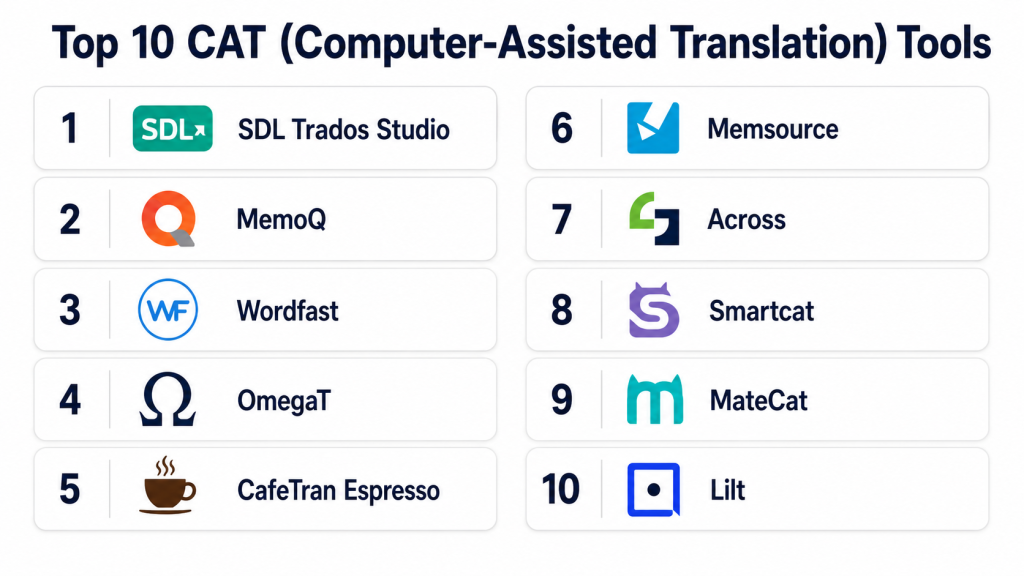
Top 10 CAT Tools
#1 — SDL Trados Studio
Short description: SDL Trados Studio is a leading CAT tool offering robust translation memory, terminology management, and project management features. It suits professional translators and enterprise localization teams.
Key Features
- Advanced translation memory
- Integrated terminology management
- Project and workflow management
- Machine translation integration
- QA and error detection
Pros
- Industry-standard reliability
- Comprehensive project management
- Supports multiple file formats
Cons
- Desktop-focused
- Premium pricing
- Steep learning curve
Platforms / Deployment
- Windows
- Desktop
Security & Compliance
- Not publicly stated
Integrations & Ecosystem
- TMS and MT integrations
- Supports plugin extensions
- Collaborative workflow support
Support & Community
- Documentation and tutorials
- Email support
- Large user community
#2 — memoQ
Short description: memoQ is a CAT tool with translation memory, terminology management, and real-time collaboration. It targets translators, agencies, and enterprise teams.
Key Features
- Translation memory and term bases
- Real-time collaborative editing
- QA checks and automated suggestions
- Multi-format support
- Integration with MT engines
Pros
- Strong collaboration features
- Intuitive interface
- Flexible project management
Cons
- Desktop-centric
- Premium subscription needed
- Learning curve for advanced features
Platforms / Deployment
- Windows, Web
- Desktop, Cloud
Security & Compliance
- Not publicly stated
Integrations & Ecosystem
- Supports TMS and MT integrations
- API for automation
- Plugin support
Support & Community
- Tutorials and documentation
- Email and chat support
- Active user forums
#3 — Wordfast
Short description: Wordfast offers translation memory and glossary management for freelance translators and small teams. It emphasizes speed and ease of use.
Key Features
- Translation memory
- Glossary management
- Cloud and desktop versions
- Multi-language support
- QA and consistency checks
Pros
- User-friendly interface
- Cross-platform support
- Cost-effective
Cons
- Limited enterprise features
- Fewer automation options
- Cloud collaboration less advanced
Platforms / Deployment
- Windows, macOS, Linux
- Desktop, Cloud
Security & Compliance
- Not publicly stated
Integrations & Ecosystem
- TMS and MT integrations
- Plugin support
- Document import/export
Support & Community
- Documentation
- Email support
- User community
#4 — Memsource
Short description: Memsource is a cloud-based CAT tool offering translation memory, terminology, and AI-assisted translation. It targets enterprise localization teams.
Key Features
- Cloud-based translation memory
- Terminology management
- AI and MT integration
- Real-time collaboration
- Reporting dashboards
Pros
- Scalable cloud solution
- Collaboration across teams
- AI-assisted productivity
Cons
- Subscription required
- Desktop version limited
- Learning curve for advanced features
Platforms / Deployment
- Web, Windows, macOS
- Cloud
Security & Compliance
- Not publicly stated
Integrations & Ecosystem
- TMS and CMS integration
- API access for automation
- Collaborative workflow support
Support & Community
- Tutorials and documentation
- Email and chat support
- Community forums
#5 — Smartcat
Short description: Smartcat is a cloud-native CAT tool designed for freelance translators, agencies, and enterprises. It offers translation memory, glossary management, and marketplace connectivity.
Key Features
- Cloud-based translation memory
- Terminology management
- AI-assisted translation suggestions
- Marketplace for freelancers
- Collaboration and workflow automation
Pros
- Fully cloud-based
- Strong freelancer connectivity
- Workflow automation
Cons
- Premium features require subscription
- Complex for beginners
- Limited offline support
Platforms / Deployment
- Web, Windows, macOS
- Cloud
Security & Compliance
- Not publicly stated
Integrations & Ecosystem
- MT engines and TMS integration
- API support
- Collaboration with freelance translators
Support & Community
- Documentation
- Email support
- Active online community
#6 — OmegaT
Short description: OmegaT is an open-source CAT tool with translation memory and glossary support. It suits freelance translators and small teams.
Key Features
- Translation memory
- Glossary management
- Multi-language support
- Project management
- Basic QA checks
Pros
- Free and open-source
- Cross-platform
- Simple interface
Cons
- Limited advanced features
- No cloud collaboration
- Smaller community
Platforms / Deployment
- Windows, macOS, Linux
- Desktop
Security & Compliance
- Not publicly stated
Integrations & Ecosystem
- Supports file import/export
- Plugin support
- Limited API
Support & Community
- Documentation
- Community forums
- Volunteer support
#7 — CafeTran
Short description: CafeTran is a flexible CAT tool for freelance translators and small teams. It provides translation memory, glossary, and integration with MT engines.
Key Features
- Translation memory
- Glossary support
- MT engine integration
- Project management
- Cross-platform support
Pros
- Affordable
- Cross-platform
- Flexible workflow
Cons
- Less suitable for large teams
- Desktop-focused
- Learning curve for advanced features
Platforms / Deployment
- Windows, macOS, Linux
- Desktop
Security & Compliance
- Not publicly stated
Integrations & Ecosystem
- MT engine support
- Plugin support
- File format compatibility
Support & Community
- Documentation
- Email support
- User forums
#8 — MateCat
Short description: MateCat is a cloud-based CAT tool offering translation memory, glossary, and machine translation integration. It targets freelance translators and small teams.
Key Features
- Cloud translation memory
- Terminology management
- MT engine integration
- Real-time collaboration
- QA checks
Pros
- Cloud-based and accessible
- Free to use for standard features
- Real-time collaboration
Cons
- Requires internet connection
- Limited offline functionality
- Fewer advanced enterprise features
Platforms / Deployment
- Web
- Cloud
Security & Compliance
- Not publicly stated
Integrations & Ecosystem
- TMS and MT integration
- Collaborative workflow support
- Reporting dashboards
Support & Community
- Documentation
- Email support
- User community
#9 — Across
Short description: Across is a professional CAT tool designed for enterprise localization and translation management, offering robust translation memory and workflow automation.
Key Features
- Translation memory
- Terminology management
- Project workflow automation
- QA checks and reporting
- Enterprise collaboration
Pros
- Enterprise-ready
- Automation features
- Supports multiple languages
Cons
- Premium pricing
- Learning curve for beginners
- Cloud version requires subscription
Platforms / Deployment
- Windows
- Desktop, Cloud
Security & Compliance
- Not publicly stated
Integrations & Ecosystem
- TMS integration
- Plugin and API support
- Enterprise reporting
Support & Community
- Documentation
- Email support
- Enterprise community
#10 — Wordbee
Short description: Wordbee is a cloud-based CAT and TMS platform for translation agencies and enterprises. It combines translation memory, workflow automation, and QA.
Key Features
- Translation memory
- Workflow automation
- QA and reporting
- Multi-language support
- Collaboration and project management
Pros
- Cloud-based enterprise solution
- Efficient workflow management
- Supports multiple content types
Cons
- Subscription-based
- Complex setup for new users
- Advanced features require premium
Platforms / Deployment
- Web
- Cloud
Security & Compliance
- Not publicly stated
Integrations & Ecosystem
- TMS integration
- API and plugin support
- Collaborative workflow support
Support & Community
- Tutorials and documentation
- Email support
- Active enterprise community
Comparison Table
| Tool Name | Best For | Platform(s) Supported | Deployment | Standout Feature | Public Rating |
|---|---|---|---|---|---|
| SDL Trados Studio | Enterprise, translators | Windows | Desktop | Advanced TM and QA | N/A |
| memoQ | Translators, agencies | Windows, Web | Desktop, Cloud | Collaboration and MT | N/A |
| Wordfast | Freelancers, small teams | Windows, macOS, Linux | Desktop, Cloud | Quick TM and glossary | N/A |
| Memsource | Enterprise teams | Web, Windows, macOS | Cloud | AI-assisted translation | N/A |
| Smartcat | Freelancers, agencies | Web, Windows, macOS | Cloud | Marketplace and collaboration | N/A |
| OmegaT | Freelancers, small teams | Windows, macOS, Linux | Desktop | Open-source flexibility | N/A |
| CafeTran | Freelancers, small teams | Windows, macOS, Linux | Desktop | MT engine integration | N/A |
| MateCat | Freelancers, small teams | Web | Cloud | Free and collaborative | N/A |
| Across | Enterprise localization | Windows | Desktop, Cloud | Workflow automation | N/A |
| Wordbee | Agencies, enterprise | Web | Cloud | Integrated TMS and CAT | N/A |
Evaluation & Scoring
| Tool Name | Core | Ease | Integrations | Security | Performance | Support | Value | Weighted Total |
|---|---|---|---|---|---|---|---|---|
| SDL Trados Studio | 9 | 7 | 8 | 7 | 9 | 8 | 7 | 8.10 |
| memoQ | 9 | 8 | 8 | 7 | 9 | 8 | 7 | 8.20 |
| Wordfast | 8 | 9 | 7 | 7 | 8 | 7 | 8 | 7.80 |
| Memsource | 9 | 8 | 8 | 7 | 9 | 8 | 7 | 8.20 |
| Smartcat | 8 | 8 | 8 | 7 | 8 | 7 | 7 | 7.70 |
| OmegaT | 7 | 8 | 7 | 7 | 8 | 7 | 8 | 7.55 |
| CafeTran | 8 | 8 | 7 | 7 | 8 | 7 | 7 | 7.65 |
| MateCat | 8 | 9 | 7 | 7 | 8 | 7 | 7 | 7.70 |
| Across | 9 | 7 | 8 | 7 | 9 | 7 | 7 | 7.95 |
| Wordbee | 9 | 7 | 8 | 7 | 9 | 8 | 7 | 8.05 |
Which CAT Tool Is Right for You
Solo / Freelancer
Wordfast, OmegaT, and CafeTran are ideal for individual translators seeking efficient TM and glossary management.
SMB
Smartcat and MateCat provide collaborative workflows for small teams with cloud access.
Mid-Market
memoQ and Memsource combine collaboration, AI-assisted translation, and enterprise-grade features.
Enterprise
SDL Trados Studio, Across, and Wordbee offer advanced translation memory, workflow automation, and reporting for large teams.
Budget vs Premium
OmegaT and Wordfast are cost-effective, while SDL Trados, memoQ, and Memsource provide premium features for larger projects.
Feature Depth vs Ease of Use
Wordfast and Smartcat are easier to use for smaller teams; SDL Trados and memoQ provide advanced features but require training.
Integrations & Scalability
Enterprise users should focus on Memsource, memoQ, and SDL Trados for TMS integration and multi-team scalability.
Security & Compliance
Choose tools with cloud access control, encryption, and audit support for enterprise translation data.
Frequently Asked Questions
1. What are CAT tools used for?
CAT tools help translators and localization teams manage translation memory, terminology, and workflow to produce consistent, high-quality translations.
2. Can they integrate with machine translation?
Yes, most CAT tools offer integration with MT engines to suggest translations and improve productivity.
3. Are CAT tools suitable for freelancers?
Yes, tools like Wordfast, OmegaT, and CafeTran are ideal for individual translators or small teams.
4. Can they handle multiple file formats?
Yes, they support common formats like DOCX, HTML, XML, XLIFF, and software localization files.
5. Do they provide QA checks?
Most CAT tools offer automated QA to detect consistency, terminology, and formatting errors.
6. Are there cloud-based options?
Yes, Memsource, Smartcat, and Wordbee offer fully cloud-based solutions for collaboration.
7. Can multiple translators collaborate?
Enterprise and cloud-based tools provide real-time collaboration, project management, and role-based access.
8. How do they improve efficiency?
By reusing translations from memory, providing terminology suggestions, and automating QA, CAT tools reduce repetitive work.
9. Are they suitable for enterprise teams?
Yes, SDL Trados, memoQ, and Memsource are designed for large-scale enterprise translation workflows.
10. Do they require training to use?
Basic usage is straightforward, but advanced features like workflow automation and TM management may require training.
Conclusion
CAT Tools are essential for professional translation and localization workflows, improving accuracy, consistency, and productivity. Freelancers and small teams benefit from Wordfast, OmegaT, and CafeTran, while mid-market and enterprise teams gain from memoQ, Memsource, SDL Trados, and Wordbee with advanced translation memory, QA, and collaboration features. Choosing the right tool depends on workflow needs, language coverage, collaboration requirements, and budget. A practical approach is to shortlist 2–3 tools, run pilot projects on real content, assess integration and workflow efficiency, and scale usage across the team to ensure high-quality, consistent translations globally.

This article provides a clear comparison of CAT tools and their key features for translation workflows. The pros-and-cons analysis makes it easier to understand which platform best suits different translation and localization needs.