Introduction
Service Catalog Platforms are software systems that allow organizations to centralize, manage, and automate the delivery of services to employees, customers, or partners. They provide a structured “catalog” of available IT, HR, or business services, enabling users to request services easily while giving administrators control over fulfillment, approvals, and SLA tracking. By offering a clear, standardized interface for service requests, these platforms improve efficiency, reduce manual work, and enhance user satisfaction.
Real-world use cases include IT service requests for device provisioning and software access, HR service requests for onboarding or benefits management, facilities requests for equipment or maintenance, finance-related approvals and procurement, and customer-facing service offerings for SaaS or product support. Modern platforms increasingly integrate AI for automated approval workflows, service recommendations, and intelligent ticket routing.
Evaluation Criteria for Buyers:
- Catalog management capabilities and service automation
- Request fulfillment workflows and SLA tracking
- Ease of use and user interface for employees
- Integrations with ITSM, ERP, HRIS, and CRM systems
- Security and compliance (SSO, MFA, audit logs, GDPR/HIPAA)
- Reporting and analytics on service usage and performance
- AI and automation capabilities for approvals and routing
- Deployment flexibility (cloud, on-prem, hybrid)
- Vendor support and community engagement
- Cost-effectiveness and scalability
Best for: IT managers, HR teams, enterprise service teams, large organizations seeking standardized service delivery and automation.
Not ideal for: Small organizations with limited service requests, companies that rely on informal or manual request tracking, or teams with minimal integration needs.
Key Trends in Service Catalog Platforms
- AI-powered service recommendations and automated request routing
- Self-service portals with guided request forms and approval workflows
- Multi-department catalog consolidation (IT, HR, Finance, Facilities)
- Integration with ITSM, ERP, and HRIS for automated fulfillment
- Cloud-first and hybrid deployment models for scalability
- Predictive analytics for service demand and SLA management
- Mobile-first interfaces for employees and remote teams
- Low-code configuration for non-technical administrators
- Security and compliance with role-based access and audit logging
- Subscription and modular pricing for flexible adoption
How We Selected These Tools (Methodology)
- Evaluated market adoption across enterprise and SMB segments
- Reviewed feature completeness including automation, approvals, and reporting
- Assessed reliability, uptime, and performance signals
- Analyzed security and compliance certifications
- Checked integration availability with ITSM, ERP, HRIS, and communication tools
- Reviewed AI and workflow automation capabilities
- Considered suitability for multiple departments and industries
- Examined vendor support quality and community engagement
- Compared deployment flexibility and scalability
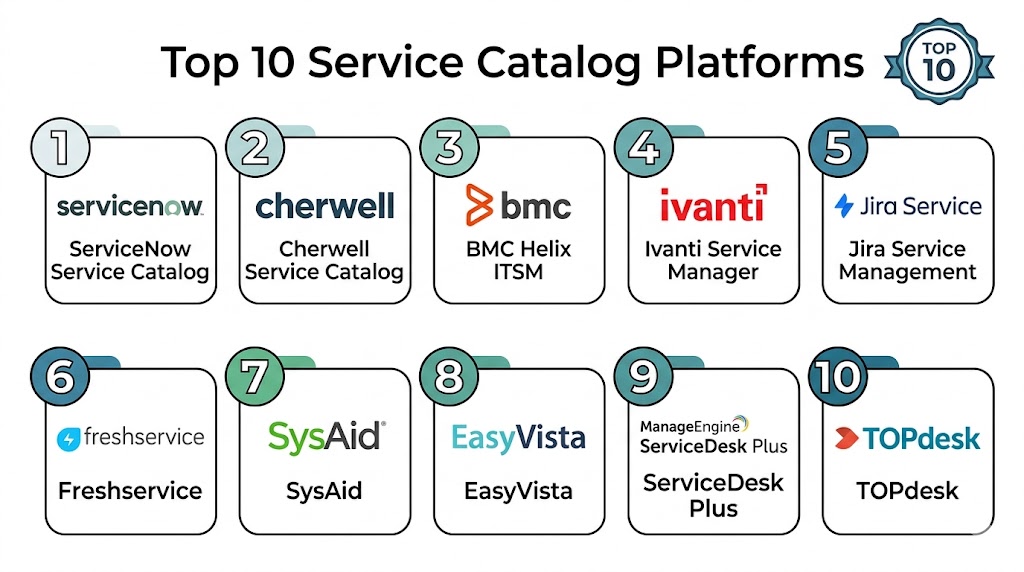
Top 10 Service Catalog Platforms Tools
1 — ServiceNow Service Catalog
Short description: ServiceNow Service Catalog provides enterprise-grade service management with automation, approvals, and multi-department service request capabilities.
Key Features
- Centralized service catalog for IT, HR, Finance, and Facilities
- Automated approvals and workflow orchestration
- SLA tracking and fulfillment dashboards
- Self-service portals with request templates
- AI-driven recommendations and routing
- Reporting and analytics on service usage
- Integration with ITSM, ERP, and CRM systems
Pros
- Enterprise-grade scalability
- Advanced automation and AI
- Multi-department support
Cons
- High cost for smaller organizations
- Complex setup and configuration
- Learning curve for administrators
Platforms / Deployment
- Web / iOS / Android
- Cloud
Security & Compliance
- SOC 2, ISO 27001, GDPR, HIPAA
- SSO/SAML, MFA, audit logs
Integrations & Ecosystem
Integrates with ITSM, HRIS, ERP, and CRM platforms.
- Salesforce, Workday, Microsoft Teams
- Jira, Slack
- API support for custom integrations
Support & Community
Enterprise support plans, documentation, knowledge base, and active community forums.
2 — BMC Helix Digital Workplace
Short description: BMC Helix offers a unified service catalog for IT and enterprise services with AI-driven automation and a self-service experience.
Key Features
- Multi-department service catalog management
- AI-based service request recommendations
- Workflow automation and SLA monitoring
- Self-service portals and virtual agents
- Reporting dashboards and analytics
- Integration with ITSM and ERP systems
Pros
- AI-driven automation improves efficiency
- Unified catalog for multiple departments
- Scalable for enterprise environments
Cons
- Implementation complexity
- Higher pricing tiers
- Some advanced features require configuration
Platforms / Deployment
- Web / iOS / Android
- Cloud
Security & Compliance
- SOC 2, ISO 27001 Not publicly stated
- SSO/SAML, encryption
Integrations & Ecosystem
Integrates with ITSM, ERP, collaboration, and HR systems.
- Workday, Salesforce, Microsoft Teams
- Slack, Jira
- API for custom workflows
Support & Community
Documentation, onboarding guides, and enterprise support plans.
3 — Cherwell Service Management
Short description: Cherwell Service Management provides a flexible service catalog solution with low-code workflow automation suitable for IT, HR, and other business units.
Key Features
- Centralized catalog for IT and business services
- Low-code workflow automation
- SLA tracking and request fulfillment dashboards
- Knowledge base integration
- AI-assisted approvals and service recommendations
- Reporting and analytics
Pros
- Low-code configuration for customization
- Multi-department service coverage
- Strong analytics capabilities
Cons
- UI may feel complex for some users
- Advanced automation requires configuration
- Pricing may be higher for small teams
Platforms / Deployment
- Web / iOS / Android
- Cloud / On-prem
Security & Compliance
- SOC 2, GDPR Not publicly stated
- SSO/SAML, encryption
Integrations & Ecosystem
Supports integration with ITSM, ERP, HR, and collaboration tools.
- Salesforce, Workday, Slack
- Jira, Microsoft Teams
- API and marketplace extensions
Support & Community
Documentation, online tutorials, and active user forums.
4 — Ivanti Service Manager
Short description: Ivanti Service Manager offers a comprehensive service catalog with workflow automation, approvals, and AI recommendations for enterprise service delivery.
Key Features
- Multi-department service catalog
- Automated request fulfillment and approvals
- SLA tracking and reporting
- Knowledge base and self-service portals
- AI recommendations for service requests
- Integration with ITSM and business systems
Pros
- Enterprise-grade automation
- Strong SLA management
- AI-assisted workflows
Cons
- Requires configuration
- Steeper learning curve
- Some integrations need technical setup
Platforms / Deployment
- Web / iOS / Android
- Cloud / On-prem
Security & Compliance
- SOC 2, GDPR Not publicly stated
- SSO/SAML, encryption
Integrations & Ecosystem
Connects with ERP, ITSM, HRIS, and collaboration platforms.
- Salesforce, Workday, Slack
- Jira, Microsoft Teams
- APIs for custom workflows
Support & Community
Documentation, onboarding, and support plans available.
5 — Freshservice
Short description: Freshservice includes service catalog capabilities for IT and enterprise teams, offering self-service portals, workflow automation, and SLA tracking.
Key Features
- Centralized service catalog
- AI-assisted request routing
- SLA and workflow management
- Self-service portals
- Reporting and analytics
- Multi-department service management
Pros
- Easy to use
- AI automation for service requests
- Scalable for mid-market and enterprise
Cons
- IT-focused; may be limited for non-IT services
- Some features require premium plans
- Reporting customization is limited
Platforms / Deployment
- Web / iOS / Android
- Cloud
Security & Compliance
- SOC 2, GDPR Not publicly stated
Integrations & Ecosystem
Integrates with ITSM, ERP, HRIS, and collaboration tools.
- Slack, Jira, Microsoft Teams
- API support
Support & Community
Documentation, enterprise support, and active community.
6 — TOPdesk
Short description: TOPdesk provides service catalog functionality for IT, HR, and facilities teams, with self-service portals and workflow automation.
Key Features
- Multi-department service catalog
- Workflow automation for approvals
- Self-service portals and request templates
- SLA tracking and reporting
- Integration with ITSM and ERP systems
Pros
- User-friendly interface
- Good multi-department coverage
- Automation reduces manual effort
Cons
- Some integrations require configuration
- Enterprise features may need premium plans
- Limited AI capabilities
Platforms / Deployment
- Web / iOS / Android
- Cloud / On-prem
Security & Compliance
- GDPR Not publicly stated
- SSO/SAML, encryption
Integrations & Ecosystem
Integrates with ERP, ITSM, HR, and collaboration tools.
- Salesforce, Workday, Slack
- Jira, Microsoft Teams
- API support
Support & Community
Documentation, onboarding guides, and support channels.
7 — SysAid
Short description: SysAid offers service catalog features combined with ITSM and automation for enterprise service delivery.
Key Features
- Centralized service catalog
- Automated workflow and approvals
- SLA monitoring
- Self-service portals
- Reporting and analytics
- Multi-department support
Pros
- Automation reduces manual work
- Multi-department coverage
- Reporting dashboards
Cons
- Limited AI capabilities
- Customization requires technical knowledge
- UI may be less intuitive than competitors
Platforms / Deployment
- Web / iOS / Android
- Cloud / On-prem
Security & Compliance
- SOC 2, GDPR Not publicly stated
- SSO/SAML, encryption
Integrations & Ecosystem
Supports integration with ITSM, ERP, and HR platforms.
- Salesforce, Workday, Jira
- Slack, Microsoft Teams
- API support
Support & Community
Documentation, support plans, and user community.
8 — TOPdesk Self-Service Portal
Short description: Focused on end-user experience, this platform offers service catalog features, AI suggestions, and request tracking.
Key Features
- Self-service portal with catalog
- Automated approvals and SLA management
- Knowledge base integration
- Reporting dashboards
- Multi-department service requests
Pros
- Simplified user experience
- Good for SMBs and mid-market
- Reduces support workload
Cons
- Limited advanced analytics
- Enterprise-scale features require configuration
- Integration options may be narrower
Platforms / Deployment
- Web / iOS / Android
- Cloud
Security & Compliance
- GDPR Not publicly stated
- SSO/SAML, encryption
Integrations & Ecosystem
CRM and collaboration integrations with API support.
- Slack, Microsoft Teams, Jira
- Workday, Salesforce
Support & Community
Documentation, tutorials, and online support channels.
9 — Ivanti Neurons for Service Management
Short description: Ivanti Neurons provides an AI-driven service catalog with workflow automation, approvals, and analytics for enterprise teams.
Key Features
- Centralized service catalog
- AI recommendations for service requests
- Workflow automation and approvals
- SLA tracking and analytics
- Integration with ITSM, ERP, HRIS
Pros
- AI-driven efficiency
- Scalable for enterprise teams
- Multi-department support
Cons
- Requires setup and training
- Costly for small teams
- Some integrations need configuration
Platforms / Deployment
- Web / iOS / Android
- Cloud
Security & Compliance
- SOC 2, GDPR Not publicly stated
- SSO/SAML, encryption
Integrations & Ecosystem
ITSM, ERP, and collaboration system integrations.
- Slack, Jira, Microsoft Teams
- Workday, Salesforce
Support & Community
Documentation, enterprise support, and community forums.
10 — Jira Service Desk OSS
Short description: Open-source solution providing customizable workflows for service catalogs, IT, and enterprise service management.
Key Features
- Centralized catalog management
- Workflow automation
- SLA monitoring
- Knowledge base integration
- Reporting dashboards
Pros
- Highly customizable
- Cost-effective
- Strong developer community
Cons
- Requires technical setup
- Less polished UI
- Learning curve for non-technical users
Platforms / Deployment
- Web / Linux / Windows / macOS
- Self-hosted / Cloud
Security & Compliance
- Varies / N/A
Integrations & Ecosystem
Supports APIs, DevOps, and collaboration integrations.
Support & Community
Active open-source community and forums.
Comparison Table (Top 10)
| Tool Name | Best For | Platform(s) Supported | Deployment | Standout Feature | Public Rating |
|---|---|---|---|---|---|
| ServiceNow | Enterprises | Web, iOS, Android | Cloud | Multi-department automation | N/A |
| BMC Helix | Enterprise IT | Web, iOS, Android | Cloud | AI-driven automation | N/A |
| Cherwell | IT/HR | Web, iOS, Android | Cloud / On-prem | Low-code workflows | N/A |
| Ivanti Service Manager | Enterprises | Web, iOS, Android | Cloud / On-prem | AI recommendations | N/A |
| Freshservice | IT Teams | Web, iOS, Android | Cloud | AI-assisted routing | N/A |
| TOPdesk | SMB/Mid-market | Web, iOS, Android | Cloud / On-prem | Self-service portals | N/A |
| SysAid | Enterprise | Web, iOS, Android | Cloud / On-prem | Automation & SLA | N/A |
| TOPdesk Self-Service | SMB | Web, iOS, Android | Cloud | User-focused catalog | N/A |
| Ivanti Neurons | Enterprise | Web, iOS, Android | Cloud | AI-driven catalog | N/A |
| Jira Service Desk OSS | IT/Developers | Web, Linux, Windows, macOS | Self-hosted / Cloud | Customizable workflows | N/A |
Evaluation & Scoring
| Tool Name | Core (25%) | Ease (15%) | Integrations (15%) | Security (10%) | Performance (10%) | Support (10%) | Value (15%) | Weighted Total (0–10) |
|---|---|---|---|---|---|---|---|---|
| ServiceNow | 10 | 8 | 9 | 9 | 9 | 8 | 7 | 8.8 |
| BMC Helix | 9 | 8 | 8 | 8 | 8 | 7 | 7 | 8.0 |
| Cherwell | 8 | 8 | 8 | 8 | 8 | 7 | 8 | 8.0 |
| Ivanti Service Manager | 9 | 7 | 8 | 8 | 9 | 8 | 7 | 8.2 |
| Freshservice | 8 | 8 | 7 | 8 | 8 | 7 | 8 | 7.9 |
| TOPdesk | 8 | 9 | 7 | 8 | 8 | 7 | 8 | 8.0 |
| SysAid | 8 | 8 | 7 | 8 | 8 | 7 | 8 | 7.9 |
| TOPdesk Self-Service | 7 | 9 | 6 | 8 | 7 | 7 | 8 | 7.6 |
| Ivanti Neurons | 9 | 7 | 8 | 8 | 9 | 7 | 7 | 8.0 |
| Jira Service Desk OSS | 8 | 7 | 7 | 7 | 8 | 6 | 9 | 7.7 |
Which Service Catalog Platform Is Right for You?
Solo / Freelancer
TOPdesk Self-Service or Freshservice for easy setup and self-service features.
SMB
TOPdesk, SysAid, or Cherwell provide user-friendly automation with moderate cost.
Mid-Market
Ivanti Service Manager or Freshservice for scalable automation and reporting.
Enterprise
ServiceNow, BMC Helix, or Ivanti Neurons for enterprise-level AI, workflows, and compliance.
Budget vs Premium
Budget-friendly: TOPdesk, Freshservice.
Premium: ServiceNow, BMC Helix. ROI depends on automation and multi-department needs.
Feature Depth vs Ease of Use
Cherwell and Jira OSS offer high customization but require technical knowledge; TOPdesk emphasizes usability.
Integrations & Scalability
ServiceNow and BMC Helix offer extensive integrations for complex workflows; TOPdesk and SysAid suffice for smaller operations.
Security & Compliance Needs
Enterprise platforms provide comprehensive security and certifications; SMB-focused tools provide essential encryption and access control.
Frequently Asked Questions
1. What pricing models are common?
Most platforms are subscription-based per user or per department, with tiered features. Free trials may exist for SMBs.
2. How long does implementation take?
Simple setups can be completed within days. Enterprise implementations may require weeks for configuration and workflow setup.
3. Can these platforms integrate with other systems?
Yes, most offer native or API integrations with ITSM, ERP, HRIS, CRM, and collaboration platforms.
4. What departments can use service catalogs?
IT, HR, Finance, Facilities, and customer service teams commonly leverage catalogs. Multi-department support varies by platform.
5. Are AI and automation included?
Many platforms offer AI-assisted approvals, service recommendations, and workflow automation to speed fulfillment.
6. How secure are service catalog platforms?
Enterprise-grade platforms provide SSO/SAML, MFA, encryption, and compliance with GDPR, SOC 2, and HIPAA where applicable.
7. Can small teams benefit from these tools?
Yes. SMB-focused platforms like TOPdesk and Freshservice provide simplified interfaces and automation without heavy overhead.
8. Is reporting included?
Most platforms include dashboards, SLA tracking, request analytics, and service performance metrics.
9. How customizable are workflows?
Platforms vary. Low-code or open-source solutions allow extensive customization; enterprise systems allow department-specific automation.
10. Can data be migrated later?
Yes, modern platforms provide export via API or CSV. Careful planning ensures smooth transition between systems.
Conclusion
Service Catalog Platforms help organizations streamline service requests, automate workflows, and improve user satisfaction across IT, HR, Finance, and Facilities. SMBs benefit from TOPdesk or Freshservice for simplicity and cost-efficiency, while mid-market and enterprise teams gain value from ServiceNow, BMC Helix, and Ivanti Neurons with advanced automation, analytics, and multi-department support. Choosing the right platform depends on team size, service complexity, automation needs, integrations, and compliance requirements. Organizations should shortlist 2–3

Many service catalogs start with well-organized documentation but gradually lose effectiveness when service information is not maintained consistently. Ownership changes, outdated dependencies, and incomplete metadata can quickly reduce trust in the catalog. Addressing automated catalog synchronization, ownership governance, and lifecycle management practices would provide useful insight into keeping service catalogs accurate and valuable as engineering organizations scale.
A service catalog is only as useful as the confidence engineers have in the information it contains. As platforms evolve, undocumented APIs, retired services, and ownership changes can quickly make catalog entries unreliable. Highlighting automated discovery, dependency synchronization, and ownership validation would help readers understand how to keep a catalog accurate without relying on manual updates.