Introduction
Customer Support Ticketing Systems are software platforms that help organizations manage, track, and resolve customer inquiries efficiently. They consolidate support requests from multiple channels—email, chat, social media, and web forms—into a structured system, ensuring that no customer issue goes unresolved. Businesses rely on these systems to streamline operations, improve response times, and enhance customer satisfaction.
Real-world use cases include managing product support tickets for e-commerce, coordinating IT helpdesk requests, tracking service inquiries in healthcare organizations, centralizing feedback for SaaS companies, and supporting field service operations. Modern ticketing platforms increasingly incorporate AI for automated ticket routing, priority scoring, and suggested responses, which improves operational efficiency.
Evaluation Criteria for Buyers:
When choosing a ticketing system, consider:
- Core ticketing and automation features
- Ease of use and onboarding
- Multi-channel support
- Integrations with CRM, analytics, and communication tools
- Security and compliance (encryption, SSO, audit logs, GDPR/HIPAA)
- Reporting and analytics capabilities
- Scalability and performance
- Vendor support and community
- AI and automation capabilities
- Cost-effectiveness and pricing model
Best for: IT managers, customer support teams, SaaS businesses, healthcare organizations, and enterprises seeking centralized and automated customer service operations.
Not ideal for: Small teams with minimal support volume, organizations that primarily rely on simple email responses, or companies with highly specialized legacy systems better served by customized workflows.
Key Trends in Customer Support Ticketing Systems
- AI-powered ticket routing and automated responses for efficiency
- Omnichannel support combining email, chat, social media, and voice
- Self-service portals and knowledge bases to reduce agent load
- Predictive analytics to identify trends and optimize performance
- Cloud-first and hybrid deployment models for flexibility
- Security and compliance with encryption, audit logs, and SSO
- Low-code workflow automation for non-technical staff
- Integration with CRM, collaboration, and business tools
- Mobile-first interfaces for remote and field agents
- Modular subscription pricing for scalable adoption
How We Selected These Tools (Methodology)
- Assessed market adoption and mindshare across SMB and enterprise segments
- Evaluated feature completeness, including automation and reporting
- Reviewed performance, reliability, and uptime signals
- Analyzed security posture and compliance certifications
- Checked integration availability with CRM, communication, and analytics tools
- Examined suitability for different company sizes and industries
- Considered vendor support quality and community engagement
- Reviewed AI and automation capabilities
- Compared deployment flexibility (cloud, self-hosted, hybrid)
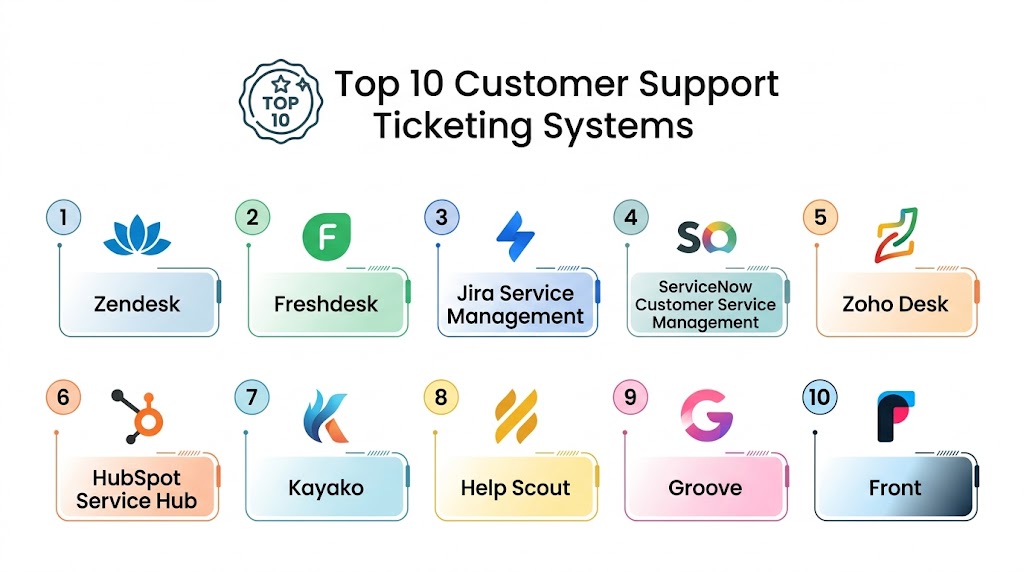
Top 10 Customer Support Ticketing Systems Tools
1 — Zendesk
Short description: Zendesk is a cloud-based ticketing system for businesses of all sizes, offering multi-channel support, AI-driven automation, and analytics for efficient issue resolution.
Key Features
- Multi-channel ticket management (email, chat, social)
- AI-assisted routing and response suggestions
- SLA tracking and performance dashboards
- Knowledge base and self-service portals
- Workflow automation
- Reporting and analytics
- CRM and communication integrations
Pros
- Enterprise-ready scalability
- Advanced AI features
- Extensive integration ecosystem
Cons
- Higher cost at large scale
- Learning curve for complex workflows
- Customization may require technical support
Platforms / Deployment
- Web / iOS / Android
- Cloud
Security & Compliance
- SOC 2, GDPR, ISO 27001
- SSO/SAML, MFA, encryption, audit logs
Integrations & Ecosystem
Supports CRM, chat, collaboration, and custom APIs.
- Salesforce, HubSpot, Microsoft Teams
- Slack, Shopify, Jira
- API access for custom workflows
Support & Community
24/7 enterprise support, extensive documentation, and active user community.
2 — Freshdesk
Short description: Freshdesk is designed for SMBs and mid-market businesses, providing multi-channel support, AI-powered automation, and self-service portals.
Key Features
- AI-assisted ticket assignment and responses
- Email, chat, phone, and social media integration
- SLA and workflow automation
- Knowledge base creation
- Analytics dashboards
- Gamification for agents
Pros
- Affordable and flexible pricing
- Intuitive interface
- Strong multi-channel support
Cons
- Advanced features require premium plans
- Reporting can be complex for beginners
- AI features need configuration
Platforms / Deployment
- Web / iOS / Android
- Cloud
Security & Compliance
- GDPR, encryption, SSO/SAML
- SOC 2 Not publicly stated
Integrations & Ecosystem
Integrates with CRM, chat, and third-party apps.
- Salesforce, Slack, Jira
- Zoom, Microsoft Teams
- Marketplace apps and APIs
Support & Community
Onboarding guides, help documentation, and active forums.
3 — Jira Service Management
Short description: Jira Service Management is tailored for IT teams, providing ticketing, incident management, and DevOps workflow integration.
Key Features
- ITSM-focused ticketing and change management
- Automation for ticket routing and SLA enforcement
- Incident, problem, and change management
- Advanced reporting dashboards
- Knowledge base linking tickets to solutions
- DevOps integration
Pros
- Ideal for technical and IT support
- Strong integration with development workflows
- Configurable workflows
Cons
- Complexity for non-technical teams
- Steeper learning curve
- Pricing scales with agents
Platforms / Deployment
- Web / iOS / Android
- Cloud / Self-hosted
Security & Compliance
- SOC 2, GDPR, ISO 27001 Not publicly stated
- SSO/SAML, MFA
Integrations & Ecosystem
Integrates with Atlassian suite and collaboration tools.
- Confluence, Bitbucket, Slack
- Microsoft Teams, GitHub
- Marketplace for apps
Support & Community
Extensive documentation, technical support, and active community forums.
4 — ServiceNow Customer Service Management
Short description: ServiceNow CSM is an enterprise-grade system for customer support, case management, and workflow automation across departments.
Key Features
- Omnichannel ticketing and case management
- AI chatbots and virtual agents
- SLA monitoring and escalation rules
- Knowledge base and self-service portals
- Workflow orchestration
- Analytics and reporting
Pros
- Enterprise-grade scalability
- Advanced AI and automation
- Integration with IT and CRM systems
Cons
- High cost for SMBs
- Requires training and configuration
- Complexity may be overkill for small teams
Platforms / Deployment
- Web / iOS / Android
- Cloud
Security & Compliance
- SOC 2, ISO 27001, GDPR, HIPAA
- SSO/SAML, MFA, encryption, audit logs
Integrations & Ecosystem
Connects with CRM, ITSM, and communication platforms.
- Salesforce, Microsoft Dynamics
- Slack, Teams, Jira
- Extensive API support
Support & Community
Dedicated enterprise support, knowledge bases, and active community.
5 — Zoho Desk
Short description: Zoho Desk offers cloud-based ticketing for SMBs, featuring multi-channel support, automation, and AI-driven workflows.
Key Features
- Ticket management across channels
- AI ticket suggestions
- Workflow automation and SLA tracking
- Knowledge base for self-service
- Analytics dashboards
- Customizable reporting
Pros
- Affordable for SMBs
- Easy to use
- AI-assisted efficiency
Cons
- Limited enterprise features
- Some integrations require paid plans
- AI features are basic compared to enterprise systems
Platforms / Deployment
- Web / iOS / Android
- Cloud
Security & Compliance
- SOC 2, GDPR, ISO 27001 Not publicly stated
- SSO/SAML, MFA
Integrations & Ecosystem
Supports CRM, email, chat, and third-party integrations.
- Salesforce, Slack, Microsoft Teams
- API and marketplace extensions
Support & Community
Documentation, online tutorials, and forums.
6 — HubSpot Service Hub
Short description: HubSpot Service Hub provides ticketing, knowledge management, and customer feedback tools, tightly integrated with HubSpot CRM.
Key Features
- Ticket pipeline management
- Customer surveys and feedback
- Knowledge base and self-service
- Automation and SLA tracking
- Chatbots and live chat
- Analytics dashboards
Pros
- Seamless CRM integration
- Simple interface
- AI-assisted automation
Cons
- Limited customization
- Higher cost for full functionality
- Best suited for existing HubSpot customers
Platforms / Deployment
- Web / iOS / Android
- Cloud
Security & Compliance
- GDPR, encryption, SSO/SAML Not publicly stated
Integrations & Ecosystem
Integrates with CRM, marketing, and collaboration apps.
- Salesforce, Slack, Microsoft Teams
- Zoom, Jira
- Marketplace apps
Support & Community
Extensive documentation, HubSpot Academy, and active community.
7 — Kayako
Short description: Kayako is designed for SMBs, offering multi-channel support, shared inbox collaboration, and ease of use.
Key Features
- Email, chat, and social ticketing
- Shared inbox and team collaboration
- SLA management and automation
- Knowledge base support
- Reporting and analytics
Pros
- Intuitive interface
- Strong team collaboration
- Affordable for SMBs
Cons
- Limited enterprise features
- Smaller integration ecosystem
- Basic AI features
Platforms / Deployment
- Web / iOS / Android
- Cloud
Security & Compliance
- GDPR, encryption, SSO/SAML Not publicly stated
Integrations & Ecosystem
CRM, chat, and collaboration tools.
- Salesforce, Slack, Shopify
- API for custom workflows
Support & Community
Documentation and forums available.
8 — Jira Service Desk Open Source
Short description: Open-source ITSM ticketing for developers and technical teams, offering customization and workflow flexibility.
Key Features
- Ticket and workflow management
- Incident and problem tracking
- SLA monitoring
- Knowledge base integration
- Reporting dashboards
Pros
- Highly customizable
- Strong developer community
- Cost-effective
Cons
- Requires technical setup
- Less polished UI
- Steep learning curve
Platforms / Deployment
- Web / Linux / Windows / macOS
- Self-hosted / Cloud
Security & Compliance
- Varies / N/A
Integrations & Ecosystem
Integrates with DevOps tools, collaboration platforms, and APIs.
Support & Community
Active open-source community and forums.
9 — Freshservice
Short description: Freshservice is an ITSM-focused platform for enterprises and mid-market companies with ticketing, asset management, and workflow automation.
Key Features
- Multi-channel ticketing
- AI-assisted automation
- Asset and configuration management
- SLA tracking
- Knowledge base and self-service
- Reporting and analytics
Pros
- Strong ITSM capabilities
- AI workflows
- Scalable for enterprise
Cons
- IT-focused, less suited for general support
- Premium pricing for SMBs
- Requires configuration for full use
Platforms / Deployment
- Web / iOS / Android
- Cloud
Security & Compliance
- SOC 2, GDPR Not publicly stated
Integrations & Ecosystem
CRM, DevOps, and collaboration integrations.
- Slack, Teams, Jira
- API support
Support & Community
Documentation, enterprise support plans, and active community.
10 — HappyFox
Short description: HappyFox is a cloud-based ticketing solution for SMBs and enterprises with multi-channel support and automation features.
Key Features
- Multi-channel ticket management
- AI-assisted automation
- SLA and workflow management
- Knowledge base support
- Reporting dashboards
Pros
- Easy setup
- Strong knowledge base features
- Effective automation
Cons
- Limited advanced reporting
- Enterprise features require premium plans
- Smaller integration ecosystem
Platforms / Deployment
- Web / iOS / Android
- Cloud
Security & Compliance
- SOC 2, GDPR Not publicly stated
Integrations & Ecosystem
CRM, communication, and custom APIs.
- Salesforce, Slack, Shopify
- API and webhook support
Support & Community
Documentation, chat and email support, community forums.
Comparison Table (Top 10)
| Tool Name | Best For | Platform(s) Supported | Deployment | Standout Feature | Public Rating |
|---|---|---|---|---|---|
| Zendesk | Enterprises, SaaS | Web, iOS, Android | Cloud | AI routing & analytics | N/A |
| Freshdesk | SMBs, Mid-market | Web, iOS, Android | Cloud | Affordable automation | N/A |
| Jira Service Management | IT teams | Web, iOS, Android | Cloud / Self-hosted | DevOps integration | N/A |
| ServiceNow CSM | Enterprises | Web, iOS, Android | Cloud | Enterprise automation | N/A |
| Zoho Desk | SMBs | Web, iOS, Android | Cloud | Multi-channel support | N/A |
| HubSpot Service Hub | SMBs, Mid-market | Web, iOS, Android | Cloud | CRM integration | N/A |
| Kayako | SMBs | Web, iOS, Android | Cloud | Team collaboration | N/A |
| Jira Service Desk OSS | Developers, IT | Web, Linux, Windows, macOS | Self-hosted / Cloud | Customizable workflows | N/A |
| Freshservice | IT teams, Enterprises | Web, iOS, Android | Cloud | ITSM capabilities | N/A |
| HappyFox | SMBs, Enterprises | Web, iOS, Android | Cloud | Knowledge base & automation | N/A |
Evaluation & Scoring
| Tool Name | Core (25%) | Ease (15%) | Integrations (15%) | Security (10%) | Performance (10%) | Support (10%) | Value (15%) | Weighted Total (0–10) |
|---|---|---|---|---|---|---|---|---|
| Zendesk | 9 | 8 | 9 | 9 | 9 | 8 | 7 | 8.8 |
| Freshdesk | 8 | 9 | 8 | 8 | 8 | 8 | 9 | 8.5 |
| Jira Service Management | 9 | 7 | 8 | 8 | 9 | 7 | 7 | 8.2 |
| ServiceNow CSM | 10 | 7 | 9 | 9 | 9 | 8 | 6 | 8.7 |
| Zoho Desk | 8 | 9 | 7 | 8 | 8 | 7 | 8 | 8.0 |
| HubSpot Service Hub | 7 | 9 | 7 | 8 | 8 | 8 | 7 | 7.9 |
| Kayako | 7 | 9 | 6 | 8 | 7 | 7 | 8 | 7.6 |
| Jira Service Desk OSS | 8 | 7 | 7 | 7 | 8 | 6 | 9 | 7.7 |
| Freshservice | 9 | 8 | 8 | 8 | 9 | 8 | 7 | 8.3 |
| HappyFox | 8 | 8 | 7 | 8 | 8 | 7 | 8 | 7.9 |
Which Customer Support Ticketing Systems Tool Is Right for You?
Solo / Freelancer
Freshdesk or Zoho Desk for easy setup and affordable, multi-channel support.
SMB
Kayako, Freshdesk, or HubSpot Service Hub balance cost, automation, and integrations.
Mid-Market
Zendesk or Freshservice offer scalability, AI-assisted workflows, and reporting.
Enterprise
ServiceNow CSM and Zendesk provide advanced automation, analytics, and compliance.
Budget vs Premium
Budget-friendly: Zoho Desk, Kayako.
Premium: ServiceNow, Zendesk. ROI depends on automation and enterprise features.
Feature Depth vs Ease of Use
Jira Service Management offers depth for technical teams; Freshdesk prioritizes simplicity.
Integrations & Scalability
Zendesk and ServiceNow have extensive integrations for complex workflows; Kayako and Zoho Desk suffice for smaller teams.
Security & Compliance Needs
Enterprise platforms excel in certifications and compliance; SMB tools provide basic encryption and GDPR adherence.
Frequently Asked Questions
1. What pricing models do ticketing systems use?
Most platforms use subscription-based pricing, typically per agent, with tiers based on features. Free plans may exist for small teams, while enterprise plans include advanced automation and compliance features.
2. How long does onboarding take?
Simple platforms can be operational within hours or days. Enterprise-grade tools may require weeks for configuration, training, and testing workflows.
3. Can these systems integrate with CRMs?
Yes. Leading systems provide native integrations or APIs for Salesforce, HubSpot, Microsoft Dynamics, and other CRM platforms.
4. What channels are supported?
Email, live chat, social media, phone, and web forms are commonly supported. Some tools also integrate chatbots and AI-driven self-service portals.
5. How secure are these tools?
Enterprise-grade platforms support SSO/SAML, MFA, encryption, and compliance certifications like SOC 2, GDPR, and HIPAA. SMB tools offer basic encryption and GDPR compliance.
6. What automation capabilities exist?
AI-assisted ticket routing, auto-responses, SLA escalation, workflow automation, and knowledge base suggestions are standard in modern systems.
7. Can ticketing systems handle large volumes?
Yes. Enterprise tools like Zendesk and ServiceNow are built for high-volume operations, while SMB solutions are optimized for smaller teams.
8. How customizable are workflows?
Most systems allow configuration of ticket priorities, SLA rules, automation rules, and integrations. Open-source options provide high customization for technical teams.
9. Is reporting included?
Yes, most platforms provide dashboards, analytics on ticket trends, agent performance, SLA compliance, and customer satisfaction metrics.
10. What if I switch platforms later?
Modern systems allow ticket and data export via APIs or CSV. Planning migrations carefully ensures minimal disruption.
Conclusion
Customer Support Ticketing Systems are essential for organized, efficient, and scalable customer service. SMBs benefit from Freshdesk, Zoho Desk, or Kayako for simplicity and cost-effectiveness, while mid-market and enterprise teams gain value from Zendesk, ServiceNow, and Freshservice with advanced automation, analytics, and compliance. The right choice depends on team size, automation needs, integrations, and security requirements. Organizations should shortlist 2–3 tools, run a pilot to test workflows and AI capabilities, validate integrations and compliance, and then scale across the team to maximize customer satisfaction and operational efficiency.

This article provides a very clear comparison of customer support ticketing systems with practical insights and simple explanations. The structured format made it easy to understand the strengths of each platform.
Ticketing systems are frequently evaluated on workflow automation and case management features, but reporting accuracy becomes a major challenge as support operations mature. Metrics such as resolution time and agent productivity can be misleading when ticket categorization and ownership practices are inconsistent. Including discussion around data quality controls, operational analytics, and KPI governance would help organizations make more informed decisions based on support data rather than just ticket volume.
As support organizations grow, maintaining consistent ticket quality becomes just as important as resolving issues quickly. Poor categorization, duplicate tickets, and inconsistent priority assignments can distort operational metrics and delay critical incidents. A discussion around AI-assisted ticket normalization, queue optimization, and continuous process auditing would give readers a stronger understanding of how to keep support operations efficient at scale.