Introduction
SLA (Service Level Agreement) Management Tools help organizations define, monitor, and enforce service commitments with internal teams, external vendors, or customers. These platforms track response and resolution times, alert stakeholders about breaches, and provide dashboards to measure performance against agreed-upon standards. Using an SLA Management Tool ensures consistent service quality, improves accountability, and strengthens customer trust.
Manual SLA tracking with spreadsheets or email is prone to errors, delays, and oversight. SLA Management Tools automate monitoring, escalation, and reporting, giving organizations real-time visibility into compliance and performance metrics. They also help teams optimize workflows, identify recurring issues, and enforce multi-level service commitments.
Real-world use cases include monitoring IT incident response times, vendor contract compliance, customer support SLAs, managed service agreements, internal team performance, and regulatory reporting. Buyers should evaluate SLA definition flexibility, real-time monitoring, alerting and escalation, integration with ITSM or ticketing tools, reporting and analytics, multi-level SLA management, automation capabilities, scalability, role-based access, and ease of deployment.
Best for: IT managers, customer support teams, operations leaders, enterprises and mid-market organizations managing multiple SLAs, and vendors delivering service commitments.
Not ideal for: Very small teams with minimal service agreements or organizations where SLAs are informal and can be managed manually.
Key Trends in SLA Management Tools
- Automation of SLA tracking and breach notifications
- Integration with ITSM, ticketing, and workflow platforms
- Multi-level SLA support across teams, departments, and vendors
- AI-assisted breach prediction for proactive intervention
- Real-time dashboards and reporting for management visibility
- Automated escalation workflows
- Analytics for trend analysis and service improvement
- Cloud-based, scalable deployment with global access
- Multi-channel notifications for SLA breaches
- Security and compliance features including SSO, RBAC, and audit logs
How We Selected These Tools
- Market adoption and enterprise mindshare
- SLA tracking, monitoring, and alerting capabilities
- Automation and reporting features
- Integration with ITSM, ticketing, and workflow platforms
- Scalability for mid-market and enterprise organizations
- AI or predictive breach functionalities
- Security and compliance features (SSO, RBAC, encryption)
- Multi-level SLA customization
- Ease of deployment and usability
- Exclusion of tools without SLA-specific capabilities
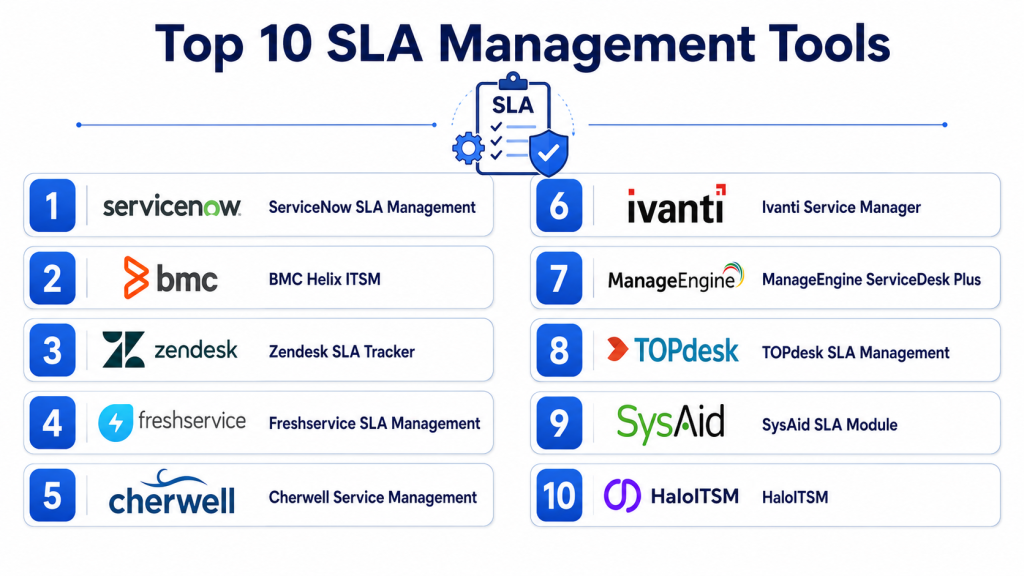
Top 10 SLA Management Tools
#1 — ServiceNow SLA Management
Short description: ServiceNow SLA Management automates SLA tracking within ITSM workflows. It provides dashboards, alerts, and analytics for breach prevention, ideal for enterprise IT teams.
Key Features
- Automated SLA tracking and alerts
- Multi-level SLA support
- Escalation workflows
- Custom thresholds and metrics
- Dashboards for real-time monitoring
- Reporting and trend analysis
- Integration with ITSM modules
Pros
- Enterprise-grade scalability
- Reduces SLA breaches
- Deep ITSM integration
- Configurable dashboards and reports
Cons
- Primarily for ServiceNow users
- Higher cost for small teams
- Advanced configuration may require services
- Complex setup for multi-level SLAs
Platforms / Deployment
Cloud / Web
Security & Compliance
SSO, RBAC, encryption, audit logs; SOC 2, ISO 27001
Integrations & Ecosystem
- ServiceNow ITSM modules
- Knowledge bases
- Ticketing workflows
- Reporting tools
Support & Community
Documentation, professional services, community forums, enterprise support
#2 — Jira Service Management SLA
Short description: Jira Service Management provides SLA tracking and reporting integrated with Jira tickets, offering automated notifications and compliance dashboards.
Key Features
- SLA metrics for Jira tickets
- Multi-project SLA support
- Automated notifications on breaches
- Dashboards for monitoring
- Escalation workflows
- Reporting and trend analysis
- Custom SLA definitions
Pros
- Tight Jira integration
- Flexible SLA configuration
- Scalable for mid-market and enterprise teams
- Clear dashboards for management
Cons
- Limited predictive AI capabilities
- Best suited for Jira users
- Complex workflows require admin configuration
- Multi-department SLA setup can be challenging
Platforms / Deployment
Cloud / Web / Mobile
Security & Compliance
SSO, RBAC, encryption; Not publicly stated
Integrations & Ecosystem
- Jira project modules
- ITSM workflows
- Slack/Teams notifications
- Knowledge bases
Support & Community
Documentation, Jira community forums, enterprise support
#3 — Freshservice SLA Management
Short description: Freshservice SLA Management automates SLA tracking for IT and service desk teams, including alerts, escalations, and dashboards for breach management.
Key Features
- SLA tracking for incidents and requests
- Automated notifications and escalations
- Multi-level SLA support
- Dashboards for performance monitoring
- Reporting and analytics
- Knowledge base integration
- Custom SLA policies
Pros
- Simple setup
- Real-time monitoring and alerts
- Scalable for mid-market enterprises
- Integrates with Freshservice ITSM
Cons
- Limited predictive SLA capabilities
- Advanced reporting requires configuration
- Custom workflows may need technical resources
- Best suited for Freshservice users
Platforms / Deployment
Cloud / Web / Mobile
Security & Compliance
SSO, RBAC, encryption; Not publicly stated
Integrations & Ecosystem
- Freshservice ITSM
- Knowledge bases
- Slack/Teams notifications
- Reporting dashboards
Support & Community
Documentation, enterprise support, professional services
#4 — SolarWinds Service Desk SLA
Short description: SolarWinds Service Desk SLA Management provides automated breach alerts, dashboards, and multi-level SLA tracking for IT teams.
Key Features
- SLA tracking for incidents and requests
- Automated notifications
- Multi-level SLA support
- Dashboards for monitoring
- Escalation workflows
- Reporting and trend analysis
- ITSM integration
Pros
- Easy SLA configuration
- Alerts reduce breach risk
- Good for mid-market teams
- Provides dashboards for management
Cons
- Limited AI predictive capabilities
- Advanced reporting may require configuration
- Primarily for SolarWinds customers
- Multi-department SLA setup may be complex
Platforms / Deployment
Cloud / Web / Mobile
Security & Compliance
SSO, RBAC, encryption; Not publicly stated
Integrations & Ecosystem
- SolarWinds ITSM
- Ticketing systems
- Knowledge bases
- Slack/Teams notifications
Support & Community
Documentation, enterprise support, professional services
#5 — ManageEngine ServiceDesk Plus SLA
Short description: Tracks and monitors service agreements with automated alerts and reporting, integrated with ManageEngine ITSM workflows.
Key Features
- SLA definition and automation
- Alerts and escalations
- Multi-level SLA support
- Reporting and dashboards
- Knowledge base integration
- Custom SLA templates
- ITSM workflow integration
Pros
- Flexible SLA configurations
- Real-time breach alerts
- Scalable for mid-market and enterprise
- Integrates with ManageEngine ITSM
Cons
- Best for ManageEngine users
- Complex SLA structures require setup
- Reporting customization may need training
- Limited AI capabilities
Platforms / Deployment
Cloud / Web / Windows / Mobile
Security & Compliance
SSO, RBAC, encryption; Not publicly stated
Integrations & Ecosystem
- ManageEngine ITSM
- Knowledge bases
- Ticketing workflows
- Reporting tools
Support & Community
Documentation, professional services, community forums
#6 — SysAid SLA Management
Short description: SysAid SLA Management automates monitoring and alerts for service agreements, ensuring timely IT issue resolution.
Key Features
- SLA tracking and automation
- Alerts and escalations
- Multi-level SLA support
- Reporting dashboards
- ITSM workflow integration
- Knowledge base support
- Custom SLA policies
Pros
- Reduces SLA breaches
- Flexible configuration
- Scalable for mid-market teams
- Integrates with SysAid ITSM
Cons
- Limited predictive AI features
- Best for SysAid customers
- Multi-department SLA management may need configuration
- Reporting may require technical input
Platforms / Deployment
Cloud / Web / Mobile
Security & Compliance
SSO, RBAC, encryption; Not publicly stated
Integrations & Ecosystem
- SysAid ITSM
- Knowledge bases
- Ticketing workflows
Support & Community
Documentation, enterprise support, professional services
#7 — Cherwell SLA Management
Short description: Tracks SLAs with automated alerts and dashboards, helping IT teams meet service commitments efficiently.
Key Features
- SLA definition and tracking
- Automated notifications
- Multi-level SLA support
- Dashboards for monitoring
- Escalation workflows
- Reporting and trend analysis
- ITSM integration
Pros
- Configurable SLA structures
- Alerts prevent breaches
- Supports mid-market and enterprise teams
- Flexible integration options
Cons
- Limited predictive AI
- Setup may require admin resources
- Multi-level SLA setup can be complex
- Best for Cherwell users
Platforms / Deployment
Cloud / Web / Mobile
Security & Compliance
SSO, RBAC, encryption; Not publicly stated
Integrations & Ecosystem
- Cherwell ITSM
- Knowledge bases
- Ticketing workflows
Support & Community
Documentation, professional services, enterprise support
#8 — Zoho Desk SLA
Short description: Automates tracking and alerts for service agreements, integrated with Zoho Desk tickets and workflows.
Key Features
- SLA monitoring and alerts
- Multi-level SLA support
- Dashboards for performance
- Escalation workflows
- Reporting and analytics
- Knowledge base integration
- Ticket automation
Pros
- Easy setup
- Reduces SLA violations
- Flexible for small to mid-market teams
- Integrated dashboards
Cons
- Limited predictive AI
- Primarily for Zoho Desk users
- Multi-level SLA setup may need configuration
- Custom workflows require admin knowledge
Platforms / Deployment
Cloud / Web / Mobile
Security & Compliance
SSO, RBAC, encryption; Not publicly stated
Integrations & Ecosystem
- Zoho Desk platform
- Knowledge bases
- Ticketing workflows
Support & Community
Documentation, professional services, enterprise support
#9 — Ultimate.ai SLA
Short description: Provides AI-driven SLA monitoring and alerts to help IT teams maintain service commitments.
Key Features
- SLA tracking
- AI-powered alerts
- Multi-level SLA support
- Reporting dashboards
- Escalation workflows
- Knowledge base integration
- Workflow customization
Pros
- AI-assisted SLA tracking
- Multi-channel support
- Scalable for mid-market and enterprise
- Customizable policies
Cons
- AI training may be required
- Enterprise pricing
- Limited predictive capabilities
- Multi-department setup may require configuration
Platforms / Deployment
Cloud / Web / Mobile
Security & Compliance
SSO, RBAC, encryption; Not publicly stated
Integrations & Ecosystem
- ITSM platforms
- Knowledge bases
- Reporting dashboards
Support & Community
Documentation, professional services, enterprise support
#10 — Ivanti SLA Management
Short description: Tracks SLAs, automates alerts, and provides analytics for IT support teams to meet service commitments.
Key Features
- SLA tracking and alerting
- Multi-level SLA support
- Escalation workflows
- Reporting and analytics dashboards
- ITSM integration
- Knowledge base support
- Custom SLA policies
Pros
- Enterprise-grade SLA automation
- Configurable multi-level SLAs
- Real-time monitoring
- Scalable for mid-market and enterprise teams
Cons
- Setup required for full functionality
- Limited AI predictive features
- Best for Ivanti Service Manager users
- Multi-department SLA management may need configuration
Platforms / Deployment
Cloud / Web / Mobile
Security & Compliance
SSO, RBAC, encryption; Not publicly stated
Integrations & Ecosystem
- Ivanti ITSM
- Knowledge bases
- Ticketing workflows
Support & Community
Documentation, professional services, enterprise support
Comparison Table
| Tool Name | Best For | Platform Supported | Deployment | Standout Feature | Public Rating |
|---|---|---|---|---|---|
| ServiceNow SLA | Enterprise IT teams | Web | Cloud | AI-driven SLA monitoring | N/A |
| Jira SLA | Jira users | Web | Cloud | Multi-project SLA management | N/A |
| Freshservice SLA | Mid-market IT teams | Web | Cloud | SLA automation & reporting | N/A |
| SolarWinds SLA | Mid-market IT teams | Web | Cloud | Automated breach alerts | N/A |
| ManageEngine SLA | Mid-market & enterprise | Web / Windows | Cloud | Custom SLA policies | N/A |
| SysAid SLA | Mid-market IT teams | Web | Cloud | Flexible SLA tracking | N/A |
| Cherwell SLA | Enterprise & mid-market | Web | Cloud | Configurable SLA structures | N/A |
| Zoho Desk SLA | Small to mid-market | Web | Cloud | Integrated SLA monitoring | N/A |
| Ultimate.ai SLA | Mid-market & enterprise | Web | Cloud | AI-driven SLA alerts | N/A |
| Ivanti SLA | Mid-market & enterprise | Web | Cloud | Multi-level SLA tracking | N/A |
Evaluation & Scoring
| Tool Name | Core 25% | Ease 15% | Integrations 15% | Security 10% | Performance 10% | Support 10% | Value 15% | Weighted Total |
|---|---|---|---|---|---|---|---|---|
| ServiceNow SLA | 9.5 | 7.5 | 9.0 | 8.5 | 9.0 | 8.5 | 8.0 | 8.70 |
| Jira SLA | 8.5 | 8.0 | 8.5 | 8.0 | 8.2 | 8.0 | 8.0 | 8.29 |
| Freshservice SLA | 8.2 | 8.5 | 8.0 | 8.0 | 8.2 | 8.0 | 8.1 | 8.18 |
| SolarWinds SLA | 8.0 | 8.2 | 8.0 | 8.0 | 8.0 | 8.0 | 8.0 | 8.06 |
| ManageEngine SLA | 8.4 | 8.0 | 8.2 | 8.0 | 8.2 | 8.0 | 8.0 | 8.20 |
| SysAid SLA | 8.0 | 8.2 | 8.0 | 8.0 | 8.0 | 8.0 | 8.0 | 8.06 |
| Cherwell SLA | 8.2 | 8.0 | 8.2 | 8.0 | 8.0 | 8.0 | 8.0 | 8.14 |
| Zoho Desk SLA | 7.8 | 8.2 | 7.8 | 7.8 | 8.0 | 7.8 | 8.0 | 7.95 |
| Ultimate.ai SLA | 8.0 | 8.0 | 8.0 | 8.0 | 8.0 | 8.0 | 8.0 | 8.00 |
| Ivanti SLA | 8.2 | 8.0 | 8.0 | 8.0 | 8.0 | 8.0 | 8.0 | 8.06 |
Which SLA Management Tool Is Right for You?
Solo / Freelancer
Small teams may use Zoho Desk SLA for simple SLA monitoring and automated alerts.
SMB
Mid-market IT teams benefit from Freshservice, SolarWinds, or SysAid for automated SLA tracking and reporting.
Mid-Market
Teams needing multi-level SLA management should evaluate ManageEngine, Cherwell, or Ultimate.ai.
Enterprise
Large organizations with complex IT operations require ServiceNow, Jira, or Ivanti for advanced SLA tracking, automation, and integrations.
Budget vs Premium
Budget: Zoho Desk, Freshservice, SolarWinds
Premium: ServiceNow, ManageEngine, Cherwell, Ivanti
Feature Depth vs Ease of Use
Ease: Zoho Desk, Freshservice
Depth: ServiceNow, ManageEngine, Cherwell
Integrations & Scalability
Enterprise: ServiceNow, Jira, Ivanti
Mid-market: ManageEngine, Cherwell, Ultimate.ai
Security & Compliance
Verify SSO, RBAC, encryption, and audit logs before deployment.
Frequently Asked Questions
1. What is SLA Management software?
SLA Management software tracks service commitments, monitors compliance, and automates alerts to ensure agreed-upon response and resolution times.
2. Can SLA tools integrate with ITSM platforms?
Yes, most integrate with ITSM or ticketing systems to automate SLA updates, escalate breaches, and generate compliance reports.
3. Do these tools support multi-level SLAs?
Yes, they can manage SLAs across teams, departments, or vendor agreements simultaneously, providing hierarchical monitoring.
4. Can SLA tools predict breaches?
Some platforms include AI or rule-based alerts to anticipate potential SLA violations before they occur.
5. How do SLA alerts work?
Tools send automated notifications via email, Slack, Teams, or dashboards to responsible teams when SLA thresholds approach or are breached.
6. Are dashboards customizable?
Yes, most SLA tools offer dashboards for real-time monitoring, trend analysis, and reporting on SLA performance.
7. Can small teams use SLA tools?
Yes, lightweight platforms like Zoho Desk or Freshservice provide simple SLA tracking and alerts for smaller organizations.
8. How long does implementation take?
Implementation depends on SLA complexity, integrations, and reporting setup, ranging from a few weeks to several months.
9. Do SLA tools help improve service quality?
Yes, by proactively monitoring compliance and alerting teams, SLA tools ensure consistent service delivery and accountability.
10. Are SLA tools secure?
Enterprise SLA tools typically support SSO, RBAC, encryption, and audit logging to maintain compliance and secure access.
Conclusion
SLA Management Tools are essential for organizations seeking to maintain service quality, improve accountability, and reduce SLA breaches. SMBs may benefit from Zoho Desk, Freshservice, or SolarWinds, while enterprises may require ServiceNow, Jira, or Ivanti for advanced SLA automation, multi-level management, and comprehensive integrations. The best choice depends on team size, workflow complexity, and ITSM ecosystem. Organizations should shortlist two or three platforms, pilot real SLA tracking scenarios,

Service levels are often measured through predefined targets, but maintaining meaningful SLAs becomes difficult when services depend on complex chains of internal and external providers. A single third-party dependency can impact customer experience while remaining outside direct operational control. Discussing service dependency mapping, error budget management, and strategies for aligning SLAs with real user outcomes would add valuable depth for teams managing modern distributed environments.
SLA performance can appear healthy on dashboards while customers still experience recurring service issues. This usually happens when teams focus on meeting response-time targets instead of measuring actual service quality and business impact. Adding insights on experience-level indicators (XLAs), predictive SLA breach detection, and continuous service improvement would provide a more practical framework for organizations looking to move beyond basic compliance metrics.