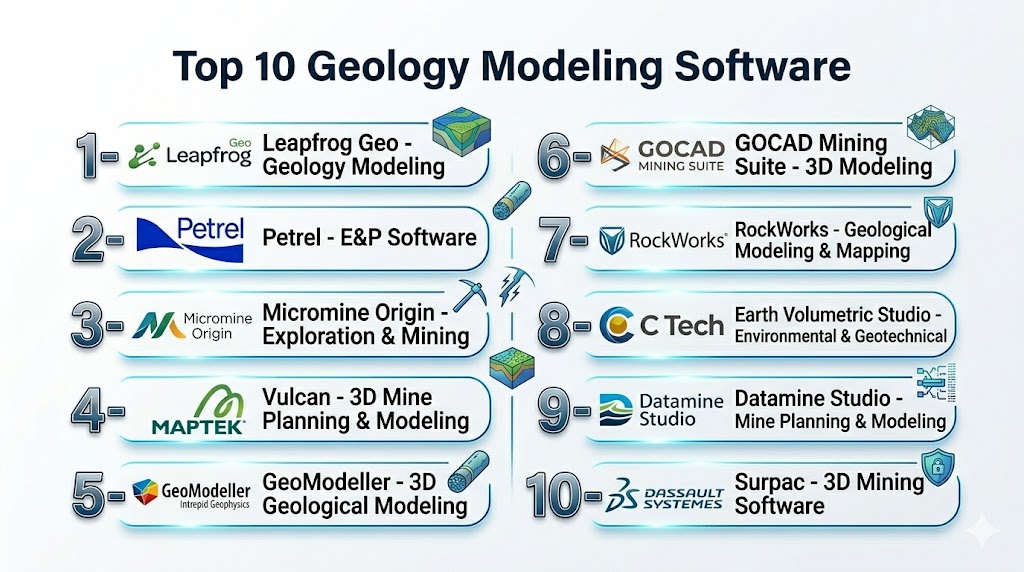
Introduction
Geology Modeling Software helps geoscientists, mining engineers, petroleum engineers, and environmental specialists visualize, analyze, and interpret subsurface geological structures using 2D and 3D modeling environments. These platforms support workflows such as resource estimation, reservoir characterization, structural interpretation, stratigraphic analysis, seismic interpretation, and mine planning.
As exploration projects become more data-intensive and operationally complex, geology modeling platforms are evolving into highly integrated digital environments that combine AI-assisted interpretation, cloud collaboration, geospatial analytics, digital twins, and advanced simulation tools. Modern solutions also support real-time data integration from drilling systems, seismic surveys, GIS environments, and remote sensing platforms.
Real-world use cases include:
- Oil and gas reservoir modeling
- Mineral exploration and resource estimation
- Geological hazard assessment
- Hydrogeological and groundwater modeling
- Geotechnical and infrastructure planning
Key evaluation criteria buyers should consider:
- 3D geological modeling accuracy
- Seismic and GIS integration capabilities
- Resource estimation functionality
- Scalability for large datasets
- Visualization and rendering quality
- Collaboration and cloud support
- AI-assisted interpretation tools
- Integration with simulation platforms
- Ease of workflow customization
- Performance for complex subsurface models
Best for: mining companies, oil and gas operators, geoscientists, exploration teams, geological consultants, infrastructure engineering firms, and environmental modeling specialists.
Not ideal for: organizations needing only lightweight CAD tools or basic mapping applications without advanced geological interpretation requirements.
Key Trends in Geology Modeling Software
- AI-assisted geological interpretation is accelerating structural and seismic analysis workflows.
- Cloud-based collaborative modeling is improving multi-disciplinary project coordination.
- Digital twin technology is becoming more common for subsurface asset simulation.
- Implicit modeling engines are reducing manual wireframing effort in exploration projects.
- Integration with drone, LiDAR, and remote sensing data is improving geological accuracy.
- High-performance 3D visualization is enabling real-time interaction with large geological datasets.
- Automated resource estimation workflows are streamlining mining operations.
- GIS-centric modeling environments are becoming standard for infrastructure and environmental studies.
- Open APIs and interoperability are improving integration across geoscience ecosystems.
- Machine learning for anomaly detection and pattern recognition is improving exploration efficiency.
How We Selected These Tools
The tools in this list were selected based on industry adoption, modeling capabilities, and operational relevance across mining, oil & gas, environmental, and geotechnical sectors.
- Evaluated global market presence and geoscience industry adoption.
- Assessed 3D geological modeling and visualization capabilities.
- Reviewed seismic interpretation and subsurface analysis features.
- Considered support for mining and petroleum workflows.
- Evaluated GIS and spatial data integration.
- Assessed AI-assisted and automated interpretation capabilities.
- Reviewed scalability for enterprise and large geological datasets.
- Considered interoperability with simulation and engineering systems.
- Evaluated usability for both technical specialists and collaborative teams.
- Reviewed vendor ecosystem maturity and support quality.
Top 10 Geology Modeling Software Tools
1- Petrel
Short description: Petrel by SLB is one of the most widely used subsurface modeling platforms in the oil and gas industry. It provides integrated workflows for seismic interpretation, geological modeling, reservoir characterization, and simulation support. Large energy companies use Petrel for complex exploration and production projects.
Key Features
- Advanced 3D geological modeling
- Seismic interpretation workflows
- Reservoir characterization tools
- Structural and stratigraphic modeling
- Dynamic simulation integration
- Collaborative subsurface environment
- AI-assisted interpretation support
Pros
- Industry-leading petroleum workflow support
- Strong integration ecosystem
- High-quality visualization tools
- Scalable enterprise platform
Cons
- Premium licensing costs
- Requires specialized training
- Resource-intensive deployment
- Complex for smaller organizations
Platforms / Deployment
- Windows
- Cloud / Hybrid
Security & Compliance
- RBAC
- User authentication
- Audit controls
- Not publicly stated for certifications
Integrations & Ecosystem
Petrel integrates deeply with seismic analysis, reservoir simulation, and oilfield operational platforms.
- Eclipse simulator integration
- Seismic interpretation systems
- Reservoir engineering workflows
- API framework
- Enterprise data integration
Support & Community
Strong enterprise support ecosystem with extensive documentation, training, and global industry adoption.
2- Leapfrog Geo
Short description: Leapfrog Geo by Seequent is a leading implicit geological modeling platform focused on mining, exploration, and geotechnical projects. It enables rapid 3D geological interpretation and modeling workflows for geologists handling large exploration datasets.
Key Features
- Implicit geological modeling
- Drillhole data integration
- 3D visualization
- Structural interpretation tools
- Resource estimation workflows
- Geotechnical modeling support
- Rapid model updating
Pros
- Fast and intuitive workflows
- Excellent implicit modeling engine
- Strong mining industry adoption
- High-quality visualization
Cons
- Premium licensing model
- Limited outside geoscience workflows
- Requires geological expertise
- Large datasets may need powerful hardware
Platforms / Deployment
- Windows
- Cloud / Hybrid
Security & Compliance
- User authentication
- RBAC
- Encryption
- Not publicly stated for certifications
Integrations & Ecosystem
Leapfrog Geo integrates with geostatistics, mine planning, and exploration data systems.
- Drillhole database integrations
- GIS compatibility
- Mine planning systems
- API support
Support & Community
Strong mining and geoscience user community with extensive training resources.
3- GOCAD Mining Suite
Short description: GOCAD Mining Suite is a powerful 3D earth modeling platform used for geological, geophysical, geochemical, and geotechnical modeling. It is widely used in exploration, mining, and structural geological analysis.
Key Features
- Advanced 3D subsurface modeling
- Structural geology workflows
- Geophysical data integration
- Geochemical interpretation
- Geotechnical analysis
- High-end visualization tools
- Resource assessment support
Pros
- Strong structural modeling capabilities
- Excellent geophysical integration
- Suitable for complex geological environments
- Powerful visualization engine
Cons
- Steeper learning curve
- Enterprise-focused pricing
- Resource-intensive deployment
- Complex interface for beginners
Platforms / Deployment
- Windows / Linux
- Hybrid
Security & Compliance
- User authentication
- RBAC
- Not publicly stated for certifications
Integrations & Ecosystem
GOCAD supports integration with mining, seismic, and geological analysis systems.
- Geophysical tools
- GIS integrations
- Mining workflows
- API framework
Support & Community
Strong technical documentation and industry-focused professional support.
4- Kingdom Geoscience Software
Short description: Kingdom Geoscience Software by S&P Global provides seismic interpretation, geological mapping, and subsurface visualization tools for petroleum exploration teams. It is widely used for seismic interpretation and structural analysis workflows.
Key Features
- 2D and 3D seismic interpretation
- Horizon tracking
- Structural mapping
- Velocity modeling
- Seismic inversion support
- Geological visualization
- Attribute analysis
Pros
- Strong seismic interpretation capabilities
- Mature oil and gas workflows
- Reliable visualization environment
- Broad petroleum industry usage
Cons
- Specialized industry focus
- Enterprise licensing costs
- Requires technical expertise
- Less suitable for mining workflows
Platforms / Deployment
- Windows
- Hybrid
Security & Compliance
- RBAC
- Authentication controls
- Not publicly stated for certifications
Integrations & Ecosystem
Kingdom integrates with seismic processing and petroleum interpretation systems.
- Seismic analysis tools
- Reservoir workflows
- GIS integration
- Data management platforms
Support & Community
Strong petroleum geoscience support network and training ecosystem.
5- Maptek Vulcan
Short description: Maptek Vulcan is a comprehensive geological modeling and mine planning platform used heavily in mining and exploration industries. It supports resource estimation, mine design, and geological visualization workflows.
Key Features
- 3D geological modeling
- Resource estimation
- Mine planning workflows
- Drillhole analysis
- Geostatistical tools
- Visualization dashboards
- Operational mine design
Pros
- Excellent mining workflow integration
- Strong resource estimation tools
- Mature industry adoption
- Detailed mine planning support
Cons
- Requires training for advanced workflows
- Less suitable for petroleum modeling
- High licensing costs
- Complex enterprise deployment
Platforms / Deployment
- Windows
- Hybrid
Security & Compliance
- RBAC
- User controls
- Not publicly stated for certifications
Integrations & Ecosystem
Maptek integrates with mine planning, GIS, and exploration data systems.
- Mining operation systems
- GIS integrations
- Drillhole databases
- Survey tools
Support & Community
Strong mining-sector support ecosystem and extensive technical documentation.
6- GeoGraphix
Short description: GeoGraphix is a geoscience interpretation and geological modeling suite focused on upstream oil and gas workflows. It provides mapping, well correlation, seismic interpretation, and subsurface analysis capabilities.
Key Features
- Geological mapping
- Well correlation tools
- Seismic interpretation
- Reservoir analysis
- Cross-section creation
- Data integration workflows
- Subsurface visualization
Pros
- Mature upstream geoscience platform
- Strong well data analysis
- Good petroleum workflows
- Reliable mapping tools
Cons
- Older interface compared to newer platforms
- Requires specialized expertise
- Enterprise deployment effort
- Primarily oil and gas focused
Platforms / Deployment
- Windows
- Hybrid
Security & Compliance
- User authentication
- RBAC
- Not publicly stated for certifications
Integrations & Ecosystem
GeoGraphix integrates with seismic interpretation and reservoir engineering systems.
- Well data systems
- Reservoir workflows
- Seismic platforms
- API support
Support & Community
Established petroleum geoscience user base and technical support ecosystem.
7- RockWorks
Short description: RockWorks by RockWare is a geological data management and visualization platform used in mining, environmental, and hydrogeological projects. It supports subsurface mapping, borehole analysis, and geospatial interpretation workflows.
Key Features
- Borehole analysis
- Geological mapping
- Cross-section generation
- Environmental modeling
- Hydrogeological workflows
- 3D visualization
- Geostatistical analysis
Pros
- Flexible geological workflows
- Strong environmental modeling support
- Affordable compared to enterprise suites
- Good visualization capabilities
Cons
- UI feels less modern
- Limited enterprise collaboration
- Advanced workflows require expertise
- Large datasets can impact performance
Platforms / Deployment
- Windows
- Desktop / Hybrid
Security & Compliance
- User controls
- Not publicly stated for certifications
Integrations & Ecosystem
RockWorks integrates with GIS, drilling, and environmental analysis systems.
- GIS compatibility
- Borehole databases
- Survey integrations
- Export functionality
Support & Community
Good documentation and active technical support for geological users.
8- Seequent Central
Short description: Seequent Central provides collaborative geological data management and modeling support for teams using Seequent applications. It enables centralized data governance and project collaboration for geoscience workflows.
Key Features
- Geological data management
- Team collaboration tools
- Centralized project governance
- Model version tracking
- Workflow synchronization
- Cloud-enabled access
- Data sharing capabilities
Pros
- Strong collaboration support
- Good workflow governance
- Seamless Seequent ecosystem integration
- Useful for distributed teams
Cons
- Best within Seequent ecosystem
- Requires supporting software stack
- Enterprise pricing model
- Limited standalone modeling functionality
Platforms / Deployment
- Web
- Cloud
Security & Compliance
- RBAC
- Authentication controls
- Encryption
- Not publicly stated for certifications
Integrations & Ecosystem
Seequent Central integrates with Leapfrog, geotechnical tools, and geological workflows.
- Leapfrog integration
- Cloud collaboration
- Geological data systems
- Workflow synchronization
Support & Community
Strong vendor support and growing collaborative geoscience ecosystem.
9- MOVE
Short description: MOVE by Petroleum Experts is a structural geology and restoration modeling platform used in energy and geotechnical industries. It specializes in fault analysis, deformation modeling, and structural interpretation workflows.
Key Features
- Structural restoration
- Fault interpretation
- 3D geological modeling
- Balanced cross-sections
- Fracture analysis
- Geomechanical workflows
- Basin modeling support
Pros
- Excellent structural geology tools
- Strong deformation analysis
- High-quality restoration workflows
- Useful for complex geology
Cons
- Specialized workflow focus
- Requires advanced expertise
- Limited outside structural geology
- Enterprise licensing costs
Platforms / Deployment
- Windows / Linux
- Hybrid
Security & Compliance
- User authentication
- RBAC
- Not publicly stated for certifications
Integrations & Ecosystem
MOVE integrates with seismic interpretation and geological analysis platforms.
- Seismic integrations
- Basin modeling workflows
- Geological data imports
- API compatibility
Support & Community
Strong technical support with specialized geological training resources.
10- Loop
Short description: Loop is an open-source geological modeling platform focused on probabilistic 3D geological and geophysical modeling. It is commonly explored by researchers, universities, and geoscientists seeking customizable workflows.
Key Features
- Open-source geological modeling
- Probabilistic modeling workflows
- 3D visualization
- Python customization
- Structural interpretation
- Geophysical modeling
- Scientific workflow flexibility
Pros
- Open-source flexibility
- Strong customization capabilities
- Useful research platform
- Supports advanced experimentation
Cons
- Requires technical expertise
- Limited enterprise support
- Smaller ecosystem
- Less polished UI compared to commercial tools
Platforms / Deployment
- Windows / Linux
- Self-hosted
Security & Compliance
- Varies / N/A
Integrations & Ecosystem
Loop supports integration with scientific computing and custom geoscience workflows.
- Python ecosystem
- Research tools
- Custom scripting support
- Scientific visualization libraries
Support & Community
Community-driven support with academic and research-focused usage.
Comparison Table
| Tool Name | Best For | Platform(s) Supported | Deployment | Standout Feature | Public Rating |
|---|---|---|---|---|---|
| Petrel | Enterprise petroleum modeling | Windows | Cloud, Hybrid | Integrated reservoir workflows | N/A |
| Leapfrog Geo | Mining and exploration | Windows | Cloud, Hybrid | Implicit geological modeling | N/A |
| GOCAD Mining Suite | Structural and geophysical analysis | Windows, Linux | Hybrid | Advanced subsurface modeling | N/A |
| Kingdom Geoscience Software | Seismic interpretation | Windows | Hybrid | Horizon tracking and seismic analysis | N/A |
| Maptek Vulcan | Mining geology and planning | Windows | Hybrid | Resource estimation workflows | N/A |
| GeoGraphix | Oil and gas interpretation | Windows | Hybrid | Well correlation and mapping | N/A |
| RockWorks | Environmental and hydrogeology | Windows | Desktop, Hybrid | Borehole analysis tools | N/A |
| Seequent Central | Collaborative geoscience workflows | Web | Cloud | Centralized geological collaboration | N/A |
| MOVE | Structural geology interpretation | Windows, Linux | Hybrid | Structural restoration modeling | N/A |
| Loop | Open-source geological modeling | Windows, Linux | Self-hosted | Probabilistic modeling workflows | N/A |
Evaluation & Scoring of Geology Modeling Software
| Tool Name | Core 25% | Ease 15% | Integrations 15% | Security 10% | Performance 10% | Support 10% | Value 15% | Weighted Total |
|---|---|---|---|---|---|---|---|---|
| Petrel | 10 | 7 | 10 | 8 | 9 | 9 | 6 | 8.5 |
| Leapfrog Geo | 9 | 8 | 8 | 7 | 9 | 8 | 7 | 8.1 |
| GOCAD Mining Suite | 9 | 6 | 8 | 7 | 8 | 7 | 6 | 7.5 |
| Kingdom Geoscience Software | 8 | 7 | 8 | 7 | 8 | 8 | 7 | 7.7 |
| Maptek Vulcan | 9 | 7 | 8 | 7 | 8 | 8 | 7 | 7.9 |
| GeoGraphix | 8 | 7 | 7 | 7 | 8 | 7 | 7 | 7.4 |
| RockWorks | 7 | 8 | 7 | 6 | 7 | 7 | 8 | 7.3 |
| Seequent Central | 7 | 8 | 8 | 7 | 8 | 8 | 7 | 7.5 |
| MOVE | 8 | 6 | 7 | 7 | 8 | 7 | 6 | 7.1 |
| Loop | 6 | 5 | 6 | 5 | 6 | 5 | 9 | 6.1 |
These scores are comparative and intended to help organizations evaluate geological modeling platforms based on operational priorities. Enterprise petroleum platforms generally score higher in integrations and scalability, while open-source and lightweight platforms may perform better in affordability and customization flexibility. Buyers should align scoring priorities with geological complexity, project scale, collaboration needs, and technical expertise available within their teams.
Which Geology Modeling Software Tool Is Right for You?
Solo / Freelancer
Independent geologists and consultants often benefit from flexible and lower-cost platforms like RockWorks or Loop. These tools provide sufficient modeling and visualization capabilities without the complexity of enterprise-scale petroleum environments.
SMB
Small and mid-sized exploration companies should prioritize usability, scalability, and geological workflow flexibility. Leapfrog Geo and RockWorks provide strong modeling capabilities while remaining manageable for smaller technical teams.
Mid-Market
Mid-market mining and energy operators typically require collaborative modeling, advanced visualization, and integration support. Maptek Vulcan and Kingdom Geoscience Software provide balanced operational depth for growing exploration environments.
Enterprise
Large mining corporations and oil & gas enterprises usually require integrated reservoir workflows, seismic interpretation, enterprise collaboration, and advanced simulation support. Petrel and GOCAD Mining Suite are especially strong for enterprise geological operations.
Budget vs Premium
Budget-conscious organizations may prefer open-source or lighter geological platforms that prioritize core interpretation functionality. Premium enterprise platforms deliver stronger integrations, scalability, and advanced analytics but involve higher licensing and implementation costs.
Feature Depth vs Ease of Use
Highly advanced geological suites often provide extensive modeling flexibility but require specialized expertise and training. Simpler platforms reduce onboarding complexity but may lack advanced structural, seismic, or reservoir modeling functionality.
Integrations & Scalability
Organizations handling large subsurface datasets should prioritize platforms with strong API ecosystems, GIS compatibility, seismic integration, and collaborative workflows. Scalability becomes increasingly important for enterprise exploration programs.
Security & Compliance Needs
Enterprise organizations should prioritize RBAC, audit controls, encryption, and centralized data governance capabilities. Collaborative cloud environments also require strong operational governance and access management controls.
Frequently Asked Questions
1- What is Geology Modeling Software?
Geology Modeling Software helps geoscientists visualize, interpret, and analyze subsurface geological structures using 2D and 3D modeling workflows. These platforms are commonly used in mining, oil & gas, environmental studies, and geotechnical engineering.
2- Which industries use these platforms most heavily?
Mining, oil and gas, hydrogeology, environmental consulting, civil engineering, and geotechnical infrastructure sectors are among the largest users of geology modeling software. Universities and research institutions also use these platforms extensively.
3- What is implicit geological modeling?
Implicit modeling automatically generates geological surfaces and structures using algorithms rather than manual wireframing. Platforms like Leapfrog Geo are particularly known for accelerating geological interpretation using implicit workflows.
4- Are these platforms suitable for cloud deployment?
Many modern geological platforms now support cloud and hybrid deployment models for collaboration, centralized data management, and remote access. Enterprise adoption of cloud-enabled workflows continues to increase.
5- How important is GIS integration?
GIS integration is critical because geological projects often rely on spatial analysis, environmental mapping, infrastructure planning, and location-based operational workflows. Strong GIS compatibility improves operational efficiency significantly.
6- Do these tools support AI-assisted interpretation?
Several modern platforms now include AI-assisted workflows for seismic interpretation, anomaly detection, automated geological classification, and predictive analysis. AI functionality continues evolving rapidly within geoscience environments.
7- What are the biggest implementation challenges?
Common challenges include data migration, integration complexity, hardware requirements, user training, and managing large geological datasets. Enterprise deployments often require phased implementation planning.
8- Is open-source geology modeling software viable?
Open-source platforms like Loop can be valuable for research, experimentation, and customizable workflows. However, commercial platforms generally provide stronger enterprise support, integrations, and operational scalability.
9- How expensive are enterprise geological modeling platforms?
Enterprise geological suites can involve significant licensing and infrastructure costs depending on modules, deployment scale, and user requirements. Pricing varies widely across mining, petroleum, and environmental workflows.
10- What should buyers prioritize when selecting a platform?
Organizations should prioritize workflow compatibility, integration capabilities, scalability, visualization quality, data management, and long-term operational support. The ideal platform depends heavily on industry focus and project complexity.
Conclusion
Geology Modeling Software has become a foundational technology layer for mining, petroleum, environmental, and geotechnical industries managing increasingly complex subsurface projects. Modern platforms now combine AI-assisted interpretation, high-performance 3D visualization, geospatial analytics, collaborative workflows, and advanced simulation support to improve geological understanding and operational decision-making. The right platform depends heavily on industry focus, project scale, technical expertise, and integration requirements. Mining organizations may prioritize implicit modeling and resource estimation, while petroleum enterprises often require seismic interpretation and reservoir characterization workflows. Open-source and lightweight tools can work well for research or smaller projects, whereas enterprise platforms deliver deeper analytics, scalability, and ecosystem integration. Instead of searching for a single universal winner, organizations should shortlist a few platforms aligned with their operational goals, validate workflow compatibility, test integration requirements, and conduct pilot projects before making long-term deployment decisions.

Geology modeling software is most valuable when it preserves the reasoning behind model revisions as new exploration data becomes available. Borehole results, geophysical surveys, and field observations can significantly alter geological interpretations over time, making traceability essential for informed decision-making. Expanding the comparison to include model versioning, uncertainty tracking, collaborative review workflows, and integration with exploration databases would provide readers with a more practical understanding of how these platforms support reliable resource evaluation throughout the project lifecycle.
Geological models rarely remain static as new drilling, sampling, logging, or geophysical information becomes available. The difficult part is often preserving the reasoning behind model changes so teams can understand whether a revised interpretation reflects stronger evidence or simply a different set of assumptions. Version control for surfaces, faults, domains, parameters, and input datasets can make collaboration and technical review much easier. Recording uncertainty alongside the model is equally important because downstream resource estimates, mine planning, and exploration decisions may depend heavily on areas where the available data is limited. A well-managed modeling workflow should therefore make both the current interpretation and the evidence behind it easy to trace.