Introduction
Court Docket Management Tools are specialized legal software platforms that help law firms, legal departments, and litigation teams track court cases, filings, deadlines, and hearing schedules in a centralized system. These tools automate docket monitoring, send alerts for critical deadlines, and reduce the risk of missed court events or compliance failures.
In modern litigation environments, managing multiple cases across jurisdictions is complex and time-sensitive. Missing a filing deadline or court hearing can have serious consequences. Docket management systems solve this by providing real-time updates, automated notifications, and centralized case tracking, allowing legal teams to stay organized and proactive.
Common use cases include:
- Tracking court filings and case updates
- Monitoring hearing schedules and deadlines
- Managing multi-jurisdiction litigation
- Automating alerts and notifications
- Organizing court documents and records
What buyers should evaluate:
- Real-time docket tracking and alerts
- Coverage across courts and jurisdictions
- Integration with legal research and case management tools
- Automation and workflow capabilities
- Ease of use and interface
- Reporting and analytics
- Scalability for large litigation portfolios
- Security and compliance features
Best for: Litigation teams, law firms, corporate legal departments, compliance teams, and government agencies handling active court cases.
Not ideal for: Small firms with minimal litigation or those relying on manual tracking.
Key Trends in Court Docket Management Tools
- AI-powered docket monitoring and alerts
- Automated e-filing and court integration
- Real-time case updates across jurisdictions
- Cloud-based access for remote legal teams
- Integration with legal research platforms
- Advanced litigation analytics and reporting
- Mobile-first docket tracking
- API-driven integration ecosystems
- Automation of compliance and deadlines
- Predictive insights for litigation strategy
How We Selected These Tools (Methodology)
- Evaluated market adoption and litigation relevance
- Assessed docket tracking and alert capabilities
- Reviewed integration with legal research and case systems
- Considered usability and onboarding experience
- Analyzed scalability across jurisdictions
- Evaluated automation and workflow features
- Reviewed security and compliance readiness
- Considered support and ecosystem maturity
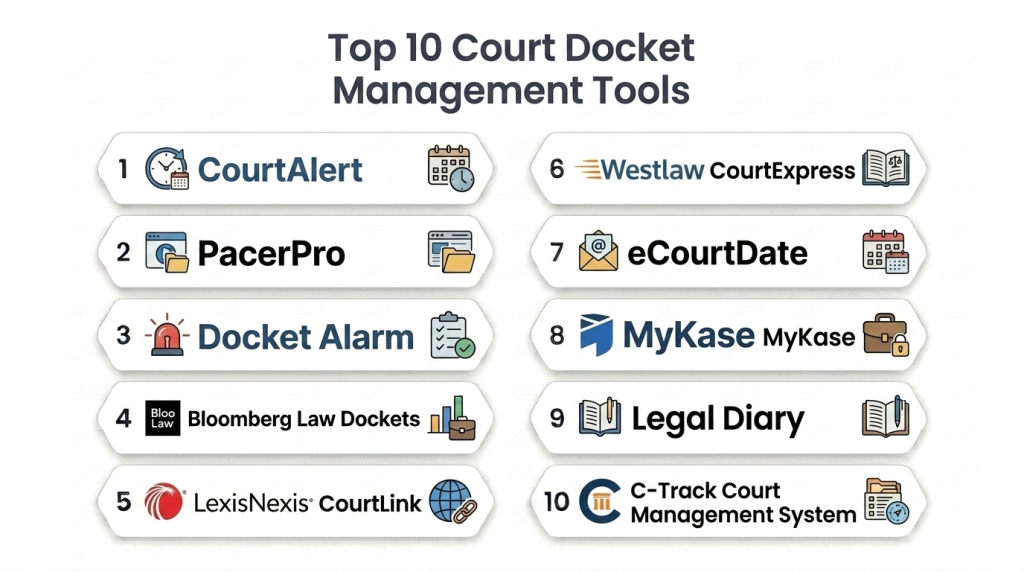
Top 10 Court Docket Management Tools
#1 — CourtAlert
Short description:
CourtAlert is a widely used docket tracking platform designed for law firms and litigation teams. It provides real-time alerts, court updates, and deadline tracking across jurisdictions. The platform helps reduce missed deadlines and improve litigation efficiency.
Key Features
- Real-time docket alerts
- Case tracking across courts
- Deadline monitoring
- Notification system
- Document access
Pros
- Reliable alert system
- Broad court coverage
Cons
- Premium pricing
- Limited customization
Platforms / Deployment
Web
Cloud
Security & Compliance
Not publicly stated
Integrations & Ecosystem
Integrates with litigation and legal research tools.
- Case management systems
- Legal databases
Support & Community
Enterprise-level support.
#2 — PacerPro
Short description:
PacerPro enhances PACER access with advanced docket tracking and document management. It simplifies federal court research and monitoring. The platform is widely used for litigation tracking and case analysis.
Key Features
- PACER integration
- Docket tracking
- Document management
- Alerts and notifications
Pros
- Strong federal court coverage
- Efficient document access
Cons
- Limited to certain jurisdictions
- Learning curve
Platforms / Deployment
Web
Cloud
Security & Compliance
Encryption
Integrations & Ecosystem
- Legal research tools
- Document systems
Support & Community
Strong support for litigation teams.
#3 — Docket Alarm
Short description:
Docket Alarm is a legal analytics and docket tracking platform that provides insights into litigation trends. It combines docket monitoring with analytics. The platform is useful for legal research and strategy.
Key Features
- Docket tracking
- Legal analytics
- Alerts system
- Document access
Pros
- Strong analytics
- Research capabilities
Cons
- Complex interface
- Premium pricing
Platforms / Deployment
Web
Cloud
Security & Compliance
Not publicly stated
Integrations & Ecosystem
- Legal analytics tools
- Research platforms
Support & Community
Professional support available.
#4 — Bloomberg Law Dockets
Short description:
Bloomberg Law Dockets provides docket tracking combined with business intelligence and legal research. It offers insights into litigation trends and case activity. The platform is ideal for professionals needing both legal and business data.
Key Features
- Docket tracking
- Litigation analytics
- Business intelligence
- Case monitoring
Pros
- Integrated data insights
- Strong analytics
Cons
- Expensive
- Complex platform
Platforms / Deployment
Web
Cloud
Security & Compliance
Not publicly stated
Integrations & Ecosystem
- Financial tools
- Legal systems
Support & Community
Enterprise-level support.
#5 — LexisNexis CourtLink
Short description:
CourtLink is a comprehensive docket search and alert platform that helps legal professionals monitor litigation activity and access court documents. It provides real-time updates and supports legal research workflows.
Key Features
- Docket search
- Real-time alerts
- Document retrieval
- Litigation monitoring
Pros
- Comprehensive database
- Strong research integration
Cons
- Premium pricing
- Requires training
Platforms / Deployment
Web
Cloud
Security & Compliance
SSO, encryption
Integrations & Ecosystem
- Legal research platforms
- Case management tools
Support & Community
Strong enterprise support.
#6 — Westlaw CourtExpress
Short description:
Westlaw CourtExpress provides docket tracking and court filing services integrated with Westlaw research tools. It helps legal teams monitor cases and manage filings efficiently. It is widely used by law firms.
Key Features
- Docket tracking
- Court filing services
- Alerts and notifications
- Legal research integration
Pros
- Strong integration with Westlaw
- Reliable data
Cons
- High cost
- Limited standalone use
Platforms / Deployment
Web
Cloud
Security & Compliance
SSO, encryption
Integrations & Ecosystem
- Westlaw ecosystem
- Legal tools
Support & Community
Enterprise-level support.
#7 — eCourtDate
Short description:
eCourtDate is a scheduling and docket tracking tool that focuses on court dates and notifications. It helps legal teams manage deadlines and hearing schedules. The platform is simple and effective for basic docket tracking.
Key Features
- Court date tracking
- Notifications
- Scheduling tools
- Calendar integration
Pros
- Easy to use
- Affordable
Cons
- Limited advanced features
- Basic analytics
Platforms / Deployment
Web
Cloud
Security & Compliance
Not publicly stated
Integrations & Ecosystem
- Calendar systems
Support & Community
Basic support.
#8 — MyKase
Short description:
MyKase is a legal case and docket management platform that provides litigation tracking and workflow automation. It supports tracking cases across multiple courts. It is suitable for modern legal teams.
Key Features
- Case tracking
- Litigation monitoring
- Workflow automation
- Document management
Pros
- Strong India coverage
- Automation features
Cons
- Limited global reach
- Smaller ecosystem
Platforms / Deployment
Web / Mobile
Cloud
Security & Compliance
Not publicly stated
Integrations & Ecosystem
- Legal tools
- Document systems
Support & Community
Regional support.
#9 — Legal Diary
Short description:
Legal Diary is a docket and case tracking tool focused on Indian courts. It automates case updates and tracks hearing dates across multiple jurisdictions. It helps lawyers avoid missing court deadlines.
Key Features
- Automatic case updates
- Hearing tracking
- Client management
- Document storage
Pros
- Strong local coverage
- Mobile-friendly
Cons
- Limited global functionality
- Basic analytics
Platforms / Deployment
Web / Mobile
Cloud
Security & Compliance
Not publicly stated
Integrations & Ecosystem
- Legal tools
Support & Community
Good regional support.
#10 — C-Track Court Management System
Short description:
C-Track is a court management system designed to streamline court workflows and case tracking. It supports court staff and legal professionals in managing cases efficiently. It is widely used in institutional environments.
Key Features
- Case tracking
- Workflow management
- Reporting tools
- Court operations support
Pros
- Strong workflow management
- Scalable
Cons
- Not focused on law firms
- Complex setup
Platforms / Deployment
Web
Cloud
Security & Compliance
Not publicly stated
Integrations & Ecosystem
- Court systems
Support & Community
Enterprise support.
Comparison Table
| Tool Name | Best For | Platform(s) Supported | Deployment | Standout Feature | Public Rating |
|---|---|---|---|---|---|
| CourtAlert | Enterprise | Web | Cloud | Real-time alerts | N/A |
| PacerPro | Federal courts | Web | Cloud | PACER integration | N/A |
| Docket Alarm | Analytics | Web | Cloud | Litigation insights | N/A |
| Bloomberg Law | Enterprise | Web | Cloud | Legal + business data | N/A |
| CourtLink | Enterprise | Web | Cloud | Docket alerts | N/A |
| Westlaw | Enterprise | Web | Cloud | Filing integration | N/A |
| eCourtDate | SMB | Web | Cloud | Simple scheduling | N/A |
| MyKase | India | Web/Mobile | Cloud | Litigation tracking | N/A |
| Legal Diary | India | Web/Mobile | Cloud | Auto updates | N/A |
| C-Track | Courts | Web | Cloud | Workflow automation | N/A |
Evaluation & Scoring of Court Docket Management Tools
| Tool Name | Core | Ease | Integrations | Security | Performance | Support | Value | Weighted Total |
|---|---|---|---|---|---|---|---|---|
| CourtAlert | 9 | 7 | 8 | 8 | 9 | 9 | 7 | 8.3 |
| PacerPro | 8 | 8 | 8 | 7 | 8 | 8 | 8 | 8.0 |
| Docket Alarm | 8 | 7 | 8 | 7 | 8 | 8 | 7 | 7.8 |
| Bloomberg | 9 | 7 | 9 | 8 | 9 | 9 | 7 | 8.4 |
| CourtLink | 9 | 8 | 9 | 8 | 9 | 9 | 7 | 8.5 |
| Westlaw | 9 | 7 | 9 | 8 | 9 | 9 | 7 | 8.4 |
| eCourtDate | 7 | 9 | 6 | 7 | 7 | 7 | 9 | 7.6 |
| MyKase | 8 | 8 | 7 | 7 | 8 | 8 | 8 | 7.9 |
| Legal Diary | 7 | 9 | 6 | 7 | 7 | 7 | 8 | 7.5 |
| C-Track | 8 | 7 | 7 | 7 | 8 | 8 | 7 | 7.7 |
How to interpret scores:
These scores provide a comparative overview of each tool’s strengths across key categories. Enterprise platforms score higher in integrations and scalability, while smaller tools excel in ease of use and affordability. Organizations should prioritize features like jurisdiction coverage, automation, and compliance based on their litigation needs. The scoring is indicative and should be validated through real-world testing and demos.
Which Court Docket Management Tool Is Right for You?
Solo / Freelancer
Basic tools like eCourtDate or Legal Diary are sufficient for simple docket tracking and scheduling.
SMB
MyKase and Legal Diary offer affordable and easy-to-use solutions for small legal teams.
Mid-Market
PacerPro and Docket Alarm provide better analytics and integration for growing firms.
Enterprise
CourtAlert, CourtLink, Bloomberg Law, and Westlaw are best for large-scale litigation management.
Budget vs Premium
Budget tools include eCourtDate and Legal Diary, while premium tools include CourtLink and Bloomberg Law.
Feature Depth vs Ease of Use
CourtLink offers deep functionality, while eCourtDate provides simplicity.
Integrations & Scalability
Westlaw, CourtLink, and Bloomberg lead in integrations and scalability.
Security & Compliance Needs
Enterprise tools provide stronger compliance, audit trails, and governance capabilities.
Frequently Asked Questions
1. What are court docket management tools?
These tools help legal professionals track court cases, filings, deadlines, and hearings. They centralize docket data and automate monitoring. This reduces the risk of missed deadlines. They are essential for litigation workflows.
2. How do docket management tools work?
They connect to court systems and databases to track case updates. Users receive alerts for new filings and deadlines. These tools store case information in one place. This improves efficiency and organization.
3. Why are docket management tools important?
They help prevent missed deadlines and ensure compliance with court procedures. They improve visibility across cases. This leads to better decision-making. They also reduce administrative workload.
4. Can these tools integrate with legal systems?
Yes, most tools integrate with legal research and case management platforms. This creates a unified workflow. Integration improves efficiency. It also reduces manual work.
5. Are these tools suitable for small law firms?
Yes, some tools are designed for SMBs. Simple platforms provide essential features at lower cost. However, advanced tools may be unnecessary for small firms. The choice depends on workload.
6. Do these tools provide real-time updates?
Yes, modern docket tools provide real-time updates and alerts. This helps legal teams respond quickly. Real-time tracking improves case management. It also enhances productivity.
7. How long does implementation take?
Implementation varies by platform. Smaller tools can be deployed quickly. Enterprise tools may take longer due to integrations. Proper training is important.
8. What industries use docket management tools?
Law firms, corporate legal teams, government agencies, and compliance organizations use these tools. They are essential for litigation-heavy environments. They improve efficiency and compliance.
9. What features should I prioritize?
Look for real-time alerts, multi-jurisdiction coverage, integration capabilities, and reporting tools. Automation features add value. Ease of use is also important.
10. Can companies switch tools easily?
Switching is possible but requires planning. Data migration and integration are key challenges. Testing and pilot runs help reduce risks. Proper onboarding ensures smooth transition.
Conclusion
Court Docket Management Tools have become essential for modern legal operations, enabling organizations to track litigation, manage deadlines, and reduce compliance risks with greater efficiency and accuracy. As legal environments grow more complex and multi-jurisdictional, relying on manual tracking methods is no longer sustainable. These platforms provide real-time updates, automated alerts, and centralized visibility, helping legal teams stay proactive and organized. The tools covered in this guide range from simple scheduling solutions to advanced enterprise platforms with deep analytics and integrations. However, the best choice depends on your organization’s size, litigation volume, and workflow complexity. Smaller firms may prioritize ease of use and affordability, while enterprises require scalability and integration depth. To make the right decision, shortlist a few tools, run pilot implementations, and validate integration with your existing systems. This approach ensures long-term efficiency, reduced risk, and improved litigation outcomes.

A well-organized comparison that clearly explains court docket management tools and their features, making it easier to choose the right solution for legal case tracking and scheduling.