Introduction
Meeting Notes Automation Tools are software platforms that help teams capture, organize, summarize, and share insights from meetings automatically. Instead of relying on manual note‑taking, these platforms use transcription, AI‑driven summarization, speaker detection, action item extraction, and integration with calendars and collaboration tools to streamline meeting documentation and follow‑up. These tools remove the cognitive load of manual note‑taking, improve knowledge retention, and ensure key decisions and tasks are captured accurately.
Organizations use Meeting Notes Automation Tools for client discussions, internal team meetings, sales calls, interviews, project updates, retrospective sessions, and executive briefings. They help reduce error, improve accountability for action items, enhance alignment across distributed teams, and support compliance or audit requirements. Buyers evaluating these tools should consider transcription accuracy, AI summarization quality, integrations with calendaring and collaboration systems, workflow automation, speaker identification, multilingual support, ease of editing, security and compliance, scalability, and mobile access.
Best for: Teams and organizations that run frequent meetings, distributed hybrid workforces, sales and consulting teams, HR and recruiting teams, product and development teams, and any group that needs accurate, organized records of verbal discussions.
Not ideal for: Small teams that rarely meet; use cases where manual note‑taking is already sufficient; or teams without digital meeting infrastructure.
Key Trends in Meeting Notes Automation Tools
- AI‑powered summarization that identifies key decisions, risks, and action items
- Native calendar and meeting platform integrations for seamless capture
- Real‑time transcription and multilingual support
- Action item extraction and task automation
- Searchable knowledge repositories for meeting history and knowledge reuse
- Automated tagging and categorization of discussion topics
- Role‑based security and access controls for sensitive meetings
- Mobile access and capture for on‑the‑go teams
- Voice recognition and speaker separation technologies
- Data export and workflow connector ecosystems for downstream systems
How We Selected These Tools
- Evaluated market adoption across SMB, mid‑market, and enterprise organizations
- Assessed transcription accuracy and AI summarization quality
- Reviewed integrations with calendars, video conferencing, and collaboration tools
- Evaluated action item extraction, tagging, and follow‑up automation
- Considered deployment flexibility and mobile access
- Reviewed security and compliance controls including encryption and access permissions
- Assessed scalability for high meeting volumes
- Evaluated support quality, user community, and onboarding resources
- Considered analytics, reporting, and searchable knowledge repositories
- Evaluated overall value relative to features and long‑term productivity impact
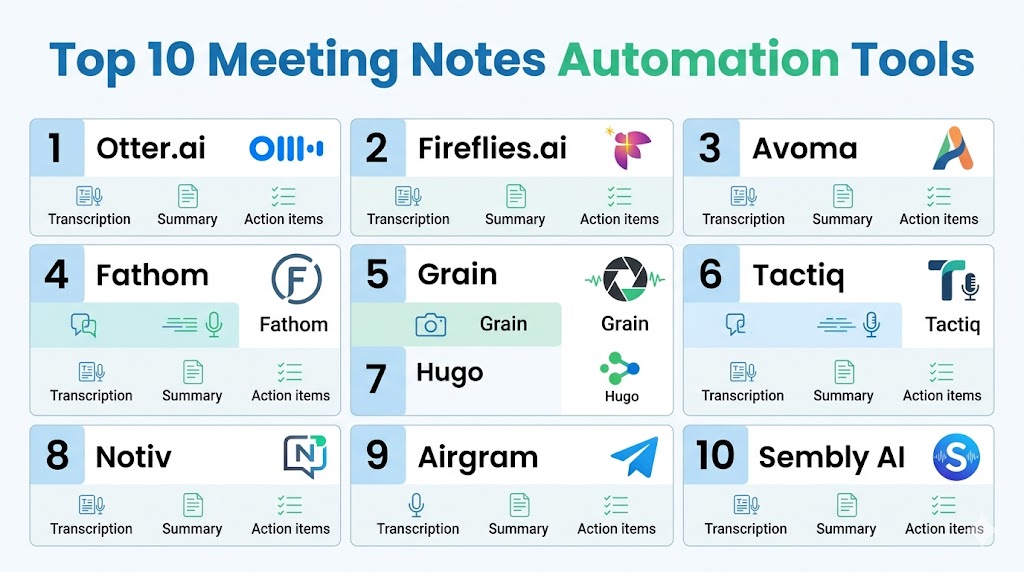
Top 10 Meeting Notes Automation Tools
1 — Otter.ai
Short description: Otter.ai is a widely adopted AI meeting assistant that provides real‑time transcription, automatic meeting summaries, speaker identification, and easy sharing across teams.
Key Features
- Live transcription during meetings
- AI‑generated summaries
- Speaker detection
- Integration with Zoom, MS Teams, Google Meet
- Searchable meeting archives
- Highlight and comment tools
- Export to text formats
Pros
- Excellent transcription accuracy
- Broad integration support
- Easy sharing and collaboration
Cons
- Summarization quality varies by meeting complexity
- Advanced features require higher subscription tiers
- UI can be overwhelming for new users
Platforms / Deployment
- Web, Windows, macOS, iOS, Android
- Cloud
Security & Compliance
- SSO, MFA support
- Encryption at rest and in transit
Integrations & Ecosystem
Integrates with video conferencing and collaboration systems.
- Zoom
- Microsoft Teams
- Google Meet
- Calendar apps
Support & Community
Strong documentation and user community with responsive support teams.
2 — Fireflies
Short description: Fireflies is an AI meeting assistant that captures voice, transcribes conversations, generates summaries, and extracts action items across meeting platforms.
Key Features
- Automated transcription
- AI summaries and highlights
- Action item and next step extraction
- Searchable meeting repository
- Integrations with CRM and productivity tools
- Voice commands
- Multilingual support
Pros
- Strong automation for recurring meetings
- Action item extraction
- Good integrations
Cons
- Transcription accuracy varies with audio quality
- Premium action item features in higher‑tier plans
- Interface may feel cluttered
Platforms / Deployment
- Web, iOS, Android
- Cloud
Security & Compliance
- Encryption
- Role‑based access controls
- MFA
Integrations & Ecosystem
Supports CRM and productivity integrations.
- Zoom
- Microsoft Teams
- Slack
- Salesforce
Support & Community
Good onboarding and responsive support channels.
3 — Zoom AI Companion Notes
Short description: Zoom AI Companion provides built‑in meeting summarization, action item capture, and searchable archives inside Zoom meetings.
Key Features
- Transcription and AI summaries within Zoom
- Automatically generated key points
- Action items and highlights
- Searchable notes linked to meetings
- Integration with Zoom chat and calendar
- Team sharing and tagging
Pros
- Seamless Zoom integration
- Real‑time insights
- No additional tool needed for Zoom users
Cons
- Limited outside Zoom ecosystem
- Feature depth varies by plan
- AI output quality depends on speech clarity
Platforms / Deployment
- Web, Windows, macOS, iOS, Android
- Cloud
Security & Compliance
- Enterprise security controls from Zoom
- Encryption and access management
Integrations & Ecosystem
Native Zoom ecosystem integration.
- Zoom Meetings
- Zoom Chat
- Calendar sync
Support & Community
Large ecosystem with enterprise‑grade support.
4 — Microsoft Teams Meeting Recap
Short description: Microsoft Teams provides AI meeting transcript and recap features within the Teams platform, capturing key points and discussed items.
Key Features
- Live transcripts
- Meeting recap and insights
- Action item suggestions
- Integration with Teams chat and Planner
- Searchable meeting artifacts
- Tagging and sharing
Pros
- Native to Teams ecosystem
- Tight integration with Microsoft 365
- Low barrier for Teams users
Cons
- Feature set tied to Teams plan level
- May lack advanced note structuring
- AI summarization quality varies
Platforms / Deployment
- Web, Windows, macOS, iOS, Android
- Cloud
Security & Compliance
- Microsoft 365 compliance standards
- Encryption and access controls
Integrations & Ecosystem
Deep integration with Microsoft productivity tools.
- Outlook
- OneNote
- Planner
- SharePoint
Support & Community
Strong enterprise support and documentation.
5 — Notion AI Notes
Short description: Notion AI extends the Notion workspace with meeting transcription and summarization to convert meeting discussions into structured, editable notes and action items.
Key Features
- AI summarization inside Notion pages
- Transcription from audio uploads
- Action item tagging
- Templates for meeting notes
- Structured database storage
- Search across workspace
Pros
- Deeply integrated with Notion workspace
- Flexible note templates
- Good editing experience
Cons
- Transcription requires upload workflow
- Limited real‑time recording
- Best suited for Notion users
Platforms / Deployment
- Web, Windows, macOS, iOS, Android
- Cloud
Security & Compliance
- SSO support
- Workspace access controls
- Encryption
Integrations & Ecosystem
Expands Notion collaboration workflows.
- Slack
- Calendar apps via integrations
- Task systems
Support & Community
Large user community with extensive templates and examples.
6 — Grain
Short description: Grain helps teams capture, summarize, and share video highlights and notes from recorded meetings on Zoom and Teams.
Key Features
- Highlight capture from recorded meetings
- AI meeting summaries
- Shareable video clips
- Action item extraction
- Tagging and annotation
- Searchable meeting content
Pros
- Excellent video highlight and sharing tools
- Good meeting recap visuals
- Supports hybrid teams
Cons
- Works primarily with recorded meetings
- Live transcription is limited
- Premium features require higher plans
Platforms / Deployment
- Web
- Cloud
Security & Compliance
- SSO, encryption
- Role‑based access
Integrations & Ecosystem
Tight with conferencing systems.
- Zoom
- Microsoft Teams
- Google Meet
Support & Community
Responsive support with onboarding guidance.
7 — Hugo
Short description: Hugo automates meeting notes, syncing with calendars and collaboration tools to capture notes, actions, and meeting context in a central hub.
Key Features
- Calendar‑linked meeting notes
- Shared team templates
- Action item tracking
- Contextual note capture
- Searchable history
- Integrations with collaboration tools
Pros
- Strong workflow around scheduled meetings
- Shared note templates
- Good search experience
Cons
- Transcription features require add‑ons
- AI summarization less robust
- Requires team adoption to unlock value
Platforms / Deployment
- Web, iOS, Android
- Cloud
Security & Compliance
- SSO, MFA
- Encryption
Integrations & Ecosystem
Connects with calendars and collaboration systems.
- Google Calendar
- Microsoft Outlook
- Slack
- CRM systems
Support & Community
Good documentation and support ecosystem.
8 — Fathom Notes
Short description: Fathom is an AI meeting assistant for Zoom that records, transcribes, and summarizes meetings, and extracts key insights and action items.
Key Features
- Automatic Zoom meeting capture
- Transcription and summary
- Action item extraction
- Keyword highlights
- Clip sharing
- Searchable records
Pros
- Seamless Zoom experience
- Good summarization and highlight capture
- Easy share and replay
Cons
- Limited support outside Zoom
- Feature set tied to Zoom recordings
- Editing interface is basic
Platforms / Deployment
- Web
- Cloud
Security & Compliance
- Encryption
- Access controls
Integrations & Ecosystem
Works primarily with Zoom ecosystem.
- Zoom Meetings
- Calendar apps
Support & Community
Responsive support with onboarding assistance.
9 — Avoma
Short description: Avoma provides AI meeting notes, coaching insights, and automated summaries to improve knowledge capture and sales or success team effectiveness.
Key Features
- Automated transcription
- AI meeting summaries
- Action item extraction
- Conversation intelligence
- CRM sync
- Searchable meeting library
- Coaching insights
Pros
- Strong analytics for conversation effectiveness
- CRM integration
- Useful for sales and success teams
Cons
- Setup and customization take effort
- Transcription quality varies with audio
- UX can feel complex
Platforms / Deployment
- Web
- Cloud
Security & Compliance
- SSO, encryption
- Role‑based permissions
Integrations & Ecosystem
Works with meeting and CRM systems.
- Zoom
- Teams
- Salesforce
- HubSpot
Support & Community
Strong support with professional services.
10 — Tactiq
Short description: Tactiq captures live transcriptions, summaries, and action items from video meetings and delivers them directly into collaboration or documentation tools.
Key Features
- Live transcription
- Highlight extraction
- Summary generation
- Integration with docs and chat tools
- Keyword tagging
- Action item capture
- Searchable notes
Pros
- Good real‑time capture
- Easy integration into workflows
- Lightweight and fast
Cons
- Limited advanced analytics
- Best features in paid plans
- UI can feel basic
Platforms / Deployment
- Web, Chrome extension
- Cloud
Security & Compliance
- Standard encryption
- User access controls
Integrations & Ecosystem
Connects to collaboration and note repositories.
- Google Docs
- Notion
- Slack
- Teams
Support & Community
Responsive support and knowledge base.
Comparison Table Top 10
| Tool Name | Best For | Platform Supported | Deployment | Standout Feature | Public Rating |
|---|---|---|---|---|---|
| Otter.ai | Broad meeting automation | Web, Windows, macOS, iOS, Android | Cloud | Live AI transcription | N/A |
| Fireflies | Action item extraction | Web, iOS, Android | Cloud | Action items and highlights | N/A |
| Zoom AI Companion Notes | Zoom users | Web, Windows, macOS, iOS, Android | Cloud | Native Zoom summarization | N/A |
| Microsoft Teams Meeting Recap | Teams ecosystem | Web, Windows, macOS, iOS, Android | Cloud | Native Teams summaries | N/A |
| Notion AI Notes | Notion workspace | Web, Windows, macOS, iOS, Android | Cloud | Flexible structured notes | N/A |
| Grain | Video highlights | Web | Cloud | Shareable meeting clips | N/A |
| Hugo | Template‑centric notes | Web, iOS, Android | Cloud | Calendar‑linked notes hub | N/A |
| Fathom Notes | Zoom deep capture | Web | Cloud | Quick highlight extraction | N/A |
| Avoma | Conversation insights | Web | Cloud | Coaching & analytics | N/A |
| Tactiq | Lightweight transcription | Web, Chrome extension | Cloud | Real‑time capture to docs | N/A |
Evaluation & Scoring
| Tool Name | Core 25% | Ease 15% | Integrations 15% | Security 10% | Performance 10% | Support 10% | Value 15% | Weighted Total |
|---|---|---|---|---|---|---|---|---|
| Otter.ai | 9 | 8 | 9 | 8 | 8 | 8 | 8 | 8.45 |
| Fireflies | 8 | 7 | 9 | 8 | 8 | 8 | 8 | 8.10 |
| Zoom AI Companion Notes | 8 | 9 | 10 | 9 | 9 | 9 | 7 | 8.55 |
| Microsoft Teams Meeting Recap | 8 | 8 | 10 | 9 | 8 | 8 | 7 | 8.30 |
| Notion AI Notes | 7 | 8 | 8 | 8 | 7 | 8 | 8 | 7.80 |
| Grain | 7 | 8 | 8 | 8 | 7 | 8 | 7 | 7.65 |
| Hugo | 7 | 8 | 8 | 8 | 7 | 8 | 7 | 7.80 |
| Fathom Notes | 7 | 8 | 8 | 8 | 7 | 8 | 7 | 7.70 |
| Avoma | 8 | 7 | 9 | 8 | 8 | 8 | 7 | 8.10 |
| Tactiq | 7 | 8 | 8 | 8 | 7 | 8 | 8 | 7.80 |
Which Tool Is Right for You
Solo / Freelancer
- Tactiq or Notion AI Notes for lightweight, flexible meeting capture workflows.
SMB
- Otter.ai or Fireflies for broad transcription and summary features with collaboration integrations.
Mid‑Market
- Zoom AI Companion Notes or Microsoft Teams Meeting Recap for native meeting ecosystem capture.
Enterprise
- Otter.ai with enterprise governance or Avoma for analytics and CRM workflows.
Budget vs Premium
- Budget‑friendly: Tactiq, Hugo
- Premium: Otter.ai, Zoom AI Companion Notes
Feature Depth vs Ease of Use
- Deep capture and analytics: Avoma, Fireflies
- Simpler usability: Notion AI Notes, Tactiq
Integrations & Scalability
- Strong enterprise integrations: Otter.ai, Zoom AI Companion Notes
- Lightweight workflow sync: Hugo, Tactiq
Security & Compliance Needs
- Strong compliance: Zoom AI Companion Notes, Microsoft Teams Meeting Recap
- Standard secure capture: Otter.ai, Fireflies
Frequently Asked Questions
1. What are meeting notes automation tools
Meeting notes automation tools automatically transcribe, summarize, and contextualize discussions, capturing key points, action items, and insights without manual note‑taking.
2. How accurate are automated transcripts
Accuracy depends on audio quality, speech clarity, accents, and background noise. Top tools use advanced AI models to deliver high accuracy, often above basic speech‑to‑text services.
3. Can these tools identify speakers
Many tools support speaker differentiation, labeling participants and separating dialogue for better context and accountability.
4. Do these tools integrate with calendars
Yes, most integrate with Google Calendar, Microsoft Outlook, and video conferencing platforms to capture meetings automatically based on invite participation.
5. Are action items automatically extracted
Leading tools use AI to detect action phrases, commitments, and tasks, then present them as actionable items separate from narrative text.
6. Are multilingual meetings supported
Some tools support multiple languages and transcription models, though language breadth varies by vendor and plan.
7. Can these tools improve compliance
Yes, automated capture ensures audit trails, searchable records, and consistent documentation for regulated environments or quality requirements.
8. Do these platforms integrate with CRMs
Many integrate with CRMs to log meeting summaries and follow‑ups directly into sales or service workflows.
9. How do teams share meeting summaries
Tools provide shareable links, exports to documents, or direct posting into collaboration apps to ensure teams stay aligned.
10. How should organizations choose the right tool
Evaluate transcription accuracy, ecosystem integrations, meeting frequency, privacy controls, and usability to choose a platform aligned with workflows and governance needs.
Conclusion
Meeting Notes Automation Tools are becoming essential for any organization that runs frequent meetings and needs accurate, organized documentation of discussions, decisions, and action items. SMBs often benefit from tools that balance transcription accuracy and integrations with collaboration apps, while enterprises require robust governance, native platform support, and analytics tied to knowledge management. Native ecosystem tools like Zoom AI Companion Notes and Microsoft Teams Meeting Recap shine for existing platform users, while standalone tools like Otter.ai, Fireflies, and Avoma provide broader capture capabilities across contexts. AI‑powered summarization, action item extraction, searchable archives, and seamless workflow integrations differentiate leading platforms. Organizations should evaluate transcription quality, integration breadth, security controls, and deployment fit, run pilot workflows, and measure productivity impacts before committing to a long‑term solution to enhance meeting effectiveness and knowledge retention across teams.

This article gives a clear and practical overview of meeting notes automation tools. The comparisons are easy to follow and provide useful insights into how each platform can improve productivity and documentation.