Introduction
Linux Fleet Management Tools are software solutions that help organizations monitor, configure, secure, and maintain large numbers of Linux systems across data centers, cloud environments, and edge deployments. These tools centralize tasks such as package updates, security hardening, compliance reporting, inventory tracking, performance monitoring, and automated remediation. In environments with hundreds or thousands of Linux servers and workstations, fleet management platforms reduce operational overhead, ensure consistency, improve reliability, and strengthen security posture.
Real-world use cases include automating patch management for Ubuntu and Red Hat servers, maintaining compliance across cloud Linux instances, deploying configuration changes via IaC (Infrastructure as Code), enforcing security baselines, monitoring system metrics at scale, and orchestrating automated remediation for performance or security anomalies. Modern fleet management platforms increasingly incorporate AI or automation workflows to detect drift, optimize resource allocation, and deliver unified observability and control.
Evaluation Criteria for Buyers:
- Automated system patching and package management
- Configuration and state enforcement
- Real-time monitoring and alerting
- Security and compliance visibility
- Scalability across hybrid and cloud environments
- Integration with CI/CD and DevOps toolchains
- Role‑based access and policy controls
- Reporting, audit logs, and system telemetry
- Ease of deployment and day‑to‑day operations
- Support and community ecosystem
Best for: IT operations teams, DevOps engineers, platform engineers, system administrators, and enterprises managing large fleets of Linux servers and endpoints.
Not ideal for: Small teams with only a handful of systems, organizations without standardization requirements, or teams heavily reliant on manual configurations and point tools.
Key Trends in Linux Fleet Management Tools
- AI‑assisted drift detection and automated remediation
- Unified telemetry with observability dashboards
- Declarative configuration and IaC integration
- Zero Trust and policy‑based access control
- Automated patching and vulnerability prioritization
- Cloud‑native fleet management services
- Edge Linux device management support
- Real‑time alerting and anomaly detection
- Container and VM orchestration integration
- Compliance reporting and audit‑ready telemetry
How We Selected These Tools (Methodology)
- Evaluated adoption across enterprise and cloud‑native environments
- Reviewed automation and patch management capabilities
- Assessed monitoring, alerting, and observability features
- Analyzed security and compliance enforcement
- Checked integrations with DevOps, CI/CD, and orchestration tools
- Reviewed scalability for large distributed fleets
- Assessed role‑based access, audit, and policy controls
- Evaluated ease of deployment and operational workflows
- Considered vendor support and community engagement
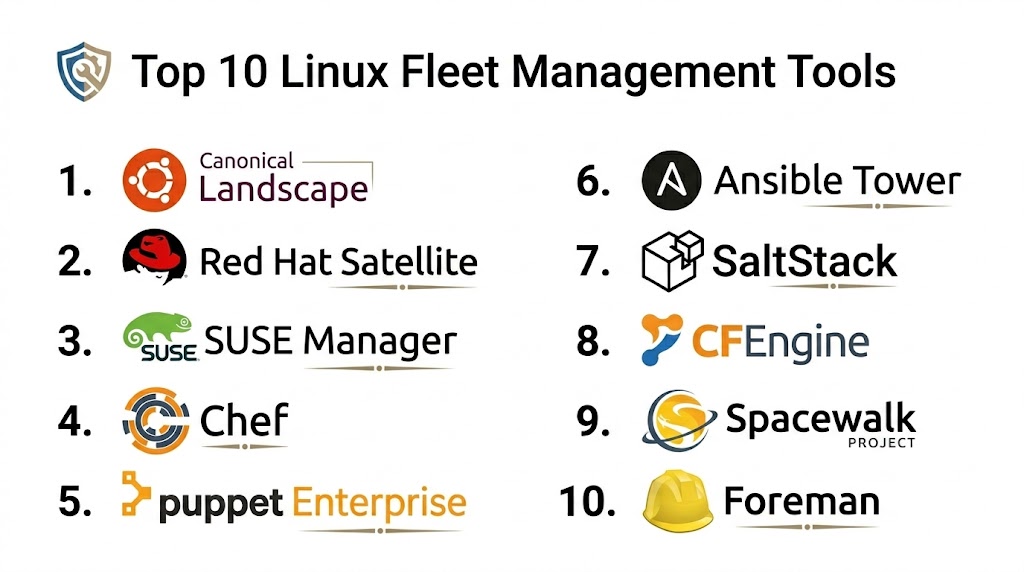
Top 10 Linux Fleet Management Tools
1 — Canonical Landscape
Short description: Canonical Landscape provides centralized management, monitoring, compliance reporting, and automated updates for Ubuntu fleets in enterprise and cloud environments.
Key Features
- Automated patching and package deployment
- Compliance reporting and audit trails
- System monitoring and alerting
- Role‑based access control
- Scheduled maintenance workflows
- Grouped system orchestration
Pros
- Designed specifically for Ubuntu environments
- Strong automated patch management
- Compliance reporting included
Cons
- Limited to Ubuntu and derivatives
- Smaller ecosystem than multi‑distro tools
- Advanced features require enterprise plans
Platforms / Deployment
- Web console
- Cloud / On‑prem
Security & Compliance
- SSO/SAML integration
- Encryption for communication
- Audit logs and compliance reports
Integrations & Ecosystem
Integrates with canonical support systems and cloud environments.
- Public cloud providers
- Monitoring and logging tools
- CI/CD toolchains
Support & Community
Official support from Canonical, documentation, and community forums.
2 — Red Hat Satellite
Short description: Red Hat Satellite is an enterprise fleet management platform that automates system provisioning, updates, configuration, and compliance for Red Hat Enterprise Linux and related systems.
Key Features
- Automated content and patch management
- System provisioning and lifecycle management
- Configuration management
- Compliance reporting and remediation
- Integration with Red Hat ecosystem
- Role‑based access
Pros
- Deep integration with Red Hat stack
- Strong compliance features
- Enterprise support and roadmap
Cons
- Best suited for RHEL environments
- Licensing cost
- Complexity for smaller teams
Platforms / Deployment
- Web / Cloud / On‑prem
Security & Compliance
- Compliance reporting
- Encryption and policy enforcement
- Role‑based permissions
Integrations & Ecosystem
Integrates deeply with Red Hat tools and enterprise systems.
- Ansible
- Cloud platforms
- Monitoring systems
Support & Community
Official Red Hat support, documentation, and certified partners.
3 — Puppet Enterprise
Short description: Puppet Enterprise is a configuration automation and fleet management platform that enforces desired state, automates drift correction, and orchestrates Linux infrastructure at scale.
Key Features
- Declarative configuration management
- Drift detection and automated remediation
- Role‑based access control
- Reporting and compliance visibility
- Integration with observability and CI/CD
- Scalable orchestration
Pros
- Strong configuration automation
- Works across many Linux distros
- Declarative enforcement
Cons
- Learning curve for new teams
- Advanced features may require expertise
- Licensing cost for enterprise
Platforms / Deployment
- Web / Cloud / On‑prem
Security & Compliance
- SSO/SAML
- Encryption and audit logging
- Role‑based authorization
Integrations & Ecosystem
Integrates with observability, CI/CD, and security tools.
- GitOps workflows
- Monitoring systems
- Cloud platforms
Support & Community
Enterprise support and active community with modules and extensions.
4 — Ansible Tower (AWX Enterprise)
Short description: Ansible Tower provides an automation hub for deploying, configuring, and maintaining Linux systems using agentless orchestration and reusable playbooks.
Key Features
- Agentless automation workflows
- Role‑based access and RBAC
- Job templates and scheduling
- Real‑time job analytics
- Inventory and credential management
- Integration with Git workflows
Pros
- Agentless, lightweight architecture
- Strong community support
- Integrates with many systems
Cons
- Less real‑time monitoring
- Requires playbook development
- Not as rich in telemetry out of the box
Platforms / Deployment
- Web / Cloud / On‑prem
Security & Compliance
- SSO/SAML
- Encryption, audit logs
- RBAC
Integrations & Ecosystem
Integrates with CI/CD, observability, and cloud tools.
- GitOps workflows
- Monitoring systems
- DevOps pipelines
Support & Community
Official support, extensive playbook repo, and community forums.
5 — SaltStack Enterprise
Short description: SaltStack Enterprise offers scalable configuration management, remote execution, and orchestration for large Linux fleets with real‑time monitoring and automated remediation.
Key Features
- Real‑time remote execution
- Event‑driven automation
- Configuration enforcement
- Monitoring and alerting
- Compliance reports
- Orchestration workflows
Pros
- Real‑time command execution
- Event‑driven automation
- Highly scalable
Cons
- Learning curve for complex events
- Enterprise licensing required for full features
- Setup complexity
Platforms / Deployment
- Web / Cloud / On‑prem
Security & Compliance
- SSO/SAML
- Encryption
- Audit logs
Integrations & Ecosystem
Integrates with observability, cloud, and CI/CD tools.
- Cloud platforms
- Monitoring systems
- CI/CD pipelines
Support & Community
Official enterprise support and active Salt community.
6 — Foreman / Katello
Short description: Foreman with Katello provides lifecycle management for Linux fleets including provisioning, patching, and content management.
Key Features
- System provisioning
- Patch management
- Content lifecycle management
- Reporting and compliance
- Role‑based access
- Integration with configuration tools
Pros
- Good provisioning and patch workflows
- Open‑source friendly
- Customizable ecosystem
Cons
- UI complexity
- Requires configuration effort
- Integration overhead
Platforms / Deployment
- Web / On‑prem / Cloud possibilities
Security & Compliance
- Encryption
- Access control
- Audit logs
Integrations & Ecosystem
Integrates with Puppet, Ansible, and observability tools.
- Monitoring systems
- CI/CD pipelines
- Cloud platforms
Support & Community
Open‑source community and enterprise support options depending on stack.
7 — Rancher (Fleet)
Short description: Rancher Fleet focuses on managing Kubernetes clusters, including Linux nodes and workloads, with GitOps workflows for configuration and deployment.
Key Features
- GitOps fleet management
- Multi‑cluster deployment
- Real‑time updates
- Policy enforcement
- Integration with CI/CD
- Monitoring and alerting
Pros
- Ideal for Kubernetes environments
- GitOps automation
- Scales across clusters
Cons
- Best suited for containerized environments
- Not a traditional fleet tool for bare Linux servers
- Requires Kubernetes familiarity
Platforms / Deployment
- Web / Cloud / On‑prem
Security & Compliance
- Encryption
- Role‑based access
- Audit logs
Integrations & Ecosystem
Strong integrations with DevOps and cluster tooling.
- Git workflows
- Observability tools
- CI/CD pipelines
Support & Community
Enterprise support and growing community.
8 — Netreo Linux Management
Short description: Netreo provides unified monitoring, patching visibility, and automation for Linux fleets with dashboards and alerting.
Key Features
- Real‑time monitoring
- Patch status visibility
- Automated alerts
- Configuration tracking
- Dashboards and reporting
- Integration with alerting systems
Pros
- Unified monitoring views
- Good visibility into patches
- Alerts and dashboards
Cons
- Fewer advanced orchestration features
- Less focused on configuration management
- Extended features require add‑ons
Platforms / Deployment
- Web / Cloud / On‑prem
Security & Compliance
- Encryption
- Role‑based access
- Audit logs
Integrations & Ecosystem
Integrates with SIEM, alerting, and observability tools.
- Monitoring tools
- Alerting platforms
- Cloud platforms
Support & Community
Vendor support, documentation, and user forums.
9 — Chef Automate
Short description: Chef Automate provides configuration management, compliance visibility, and automated enforcement for Linux fleets with policy as code.
Key Features
- Policy‑as‑code enforcement
- Compliance scanning and reporting
- Configuration management
- Automated remediation
- Integration with DevOps pipelines
- Dashboards and visualization
Pros
- Strong policy‑as‑code workflows
- Compliance reporting
- Integration with DevOps
Cons
- Learning curve for DSL
- Requires Chef ecosystem setup
- Not as strong real‑time monitoring
Platforms / Deployment
- Web / Cloud / On‑prem
Security & Compliance
- Encryption
- SSO/SAML
- Audit logs
Integrations & Ecosystem
Works with observability, CI/CD, cloud, and security tools.
Support & Community
Enterprise support and active Chef community.
10 — Open‑source Bash/Script Management
Short description: Script‑based fleet management uses custom scripts and open‑source utilities to automate tasks across Linux fleets without a centralized platform.
Key Features
- Custom patching and configuration scripts
- Cron‑based scheduling
- SSH inventory runs
- Logging to central servers
- Custom monitoring scripts
Pros
- No licensing cost
- Fully customizable
- Works with any Linux distro
Cons
- No centralized dashboard
- Manual script maintenance
- Lacks enterprise features
Platforms / Deployment
- Any Linux distro
- Custom setup
Security & Compliance
- Varies / N/A
Integrations & Ecosystem
Depends on custom toolchains.
Support & Community
Community knowledge; DIY support.
Comparison Table (Top 10)
| Tool Name | Best For | Platform(s) Supported | Deployment | Standout Feature | Public Rating |
|---|---|---|---|---|---|
| Canonical Landscape | Ubuntu fleets | Web | Cloud / On‑prem | Patch automation | N/A |
| Red Hat Satellite | RHEL environments | Web | Cloud / On‑prem | Lifecycle management | N/A |
| Puppet Enterprise | Configuration enforcement | Web | Cloud / On‑prem | Declarative configuration | N/A |
| Ansible Tower | Orchestration automation | Web | Cloud / On‑prem | Agentless workflows | N/A |
| SaltStack Enterprise | Real‑time automation | Web | Cloud / On‑prem | Event‑driven execution | N/A |
| Foreman / Katello | Provisioning + patching | Web | On‑prem | Lifecycle management | N/A |
| Rancher Fleet | Kubernetes fleets | Web | Cloud / On‑prem | GitOps fleet deployment | N/A |
| Netreo Linux Mgmt | Monitoring + alerts | Web | Cloud / On‑prem | Unified monitoring | N/A |
| Chef Automate | Policy‑as‑code compliance | Web | Cloud / On‑prem | Compliance visibility | N/A |
| Script‑based Mgmt | Custom automation | Any Linux | Custom | Script flexibility | N/A |
Evaluation & Scoring
| Tool Name | Core (25%) | Ease (15%) | Integrations (15%) | Security (10%) | Performance (10%) | Support (10%) | Value (15%) | Weighted Total (0–10) |
|---|---|---|---|---|---|---|---|---|
| Landscape | 8 | 9 | 7 | 8 | 8 | 7 | 8 | 8.0 |
| Satellite | 9 | 7 | 9 | 9 | 9 | 9 | 7 | 8.5 |
| Puppet | 9 | 7 | 9 | 8 | 8 | 8 | 7 | 8.3 |
| Ansible Tower | 8 | 8 | 8 | 8 | 8 | 8 | 8 | 8.1 |
| SaltStack | 9 | 7 | 8 | 8 | 9 | 8 | 7 | 8.3 |
| Foreman | 8 | 7 | 8 | 8 | 8 | 7 | 8 | 7.9 |
| Rancher Fleet | 7 | 8 | 8 | 8 | 9 | 7 | 7 | 7.8 |
| Netreo | 7 | 8 | 7 | 8 | 8 | 7 | 8 | 7.7 |
| Chef Automate | 8 | 7 | 9 | 8 | 8 | 8 | 7 | 8.1 |
| Script‑based | 5 | 9 | 4 | 5 | 6 | 4 | 9 | 6.3 |
Which Linux Fleet Management Tool Is Right for You?
Solo / Freelancer
Ansible Tower or Landscape for simple, cost‑effective automation and patching needs without complex infrastructure.
SMB
Puppet Enterprise, SaltStack, or Foreman offer automation and compliance visibility at moderate scale without enterprise licensing overhead.
Mid‑Market
Satellite and Puppet Enterprise provide structured lifecycle management, compliance controls, and scalable automation workflows for growing fleets.
Enterprise
Red Hat Satellite, SaltStack Enterprise, and Puppet Enterprise deliver deep automation, compliance, real‑time execution, and integration across hybrid and cloud infrastructures.
Budget vs Premium
Budget options include Landscape and script‑based approaches for basic automation. Premium enterprise platforms like Satellite or Puppet offer advanced lifecycle, compliance, and security controls.
Feature Depth vs Ease of Use
Ansible Tower and Landscape are easier to adopt for teams starting automation. Satellite and SaltStack provide deeper lifecycle and event‑driven capabilities with higher complexity.
Integrations & Scalability
Enterprises should prioritize tools with strong integrations into CI/CD, observability, security, and cloud toolchains. Satellite, Puppet, and SaltStack provide broad ecosystem compatibility.
Security & Compliance Needs
Platforms with compliance reporting, RBAC, audit trails, and encryption help enterprises meet internal and regulatory requirements, with Satellite and Puppet offering mature capabilities.
Frequently Asked Questions
1. What is Linux fleet management?
Linux fleet management refers to centrally controlling, configuring, monitoring, and automating a large group of Linux systems across cloud, data centers, and edge environments.
2. Why do organizations need fleet management?
Fleet management reduces manual configuration drift, strengthens security posture, ensures compliance, and improves operational efficiency across large Linux infrastructures.
3. How do these tools handle updates?
Most tools automate patching and package updates, schedule maintenance, and provide compliance reports on patch status across fleets.
4. Do fleet management tools support multiple Linux distributions?
Many tools support multiple distros (Ubuntu, Red Hat, CentOS, SUSE), though some are tailored to specific ecosystems like Ubuntu or RHEL.
5. What is configuration enforcement?
Configuration enforcement ensures systems stay in a desired state, correcting drift automatically based on predefined policies.
6. Are these tools suitable for cloud‑only environments?
Yes, most tools support hybrid and cloud environments, and integrate with cloud provider APIs for instance lifecycle management.
7. How do these tools integrate with DevOps workflows?
They often integrate with CI/CD pipelines, observability systems, and GitOps workflows to automate deployment, monitoring, and configuration updates.
8. What is agentless management?
Ansible Tower uses agentless SSH approaches to execute tasks, avoiding additional software on targets while still enabling automation.
9. Can these platforms help with compliance?
Yes, many provide compliance reporting, audit logs, and remediation workflows to help meet regulatory standards.
10. What challenges should teams expect?
Challenges include configuring workflows, scaling automation, managing credentials securely, and tuning monitoring alerts for high‑volume environments.
Conclusion
Linux Fleet Management Tools provide the automation, monitoring, and control enterprises need to manage large-scale Linux infrastructures reliably and securely. SMBs and mid‑market teams can adopt Ansible Tower, Landscape, or SaltStack for flexible automation, while enterprises benefit from Red Hat Satellite and Puppet Enterprise for deep lifecycle management, compliance controls, real‑time execution, and robust integration into DevOps ecosystems. The right solution depends on fleet size, distro diversity, security requirements, integration needs, and automation maturity. Organizations should shortlist a few platforms, run pilot deployments to validate workflows and compliance, integrate fleet telemetry with monitoring and security tools, and scale gradually to ensure efficient and secure Linux operations across all environments.

This article did a great job explaining Linux fleet management tools with clear comparisons and useful insights. The structured format made it easy to understand the strengths of each platform.
One aspect that is often missing from Linux fleet management discussions is how these platforms handle ephemeral infrastructure and short-lived workloads. Modern environments increasingly rely on auto-scaling cloud instances, Kubernetes worker nodes, and edge systems that may exist for only hours or days. Traditional fleet management metrics such as patch compliance and configuration enforcement are valuable, but they do not fully address the operational challenge of maintaining consistent security baselines across rapidly changing infrastructure. A useful evaluation would include integration with immutable infrastructure patterns, automated node replacement strategies, policy-as-code enforcement, and the ability to generate audit evidence even after systems have been terminated. As organizations move toward cloud-native operations, the distinction between fleet management and platform engineering continues to blur, making lifecycle automation just as important as configuration management itself.
Maintaining a large Linux fleet becomes increasingly complex when systems span multiple cloud providers, data centers, and edge locations. While configuration and patch management are essential, ensuring policy consistency across diverse environments is often the bigger challenge. Exploring drift detection, compliance auditing, and automated remediation strategies would provide valuable insight into how these tools support operational reliability at enterprise scale.