Introduction
STEM coding education platforms are digital learning environments designed to teach students and learners programming, computational thinking, and STEM concepts through interactive courses, projects, and exercises. These platforms are increasingly critical in 2026+ as schools, colleges, and online programs emphasize coding literacy and problem-solving skills from an early age.
Real-world use cases include:
- Teaching programming fundamentals to K‑12 students
- Preparing learners for computer science courses in higher education
- Upskilling professionals in STEM and technical careers
- Engaging students with hands-on coding projects and simulations
- Supporting teachers with curriculum-aligned content and tracking tools
Key evaluation criteria for buyers:
- Curriculum coverage and coding languages supported
- Interactive exercises, projects, and gamification
- Multi-device accessibility (desktop, tablet, mobile)
- Teacher dashboards and student progress tracking
- Integration with classroom tools or LMS platforms
- Offline access and assignment capabilities
- Coding environment flexibility (block-based, text-based, Python, Java, etc.)
- Community and mentorship support
- Security, privacy, and compliance
- Cost, licensing, and scalability
Best for: Schools, teachers, students, parents, and educators seeking structured STEM and coding curricula.
Not ideal for: Casual learners seeking unstructured tutorials or those not requiring curriculum-aligned programs.
Key Trends in STEM Coding Education Platforms
- Gamification and interactive coding challenges to enhance engagement
- Integration with robotics, AI, and real-world STEM projects
- Cloud-based coding environments supporting multiple languages
- Teacher dashboards with progress tracking and analytics
- Collaboration features for team projects and peer learning
- Cross-platform support for tablets, laptops, and Chromebooks
- AI-assisted hints, code validation, and adaptive learning paths
- Offline access and lesson downloads for low-bandwidth environments
- Integration with educational tools and Learning Management Systems
- Subscription and freemium models providing scalable access
How We Selected These Tools (Methodology)
- Evaluated adoption in schools, coding bootcamps, and online learning platforms
- Assessed curriculum coverage across STEM and coding subjects
- Measured interactivity, project-based learning, and gamification features
- Reviewed cross-platform support and offline capabilities
- Examined teacher and student dashboards for progress tracking
- Considered integration with LMS platforms and classroom tools
- Analyzed AI or automated assistance for coding exercises
- Reviewed documentation, support resources, and community engagement
- Compared cost-effectiveness and licensing options
- Assessed scalability for individual, small group, and classroom deployments
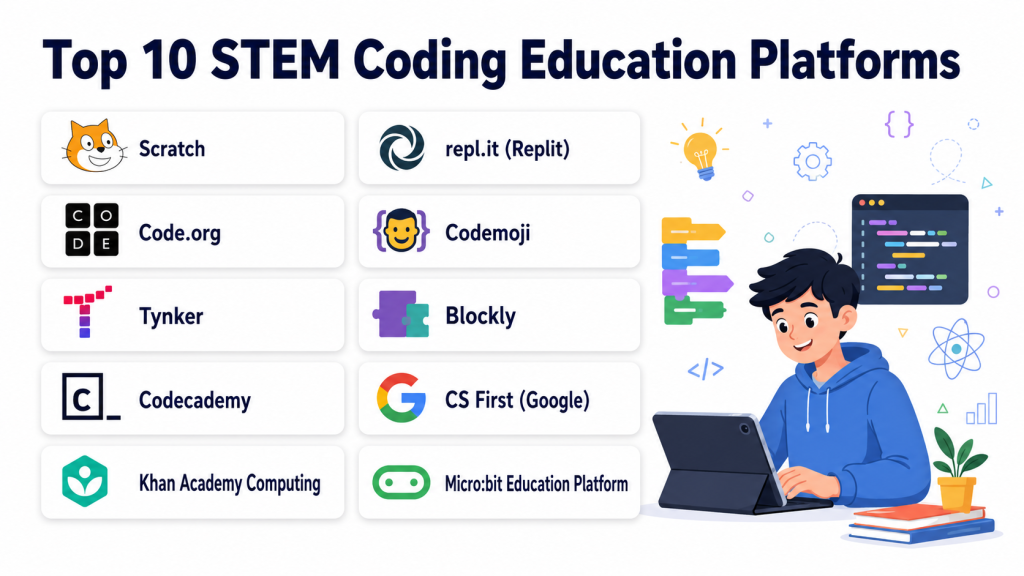
Top 10 STEM Coding Education Platforms
#1 — Code.org
Short description (4–5 lines): Code.org provides comprehensive coding curricula for K‑12 students, including interactive lessons, block-based programming, and gamified exercises. Ideal for schools and beginner learners.
Key Features
- Block-based and text-based coding
- Curriculum aligned to standards
- Interactive tutorials and exercises
- Teacher dashboards for tracking
- Hour of Code events
Pros
- Free for schools and students
- Widely adopted in K‑12 education
Cons
- Advanced topics limited to beginner and intermediate levels
- Requires internet access for full features
Platforms / Deployment
- Web, iOS, Android; Cloud-based
Security & Compliance
- Not publicly stated
Integrations & Ecosystem
- LMS integration
- Classroom management tools
- Google Classroom compatibility
Support & Community
Teacher guides, tutorials, and large user community.
#2 — Tynker
Short description (4–5 lines): Tynker offers interactive coding courses with block-based and Python programming for students. Suitable for schools and self-paced learning for children aged 5+.
Key Features
- Block-based coding, Python, and JavaScript
- Gamified learning experiences
- Teacher dashboard and analytics
- Interactive projects and challenges
- STEM curriculum alignment
Pros
- Engaging gamification for younger learners
- Multi-language support for coding
Cons
- Paid subscription required for full content
- Limited advanced courses for older students
Platforms / Deployment
- Web, iOS, Android; Cloud-based
Security & Compliance
- Not publicly stated
Integrations & Ecosystem
- LMS systems
- Classroom portals
- Coding competitions
Support & Community
Tutorials, support guides, and community forums.
#3 — Scratch
Short description (4–5 lines): Scratch is a block-based programming platform that teaches coding through storytelling, games, and animations. Ideal for young learners and beginner coders.
Key Features
- Drag-and-drop programming blocks
- Interactive stories and games
- Collaboration and sharing community
- Step-by-step tutorials
- Cross-platform browser-based access
Pros
- Highly engaging for beginners
- Free to use and widely recognized
Cons
- Limited for text-based coding learners
- Not suited for advanced STEM projects
Platforms / Deployment
- Web; Cloud-based
Security & Compliance
- Not publicly stated
Integrations & Ecosystem
- Online sharing community
- Lesson plans for educators
Support & Community
Scratch community, teacher resources, forums.
#4 — Codeacademy
Short description (4–5 lines): Codeacademy provides text-based coding courses in Python, JavaScript, Java, and more. Suitable for K‑12 and adult learners seeking structured programming education.
Key Features
- Interactive coding exercises
- Multiple programming languages
- Progress tracking and certificates
- Quizzes and projects
- Web-based IDE
Pros
- Wide range of languages
- Structured learning paths
Cons
- Subscription required for full content
- Less gamification for younger students
Platforms / Deployment
- Web, iOS, Android; Cloud-based
Security & Compliance
- Not publicly stated
Integrations & Ecosystem
- LMS integration
- APIs for content embedding
Support & Community
Documentation, forums, and online tutorials.
#5 — Replit
Short description (4–5 lines): Replit is a collaborative coding platform that supports multiple languages and real-time collaboration. Ideal for classrooms and project-based learning.
Key Features
- Multi-language support
- Collaborative real-time coding
- Cloud-based coding environment
- Project templates and challenges
- Version control and deployment
Pros
- Supports team collaboration
- Real-time execution and debugging
Cons
- Advanced features require paid subscription
- Cloud-dependent
Platforms / Deployment
- Web, iOS, Android; Cloud-based
Security & Compliance
- Not publicly stated
Integrations & Ecosystem
- GitHub integration
- Classroom portals
- Online IDE tools
Support & Community
Documentation, tutorials, forums, and community projects.
#6 — CodinGame
Short description (4–5 lines): CodinGame teaches coding through gamified challenges and puzzles in multiple languages. Suitable for K‑12 students and competitive programming training.
Key Features
- Gamified coding challenges
- Multiple programming languages
- AI-assisted hints
- Leaderboards and competitions
- Project-based exercises
Pros
- Engaging gamification
- Supports multiple languages
Cons
- Focused on challenges, less structured curriculum
- Limited LMS integration
Platforms / Deployment
- Web; Cloud-based
Security & Compliance
- Not publicly stated
Integrations & Ecosystem
- GitHub
- Online leaderboard systems
Support & Community
Documentation, community forums, coding competitions.
#7 — CodeMonkey
Short description (4–5 lines): CodeMonkey teaches coding through game-based learning using CoffeeScript. Ideal for elementary and middle school students learning programming fundamentals.
Key Features
- Game-based programming
- Curriculum-aligned coding lessons
- Teacher dashboard and analytics
- Step-by-step instructions
- Cloud access and mobile support
Pros
- Engaging and educational
- Tracks student progress
Cons
- Limited advanced coding languages
- Paid subscription needed for full access
Platforms / Deployment
- Web, iOS, Android; Cloud-based
Security & Compliance
- Not publicly stated
Integrations & Ecosystem
- Classroom portals
- LMS integration
- Cloud storage
Support & Community
Teacher guides, tutorials, and community support.
#8 — Mimo
Short description (4–5 lines): Mimo provides coding lessons for web, mobile, and Python programming. Ideal for self-paced learning and beginner-friendly STEM education.
Key Features
- Step-by-step coding lessons
- Gamified exercises and badges
- Multi-language support
- Mobile-friendly interface
- Project-based learning
Pros
- Mobile-first learning
- Engaging gamified experience
Cons
- Limited classroom analytics
- Paid subscription for full content
Platforms / Deployment
- iOS, Android, Web; Cloud-based
Security & Compliance
- Not publicly stated
Integrations & Ecosystem
- Classroom dashboards
- Online coding challenges
Support & Community
Documentation, tutorials, and online forums.
#9 — Grasshopper
Short description (4–5 lines): Grasshopper is a mobile coding platform from Google for beginners. It uses interactive puzzles and mini-games to teach JavaScript fundamentals.
Key Features
- Mobile-first coding lessons
- Gamified learning interface
- JavaScript tutorials
- Progress tracking and achievements
- Cloud-based exercises
Pros
- Beginner-friendly mobile learning
- Free to use
Cons
- Limited advanced topics
- Not ideal for classroom integration
Platforms / Deployment
- iOS, Android, Web; Cloud-based
Security & Compliance
- Not publicly stated
Integrations & Ecosystem
- Google accounts
- Cloud progress sync
Support & Community
Documentation and online tutorials.
#10 — ScratchJr
Short description (4–5 lines): ScratchJr introduces coding to young children using a simple, block-based interface. Ideal for early STEM education (ages 5–7).
Key Features
- Simple block-based coding
- Interactive story creation
- Multi-device support
- Offline lesson access
- Beginner-friendly interface
Pros
- Engaging for early learners
- Free and easy to use
Cons
- Limited complexity
- Not suitable for older students
Platforms / Deployment
- iOS, Android, Web; Cloud-based
Security & Compliance
- Not publicly stated
Integrations & Ecosystem
- Classroom management tools
- Cloud lesson libraries
Support & Community
Documentation, educator guides, and forums.
Comparison Table (Top 10)
| Tool Name | Best For | Platforms Supported | Deployment | Standout Feature | Public Rating |
|---|---|---|---|---|---|
| Code.org | K-12 beginners | Web, iOS, Android | Cloud | Block-based coding curriculum | N/A |
| Tynker | Gamified K-12 coding | Web, iOS, Android | Cloud | Gamified coding exercises | N/A |
| Scratch | Young learners | Web | Cloud | Interactive story/game coding | N/A |
| Codeacademy | Text-based learning | Web, iOS, Android | Cloud | Multi-language coding courses | N/A |
| Replit | Collaborative coding | Web, iOS, Android | Cloud | Real-time collaboration | N/A |
| CodinGame | Gamified challenges | Web | Cloud | Interactive coding games | N/A |
| CodeMonkey | Elementary/middle school | Web, iOS, Android | Cloud | Game-based coding curriculum | N/A |
| Mimo | Mobile-friendly learners | Web, iOS, Android | Cloud | Mobile-first interactive coding | N/A |
| Grasshopper | Beginners | Web, iOS, Android | Cloud | Interactive puzzles for JavaScript | N/A |
| ScratchJr | Early learners (ages 5–7) | Web, iOS, Android | Cloud | Block-based beginner coding | N/A |
Evaluation & Scoring of STEM Coding Education Platforms
| Tool Name | Core (25%) | Ease (15%) | Integrations (15%) | Security (10%) | Performance (10%) | Support (10%) | Value (15%) | Weighted Total |
|---|---|---|---|---|---|---|---|---|
| Code.org | 9 | 9 | 8 | 8 | 9 | 8 | 8 | 8.55 |
| Tynker | 8 | 8 | 7 | 8 | 8 | 7 | 7 | 7.70 |
| Scratch | 9 | 9 | 7 | 8 | 8 | 8 | 8 | 8.45 |
| Codeacademy | 8 | 8 | 8 | 8 | 8 | 7 | 7 | 7.80 |
| Replit | 8 | 8 | 8 | 7 | 8 | 7 | 7 | 7.75 |
| CodinGame | 8 | 7 | 7 | 7 | 8 | 7 | 7 | 7.40 |
| CodeMonkey | 8 | 8 | 7 | 7 | 7 | 7 | 7 | 7.45 |
| Mimo | 7 | 8 | 6 | 7 | 7 | 7 | 7 | 7.10 |
| Grasshopper | 7 | 9 | 6 | 7 | 7 | 7 | 7 | 7.25 |
| ScratchJr | 8 | 9 | 6 | 7 | 7 | 7 | 7 | 7.45 |
Which STEM Coding Education Platform Is Right for You?
Solo / Freelancer
Platforms like Replit and Codeacademy allow independent learners to explore programming and develop projects.
SMB / Small Team
Tynker, CodeMonkey, and CodinGame are ideal for small classroom or after-school programs with structured exercises and gamification.
Mid-Market
Code.org, Scratch, and Mimo provide scalable solutions for medium-sized educational institutions or online course platforms.
Enterprise
Replit Teams, Codeacademy Pro, and CodinGame for Work enable enterprise-grade coding curricula, analytics, and classroom management.
Budget vs Premium
Scratch, Code.org, and Grasshopper offer free solutions, while Tynker, Codeacademy, and Replit Pro provide subscription-based advanced features.
Feature Depth vs Ease of Use
Platforms like Replit and Codeacademy provide depth and multi-language support, while Scratch, ScratchJr, and Grasshopper prioritize simplicity and engagement.
Integrations & Scalability
Platforms such as Code.org, Replit, and Tynker integrate with LMS tools and cloud solutions for scaling classroom or online learning.
Security & Compliance Needs
Ensure platforms comply with student data privacy standards and offer secure logins for safe deployment in educational institutions.
Frequently Asked Questions (FAQs)
1. What are STEM coding education platforms?
They are digital tools that teach coding, computational thinking, and STEM concepts through interactive exercises, projects, and gamification.
2. Can these platforms be used for classrooms?
Yes, many platforms like Code.org, Tynker, and Scratch include teacher dashboards and LMS integration for classroom use.
3. Are they suitable for young children?
Platforms like ScratchJr, CodeMonkey, and Scratch are designed for children aged 5+, using block-based coding for early learning.
4. Do these platforms support multiple programming languages?
Yes, advanced platforms such as Codeacademy, Replit, and CodinGame support Python, Java, JavaScript, and more.
5. Can students collaborate on coding projects?
Yes, Replit and CodinGame allow real-time collaboration, enabling team-based learning and shared projects.
6. Are these platforms free?
Some platforms, like Scratch and Code.org, are free, while others like Tynker, Replit Pro, and Codeacademy require subscriptions for full features.
7. Do they offer offline access?
Some platforms provide offline lessons or downloadable exercises, but most require internet access for full functionality.
8. Can teachers track student progress?
Yes, teacher dashboards on platforms like Code.org, Tynker, and Replit allow monitoring of student activity, progress, and achievements.
9. Are gamification features effective for engagement?
Gamification in platforms like Tynker, CodinGame, and Mimo helps maintain engagement and motivation through challenges, badges, and rewards.
10. How should I choose the right platform?
Consider age group, coding level, classroom vs. self-paced learning, curriculum alignment, and device compatibility when selecting a platform.
Conclusion
STEM coding education platforms provide structured, interactive, and engaging ways for students and learners to develop programming and STEM skills. Beginners may start with Scratch, ScratchJr, or Grasshopper for accessible, gamified learning. Intermediate learners benefit from Tynker, CodeMonkey, and CodinGame with structured projects and coding exercises. For advanced learners or enterprise-grade classrooms, Replit, Codeacademy, and Code.org provide multi-language support, collaboration, and analytics. Evaluate age group, curriculum integration, and classroom scale before selecting a platform. Begin by shortlisting 2–3 platforms, testing lessons and coding exercises, and ensuring compatibility with devices and LMS tools to maximize learning outcomes.
