Introduction
Music Streaming Apps are digital platforms that allow users to access, discover, and listen to music from vast catalogs across genres, artists, and playlists. These apps provide on-demand playback, personalized recommendations, curated playlists, offline listening, and social sharing features, enabling both casual listeners and music enthusiasts to enjoy music anytime, anywhere. In a world where music consumption has shifted from downloads to streaming, these apps play a critical role in shaping listening habits and connecting users to artists.
Real-world use cases include individuals streaming playlists during workouts or commutes, DJs discovering trending tracks, students using background music for studying, families sharing playlists across devices, and brands using music to enhance campaigns. Music streaming apps also support social features, cross-device sync, and AI-driven recommendations for personalized experiences.
Evaluation criteria include catalog size, recommendation intelligence, audio quality, offline playback, device compatibility, integration with social platforms, playlist creation and sharing, user interface, pricing models, and support resources.
Best for: Music lovers, casual listeners, professional DJs, fitness enthusiasts, and students who want personalized music experiences across devices.
Not ideal for: Users who prefer physical music ownership or who require specialized offline libraries without subscription dependency.
Key Trends in Music Streaming Apps
- AI-powered song and playlist recommendations based on listening history
- High-fidelity audio streaming, including lossless and spatial audio
- Social sharing and collaborative playlist features
- Integration with smart devices, speakers, and connected cars
- Offline playback with downloads and cross-device sync
- Voice-controlled search and playback via virtual assistants
- Integration with video content, podcasts, and live performances
- Curated playlists for moods, activities, and emerging artists
- Subscription and freemium models with exclusive content
- Data-driven analytics for artists and listener engagement
How We Selected These Tools
- Evaluated adoption and market share among casual and premium users
- Assessed audio quality, catalog size, and genre diversity
- Reviewed AI recommendation and playlist curation capabilities
- Considered offline playback and cross-device synchronization
- Checked integrations with smart speakers, apps, and social platforms
- Weighed subscription flexibility, pricing models, and value
- Reviewed user interface, ease of use, and accessibility
- Considered social sharing and collaborative features
- Assessed analytics and insights for artists and creators
- Examined support resources and community engagement
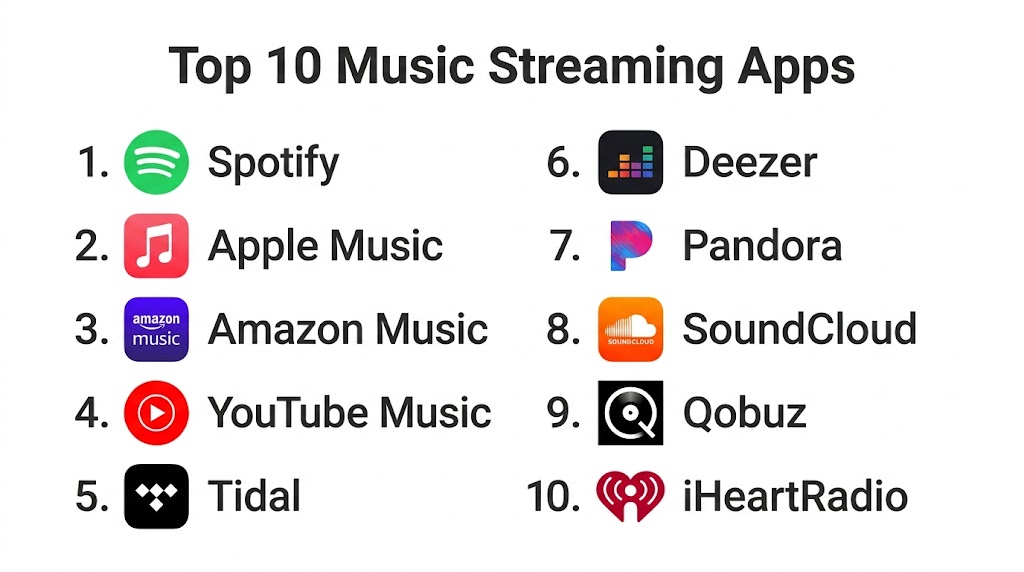
Top 10 Music Streaming Apps
#1 — Spotify
Short description: Spotify offers one of the largest music catalogs with personalized playlists, podcast integration, and advanced AI recommendations. It is ideal for casual listeners, music enthusiasts, and playlist curators.
Key Features
- Personalized playlists like Daily Mix and Discover Weekly
- Podcast and video integration
- Collaborative playlist creation
- Offline playback
- Cross-device sync
- AI-driven recommendations
Pros
- Extensive music catalog
- Strong social and playlist features
Cons
- Free plan includes ads
- High-quality audio requires premium subscription
Platforms / Deployment
- Web, Windows, macOS, iOS, Android, smart speakers
- Cloud
Security & Compliance
- Secure login and encrypted streaming
- Not publicly stated for certifications
Integrations & Ecosystem
Supports social and device integrations
- Facebook, Instagram sharing
- Smart speakers
- Third-party music tools
Support & Community
- Help center
- Community forums
- In-app tutorials
#2 — Apple Music
Short description: Apple Music integrates deeply with the Apple ecosystem, offering high-fidelity audio, curated playlists, and exclusive releases. Suitable for iOS and Mac users seeking seamless integration.
Key Features
- Curated playlists and radio stations
- Lossless and spatial audio
- Music library integration across devices
- Offline playback
- Lyrics and video content
- Siri voice control
Pros
- Seamless Apple device integration
- High-quality audio options
Cons
- Limited to Apple ecosystem for full features
- User interface less intuitive for Android users
Platforms / Deployment
- iOS, macOS, Android, Web
- Cloud
Security & Compliance
- Device security and encryption
- Not publicly stated for certifications
Integrations & Ecosystem
- Apple ecosystem apps
- AirPlay devices
- Siri voice commands
Support & Community
- Apple support pages
- Community forums
- In-app help
#3 — Amazon Music
Short description: Amazon Music offers an extensive catalog with high-definition streaming and integration with Alexa devices. Ideal for Prime subscribers and smart home users.
Key Features
- HD and Ultra HD audio streaming
- Alexa voice control
- Offline downloads
- Curated playlists and radio stations
- Cross-device sync
Pros
- Excellent integration with smart speakers
- High-fidelity streaming for premium users
Cons
- Free tier limited for non-Prime users
- App interface less refined
Platforms / Deployment
- Web, Windows, macOS, iOS, Android, smart speakers
- Cloud
Security & Compliance
- Secure account and encrypted streams
- Not publicly stated for certifications
Integrations & Ecosystem
- Alexa-enabled devices
- Amazon Echo and Fire TV
- Playlist and podcast integration
Support & Community
- Help resources
- Customer service
- User forums
#4 — YouTube Music
Short description: YouTube Music combines official music, user-generated content, and video integration. It is ideal for users seeking music with visual content and discovery from YouTube’s ecosystem.
Key Features
- Music videos and live performances
- Personalized playlists and recommendations
- Offline playback
- Integration with YouTube Premium
- Smart search by lyrics or video content
Pros
- Seamless video and audio integration
- Large catalog including exclusive content
Cons
- Ads in free tier
- Requires Google account
Platforms / Deployment
- Web, iOS, Android, smart TVs
- Cloud
Security & Compliance
- Google account security
- Not publicly stated for certifications
Integrations & Ecosystem
- YouTube and Google ecosystem
- Smart speakers
- Playlist sharing
Support & Community
- Online help
- Google support
- Forums
#5 — Tidal
Short description: Tidal focuses on high-fidelity audio, exclusive content, and artist-focused playlists. Suitable for audiophiles and music enthusiasts seeking the best sound quality.
Key Features
- HiFi and Master quality audio
- Curated playlists and exclusive releases
- Offline listening
- Artist pages and interviews
- Collaborative playlists
Pros
- Superior sound quality
- Exclusive artist content
Cons
- Premium pricing
- Smaller catalog than competitors
Platforms / Deployment
- Web, Windows, macOS, iOS, Android
- Cloud
Security & Compliance
- Secure account and encrypted streaming
- Not publicly stated for certifications
Integrations & Ecosystem
- Smart speakers
- Social sharing
- Playlist import/export
Support & Community
- Help center
- Community forums
- Customer support
#6 — Deezer
Short description: Deezer offers a wide catalog, Flow recommendations, and high-quality streaming. Ideal for users seeking personalized recommendations and mood-based playlists.
Key Features
- Flow personalized playlists
- HiFi and standard audio streaming
- Offline listening
- Podcast integration
- Curated playlists and charts
Pros
- Personalized recommendations
- Good audio quality options
Cons
- Limited device compatibility for HiFi
- Less known in some regions
Platforms / Deployment
- Web, iOS, Android, Windows, macOS
- Cloud
Security & Compliance
- Secure streaming
- Not publicly stated for certifications
Integrations & Ecosystem
- Smart speakers
- Social sharing
- Device sync
Support & Community
- Help portal
- FAQs
- Email support
#7 — SoundCloud
Short description: SoundCloud is a platform for independent creators and emerging artists, allowing discovery and curation of unique tracks. Ideal for users seeking new and niche music.
Key Features
- Independent music discovery
- Playlist creation and sharing
- Offline listening (premium)
- Commenting on tracks
- Recommendations based on listening habits
Pros
- Diverse and emerging content
- Strong community interaction
Cons
- Free tier limited in features
- Quality varies by user uploads
Platforms / Deployment
- Web, iOS, Android
- Cloud
Security & Compliance
- Secure account login
- Not publicly stated
Integrations & Ecosystem
- Social sharing
- Playlist embedding
- Third-party apps
Support & Community
- Help pages
- User forums
- Creator support
#8 — Pandora
Short description: Pandora offers personalized radio stations and algorithmic recommendations. It is ideal for casual listeners who enjoy automated playlist curation.
Key Features
- Personalized stations
- Thumb-based feedback for tuning
- Offline listening
- Playlist creation
- Podcast integration
Pros
- Easy to discover new music
- Simple interface
Cons
- Limited song selection for on-demand playback
- Premium subscription needed for full features
Platforms / Deployment
- Web, iOS, Android
- Cloud
Security & Compliance
- Secure login
- Not publicly stated
Integrations & Ecosystem
- Smart speakers
- Device sync
- Playlist sharing
Support & Community
- FAQs and tutorials
- Help desk
- Community forum
#9 — iHeartRadio
Short description: iHeartRadio provides radio-style streaming, curated playlists, and podcast access. Suitable for users who enjoy traditional radio with on-demand features.
Key Features
- Live radio stations
- Curated playlists
- Podcast integration
- Personalized recommendations
- Offline listening (premium)
Pros
- Radio-style experience
- Large curated content library
Cons
- Limited customization for free users
- Ads in free tier
Platforms / Deployment
- Web, iOS, Android
- Cloud
Security & Compliance
- Account login security
- Not publicly stated
Integrations & Ecosystem
- Smart speakers
- Social sharing
- Device sync
Support & Community
- Help center
- FAQs
- Customer support
#10 — YouTube Music Premium
Short description: YouTube Music Premium extends YouTube Music with offline downloads, ad-free playback, and background listening. Ideal for users who want uninterrupted streaming with full YouTube integration.
Key Features
- Offline downloads
- Background playback
- Personalized recommendations
- Playlist and station creation
- Integration with YouTube Premium content
Pros
- Ad-free experience
- Seamless integration with YouTube ecosystem
Cons
- Requires subscription
- Limited independent catalog compared to Spotify
Platforms / Deployment
- Web, iOS, Android
- Cloud
Security & Compliance
- Google account security
- Not publicly stated
Integrations & Ecosystem
- YouTube ecosystem
- Smart devices
- Playlist sharing
Support & Community
- Google support
- Help documentation
- Community forums
Comparison Table
| Tool Name | Best For | Platform(s) Supported | Deployment | Standout Feature | Public Rating |
|---|---|---|---|---|---|
| Spotify | Personalized playlists | Web, Windows, macOS, iOS, Android | Cloud | AI-driven recommendations | N/A |
| Apple Music | Apple ecosystem users | iOS, macOS, Android, Web | Cloud | Seamless device integration | N/A |
| Amazon Music | Prime members and Alexa users | Web, iOS, Android, smart speakers | Cloud | HD and Ultra HD audio | N/A |
| YouTube Music | Video and music combined | Web, iOS, Android, smart TVs | Cloud | Music video integration | N/A |
| Tidal | Audiophiles | Web, Windows, macOS, iOS, Android | Cloud | Master-quality audio | N/A |
| Deezer | Personalized recommendations | Web, iOS, Android, Windows, macOS | Cloud | Flow playlists and genre curation | N/A |
| SoundCloud | Independent and emerging artists | Web, iOS, Android | Cloud | Community-driven discovery | N/A |
| Pandora | Radio-style personalized stations | Web, iOS, Android | Cloud | Algorithmic stations | N/A |
| iHeartRadio | Live radio and curated playlists | Web, iOS, Android | Cloud | Radio-style streaming | N/A |
| YouTube Music Premium | Ad-free YouTube integration | Web, iOS, Android | Cloud | Offline downloads and background play | N/A |
Evaluation & Scoring
| Tool Name | Core (25%) | Ease (15%) | Integrations (15%) | Security (10%) | Performance (10%) | Support (10%) | Value (15%) | Weighted Total |
|---|---|---|---|---|---|---|---|---|
| Spotify | 9 | 9 | 8 | 8 | 9 | 8 | 8 | 8.6 |
| Apple Music | 8 | 9 | 8 | 8 | 9 | 8 | 8 | 8.4 |
| Amazon Music | 8 | 8 | 7 | 8 | 8 | 7 | 8 | 7.9 |
| YouTube Music | 8 | 8 | 8 | 8 | 8 | 7 | 7 | 7.8 |
| Tidal | 9 | 7 | 7 | 8 | 8 | 7 | 7 | 7.9 |
| Deezer | 8 | 8 | 7 | 8 | 8 | 7 | 7 | 7.8 |
| SoundCloud | 7 | 8 | 7 | 7 | 7 | 7 | 7 | 7.3 |
| Pandora | 7 | 8 | 6 | 7 | 7 | 6 | 7 | 6.9 |
| iHeartRadio | 7 | 8 | 6 | 7 | 7 | 6 | 7 | 6.9 |
| YouTube Music Premium | 8 | 8 | 8 | 8 | 8 | 7 | 7 | 7.8 |
Which Music Streaming App Is Right for You?
Solo / Casual Listener
Spotify, YouTube Music, and Apple Music offer easy discovery and playlists tailored to individual tastes.
Fitness & Activity Use
Deezer and Spotify provide curated playlists for workouts, running, or relaxation.
Audiophiles
Tidal delivers master-quality and lossless audio for users prioritizing sound fidelity.
Smart Device Integration
Amazon Music integrates best with Alexa-enabled smart speakers and connected devices.
Budget vs Premium
Free tiers are available on Spotify, YouTube Music, and Pandora, but premium subscriptions unlock offline playback, high-fidelity audio, and ad-free experience.
Feature Depth vs Ease of Use
Spotify and Apple Music balance intuitive interfaces with advanced playlist and recommendation systems.
Integrations & Scalability
Cross-device sync and smart speaker integration are strongest in Spotify, Apple Music, and Amazon Music.
Security & Compliance
All major services provide secure accounts and encrypted streaming. User data privacy should be reviewed for cloud-based services.
Frequently Asked Questions
1. How do music streaming apps recommend songs?
They use listening history, liked tracks, playlists, and AI algorithms to suggest songs aligned with your taste, activity, and genre preferences.
2. Can I download music for offline listening?
Most premium tiers allow offline downloads, enabling playback without internet connectivity across devices.
3. Do these apps support multiple devices?
Yes, most apps provide cross-device synchronization, ensuring playlists, liked songs, and progress carry across phones, tablets, computers, and smart speakers.
4. How is audio quality measured?
Apps provide standard, high, and lossless audio quality. Tidal offers master-quality tracks, while others provide compressed and high-fidelity options.
5. Can I create and share playlists?
All apps support playlist creation, with many allowing collaborative playlists and sharing links with friends or social platforms.
6. Are there free versions?
Many apps provide freemium tiers with ads and limited features. Premium subscriptions remove ads, unlock offline playback, and provide high-quality streaming.
7. How do apps integrate with smart speakers?
Spotify, Apple Music, and Amazon Music support voice commands, device pairing, and automatic playback on compatible smart devices.
8. Can I listen to podcasts and videos?
Many platforms, including Spotify and YouTube Music, integrate podcasts, live streams, and videos within their apps.
9. Is there social sharing of music?
Yes, collaborative playlists, song sharing, and integration with social networks are common features.
10. How do I choose the best app for me?
Consider your ecosystem, desired audio quality, discovery features, device integration, offline capabilities, and budget. Testing free or trial versions can help determine fit.
Conclusion
Music Streaming Apps provide versatile and personalized access to millions of tracks, curated playlists, and podcasts. Choosing the right app depends on your listening habits, ecosystem preferences, and audio quality priorities. Casual listeners may enjoy Spotify or Apple Music for easy discovery, while audiophiles will prefer Tidal for lossless streaming. Smart device users benefit from Amazon Music, and creators or social sharers can leverage collaborative features in SoundCloud or Spotify. Evaluate features, offline playback, AI recommendations, integrations, and pricing before adoption. The next step is to shortlist two or three apps, test features and audio quality, and select the one that best aligns with your music lifestyle and ecosystem.

This article provides a helpful comparison of music streaming apps and highlights the features that shape the listening experience. The straightforward analysis of strengths and limitations makes it easier to choose a platform that matches individual preferences.