Introduction
Time Blocking Apps are digital tools designed to help individuals and teams schedule tasks into dedicated blocks of time, improving focus, productivity, and efficiency. Unlike traditional calendars, these apps allow deliberate planning of work hours, breaks, and deep-focus sessions, giving better control over daily workflows. With hybrid work models and AI-powered assistants becoming common, structured time management is critical for professionals who want measurable productivity gains.
Real-world use cases include managing multiple client deadlines without overbooking, scheduling uninterrupted coding sprints, planning marketing campaigns efficiently, coordinating meetings while preserving deep work, and allocating study or research time.
Evaluation criteria buyers should consider include ease of use, flexibility in scheduling, integrations with calendars and productivity tools, AI-assisted scheduling, cross-platform accessibility, security and privacy features, reporting capabilities, pricing and subscription models, support and community resources, and adaptability for solo or team users.
Best for: Professionals, teams, and freelancers across industries such as IT, marketing, consulting, and creative roles who need structured productivity tools. Suitable for both SMBs and enterprise environments aiming to optimize time and reduce context switching.
Not ideal for: Users who prefer unstructured task lists or rely solely on to-do lists. Individuals or teams with highly dynamic schedules may find strict time blocks restrictive.
Key Trends in Time Blocking Apps
- AI-driven task prioritization and predictive scheduling to optimize daily workflow
- Integration with virtual assistants and voice commands for effortless block creation
- Real-time collaboration and visibility across distributed teams
- Smart notifications and adaptive reminders based on work patterns
- Hybrid deployment models offering cloud and offline access
- Enhanced security protocols including encryption, SSO, and audit logging
- Analytics dashboards providing insights into productivity patterns and time allocation
- Mobile-first experiences with offline editing and synchronization
- Gamification features to encourage adherence to time blocks
- Customizable templates for projects, focus sessions, and recurring tasks
How We Selected These Tools
- Evaluated market adoption and recognition among professionals and teams
- Assessed feature completeness and differentiation in time blocking functionality
- Considered reliability, performance, and uptime signals
- Reviewed security posture including SSO, encryption, and compliance features
- Examined integrations and ecosystem support for calendars, task management, and collaboration tools
- Analyzed suitability for different team sizes, freelancers, and enterprise contexts
- Prioritized tools with reporting, analytics, and AI-assisted features
- Reviewed customer feedback and adoption across industries
- Evaluated ease of onboarding and quality of documentation
- Weighted overall value relative to subscription pricing and plan flexibility
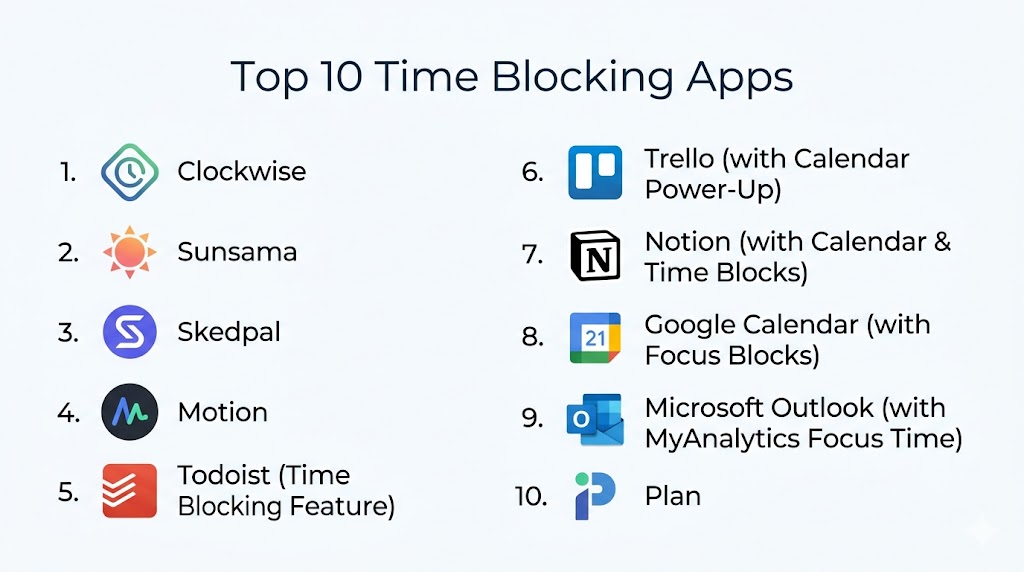
Top 10 Time Blocking Apps
#1 — Clockwise
Short description: Clockwise is an AI-powered calendar assistant that optimizes your schedule by arranging meetings and focus blocks automatically. Ideal for knowledge workers and distributed teams who want uninterrupted work hours.
Key Features
- Automatic focus time scheduling based on priorities
- Smart meeting reshuffling to reduce conflicts
- Analytics on time utilization and calendar efficiency
- Team-wide visibility for collaborative planning
- Integration with popular calendar tools
- AI recommendations for optimal time allocation
Pros
- Minimizes meeting overload
- Preserves deep work blocks automatically
Cons
- Best functionality tied to specific calendar ecosystems
- Some AI recommendations may require manual adjustments
Platforms / Deployment
- Web, iOS, Android
- Cloud
Security & Compliance
- SSO/SAML, MFA
- Not publicly stated
Integrations & Ecosystem
Clockwise integrates seamlessly with calendars and provides APIs for custom workflows
- Slack notifications
- Zoom scheduling
- Calendar sync
Support & Community
- Documentation available online
- Email support and community forum
- Varies / Not publicly stated
#2 — TimeBloc
Short description: TimeBloc is a mobile-first app for personal productivity. Users create visual, color-coded blocks to manage tasks, goals, and routines efficiently.
Key Features
- Drag-and-drop interface for block scheduling
- Recurring task and habit tracking
- Color-coded blocks for easy categorization
- Notifications and reminders for each block
- Calendar integration
Pros
- Simple and visually intuitive design
- Supports habit and goal tracking
Cons
- Limited team collaboration features
- Analytics and reporting are basic
Platforms / Deployment
- iOS, Android
- Cloud
Security & Compliance
- Not publicly stated
Integrations & Ecosystem
Supports basic calendar integrations and notifications
- Calendar apps
- Push notifications
Support & Community
- In-app tutorials and FAQ
- Email support
- Small but active user community
#3 — SkedPal
Short description: SkedPal combines smart scheduling with task management, using AI to adjust time blocks dynamically based on priorities and deadlines.
Key Features
- AI-assisted task prioritization
- Dynamic block adjustment with shifting deadlines
- Integration with popular task managers and calendars
- Customizable work hours and focus periods
- Time analytics for efficiency insights
Pros
- Adaptable to changing schedules
- Strong integration with task management tools
Cons
- Learning curve due to AI features
- Limited mobile functionality compared to desktop
Platforms / Deployment
- Web, Windows, macOS, iOS
- Cloud
Security & Compliance
- Not publicly stated
Integrations & Ecosystem
- Task managers
- Calendar apps
- Automation APIs
Support & Community
- Knowledge base and webinars
- Email and chat support
- Active user forum
#4 — Sunsama
Short description: Sunsama provides a daily planner interface integrating multiple productivity apps into a single time-blocked schedule. Suitable for teams and individuals managing complex workflows.
Key Features
- Daily planning with drag-and-drop blocks
- Integration with task management tools and email
- Team visibility and shared workspace planning
- Analytics for task completion
- Focus mode to minimize distractions
Pros
- Consolidates multiple task sources
- Supports team planning and personal scheduling
Cons
- Subscription cost may be high for individuals
- Requires integration setup for full functionality
Platforms / Deployment
- Web, iOS, Android
- Cloud
Security & Compliance
- Not publicly stated
Integrations & Ecosystem
- Project management apps
- Slack
- Email platforms
Support & Community
- Online documentation
- Email support
- Community forums
#5 — Motion
Short description: Motion uses AI to automate task scheduling, time blocking, and calendar optimization for teams aiming to reduce context switching and meeting fatigue.
Key Features
- Automatic block generation from tasks
- Calendar synchronization
- Focus and deep work mode suggestions
- AI task prioritization
- Analytics dashboards
Pros
- Reduces manual planning effort
- AI-driven prioritization enhances efficiency
Cons
- Limited offline capabilities
- Requires time to trust AI scheduling fully
Platforms / Deployment
- Web, Windows, macOS, iOS, Android
- Cloud
Security & Compliance
- Not publicly stated
Integrations & Ecosystem
- Calendar apps
- Communication tools
- Automation platforms
Support & Community
- Email support and onboarding guides
- User community for tips
#6 — Plan
Short description: Plan combines project management and time blocking, allowing teams to schedule work around tasks, meetings, and goals visually.
Key Features
- Task visualization in a Kanban style
- Drag-and-drop calendar scheduling
- Team collaboration and assignment
- Integration with popular project tools
- Analytics on time utilization
Pros
- Combines project and personal scheduling
- Team-oriented with shared visibility
Cons
- Can feel complex for solo users
- Advanced analytics require premium plans
Platforms / Deployment
- Web, iOS, Android
- Cloud
Security & Compliance
- Not publicly stated
Integrations & Ecosystem
- Project management apps
- Communication platforms
Support & Community
- Email support
- Knowledge base
- Active community
#7 — TickTick
Short description: TickTick is a task manager incorporating time blocking, habit tracking, and calendar views, catering to both individuals and small teams.
Key Features
- Task and subtask management
- Pomodoro timer
- Calendar view with blocks
- Habit tracking and reminders
- Multi-platform sync
Pros
- Combines time blocking and task management
- Supports personal and small team workflows
Cons
- Limited AI features
- Visual customization is basic
Platforms / Deployment
- Web, Windows, macOS, iOS, Android
- Cloud
Security & Compliance
- Not publicly stated
Integrations & Ecosystem
- Calendar apps
- Automation tools
- Shortcuts
Support & Community
- Documentation
- Email support
- Community forum
#8 — Todoist
Short description: Todoist is a task manager supporting visual time blocking via calendar integrations, suitable for users combining task tracking with scheduled focus.
Key Features
- Task prioritization and labels
- Calendar integration for blocks
- Recurring tasks and reminders
- Project templates and collaboration
- Productivity analytics
Pros
- Flexible task and block management
- Strong integration ecosystem
Cons
- Native time blocking is limited
- Learning curve for advanced features
Platforms / Deployment
- Web, Windows, macOS, iOS, Android
- Cloud
Security & Compliance
- Not publicly stated
Integrations & Ecosystem
- Calendar apps
- Communication tools
- Automation platforms
Support & Community
- Knowledge base
- Email support
- Large user community
#9 — Focus Booster
Short description: Focus Booster uses the Pomodoro technique combined with time-blocking principles to help individuals manage focus, breaks, and productivity.
Key Features
- Adjustable Pomodoro timer
- Visual block tracking
- Reporting on focus and break patterns
- Multi-device sync
- Distraction-free interface
Pros
- Excellent for structured focus
- Clear reporting on time utilization
Cons
- Limited collaboration features
- Not ideal for complex project scheduling
Platforms / Deployment
- Windows, macOS, iOS, Android
- Cloud
Security & Compliance
- Not publicly stated
Integrations & Ecosystem
- Basic calendar sync
- Export options
Support & Community
- Email support
- Online tutorials
- Small active community
#10 — WeekPlan
Short description: WeekPlan combines weekly planning with daily time blocks, emphasizing priority-based scheduling and goal alignment for teams and individuals.
Key Features
- Eisenhower matrix integration for task prioritization
- Weekly and daily views with blocks
- Recurring tasks and reminders
- Team collaboration and shared planning
- Analytics for productivity
Pros
- Structured weekly and daily planning
- Good for balancing priorities and focus
Cons
- UI can feel cluttered
- Advanced features require premium subscription
Platforms / Deployment
- Web, iOS, Android
- Cloud
Security & Compliance
- Not publicly stated
Integrations & Ecosystem
- Calendar apps
- Communication platforms
- Automation tools
Support & Community
- Email support
- Community forums
Comparison Table
| Tool Name | Best For | Platform(s) Supported | Deployment | Standout Feature | Public Rating |
|---|---|---|---|---|---|
| Clockwise | Teams & knowledge workers | Web, iOS, Android | Cloud | AI-driven focus time scheduling | N/A |
| TimeBloc | Individuals & freelancers | iOS, Android | Cloud | Visual color-coded blocks | N/A |
| SkedPal | Task-heavy professionals | Web, Windows, macOS, iOS | Cloud | AI task prioritization | N/A |
| Sunsama | Teams & workflow managers | Web, iOS, Android | Cloud | Daily planning & integration | N/A |
| Motion | Teams & productivity buffs | Web, Windows, macOS, iOS, Android | Cloud | Automated scheduling | N/A |
| Plan | Teams & project managers | Web, iOS, Android | Cloud | Project + time block visualization | N/A |
| TickTick | Personal & small teams | Web, Windows, macOS, iOS, Android | Cloud | Task + habit tracking | N/A |
| Todoist | Task-driven users | Web, Windows, macOS, iOS, Android | Cloud | Task + calendar integration | N/A |
| Focus Booster | Individuals needing focus | Windows, macOS, iOS, Android | Cloud | Pomodoro + time blocking | N/A |
| WeekPlan | Teams & goal-oriented users | Web, iOS, Android | Cloud | Priority-based weekly planning | N/A |
Evaluation & Scoring
| Tool Name | Core (25%) | Ease (15%) | Integrations (15%) | Security (10%) | Performance (10%) | Support (10%) | Value (15%) | Weighted Total |
|---|---|---|---|---|---|---|---|---|
| Clockwise | 9 | 8 | 8 | 7 | 9 | 8 | 8 | 8.3 |
| TimeBloc | 7 | 9 | 6 | 6 | 8 | 7 | 8 | 7.5 |
| SkedPal | 9 | 7 | 8 | 7 | 8 | 8 | 7 | 8.0 |
| Sunsama | 8 | 8 | 8 | 6 | 8 | 7 | 7 | 7.7 |
| Motion | 9 | 8 | 7 | 7 | 8 | 7 | 8 | 8.0 |
| Plan | 8 | 7 | 7 | 6 | 8 | 7 | 7 | 7.3 |
| TickTick | 7 | 9 | 7 | 6 | 8 | 7 | 8 | 7.6 |
| Todoist | 8 | 8 | 8 | 7 | 8 | 7 | 7 | 7.7 |
| Focus Booster | 7 | 9 | 6 | 6 | 7 | 6 | 7 | 7.0 |
| WeekPlan | 8 | 8 | 7 | 6 | 7 | 7 | 7 | 7.3 |
Scores provide a comparative perspective. Weighted totals indicate overall suitability, but the best choice depends on context, team size, and workflow requirements.
Which Time Blocking App Is Right for You
Solo / Freelancer
TimeBloc, Focus Booster, and TickTick are ideal for individuals managing personal tasks, habits, and focus periods. Simple and intuitive design makes them easy to adopt without team dependencies.
SMB
Sunsama, Plan, and Motion are suitable for small teams with shared calendars, task visibility, and AI-assisted scheduling.
Mid-Market
Clockwise, SkedPal, and WeekPlan fit mid-market organizations with multiple teams, requiring AI scheduling, task prioritization, and analytics dashboards.
Enterprise
Clockwise and Motion are ideal for enterprise deployment, integrating into corporate calendars, ensuring compliance, and optimizing workload across large teams.
Budget vs Premium
Budget-conscious users may choose TimeBloc or Focus Booster. Premium plans such as SkedPal or Motion deliver advanced analytics and AI features.
Feature Depth vs Ease of Use
Simple apps like TimeBloc and Focus Booster excel in ease of use. Feature-rich apps like SkedPal and Sunsama provide depth but require learning time.
Integrations & Scalability
Mid-market and enterprise teams benefit from Clockwise and Motion due to extensive calendar, task, and collaboration integrations.
Security & Compliance Needs
Organizations with sensitive data should verify encryption, SSO, and compliance features. Clockwise supports SSO/SAML, while others do not publicly state security certifications.
Frequently Asked Questions (FAQs)
1. What pricing models do Time Blocking Apps use?
Most apps offer subscription-based pricing per user, with tiered plans unlocking AI scheduling, analytics, and team collaboration features.
2. How easy is onboarding for new users?
Individual apps are typically plug-and-play, whereas team-oriented apps require calendar integration, role assignments, and workspace setup.
3. Can I integrate these apps with my existing tools?
Yes, most apps support popular calendars, task managers, and communication tools, though integration depth varies.
4. Are there AI features for scheduling?
Some apps, like Clockwise and Motion, provide AI-assisted scheduling and prioritization. Others focus on manual block management.
5. Can teams collaborate within these apps?
Yes, apps such as Sunsama, Plan, and Motion allow team-wide visibility and shared planning, while solo-focused apps are primarily personal productivity tools.
6. Are these apps mobile-friendly?
Most tools offer iOS and Android apps with offline support, syncing automatically with cloud platforms.
7. How secure are these apps?
Security varies. Some apps support SSO, MFA, and encryption, while many do not publicly disclose compliance certifications.
8. Do they support recurring tasks or habits?
Yes, TimeBloc, TickTick, and WeekPlan provide recurring task and habit tracking to integrate daily routines into time blocks.
9. Can I get analytics on time utilization?
Advanced tools like Clockwise, SkedPal, and Motion offer dashboards tracking focus hours, meeting patterns, and efficiency metrics.
10. How do I switch from another productivity app?
Most tools provide calendar and task imports. Transition may require manually mapping recurring tasks and adjusting workflow blocks.
Conclusion
Time Blocking Apps provide structured scheduling, improved focus, and productivity insights for individuals and teams. Choosing the right app depends on your workflow, team size, integration needs, and desired AI or analytics features. Solo users benefit from simple mobile-first tools, while enterprises require scalable platforms with collaboration, AI scheduling, and security features. Comparing apps using feature, integration, and value scores helps narrow the options. The next step is to shortlist two or three tools, run a pilot with your workflow, and validate integration and security before scaling adoption across your team or organization. Consistent time management using the right app can transform productivity and reduce burnout over time.

This article offers a clear and practical comparison of time-blocking apps for improving productivity and managing daily schedules. The feature breakdown makes it easy to understand which tool best fits different planning and time management styles.