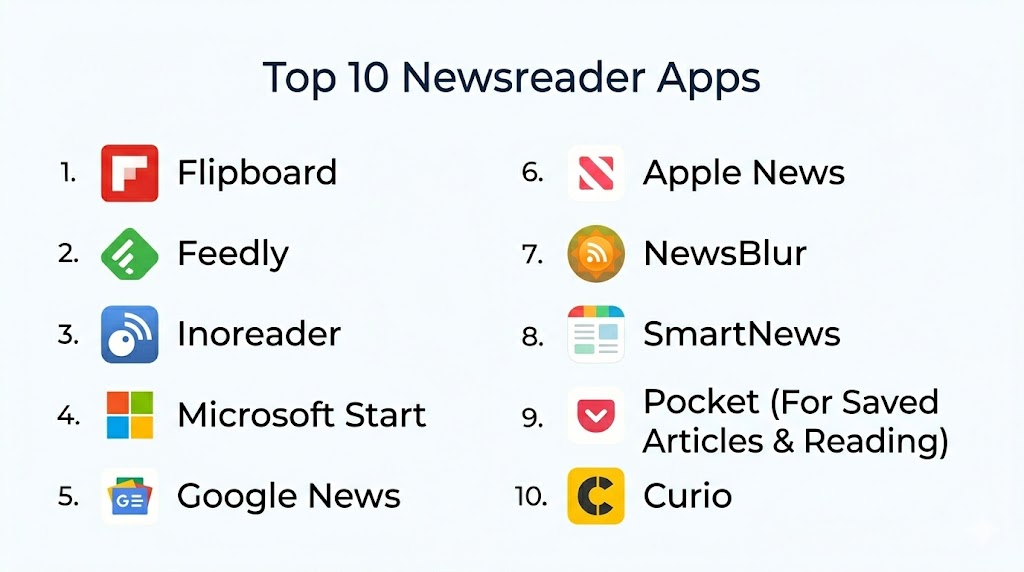
Introduction
Newsreader Apps are digital platforms that curate, organize, and deliver news and articles from a wide range of sources to users in a personalized and digestible format. They use algorithms, user preferences, topic categories, and sometimes AI recommendations to tailor what you see, helping users stay informed without information overload. With the rapid pace of global news and the fragmentation of sources, these apps help individuals and professionals quickly access trustworthy content relevant to their interests and needs.
Real-world use cases include professionals tracking industry trends, students following current events for research, commuters catching headlines on the go, niche audience members following specialized topics, and busy individuals consolidating news from multiple outlets into one feed. Newsreader apps also serve as essential tools for content discovery, deep reading, and alerting users to breaking developments.
Evaluation criteria for Newsreader Apps include coverage breadth, personalization intelligence, source credibility controls, offline reading capabilities, user interface fluidity, cross‑platform sync, integration with other productivity tools, multimedia support, notification controls, privacy settings, and pricing flexibility.
Best for: Anyone who wants a consolidated, personalized news experience including professionals, researchers, executives, students, and news lovers. Ideal for users who need daily information updates quickly without visiting multiple websites.
Not ideal for: Users who prefer direct original sources exclusively, those who require enterprise news delivery with proprietary filters, or users who avoid aggregated content in favor of individual specialist feeds.
Key Trends in Newsreader Apps
- AI‑assisted personalization that learns user interests from reading behavior
- Integration of audio summaries and text‑to‑speech for on‑the‑go consumption
- Native support for newsletters and curated topic lists from trusted sources
- Offline reading capabilities with progressive sync for travel environments
- Enhanced privacy controls and local data processing of preferences
- Content verification indicators highlighting credibility signals
- Cross‑platform synchronization with reading progress saved seamlessly
- Rich multimedia content integration including video, podcasts, and images
- Deep‑topic exploration with linked article graphs and background context
- Modular widget support for home screens and quick glance feeds
How We Selected These Tools
- Assessed adoption and relevance among wide user groups
- Evaluated personalization and recommendation intelligence
- Checked breadth of source coverage and ability to add custom feeds
- Considered offline reading, sync, and mobile performance
- Reviewed interface design and ease of use
- Analyzed integration with external tools and notification systems
- Weighed privacy features and user control over data
- Considered pricing flexibility and value options
- Reviewed community reception and feedback patterns
- Prioritized tools with additional features such as audio, multimedia support, and topic exploration
Top 10 Newsreader Apps
#1 — Feedly
Short description: Feedly is an RSS‑powered newsreader that lets users follow news, blogs, podcasts, and topic feeds in one unified interface. It is ideal for professionals, researchers, and enthusiasts who want a highly customizable and source‑driven news experience.
Key Features
- Custom RSS feed support
- Personalized topic boards and collections
- AI suggestions for related content
- Article tagging and saved reading lists
- Team boards for shared insight streams
- Integration with reading and productivity tools
Pros
- Extensive control over sources and topics
- Excellent for deep research and curated feeds
Cons
- Initial setup and feed customization can be time‑intensive
- Power features are tied to paid plans
Platforms / Deployment
- Web, iOS, Android
- Cloud
Security & Compliance
- Secure authentication
- Not publicly stated for certifications
Integrations & Ecosystem
Feedly connects with many productivity tools and sharing options
- Integration with task apps
- Email sharing
- Custom archive features
Support & Community
- Comprehensive documentation
- User community forums
- Support tickets available
#2 — Flipboard
Short description: Flipboard aggregates news, articles, social feeds, and rich media into visually styled magazines. It is designed for users who want an immersive, magazine‑like browsing experience across topics they care about.
Key Features
- Topic and magazine creation
- Multimedia content support
- User‑curated collections
- Smart recommendations based on interests
- Social content integration
Pros
- Beautiful visual layout and browsing experience
- Easy discovery of themed content
Cons
- May feel less structured than traditional news lists
- Personalization quality varies by usage
Platforms / Deployment
- Web, iOS, Android
- Cloud
Security & Compliance
- Not publicly stated
Integrations & Ecosystem
Supports linking to social content and sharing
- Social feed integration
- Sharing to email and messaging
- Discovery lists
Support & Community
- Help center
- User galleries of curated magazines
#3 — Inoreader
Short description: Inoreader is an advanced newsreader focused on customizable feeds, automation rules, search filters, and workflow integrations. Ideal for power users, researchers, and professionals with specific information needs.
Key Features
- Complex filtering and rules automation
- RSS and social feed integration
- Full‑text search across sources
- Save‑for‑later and tagging systems
- Triggered alerts based on keywords
Pros
- Highly powerful automation and filtering tools
- Excellent for specific topic tracking
Cons
- Can be overwhelming for casual users
- Advanced features require paid plans
Platforms / Deployment
- Web, iOS, Android
- Cloud
Security & Compliance
- Secure authentication
- Not publicly stated for privacy certifications
Integrations & Ecosystem
Supports workflow integrations with other productivity tools
- Email notifications
- Read‑later integrations
- Export and archive tools
Support & Community
- Knowledge base
- Forums
- Support channels
#4 — Newsify
Short description: Newsify combines RSS feeds with a clean, newspaper‑style layout that adapts based on preferences and reading habits. Suited for casual and intermediate news consumers who want a readable, organized presentation.
Key Features
- Newspaper‑style layout
- RSS feed support
- Offline reading
- Categorized news streams
- Font and style customization
Pros
- Reader‑friendly design with clear organization
- Offline reading support
Cons
- Limited advanced filtering
- Not as deep for research purposes
Platforms / Deployment
- iOS, Android
- Cloud
Security & Compliance
- Not publicly stated
Integrations & Ecosystem
- Sync with RSS feed lists
- Offline caching options
Support & Community
- Basic help articles
- In‑app tips
#5 — Apple News Reader
Short description: Apple News Reader consolidates premium publisher content with personalized recommendations through intelligent learning of user interests. It is ideal for users within the Apple ecosystem seeking a seamless news experience.
Key Features
- Personalized recommendation engine
- Premium curated content from major publishers
- Topic feeds tailored to interests
- Reading history sync across devices
- Multimedia article support
Pros
- Seamless integration with devices
- High‑quality curated sources
Cons
- Limited to devices within the same ecosystem
- Customization is less granular
Platforms / Deployment
- iOS
- Cloud
Security & Compliance
- Built‑in device security
- Not publicly stated for certificates
Integrations & Ecosystem
- System‑level sharing
- Bookmark sync across devices
Support & Community
- Device support system
- In‑app help
#6 — Microsoft Start
Short description: Microsoft Start offers a personalized feed of news, weather, topics, and alerts that adapts to user interests. It delivers bite‑sized highlights and story suggestions tailored over time.
Key Features
- Personalized news feed
- Topic cards and highlights
- Alerts and push notifications
- Integration with other system services
Pros
- Quick updates and snapshot view of news
- Easy topic subscription
Cons
- Personalization can be inconsistent for niche interests
- Less deep‑dive capability than specialized readers
Platforms / Deployment
- Web, iOS, Android
- Cloud
Security & Compliance
- Uses secure authentication
- Not publicly stated
Integrations & Ecosystem
- System integrations for alerts
- Weather and special topics
Support & Community
- Built‑in help
- FAQ and troubleshooting resources
#7 — SmartNews
Short description: SmartNews uses machine learning to identify trending and relevant stories from a variety of publishers and presents them in a streamlined interface that prioritizes important developments.
Key Features
- Curated trending news channels
- Topic categories based on interest
- Offline reading queues
- Smart categorization engine
Pros
- Good at highlighting trending stories
- Easy topic navigation
Cons
- Algorithm lacks deep personalization customization
- Limited feed customization
Platforms / Deployment
- Web, iOS, Android
- Cloud
Security & Compliance
- Secure authentication
- Not publicly stated
Integrations & Ecosystem
- Share to social and messaging
- Offline article downloads
Support & Community
- Help resources
- Support articles
#8 — Feedbro
Short description: Feedbro is a robust news aggregator offering advanced feed grouping, pattern filtering, and intelligent search. Best for users who want desktop‑centric power tools for news collation and filtering.
Key Features
- Feed grouping and custom filters
- Pattern matching
- In‑article search
- Folder organization
- Full‑text extraction
Pros
- Powerful desktop feed customization
- Excellent organization features
Cons
- Interface is less friendly for casual use
- Mobile capability limited
Platforms / Deployment
- Browser extension
- Desktop
Security & Compliance
- Local feed storage options
- Not publicly stated
Integrations & Ecosystem
- Sync with external feed lists
- Export and print options
Support & Community
- Documentation
- User forums
#9 — Refind
Short description: Refind tracks the articles you save and read, then builds a refined feed that surfaces content aligned with your long‑term interests and patterns.
Key Features
- Smart interest learning
- Article scoring based on engagement
- Topic discovery cards
- Clean reading presentation
Pros
- Personalized discovery aligned with reading behavior
- Encourages deep reading
Cons
- Less structured for real‑time news
- Learning period required for refined recommendations
Platforms / Deployment
- Web, iOS, Android
- Cloud
Security & Compliance
- HTTPS and secure login
- Not publicly stated
Integrations & Ecosystem
- Save to read later features
- Discovery enhancements
Support & Community
- Help docs
- Email support
#10 — NewsBlur
Short description: NewsBlur is an RSS‑based newsreader with social features, training filters, and shared story streams. It helps users fine‑tune what they see by training the reader on topics they like.
Key Features
- RSS feed support
- Training filters per feed and topic
- Social sharing and comments
- Saved stories and tags
Pros
- Strong customization with training filters
- Social features for discussions
Cons
- Interface is utilitarian
- Learning curve for filters
Platforms / Deployment
- Web, iOS, Android
- Cloud
Security & Compliance
- Secure login
- Not publicly stated for certifications
Integrations & Ecosystem
- Aggregation of feeds
- Export and tagging
Support & Community
- Help center
- Community interactions
Comparison Table
| Tool Name | Best For | Platform(s) Supported | Deployment | Standout Feature | Public Rating |
|---|---|---|---|---|---|
| Feedly | Source‑driven research | Web, iOS, Android | Cloud | Custom RSS feed control | N/A |
| Visual magazine browsing | Web, iOS, Android | Cloud | Themed magazine experience | N/A | |
| Inoreader | Power users and researchers | Web, iOS, Android | Cloud | Advanced filtering and rules | N/A |
| Newsify | Casual and intermediate users | iOS, Android | Cloud | Newspaper‑style feed | N/A |
| Apple News Reader | Curated premium feeds | iOS | Cloud | Personalized curated sources | N/A |
| Microsoft Start | Quick topic snapshots | Web, iOS, Android | Cloud | Topic cards and highlights | N/A |
| SmartNews | Trending story discovery | Web, iOS, Android | Cloud | Trending news channels | N/A |
| Feedbro | Desktop power users | Browser extension, Desktop | Local | Grouping and filtering | N/A |
| Refind | Interest‑based discovery | Web, iOS, Android | Cloud | Learning long‑term preferences | N/A |
| NewsBlur | Custom filtering and social | Web, iOS, Android | Cloud | Training filters for relevance | N/A |
Evaluation & Scoring of Newsreader Apps
| Tool Name | Core (25%) | Ease (15%) | Integrations (15%) | Security (10%) | Performance (10%) | Support (10%) | Value (15%) | Weighted Total |
|---|---|---|---|---|---|---|---|---|
| Feedly | 9 | 7 | 8 | 8 | 8 | 7 | 8 | 8.2 |
| 7 | 9 | 7 | 7 | 8 | 8 | 7 | 7.8 | |
| Inoreader | 9 | 6 | 9 | 8 | 8 | 7 | 8 | 8.3 |
| Newsify | 6 | 9 | 6 | 7 | 7 | 7 | 7 | 7.2 |
| Apple News Reader | 8 | 8 | 7 | 8 | 8 | 8 | 7 | 7.9 |
| Microsoft Start | 7 | 8 | 7 | 8 | 7 | 7 | 7 | 7.5 |
| SmartNews | 7 | 8 | 6 | 7 | 8 | 7 | 7 | 7.4 |
| Feedbro | 8 | 6 | 7 | 8 | 8 | 7 | 8 | 7.8 |
| Refind | 7 | 7 | 6 | 7 | 7 | 7 | 7 | 7.0 |
| NewsBlur | 8 | 7 | 7 | 8 | 8 | 7 | 7 | 7.7 |
These scores reflect comparative strengths. High totals indicate strong overall balance of features, ease of use, integration, value, and support.
Which Newsreader App Is Right for You?
Solo / Freelancer
Users who want a tightly controlled personalized feed should consider Feedly or Inoreader. Flipboard and SmartNews suit casual consumption and broader exploration.
SMB
Teams that need curated topic boards and collaborative sharing benefit from Feedly and NewsBlur. Apple News Reader and Microsoft Start provide easy distribution of relevant news highlights.
Mid‑Market
Feedly and Inoreader work well where topic specialization and integration with workflows matter most. Flipboard helps with broader cultural and trend topics.
Enterprise
Inoreader’s automation and filtering tools provide workflow feeds for professional monitoring. Feedly coupled with team boards centralizes shared news insight across departments.
Budget vs Premium
Free tiers of many newsreaders cover basic needs, but premium plans unlock advanced filtering, AI suggestions, automation rules, and ad‑free reading.
Feature Depth vs Ease of Use
Feedly and Inoreader deliver depth for research and workflows but have steeper learning curves. Flipboard, Newsify, and SmartNews prioritize ease of browsing.
Integrations & Scalability
Inoreader and Feedly provide integration hooks for other tools, making them scalable for workflows and external automation.
Security & Compliance Needs
Apps with secure login and authentication, such as Apple News Reader and Feedly, provide better keyed‑in control. Deeper enterprise compliance should be verified per organization needs.
Frequently Asked Questions (FAQs)
1. How do Newsreader Apps personalize my experience?
Newsreader Apps analyze your reading history, topic follows, saved articles, and clicks to refine recommendations. Over time, algorithms learn your preferences and surface content aligned with your interests without manual curation.
2. Can I add my own sources to these apps?
Yes. Many newsreader platforms allow you to add custom RSS feeds, newsletters, and content sources. This lets you follow niche blogs, independent news outlets, and specialty sites in the same feed as mainstream news.
3. Do these apps support offline reading?
Several Newsreader Apps support offline reading by caching articles to your device. This is especially helpful when traveling or in areas with limited connectivity. Offline sync typically requires app permissions to store content locally.
4. How do apps handle source credibility?
Some apps use editorial curation, algorithmic signals, and reputational data to highlight trustworthy sources. Users are often able to prioritize or block specific sources themselves, giving more control over credibility.
5. What are topic cards and highlights?
Topic cards are modular content groups that present news summaries on specific themes such as business, technology, health, or sports. Highlights are brief presented snippets of top news stories that users can tap to read full articles.
6. Can I read multimedia content within Newsreader Apps?
Modern apps support multimedia elements including embedded video, images, and sometimes audio previews. A growing number also support text‑to‑speech so articles can be listened to instead of read.
7. Do these apps work across devices?
Most Newsreader Apps support cross‑device sync so reading progress, saved stories, and preferences carry across smartphones, tablets, and web interfaces. This requires a user account and synchronization permissions.
8. Are there privacy concerns when using these apps?
Privacy varies by app. Some apps store preferences and reading history in local profiles, while others transmit data to servers to improve personalization. Users should review privacy settings and adjust what data is shared.
9. Can newsreader apps replace direct news sources?
Newsreader Apps aggregate and curate content from numerous sources, but they do not replace direct access to individual news outlets. They simplify consumption but original sources often provide additional context and features.
10. How do I choose the best app for me?
Start by defining your priorities such as source range, personalization depth, offline reading needs, and multimedia support. Then shortlist apps that align with those needs and evaluate them through trial or free plans to find the best fit.
Conclusion
Newsreader Apps provide a powerful way to access, personalize, and manage news content from a broad range of sources in one place. Choosing the right app depends on whether you need deep productivity features for research, visual browsing for casual reading, or automated topic alerts for professional monitoring. Solo users benefit from flexible RSS‑centric tools, while teams and enterprises may lean on collaborative feeds and topic boards. Comparing features, integration capabilities, personalization accuracy, security controls, and value helps identify the best solution for your workflow. As news continues to fragment across platforms, the right Newsreader App simplifies consumption, sharpens focus, and ensures you never miss the developments that matter most. Try a few options, refine your preferences, and leverage advanced features to stay informed efficiently and effectively.

A well-structured comparison that highlights the key strengths of different newsreader apps. The concise feature analysis makes it easier to choose an app that matches individual reading habits and preferences.