Introduction
Browser-based SSO portals are identity platforms that let users log in once through a web browser and access multiple applications without re-entering credentials. In simple terms, they act as a central login dashboard (identity gateway) where employees can open all their SaaS tools securely from a single place.
These portals are becoming critical in 2026 because organizations now rely heavily on cloud apps, remote work systems, APIs, and hybrid infrastructure. Managing dozens or hundreds of passwords manually is no longer practical, and it significantly increases the risk of credential theft, phishing, and account takeover attacks.
Common use cases include employee onboarding and offboarding, SaaS access management, secure remote workforce authentication, partner/vendor access control, and centralized identity governance across cloud applications.
When evaluating browser-based SSO portals, buyers should focus on authentication protocols (SAML, OAuth, OIDC), security controls (MFA, conditional access), integration depth, user lifecycle management, scalability, reporting capabilities, compliance support, and ease of administration.
Best for: IT administrators, security teams, enterprises, SaaS companies, and organizations using multiple cloud applications.
Not ideal for: very small teams with minimal SaaS usage, offline systems, or organizations that do not require centralized identity management.
Key Trends in Browser-Based SSO Portals
- Zero trust authentication models are becoming the default security framework for SSO systems
- Passwordless authentication (passkeys, biometrics) is rapidly replacing traditional passwords
- Identity Threat Detection and Response (ITDR) is being integrated into SSO platforms
- AI-driven anomaly detection is improving login risk scoring and adaptive authentication
- Unified identity for human + machine users is expanding due to APIs and AI agents
- Continuous authentication is replacing one-time login validation
- Stronger MFA enforcement (phishing-resistant MFA) is becoming standard
- Deep SaaS integration catalogs are growing as organizations adopt more cloud apps
- Automated user lifecycle management (SCIM provisioning) is now a core requirement
- Hybrid identity management is essential for enterprises operating across cloud + on-prem systems
How We Selected These Tools
- Focused on platforms offering browser-based SSO portals and identity dashboards
- Included both enterprise-grade and SMB-friendly identity providers
- Prioritized support for SAML, OAuth, and OpenID Connect standards
- Considered security capabilities like MFA, conditional access, and zero trust
- Evaluated integration ecosystems with SaaS applications and cloud providers
- Included tools supporting user lifecycle automation and provisioning
- Balanced cloud-native, hybrid, and self-hosted identity platforms
- Considered scalability for large enterprise identity environments
- Avoided unverified claims and used Not publicly stated where needed
- Ensured coverage of industry leaders and widely adopted identity platforms
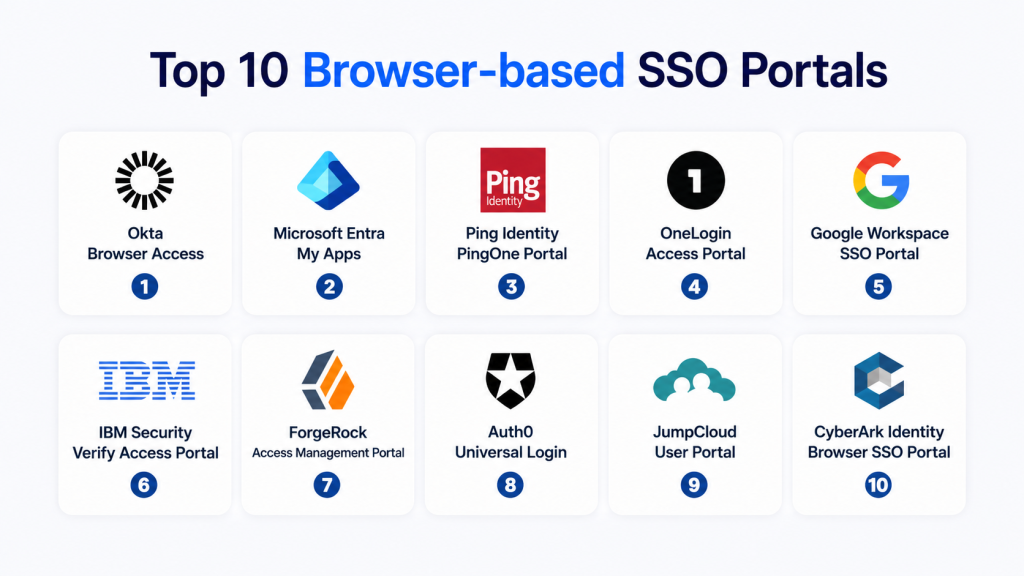
Top 10 Browser-Based SSO Portals
1- Okta Identity Platform
Short description: Okta is one of the most widely used identity platforms providing a browser-based SSO portal for accessing enterprise and SaaS applications. It centralizes authentication, user management, and access control into a unified identity dashboard. It is designed for organizations managing large SaaS ecosystems and complex workforce environments.
Key Features
- Centralized browser-based SSO dashboard
- SAML, OAuth, and OpenID Connect support
- Adaptive multi-factor authentication
- Automated user provisioning and deprovisioning
- Lifecycle management for identities
- API-based integrations
- Detailed audit and access logs
Pros
- Extremely mature identity ecosystem
- Large SaaS integration catalog
- Strong enterprise scalability
- Reliable authentication workflows
Cons
- Higher cost at scale
- Complex configuration for advanced policies
- Requires expertise for enterprise setup
- Feature complexity for small teams
Platforms / Deployment
Cloud-based SaaS identity platform
Security & Compliance
Supports enterprise-grade encryption, MFA, audit logging, and access controls. Compliance certifications vary by deployment and are Not publicly stated in detail.
Integrations & Ecosystem
- SaaS applications
- Cloud platforms
- API services
- Security tools
- HR and IT systems
Support & Community
Strong enterprise support, large partner ecosystem, and extensive documentation.
2- Microsoft Entra ID
Short description: Microsoft Entra ID is a cloud identity platform deeply integrated into Microsoft ecosystems. It provides browser-based SSO access to Microsoft 365, Azure, and thousands of third-party SaaS applications through a unified identity portal.
Key Features
- Seamless browser-based SSO across apps
- Conditional access policies
- Built-in MFA and risk-based authentication
- Hybrid identity support
- Enterprise application gallery
- Identity governance tools
- Secure app access portal
Pros
- Best fit for Microsoft ecosystems
- Strong enterprise security controls
- Highly scalable identity infrastructure
- Deep integration with Azure services
Cons
- Complex for non-Microsoft environments
- Advanced features require premium licensing
- Configuration complexity for hybrid setups
- Less intuitive for beginners
Platforms / Deployment
Cloud-based with hybrid identity support
Security & Compliance
Enterprise security controls include encryption, auditing, MFA, and conditional access. Compliance details are Not publicly stated.
Integrations & Ecosystem
- Microsoft 365
- Azure services
- SaaS applications
- Security platforms
- Enterprise directories
Support & Community
Global enterprise support and large technical community.
3- Google Workspace SSO (Cloud Identity)
Short description: Google Workspace SSO provides a browser-based identity portal for organizations using Google’s ecosystem, enabling seamless access to SaaS applications through a centralized login experience.
Key Features
- Web-based SSO portal for SaaS apps
- Centralized user directory
- Context-aware access policies
- Simple admin console
- Device-based security controls
- Easy application provisioning
- Native Google integration
Pros
- Very easy to deploy
- Ideal for Google-first organizations
- Simple user experience
- Low administrative overhead
Cons
- Limited advanced IAM features
- Not ideal for complex enterprise identity needs
- Smaller governance capabilities
- Less flexibility than enterprise platforms
Platforms / Deployment
Cloud-based SaaS identity system
Security & Compliance
Includes encryption, MFA, and audit logging. Compliance certifications are Not publicly stated.
Integrations & Ecosystem
- Google Workspace apps
- SaaS applications
- Cloud platforms
- Third-party identity providers
- Security tools
Support & Community
Good documentation and enterprise support via Google Workspace.
4- OneLogin
Short description: OneLogin is a browser-based SSO platform that provides secure access management for SaaS applications with a strong focus on usability and enterprise identity workflows.
Key Features
- Browser-based SSO portal
- Multi-factor authentication
- App provisioning and deprovisioning
- Directory integration
- Role-based access control
- User activity monitoring
- Access policy management
Pros
- Easy-to-use interface
- Strong SaaS integration support
- Balanced enterprise features
- Good value for mid-market
Cons
- Smaller ecosystem than top competitors
- Limited advanced analytics
- Reporting depth could be improved
- Enterprise scaling limitations in some cases
Platforms / Deployment
Cloud-based identity platform
Security & Compliance
Supports MFA, encryption, and audit logging. Compliance details are Not publicly stated.
Integrations & Ecosystem
- SaaS applications
- Cloud platforms
- Identity providers
- ITSM systems
- API integrations
Support & Community
Good enterprise support and onboarding resources.
5- Auth0
Short description: Auth0 is a developer-focused identity platform offering customizable browser-based SSO flows for applications, APIs, and SaaS environments.
Key Features
- Customizable SSO login flows
- Social and enterprise identity support
- API-first authentication model
- Adaptive authentication policies
- Multi-tenant identity support
- Logging and analytics
- Scalable cloud infrastructure
Pros
- Highly flexible for developers
- Strong API-driven architecture
- Easy integration into apps
- Scalable cloud platform
Cons
- Not ideal for non-technical teams
- Pricing grows with usage
- Requires development effort
- Admin UI can be complex
Platforms / Deployment
Cloud-based identity platform
Security & Compliance
Includes encryption, MFA, and audit logs. Compliance details are Not publicly stated.
Integrations & Ecosystem
- SaaS applications
- APIs and microservices
- Cloud platforms
- CI/CD pipelines
- Developer tools
Support & Community
Strong developer community and documentation.
6- Ping Identity
Short description: Ping Identity is an enterprise identity platform offering secure browser-based SSO with advanced federation and hybrid identity capabilities.
Key Features
- Enterprise SSO portal
- Identity federation
- Adaptive authentication
- API security support
- Directory integration
- Access policy controls
- High availability architecture
Pros
- Strong enterprise security focus
- Excellent federation capabilities
- Highly scalable architecture
- Flexible identity workflows
Cons
- Complex deployment and configuration
- Higher cost structure
- Requires IAM expertise
- Steep learning curve
Platforms / Deployment
Cloud and hybrid identity environments
Security & Compliance
Enterprise-grade identity security controls. Compliance details are Not publicly stated.
Integrations & Ecosystem
- SaaS applications
- Cloud platforms
- Identity providers
- Enterprise directories
- Security tools
Support & Community
Strong enterprise support and consulting services.
7- JumpCloud
Short description: JumpCloud is a cloud directory platform combining browser-based SSO, device management, and identity services for SMB and mid-market organizations.
Key Features
- Cloud directory services
- Browser-based SSO portal
- Multi-factor authentication
- Device management integration
- User lifecycle management
- Access control policies
- Cross-platform identity management
Pros
- Simple deployment
- Good SMB fit
- Unified identity + device management
- Cost-effective solution
Cons
- Limited enterprise depth
- Smaller ecosystem
- Less advanced governance features
- Not ideal for complex architectures
Platforms / Deployment
Cloud-based SaaS identity platform
Security & Compliance
Includes encryption, MFA, and audit logs. Compliance details are Not publicly stated.
Integrations & Ecosystem
- SaaS applications
- Cloud platforms
- Device systems
- Identity providers
- API integrations
Support & Community
Good SMB-focused support and documentation.
8- Keycloak
Short description: Keycloak is an open-source identity and access management solution providing browser-based SSO with high customization and self-hosting capabilities.
Key Features
- Web-based SSO portal
- SAML and OpenID Connect support
- User federation and identity brokering
- Role-based access control
- Custom login themes
- Self-hosted deployment
- Multi-realm identity management
Pros
- Open-source and flexible
- No licensing cost
- Highly customizable
- Strong developer control
Cons
- Requires technical expertise
- No default enterprise support
- Manual scaling and maintenance
- Complex setup for beginners
Platforms / Deployment
Self-hosted, hybrid environments
Security & Compliance
Security depends on deployment configuration. Compliance features are Not publicly stated.
Integrations & Ecosystem
- Enterprise directories
- SaaS applications
- APIs and microservices
- Cloud environments
- DevSecOps tools
Support & Community
Strong open-source community support.
9- Duo Single Sign-On
Short description: Duo provides a security-focused browser-based SSO solution with strong emphasis on multi-factor authentication and secure access policies.
Key Features
- Browser-based SSO portal
- Integrated MFA enforcement
- Device trust validation
- Access control policies
- Activity logging and monitoring
- Secure authentication flows
- Application access control
Pros
- Excellent MFA security model
- Easy to deploy
- Strong security posture
- User-friendly experience
Cons
- Limited customization options
- Smaller application catalog
- Less enterprise governance depth
- Not a full IAM suite
Platforms / Deployment
Cloud-based identity platform
Security & Compliance
Strong encryption, MFA, and security controls. Compliance details are Not publicly stated.
Integrations & Ecosystem
- SaaS applications
- Identity providers
- Security tools
- Cloud platforms
- IT systems
Support & Community
Good enterprise support and documentation.
10- ForgeRock Identity Platform
Short description: ForgeRock is a comprehensive enterprise identity platform offering advanced browser-based SSO, identity orchestration, and adaptive access control for complex environments.
Key Features
- Enterprise SSO portal
- Identity orchestration engine
- Adaptive risk-based authentication
- Federation services
- API-driven identity flows
- Advanced analytics
- High scalability architecture
Pros
- Extremely powerful identity platform
- Suitable for complex enterprise systems
- Strong scalability
- Advanced identity orchestration
Cons
- Complex setup and management
- High cost of ownership
- Requires IAM expertise
- Longer deployment cycles
Platforms / Deployment
Cloud, hybrid, enterprise environments
Security & Compliance
Enterprise-grade security features. Compliance details are Not publicly stated.
Integrations & Ecosystem
- SaaS applications
- Cloud platforms
- Identity providers
- Enterprise systems
- Security tools
Support & Community
Strong enterprise support and professional services.
Comparison Table
| Tool Name | Best For | Platforms Supported | Deployment | Standout Feature | Public Rating |
|---|---|---|---|---|---|
| Okta | Enterprise SaaS identity | Cloud | Cloud | Large app ecosystem | N/A |
| Microsoft Entra ID | Microsoft ecosystems | Cloud + Hybrid | Cloud | Conditional access | N/A |
| Google Workspace SSO | Google-first teams | Cloud | Cloud | Simplicity | N/A |
| OneLogin | Mid-market SaaS SSO | Cloud | Cloud | Ease of use | N/A |
| Auth0 | Developers | APIs + Cloud | Cloud | Custom authentication flows | N/A |
| Ping Identity | Enterprise federation | Cloud + Hybrid | Cloud/Hybrid | Advanced federation | N/A |
| JumpCloud | SMB identity management | Cloud + Devices | Cloud | Directory + SSO combo | N/A |
| Keycloak | Self-hosted IAM | Web apps | Self-hosted | Open-source flexibility | N/A |
| Duo SSO | Security-focused teams | Cloud | Cloud | MFA-first security | N/A |
| ForgeRock | Large enterprises | Cloud + Hybrid | Cloud/Hybrid | Identity orchestration | N/A |
Evaluation & Scoring of Browser-Based SSO Portals
| Tool Name | Core 25% | Ease 15% | Integrations 15% | Security 10% | Performance 10% | Support 10% | Value 15% | Weighted Total |
|---|---|---|---|---|---|---|---|---|
| Okta | 9.4 | 9.0 | 9.3 | 9.2 | 9.0 | 9.0 | 8.8 | 9.1 |
| Microsoft Entra ID | 9.3 | 8.5 | 9.2 | 9.4 | 9.2 | 9.0 | 8.7 | 9.0 |
| Google Workspace SSO | 8.6 | 9.2 | 8.8 | 8.8 | 9.0 | 8.5 | 9.0 | 8.8 |
| OneLogin | 8.7 | 9.0 | 8.8 | 8.8 | 8.8 | 8.7 | 8.8 | 8.8 |
| Auth0 | 9.0 | 8.5 | 9.2 | 9.0 | 9.0 | 8.8 | 8.5 | 8.9 |
| Ping Identity | 9.0 | 7.8 | 9.0 | 9.4 | 9.0 | 9.0 | 8.2 | 8.8 |
| JumpCloud | 8.4 | 9.0 | 8.6 | 8.5 | 8.6 | 8.5 | 9.0 | 8.6 |
| Keycloak | 8.5 | 7.5 | 8.5 | 8.7 | 8.5 | 8.0 | 9.5 | 8.5 |
| Duo SSO | 8.6 | 8.8 | 8.7 | 9.2 | 9.0 | 8.8 | 8.6 | 8.8 |
| ForgeRock | 9.1 | 7.2 | 9.0 | 9.3 | 9.1 | 9.0 | 8.0 | 8.7 |
Which Browser-Based SSO Tool Is Right for You?
Solo / Freelancer
Keycloak or Google Workspace SSO is enough for basic identity needs.
SMB
JumpCloud, OneLogin, and Google Workspace SSO offer simplicity and affordability.
Mid-Market
Okta, Auth0, and OneLogin provide scalability and SaaS integration depth.
Enterprise
Microsoft Entra ID, Ping Identity, Okta, and ForgeRock are best for complex identity ecosystems.
Budget vs Premium
Keycloak is cost-effective but requires engineering effort, while Okta and ForgeRock are premium enterprise platforms.
Feature Depth vs Ease of Use
Google Workspace and JumpCloud are easy, while Ping Identity and ForgeRock are more complex but powerful.
Integrations & Scalability
Enterprises should prioritize integration with SaaS apps, cloud providers, and identity governance systems.
Security & Compliance Needs
Organizations in regulated industries should prioritize MFA, conditional access, audit logs, and lifecycle automation.
Frequently Asked Questions
1. What is a browser-based SSO portal?
A browser-based SSO portal is a centralized login dashboard that allows users to access multiple applications after a single authentication. It eliminates the need for multiple passwords. It improves security and convenience. It is widely used in enterprises.
2. How does SSO work in a browser?
SSO works by authenticating a user once and creating a session. That session is shared across multiple applications. Users can then access apps without logging in again. It relies on identity providers and tokens.
3. Is browser-based SSO secure?
Yes, when implemented correctly with MFA and encryption. It reduces password reuse risks. It also centralizes authentication control. However, misconfiguration can introduce risks.
4. What protocols do SSO systems use?
They commonly use SAML, OAuth, and OpenID Connect. These standards enable secure authentication and authorization. They allow identity federation across systems. Modern SSO platforms support all three.
5. Can SSO replace passwords completely?
Not entirely. SSO reduces password usage but still depends on authentication mechanisms. Passwordless methods are emerging but not universal yet. Some fallback systems still require passwords.
6. What is the difference between IAM and SSO?
IAM manages identity lifecycle and access control. SSO is a feature within IAM that handles login across multiple apps. IAM is broader in scope. SSO focuses only on authentication convenience.
7. Do small businesses need SSO portals?
Yes, if they use multiple SaaS applications. SSO improves security and reduces password fatigue. It also simplifies onboarding and offboarding. However, very small teams may not need it.
8. Can SSO integrate with cloud applications?
Yes, most SSO portals integrate with SaaS and cloud applications. They support thousands of apps through connectors. Integration is a key feature. It improves centralized access control.
9. What is conditional access in SSO?
Conditional access is a policy that controls login based on conditions like location, device, or risk level. It adds an extra layer of security. It is widely used in enterprise identity systems. It helps enforce zero trust principles.
10. What is the best SSO portal?
There is no single best option. Okta and Microsoft Entra ID are leaders for enterprises. JumpCloud and OneLogin are great for SMBs. Keycloak is ideal for self-hosted environments. The best choice depends on requirements.
Conclusion
Browser-based SSO portals are a core part of modern identity security, enabling organizations to centralize authentication, improve user experience, and strengthen access control across cloud and SaaS environments. Leading platforms like Okta, Microsoft Entra ID, and Ping Identity provide enterprise-grade scalability, while tools like JumpCloud, Google Workspace SSO, and OneLogin offer simpler solutions for SMBs. Open-source options like Keycloak give full control for technical teams. The right choice depends on your ecosystem, security maturity, and integration needs, but all modern organizations benefit significantly from adopting a browser-based SSO strategy.

This article clearly explains browser-based SSO portals and how they help organizations simplify secure access management across multiple applications and systems.
Helpful comparison showing how browser-based SSO portals simplify secure access management and improve user authentication experiences across multiple applications.
A key gap is how securely and seamlessly these SSO portals handle session management and cross-app authentication without adding friction for end users.