Introduction
Geographic Information Systems GIS platforms help organizations capture, manage, analyze, visualize, and share spatial and geographic data. These systems combine mapping technology with analytics, databases, satellite imagery, and real-world location intelligence to support planning, operations, infrastructure management, environmental monitoring, public safety, logistics, utilities, and urban development.
Modern GIS platforms go far beyond static maps. They now support real-time geospatial analytics, AI-assisted spatial analysis, 3D visualization, digital twins, drone mapping, field mobility, and cloud-native collaboration. Governments, enterprises, utilities, transportation agencies, environmental organizations, and smart city programs increasingly rely on GIS technology to make data-driven decisions using location intelligence.
Real-world use cases:
- Urban planning and smart city operations
- Infrastructure and utility network management
- Environmental and climate analysis
- Transportation and logistics optimization
- Public safety and emergency response mapping
Evaluation Criteria for Buyers:
- Spatial analysis and mapping capabilities
- 2D and 3D visualization support
- Cloud and enterprise deployment flexibility
- GIS database and interoperability support
- Real-time analytics and dashboards
- Mobile and field workforce integration
- AI and automation capabilities
- Security and access controls
- Integration with ERP, CAD, IoT, and business systems
- Scalability for enterprise geospatial workloads
Best for: Governments, utilities, transportation agencies, urban planners, environmental organizations, telecom companies, logistics providers, public safety agencies, and enterprises using location intelligence.
Not ideal for: Small organizations that only require simple static map viewing without advanced analytics or spatial workflows.
Key Trends in Geographic Information Systems GIS
- AI-powered geospatial analytics and automation
- Cloud-native GIS and SaaS mapping platforms
- Digital twins for cities and infrastructure
- Real-time IoT and sensor-based mapping
- Drone and satellite imagery integration
- 3D and 4D spatial visualization
- Mobile GIS for field workforce operations
- Open-source GIS adoption growth
- Spatial analytics for climate and sustainability initiatives
- Integration of GIS with enterprise analytics and BI systems
How We Selected These Tools
- Market adoption across government and enterprise sectors
- Spatial analysis and mapping depth
- Cloud and hybrid deployment flexibility
- Integration ecosystem and interoperability
- Real-time analytics and dashboard capabilities
- Security and enterprise governance readiness
- Mobile and field GIS functionality
- AI, automation, and geospatial intelligence support
- Vendor maturity and geospatial ecosystem strength
- Documentation, training, and support quality
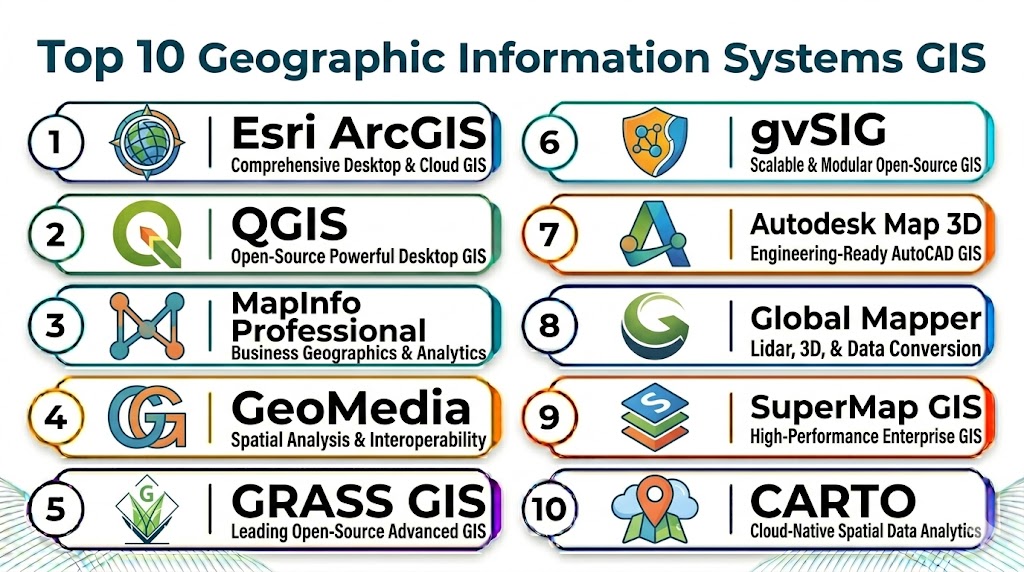
Top 10 Geographic Information Systems GIS Tools
#1 — Esri ArcGIS
Short description: Esri ArcGIS is the industry-leading GIS platform used across governments, utilities, transportation, public safety, and enterprise organizations for mapping, spatial analytics, geospatial data management, and location intelligence. It provides a comprehensive ecosystem including ArcGIS Pro, ArcGIS Online, and ArcGIS Enterprise.
Key Features
- Advanced spatial analysis and mapping
- 2D, 3D, and real-time visualization
- ArcGIS Online cloud platform
- Enterprise GIS and geodatabases
- Mobile GIS and field operations
- AI-assisted geospatial analytics
- Digital twin and IoT integration
Pros
- Industry-leading GIS ecosystem
- Extensive enterprise integrations
- Strong analytics and visualization capabilities
Cons
- Premium enterprise pricing
- Steep learning curve for beginners
- Resource-intensive for complex workloads
Platforms / Deployment
- Web / Windows / iOS / Android
- Cloud / On-premise / Hybrid
Security & Compliance
- Role-based access controls
- Encryption and audit logging
- Enterprise identity integration
Integrations & Ecosystem
ArcGIS integrates with ERP, CAD, IoT, BI, drone mapping, and public safety platforms to support enterprise geospatial workflows.
- Microsoft ecosystem integrations
- CAD and BIM systems
- IoT and sensor platforms
- Drone and satellite imagery tools
- Enterprise analytics platforms
Support & Community
- Extensive documentation and certification programs
- Large global GIS community
- Enterprise support and implementation services
#2 — QGIS
Short description: QGIS is a widely adopted open-source GIS platform used for mapping, spatial analysis, environmental studies, and research. It provides powerful geospatial capabilities without commercial licensing costs.
Key Features
- Open-source GIS platform
- Vector and raster analysis
- Plugin ecosystem and extensions
- Cartography and map creation
- Spatial database support
- Python scripting support
Pros
- Free and open-source
- Strong customization flexibility
- Large community ecosystem
Cons
- Enterprise governance varies by deployment
- Advanced support may require partners
- User interface can feel technical
Platforms / Deployment
- Windows / macOS / Linux
- Self-hosted / Local / Cloud
Security & Compliance
- Security depends on deployment configuration
- Role-based access through integrations
Integrations & Ecosystem
- PostGIS and spatial databases
- Python GIS libraries
- OpenStreetMap
- Remote sensing platforms
Support & Community
- Large open-source GIS community
- Extensive plugins and tutorials
- Community-driven documentation
#3 — MapInfo Pro
Short description: MapInfo Pro is a professional GIS and spatial analytics platform widely used in telecom, utilities, insurance, and government sectors for location intelligence and geographic analysis.
Key Features
- Spatial analysis and thematic mapping
- Business and demographic analysis
- Data visualization dashboards
- Location intelligence workflows
- Geospatial reporting
- Raster and vector support
Pros
- Strong business intelligence capabilities
- Useful for telecom and utility sectors
- Mature GIS platform
Cons
- Desktop-focused workflows
- Smaller ecosystem than ArcGIS
- Enterprise cloud features less extensive
Platforms / Deployment
- Windows
- On-premise / Hybrid
Security & Compliance
- Secure authentication and access controls
Integrations & Ecosystem
- Spatial databases
- Business intelligence platforms
- Enterprise reporting tools
Support & Community
- Vendor support and training resources
- GIS user community available
#4 — CARTO
Short description: CARTO is a cloud-native spatial analytics platform designed for enterprise location intelligence, geospatial data science, and cloud-scale analytics workflows.
Key Features
- Cloud-native spatial analytics
- Geospatial data warehousing
- Interactive dashboards
- AI-powered location intelligence
- Spatial SQL workflows
- Enterprise analytics integrations
Pros
- Excellent cloud scalability
- Strong analytics and BI integrations
- Modern developer-friendly workflows
Cons
- Less focused on desktop GIS
- Enterprise pricing can increase with scale
- Requires cloud analytics familiarity
Platforms / Deployment
- Web
- Cloud
Security & Compliance
- Encryption and role-based access
- Enterprise cloud security controls
Integrations & Ecosystem
- Snowflake
- BigQuery
- Databricks
- Tableau and Power BI
- Cloud data warehouses
Support & Community
- Enterprise support and onboarding
- Developer documentation and APIs
#5 — Mapbox
Short description: Mapbox provides customizable mapping APIs, developer tools, navigation services, and location intelligence workflows for mobile apps, logistics, transportation, and enterprise platforms.
Key Features
- Custom map design and APIs
- Navigation and routing services
- Real-time geospatial visualization
- Mobile SDKs
- Location analytics
- Vector tile support
Pros
- Strong developer ecosystem
- Excellent mobile and app integration
- Highly customizable maps
Cons
- Requires developer expertise
- Advanced enterprise use can become expensive
- Not a traditional full desktop GIS
Platforms / Deployment
- Web / iOS / Android
- Cloud
Security & Compliance
- Secure API authentication
- Enterprise access controls
Integrations & Ecosystem
- Mobile application platforms
- Navigation and logistics systems
- IoT and fleet management tools
Support & Community
- Developer documentation and APIs
- Enterprise support plans available
#6 — Maptitude
Short description: Maptitude is a GIS and mapping platform focused on business mapping, logistics optimization, demographic analysis, and territory planning.
Key Features
- Territory and route optimization
- Demographic mapping
- Business intelligence integration
- Logistics and routing analytics
- Data visualization dashboards
- Desktop GIS workflows
Pros
- Strong business-focused GIS features
- Good logistics analysis support
- Easier learning curve than enterprise GIS suites
Cons
- Smaller ecosystem than ArcGIS
- Limited advanced enterprise workflows
- Desktop-heavy environment
Platforms / Deployment
- Windows / Web
- On-premise / Cloud
Security & Compliance
- Secure authentication and permissions support
Integrations & Ecosystem
- CRM systems
- Logistics and routing platforms
- Business intelligence tools
Support & Community
- Vendor support and tutorials
- GIS training resources
#7 — Google Earth Pro
Short description: Google Earth Pro helps organizations visualize geographic data, satellite imagery, terrain, and location-based projects through an accessible geospatial visualization platform.
Key Features
- Satellite imagery visualization
- 3D terrain and mapping
- Geographic measurement tools
- KML and KMZ support
- Spatial visualization workflows
- Historical imagery access
Pros
- Easy-to-use interface
- Strong satellite imagery support
- Useful for visualization projects
Cons
- Limited enterprise GIS analysis
- Not suitable for advanced geoprocessing
- Integration capabilities limited
Platforms / Deployment
- Windows / macOS / Linux
- Desktop / Cloud services
Security & Compliance
- Standard authentication controls
Integrations & Ecosystem
- KML-based GIS workflows
- Google ecosystem integrations
Support & Community
- Public documentation and tutorials
- Large general user community
#8 — GRASS GIS
Short description: GRASS GIS is an open-source geospatial analysis platform widely used in environmental science, terrain analysis, remote sensing, and research workflows.
Key Features
- Raster and terrain analysis
- Environmental modeling
- Remote sensing workflows
- Spatial statistics
- Geospatial scripting support
- Advanced geoprocessing tools
Pros
- Powerful scientific analysis tools
- Open-source flexibility
- Strong research capabilities
Cons
- Technical learning curve
- User interface less modern
- Requires GIS expertise
Platforms / Deployment
- Windows / macOS / Linux
- Self-hosted / Local
Security & Compliance
- Depends on deployment configuration
Integrations & Ecosystem
- QGIS integration
- Python geospatial libraries
- Remote sensing tools
Support & Community
- Open-source research community
- Documentation and tutorials available
#9 — HERE Location Services
Short description: HERE Location Services provides enterprise mapping APIs, routing, geocoding, navigation, and spatial analytics capabilities for transportation, logistics, and mobility platforms.
Key Features
- Enterprise mapping APIs
- Routing and navigation
- Geocoding and tracking
- Fleet and mobility analytics
- Real-time traffic data
- Developer SDKs
Pros
- Strong transportation and mobility focus
- Excellent API ecosystem
- Good real-time location data
Cons
- Less comprehensive for desktop GIS
- Developer-centric workflows
- Enterprise pricing varies by usage
Platforms / Deployment
- Web / iOS / Android
- Cloud
Security & Compliance
- Secure API authentication
- Enterprise access controls
Integrations & Ecosystem
- Fleet management systems
- Transportation platforms
- Logistics and mobility apps
Support & Community
- Developer documentation and APIs
- Enterprise support plans
#10 — Global Mapper
Short description: Global Mapper provides GIS, terrain analysis, LiDAR processing, and geospatial visualization capabilities for mapping professionals, engineers, and environmental analysts.
Key Features
- Terrain and elevation analysis
- LiDAR processing workflows
- Raster and vector support
- 3D visualization
- Geospatial editing tools
- Spatial data conversion
Pros
- Strong terrain and LiDAR capabilities
- Cost-effective GIS functionality
- Good data format support
Cons
- Smaller ecosystem than ArcGIS
- Enterprise collaboration features limited
- UI less modern than cloud-native platforms
Platforms / Deployment
- Windows
- Desktop / Hybrid
Security & Compliance
- Secure local deployment controls
Integrations & Ecosystem
- Remote sensing tools
- CAD systems
- Spatial databases
Support & Community
- Vendor documentation and training
- GIS support resources available
Comparison Table
| Tool Name | Best For | Platform(s) Supported | Deployment | Standout Feature | Public Rating |
|---|---|---|---|---|---|
| Esri ArcGIS | Enterprise GIS | Web / Windows / Mobile | Cloud / Hybrid | Comprehensive geospatial platform | N/A |
| QGIS | Open-source GIS | Windows / macOS / Linux | Self-hosted / Cloud | Open-source flexibility | N/A |
| MapInfo Pro | Business GIS | Windows | On-premise / Hybrid | Business intelligence mapping | N/A |
| CARTO | Cloud spatial analytics | Web | Cloud | Spatial analytics for cloud data | N/A |
| Mapbox | Developer mapping | Web / Mobile | Cloud | Custom map APIs | N/A |
| Maptitude | Business mapping | Windows / Web | Cloud / Hybrid | Logistics and routing analysis | N/A |
| Google Earth Pro | Visualization | Windows / macOS / Linux | Desktop / Cloud | Satellite imagery visualization | N/A |
| GRASS GIS | Scientific GIS | Windows / macOS / Linux | Self-hosted | Environmental analysis | N/A |
| HERE Location Services | Mobility and routing | Web / Mobile | Cloud | Real-time navigation APIs | N/A |
| Global Mapper | Terrain and LiDAR analysis | Windows | Desktop / Hybrid | LiDAR processing | N/A |
Evaluation & Scoring of Geographic Information Systems GIS Tools
| Tool Name | Core (25%) | Ease (15%) | Integrations (15%) | Security (10%) | Performance (10%) | Support (10%) | Value (15%) | Weighted Total (0–10) |
|---|---|---|---|---|---|---|---|---|
| Esri ArcGIS | 10 | 7 | 10 | 9 | 9 | 9 | 7 | 8.9 |
| QGIS | 8 | 7 | 8 | 7 | 8 | 8 | 10 | 8.0 |
| MapInfo Pro | 8 | 7 | 7 | 8 | 8 | 7 | 7 | 7.5 |
| CARTO | 8 | 8 | 9 | 8 | 9 | 8 | 7 | 8.1 |
| Mapbox | 8 | 7 | 9 | 8 | 9 | 8 | 7 | 8.0 |
| Maptitude | 7 | 8 | 7 | 7 | 7 | 7 | 8 | 7.3 |
| Google Earth Pro | 6 | 9 | 6 | 7 | 7 | 7 | 9 | 7.3 |
| GRASS GIS | 8 | 6 | 7 | 7 | 8 | 7 | 9 | 7.6 |
| HERE Location Services | 8 | 8 | 9 | 8 | 9 | 8 | 7 | 8.1 |
| Global Mapper | 7 | 7 | 7 | 7 | 8 | 7 | 8 | 7.3 |
Weighted scores compare geospatial analysis depth, usability, integrations, security, scalability, support, and value across GIS environments. Higher scores usually indicate stronger enterprise readiness and broader ecosystem support. Organizations should prioritize platforms based on their operational workflows, geospatial maturity, and deployment requirements.
Which Geographic Information Systems GIS Tool Is Right for You?
Solo / Freelancer
- QGIS, Google Earth Pro, or Global Mapper for affordable mapping and geospatial analysis workflows.
SMB
- Maptitude, Mapbox, or QGIS for logistics, business intelligence, and custom mapping projects.
Mid-Market
- CARTO, MapInfo Pro, or HERE Location Services for cloud analytics and enterprise mapping workflows.
Enterprise
- Esri ArcGIS, CARTO, or Oracle-integrated GIS ecosystems for large-scale geospatial analytics and operational intelligence.
Budget vs Premium
- Budget: QGIS, GRASS GIS, Google Earth Pro
- Premium: Esri ArcGIS, CARTO, MapInfo Pro
Feature Depth vs Ease of Use
- High feature depth: ArcGIS, GRASS GIS, CARTO
- High ease of use: Google Earth Pro, Maptitude, Mapbox
Integrations & Scalability
- Extensive: ArcGIS, CARTO, Mapbox
- Limited: Google Earth Pro, Global Mapper
Security & Compliance Needs
- Enterprise-grade: ArcGIS, CARTO, HERE Location Services
- Open-source and research-focused: QGIS, GRASS GIS
Frequently Asked Questions
1. What is a Geographic Information System GIS?
A GIS platform helps organizations capture, analyze, visualize, and manage spatial and geographic data. It combines mapping with analytics to support planning, operations, infrastructure management, and decision-making. GIS is widely used in government, utilities, transportation, environmental science, and logistics.
2. What industries use GIS software?
GIS is used across government, utilities, transportation, telecom, healthcare, logistics, public safety, environmental science, agriculture, and real estate. Organizations use GIS for location intelligence, infrastructure planning, mapping, and operational analysis. The use cases vary depending on industry workflows and spatial data requirements.
3. Is QGIS a good alternative to ArcGIS?
QGIS is a strong open-source alternative for many GIS workflows and provides extensive geospatial analysis capabilities. However, ArcGIS offers a larger enterprise ecosystem, broader integrations, and advanced enterprise management tools. The best choice depends on budget, scalability, and organizational requirements.
4. What is spatial analysis?
Spatial analysis uses geographic data to identify patterns, relationships, distances, risks, and trends based on location. It helps organizations make better operational and planning decisions. Common examples include route optimization, hotspot detection, infrastructure planning, and environmental modeling.
5. Can GIS platforms integrate with business systems?
Yes, many GIS platforms integrate with ERP, CRM, CAD, IoT, analytics, and business intelligence systems. Enterprise GIS solutions often connect with operational data sources to support real-time decision-making. Integration capabilities vary by vendor and deployment model.
6. What is cloud GIS?
Cloud GIS delivers geospatial capabilities through cloud infrastructure and web-based services rather than only desktop environments. It improves scalability, collaboration, and remote accessibility. Many organizations now use cloud GIS for real-time analytics and distributed teams.
7. Are GIS systems secure?
Enterprise GIS platforms typically provide encryption, role-based access controls, secure authentication, audit logging, and governance features. Security requirements vary by industry and deployment type. Organizations should validate data protection and compliance controls before deployment.
8. What are digital twins in GIS?
Digital twins combine GIS, sensors, IoT, and real-time operational data to create virtual representations of physical infrastructure or environments. Governments and enterprises use them for smart cities, utilities, transportation systems, and infrastructure management. GIS is often the foundation for spatial digital twins.
9. Which GIS platform is best for developers?
Mapbox and HERE Location Services are popular for developer-focused mapping APIs, routing, and custom geospatial applications. They provide SDKs and APIs for web and mobile integration. Developer teams often choose them for highly customized mapping experiences.
10. Which GIS platform is best for enterprise organizations?
Esri ArcGIS remains the leading enterprise GIS platform because of its extensive ecosystem, integrations, analytics, and operational capabilities. However, organizations may also evaluate CARTO, HERE, or open-source combinations depending on analytics requirements, cloud strategy, and budget. A pilot deployment with real spatial workflows is recommended before large-scale adoption.
Conclusion
Geographic Information Systems GIS platforms help organizations turn spatial data into operational intelligence through mapping, analytics, visualization, and real-time geospatial workflows. Smaller teams and researchers may benefit from QGIS, GRASS GIS, or Google Earth Pro for affordable and flexible geospatial analysis, while mid-sized organizations can evaluate MapInfo Pro, Maptitude, or HERE Location Services for business intelligence and operational mapping. Enterprise organizations should consider Esri ArcGIS, CARTO, or cloud-native geospatial ecosystems for advanced analytics, digital twins, infrastructure management, and large-scale spatial operations. Start by identifying your mapping and analytics goals, shortlist 2–3 GIS platforms, test integrations with operational systems, validate performance and usability, then scale after training and workflow optimization.
