Introduction
Intranet Platforms are digital workplace solutions designed to centralize internal communication, collaboration, knowledge sharing, employee engagement, and company resources within a single environment. Modern intranet systems go far beyond static company portals by integrating messaging, document management, workflow automation, AI-powered search, employee recognition, and business applications into a unified employee experience platform.
Organizations use intranet platforms to improve internal communication, support hybrid workforces, centralize knowledge bases, streamline onboarding, manage policies and documents, enable collaboration across departments, and boost employee engagement. Buyers evaluating intranet platforms should focus on usability, mobile experience, integrations, AI capabilities, governance controls, security, scalability, analytics, deployment flexibility, and content management features. Modern intranet trends are also emphasizing AI-driven knowledge discovery, personalized employee experiences, and mobile-first communication for frontline workers.
Best for: Enterprises, hybrid workplaces, global organizations, frontline workforce communication, HR teams, IT departments, and businesses looking to improve employee engagement and collaboration.
Not ideal for: Very small businesses with minimal internal collaboration needs or organizations relying solely on simple shared drives and email communication.
Key Trends in Intranet Platforms
- AI-powered enterprise search and knowledge discovery are becoming core platform features
- Mobile-first intranet experiences are growing for frontline and distributed workers
- Personalized employee dashboards are replacing one-size-fits-all portals
- Microsoft 365 and Google Workspace integrations dominate modern intranet deployments
- Employee engagement and social-style communication features are increasingly important
- Workflow automation and low-code customization are expanding rapidly
- Governance, lifecycle management, and content ownership controls are becoming critical for enterprise adoption
- AI-generated summaries and intelligent recommendations are improving productivity
- Analytics and employee sentiment tracking are becoming standard features
- Hybrid and remote work strategies continue driving intranet modernization investments
How We Selected These Tools
- Evaluated adoption across enterprise, mid-market, and SMB environments
- Assessed communication, collaboration, and knowledge management capabilities
- Reviewed AI-powered search, personalization, and automation features
- Analyzed integrations with Microsoft 365, Google Workspace, and enterprise systems
- Evaluated scalability for global and distributed organizations
- Assessed security, governance, and compliance controls
- Reviewed mobile experience and frontline worker support
- Evaluated customization and branding flexibility
- Assessed analytics, reporting, and employee engagement capabilities
- Considered ecosystem maturity, support quality, and overall long-term value
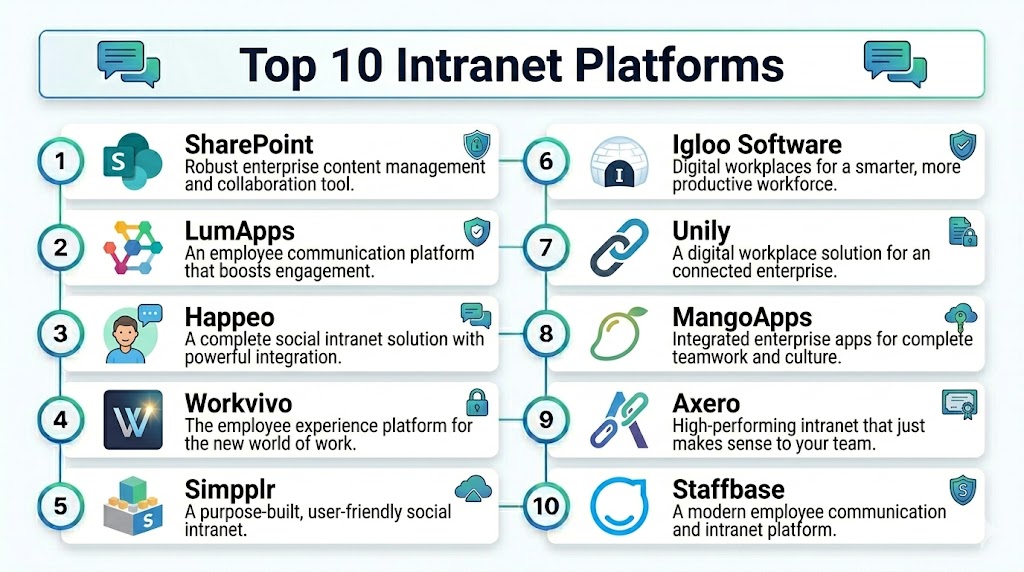
Top 10 Intranet Platforms
1 — Microsoft SharePoint
Short description: Microsoft SharePoint is one of the most widely adopted intranet platforms, providing document management, collaboration, workflow automation, and knowledge sharing deeply integrated into Microsoft 365 environments. It is widely used by enterprises and government organizations.
Key Features
- Enterprise document management
- AI-powered search and knowledge discovery
- Workflow automation with Power Automate
- Team collaboration sites
- Integration with Microsoft Teams and Viva
- Content management and governance
- Low-code customization
Pros
- Deep Microsoft ecosystem integration
- Highly scalable for enterprises
- Strong workflow automation capabilities
Cons
- Requires technical expertise for customization
- User experience depends heavily on implementation quality
- Mobile experience can feel inconsistent
Platforms / Deployment
- Web, Windows, macOS, iOS, Android
- Cloud, Hybrid
Security & Compliance
- SSO, MFA
- Microsoft compliance ecosystem
- Governance and audit logging
Integrations & Ecosystem
SharePoint integrates deeply with Microsoft collaboration and productivity ecosystems.
- Microsoft Teams
- OneDrive
- Viva Engage
- Power BI
- Dynamics 365
Support & Community
Large enterprise ecosystem with extensive documentation and implementation partners.
2 — Workvivo
Short description: Workvivo is a social-style intranet platform focused on employee engagement, culture building, communication, and collaboration for distributed and hybrid workforces.
Key Features
- Social-style employee feeds
- Employee recognition tools
- Internal communication campaigns
- AI-powered content recommendations
- Mobile-first collaboration
- Video and live event integration
- Employee engagement analytics
Pros
- Excellent employee engagement experience
- Mobile-first design for frontline teams
- Strong communication and culture features
Cons
- Advanced workflow automation is limited
- Enterprise customization may require support
- Premium pricing for larger deployments
Platforms / Deployment
- Web, iOS, Android
- Cloud
Security & Compliance
- SSO
- Enterprise governance controls
Integrations & Ecosystem
Designed for modern employee communication ecosystems.
- Microsoft 365
- Zoom
- Google Workspace
- HR systems
- Slack
Support & Community
Strong onboarding resources and growing enterprise adoption.
3 — LumApps
Short description: LumApps is a cloud-based intranet platform built around Google Workspace and Microsoft 365 environments with strong personalization and knowledge-sharing capabilities.
Key Features
- Personalized employee dashboards
- AI-powered enterprise search
- Knowledge management
- Employee communities
- Mobile intranet access
- Content targeting and personalization
- Multi-language support
Pros
- Excellent Google Workspace integration
- Strong personalization features
- Good mobile experience
Cons
- Advanced customization may require technical support
- Enterprise pricing structure
- Smaller ecosystem than SharePoint
Platforms / Deployment
- Web, iOS, Android
- Cloud
Security & Compliance
- SSO
- Enterprise access controls
- Audit logging
Integrations & Ecosystem
Works closely with productivity and collaboration systems.
- Google Workspace
- Microsoft 365
- Salesforce
- Slack
Support & Community
Strong implementation support and enterprise consulting ecosystem.
4 — Simpplr
Short description: Simpplr is an AI-powered employee experience platform focused on communication, engagement, and knowledge discovery for modern organizations.
Key Features
- AI-powered enterprise search
- Personalized content delivery
- Employee engagement analytics
- Content governance tools
- Mobile collaboration
- Workflow automation
- Knowledge management
Pros
- Strong AI-driven personalization
- User-friendly employee experience
- Good analytics and engagement insights
Cons
- Premium enterprise pricing
- Limited self-hosted deployment options
- Some advanced integrations require setup planning
Platforms / Deployment
- Web, iOS, Android
- Cloud
Security & Compliance
- MFA
- Enterprise governance
- Compliance controls
Integrations & Ecosystem
Supports integrations with enterprise productivity ecosystems.
- Microsoft 365
- Google Workspace
- Salesforce
- Slack
Support & Community
Enterprise support with strong onboarding and training resources.
5 — Staffbase
Short description: Staffbase is a mobile-first intranet and employee communication platform designed to improve communication across deskless and frontline workforces.
Key Features
- Mobile employee communication
- Internal newsletters
- Employee feedback tools
- Personalized content targeting
- Analytics dashboards
- Multi-language support
- Employee surveys
Pros
- Excellent frontline workforce communication
- Strong mobile app experience
- Good employee engagement features
Cons
- Advanced collaboration features are limited
- Less suitable for complex document management
- Premium pricing for enterprise deployments
Platforms / Deployment
- Web, iOS, Android
- Cloud
Security & Compliance
- Enterprise governance controls
- SSO
Integrations & Ecosystem
Supports enterprise communication and HR ecosystems.
- Microsoft 365
- HR platforms
- Slack
- Salesforce
Support & Community
Strong enterprise communication-focused support ecosystem.
6 — Interact
Short description: Interact is an enterprise intranet platform focused on knowledge sharing, personalized communication, and intelligent content discovery.
Key Features
- Intelligent enterprise search
- Personalized dashboards
- Community collaboration spaces
- Content governance
- Employee engagement analytics
- AI-driven recommendations
- Knowledge management
Pros
- Strong usability and navigation
- Excellent content discovery capabilities
- Good governance controls
Cons
- Enterprise implementation complexity
- Premium pricing structure
- Requires governance planning for large deployments
Platforms / Deployment
- Web, iOS, Android
- Cloud
Security & Compliance
- SSO
- Governance and audit controls
Integrations & Ecosystem
Supports enterprise collaboration and productivity ecosystems.
- Microsoft 365
- Google Workspace
- Salesforce
- Teams
Support & Community
Enterprise-focused support with implementation consulting.
7 — Unily
Short description: Unily provides highly customizable enterprise intranet experiences with advanced branding, communication, and AI-powered collaboration capabilities.
Key Features
- AI-powered personalization
- Enterprise branding customization
- Content management
- Employee engagement tools
- Multi-language support
- Workflow automation
- Advanced analytics
Pros
- Highly customizable enterprise experiences
- Strong global workforce support
- Excellent design flexibility
Cons
- Higher enterprise pricing
- Requires implementation expertise
- Complex administration for smaller teams
Platforms / Deployment
- Web, iOS, Android
- Cloud
Security & Compliance
- Enterprise governance controls
- SSO
- Compliance support
Integrations & Ecosystem
Integrates with major enterprise ecosystems.
- Microsoft 365
- Google Workspace
- Salesforce
- ServiceNow
Support & Community
Strong enterprise support and partner ecosystem.
8 — Happeo
Short description: Happeo is a Google Workspace-focused intranet platform combining social collaboration, knowledge sharing, and communication management.
Key Features
- Social intranet feeds
- AI-powered search
- Google Workspace integration
- Employee communities
- Knowledge management
- Mobile collaboration
- Content personalization
Pros
- Excellent Google Workspace integration
- Easy collaboration experience
- Strong employee communication features
Cons
- Less suitable for Microsoft-focused environments
- Smaller enterprise ecosystem
- Advanced governance capabilities are limited
Platforms / Deployment
- Web, iOS, Android
- Cloud
Security & Compliance
- SSO
- Enterprise access controls
Integrations & Ecosystem
Optimized for Google-based collaboration environments.
- Google Workspace
- Slack
- Jira
- Zoom
Support & Community
Growing ecosystem with strong Google-focused support.
9 — MangoApps
Short description: MangoApps combines intranet, employee communication, collaboration, and knowledge management into a unified digital workplace platform.
Key Features
- Unified employee hub
- Team collaboration spaces
- Knowledge management
- Employee recognition tools
- Workflow automation
- Mobile intranet
- Analytics dashboards
Pros
- Strong all-in-one workplace capabilities
- Good frontline and desk workforce support
- Flexible deployment options
Cons
- UI can feel busy for new users
- Advanced customization may require support
- Some enterprise integrations need additional setup
Platforms / Deployment
- Web, Windows, macOS, iOS, Android
- Cloud, Hybrid
Security & Compliance
- MFA
- Governance controls
- Enterprise access management
Integrations & Ecosystem
Supports broad workplace collaboration integrations.
- Microsoft 365
- Google Workspace
- Salesforce
- Zoom
Support & Community
Strong onboarding and customer support resources.
10 — ThoughtFarmer
Short description: ThoughtFarmer is an intranet platform focused on internal knowledge sharing, employee communication, and collaboration for distributed teams.
Key Features
- Knowledge management
- Employee communication
- Team collaboration
- Content publishing
- AI-powered search
- Employee directories
- Mobile intranet access
Pros
- Easy-to-use interface
- Strong knowledge-sharing capabilities
- Good onboarding experience
Cons
- Smaller ecosystem than enterprise leaders
- Limited advanced automation
- Enterprise scalability may require planning
Platforms / Deployment
- Web, iOS, Android
- Cloud
Security & Compliance
- SSO
- Access management controls
Integrations & Ecosystem
Supports collaboration and productivity integrations.
- Microsoft 365
- Google Workspace
- Slack
- CRM systems
Support & Community
Good customer support and implementation guidance.
Comparison Table Top 10
| Tool Name | Best For | Platform Supported | Deployment | Standout Feature | Public Rating |
|---|---|---|---|---|---|
| Microsoft SharePoint | Enterprise collaboration | Web, Windows, macOS, iOS, Android | Cloud, Hybrid | Deep Microsoft integration | N/A |
| Workvivo | Employee engagement | Web, iOS, Android | Cloud | Social-style communication | N/A |
| LumApps | Google Workspace organizations | Web, iOS, Android | Cloud | Personalized employee experiences | N/A |
| Simpplr | AI-powered employee experience | Web, iOS, Android | Cloud | AI-driven personalization | N/A |
| Staffbase | Frontline communication | Web, iOS, Android | Cloud | Mobile-first workforce communication | N/A |
| Interact | Knowledge sharing and governance | Web, iOS, Android | Cloud | Intelligent content discovery | N/A |
| Unily | Enterprise customization | Web, iOS, Android | Cloud | Advanced branding and customization | N/A |
| Happeo | Google-based collaboration | Web, iOS, Android | Cloud | Google Workspace integration | N/A |
| MangoApps | Unified digital workplace | Web, Windows, macOS, iOS, Android | Cloud, Hybrid | All-in-one employee hub | N/A |
| ThoughtFarmer | Knowledge management | Web, iOS, Android | Cloud | Easy knowledge sharing | N/A |
Evaluation & Scoring
| Tool Name | Core 25% | Ease 15% | Integrations 15% | Security 10% | Performance 10% | Support 10% | Value 15% | Weighted Total |
|---|---|---|---|---|---|---|---|---|
| Microsoft SharePoint | 10 | 6 | 10 | 9 | 9 | 9 | 8 | 8.75 |
| Workvivo | 8 | 9 | 8 | 8 | 8 | 8 | 8 | 8.10 |
| LumApps | 8 | 8 | 9 | 8 | 8 | 8 | 8 | 8.10 |
| Simpplr | 9 | 8 | 8 | 8 | 8 | 8 | 7 | 8.05 |
| Staffbase | 8 | 8 | 7 | 8 | 8 | 8 | 7 | 7.75 |
| Interact | 8 | 8 | 8 | 8 | 8 | 8 | 7 | 7.95 |
| Unily | 9 | 7 | 9 | 9 | 8 | 8 | 6 | 8.00 |
| Happeo | 8 | 8 | 8 | 7 | 8 | 7 | 8 | 7.80 |
| MangoApps | 8 | 7 | 8 | 8 | 8 | 7 | 8 | 7.80 |
| ThoughtFarmer | 7 | 8 | 7 | 7 | 7 | 7 | 8 | 7.35 |
Higher weighted scores indicate stronger balance between collaboration capabilities, governance, integrations, usability, scalability, and employee experience features. Enterprise organizations generally prioritize governance, AI-powered search, and workflow automation, while SMBs often value simplicity and affordability. Businesses should evaluate ecosystem compatibility, workforce communication needs, and deployment flexibility before selecting a long-term intranet solution.
Which Tool Is Right for You
Solo / Freelancer
- ThoughtFarmer or Happeo for lightweight collaboration and knowledge sharing
SMB
- Workvivo or MangoApps for communication, engagement, and affordability
Mid-Market
- LumApps or Simpplr for AI-powered employee experiences and integrations
Enterprise
- Microsoft SharePoint or Unily for scalability, governance, and enterprise customization
Budget vs Premium
- Budget-friendly: ThoughtFarmer, MangoApps
- Premium: Microsoft SharePoint, Unily
Feature Depth vs Ease of Use
- Advanced enterprise capabilities: Microsoft SharePoint, Unily
- Easier employee adoption: Workvivo, LumApps
Integrations & Scalability
- Deep enterprise integrations: Microsoft SharePoint, LumApps
- Flexible collaboration ecosystems: MangoApps, Happeo
Security & Compliance Needs
- Strong enterprise governance: Microsoft SharePoint, Unily
- General workforce collaboration security: Workvivo, Interact
Frequently Asked Questions
1. What is an intranet platform
An intranet platform is a digital workplace solution that centralizes communication, collaboration, knowledge sharing, and employee resources inside an organization.
2. Why are intranet platforms important
They improve internal communication, streamline collaboration, support hybrid work, centralize company knowledge, and increase employee engagement.
3. Which intranet platform is best for enterprises
Microsoft SharePoint, Unily, and LumApps are among the strongest enterprise options because they provide governance, scalability, and advanced integrations.
4. Are mobile intranet experiences important
Yes, mobile-first experiences are increasingly important for frontline and distributed workforces that need access to communication and resources on the go.
5. Do modern intranet platforms use AI
Yes, many platforms now include AI-powered search, personalization, summaries, and content recommendations to improve productivity.
6. Can intranet platforms integrate with Microsoft 365 and Google Workspace
Most modern platforms integrate deeply with Microsoft 365, Google Workspace, and enterprise productivity systems.
7. Are self-hosted intranet platforms available
Yes, some vendors offer self-hosted or hybrid deployment options for organizations requiring greater control over data and governance.
8. Which industries benefit most from intranet platforms
Healthcare, finance, manufacturing, retail, government, technology, and global enterprises benefit heavily because they require centralized communication and collaboration.
9. How difficult is intranet implementation
Implementation complexity varies depending on customization, integrations, governance requirements, and workforce size. Enterprise deployments often require planning and consulting support.
10. How should organizations choose the right intranet platform
Businesses should evaluate integrations, usability, AI capabilities, governance controls, scalability, mobile support, and employee engagement features before selecting a platform.
Conclusion
Intranet Platforms have evolved into critical digital workplace solutions that centralize communication, collaboration, knowledge management, and employee engagement for modern organizations. SMBs often prioritize ease of use, affordability, and quick deployment, while enterprises require advanced governance, AI-powered knowledge discovery, workflow automation, and deep integration with existing productivity ecosystems. Mobile-first experiences, personalization, and intelligent search are increasingly differentiating leading platforms as organizations support hybrid and frontline workforces. Businesses should evaluate scalability, governance controls, ecosystem compatibility, employee experience, and deployment flexibility before making a long-term investment. The most effective strategy is to shortlist a few platforms, run pilot deployments, validate employee adoption and integration workflows, and ensure alignment with broader digital workplace and collaboration strategies before organization-wide rollout.
