Introduction
Team Messaging Apps are collaboration platforms designed to help employees communicate in real time through chat, channels, voice calls, video meetings, and file sharing. These tools replace fragmented email conversations with organized workspaces that centralize communication, improve collaboration, and accelerate decision-making. Modern platforms also integrate with project management, productivity, CRM, and AI tools, making them a core part of digital workplace infrastructure.
Organizations use Team Messaging Apps for remote collaboration, cross-functional communication, project coordination, customer support escalation, internal announcements, and knowledge sharing. Buyers evaluating these platforms should consider usability, integrations, AI features, security, compliance, scalability, mobile support, search capabilities, automation workflows, and deployment flexibility. Enterprise organizations often prioritize governance and compliance, while SMBs focus on affordability and ease of use. Modern collaboration trends are also pushing vendors to integrate AI assistants, workflow automation, and cross-platform collaboration capabilities into messaging environments.
Best for: Remote teams, hybrid workplaces, startups, SMBs, enterprises, customer support teams, engineering organizations, and operational departments requiring real-time collaboration.
Not ideal for: Very small organizations relying primarily on email or businesses with limited digital collaboration requirements.
Key Trends in Team Messaging Apps
- AI assistants are being integrated into messaging platforms for summaries, automation, and workflow management
- Hybrid work continues driving demand for unified collaboration environments
- Enterprise security and governance controls are becoming standard expectations
- Mobile-first messaging experiences are improving frontline and deskless worker communication
- Cross-platform integrations with project management and CRM systems are expanding
- Secure messaging and encrypted communication are becoming more important for regulated industries
- Voice and video collaboration are increasingly integrated directly into messaging apps
- Self-hosted and on-premise deployment options are growing for privacy-focused organizations
- Workflow automation and chatbot integrations are reducing repetitive tasks
- Persistent searchable knowledge bases are improving long-term collaboration efficiency
How We Selected These Tools
- Evaluated market adoption across enterprise, SMB, and startup environments
- Assessed messaging, voice, video, and collaboration feature completeness
- Reviewed integrations with productivity, CRM, and project management platforms
- Evaluated scalability for large organizations and distributed teams
- Assessed security, encryption, compliance, and governance capabilities
- Reviewed usability across desktop and mobile platforms
- Considered AI-assisted productivity and automation features
- Evaluated deployment flexibility including cloud and self-hosted models
- Assessed support quality, onboarding resources, and ecosystem maturity
- Compared overall value and long-term collaboration capabilities
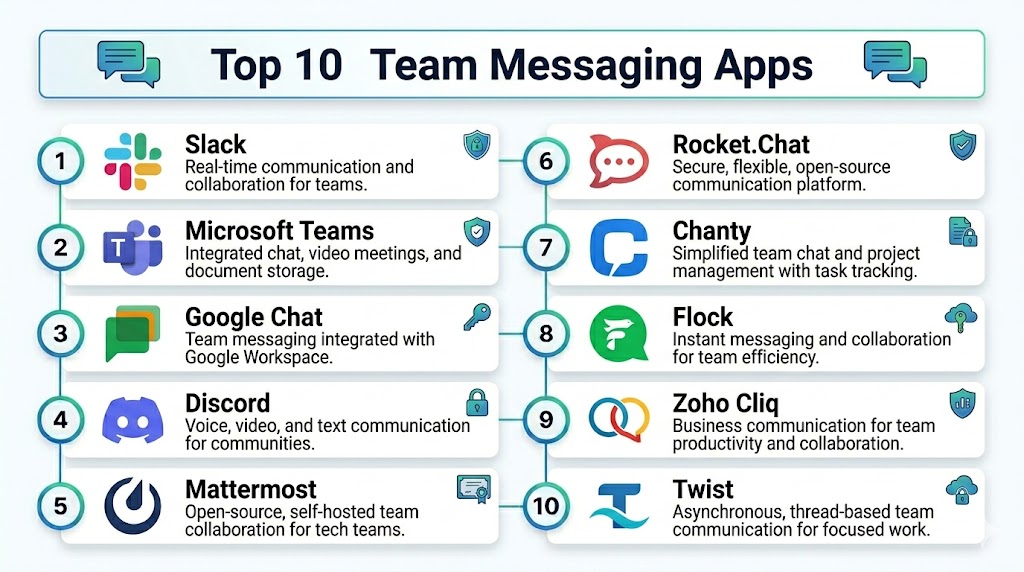
Top 10 Team Messaging Apps
1 — Slack
Short description: Slack is one of the most widely adopted team collaboration platforms, offering organized channels, messaging, file sharing, voice calls, and integrations with thousands of business applications. It is especially popular among startups, SMBs, and technology companies.
Key Features
- Channel-based communication
- Huddles and voice collaboration
- Workflow automation
- AI-powered summaries and search
- File sharing and collaboration
- App marketplace integrations
- Advanced notification controls
Pros
- Extremely strong integrations ecosystem
- User-friendly interface
- Excellent search and collaboration capabilities
Cons
- Costs increase significantly at enterprise scale
- Message history limitations on free plans
- Notification overload can become an issue
Platforms / Deployment
- Web, Windows, macOS, Linux, iOS, Android
- Cloud
Security & Compliance
- SSO, MFA
- Enterprise governance controls
- Audit logging
Integrations & Ecosystem
Slack has one of the largest collaboration ecosystems available.
- Google Workspace
- Microsoft 365
- Jira
- Salesforce
- Zoom
Support & Community
Large global user community with extensive onboarding documentation and enterprise support.
2 — Microsoft Teams
Short description: Microsoft Teams is an enterprise collaboration hub integrated deeply with Microsoft 365, combining messaging, meetings, file sharing, and workflow collaboration in a centralized environment.
Key Features
- Persistent team messaging
- Integrated video conferencing
- Microsoft 365 collaboration
- AI-powered Copilot features
- File sharing and collaboration
- Enterprise governance controls
- Workflow integrations
Pros
- Deep Microsoft ecosystem integration
- Strong enterprise security and compliance
- Excellent meeting and collaboration capabilities
Cons
- Can feel complex for new users
- Performance may vary in large organizations
- Requires Microsoft ecosystem familiarity
Platforms / Deployment
- Web, Windows, macOS, Linux, iOS, Android
- Cloud
Security & Compliance
- MFA
- Microsoft compliance ecosystem
- Enterprise governance
Integrations & Ecosystem
Integrated tightly with Microsoft productivity and enterprise systems.
- Microsoft 365
- SharePoint
- OneDrive
- Power BI
- Dynamics 365
Support & Community
Large enterprise ecosystem with extensive support and training resources.
3 — Google Chat
Short description: Google Chat is a lightweight messaging and collaboration platform integrated into Google Workspace, ideal for teams already using Gmail and Google productivity applications.
Key Features
- Spaces and threaded conversations
- Google Workspace integration
- File collaboration
- Video meetings through Google Meet
- Smart search functionality
- AI-powered assistance
- Mobile collaboration
Pros
- Very easy to use
- Seamless Gmail and Workspace integration
- Good SMB affordability
Cons
- Fewer advanced enterprise controls than competitors
- Smaller integrations ecosystem
- Limited customization
Platforms / Deployment
- Web, Windows, macOS, iOS, Android
- Cloud
Security & Compliance
- Google security infrastructure
- MFA
- Admin controls
Integrations & Ecosystem
Optimized for Google productivity environments.
- Gmail
- Google Drive
- Google Meet
- Google Docs
- Google Calendar
Support & Community
Strong Google Workspace documentation and support ecosystem.
4 — Zoom Team Chat
Short description: Zoom Team Chat combines persistent messaging with Zoom’s video collaboration capabilities, making it ideal for hybrid and remote teams.
Key Features
- Persistent messaging
- Integrated video meetings
- Team channels
- AI meeting summaries
- File sharing
- Workflow automation
- Mobile collaboration
Pros
- Excellent video meeting quality
- Unified communication experience
- Easy remote collaboration
Cons
- Messaging features are less mature than Slack
- Enterprise administration can become complex
- Heavy reliance on Zoom ecosystem
Platforms / Deployment
- Web, Windows, macOS, iOS, Android
- Cloud
Security & Compliance
- Encryption controls
- MFA
- Enterprise admin management
Integrations & Ecosystem
Works with productivity and communication ecosystems.
- Google Workspace
- Microsoft 365
- Salesforce
- Slack integrations
Support & Community
Strong onboarding and enterprise support resources.
5 — Cisco Webex
Short description: Cisco Webex provides secure enterprise communication with messaging, meetings, calling, and collaboration capabilities for large organizations.
Key Features
- Secure team messaging
- Enterprise video conferencing
- AI-powered collaboration
- File sharing
- Whiteboarding
- Enterprise calling
- Workflow integrations
Pros
- Strong enterprise security
- Reliable video and voice performance
- Good compliance capabilities
Cons
- Interface can feel enterprise-heavy
- Higher cost for advanced features
- Smaller casual-user adoption
Platforms / Deployment
- Web, Windows, macOS, Linux, iOS, Android
- Cloud, Hybrid
Security & Compliance
- Encryption
- Enterprise governance
- Compliance controls
Integrations & Ecosystem
Integrated with enterprise collaboration ecosystems.
- Microsoft 365
- Google Workspace
- Salesforce
- Cisco ecosystem
Support & Community
Enterprise-grade support with strong global presence.
6 — Mattermost
Short description: Mattermost is an open-source team messaging platform designed for organizations requiring self-hosted collaboration and strong security controls.
Key Features
- Self-hosted messaging
- Channel-based collaboration
- Workflow automation
- File sharing
- Secure communication
- DevOps integrations
- Open-source customization
Pros
- Strong privacy and control
- Self-hosting flexibility
- Excellent for engineering teams
Cons
- Requires technical administration
- Smaller ecosystem than Slack or Teams
- UI less polished than mainstream competitors
Platforms / Deployment
- Web, Windows, macOS, Linux, iOS, Android
- Cloud, Self-hosted
Security & Compliance
- Encryption
- Role-based access controls
- Self-hosted governance
Integrations & Ecosystem
Popular among developer and DevOps teams.
- GitHub
- GitLab
- Jira
- Jenkins
- Kubernetes
Support & Community
Strong open-source developer community and enterprise support options.
7 — Rocket.Chat
Short description: Rocket.Chat is an open-source communication platform offering secure messaging, voice, and video collaboration with self-hosted deployment options.
Key Features
- Open-source messaging
- Omnichannel communication
- Voice and video collaboration
- Self-hosted deployment
- Workflow automation
- Custom integrations
- Team channels
Pros
- Strong privacy and control
- Flexible deployment models
- Highly customizable
Cons
- Requires technical expertise
- Smaller integrations ecosystem
- Setup complexity for enterprises
Platforms / Deployment
- Web, Windows, macOS, Linux, iOS, Android
- Cloud, Self-hosted
Security & Compliance
- Encryption
- Self-hosted security controls
- Role-based permissions
Integrations & Ecosystem
Supports developer and enterprise workflows.
- Jira
- GitHub
- LDAP
- CRM systems
Support & Community
Active open-source community with enterprise support available.
8 — Discord
Short description: Discord started as a gaming communication platform but has evolved into a collaboration and community messaging app used by startups, developer groups, and creative teams.
Key Features
- Persistent voice channels
- Team messaging
- Video streaming
- Community management
- File sharing
- Role management
- Bot integrations
Pros
- Excellent voice communication
- Highly engaging collaboration environment
- Strong community-building features
Cons
- Limited enterprise governance
- Less suitable for regulated industries
- Informal user experience
Platforms / Deployment
- Web, Windows, macOS, Linux, iOS, Android
- Cloud
Security & Compliance
- MFA
- Role-based permissions
Integrations & Ecosystem
Popular with developer and creative communities.
- Twitch
- YouTube
- Spotify
- Bots and APIs
Support & Community
Large and active global user community.
9 — Troop Messenger
Short description: Troop Messenger is a secure enterprise messaging platform focused on organizations requiring on-premise deployment and enhanced security controls.
Key Features
- Secure messaging
- On-premise deployment
- Screen sharing
- Voice and video collaboration
- Self-destructing chats
- Broadcast messaging
- Location tracking
Pros
- Strong security-focused deployment options
- Good for regulated industries
- Flexible communication features
Cons
- Smaller ecosystem compared to Slack or Teams
- UI less modern than major competitors
- Limited third-party integrations
Platforms / Deployment
- Web, Windows, macOS, Linux, iOS, Android
- Cloud, On-premise
Security & Compliance
- Encryption
- On-premise governance
- Secure chat controls
Integrations & Ecosystem
Focused on enterprise communication environments.
- LDAP
- Productivity tools
- Internal enterprise systems
Support & Community
Enterprise-focused support with growing adoption in regulated industries.
10 — Pumble
Short description: Pumble is a team messaging app designed for organizations seeking affordable communication tools with unlimited message history and collaboration features.
Key Features
- Unlimited chat history
- Channels and threads
- File sharing
- Voice and video calls
- Guest access
- Team collaboration
- Search functionality
Pros
- Affordable pricing
- Unlimited message history
- Easy onboarding for teams
Cons
- Smaller ecosystem than Slack or Teams
- Advanced enterprise features are limited
- Fewer automation capabilities
Platforms / Deployment
- Web, Windows, macOS, Linux, iOS, Android
- Cloud
Security & Compliance
- MFA
- Admin controls
Integrations & Ecosystem
Supports collaboration and productivity integrations.
- Google Workspace
- Microsoft 365
- Calendar integrations
Support & Community
Growing SMB-focused ecosystem with onboarding resources.
Comparison Table Top 10
| Tool Name | Best For | Platform Supported | Deployment | Standout Feature | Public Rating |
|---|---|---|---|---|---|
| Slack | Startups and SMB collaboration | Web, Windows, macOS, Linux, iOS, Android | Cloud | Massive integrations ecosystem | N/A |
| Microsoft Teams | Microsoft 365 organizations | Web, Windows, macOS, Linux, iOS, Android | Cloud | Deep Microsoft integration | N/A |
| Google Chat | Google Workspace users | Web, Windows, macOS, iOS, Android | Cloud | Native Google collaboration | N/A |
| Zoom Team Chat | Hybrid and remote teams | Web, Windows, macOS, iOS, Android | Cloud | Unified meetings and messaging | N/A |
| Cisco Webex | Enterprise communication | Web, Windows, macOS, Linux, iOS, Android | Cloud, Hybrid | Enterprise security and meetings | N/A |
| Mattermost | Secure engineering collaboration | Web, Windows, macOS, Linux, iOS, Android | Cloud, Self-hosted | Open-source self-hosting | N/A |
| Rocket.Chat | Privacy-focused collaboration | Web, Windows, macOS, Linux, iOS, Android | Cloud, Self-hosted | Flexible open-source messaging | N/A |
| Discord | Creative and community collaboration | Web, Windows, macOS, Linux, iOS, Android | Cloud | Persistent voice collaboration | N/A |
| Troop Messenger | Regulated enterprise communication | Web, Windows, macOS, Linux, iOS, Android | Cloud, On-premise | Secure on-premise deployment | N/A |
| Pumble | Affordable SMB messaging | Web, Windows, macOS, Linux, iOS, Android | Cloud | Unlimited message history | N/A |
Evaluation & Scoring
| Tool Name | Core 25% | Ease 15% | Integrations 15% | Security 10% | Performance 10% | Support 10% | Value 15% | Weighted Total |
|---|---|---|---|---|---|---|---|---|
| Slack | 9 | 9 | 10 | 8 | 9 | 9 | 7 | 8.85 |
| Microsoft Teams | 9 | 7 | 10 | 9 | 9 | 9 | 8 | 8.80 |
| Google Chat | 7 | 9 | 8 | 8 | 8 | 8 | 9 | 8.00 |
| Zoom Team Chat | 8 | 8 | 8 | 8 | 9 | 8 | 8 | 8.10 |
| Cisco Webex | 8 | 7 | 8 | 9 | 9 | 8 | 7 | 7.95 |
| Mattermost | 8 | 6 | 7 | 9 | 8 | 7 | 8 | 7.60 |
| Rocket.Chat | 8 | 6 | 7 | 9 | 8 | 7 | 8 | 7.60 |
| Discord | 7 | 9 | 6 | 6 | 8 | 7 | 9 | 7.55 |
| Troop Messenger | 7 | 7 | 6 | 9 | 8 | 7 | 7 | 7.20 |
| Pumble | 7 | 8 | 6 | 7 | 7 | 7 | 9 | 7.35 |
Higher weighted scores indicate stronger balance between collaboration features, integrations, security, usability, scalability, and overall value. Enterprise organizations typically prioritize governance, compliance, and integrations, while SMBs often value affordability and ease of deployment. Teams should evaluate communication workflows, ecosystem compatibility, and long-term scalability before choosing a platform.
Which Tool Is Right for You
Solo / Freelancer
- Discord or Google Chat for lightweight collaboration and affordability
SMB
- Slack or Pumble for affordable messaging, integrations, and easy onboarding
Mid-Market
- Zoom Team Chat or Google Chat for balanced collaboration and productivity integrations
Enterprise
- Microsoft Teams or Cisco Webex for governance, scalability, and enterprise-grade security
Budget vs Premium
- Budget-friendly: Pumble, Google Chat
- Premium: Slack Enterprise Grid, Cisco Webex
Feature Depth vs Ease of Use
- Advanced enterprise collaboration: Microsoft Teams, Cisco Webex
- Simpler onboarding and usability: Slack, Google Chat
Integrations & Scalability
- Deep enterprise integrations: Slack, Microsoft Teams
- Open-source scalability: Mattermost, Rocket.Chat
Security & Compliance Needs
- Strong enterprise governance: Microsoft Teams, Cisco Webex
- Privacy-focused collaboration: Mattermost, Rocket.Chat
Frequently Asked Questions
1. What are team messaging apps
Team messaging apps are collaboration platforms that allow employees to communicate through channels, direct messages, voice calls, video meetings, and file sharing in real time.
2. Why are team messaging apps important
These platforms improve communication speed, reduce reliance on email, centralize collaboration, and help distributed teams stay aligned across projects and workflows.
3. Which team messaging app is best for enterprises
Microsoft Teams, Slack, and Cisco Webex are among the strongest enterprise options because they provide governance, compliance, and scalability features.
4. Are open-source messaging platforms available
Yes, Mattermost and Rocket.Chat are popular open-source messaging platforms offering self-hosted deployment and strong privacy controls.
5. Can these apps integrate with project management tools
Most platforms integrate with Jira, Trello, Asana, ClickUp, and other project management systems to centralize workflows.
6. Are team messaging apps secure
Enterprise platforms provide encryption, MFA, audit logging, and governance controls to secure communication and support compliance requirements.
7. Which platform is best for remote teams
Slack, Zoom Team Chat, and Microsoft Teams are widely used by remote and hybrid organizations because they combine messaging with meetings and collaboration tools.
8. Do team messaging apps support AI features
Yes, many platforms now include AI-powered summaries, search, workflow automation, and meeting assistance capabilities.
9. What industries benefit most from these platforms
Technology companies, healthcare providers, finance organizations, education institutions, and customer support teams benefit heavily from centralized communication tools.
10. How should organizations choose the right messaging app
Businesses should evaluate integrations, usability, security, scalability, mobile experience, automation capabilities, and deployment flexibility before selecting a platform.
Conclusion
Team Messaging Apps have become foundational collaboration infrastructure for modern organizations operating in remote, hybrid, and distributed environments. SMBs typically prioritize ease of use, affordability, and integrations, while enterprises require governance, compliance, scalability, and advanced collaboration capabilities. AI-powered workflows, integrated meetings, automation, and searchable knowledge sharing are becoming major differentiators in the market. Open-source and self-hosted platforms are also growing in importance for privacy-focused organizations that require greater control over communication infrastructure. Businesses should shortlist several platforms, test collaboration workflows, validate integrations with productivity and project management systems, and confirm scalability and governance capabilities before making a long-term deployment decision across teams and departments.
