Introduction
Government permitting and licensing systems help public sector agencies manage applications, approvals, inspections, renewals, payments, documents, and citizen communication in one digital platform. These systems are commonly used for building permits, business licenses, zoning approvals, trade licenses, health permits, professional licenses, environmental permits, and code enforcement workflows.
They reduce manual paperwork, improve processing speed, increase transparency, and help agencies deliver better citizen services. Instead of relying on emails, spreadsheets, and in-person submissions, agencies can use digital portals to accept applications, route approvals, collect fees, schedule inspections, and track compliance.
Real-world use cases:
- Online building permit applications
- Business license renewals
- Planning and zoning approvals
- Inspection scheduling and status tracking
- Code enforcement and compliance workflows
Evaluation Criteria for Buyers:
- Online application and citizen portal
- Workflow routing and approvals
- Inspection scheduling and field mobility
- Payment processing and fee management
- Document and records management
- GIS and parcel integration
- Reporting and compliance dashboards
- Security, audit logs, and role-based access
- Integration with finance, ERP, and CRM systems
- Scalability for city, county, and state agencies
Best for: Municipal governments, counties, state agencies, planning departments, building departments, licensing boards, code enforcement teams, and public works agencies.
Not ideal for: Very small agencies with low application volume that can manage basic permitting through simple forms and manual review workflows.
Key Trends in Government Permitting & Licensing Systems
- Citizen self-service portals for online applications
- Digital plan review and document collaboration
- Mobile inspection apps for field officers
- GIS-based parcel and zoning integration
- Automated fee calculation and online payments
- Workflow automation for approvals and renewals
- Cloud deployment for faster modernization
- AI-assisted application review and document routing
- Real-time status tracking for applicants
- Stronger audit trails and compliance reporting
How We Selected These Tools
- Adoption across local, regional, and state government agencies
- Depth of permitting, licensing, inspection, and renewal workflows
- Citizen portal usability and self-service capabilities
- Integration with GIS, finance, ERP, and document systems
- Security, audit logging, and public sector readiness
- Mobile inspection and field access capabilities
- Reporting, dashboards, and compliance visibility
- Scalability for multi-department government operations
- Workflow automation and configuration flexibility
- Vendor maturity, implementation support, and training resources
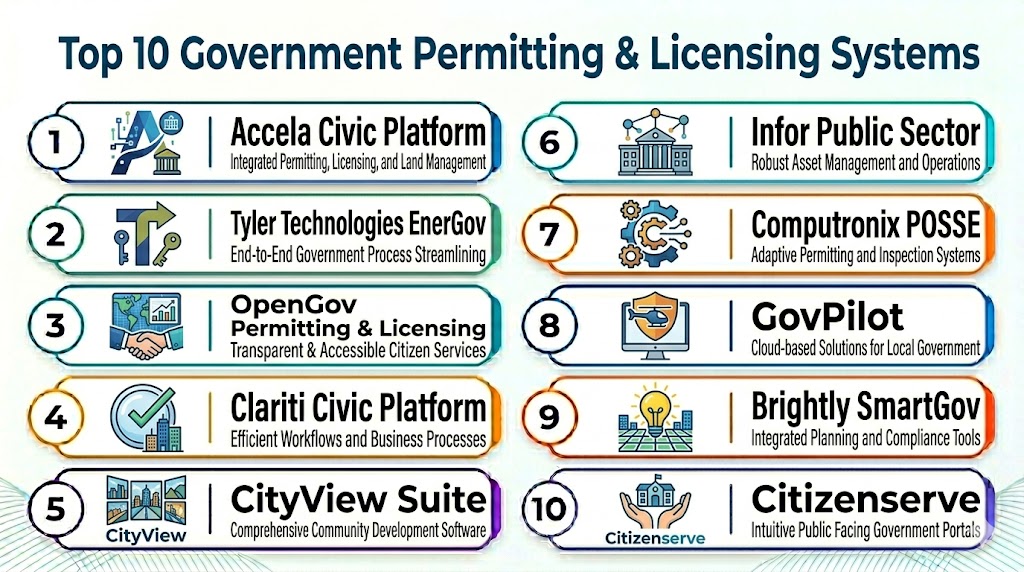
Top 10 Government Permitting & Licensing Systems
#1 — Accela Civic Platform
Short description: Accela Civic Platform is a widely used government permitting and licensing system for cities, counties, and state agencies. It supports building permits, planning, licensing, code enforcement, inspections, payments, and citizen engagement workflows.
Key Features
- Online permit and license applications
- Citizen self-service portal
- Workflow routing and approvals
- Inspection scheduling and mobile access
- Fee calculation and payment processing
- GIS and parcel data integration
Pros
- Strong public sector adoption
- Broad permitting and licensing capabilities
- Scalable for multi-department agencies
Cons
- Implementation can be complex
- Premium pricing for larger deployments
- Configuration requires planning and training
Platforms / Deployment
- Web / Mobile
- Cloud / Hybrid
Security & Compliance
- Encryption and role-based access
- Audit logging support
Integrations & Ecosystem
Accela integrates with GIS, finance, document management, payment, and citizen engagement systems to support connected government workflows.
- GIS platforms
- Payment processors
- Finance and ERP systems
- Document management tools
Support & Community
- Enterprise implementation support
- Training resources and documentation
- Public sector customer community
#2 — Tyler Technologies EnerGov
Short description: Tyler EnerGov helps government agencies manage permitting, licensing, inspections, planning, zoning, and code enforcement. It is especially useful for agencies already using Tyler public sector systems.
Key Features
- Permit and license application processing
- Planning and zoning workflows
- Inspection scheduling and mobile inspections
- Code enforcement case tracking
- Online citizen portal
- Reporting and dashboards
Pros
- Strong municipal government ecosystem
- Good integration with Tyler systems
- Useful for planning and code enforcement workflows
Cons
- Implementation may require services
- Interface can feel traditional
- Advanced configuration may add cost
Platforms / Deployment
- Web / Mobile
- Cloud / Hybrid
Security & Compliance
- Encryption and access controls
- Audit logging support
Integrations & Ecosystem
- Tyler finance systems
- GIS platforms
- Payment systems
- Document management tools
Support & Community
- Public sector support team
- Training and implementation resources
#3 — OpenGov Permitting & Licensing
Short description: OpenGov Permitting & Licensing provides cloud-based workflows for permits, licenses, inspections, code enforcement, and citizen applications. It is designed for modern government teams looking for easier online services and configurable workflows.
Key Features
- Online application portals
- Configurable approval workflows
- Inspection scheduling
- License renewal management
- Digital payment support
- Reporting dashboards
Pros
- Modern cloud interface
- Good workflow configurability
- Strong citizen self-service experience
Cons
- Advanced use cases may require setup
- Best fit for cloud-ready agencies
- Some integrations may need configuration
Platforms / Deployment
- Web / Mobile
- Cloud
Security & Compliance
- Encryption and role-based access
- Audit trail support
Integrations & Ecosystem
- ERP and finance systems
- GIS tools
- Payment processors
- Reporting platforms
Support & Community
- Onboarding assistance
- Knowledge base and support resources
#4 — Clariti Community Development
Short description: Clariti Community Development supports government permitting, licensing, planning, inspections, and code enforcement through configurable workflows and digital service portals.
Key Features
- Permit and license management
- Planning and zoning workflows
- Inspection management
- Citizen portal
- Code enforcement support
- Reporting and analytics
Pros
- Strong community development focus
- Flexible workflow configuration
- Good portal experience
Cons
- Implementation planning required
- Smaller ecosystem than largest vendors
- Advanced reporting may require configuration
Platforms / Deployment
- Web / Mobile
- Cloud
Security & Compliance
- Encryption and role-based access
- Audit logging support
Integrations & Ecosystem
- GIS systems
- Finance and payment systems
- Document management platforms
Support & Community
- Customer support and onboarding
- Documentation and training resources
#5 — CivicPlus Community Development
Short description: CivicPlus Community Development provides permitting, licensing, inspections, and citizen engagement workflows for local governments. It helps agencies digitize applications and streamline public-facing services.
Key Features
- Online permitting portal
- License application workflows
- Inspection tracking
- Citizen communication tools
- Fee collection support
- Reporting dashboards
Pros
- Good citizen engagement capabilities
- Useful for small and mid-sized governments
- Easy public-facing portal experience
Cons
- May be less deep for complex enterprise agencies
- Integration setup varies
- Advanced automation may require add-ons
Platforms / Deployment
- Web / Mobile
- Cloud
Security & Compliance
- Encryption and secure access controls
- Audit logging support
Integrations & Ecosystem
- Government websites
- Payment tools
- GIS and records systems
Support & Community
- Support documentation
- Onboarding and training assistance
#6 — CityView
Short description: CityView helps municipalities manage permitting, licensing, planning, inspections, and code enforcement through configurable workflows and public-facing online portals.
Key Features
- Permit application management
- Licensing and renewals
- Inspection scheduling
- Planning and zoning support
- Code enforcement workflows
- Citizen portal
Pros
- Strong fit for local governments
- Configurable workflows
- Good inspection and code enforcement tools
Cons
- Interface may feel dated in some deployments
- Configuration requires staff training
- Advanced integrations may require services
Platforms / Deployment
- Web / Mobile
- Cloud / Hybrid
Security & Compliance
- Encryption and access control
- Audit trail support
Integrations & Ecosystem
- GIS platforms
- Payment systems
- Financial systems
- Document management
Support & Community
- Implementation assistance
- Training and support resources
#7 — BS&A Online Permitting
Short description: BS&A Online Permitting supports local government building permits, applications, inspections, payments, and citizen access. It is commonly suited for municipalities seeking practical, easy-to-use permitting workflows.
Key Features
- Online permit applications
- Fee and payment processing
- Inspection request tracking
- Citizen self-service access
- Document submission
- Status updates
Pros
- Practical for small and mid-sized municipalities
- Easy citizen-facing workflows
- Good permitting and payment support
Cons
- Less broad than enterprise civic platforms
- Advanced licensing workflows may be limited
- Integration depth depends on setup
Platforms / Deployment
- Web / Mobile
- Cloud
Security & Compliance
- Secure access controls
- Audit logging support
Integrations & Ecosystem
- BS&A municipal systems
- Payment tools
- Property and tax systems
Support & Community
- Vendor support and onboarding
- Documentation resources
#8 — GovPilot
Short description: GovPilot offers cloud-based government management software with permitting, licensing, inspections, code enforcement, and public portal workflows for local agencies.
Key Features
- Online application submission
- Permit and license workflows
- Inspection scheduling
- Code enforcement tracking
- Digital forms and documents
- Reporting dashboards
Pros
- Cloud-based and modular
- Good fit for small and mid-sized agencies
- Strong digital forms capability
Cons
- Enterprise customization may be limited
- Some integrations may require services
- Advanced analytics can be basic
Platforms / Deployment
- Web / Mobile
- Cloud
Security & Compliance
- Encryption and access controls
- Audit trail support
Integrations & Ecosystem
- GIS tools
- Payment processors
- Document management systems
Support & Community
- Customer support and implementation help
- Training resources available
#9 — Cloudpermit
Short description: Cloudpermit is a cloud-based permitting and licensing platform focused on building permits, planning approvals, inspections, and citizen application workflows.
Key Features
- Online permit applications
- Digital plan submission
- Inspection scheduling
- Approval workflows
- Citizen status tracking
- Mobile access
Pros
- Simple online permitting experience
- Good digital plan review workflows
- Useful for building departments
Cons
- Less broad than full civic suites
- Advanced licensing workflows may be limited
- Integration requirements may add setup time
Platforms / Deployment
- Web / Mobile
- Cloud
Security & Compliance
- Encryption and access controls
- Audit logging support
Integrations & Ecosystem
- GIS and property systems
- Payment tools
- Document workflows
Support & Community
- Onboarding and support resources
- Product documentation
#10 — MyGov
Short description: MyGov provides permitting, licensing, code enforcement, inspections, and asset management tools for local governments needing practical digital workflows.
Key Features
- Permit and license management
- Inspection scheduling
- Code enforcement workflows
- Citizen request portal
- Document tracking
- Reporting tools
Pros
- Good for local government operations
- Supports multiple municipal workflows
- Practical implementation approach
Cons
- Less enterprise-scale than larger vendors
- Interface may require user training
- Advanced integrations may need configuration
Platforms / Deployment
- Web / Mobile
- Cloud
Security & Compliance
- Secure access controls
- Audit logging support
Integrations & Ecosystem
- GIS systems
- Payment platforms
- Municipal records tools
Support & Community
- Vendor support and onboarding
- Help resources and training
Comparison Table
| Tool Name | Best For | Platform(s) Supported | Deployment | Standout Feature | Public Rating |
|---|---|---|---|---|---|
| Accela Civic Platform | Large agencies | Web / Mobile | Cloud / Hybrid | Broad civic workflows | N/A |
| Tyler EnerGov | Municipal governments | Web / Mobile | Cloud / Hybrid | Tyler ecosystem integration | N/A |
| OpenGov Permitting | Cloud-ready agencies | Web / Mobile | Cloud | Modern citizen portal | N/A |
| Clariti Community Development | Community development teams | Web / Mobile | Cloud | Configurable workflows | N/A |
| CivicPlus Community Development | Citizen service teams | Web / Mobile | Cloud | Public engagement tools | N/A |
| CityView | Local governments | Web / Mobile | Cloud / Hybrid | Planning and code enforcement | N/A |
| BS&A Online Permitting | Small municipalities | Web / Mobile | Cloud | Practical permit workflows | N/A |
| GovPilot | Modular local government workflows | Web / Mobile | Cloud | Digital forms and inspections | N/A |
| Cloudpermit | Building departments | Web / Mobile | Cloud | Digital plan submission | N/A |
| MyGov | Local government operations | Web / Mobile | Cloud | Permits plus code enforcement | N/A |
Evaluation & Scoring of Government Permitting & Licensing Systems
| Tool Name | Core (25%) | Ease (15%) | Integrations (15%) | Security (10%) | Performance (10%) | Support (10%) | Value (15%) | Weighted Total (0–10) |
|---|---|---|---|---|---|---|---|---|
| Accela Civic Platform | 9 | 7 | 9 | 8 | 8 | 8 | 7 | 8.1 |
| Tyler EnerGov | 9 | 7 | 8 | 8 | 8 | 8 | 7 | 7.9 |
| OpenGov Permitting | 8 | 8 | 8 | 8 | 8 | 8 | 8 | 8.0 |
| Clariti Community Development | 8 | 8 | 8 | 8 | 8 | 7 | 7 | 7.8 |
| CivicPlus Community Development | 8 | 8 | 7 | 8 | 7 | 8 | 8 | 7.8 |
| CityView | 8 | 7 | 7 | 8 | 7 | 7 | 7 | 7.4 |
| BS&A Online Permitting | 7 | 8 | 7 | 7 | 7 | 8 | 8 | 7.5 |
| GovPilot | 7 | 8 | 7 | 8 | 7 | 7 | 8 | 7.5 |
| Cloudpermit | 7 | 8 | 7 | 8 | 7 | 7 | 8 | 7.5 |
| MyGov | 7 | 8 | 7 | 7 | 7 | 7 | 8 | 7.3 |
Weighted scores compare permitting and licensing depth, usability, integrations, security, performance, support, and value. Higher scores usually indicate stronger enterprise readiness and broader workflow coverage. Smaller agencies may prefer lower-complexity systems with faster deployment and simpler citizen portals.
Which Government Permitting & Licensing System Is Right for You?
Solo / Small Agency
- BS&A Online Permitting, GovPilot, or MyGov for practical, lower-complexity permitting and licensing workflows.
SMB
- Cloudpermit, CityView, or CivicPlus for building permits, inspections, and citizen-facing services.
Mid-Market
- OpenGov, Clariti, or Tyler EnerGov for configurable workflows and broader department coverage.
Enterprise
- Accela Civic Platform, Tyler EnerGov, or OpenGov for multi-department operations, integration depth, and scalable digital services.
Budget vs Premium
- Budget: BS&A Online Permitting, GovPilot, MyGov
- Premium: Accela, Tyler EnerGov, Clariti
Feature Depth vs Ease of Use
- High feature depth: Accela, Tyler EnerGov, Clariti
- High ease of use: OpenGov, Cloudpermit, BS&A
Integrations & Scalability
- Extensive: Accela, Tyler EnerGov, OpenGov
- Limited: MyGov, BS&A
Security & Compliance Needs
- Enterprise-grade: Accela, Tyler EnerGov, OpenGov
- Small agency-ready: GovPilot, Cloudpermit, CityView
Frequently Asked Questions
1. What is a government permitting and licensing system?
It is software that helps public agencies manage applications, permits, licenses, inspections, renewals, payments, documents, and approvals. It replaces manual paper workflows with digital portals and automated routing. These systems improve transparency, speed, and citizen service delivery.
2. What departments use permitting and licensing software?
Building departments, planning teams, zoning offices, business licensing teams, environmental agencies, code enforcement units, and public works departments commonly use these systems. Some platforms support multiple departments in one shared system. This helps agencies reduce duplicate data entry and improve collaboration.
3. Can citizens apply for permits online?
Yes, most modern systems include online portals where citizens and businesses can submit applications, upload documents, pay fees, and track status. This reduces in-person visits and phone calls. A strong portal is one of the most important features for improving public service.
4. Do these systems support inspections?
Yes, many platforms support inspection scheduling, mobile inspection notes, checklists, photos, results, and reinspection workflows. Field inspectors can often access assigned inspections from mobile devices. This helps agencies speed up approvals and maintain complete inspection records.
5. Can these tools integrate with GIS and parcel data?
Yes, many permitting platforms integrate with GIS and parcel systems to validate addresses, zoning rules, property ownership, and location-based requirements. GIS integration is especially useful for planning, zoning, building permits, and code enforcement. Buyers should confirm integration depth during vendor evaluation.
6. Do permitting systems support online payments?
Most leading platforms support online payment processing for permit fees, license renewals, inspections, and other agency charges. Payment workflows may integrate with finance or ERP systems. Agencies should review fee calculation flexibility, refund workflows, and payment reconciliation capabilities.
7. What are common implementation mistakes?
Common mistakes include digitizing broken manual workflows without redesign, weak data migration planning, unclear approval routing, and limited staff training. Agencies should map current processes before configuration. Pilot testing with real applications can reduce rollout issues.
8. Are cloud permitting systems secure?
Cloud systems can be secure when they include encryption, access controls, audit logs, secure authentication, and strong vendor governance. Agencies should review data residency, retention rules, and user permission controls. Security requirements should be validated before procurement.
9. Which system is best for small municipalities?
BS&A Online Permitting, GovPilot, Cloudpermit, and MyGov can be good fits for smaller municipalities because they support practical workflows and simpler deployment. The best choice depends on permit types, inspection needs, integrations, and budget. A demo using real agency workflows is recommended.
10. Which system is best for large agencies?
Accela Civic Platform, Tyler EnerGov, and OpenGov are strong options for larger agencies needing multi-department workflows, integrations, citizen portals, and scalable operations. Large agencies should prioritize configurability, data migration, reporting, security, and long-term vendor support before selecting a system.
Conclusion
Government permitting and licensing systems help agencies modernize public services by digitizing applications, approvals, inspections, payments, renewals, and compliance workflows in one platform. Smaller municipalities may benefit from BS&A, GovPilot, Cloudpermit, or MyGov for practical permitting and inspection processes, while mid-sized agencies can evaluate OpenGov, CityView, CivicPlus, or Clariti for stronger workflow automation and citizen portals. Larger public sector organizations should consider Accela or Tyler EnerGov for multi-department scalability, integrations, and enterprise public sector operations. Start by mapping current workflows, shortlist 2–3 systems, test citizen portal and inspection workflows, validate GIS and finance integrations, then scale after staff training and user acceptance.

This is a well-structured overview of government permitting and licensing systems. The side-by-side comparison provides useful insights for anyone evaluating solutions for efficient permit management.