Introduction
Org Chart & Directory Tools are specialized software solutions that help organizations visualize reporting structures, team hierarchies, employee information, skills, roles, locations, and team connections in a centralized interface. These tools transform static spreadsheets and outdated documents into interactive, searchable views that support HR, IT, management, and workforce planning. By enabling employees and leaders to understand “who does what,” how teams are structured, and how resources are allocated, these tools bridge communication gaps, improve onboarding, enhance collaboration, and support organizational change initiatives.
Organizations use Org Chart & Directory Tools for workforce planning, succession planning, onboarding and offboarding processes, organizational transparency, compliance and audit readiness, resource allocation, collaboration discovery, and employee directory search. Buyers evaluating these platforms should consider user experience, data integration capability, security and compliance, automation of updates, visualization flexibility, search and filter capabilities, mobile access, API support, deployment models, scalability, and support for large enterprises.
Best for: HR leaders, people operations teams, IT administrators, business leaders, executives, and organizations with distributed or complex structures.
Not ideal for: Very small teams with flat hierarchies or minimal reporting complexity where basic spreadsheets suffice.
Key Trends in Org Chart & Directory Tools
- AI-assisted auto‑generation of org charts from HR and identity systems
- Real‑time directory updates with HRIS and identity provider synchronization
- Searchable, filterable employee directories with rich profiles
- Mobile‑first access for distributed and frontline workforces
- Integration with collaboration platforms for dynamic people insights
- Privacy and compliance controls for sensitive personnel data
- Visual analytics for role gaps, spans of control, and succession planning
- Self‑service directory updates by employees
- Cross‑system identity linkage with SSO and IAM platforms
- Unified platforms supporting skills inventories and talent marketplaces
How We Selected These Tools
- Evaluated adoption across enterprise and mid‑market organizations
- Assessed core org chart and directory visualization capabilities
- Reviewed integration with HRIS, ATS, identity, and collaboration systems
- Evaluated automation, AI, and data synchronization strength
- Considered security, governance, and compliance controls
- Reviewed mobile accessibility and user experience
- Assessed scalability for global organizations
- Reviewed API and developer extensibility
- Assessed analytics, reporting, and insights features
- Considered support quality, onboarding resources, and value
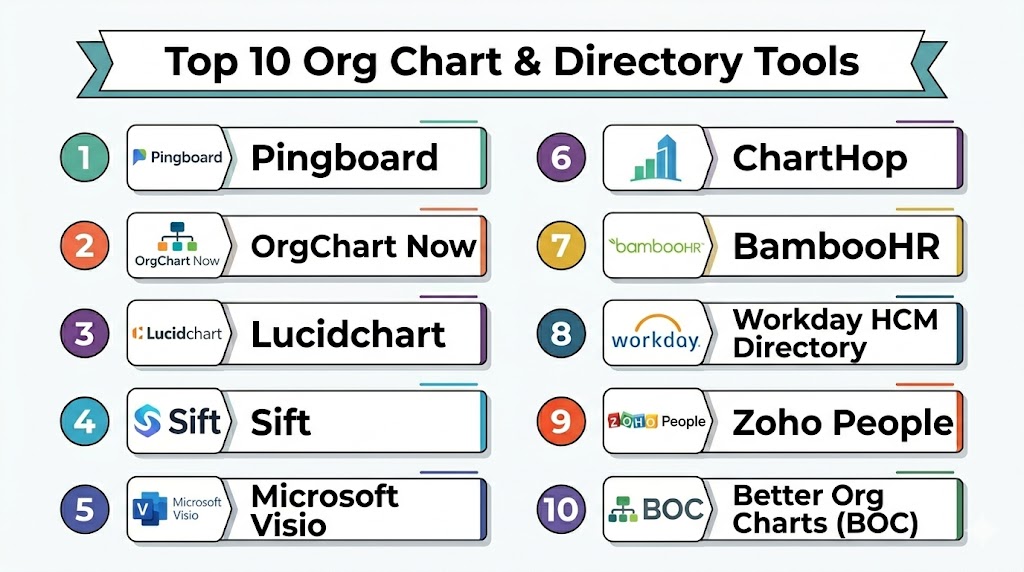
Top 10 Org Chart & Directory Tools
1 — OrgChart Now
Short description: OrgChart Now is a cloud‑based org chart and workforce visualization platform that helps HR and management teams create dynamic, up‑to‑date org charts with data integration from HR systems.
Key Features
- Drag‑and‑drop org chart builder
- HRIS integrations for automated updates
- Multiple chart layouts and visualization styles
- Employee directory with rich profiles
- Export to PDF and PowerPoint
- Role, location, and department filters
- Mobile access
Pros
- Easy chart creation and editing
- Strong data integration capabilities
- Supports multiple visual layouts
Cons
- Advanced analytics require custom configuration
- UI is functional rather than modern
- Limited built‑in succession planning features
Platforms / Deployment
- Web
- Cloud
Security & Compliance
- SSO integration
- Role‑based permissions
- Standard encryption
Integrations & Ecosystem
Integrates with HRIS and directory systems to keep chart data updated.
- Workday
- SAP SuccessFactors
- ADP
- Oracle HCM
Support & Community
Standard support with documentation and onboarding assistance.
2 — Pingboard
Short description: Pingboard delivers interactive org charts, employee directories, and people discovery tools focused on transparency and collaboration for modern teams.
Key Features
- Dynamic interactive org charts
- People directory with skills and bios
- Searchable employee directory
- Real‑time updates
- Custom fields and metadata
- Manager and team dashboards
- Mobile apps
Pros
- Engaging and interactive visuals
- Excellent search and mobile experience
- Frequent updates and real‑time sync
Cons
- Some advanced HRIS connectors require premium tiers
- Less suited for large enterprise custom workflows
- Analytics beyond charts are basic
Platforms / Deployment
- Web, iOS, Android
- Cloud
Security & Compliance
- SSO, MFA
- Role‑based access controls
- Encryption at rest and in transit
Integrations & Ecosystem
Works well with collaboration and HR systems.
- BambooHR
- Google Workspace
- Microsoft 365
- Slack
Support & Community
Responsive support and user community with frequent product updates.
3 — ChartHop
Short description: ChartHop is an org chart and people analytics platform combining interactive org visuals, analytics, scenario modeling, and planning tools for strategic HR decision‑making.
Key Features
- Interactive org charts
- People analytics dashboards
- Scenario planning and workforce modeling
- Diversity and inclusion analytics
- Skills and competencies tracking
- HRIS sync and automation
- Collaboration directory
Pros
- Combines org visuals with analytics
- Scenario modeling for workforce planning
- Strong HRIS automation
Cons
- Premium pricing for extensive features
- Setup complexity for large enterprises
- Learning curve for new users
Platforms / Deployment
- Web
- Cloud
Security & Compliance
- SSO/MFA
- Enterprise governance controls
- Audit logs
Integrations & Ecosystem
Deep connectors with HR systems and collaboration tools.
- Workday
- Greenhouse
- BambooHR
- Okta
Support & Community
Enterprise support with onboarding and professional services.
4 — OrgWeaver
Short description: OrgWeaver is an intuitive org chart tool with strong scenario planning, workforce planning, and interactive directory capabilities supporting HR and leadership teams.
Key Features
- Drag‑and‑drop chart design
- Scenario planning tools
- Employee directory
- Custom data fields
- Exportable reports and dashboards
- Multiple chart views
- HRIS integration
Pros
- Intuitive chart creation
- Scenario and workforce planning
- Clean UI
Cons
- Analytics are basic
- Requires manual config for some integrations
- Suitability limits for very large enterprises
Platforms / Deployment
- Web
- Cloud
Security & Compliance
- SSO
- Standard encryption
- Access controls
Integrations & Ecosystem
Integrates with common HR systems and data sources.
- Workday
- SAP SuccessFactors
- CSV data import
Support & Community
Responsive support with documentation and onboarding resources.
5 — People Directory by Microsoft
Short description: Microsoft’s People Directory feature within Microsoft 365 provides searchable employee profiles, directory, and basic org chart visuals integrated with Microsoft applications.
Key Features
- Employee directory within Microsoft 365
- Profile cards with details
- Basic reporting structure views
- Search across organization
- Integration with Teams and Outlook
- Mobile accessibility via Microsoft apps
Pros
- Native to Microsoft ecosystem
- Unified profiles and directory search
- Works seamlessly with collaboration apps
Cons
- Limited advanced org chart visuals
- Analytics and planning features are minimal
- Best suited for Microsoft‑centric organizations
Platforms / Deployment
- Web, Windows, macOS, iOS, Android
- Cloud
Security & Compliance
- Microsoft enterprise security
- SSO/MFA
- Compliance certifications
Integrations & Ecosystem
Deep integration with Microsoft 365 services.
- Microsoft Teams
- SharePoint
- Outlook
- Azure AD
Support & Community
Large Microsoft support ecosystem and documentation.
6 — Sift
Short description: Sift is a people directory and org exploration tool enabling teams to discover where expertise lives, visualize org connections, and improve internal mobility.
Key Features
- People directory with skill tags
- Org exploration maps
- Rich employee profiles
- Search and filters
- Integrations with HRIS
- Team and location views
- Analytics on skills and connections
Pros
- Focused on skills discovery and connections
- Strong search and filtering
- Enhances internal mobility
Cons
- Org chart visuals are not primary focus
- Pricing geared toward mid‑market and enterprise
- Requires integration setup for best experience
Platforms / Deployment
- Web
- Cloud
Security & Compliance
- SSO/MFA
- Role‑based controls
- Encryption
Integrations & Ecosystem
Connects to HR and identity systems.
- Workday
- BambooHR
- ADP
- Azure AD
Support & Community
Enterprise support with onboarding and analytics assistance.
7 — OrgChartPlus
Short description: OrgChartPlus provides flexible org chart creation, custom fields, employee directories, and print‑ready exports suitable for HR and management teams.
Key Features
- Customizable org charts
- Employee directory search
- Custom data fields and metadata
- Printable chart exports
- Collaboration tools
- Role and department filtering
Pros
- Flexible chart customization
- Easy export and sharing tools
- Good directory search
Cons
- Limited automation and analytics
- Less advanced integrations
- UI is less modern than competitors
Platforms / Deployment
- Web
- Cloud
Security & Compliance
- SSO support
- Standard security controls
Integrations & Ecosystem
Integrates with foundational HR data sources.
- CSV import
- LDAP/Active Directory
Support & Community
Standard support and documentation.
8 — ChartGo
Short description: ChartGo is a lightweight org chart and directory tool offering simple chart creation and visualization for teams needing quick structural views.
Key Features
- Simple org chart builder
- Visual templates
- Employee directory listings
- Export and share options
- Basic filtering
Pros
- Quick setup and simple interface
- Affordable for small teams
- Easy chart sharing
Cons
- Limited advanced features
- Not designed for enterprise HR integration
- Reporting and analytics are minimal
Platforms / Deployment
- Web
- Cloud
Security & Compliance
- Standard web security
- User authentication
Integrations & Ecosystem
Basic data import via CSV and manual entry.
Support & Community
Basic support resources.
9 — Gusto Org Chart
Short description: Gusto Org Chart is part of the Gusto HR and payroll platform, offering interactive org chart views and employee directory features within a unified people platform.
Key Features
- Automated org charts from HR data
- Employee directory with profiles
- Department and role views
- Searchable directory
- Integration with HR and payroll
- Mobile access via Gusto app
Pros
- Automatic chart generation
- Integrated with payroll and HR data
- Simple and clean UI
Cons
- Best suited for Gusto customers
- Features are not standalone
- Organizational analytics are limited
Platforms / Deployment
- Web, iOS, Android
- Cloud
Security & Compliance
- SSO/MFA
- Payroll‑grade security
Integrations & Ecosystem
Part of the Gusto HR ecosystem.
- Gusto HR & payroll
- Benefits systems
Support & Community
Gusto support with HR platform assistance.
10 — Relay
Short description: Relay is a people directory and org exploration platform focused on connecting employees with roles, expertise, and team structure insights.
Key Features
- Searchable people directory
- Org tree navigation
- Skills and expertise tags
- Collaboration and contact tools
- Integration with HR and identity systems
- Mobile access
Pros
- Easy people discovery
- Strong directory search
- Good for internal collaboration
Cons
- Org chart visuals are basic
- Advanced analytics are limited
- Setup may require integration effort
Platforms / Deployment
- Web
- Cloud
Security & Compliance
- SSO/MFA
- Role‑based access
- Encryption
Integrations & Ecosystem
Connects to HR and identity data.
- Workday
- Okta
- Azure AD
- Google Workspace
Support & Community
Responsive support and onboarding guidance.
Comparison Table Top 10
| Tool Name | Best For | Platform Supported | Deployment | Standout Feature | Public Rating |
|---|---|---|---|---|---|
| OrgChart Now | HR and reporting structures | Web | Cloud | Automated HRIS sync | N/A |
| Pingboard | Mid‑market teams | Web, iOS, Android | Cloud | Interactive charts & directory | N/A |
| ChartHop | Strategic planning | Web | Cloud | Org analytics & scenario modeling | N/A |
| OrgWeaver | Scenario planning | Web | Cloud | Workforce planning | N/A |
| People Directory by Microsoft | Microsoft ecosystems | Web, Windows, macOS, iOS, Android | Cloud | Native directory & search | N/A |
| Sift | Skills & connections discovery | Web | Cloud | Skills and expertise search | N/A |
| OrgChartPlus | Flexible charts | Web | Cloud | Custom fields & exports | N/A |
| ChartGo | Quick org visualizations | Web | Cloud | Simple charting | N/A |
| Gusto Org Chart | HR/Payroll users | Web, iOS, Android | Cloud | Auto charts from HR data | N/A |
| Relay | People discovery | Web | Cloud | Searchable directory & expertise | N/A |
Evaluation & Scoring
| Tool Name | Core 25% | Ease 15% | Integrations 15% | Security 10% | Performance 10% | Support 10% | Value 15% | Weighted Total |
|---|---|---|---|---|---|---|---|---|
| OrgChart Now | 9 | 8 | 9 | 8 | 9 | 8 | 8 | 8.55 |
| Pingboard | 8 | 9 | 8 | 8 | 8 | 8 | 8 | 8.15 |
| ChartHop | 9 | 7 | 9 | 9 | 8 | 8 | 7 | 8.20 |
| OrgWeaver | 8 | 8 | 8 | 8 | 8 | 8 | 7 | 7.85 |
| People Directory by Microsoft | 7 | 9 | 9 | 9 | 8 | 8 | 8 | 8.10 |
| Sift | 8 | 8 | 8 | 8 | 8 | 8 | 7 | 7.95 |
| OrgChartPlus | 7 | 8 | 7 | 8 | 7 | 7 | 7 | 7.50 |
| ChartGo | 6 | 9 | 6 | 7 | 6 | 7 | 9 | 7.25 |
| Gusto Org Chart | 7 | 8 | 7 | 9 | 8 | 8 | 7 | 7.80 |
| Relay | 7 | 8 | 8 | 8 | 7 | 8 | 7 | 7.75 |
Which Tool Is Right for You
Solo / Freelancer
- ChartGo or People Directory by Microsoft for lightweight visualization and directory search.
SMB
- Pingboard or Gusto Org Chart for interactive org visuals with HR data integration.
Mid‑Market
- OrgChart Now or Sift for workforce planning and people discovery.
Enterprise
- ChartHop or OrgWeaver for strategic planning and analytics.
Budget vs Premium
- Budget‑friendly: ChartGo, OrgChartPlus
- Premium: ChartHop, OrgChart Now
Feature Depth vs Ease of Use
- Deep analytics & planning: ChartHop, OrgWeaver
- Easy get‑started: Pingboard, ChartGo
Integrations & Scalability
- Strong enterprise integration: OrgChart Now, ChartHop
- Lightweight directory focus: People Directory by Microsoft, Relay
Security & Compliance Needs
- Enterprise governance: ChartHop, OrgChart Now
- Standard directory security: Pingboard, Sift
Frequently Asked Questions
1. What are Org Chart & Directory tools
Org Chart & Directory tools visualize organizational structures and provide searchable employee directories to help teams understand reporting lines, roles, and connections.
2. Why are these tools important
These platforms improve organizational transparency, support onboarding, aid workforce planning, and help employees find colleagues and expertise quickly.
3. Can these platforms integrate with HR systems
Yes, most integrate with HRIS, ATS, identity providers, and collaboration systems to keep data fresh and synchronized.
4. Do these tools support mobile access
Yes, many offer mobile apps and responsive web access so employees can search directories and view org charts on the go.
5. Are org charts automatically updated
When connected to HR and identity systems, org charts can auto‑update with the latest reporting changes and employee data.
6. Which industries benefit most
HR departments in technology, finance, healthcare, and large enterprises gain the most from visual workforce insights and searchable directories.
7. Are security and privacy supported
Enterprise tools support SSO, role‑based access, encryption, audit logs, and governance controls for sensitive personnel data.
8. What features should buyers evaluate
Look for automation, integrations, visualization flexibility, search quality, mobile support, analytics, and data governance.
9. Can these tools support workforce planning
Yes, advanced tools include scenario modeling, planning dashboards, and analytics tied to workforce strategy.
10. How should organizations choose the right tool
Shortlist based on HR ecosystem compatibility, deployment needs, data automation, usability, and strategic planning support.
Conclusion
Org Chart & Directory Tools are vital for organizations that need clear visibility into reporting structures, role relationships, and employee information. SMBs often prefer interactive, easy‑to‑deploy solutions with good mobile support, while enterprises rely on deep integrations, automation, analytics, and strategic planning capabilities. AI‑assisted chart automation, real‑time directory updates, searchable profiles, and workforce insights are now key differentiators. Organizations should evaluate integration breadth, visualization flexibility, analytics depth, and governance controls. Shortlist two to three platforms, test with representative HR data, validate integration and directory search workflows, and confirm alignment with strategic workforce planning before full rollout across teams and departments.

This article provides a clear and practical comparison of document redaction tools. The feature summaries are easy to follow and offer valuable insights for anyone looking to improve document security and compliance.