Introduction
AI Image Generation Tools are platforms that use artificial intelligence—especially diffusion models and generative neural networks—to create images from text prompts, sketches, or reference images. In simple terms, you describe what you want, and the tool generates a visual based on that input.
These tools have rapidly evolved from experimental tech into essential creative infrastructure. Today, they are used across marketing, design, gaming, e-commerce, and media production. With improvements in realism, speed, and prompt understanding, AI image generators can now produce professional-grade visuals in seconds.
Real-world use cases include:
- Marketing creatives and social media graphics
- Product mockups and e-commerce visuals
- Concept art and game design
- Blog and website illustrations
- Branding and logo ideation
What buyers should evaluate:
- Image quality and realism
- Prompt understanding and control
- Speed and generation time
- Customization and style options
- Commercial usage rights
- Integration with design tools
- Cost per image or subscription pricing
- Ease of use (UI/UX)
- API and developer support
- Privacy and data handling
Best for: Designers, marketers, content creators, agencies, startups, and enterprises producing visual content at scale.
Not ideal for: Users needing precise manual design control (traditional tools may be better) or industries requiring strict originality verification without AI assistance.
Key Trends in AI Image Generation Tools
- Shift toward hyper-realistic image generation with advanced diffusion models
- Integration with AI assistants and multimodal systems
- Growth of text-to-image + image-to-image workflows
- Improved text rendering inside images (historically weak area)
- Rise of open-source models dominating usage
- Expansion of commercial-safe training datasets
- Real-time and low-latency image generation APIs
- Increased support for multilingual prompts
- Stronger ethical and copyright controls
- Hybrid workflows combining AI + human design tools
How We Selected These Tools (Methodology)
The tools were selected based on:
- Market adoption and popularity
- Output quality and consistency
- Feature depth (styles, control, editing)
- Ease of use for beginners and professionals
- Integration with creative ecosystems
- Performance and generation speed
- Flexibility (API, open-source, UI tools)
- Security and licensing considerations
- Community and developer support
- Overall value across different use cases
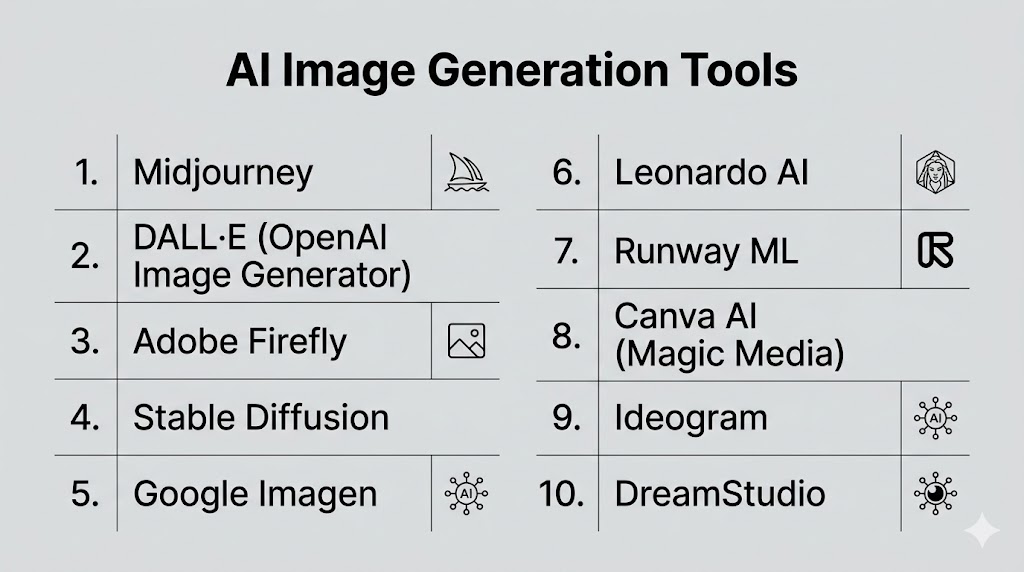
Top 10 AI Image Generation Tool
#1 — Midjourney
Short description: A leading AI image generator known for highly artistic and visually rich outputs.
Key Features
- High-quality artistic rendering
- Advanced prompt interpretation
- Stylized outputs with cinematic quality
- Fast image generation
- Community-based workflows
- Continuous model improvements
Pros
- Best-in-class artistic quality
- Strong creative outputs
Cons
- Learning curve (Discord-based workflow)
- Limited control for precise edits
Platforms / Deployment
Web / Cloud
Security & Compliance
Not publicly stated
Integrations & Ecosystem
- Creative workflows
- Community tools
Support & Community
Very active global community
#2 — OpenAI Image Generator (GPT Image / DALL·E)
Short description: A powerful AI image generator integrated with conversational AI for easy prompting.
Key Features
- Text-to-image generation
- Conversational editing
- Multi-image outputs
- High prompt accuracy
- Multilingual support
- Realistic and creative outputs
Pros
- Easy to use
- Strong instruction following
Cons
- Limited manual control
- Cloud-only
Platforms / Deployment
Web / Cloud
Security & Compliance
Not publicly stated
Integrations & Ecosystem
- APIs
- AI workflows
Support & Community
Large global user base
#3 — Adobe Firefly
Short description: A professional AI image generator focused on commercial-safe content creation.
Key Features
- Generative fill
- Text-to-image generation
- Photoshop integration
- Commercial-safe outputs
- Style customization
- Design workflows
Pros
- Strong for professionals
- Safe for commercial use
Cons
- Requires Adobe ecosystem
- Subscription cost
Platforms / Deployment
Web / Desktop
Security & Compliance
Not publicly stated
Integrations & Ecosystem
- Adobe Creative Cloud
- Design tools
Support & Community
Enterprise-level support
#4 — Stable Diffusion
Short description: An open-source image generation model offering full customization and control.
Key Features
- Open-source flexibility
- Local deployment
- Custom model training
- ControlNet support
- Style customization
- API integrations
Pros
- Highly customizable
- No per-image cost
Cons
- Requires technical setup
- Hardware dependent
Platforms / Deployment
Windows / Linux / Cloud / Self-hosted
Security & Compliance
Not publicly stated
Integrations & Ecosystem
- Developer tools
- ML pipelines
Support & Community
Very large open-source community
#5 — Google Imagen / Gemini Image
Short description: A powerful AI image model focused on accuracy and realistic outputs.
Key Features
- High-quality image generation
- Strong prompt understanding
- Integration with Google ecosystem
- Realistic outputs
- Multimodal capabilities
Pros
- Strong accuracy
- Easy integration
Cons
- Limited public access
- Ecosystem dependency
Platforms / Deployment
Cloud
Security & Compliance
Not publicly stated
Integrations & Ecosystem
- Google Cloud
- APIs
Support & Community
Growing ecosystem
#6 — Ideogram
Short description: A specialized AI tool known for generating images with accurate text rendering.
Key Features
- Text-in-image accuracy
- Graphic design outputs
- Logo and typography support
- High-resolution images
- Prompt control
Pros
- Best for typography
- Good for branding
Cons
- Limited artistic depth
- Smaller ecosystem
Platforms / Deployment
Web
Security & Compliance
Not publicly stated
Integrations & Ecosystem
- Design tools
- APIs
Support & Community
Growing community
#7 — Leonardo AI
Short description: A creative platform for generating game assets and visual designs.
Key Features
- Game asset generation
- Custom models
- Style control
- Image editing tools
- Batch generation
Pros
- Great for designers
- Flexible features
Cons
- Learning curve
- Requires credits
Platforms / Deployment
Web
Security & Compliance
Not publicly stated
Integrations & Ecosystem
- Creative tools
- APIs
Support & Community
Active community
#8 — Runway ML
Short description: A creative AI platform offering image, video, and design generation tools.
Key Features
- Image generation
- Video tools
- Editing workflows
- Real-time generation
- AI-powered effects
Pros
- Multi-modal capabilities
- Creative workflows
Cons
- Not focused only on images
- Pricing varies
Platforms / Deployment
Web
Security & Compliance
Not publicly stated
Integrations & Ecosystem
- Creative tools
- APIs
Support & Community
Strong creative community
#9 — Canva AI (Magic Media)
Short description: A beginner-friendly design platform with built-in AI image generation.
Key Features
- Text-to-image generation
- Templates and design tools
- Drag-and-drop editor
- Collaboration features
- Branding tools
Pros
- Very easy to use
- All-in-one platform
Cons
- Limited advanced control
- Less powerful outputs
Platforms / Deployment
Web / Mobile
Security & Compliance
Not publicly stated
Integrations & Ecosystem
- Design tools
- Templates
Support & Community
Large user base
#10 — DreamStudio (Stable Diffusion UI)
Short description: An official interface for Stable Diffusion offering easier access to powerful models.
Key Features
- Text-to-image generation
- Adjustable parameters
- Style presets
- API access
- Credit-based pricing
Pros
- Easier than raw Stable Diffusion
- Flexible controls
Cons
- Still requires learning
- Paid credits
Platforms / Deployment
Web
Security & Compliance
Not publicly stated
Integrations & Ecosystem
- APIs
- ML tools
Support & Community
Moderate support
Comparison Table (Top 10)
| Tool Name | Best For | Platform(s) Supported | Deployment | Standout Feature | Public Rating |
|---|---|---|---|---|---|
| Midjourney | Artistic visuals | Web | Cloud | Creative quality | N/A |
| OpenAI Image | General use | Web | Cloud | Prompt accuracy | N/A |
| Adobe Firefly | Designers | Web/Desktop | Cloud | Commercial-safe | N/A |
| Stable Diffusion | Developers | Multi-platform | Self-hosted | Open-source | N/A |
| Google Imagen | Realism | Cloud | Cloud | Accuracy | N/A |
| Ideogram | Typography | Web | Cloud | Text rendering | N/A |
| Leonardo AI | Game assets | Web | Cloud | Custom models | N/A |
| Runway ML | Creative workflows | Web | Cloud | Multi-modal | N/A |
| Canva AI | Beginners | Web/Mobile | Cloud | Ease of use | N/A |
| DreamStudio | Flexibility | Web | Cloud | Control | N/A |
Evaluation & Scoring of AI Image Generation Tools
| Tool Name | Core (25%) | Ease (15%) | Integrations (15%) | Security (10%) | Performance (10%) | Support (10%) | Value (15%) | Weighted Total |
|---|---|---|---|---|---|---|---|---|
| Midjourney | 10 | 7 | 7 | 7 | 9 | 9 | 8 | 8.6 |
| OpenAI Image | 9 | 9 | 9 | 8 | 9 | 9 | 8 | 8.9 |
| Adobe Firefly | 9 | 8 | 9 | 8 | 8 | 8 | 7 | 8.3 |
| Stable Diffusion | 9 | 6 | 9 | 7 | 8 | 8 | 10 | 8.5 |
| Google Imagen | 9 | 8 | 8 | 8 | 9 | 8 | 7 | 8.4 |
| Ideogram | 8 | 8 | 7 | 7 | 8 | 7 | 7 | 7.6 |
| Leonardo | 8 | 7 | 7 | 7 | 8 | 7 | 8 | 7.7 |
| Runway | 8 | 8 | 8 | 7 | 8 | 8 | 7 | 7.9 |
| Canva AI | 7 | 10 | 7 | 6 | 7 | 8 | 9 | 7.9 |
| DreamStudio | 8 | 7 | 8 | 7 | 8 | 7 | 8 | 7.8 |
How to interpret scores:
- Scores are comparative within this category
- Higher scores indicate stronger overall capability
- Open-source tools rank high in value
- Enterprise tools perform better in integration and scalability
- Choose based on your specific creative workflow
Which AI Image Generation Tool Is Right for You?
Solo / Freelancer
- Best: Canva AI, OpenAI Image
- Easy and quick to use
SMB
- Best: Leonardo AI, Runway
- Balanced features and flexibility
Mid-Market
- Best: Adobe Firefly, Midjourney
- High-quality outputs
Enterprise
- Best: Google Imagen, Stable Diffusion
- Scalable and customizable
Budget vs Premium
- Budget: Stable Diffusion, Canva AI
- Premium: Midjourney, Adobe Firefly
Feature Depth vs Ease of Use
- Depth: Stable Diffusion, Runway
- Ease: Canva, OpenAI Image
Integrations & Scalability
- Strong: Adobe, Google
- Moderate: Leonardo, Ideogram
Security & Compliance Needs
- Enterprise tools offer better governance
- Open-source requires manual setup
Frequently Asked Questions (FAQs)
What are AI image generation tools?
These tools use AI models to create images from text prompts. They automate visual creation. They are widely used in design and marketing.
Are AI-generated images high quality?
Yes, modern tools can produce highly realistic images. Quality depends on the tool and prompt. Some tools specialize in artistic outputs.
Can I use AI images commercially?
Some tools allow commercial use, while others have restrictions. Always check licensing terms. Adobe Firefly focuses on safe usage.
Do I need design skills?
No, most tools are beginner-friendly. However, better prompts improve results. Professionals can achieve more advanced outputs.
Which tool is best for beginners?
Canva AI and OpenAI Image tools are easiest. They require minimal learning. They offer intuitive interfaces.
Are these tools free?
Some offer free tiers. Others use subscriptions or credits. Costs vary by usage.
Can AI generate realistic photos?
Yes, many tools produce photorealistic images. Some are nearly indistinguishable from real photos.
What is Stable Diffusion?
It is an open-source AI model for generating images. It allows full customization. It is popular among developers.
How do I choose the right tool?
Consider your use case and budget. Evaluate quality, ease, and control. Testing multiple tools helps.
Can AI replace designers?
No, it supports designers rather than replacing them. Creativity and strategy still require human input. It improves efficiency.
Conclusion
AI image generation tools have transformed how visuals are created, making high-quality design accessible to individuals and businesses alike. From artistic tools like Midjourney to flexible platforms like Stable Diffusion and beginner-friendly solutions like Canva AI, the ecosystem offers something for every use case. The right choice depends on your priorities—whether it’s creative quality, ease of use, customization, or scalability. While these tools significantly reduce production time, human creativity remains essential for direction and refinement. Integration with existing workflows can further enhance efficiency and output quality. It’s important to evaluate licensing and security considerations, especially for commercial use. Testing a few tools with real projects is the best way to identify the right fit. As the technology continues to evolve, these platforms will play an even bigger role in design, marketing, and digital experiences.
