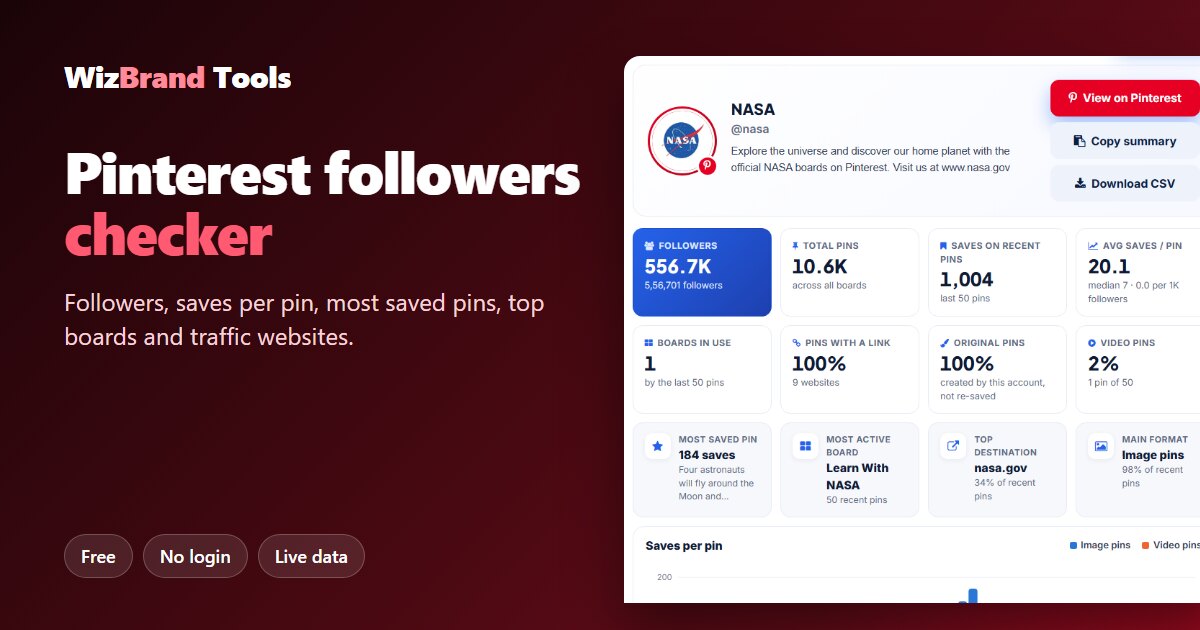

Followers are only half the story on Pinterest
On Pinterest, a big follower number looks good, but it is not what makes a pin spread. What matters is saves. Every time someone saves a pin to their own board, Pinterest shows that pin to more people. A pin with many saves keeps bringing visitors for months.
The problem: Pinterest only shows its detailed analytics to the account owner. If you want to study a competitor, check a creator before working with them, or simply learn what works in your niche, you can’t see their numbers.
The free Pinterest Followers Count checker by WizBrand fixes that. Paste any public profile link or username and in a few seconds you see the live follower count, total pins, and a full report on the latest 50 pins: saves per pin, the most saved pins, the boards in use, the websites the pins link to, and whether image or video pins do better.
No login, no Pinterest account and no payment needed. Below we show exactly how it works with a real check of NASA’s Pinterest account.
What the Pinterest followers checker shows
| Metric | What it tells you |
|---|---|
| Followers | The live follower count, shortened (556.7K) and in full. |
| Total pins | How many pins the account has across all its boards. |
| Saves on recent pins | Total saves on the latest 50 pins. |
| Average and median saves per pin | What a typical pin earns – the median shows the “normal” pin, the average is pulled up by hits. |
| Boards in use | Which boards the account is actively filling. |
| Pins with a link | How many pins send people to a website, and how many different websites. |
| Original pins | How many pins the account created itself instead of re-saving other people’s pins. |
| Image vs video pins | The content mix and which format gets more saves. |
| Most saved pins | The top 3 recent pins by saves, with their board and link. |
| Where pins send traffic | The websites the pins link to – the account’s traffic sources from Pinterest. |
| Recent pins | All 50 latest pins, which you can filter by format, sort by saves, or download as a CSV. |
How to check Pinterest followers (3 easy steps)
Step 1: Paste the profile link or username
Open the Pinterest Followers Count tool. Paste a profile link such as https://www.pinterest.com/nasa/ or just type the username, nasa. Board links, pin.it short links from the Pinterest app and country sites like in.pinterest.com work too.


Step 2: Click Analyse
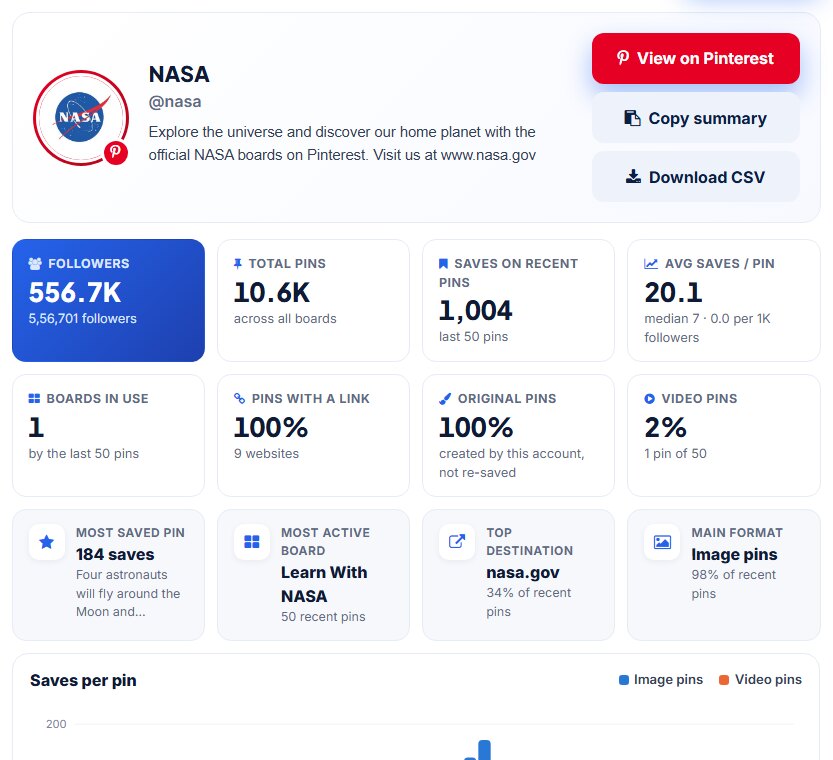
Click Analyse. The tool reads the account’s live public profile and its latest 50 pins. In a few seconds you see the profile card, followers, total pins, saves and the key insights.

Step 3: Read the full report
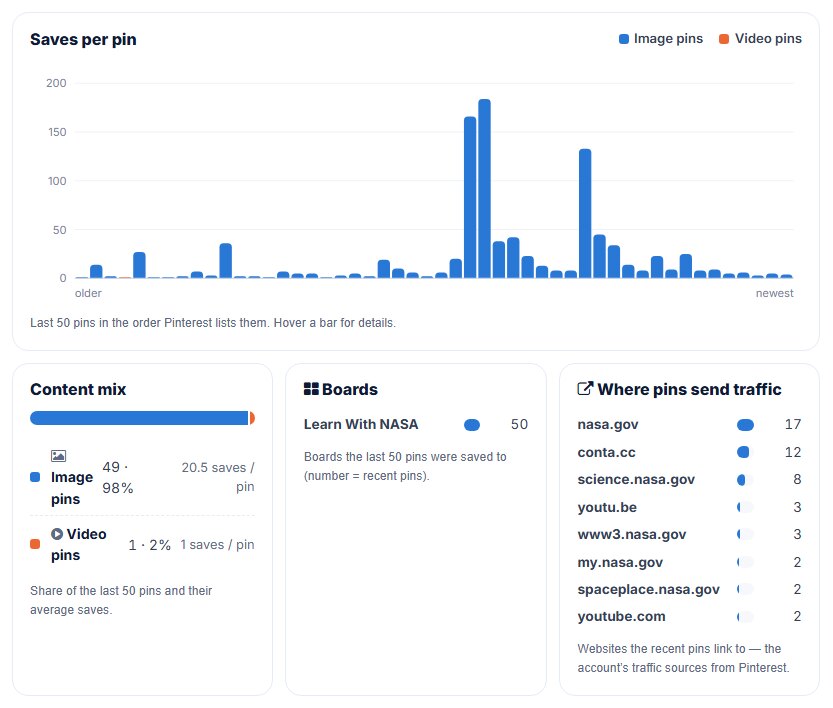
Scroll down for the charts: saves of each of the last 50 pins, the content mix (image vs video), the boards in use and the websites the pins send traffic to.
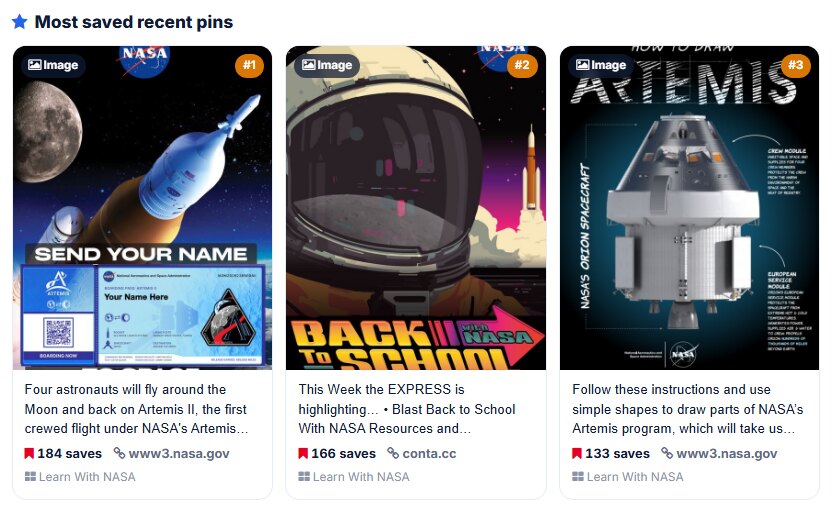
Then see the three most saved recent pins – the content that is working best right now.
Real example: what we found for NASA on Pinterest
We ran the tool on NASA’s public Pinterest account (@nasa) on 13 November 2026. These are the real results.
| Metric | @nasa result |
|---|---|
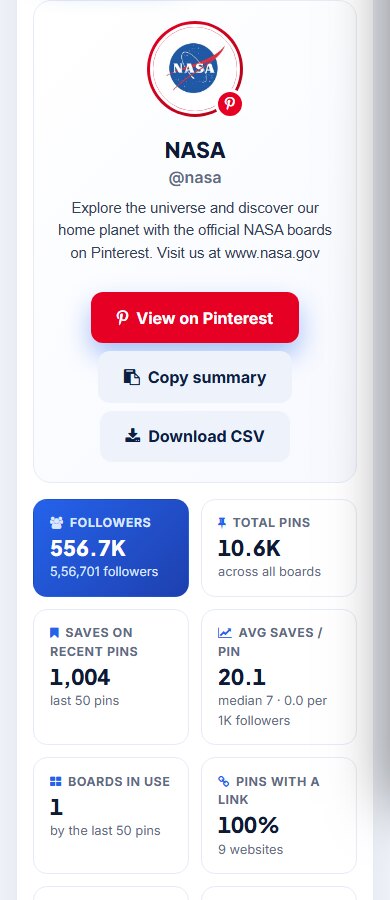
| Followers | 556.7K (556,701) |
| Total pins | 10.6K across all boards |
| Saves on the last 50 pins | 1,004 |
| Average saves per pin | 20.1 (median 7) |
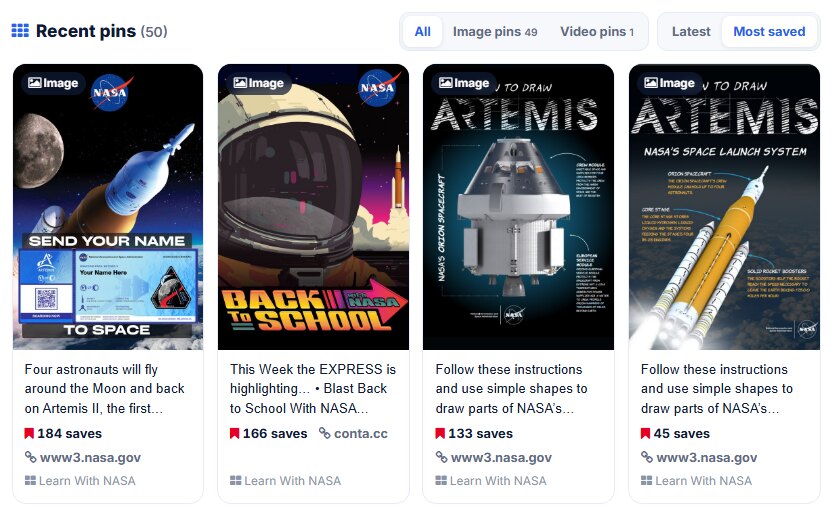
| Most saved recent pin | 184 saves – an Artemis II “send your name around the Moon” pin |
| Boards in use | 1 – all 50 recent pins went to Learn With NASA |
| Pins with a link | 100%, pointing to 9 websites |
| Top destination | nasa.gov – 17 of 50 pins (34%) |
| Original pins | 100% created by NASA, none re-saved |
| Content mix | 49 image pins (avg 20.5 saves), 1 video pin (1 save) |
What these numbers mean
- A few pins win big. The top 3 pins (184 + 166 + 133 saves) collected 483 saves – about 48% of all saves from just 3 of 50 pins. That is normal on Pinterest, and it is why the median (7) is much lower than the average (20.1). Look at the median to see what a “normal” pin gets.
- Useful, how-to content gets saved. NASA’s top pins are an Artemis activity, a back-to-school resource roundup and a “how to draw Artemis” guide. People save pins they want to come back to: guides, activities, templates and checklists.
- Every pin drives traffic. All 50 pins carry a link, mostly to nasa.gov and NASA’s science sites. For a brand, Pinterest works best as a traffic channel, not just a gallery.
- One focused board. NASA is filling a single education board right now. The “Boards in use” card quickly shows you where an account is putting its effort.
Sort pins, filter by format or download a CSV
Under the charts you get all 50 recent pins with their saves, link and board. Sort them by Latest or Most saved, or filter to only image or only video pins. Use Copy summary to paste the key numbers into a report or chat, and Download CSV to open every pin in Excel or Google Sheets. Click Refresh data any time for the latest numbers.
Who should use a Pinterest followers checker?
- Brands and marketers – check a creator’s real saves before paying for a collaboration.
- Pinterest managers – benchmark against competitors and see which pins and boards work in your niche.
- Bloggers and online shops – see which websites your competitors’ pins send traffic to.
- Creators – track your own followers and find your most saved content.
- Agencies – export pins to CSV for client reports in seconds.
Works on your phone too
The report works in any mobile browser, on Android or iPhone, without installing an app. Copy a profile link from the Pinterest app and paste it straight in – pin.it short links work.
What the tool can’t show (and why)
Pinterest shares followers, pins and saves publicly. Monthly views, impressions, outbound clicks and pin dates are visible only to the account owner in Pinterest Analytics, so no outside tool can honestly show them for someone else’s account. The tool also can’t read secret boards. If you see a tool claiming exact monthly views for any account, those numbers are estimates.
Tips to get more saves on Pinterest
- Make pins worth keeping. Guides, checklists, templates, recipes and step-by-step ideas get saved because people want to come back to them.
- Use tall images. A 2:3 vertical pin (for example 1000 × 1500 px) takes more space in the feed.
- Add clear text on the image. A short title on the pin tells people what they will get before they click.
- Always add a link. Send every pin to a useful page on your website, as NASA does.
- Write keyword-rich descriptions. Pinterest is a search engine. Use the words people search for in the pin title, description and board name.
- Learn from the most saved pins. Check your own and your competitors’ top pins and repeat what they have in common: topic, format and style.
- Pin consistently. A few fresh, original pins every week beat a big batch once a month.
Frequently asked questions
Is the Pinterest followers checker free?
Yes. It is completely free and unlimited. You do not need an account, login or credit card.
What can I enter?
A profile link like https://www.pinterest.com/username, a board link, a pin.it short link from the Pinterest app, or just the username. Links from any Pinterest country site (in.pinterest.com, pinterest.co.uk and others) work too.
What are saves and why do they matter?
A save is when someone keeps a pin on one of their own boards. Saves are Pinterest’s main signal of interest: pins that get saved are shown to more people, so saves per pin tell you which content works.
Are the numbers live?
Yes. Data is fetched from Pinterest when you search and kept for at most 15 minutes. Click “Refresh data” under the report for the latest numbers.
Why can’t I see monthly views or clicks?
Pinterest shows monthly views, impressions and outbound clicks only to the account owner in Pinterest Analytics. Publicly it shares followers, pins and saves, which is what this report uses.
Can I check private or secret boards?
No. Only public profiles and public boards can be read. Secret boards are visible to their owner and collaborators only.
Will the account owner know I checked them?
No. The tool only reads public data and you never log in, so nobody is notified.
Can I download the data?
Yes. Click “Download CSV” to save every recent pin with its saves, link and board, or “Copy summary” to copy the key numbers.
Conclusion: follow the saves
On Pinterest, saves tell you what really works. As the NASA example shows, a handful of useful, how-to pins can bring in half of all saves, and every pin can send people to your website.
Check any account now with the free Pinterest Followers Count checker. It is live, free and needs no login.
Check Pinterest followers now →
More free social media tools
- Instagram Followers Count – followers, reels and engagement of any business or creator account
- X Follower Count – live followers, views and engagement rate
- YouTube Subscriber Count – live subscribers, views and top videos
- Threads Followers Count – check Threads profiles
- Facebook Page Followers Count – page followers and post engagement
- Reddit Stats – subreddit members and top posts
