Introduction
Application Lifecycle Management ALM Suites are comprehensive software platforms used to manage the entire lifecycle of an application from planning and requirements to development, testing, deployment, and maintenance. These tools bring together multiple stages of software development into a unified environment, ensuring better collaboration, traceability, and control.
In modern software development, teams are distributed, workflows are complex, and releases are continuous. Managing everything across separate tools leads to silos, inefficiencies, and risks. ALM suites solve this by providing end to end visibility, automation, and integration across the entire development lifecycle, helping organizations deliver high quality software faster.
Real-world use cases
- Managing software development lifecycle end to end
- Tracking requirements, development, and testing
- Ensuring traceability and compliance
- Coordinating DevOps and agile workflows
- Managing releases and version control
What buyers should evaluate
- Coverage of full lifecycle stages
- Integration with DevOps and CI CD tools
- Requirement and test management capabilities
- Reporting and analytics
- Scalability for enterprise use
- Customization and workflow flexibility
- Security and compliance readiness
- Pricing and licensing flexibility
Best for: Enterprises, product teams, DevOps teams, and organizations managing complex software development workflows.
Not ideal for: Small teams with simple workflows that can rely on lightweight project management tools.
Key Trends in Application Lifecycle Management ALM Suites
- Integration with DevOps and CI CD pipelines
- AI driven analytics and automation
- Cloud based ALM platforms
- Real time collaboration across teams
- Shift towards unified DevOps platforms
- Increased focus on traceability and compliance
- API first integration ecosystems
- Automation of testing and release processes
- Support for agile and hybrid development models
- Data driven decision making using lifecycle insights
How We Selected These Tools
- Evaluated market adoption and enterprise usage
- Assessed lifecycle coverage across stages
- Considered integration capabilities
- Reviewed scalability for large teams
- Analyzed usability and onboarding
- Evaluated reporting and analytics features
- Considered security and compliance readiness
- Assessed overall value and flexibility
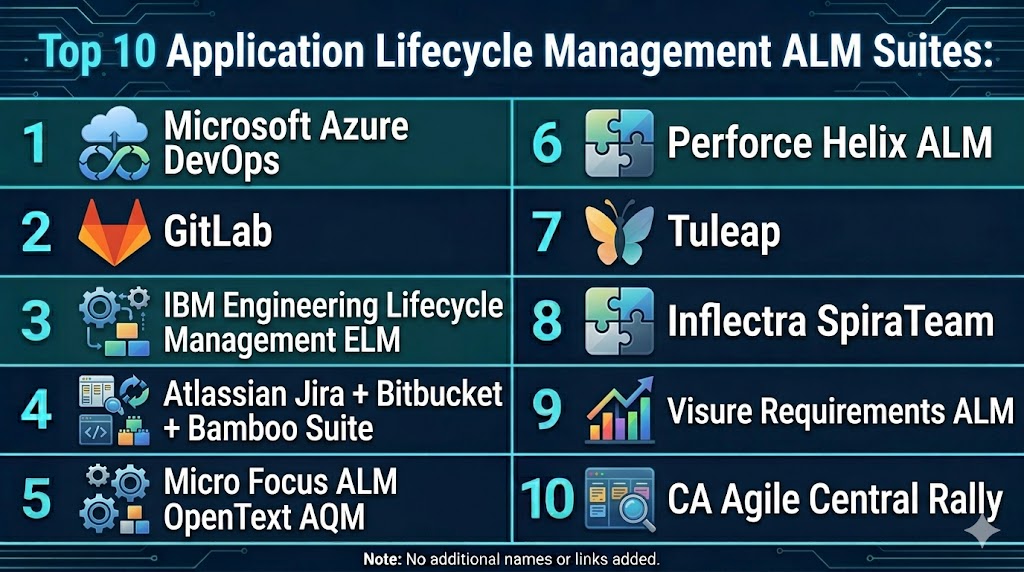
Top 10 Application Lifecycle Management ALM Suites
#1 — Microsoft Azure DevOps
Short description: Azure DevOps is a comprehensive ALM platform offering tools for planning, development, testing, and deployment integrated with cloud services.
Key Features
- Boards for tracking work
- Repositories and version control
- CI CD pipelines
- Test management
- Reporting dashboards
Pros
- Strong DevOps integration
- Scalable
- Enterprise ready
Cons
- Complex setup
- Learning curve
- Requires Azure ecosystem
Platforms / Deployment
- Web
- Cloud On premise
Security & Compliance
- Enterprise level access control
- Not publicly stated
Integrations & Ecosystem
Integrates with Microsoft and third party tools.
- APIs
- DevOps tools
- Cloud services
Support & Community
Strong enterprise support
#2 — IBM Engineering Lifecycle Management
Short description: A full ALM suite for managing requirements, development, testing, and compliance in complex industries.
Key Features
- Requirement management
- Test management
- Workflow automation
- Reporting
- Compliance support
Pros
- Enterprise grade
- Strong compliance features
- Scalable
Cons
- Expensive
- Complex
- Requires training
Platforms / Deployment
- Web
- Cloud On premise
Security & Compliance
- Role based access
- Not publicly stated
Integrations & Ecosystem
Integrates with enterprise systems.
- APIs
- ALM tools
Support & Community
Enterprise support
#3 — Siemens Polarion ALM
Short description: Polarion provides end to end lifecycle management with strong traceability and compliance capabilities.
Key Features
- Requirement management
- Test management
- Traceability
- Collaboration
- Reporting
Pros
- Strong traceability
- Scalable
- Enterprise ready
Cons
- Complex
- Expensive
- Learning curve
Platforms / Deployment
- Web
- Cloud On premise
Security & Compliance
- Not publicly stated
Integrations & Ecosystem
Supports integration with engineering tools.
- APIs
- Dev tools
Support & Community
Enterprise support
#4 — Micro Focus ALM Quality Center
Short description: A widely used ALM solution focused on testing and quality management.
Key Features
- Test management
- Requirement tracking
- Defect management
- Reporting
- Automation support
Pros
- Strong testing capabilities
- Reliable
- Scalable
Cons
- Complex interface
- Expensive
- Requires setup
Platforms / Deployment
- Web Windows
- Cloud On premise
Security & Compliance
- Not publicly stated
Integrations & Ecosystem
Integrates with testing tools.
- APIs
- Dev tools
Support & Community
Enterprise support
#5 — Atlassian Jira Software
Short description: Jira Software is a flexible ALM tool widely used for issue tracking, agile workflows, and DevOps integration.
Key Features
- Issue tracking
- Agile boards
- Workflow customization
- Automation
- Reporting
Pros
- Highly customizable
- Large ecosystem
- Easy integration
Cons
- Complex setup
- Pricing
- Learning curve
Platforms / Deployment
- Web Mobile
- Cloud On premise
Security & Compliance
- Not publicly stated
Integrations & Ecosystem
Strong ecosystem of plugins and tools.
- APIs
- Dev tools
Support & Community
Large community
#6 — Codebeamer
Short description: Codebeamer is an ALM platform focused on product lifecycle management and compliance.
Key Features
- Requirement management
- Lifecycle tracking
- Risk management
- Reporting
- Collaboration
Pros
- Strong ALM features
- Scalable
- Enterprise ready
Cons
- Expensive
- Complex
- Learning curve
Platforms / Deployment
- Web
- Cloud
Security & Compliance
- Not publicly stated
Integrations & Ecosystem
Supports integration with development tools.
- APIs
- Dev tools
Support & Community
Enterprise support
#7 — Inflectra SpiraTeam
Short description: SpiraTeam provides integrated requirement, test, and project management capabilities.
Key Features
- Requirement management
- Test management
- Issue tracking
- Reporting
- Collaboration
Pros
- All in one platform
- Good integration
- Scalable
Cons
- Complex UI
- Learning curve
- Setup effort
Platforms / Deployment
- Web
- Cloud On premise
Security & Compliance
- Not publicly stated
Integrations & Ecosystem
Supports integration with development tools.
- APIs
- ALM tools
Support & Community
Good support
#8 — CollabNet VersionOne
Short description: VersionOne is an agile lifecycle management tool focused on enterprise agile development.
Key Features
- Agile planning
- Workflow management
- Reporting
- Collaboration
- Integration
Pros
- Strong agile support
- Scalable
- Enterprise ready
Cons
- Complex
- Expensive
- Learning curve
Platforms / Deployment
- Web
- Cloud
Security & Compliance
- Not publicly stated
Integrations & Ecosystem
Supports integrations with DevOps tools.
- APIs
- Dev tools
Support & Community
Enterprise support
#9 — Perforce Helix ALM
Short description: Helix ALM offers requirement management, testing, and issue tracking in one platform.
Key Features
- Requirement management
- Test management
- Issue tracking
- Reporting
- Traceability
Pros
- Strong traceability
- Scalable
- Flexible
Cons
- Complex
- Learning curve
- Pricing
Platforms / Deployment
- Web
- Cloud
Security & Compliance
- Not publicly stated
Integrations & Ecosystem
Integrates with Perforce ecosystem.
- APIs
- Dev tools
Support & Community
Enterprise support
#10 — Digital.ai Agility
Short description: Digital.ai Agility is an enterprise agile and ALM platform for managing large scale development.
Key Features
- Agile planning
- Workflow automation
- Reporting
- Collaboration
- Integration
Pros
- Strong enterprise support
- Scalable
- Flexible
Cons
- Complex
- Expensive
- Learning curve
Platforms / Deployment
- Web
- Cloud
Security & Compliance
- Not publicly stated
Integrations & Ecosystem
Supports integration with DevOps tools.
- APIs
- Dev tools
Support & Community
Enterprise support
Comparison Table
| Tool Name | Best For | Platform Supported | Deployment | Standout Feature | Public Rating |
|---|---|---|---|---|---|
| Azure DevOps | Enterprise | Web | Cloud On premise | DevOps integration | N/A |
| IBM ELM | Compliance | Web | Cloud On premise | Full lifecycle mgmt | N/A |
| Polarion | Engineering | Web | Cloud On premise | Traceability | N/A |
| Micro Focus ALM | Testing | Web Windows | Cloud On premise | Test management | N/A |
| Jira Software | Agile teams | Web Mobile | Cloud On premise | Custom workflows | N/A |
| Codebeamer | Enterprise | Web | Cloud | Lifecycle mgmt | N/A |
| SpiraTeam | All in one | Web | Cloud On premise | Combined ALM | N/A |
| VersionOne | Agile teams | Web | Cloud | Agile planning | N/A |
| Helix ALM | Traceability | Web | Cloud | Requirement tracking | N/A |
| Digital.ai | Enterprise | Web | Cloud | Agile scaling | N/A |
Evaluation & Scoring of Application Lifecycle Management ALM Suites
| Tool Name | Core | Ease | Integrations | Security | Performance | Support | Value | Weighted Total |
|---|---|---|---|---|---|---|---|---|
| Azure DevOps | 9 | 7 | 9 | 9 | 9 | 9 | 7 | 8.6 |
| IBM ELM | 10 | 6 | 9 | 9 | 9 | 9 | 6 | 8.7 |
| Polarion | 9 | 6 | 8 | 9 | 9 | 8 | 6 | 8.1 |
| Micro Focus | 9 | 6 | 8 | 8 | 9 | 8 | 6 | 8.0 |
| Jira | 8 | 8 | 9 | 8 | 8 | 8 | 8 | 8.2 |
| Codebeamer | 9 | 6 | 8 | 8 | 8 | 7 | 6 | 7.9 |
| SpiraTeam | 8 | 7 | 7 | 7 | 8 | 7 | 8 | 7.7 |
| VersionOne | 8 | 6 | 8 | 8 | 8 | 7 | 6 | 7.7 |
| Helix ALM | 8 | 6 | 7 | 8 | 8 | 7 | 7 | 7.5 |
| Digital.ai | 8 | 6 | 8 | 8 | 8 | 7 | 6 | 7.6 |
Scores are comparative and reflect lifecycle coverage, usability, and integration capabilities.
Which Application Lifecycle Management ALM Suite Is Right for You
Solo / Small Teams
Jira Software or SpiraTeam are simple and flexible.
SMB
Azure DevOps offers strong value and scalability.
Mid Market
Helix ALM and Codebeamer provide balanced features.
Enterprise
IBM ELM, Polarion, and Digital.ai are ideal.
Budget vs Premium
Jira is budget-friendly, IBM ELM is premium.
Feature Depth vs Ease of Use
IBM ELM for depth, Jira for simplicity.
Integrations & Scalability
Azure DevOps and Jira are strong options.
Security & Compliance Needs
Enterprise tools provide stronger governance.
Frequently Asked Questions
1. What is ALM software
ALM software manages the entire application lifecycle from planning to maintenance. It helps teams coordinate development workflows. It improves efficiency.
2. Why is ALM important
It ensures better collaboration and traceability. Teams can manage complex projects more effectively. It improves software quality.
3. How does ALM work
It connects requirements, development, testing, and deployment. This creates a unified workflow. It improves visibility.
4. Is ALM suitable for small teams
Some tools are suitable for small teams. However, full ALM suites are often used by enterprises.
5. How much does ALM software cost
Pricing varies widely. Some tools offer affordable plans, while enterprise tools are expensive.
6. Do ALM tools integrate with DevOps
Yes, most tools integrate with DevOps pipelines. This improves automation and efficiency.
7. How long does implementation take
Implementation can take from days to weeks. It depends on complexity and customization.
8. What are common mistakes
Choosing overly complex tools is common. Teams should match tools with needs.
9. Are ALM tools secure
Most tools provide enterprise level security features. Security varies by vendor.
10. Are there alternatives
Alternatives include separate tools for each stage. However, they lack unified visibility.
Conclusion
Application Lifecycle Management suites are critical for organizations aiming to manage software development efficiently from start to finish. These platforms unify planning, development, testing, and deployment into a single ecosystem, improving collaboration, visibility, and overall software quality. From flexible tools like Jira Software to enterprise-grade platforms like IBM Engineering Lifecycle Management and Azure DevOps, each solution offers different strengths based on organizational size and complexity. The best choice depends on your workflow requirements, integration needs, and scalability goals rather than a single universal option. Organizations should prioritize lifecycle coverage, integration capabilities, and usability when selecting a tool. A practical next step is to shortlist a few platforms, run pilot projects, and evaluate how well they align with your development processes and long-term objectives.
