Introduction
Requirements Management Tools are software platforms used to capture, organize, analyze, track, and manage requirements throughout the product or project lifecycle. They help teams ensure that business, technical, and stakeholder requirements are clearly defined, connected, and delivered correctly.
In complex product development environments, managing requirements manually through spreadsheets or documents quickly becomes inefficient and risky. Without proper tools, teams face miscommunication, scope creep, delays, and compliance issues. These tools provide structured workflows, traceability, and collaboration to keep projects aligned and on track.
Real-world use cases
- Managing software and product requirements
- Linking requirements with testing and development
- Ensuring regulatory compliance and audit readiness
- Supporting agile and DevOps workflows
- Coordinating cross-team collaboration
What buyers should evaluate
- Requirement capture and structuring
- End-to-end traceability
- Version control and change management
- Collaboration and stakeholder alignment
- Integration with ALM, DevOps, and testing tools
- Reporting and analytics
- Scalability for enterprise projects
- Security and access control
Best for: Product managers, system engineers, QA teams, and enterprises handling complex product development.
Not ideal for: Small teams with simple workflows that do not require structured requirement tracking.
Key Trends in Requirements Management Tools
- AI-assisted requirement analysis and prioritization
- End-to-end traceability across development lifecycle
- Integration with agile and DevOps pipelines
- Cloud-based collaboration platforms
- Automation of requirement validation and testing links
- Increased focus on compliance and audit readiness
- API-driven integrations with enterprise ecosystems
- Real-time collaboration across distributed teams
- Reuse and modularization of requirements
- Data-driven decision-making using requirement insights
How We Selected These Tools
- Evaluated market adoption and enterprise usage
- Assessed requirement lifecycle coverage
- Considered traceability and compliance capabilities
- Reviewed integrations with ALM and DevOps tools
- Analyzed scalability across industries
- Evaluated usability and onboarding experience
- Considered reporting and analytics capabilities
- Assessed flexibility and value for money
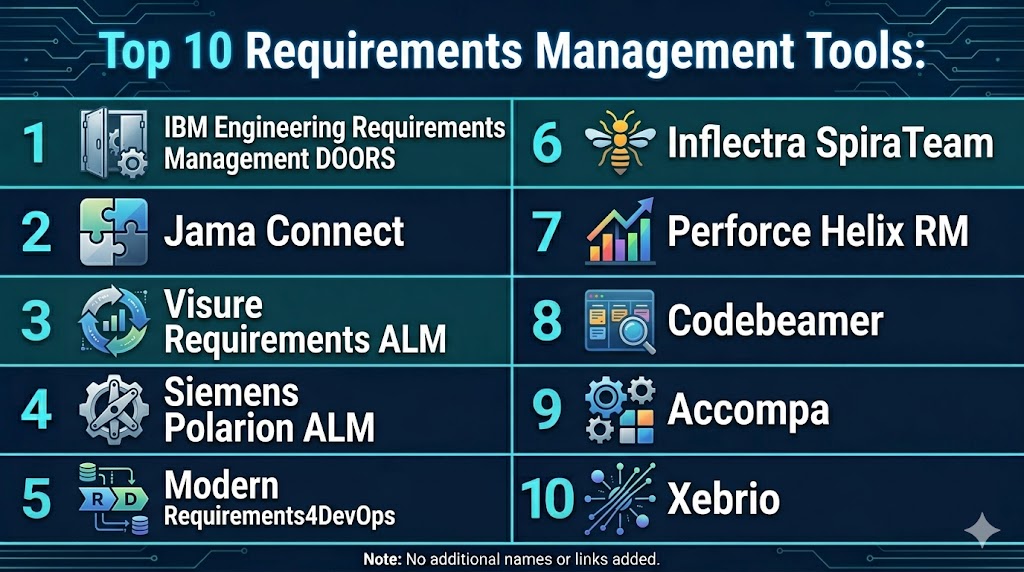
Top 10 Requirements Management Tools
#1 — IBM Engineering Requirements Management DOORS
Short description: A highly advanced enterprise-grade tool used in complex industries for managing large-scale requirements with strong traceability and compliance.
Key Features
- Advanced traceability
- Requirement hierarchy
- Change management
- Compliance support
- Integration with ALM tools
Pros
- Industry standard
- Highly scalable
- Strong compliance features
Cons
- Complex setup
- Expensive
- Steep learning curve
Platforms / Deployment
- Web Windows Linux
- Cloud On-premise
Security & Compliance
- Role-based access, encryption
- Not publicly stated
Integrations & Ecosystem
Supports integration with enterprise tools and ALM systems.
- APIs
- DevOps tools
- ALM platforms
Support & Community
Enterprise-grade support
#2 — Jama Connect
Short description: A leading requirements platform focused on traceability, risk management, and collaboration for product development teams.
Key Features
- Requirement traceability
- Risk and test management
- Collaboration tools
- Reporting dashboards
- Compliance support
Pros
- Strong traceability
- Enterprise-ready
- Good collaboration
Cons
- Expensive
- Complex
- Learning curve
Platforms / Deployment
- Web
- Cloud
Security & Compliance
- Not publicly stated
Integrations & Ecosystem
Integrates with DevOps and ALM tools.
- APIs
- Test tools
Support & Community
Enterprise support
#3 — Siemens Polarion ALM
Short description: A full lifecycle management tool combining requirements, testing, and development workflows.
Key Features
- Lifecycle management
- Requirement traceability
- Collaboration
- Reporting
- Compliance tools
Pros
- End-to-end lifecycle coverage
- Scalable
- Enterprise-ready
Cons
- Complex
- Expensive
- Requires training
Platforms / Deployment
- Web
- Cloud On-premise
Security & Compliance
- Not publicly stated
Integrations & Ecosystem
Supports integration with engineering tools.
- APIs
- ALM tools
Support & Community
Enterprise support
#4 — Visure Requirements ALM
Short description: A comprehensive ALM solution focused on traceability, compliance, and integration flexibility.
Key Features
- Requirement capture
- Traceability matrix
- Risk management
- Version control
- Compliance support
Pros
- Strong compliance features
- Flexible workflows
- Scalable
Cons
- Complex interface
- Setup effort
- Learning curve
Platforms / Deployment
- Web
- Cloud On-premise
Security & Compliance
- Not publicly stated
Integrations & Ecosystem
Supports integrations with enterprise tools.
- APIs
- Dev tools
Support & Community
Enterprise support
#5 — Modern Requirements4DevOps
Short description: A requirements tool built on Azure DevOps, offering seamless integration with development workflows.
Key Features
- Requirement traceability
- Visual diagrams
- Collaboration
- Reporting
- DevOps integration
Pros
- Native Azure integration
- Easy adoption
- Flexible
Cons
- Limited outside Azure ecosystem
- Smaller ecosystem
- Dependency on DevOps
Platforms / Deployment
- Web
- Cloud
Security & Compliance
- Not publicly stated
Integrations & Ecosystem
Deep integration with Azure DevOps.
- APIs
- DevOps tools
Support & Community
Good support
#6 — Inflectra SpiraTeam
Short description: An all-in-one platform combining requirements, testing, and project management.
Key Features
- Requirement management
- Test management
- Issue tracking
- Reporting
- Collaboration
Pros
- Unified platform
- Scalable
- Good integration
Cons
- Complex UI
- Learning curve
- Setup effort
Platforms / Deployment
- Web
- Cloud On-premise
Security & Compliance
- Not publicly stated
Integrations & Ecosystem
Supports integrations with development tools.
- APIs
- ALM tools
Support & Community
Good support
#7 — Perforce Helix RM
Short description: A robust tool focused on traceability and requirement lifecycle management.
Key Features
- Requirement tracking
- Version control
- Traceability
- Collaboration
- Reporting
Pros
- Strong traceability
- Scalable
- Flexible
Cons
- Complex
- Learning curve
- Pricing
Platforms / Deployment
- Web
- Cloud
Security & Compliance
- Not publicly stated
Integrations & Ecosystem
Integrates with Perforce ecosystem.
- APIs
- Dev tools
Support & Community
Enterprise support
#8 — Codebeamer
Short description: A powerful ALM tool with strong requirements and lifecycle management features.
Key Features
- Requirement tracking
- Lifecycle management
- Risk management
- Reporting
- Collaboration
Pros
- Strong ALM features
- Scalable
- Enterprise-ready
Cons
- Expensive
- Complex
- Learning curve
Platforms / Deployment
- Web
- Cloud
Security & Compliance
- Not publicly stated
Integrations & Ecosystem
Supports integration with development tools.
- APIs
- Dev tools
Support & Community
Enterprise support
#9 — Accompa
Short description: A simple cloud-based requirements management tool designed for collaboration and ease of use.
Key Features
- Requirement tracking
- Collaboration
- Reporting
- Version control
- Traceability
Pros
- Easy to use
- Affordable
- Cloud-based
Cons
- Limited advanced features
- Smaller ecosystem
- Basic analytics
Platforms / Deployment
- Web
- Cloud
Security & Compliance
- Not publicly stated
Integrations & Ecosystem
Supports integration via APIs.
- APIs
- Tools
Support & Community
Good support
#10 — Xebrio
Short description: A lightweight platform combining requirements management with project collaboration features.
Key Features
- Requirement management
- Collaboration
- Reporting
- Task tracking
- Documentation
Pros
- Easy to use
- Affordable
- All-in-one platform
Cons
- Limited enterprise features
- Smaller ecosystem
- Basic integrations
Platforms / Deployment
- Web
- Cloud
Security & Compliance
- Not publicly stated
Integrations & Ecosystem
Supports integrations with project tools.
- APIs
- Dev tools
Support & Community
Growing support
Comparison Table
| Tool Name | Best For | Platform Supported | Deployment | Standout Feature | Public Rating |
|---|---|---|---|---|---|
| IBM DOORS | Enterprise | Web Windows Linux | Cloud On-premise | Traceability | N/A |
| Jama Connect | Compliance | Web | Cloud | Risk management | N/A |
| Polarion | Engineering | Web | Cloud On-premise | Lifecycle mgmt | N/A |
| Visure ALM | Compliance | Web | Cloud On-premise | Traceability matrix | N/A |
| Modern Requirements | DevOps teams | Web | Cloud | Azure integration | N/A |
| SpiraTeam | All-in-one | Web | Cloud On-premise | Combined ALM | N/A |
| Helix RM | Traceability | Web | Cloud | Version control | N/A |
| Codebeamer | Enterprise ALM | Web | Cloud | Lifecycle mgmt | N/A |
| Accompa | SMB | Web | Cloud | Simplicity | N/A |
| Xebrio | Small teams | Web | Cloud | All-in-one | N/A |
Evaluation & Scoring of Requirements Management Tools
| Tool Name | Core | Ease | Integrations | Security | Performance | Support | Value | Weighted Total |
|---|---|---|---|---|---|---|---|---|
| IBM DOORS | 10 | 6 | 9 | 9 | 9 | 9 | 6 | 8.6 |
| Jama Connect | 9 | 7 | 8 | 9 | 9 | 8 | 7 | 8.4 |
| Polarion | 9 | 6 | 8 | 9 | 9 | 8 | 6 | 8.1 |
| Visure ALM | 9 | 6 | 8 | 8 | 8 | 7 | 7 | 7.9 |
| Modern Requirements | 8 | 8 | 8 | 7 | 8 | 7 | 8 | 7.9 |
| SpiraTeam | 8 | 7 | 7 | 7 | 8 | 7 | 8 | 7.7 |
| Helix RM | 8 | 6 | 7 | 8 | 8 | 7 | 7 | 7.5 |
| Codebeamer | 9 | 6 | 8 | 8 | 8 | 7 | 6 | 7.8 |
| Accompa | 7 | 9 | 6 | 7 | 7 | 7 | 9 | 7.6 |
| Xebrio | 7 | 9 | 6 | 7 | 7 | 7 | 8 | 7.5 |
Scores are comparative and reflect strengths across traceability, usability, and scalability. Choose based on project complexity and compliance requirements.
Which Requirements Management Tool Is Right for You
Solo / Freelancer
Accompa or Xebrio are simple and easy to use.
SMB
Modern Requirements and SpiraTeam provide good value.
Mid-Market
Visure and Helix RM offer balanced features.
Enterprise
IBM DOORS, Jama Connect, and Polarion are ideal.
Budget vs Premium
Xebrio is budget-friendly, DOORS is premium.
Feature Depth vs Ease of Use
DOORS for depth, Accompa for simplicity.
Integrations & Scalability
Polarion and Jama Connect are strong options.
Security & Compliance Needs
Enterprise tools provide stronger compliance capabilities.
Frequently Asked Questions
1. What are requirements management tools
These tools help capture, organize, and track requirements throughout a project lifecycle. They ensure alignment between stakeholders and development teams.
2. Why are these tools important
They reduce risks such as delays, miscommunication, and compliance gaps. They also improve collaboration and product quality.
3. How do these tools work
They store requirements in structured formats, link them to tasks and tests, and track changes over time. This ensures traceability.
4. Are these tools suitable for agile teams
Yes, most modern tools support agile workflows and continuous updates. They adapt well to changing requirements.
5. How much do these tools cost
Pricing varies depending on features and team size. Some tools offer free versions, while enterprise tools are expensive.
6. Do they integrate with development tools
Yes, most tools integrate with DevOps, testing, and project management platforms. This improves workflow efficiency.
7. How long does implementation take
Implementation can take from days to weeks depending on complexity and customization.
8. What are common mistakes
Poor requirement documentation and lack of traceability are common issues. Teams should maintain structured processes.
9. Are these tools secure
Most tools include access control and audit logs. Security levels vary by provider.
10. Are there alternatives
Basic tools like spreadsheets can be used initially, but they lack scalability and traceability.
Conclusion
Requirements Management Tools are essential for ensuring that projects remain aligned with business goals, stakeholder expectations, and technical requirements throughout the development lifecycle. They provide structured workflows, traceability, and collaboration capabilities that reduce risks, improve communication, and enhance product quality. From lightweight tools like Xebrio and Accompa to enterprise-grade platforms like IBM DOORS and Jama Connect, each solution offers unique strengths depending on organizational needs and project complexity. The right choice depends on factors such as scalability, integration needs, and compliance requirements rather than a one-size-fits-all solution. Organizations should prioritize usability, traceability, and ecosystem integration when selecting a tool. A practical next step is to shortlist a few tools, run pilot implementations, and evaluate how well they align with your workflows and long-term product development strategy.
