Introduction
Wi-Fi Planning Tools are specialized software solutions used to design, simulate, and optimize wireless network deployments before and after installation. These tools help engineers determine access point placement, signal coverage, interference levels, and network capacity—ensuring reliable connectivity across offices, campuses, warehouses, and public venues.
In modern environments with dense devices, cloud apps, and high user expectations, poor Wi-Fi design leads to dead zones, congestion, and performance issues. Wi-Fi planning tools eliminate guesswork by using predictive modeling, heatmaps, and real-world surveys to deliver accurate network designs.
Common Use Cases
- Access point placement planning for optimal coverage
- Heatmap generation for signal strength and interference
- Capacity planning for high-density environments
- Pre-deployment simulation to avoid costly redesigns
- Post-deployment validation and troubleshooting
What Buyers Should Evaluate
- Predictive RF modeling capabilities
- Heatmap visualization quality
- Support for modern Wi-Fi standards (Wi-Fi 6/6E/7)
- Ease of use vs technical depth
- Real-time survey and validation tools
- Integration with hardware vendors
- Cloud collaboration features
- Reporting and documentation capabilities
- Scalability for large environments
Best for: Network engineers, wireless consultants, IT teams, MSPs, and enterprises deploying or optimizing Wi-Fi networks.
Not ideal for: Small setups where basic router placement is sufficient or users relying on managed Wi-Fi solutions.
Key Trends in Wi-Fi Planning Tools
- AI-powered predictive modeling for AP placement optimization
- Support for next-gen Wi-Fi standards (6/6E/7)
- Cloud-based collaborative planning tools
- Integration with real-time survey validation tools
- Automation of RF design and channel planning
- 3D modeling of buildings and environments
- Hybrid planning + monitoring platforms
- API-driven integrations with network ecosystems
- Real-time interference and spectrum analysis
How We Selected These Tools (Methodology)
- Strong industry adoption and credibility
- Proven RF planning and survey capabilities
- Support for modern Wi-Fi technologies
- Availability of heatmaps and predictive modeling
- Integration with hardware and cloud platforms
- Suitability across SMB, mid-market, and enterprise use cases
- Quality of documentation and reporting features
- Balance between ease of use and advanced functionality
Top 10 Wi-Fi Planning Tools
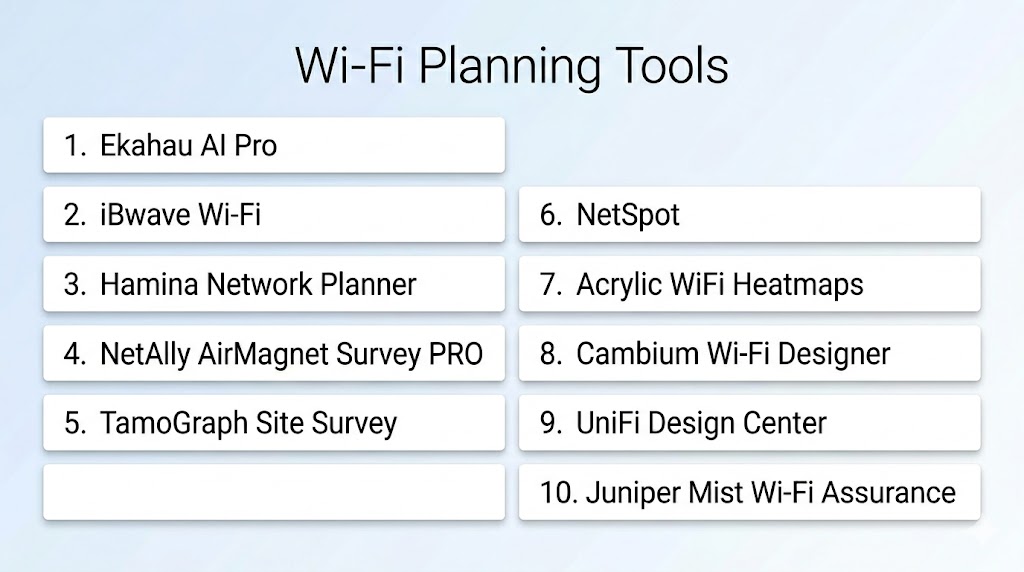
#1 — Ekahau AI Pro
Short description:
An industry-standard Wi-Fi planning tool used by professionals for predictive design, validation, and troubleshooting of enterprise networks.
Key Features
- AI-based access point placement
- Predictive RF modeling
- Heatmap visualization
- Support for modern Wi-Fi standards
- Real-time survey tools
- Spectrum analysis integration
- Detailed reporting
Pros
- Industry-leading accuracy
- Comprehensive design-to-validation workflow
Cons
- Expensive
- Requires expertise
Platforms / Deployment
Windows / macOS / Hybrid
Security & Compliance
Not publicly stated
Integrations & Ecosystem
Integrates with enterprise Wi-Fi hardware and survey tools.
Support & Community
Strong professional community and vendor support
#2 — iBwave Wi-Fi
Short description:
A powerful enterprise-grade design tool focused on large-scale Wi-Fi deployments and detailed documentation.
Key Features
- 3D network modeling
- Predictive coverage planning
- Bill of materials generation
- Active and passive surveys
- Collaboration tools
- Detailed reporting
Pros
- Excellent for large venues
- Strong documentation features
Cons
- Complex interface
- High cost
Platforms / Deployment
Windows / Hybrid
Security & Compliance
Not publicly stated
Integrations & Ecosystem
Integrates with enterprise network equipment and design tools.
Support & Community
Enterprise-level support
#3 — Hamina Wireless
Short description:
A modern cloud-based Wi-Fi planning tool designed for collaboration and rapid deployment.
Key Features
- Cloud-based planning
- Collaborative design
- Predictive modeling
- Heatmap visualization
- Multi-site management
- Standardized templates
Pros
- Easy collaboration
- Fast deployment
Cons
- Limited deep RF analysis
- Requires internet access
Platforms / Deployment
Web / Cloud
Security & Compliance
Not publicly stated
Integrations & Ecosystem
API-driven integrations
Support & Community
Growing support ecosystem
#4 — NetAlly AirMagnet Survey PRO
Short description:
A professional Wi-Fi survey tool focused on validation, troubleshooting, and real-world performance analysis.
Key Features
- Active and passive surveys
- Heatmap generation
- Interference detection
- Reporting tools
- Troubleshooting capabilities
Pros
- Strong validation capabilities
- Reliable performance analysis
Cons
- Outdated interface
- Expensive
Platforms / Deployment
Windows / On-premises
Security & Compliance
Not publicly stated
Integrations & Ecosystem
Works with enterprise Wi-Fi tools
Support & Community
Professional support
#5 — TamoGraph Site Survey
Short description:
A comprehensive Wi-Fi planning and survey tool for both predictive modeling and real-world validation.
Key Features
- Passive and active surveys
- Predictive modeling
- Heatmaps and reporting
- Multi-adapter support
- Interference analysis
Pros
- Balanced features and pricing
- Strong visualization tools
Cons
- Requires additional hardware for full capability
- Learning curve
Platforms / Deployment
Windows / macOS
Security & Compliance
Not publicly stated
Integrations & Ecosystem
Supports integration with Wi-Fi hardware
Support & Community
Reliable support
#6 — NetSpot
Short description:
A user-friendly Wi-Fi planning and analysis tool ideal for small to mid-sized deployments.
Key Features
- Heatmap visualization
- Signal strength analysis
- Survey mode
- Real-time monitoring
- Multi-platform support
Pros
- Easy to use
- Affordable
Cons
- Limited advanced features
- Not ideal for large enterprises
Platforms / Deployment
Windows / macOS / Mobile
Security & Compliance
Not publicly stated
Integrations & Ecosystem
Basic integrations
Support & Community
Good documentation
#7 — Acrylic WiFi Heatmaps
Short description:
A Windows-based Wi-Fi planning tool offering heatmap analysis and RF visualization.
Key Features
- Heatmap generation
- Signal analysis
- Channel planning
- Performance metrics
- Reporting tools
Pros
- Cost-effective
- Good visualization
Cons
- Windows-only
- Limited enterprise features
Platforms / Deployment
Windows
Security & Compliance
Not publicly stated
Integrations & Ecosystem
Limited integrations
Support & Community
Moderate support
#8 — Cambium Wi-Fi Designer
Short description:
A cloud-based planning tool designed for quick Wi-Fi design and access point placement.
Key Features
- Predictive modeling
- AP placement
- Coverage simulation
- Cloud-based interface
- Easy setup
Pros
- Beginner-friendly
- Free to use
Cons
- Limited advanced features
- Vendor-focused
Platforms / Deployment
Web / Cloud
Security & Compliance
Not publicly stated
Integrations & Ecosystem
Works within Cambium ecosystem
Support & Community
Basic support
#9 — UniFi Design Center
Short description:
A vendor-specific tool for designing UniFi-based Wi-Fi networks.
Key Features
- AP placement simulation
- Coverage visualization
- Hardware integration
- Simple interface
- Cloud-based design
Pros
- Easy to use
- Free tool
Cons
- Limited to UniFi ecosystem
- Basic features
Platforms / Deployment
Web / Cloud
Security & Compliance
Not publicly stated
Integrations & Ecosystem
Works with UniFi devices
Support & Community
Active community
#10 — Juniper Mist Wi-Fi Assurance
Short description:
A cloud-based platform combining Wi-Fi planning with AI-driven monitoring and optimization.
Key Features
- AI-driven insights
- Network optimization
- Performance analytics
- Cloud management
- Automation tools
Pros
- Strong automation
- Advanced analytics
Cons
- Requires Juniper ecosystem
- Premium pricing
Platforms / Deployment
Cloud
Security & Compliance
Encryption, access control
Integrations & Ecosystem
Integrates with cloud and networking platforms
Support & Community
Enterprise support
Comparison Table (Top 10)
| Tool Name | Best For | Platform(s) Supported | Deployment | Standout Feature | Public Rating |
|---|---|---|---|---|---|
| Ekahau AI Pro | Enterprise | Windows/macOS | Hybrid | AI planning | N/A |
| iBwave | Large venues | Windows | Hybrid | 3D modeling | N/A |
| Hamina | Collaboration | Web | Cloud | Cloud planning | N/A |
| AirMagnet | Surveys | Windows | On-prem | Validation tools | N/A |
| TamoGraph | Balanced use | Windows/macOS | Local | Heatmaps | N/A |
| NetSpot | SMB | Multi-platform | Local | Ease of use | N/A |
| Acrylic | Budget users | Windows | Local | Visualization | N/A |
| Cambium | Beginners | Web | Cloud | Free planning | N/A |
| UniFi | Vendor users | Web | Cloud | Simplicity | N/A |
| Juniper Mist | AI-driven | Cloud | Cloud | AI optimization | N/A |
Evaluation & Scoring of Wi-Fi Planning Tools
| Tool Name | Core | Ease | Integrations | Security | Performance | Support | Value | Weighted Total |
|---|---|---|---|---|---|---|---|---|
| Ekahau | 10 | 8 | 8 | 7 | 9 | 8 | 6 | 8.2 |
| iBwave | 9 | 7 | 7 | 7 | 8 | 8 | 6 | 7.5 |
| Hamina | 8 | 9 | 7 | 7 | 8 | 7 | 7 | 7.6 |
| AirMagnet | 8 | 6 | 6 | 6 | 8 | 6 | 6 | 6.7 |
| TamoGraph | 7 | 7 | 5 | 6 | 7 | 7 | 8 | 6.7 |
| NetSpot | 6 | 9 | 4 | 5 | 6 | 6 | 9 | 6.5 |
| Acrylic | 5 | 7 | 3 | 5 | 6 | 5 | 8 | 5.5 |
| Cambium | 5 | 8 | 5 | 6 | 7 | 6 | 10 | 6.6 |
| UniFi | 5 | 8 | 5 | 6 | 7 | 6 | 10 | 6.6 |
| Juniper | 7 | 7 | 7 | 7 | 8 | 7 | 5 | 6.8 |
Interpretation:
Scores are comparative. Enterprise tools score higher in predictive modeling and performance, while simpler tools excel in usability and affordability.
Which Wi-Fi Planning Tool Is Right for You?
Solo / Freelancer
- NetSpot, Acrylic
- Focus on simplicity and affordability
SMB
- NetSpot, TamoGraph
- Balanced features and usability
Mid-Market
- Hamina, TamoGraph
- Scalability with collaboration
Enterprise
- Ekahau, iBwave
- Advanced modeling and validation
Budget vs Premium
- Budget: NetSpot, Cambium
- Premium: Ekahau, iBwave
Feature Depth vs Ease of Use
- Deep features: Ekahau
- Ease of use: NetSpot
Integrations & Scalability
- Strongest: iBwave, Juniper
Security & Compliance Needs
- Prefer tools with enterprise-grade control
Frequently Asked Questions (FAQs)
1. What are Wi-Fi planning tools?
They are software tools used to design and optimize wireless networks before deployment.
2. Why are they important?
They help avoid dead zones, interference, and performance issues.
3. Do they support modern Wi-Fi standards?
Yes, most tools support Wi-Fi 6 and newer standards.
4. What is a heatmap?
A visual representation of signal strength across an area.
5. Can these tools predict network performance?
Yes, predictive modeling is a core feature.
6. Are they difficult to use?
Some tools require expertise, while others are beginner-friendly.
7. Do they work in cloud environments?
Yes, many tools are cloud-native.
8. What is RF modeling?
It simulates wireless signal behavior in an environment.
9. Are free tools available?
Yes, but they may lack advanced features.
10. What should I avoid?
Avoid tools that don’t scale with your network needs.
Conclusion
Wi-Fi planning tools are essential for designing reliable, high-performance wireless networks in modern environments. As networks become more complex with increasing device density and cloud reliance, proper planning is critical to avoid costly deployment mistakes and ensure consistent user experiences.
The choice of tool depends heavily on your environment and expertise. Enterprise solutions provide advanced predictive modeling and validation capabilities, while simpler tools offer ease of use and quick insights for smaller deployments. Each category serves a different purpose, making it important to align the tool with your specific requirements.
