Introduction
Production Scheduling Tools are software systems that help manufacturers plan, sequence, and optimize production activities across machines, workers, and resources in real time. These tools ensure that production orders are executed efficiently while minimizing delays, bottlenecks, and downtime.
In modern manufacturing, scheduling is no longer a manual process. With increasing demand variability and complex supply chains, companies use advanced scheduling systems to balance capacity, demand, and resource availability dynamically.
Common use cases include:
- Factory production planning and sequencing
- Machine and workforce allocation
- Order prioritization and delivery planning
- Bottleneck detection and optimization
- Real-time shop floor scheduling
Key evaluation criteria:
- Real-time scheduling capabilities
- Constraint-based planning (machines, labor, materials)
- Integration with ERP/MES/SCADA systems
- AI or optimization engine support
- Scalability for multi-site operations
- Visualization (Gantt charts, dashboards)
- Ease of use and configuration
- What-if analysis and simulation
Best for: Manufacturing companies, industrial plants, automotive production, electronics assembly, and process industries.
Not ideal for: Small-scale production setups with no complex scheduling needs.
Key Trends in Production Scheduling Tools
- Adoption of AI-driven scheduling optimization
- Growth of cloud-based production planning platforms
- Integration with MES and ERP systems for unified operations
- Use of real-time machine data (IIoT) for dynamic scheduling
- Expansion of digital twin-based scheduling simulation
- Increased focus on constraint-based optimization engines
- Rise of what-if scenario planning tools
- Support for multi-plant and global scheduling
- Automation of job sequencing and prioritization
- Integration with predictive maintenance systems
How We Selected These Tools (Methodology)
- Evaluated industry adoption and enterprise usage
- Assessed scheduling accuracy and optimization capabilities
- Reviewed integration with MES/ERP/IoT systems
- Considered real-time adaptability and performance
- Included both enterprise and mid-market solutions
- Analyzed AI and constraint-solving capabilities
- Focused on real-world manufacturing deployments
- Balanced legacy and modern cloud tools
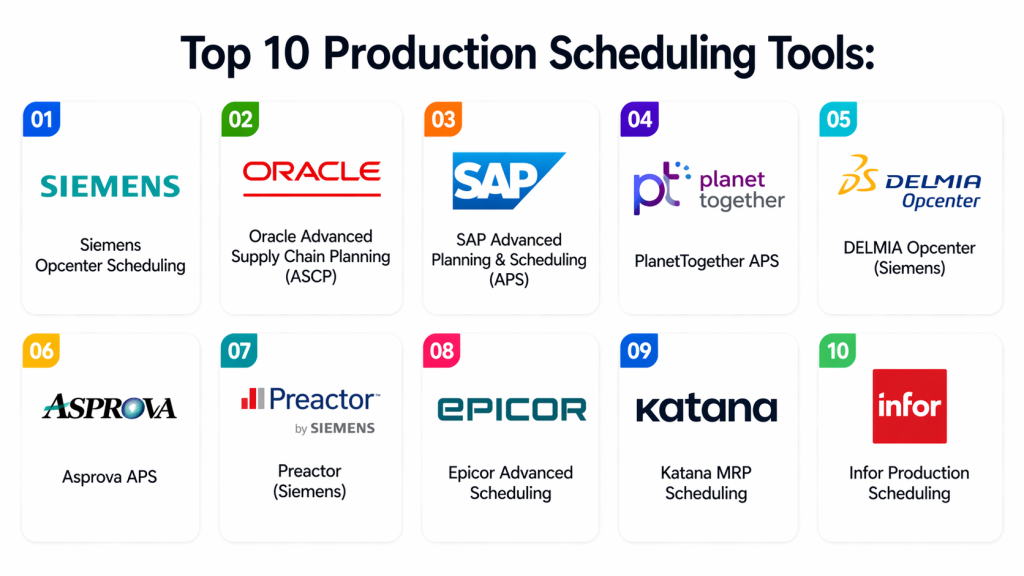
Top 10 Production Scheduling Tools
#1 — Siemens Opcenter Scheduling
Short description: A powerful advanced planning and scheduling system designed for complex manufacturing environments. It optimizes production schedules using real-time constraints like machine availability and material supply.
Key Features
- Constraint-based scheduling
- Real-time production optimization
- Machine capacity planning
- What-if analysis
- ERP/MES integration
Pros
- Highly accurate scheduling
- Strong industrial adoption
Cons
- Complex configuration
- High implementation cost
Platforms / Deployment
Cloud / On-prem
Security & Compliance
Enterprise-grade industrial security
Integrations & Ecosystem
Works with Siemens MES and ERP systems.
Support & Community
Strong enterprise support.
#2 — Oracle Advanced Supply Chain Planning (ASCP)
Short description: A comprehensive enterprise planning system that provides constraint-based production scheduling and supply chain optimization within Oracle ERP ecosystems.
Key Features
- Constraint-based scheduling
- Demand-driven planning
- Capacity balancing
- Scenario modeling
- ERP integration
Pros
- Deep Oracle integration
- Scalable enterprise system
Cons
- Complex setup
- Oracle dependency
Platforms / Deployment
Cloud / On-prem
Security & Compliance
Enterprise-grade security
Integrations & Ecosystem
Oracle ERP and supply chain systems.
Support & Community
Strong enterprise support.
#3 — SAP Advanced Planning & Scheduling (APO / S/4HANA APS)
Short description: SAP’s production scheduling system designed for large-scale manufacturing with strong integration into ERP and supply chain systems.
Key Features
- Production scheduling optimization
- Demand planning
- Capacity leveling
- Order sequencing
- ERP integration
Pros
- Industry-leading ERP integration
- Highly scalable
Cons
- Very complex
- High cost
Platforms / Deployment
Cloud / On-prem
Security & Compliance
Enterprise-grade
Integrations & Ecosystem
SAP ERP and supply chain ecosystem
Support & Community
Global enterprise support.
#4 — PlanetTogether APS
Short description: An AI-powered advanced planning and scheduling system used to optimize production workflows and capacity planning in manufacturing environments.
Key Features
- Constraint-based scheduling
- Capacity optimization
- Order prioritization
- What-if simulation
- ERP integration
Pros
- Strong optimization engine
- Flexible deployment
Cons
- Requires setup expertise
- Mid-market pricing
Platforms / Deployment
Cloud / On-prem
Security & Compliance
Not publicly stated
Integrations & Ecosystem
ERP and MES integrations
Support & Community
Enterprise support.
#5 — DELMIA Opcenter (Siemens)
Short description: A production scheduling solution that synchronizes manufacturing processes to improve efficiency and delivery performance.
Key Features
- Real-time scheduling
- Production synchronization
- Bottleneck detection
- Capacity planning
- Visualization tools
Pros
- Strong scheduling accuracy
- Industrial-grade system
Cons
- Complex implementation
- Costly
Platforms / Deployment
Cloud / On-prem
Security & Compliance
Enterprise-grade
Integrations & Ecosystem
Siemens industrial ecosystem
Support & Community
Strong enterprise support.
#6 — Asprova APS
Short description: A high-speed production scheduling tool designed for complex manufacturing environments with real-time optimization capabilities.
Key Features
- Advanced scheduling algorithms
- Capacity balancing
- Real-time adjustments
- Multi-factory planning
- Visualization dashboards
Pros
- Very fast optimization
- Highly detailed scheduling
Cons
- Steep learning curve
- Expensive
Platforms / Deployment
On-prem / Cloud
Security & Compliance
Not publicly stated
Integrations & Ecosystem
ERP and MES integrations
Support & Community
Enterprise support.
#7 — Preactor (Siemens)
Short description: A widely used advanced planning and scheduling tool for optimizing production workflows and reducing bottlenecks.
Key Features
- Gantt chart scheduling
- Capacity planning
- Order sequencing
- Simulation tools
- ERP integration
Pros
- Easy visualization
- Strong optimization
Cons
- Limited cloud-native features
- Legacy interface
Platforms / Deployment
On-prem
Security & Compliance
Enterprise-grade
Integrations & Ecosystem
ERP and MES systems
Support & Community
Strong enterprise support.
#8 — Epicor Advanced Scheduling
Short description: A manufacturing scheduling solution integrated into Epicor ERP for real-time production control and optimization.
Key Features
- Production scheduling
- Resource allocation
- Order management
- Real-time updates
- ERP integration
Pros
- Strong ERP integration
- Manufacturing-focused
Cons
- Limited flexibility outside Epicor
- Complex setup
Platforms / Deployment
Cloud / On-prem
Security & Compliance
Enterprise-grade
Integrations & Ecosystem
Epicor ERP ecosystem
Support & Community
Enterprise support.
#9 — Katana MRP Scheduling
Short description: A modern cloud-based production scheduling tool designed for small and mid-sized manufacturers with visual planning features.
Key Features
- Visual production scheduling
- Inventory synchronization
- Real-time order tracking
- Drag-and-drop planning
- Demand forecasting
Pros
- Easy to use
- Great UI
Cons
- Limited enterprise scalability
- Fewer advanced features
Platforms / Deployment
Cloud
Security & Compliance
Not publicly stated
Integrations & Ecosystem
E-commerce and ERP integrations
Support & Community
Good SMB support.
#10 — Infor Production Scheduling
Short description: A manufacturing scheduling system designed to optimize production planning based on constraints like materials, labor, and machine capacity.
Key Features
- Constraint-based scheduling
- Capacity planning
- Resource allocation
- Production sequencing
- ERP integration
Pros
- Strong enterprise features
- Good scalability
Cons
- Complex UI
- Enterprise cost
Platforms / Deployment
Cloud / On-prem
Security & Compliance
Enterprise-grade
Integrations & Ecosystem
Infor ERP ecosystem
Support & Community
Strong enterprise support.
Comparison Table
| Tool Name | Best For | Platform(s) Supported | Deployment | Standout Feature | Public Rating |
|---|---|---|---|---|---|
| Siemens Opcenter | Enterprise manufacturing | Multi-platform | Hybrid | Real-time scheduling | N/A |
| Oracle ASCP | ERP-driven planning | Cloud | Cloud | Constraint planning | N/A |
| SAP APS | Global enterprises | Multi-platform | Hybrid | ERP integration | N/A |
| PlanetTogether | Optimization | Multi-platform | Hybrid | AI scheduling | N/A |
| DELMIA Opcenter | Industrial plants | Multi-platform | Hybrid | Synchronization | N/A |
| Asprova APS | Complex factories | Multi-platform | Hybrid | Fast optimization | N/A |
| Preactor | Manufacturing planning | On-prem | On-prem | Gantt scheduling | N/A |
| Epicor APS | ERP users | Multi-platform | Hybrid | ERP integration | N/A |
| Katana | SMB manufacturing | Web | Cloud | Visual scheduling | N/A |
| Infor Scheduling | Industrial ERP | Multi-platform | Hybrid | Constraint scheduling | N/A |
Evaluation & Scoring of Production Scheduling Tools
| Tool Name | Core | Ease | Integrations | Security | Performance | Support | Value | Weighted Total |
|---|---|---|---|---|---|---|---|---|
| Siemens Opcenter | 10 | 7 | 9 | 9 | 9 | 9 | 7 | 8.7 |
| Oracle ASCP | 9 | 7 | 9 | 9 | 9 | 9 | 7 | 8.6 |
| SAP APS | 10 | 6 | 9 | 9 | 9 | 9 | 6 | 8.5 |
| PlanetTogether | 8 | 8 | 8 | 7 | 8 | 8 | 8 | 8.0 |
| DELMIA Opcenter | 9 | 7 | 8 | 8 | 9 | 8 | 7 | 8.2 |
| Asprova APS | 9 | 6 | 8 | 8 | 9 | 8 | 6 | 8.0 |
| Preactor | 8 | 7 | 8 | 8 | 8 | 8 | 7 | 7.9 |
| Epicor APS | 8 | 7 | 8 | 8 | 8 | 8 | 7 | 7.9 |
| Katana | 7 | 9 | 8 | 7 | 7 | 7 | 9 | 7.8 |
| Infor Scheduling | 8 | 7 | 8 | 8 | 8 | 8 | 7 | 7.9 |
Frequently Asked Questions (FAQs)
1. What is a production scheduling tool?
A production scheduling tool is software that helps manufacturers plan and sequence production tasks across machines and resources. It ensures that manufacturing operations run efficiently with minimal delays and optimized resource usage.
2. Why is production scheduling important?
It helps reduce downtime, improve efficiency, and ensure on-time delivery by optimizing how machines, labor, and materials are used in production processes.
3. What industries use scheduling tools?
Industries like automotive, electronics, pharmaceuticals, FMCG, and heavy manufacturing rely heavily on production scheduling systems for efficient operations.
4. What is the difference between scheduling and planning?
Planning defines what needs to be produced, while scheduling determines when and how production tasks are executed in detail.
5. Do these tools support real-time scheduling?
Yes, modern scheduling tools adjust production schedules in real time based on machine availability, demand changes, and resource constraints.
6. Can scheduling tools integrate with ERP systems?
Yes, most tools integrate with ERP and MES systems to ensure seamless data flow across business and production processes.
7. Are cloud-based scheduling tools available?
Yes, many modern tools like Katana and PlanetTogether offer cloud-based scheduling solutions for flexibility and remote access.
8. What are common challenges in scheduling?
Challenges include machine downtime, demand fluctuations, resource constraints, and data accuracy issues.
9. Do AI-based scheduling tools exist?
Yes, many modern systems use AI and optimization algorithms to improve scheduling efficiency and reduce bottlenecks.
10. Are these tools suitable for small manufacturers?
Yes, SMB-focused tools like Katana are designed for smaller manufacturers, while enterprise tools are better suited for large-scale operations.
Conclusion
Production Scheduling Tools are essential for modern manufacturing environments, enabling businesses to efficiently manage production workflows, reduce delays, and optimize resource utilization. They play a critical role in ensuring smooth operations across factories and supply chains. There is no single best tool for every organization. Enterprises often rely on SAP, Siemens, or Oracle for large-scale scheduling, while mid-sized manufacturers use tools like PlanetTogether or Epicor. Smaller businesses benefit from simpler solutions like Katana. The right choice depends on production complexity, integration needs, and scalability requirements. Companies should evaluate tools based on real-time capabilities, integration strength, and ease of use. Start by testing a few platforms, analyzing scheduling efficiency, and validating integration with existing systems to ensure long-term operational success.
