Introduction
PLC Programming Tools are software platforms used to design, program, simulate, and maintain Programmable Logic Controllers (PLCs) in industrial automation systems. PLCs act as the “brains” of machines in factories, controlling everything from assembly lines to robotic systems.
These tools enable engineers to write logic using languages like Ladder Logic, Function Block Diagram (FBD), Structured Text, and Instruction List, ensuring machines operate safely and efficiently. In modern Industry 4.0 environments, PLC tools are essential for integrating automation with IoT, SCADA, and smart manufacturing systems.
Common use cases include:
- Manufacturing automation and production lines
- Robotics control systems
- Energy and power distribution systems
- Water treatment and utility plants
- Industrial process automation
Key evaluation criteria:
- Supported PLC hardware compatibility
- Programming languages (IEC 61131-3 support)
- Simulation and debugging capabilities
- Ease of use and learning curve
- Integration with SCADA and HMI systems
- Real-time monitoring and diagnostics
- Scalability for large automation systems
- Vendor ecosystem and support
Best for: Automation engineers, PLC programmers, industrial system integrators, manufacturing companies, and robotics developers.
Not ideal for: Basic software developers or non-industrial applications without automation hardware.
Key Trends in PLC Programming Tools
- Integration with Industry 4.0 and IIoT systems
- Adoption of cloud-based PLC programming environments
- Increased use of digital twin simulation
- Support for cross-platform programming tools
- Integration with SCADA and MES systems
- Rise of AI-assisted automation logic design
- Expansion of open-source PLC programming platforms
- Improved cybersecurity in industrial control systems
- Support for real-time remote debugging
- Standardization around IEC 61131-3 programming languages
How We Selected These Tools (Methodology)
- Evaluated industrial adoption and market presence
- Assessed hardware compatibility and vendor support
- Reviewed programming capabilities and language support
- Considered simulation and debugging features
- Included both enterprise and open-source tools
- Analyzed integration with SCADA and IoT systems
- Focused on real-world industrial usage
- Balanced ease of use and advanced functionality
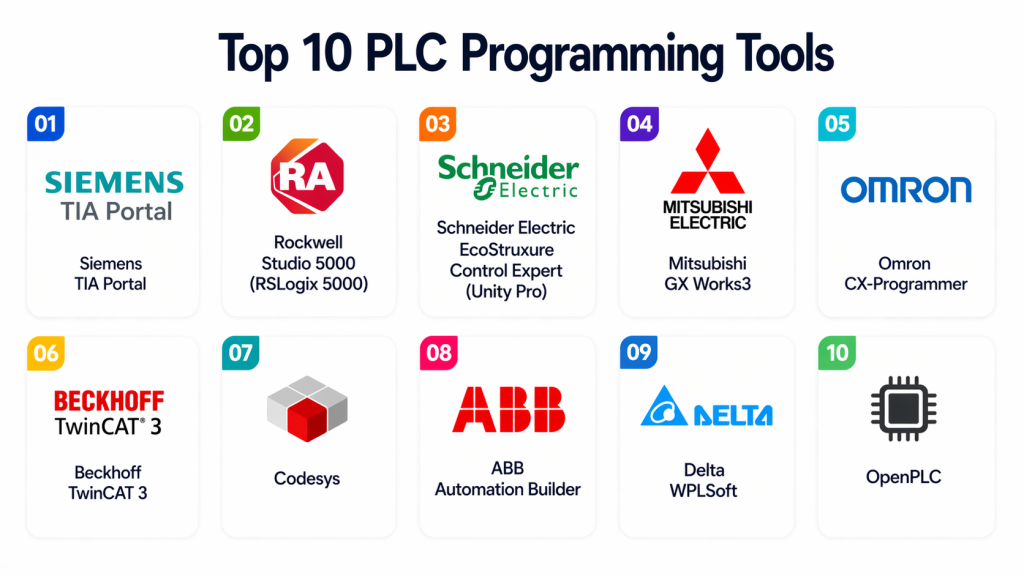
Top 10 PLC Programming Tools
#1 — Siemens TIA Portal
Short description: A comprehensive engineering platform used for programming Siemens PLCs, HMI, and industrial automation systems in a unified environment. It is widely used in manufacturing and smart factories.
Key Features
- Integrated PLC and HMI programming
- Ladder Logic and Structured Text support
- Real-time diagnostics
- Simulation tools
- Device configuration
Pros
- Highly integrated ecosystem
- Industry standard in many regions
Cons
- Expensive licensing
- Steep learning curve
Platforms / Deployment
Windows / On-prem
Security & Compliance
Enterprise-grade industrial security features
Integrations & Ecosystem
Works with Siemens automation hardware and SCADA systems.
Support & Community
Strong global industrial support.
#2 — Rockwell Studio 5000
Short description: A leading PLC programming environment used for Allen-Bradley controllers, widely adopted in North American industrial automation systems.
Key Features
- Ladder Logic programming
- Structured Text support
- Device configuration
- Simulation tools
- Real-time monitoring
Pros
- Strong industrial adoption
- Reliable performance
Cons
- Expensive
- Vendor lock-in
Platforms / Deployment
Windows
Security & Compliance
Industrial-grade security features
Integrations & Ecosystem
Works with Rockwell Automation hardware and SCADA systems.
Support & Community
Strong enterprise support.
#3 — Schneider Electric EcoStruxure Control Expert
Short description: A powerful PLC programming platform designed for Schneider Electric controllers with strong automation and control capabilities.
Key Features
- Multi-language PLC programming
- Device configuration
- Simulation tools
- Real-time diagnostics
- SCADA integration
Pros
- Flexible programming
- Strong ecosystem
Cons
- Complex interface
- Licensing cost
Platforms / Deployment
Windows
Security & Compliance
Enterprise-grade security
Integrations & Ecosystem
Works with Schneider Electric automation systems.
Support & Community
Strong enterprise support.
#4 — Mitsubishi GX Works3
Short description: A PLC programming tool designed for Mitsubishi PLC systems, offering intuitive programming and strong industrial integration.
Key Features
- Ladder Logic programming
- Structured programming
- Simulation tools
- Device configuration
- Debugging support
Pros
- Easy to use
- Reliable performance
Cons
- Limited to Mitsubishi hardware
- Smaller ecosystem
Platforms / Deployment
Windows
Security & Compliance
Not publicly stated
Integrations & Ecosystem
Works with Mitsubishi automation systems.
Support & Community
Strong regional support.
#5 — Omron CX-One
Short description: An integrated software suite for Omron PLC programming and industrial automation system configuration.
Key Features
- PLC programming tools
- HMI configuration
- Simulation support
- Device integration
- Debugging tools
Pros
- Easy integration
- Beginner-friendly
Cons
- Outdated interface
- Limited flexibility
Platforms / Deployment
Windows
Security & Compliance
Not publicly stated
Integrations & Ecosystem
Works with Omron automation hardware.
Support & Community
Moderate support.
#6 — ABB Automation Builder
Short description: A unified engineering tool for ABB PLCs, motion control, and robotics programming in industrial environments.
Key Features
- PLC programming
- Robotics integration
- Motion control
- Simulation tools
- Device configuration
Pros
- Multi-domain support
- Strong industrial focus
Cons
- Complex setup
- Vendor dependency
Platforms / Deployment
Windows
Security & Compliance
Industrial-grade features
Integrations & Ecosystem
Works with ABB automation systems.
Support & Community
Enterprise support.
#7 — Codesys
Short description: A powerful vendor-independent PLC programming platform supporting multiple hardware systems and automation environments.
Key Features
- IEC 61131-3 support
- Multi-platform compatibility
- Simulation environment
- HMI development
- Modular architecture
Pros
- Vendor-independent
- Highly flexible
Cons
- Requires expertise
- Setup complexity
Platforms / Deployment
Windows / Linux
Security & Compliance
Varies
Integrations & Ecosystem
Supports multiple PLC hardware vendors.
Support & Community
Strong global community.
#8 — Delta WPLSoft
Short description: A simple and lightweight PLC programming tool designed for Delta PLC systems.
Key Features
- Ladder Logic programming
- Simulation tools
- Device configuration
- Monitoring tools
- Easy interface
Pros
- Easy to learn
- Lightweight
Cons
- Limited features
- Vendor-specific
Platforms / Deployment
Windows
Security & Compliance
Not publicly stated
Integrations & Ecosystem
Works with Delta PLC systems.
Support & Community
Basic support.
#9 — Beckhoff TwinCAT
Short description: A PC-based control system that turns a standard PC into a real-time PLC for industrial automation.
Key Features
- PC-based PLC programming
- Real-time control
- Simulation environment
- Motion control
- Integration with automation systems
Pros
- High performance
- Flexible architecture
Cons
- Requires technical expertise
- Complex setup
Platforms / Deployment
Windows
Security & Compliance
Industrial-grade features
Integrations & Ecosystem
Works with Beckhoff automation systems.
Support & Community
Strong industrial support.
#10 — AutomationDirect Do-more Designer
Short description: A PLC programming tool designed for AutomationDirect PLCs with an easy-to-use interface for industrial automation tasks.
Key Features
- Ladder Logic programming
- Device configuration
- Simulation tools
- Debugging features
- Monitoring interface
Pros
- Simple interface
- Cost-effective
Cons
- Limited scalability
- Vendor-specific
Platforms / Deployment
Windows
Security & Compliance
Not publicly stated
Integrations & Ecosystem
Works with AutomationDirect hardware.
Support & Community
Moderate support.
Comparison Table (Top 10)
| Tool Name | Best For | Platform(s) Supported | Deployment | Standout Feature | Public Rating |
|---|---|---|---|---|---|
| Siemens TIA Portal | Industrial automation | Windows | On-prem | Unified engineering | N/A |
| Rockwell Studio 5000 | Manufacturing | Windows | On-prem | PLC programming standard | N/A |
| Schneider EcoStruxure | Automation systems | Windows | Hybrid | Multi-device control | N/A |
| Mitsubishi GX Works3 | Mitsubishi PLCs | Windows | On-prem | Easy ladder logic | N/A |
| Omron CX-One | Industrial control | Windows | On-prem | Integrated suite | N/A |
| ABB Automation Builder | Robotics & PLC | Windows | On-prem | Robotics integration | N/A |
| Codesys | Multi-vendor PLCs | Multi-platform | Hybrid | Vendor-independent | N/A |
| Delta WPLSoft | Small systems | Windows | On-prem | Lightweight tool | N/A |
| Beckhoff TwinCAT | PC-based PLC | Windows | Hybrid | Real-time control | N/A |
| Do-more Designer | Entry-level PLC | Windows | On-prem | Simple interface | N/A |
Evaluation & Scoring of PLC Programming Tools
| Tool Name | Core | Ease | Integrations | Security | Performance | Support | Value | Weighted Total |
|---|---|---|---|---|---|---|---|---|
| Siemens TIA Portal | 10 | 7 | 9 | 8 | 9 | 9 | 7 | 8.6 |
| Rockwell Studio 5000 | 9 | 7 | 9 | 8 | 9 | 9 | 7 | 8.4 |
| Schneider EcoStruxure | 9 | 7 | 8 | 8 | 8 | 8 | 7 | 8.1 |
| Mitsubishi GX Works3 | 8 | 8 | 7 | 7 | 8 | 8 | 8 | 7.9 |
| Omron CX-One | 7 | 8 | 7 | 7 | 7 | 7 | 8 | 7.4 |
| ABB Automation Builder | 8 | 7 | 8 | 8 | 8 | 8 | 7 | 7.9 |
| Codesys | 9 | 6 | 9 | 7 | 9 | 8 | 9 | 8.3 |
| Delta WPLSoft | 6 | 9 | 6 | 6 | 7 | 6 | 9 | 7.0 |
| Beckhoff TwinCAT | 9 | 6 | 8 | 8 | 9 | 8 | 7 | 8.2 |
| Do-more Designer | 6 | 9 | 6 | 6 | 7 | 6 | 9 | 7.0 |
How to interpret scores:
These scores compare tools across industrial usability, performance, and ecosystem strength. Higher scores indicate stronger enterprise capability, while lower scores often reflect simplicity or limited scope.
Which PLC Programming Tool Is Right for You?
Solo / Freelancer
Do-more Designer or Delta WPLSoft for learning and small projects.
SMB
Omron CX-One or Mitsubishi GX Works3 for balanced functionality.
Mid-Market
Codesys or Beckhoff TwinCAT for scalable automation.
Enterprise
Siemens TIA Portal, Rockwell Studio 5000, and Schneider EcoStruxure for large-scale systems.
Budget vs Premium
Entry tools are cost-effective; enterprise platforms offer advanced control.
Feature Depth vs Ease of Use
TIA Portal offers depth; Omron CX-One offers simplicity.
Integrations & Scalability
Codesys and Siemens excel in integration-heavy environments.
Security & Compliance Needs
Enterprise tools provide stronger industrial security controls.
Frequently Asked Questions (FAQs)
1. What is a PLC programming tool?
A PLC programming tool is software used to create logic programs for programmable logic controllers. These tools help automate industrial machines and processes by defining control sequences.
2. Why are PLC tools important?
They are essential for industrial automation. They allow engineers to control machines efficiently, reduce manual work, and improve production accuracy and safety.
3. What languages are used in PLC programming?
PLC programming uses IEC 61131-3 languages like Ladder Logic, Function Block Diagram, Structured Text, and Instruction List for different control needs.
4. Are PLC tools hardware-specific?
Yes, many tools are tied to specific PLC vendors, but some platforms like Codesys support multiple hardware systems.
5. Can PLC tools simulate programs?
Yes, most modern PLC tools include simulation features that allow testing programs before deploying them to real hardware.
6. Are these tools used in real-time systems?
Yes, PLC systems operate in real-time environments where immediate response to inputs is critical for industrial processes.
7. Do PLC tools integrate with SCADA?
Yes, PLC tools are often integrated with SCADA systems for monitoring, visualization, and higher-level control.
8. Are PLC programming tools hard to learn?
Some tools are beginner-friendly, while others require advanced industrial automation knowledge depending on complexity.
9. What industries use PLC tools?
Industries like manufacturing, energy, automotive, water treatment, and logistics heavily rely on PLC programming tools.
10. Are open-source PLC tools available?
Yes, platforms like Codesys provide open and flexible environments, though many industrial tools are proprietary.
Conclusion
PLC Programming Tools are the foundation of industrial automation, enabling precise control of machines and processes across industries. They help engineers design reliable systems that improve productivity, safety, and efficiency. There is no single best tool for every use case. Siemens TIA Portal and Rockwell Studio 5000 dominate enterprise environments, while Codesys offers flexibility across multiple hardware systems. For learning or smaller setups, tools like Omron CX-One or Delta WPLSoft are suitable. The right choice depends on your hardware ecosystem, project complexity, and scalability needs. Focus on tools that align with your industrial requirements and long-term automation strategy. Start with a few platforms, test programming workflows, and validate integration with your PLC hardware. This ensures smooth deployment and reliable industrial operations.
