Introduction
Server Management Tools are software solutions designed to monitor, manage, and maintain the performance, health, and security of servers. In simple terms, they act as a centralized control system that helps IT teams keep servers running smoothly without manual intervention.
Modern infrastructures—whether on-premise, cloud, or hybrid—depend heavily on these tools. They help track uptime, monitor CPU and memory usage, automate routine tasks, and detect issues before they cause downtime. Without server management tools, managing large-scale systems becomes inefficient and error-prone.
These platforms typically include features like real-time monitoring, automation, alerting, patch management, performance analytics, and security controls. They are widely used across enterprises, data centers, cloud environments, and DevOps workflows.
Common use cases include:
- Server performance monitoring
- Infrastructure automation
- Patch and update management
- Incident detection and alerting
- Resource optimization
What buyers should evaluate:
- Real-time monitoring capabilities
- Automation and scripting support
- Scalability
- Multi-cloud compatibility
- Security features
- Ease of use
- Integration ecosystem
- Reporting and analytics
- Cost and licensing
- Support quality
Best for: IT teams, system administrators, DevOps engineers, enterprises, and cloud infrastructure teams.
Not ideal for: Small setups with minimal infrastructure complexity.
Key Trends in Server Management Tools
- AI-driven monitoring and anomaly detection
- Cloud-native and hybrid infrastructure support
- Automation and infrastructure-as-code integration
- Real-time observability dashboards
- Integration with DevOps and CI/CD pipelines
- Security-first server management approaches
- Unified monitoring across servers, networks, and applications
- Predictive maintenance and failure detection
- Remote server management capabilities
- Increased use of SaaS-based management platforms
How We Selected These Tools (Methodology)
- Market popularity and adoption
- Feature completeness
- Monitoring and automation capabilities
- Integration ecosystem
- Scalability
- Security features
- Ease of deployment
- Vendor reliability
- Support and documentation
- Overall value
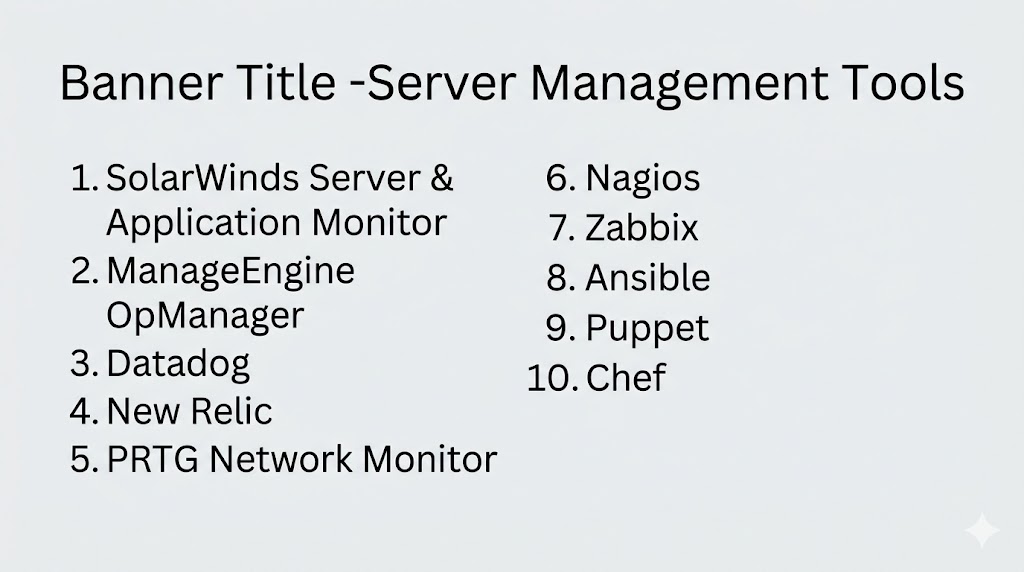
Top 10 Server Management Tools
#1 — SolarWinds Server & Application Monitor (SAM)
Short description: Comprehensive server monitoring and management tool with deep performance insights.
Key Features
- Real-time server monitoring
- Application performance tracking
- Custom alerts and reports
- Auto-discovery of servers
- Resource utilization metrics
Pros
- Easy-to-use interface
- Scalable for enterprises
Cons
- Premium pricing
- Complex setup for beginners
#2 — ManageEngine OpManager
Short description: Integrated server and network management tool with strong monitoring capabilities.
Key Features
- Real-time monitoring
- Network and server visibility
- Alerts and notifications
- Automation workflows
- Performance analytics
Pros
- All-in-one solution
- Good for mid-sized businesses
Cons
- UI complexity
- Advanced features require upgrades
#3 — Datadog
Short description: Cloud-based monitoring platform offering full-stack observability.
Key Features
- Infrastructure monitoring
- Log management
- Performance tracking
- Cloud integrations
- Real-time dashboards
Pros
- Strong cloud-native capabilities
- Excellent integrations
Cons
- Pricing can scale quickly
- Learning curve
#4 — New Relic
Short description: Observability platform for monitoring servers, applications, and infrastructure.
Key Features
- Real-time monitoring
- Log analytics
- Performance tracking
- Custom dashboards
- Alerting system
Pros
- Powerful analytics
- Flexible dashboards
Cons
- Pricing complexity
- Setup can be technical
#5 — PRTG Network Monitor
Short description: All-in-one monitoring tool for servers, networks, and infrastructure.
Key Features
- Real-time monitoring
- Custom sensors
- Alerts and notifications
- Performance tracking
- Centralized dashboard
Pros
- Easy setup
- Wide protocol support
Cons
- Licensing based on sensors
- UI can feel dated
#6 — Nagios
Short description: Open-source server monitoring tool widely used for infrastructure monitoring.
Key Features
- Server monitoring
- Alerting system
- Plugin ecosystem
- Performance tracking
- Customizable dashboards
Pros
- Open-source flexibility
- Highly customizable
Cons
- Requires manual setup
- Outdated UI
#7 — Zabbix
Short description: Enterprise-grade open-source monitoring tool for servers and networks.
Key Features
- Real-time monitoring
- Data visualization
- Alerting system
- Scalability
- Automation support
Pros
- Free and powerful
- Highly scalable
Cons
- Steep learning curve
- Complex configuration
#8 — Ansible
Short description: Automation tool used for server configuration and management.
Key Features
- Configuration management
- Automation workflows
- Infrastructure as code
- Agentless architecture
- Deployment automation
Pros
- Easy automation
- No agents required
Cons
- Not a full monitoring tool
- Requires scripting knowledge
#9 — Puppet
Short description: Configuration management tool for automating server infrastructure.
Key Features
- Infrastructure automation
- Configuration management
- Policy enforcement
- Scalability
- Reporting tools
Pros
- Strong automation capabilities
- Enterprise-ready
Cons
- Complex setup
- Learning curve
#10 — Chef
Short description: Automation platform for managing server configurations and deployments.
Key Features
- Infrastructure as code
- Automation workflows
- Configuration management
- Compliance tools
- Scalability
Pros
- Powerful automation
- Flexible
Cons
- Requires expertise
- Setup complexity
Comparison Table (Top 10)
| Tool Name | Best For | Deployment | Standout Feature | Category | Public Rating |
|---|---|---|---|---|---|
| SolarWinds SAM | Enterprises | On-prem/Cloud | Deep monitoring | Monitoring | N/A |
| ManageEngine OpManager | SMB/Mid-market | On-prem/Cloud | Unified monitoring | Monitoring | N/A |
| Datadog | Cloud teams | Cloud | Full-stack observability | Monitoring | N/A |
| New Relic | DevOps teams | Cloud | Advanced analytics | Monitoring | N/A |
| PRTG | IT teams | On-prem | Sensor-based monitoring | Monitoring | N/A |
| Nagios | Open-source users | On-prem | Custom plugins | Monitoring | N/A |
| Zabbix | Enterprises | On-prem/Cloud | Scalability | Monitoring | N/A |
| Ansible | DevOps | Hybrid | Agentless automation | Automation | N/A |
| Puppet | Enterprises | Hybrid | Policy automation | Automation | N/A |
| Chef | DevOps | Hybrid | Infrastructure as code | Automation | N/A |
Evaluation & Scoring of Server Management Tools
| Tool Name | Core (25%) | Ease (15%) | Integrations (15%) | Security (10%) | Performance (10%) | Support (10%) | Value (15%) | Weighted Total |
|---|---|---|---|---|---|---|---|---|
| SolarWinds SAM | 10 | 8 | 9 | 9 | 9 | 9 | 7 | 9.0 |
| ManageEngine OpManager | 9 | 8 | 8 | 8 | 8 | 8 | 9 | 8.4 |
| Datadog | 9 | 8 | 10 | 9 | 9 | 9 | 7 | 8.9 |
| New Relic | 9 | 8 | 9 | 9 | 9 | 8 | 7 | 8.7 |
| PRTG | 8 | 9 | 8 | 8 | 8 | 8 | 8 | 8.3 |
| Nagios | 8 | 6 | 8 | 8 | 8 | 7 | 9 | 7.9 |
| Zabbix | 9 | 7 | 8 | 8 | 9 | 7 | 9 | 8.2 |
| Ansible | 8 | 8 | 9 | 8 | 8 | 8 | 9 | 8.3 |
| Puppet | 9 | 7 | 9 | 9 | 8 | 8 | 8 | 8.4 |
| Chef | 9 | 7 | 9 | 9 | 8 | 8 | 8 | 8.4 |
How to interpret scores:
Monitoring tools dominate performance visibility, while automation tools excel in infrastructure control and scalability.
Which Server Management Tool Is Right for You?
Solo / Freelancer
Zabbix, Nagios
SMB
PRTG, ManageEngine
Mid-Market
Datadog, New Relic
Enterprise
SolarWinds, Puppet, Chef
Budget vs Premium
- Budget: Zabbix, Nagios
- Premium: Datadog, SolarWinds
Feature Depth vs Ease of Use
- Easy: PRTG, ManageEngine
- Deep: Datadog, Puppet
Integrations & Scalability
Datadog, New Relic
Security & Compliance Needs
Puppet, Chef
Frequently Asked Questions (FAQs)
What are server management tools?
They help monitor, manage, and maintain servers.
Why are they important?
They prevent downtime and improve performance.
Do they support cloud environments?
Yes, most modern tools support cloud and hybrid setups.
What features should I look for?
Monitoring, automation, security, and scalability.
Are open-source tools available?
Yes, tools like Nagios and Zabbix.
Can they automate tasks?
Yes, many tools support automation.
Do they improve security?
Yes, through monitoring and alerts.
Are they expensive?
Depends on the tool and scale.
Which is best for beginners?
PRTG or ManageEngine.
How do I choose?
Evaluate your infrastructure, budget, and feature needs.
Conclusion
Server Management Tools are essential for maintaining performance, security, and reliability in modern IT environments. Tools like SolarWinds and Datadog provide deep monitoring and enterprise capabilities, while ManageEngine and PRTG offer balanced solutions for mid-sized teams. Open-source tools like Zabbix and Nagios provide cost-effective alternatives, and automation platforms like Ansible, Puppet, and Chef help streamline operations. The right choice depends on your infrastructure size, technical expertise, and operational needs. Start with monitoring tools for visibility, then integrate automation as your infrastructure grows.
