Introduction
Video editing software enables creators to cut, arrange, enhance, and export video content for various platforms. It serves as the backbone of modern content production—whether for films, social media, marketing campaigns, or online education. From trimming clips to applying transitions, color grading, sound design, and visual effects, these tools transform raw footage into polished stories.
With the rapid growth of digital content consumption, video editing tools have evolved significantly. Today’s platforms offer AI-powered editing, real-time collaboration, cloud workflows, and seamless integrations with production pipelines, making them more accessible and powerful than ever.
Common Use Cases
- YouTube and social media content creation
- Film and documentary editing
- Marketing and advertising videos
- Corporate training and presentations
- Game streaming and highlight editing
What Buyers Should Evaluate
- Ease of use vs professional depth
- Timeline editing capabilities
- Performance and rendering speed
- AI features (auto-cut, captions, enhancements)
- Integration with other creative tools
- Supported formats and export options
- Collaboration and cloud workflows
- Audio editing capabilities
- Plugin ecosystem
- Pricing and licensing model
Best for: Content creators, video editors, filmmakers, marketers, educators, and media production teams.
Not ideal for: Users who only need simple trimming or basic edits (mobile apps may be sufficient).
Key Trends in Video Editing Software
- AI-assisted editing (auto cuts, captions, scene detection)
- Cloud-based collaboration and remote workflows
- Real-time playback and rendering improvements
- Integration with VFX, color grading, and audio tools
- Mobile and cross-device editing workflows
- Expansion of template-driven editing for creators
- GPU acceleration for faster processing
- Increased support for vertical video formats
- Automation of repetitive editing tasks
- Growth of creator-focused all-in-one platforms
How We Selected These Tools (Methodology)
- Industry adoption across creators, studios, and businesses
- Feature completeness (editing, effects, audio, export)
- Performance and reliability
- Integration with creative ecosystems
- Usability across beginner to advanced users
- Community support and documentation
- Availability across platforms
- Balance of free and premium options
- Scalability for different team sizes
- Relevance for modern content workflows
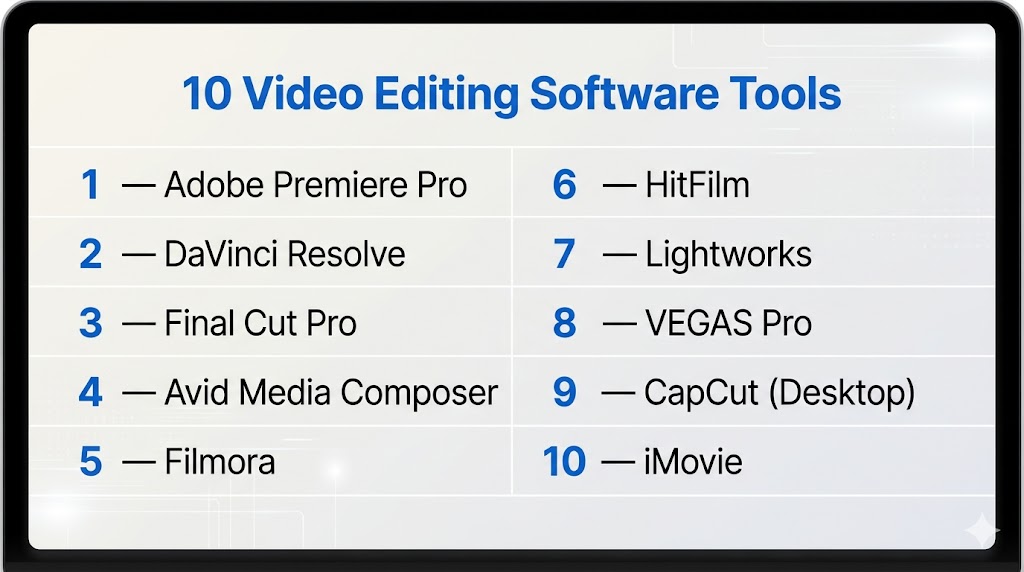
Top 10 Video Editing Software Tools
#1 — Adobe Premiere Pro
Short description: A professional video editing software widely used across industries for its flexibility and integration with creative workflows.
Key Features
- Timeline-based editing
- Multi-format support
- Advanced color grading tools
- Audio editing capabilities
- AI-powered features
- Plugin ecosystem
- Cloud collaboration
Pros
- Industry-standard tool
- Strong integration with creative tools
Cons
- Subscription model
- Performance issues on lower-end systems
Platforms / Deployment
Windows / macOS
Cloud / Local
Security & Compliance
Not publicly stated
Integrations & Ecosystem
Part of a large creative ecosystem with seamless integration across tools.
- Motion graphics tools
- Audio editing tools
- Asset libraries
- Plugin marketplace
Support & Community
Very large global community with extensive tutorials and support resources.
#2 — DaVinci Resolve
Short description: An all-in-one post-production platform combining video editing, color grading, VFX, and audio tools.
Key Features
- Professional editing timeline
- Advanced color grading
- Built-in VFX tools
- Audio production suite
- Real-time collaboration
- AI features
- Multi-user workflows
Pros
- Free version available
- Comprehensive toolset
Cons
- High system requirements
- Complex interface
Platforms / Deployment
Windows / macOS / Linux
Local
Security & Compliance
Not publicly stated
Integrations & Ecosystem
Integrated full post-production workflow.
- Editing
- VFX
- Audio
Support & Community
Large and rapidly growing community.
#3 — Final Cut Pro
Short description: A macOS-exclusive video editing software known for performance and ease of use.
Key Features
- Magnetic timeline
- Real-time playback
- Optimized for Apple hardware
- Advanced color tools
- Plugin support
- HDR support
Pros
- Fast performance
- User-friendly interface
Cons
- macOS only
- Smaller plugin ecosystem
Platforms / Deployment
macOS
Local
Security & Compliance
Not publicly stated
Integrations & Ecosystem
Works within Apple ecosystem.
Support & Community
Strong Mac-focused community.
#4 — Avid Media Composer
Short description: A professional editing tool used in film and television production for complex workflows.
Key Features
- Advanced timeline editing
- Media management tools
- Collaboration features
- High-end workflows
- Integration with production pipelines
Pros
- Industry-standard for film and TV
- Strong media handling
Cons
- Steep learning curve
- Expensive
Platforms / Deployment
Windows / macOS
Local
Security & Compliance
Not publicly stated
Integrations & Ecosystem
Deep integration with production workflows.
Support & Community
Large professional user base.
#5 — Filmora
Short description: A beginner-friendly video editing software designed for content creators and small businesses.
Key Features
- Drag-and-drop editing
- Built-in templates
- Effects library
- AI tools
- Audio editing
- Export options
Pros
- Easy to learn
- Affordable
Cons
- Limited advanced features
- Watermark in free version
Platforms / Deployment
Windows / macOS
Local
Security & Compliance
Not publicly stated
Integrations & Ecosystem
Standalone tool with basic integrations.
Support & Community
Moderate community with tutorials.
#6 — HitFilm
Short description: A hybrid video editing and VFX tool for creators and indie filmmakers.
Key Features
- Editing and VFX tools
- Effects library
- Real-time preview
- Templates
- Audio tools
Pros
- All-in-one solution
- Good for beginners
Cons
- Limited advanced workflows
- Smaller ecosystem
Platforms / Deployment
Windows / macOS
Local
Security & Compliance
Not publicly stated
Integrations & Ecosystem
Standalone with plugin support.
Support & Community
Moderate community.
#7 — Lightworks
Short description: A lightweight video editing software with professional capabilities and a free version.
Key Features
- Timeline editing
- Multi-format support
- Real-time effects
- Export options
- Customizable interface
Pros
- Free version available
- Lightweight
Cons
- Learning curve
- Limited advanced features
Platforms / Deployment
Windows / macOS / Linux
Local
Security & Compliance
Not publicly stated
Integrations & Ecosystem
Standalone editor.
Support & Community
Moderate support.
#8 — VEGAS Pro
Short description: A powerful video editing software focused on performance and advanced editing features.
Key Features
- Timeline editing
- Advanced effects
- Audio editing
- GPU acceleration
- AI tools
Pros
- Fast performance
- Strong audio tools
Cons
- Windows only
- Interface complexity
Platforms / Deployment
Windows
Local
Security & Compliance
Not publicly stated
Integrations & Ecosystem
Supports plugins and extensions.
Support & Community
Active user community.
#9 — CapCut (Desktop)
Short description: A modern video editing tool popular among content creators for quick and easy editing.
Key Features
- Template-based editing
- AI tools
- Effects library
- Social media export
- Real-time preview
Pros
- Very easy to use
- Free and fast
Cons
- Limited advanced features
- Internet dependency for some features
Platforms / Deployment
Windows / macOS / Mobile
Cloud / Local
Security & Compliance
Not publicly stated
Integrations & Ecosystem
Focused on content creation workflows.
Support & Community
Large creator community.
#10 — iMovie
Short description: A simple video editing tool for beginners available on Apple devices.
Key Features
- Drag-and-drop editing
- Templates
- Real-time preview
- Basic effects
- Easy export
Pros
- Free and easy to use
- Great for beginners
Cons
- Limited features
- macOS/iOS only
Platforms / Deployment
macOS / iOS
Local
Security & Compliance
Not publicly stated
Integrations & Ecosystem
Works within Apple ecosystem.
Support & Community
Strong beginner-focused community.
Comparison Table (Top 10)
| Tool Name | Best For | Platform(s) Supported | Deployment | Standout Feature | Public Rating |
|---|---|---|---|---|---|
| Premiere Pro | Professionals | Windows, macOS | Cloud/Local | Industry standard | N/A |
| DaVinci Resolve | All-in-one | Windows, macOS, Linux | Local | Full pipeline | N/A |
| Final Cut Pro | Mac users | macOS | Local | Performance | N/A |
| Avid Media Composer | Film/TV | Windows, macOS | Local | Media management | N/A |
| Filmora | Beginners | Windows, macOS | Local | Ease of use | N/A |
| HitFilm | Indie creators | Windows, macOS | Local | VFX tools | N/A |
| Lightworks | Budget users | Windows, macOS, Linux | Local | Lightweight | N/A |
| VEGAS Pro | Windows users | Windows | Local | Audio tools | N/A |
| CapCut | Content creators | Windows, macOS, Mobile | Cloud/Local | Templates | N/A |
| iMovie | Beginners | macOS, iOS | Local | Simplicity | N/A |
Evaluation & Scoring of Video Editing Software
| Tool Name | Core (25%) | Ease (15%) | Integrations (15%) | Security (10%) | Performance (10%) | Support (10%) | Value (15%) | Weighted Total |
|---|---|---|---|---|---|---|---|---|
| Premiere Pro | 9 | 8 | 9 | 6 | 8 | 9 | 7 | 8.2 |
| DaVinci Resolve | 10 | 7 | 9 | 6 | 9 | 9 | 10 | 9.0 |
| Final Cut Pro | 8 | 9 | 8 | 6 | 9 | 8 | 8 | 8.3 |
| Avid | 9 | 6 | 9 | 6 | 8 | 9 | 7 | 8.1 |
| Filmora | 7 | 10 | 6 | 5 | 7 | 7 | 9 | 7.7 |
| HitFilm | 7 | 9 | 6 | 5 | 7 | 7 | 9 | 7.6 |
| Lightworks | 6 | 7 | 6 | 5 | 7 | 7 | 9 | 6.9 |
| VEGAS Pro | 8 | 7 | 7 | 5 | 8 | 7 | 8 | 7.6 |
| CapCut | 6 | 10 | 6 | 5 | 7 | 8 | 10 | 7.7 |
| iMovie | 5 | 10 | 5 | 5 | 7 | 7 | 10 | 7.0 |
How to interpret scores:
- Scores are comparative across tools
- Higher scores indicate balanced capabilities
- Lower scores may still fit specific needs
- Choose based on your workflow priorities
- Always test tools before final decision
Which Video Editing Software Is Right for You?
Solo / Freelancer
- Best: DaVinci Resolve, CapCut, Filmora
- Focus on affordability and flexibility
SMB
- Best: Premiere Pro, Final Cut Pro
- Balance usability and features
Mid-Market
- Best: Premiere Pro, DaVinci Resolve
- Need integration and scalability
Enterprise
- Best: Avid Media Composer, DaVinci Resolve
- Require advanced workflows
Budget vs Premium
- Budget: CapCut, Resolve
- Premium: Avid, Premiere
Feature Depth vs Ease of Use
- Advanced: Avid, Resolve
- Easy: Filmora, CapCut
Integrations & Scalability
- Strong: Premiere, Resolve
- Limited: iMovie
Security & Compliance Needs
- Most tools: Not publicly stated
Frequently Asked Questions (FAQs)
What is video editing software?
It is used to create and edit video content.
Which tool is best for beginners?
Filmora and CapCut are beginner-friendly.
Are there free tools?
Yes, DaVinci Resolve and CapCut offer free versions.
Do I need a powerful PC?
Yes, especially for high-resolution editing.
Can I edit videos on mobile?
Yes, many tools support mobile editing.
What is timeline editing?
It is arranging clips in sequence for storytelling.
Are AI tools useful?
Yes, they save time and improve efficiency.
Can I switch tools easily?
Switching is possible but may require learning new workflows.
What formats are supported?
Most tools support common video formats.
What are common mistakes?
Overusing effects and ignoring audio quality.
Conclusion
Video editing software has become essential for modern content creation, offering tools for everything from simple edits to professional production. Whether you are a beginner or an experienced editor, there are tools tailored to your needs.
